Netem
The following scenario shows how to configure a Network Emulator qdisc.
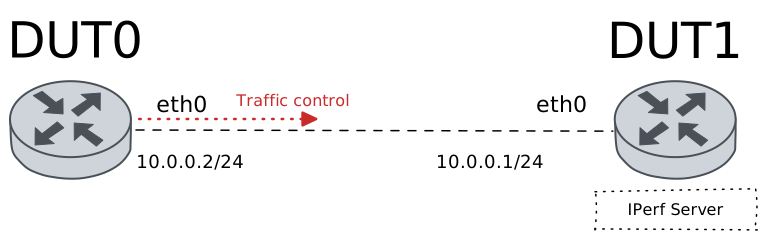
Test NetEm QDisc
Description
In this scenario, a Network Emulator (NetEm) qdisc is configured in DUT0 to add certain characteristics (like delay or packet loss) to packets leaving the ‘eth0’ interface.
Scenario
Step 1: Set the following configuration in DUT0:
set interfaces ethernet eth0 address 10.0.0.2/24
set interfaces ethernet eth0 traffic control out QDISC
set system login user admin authentication encrypted-password '$6$GSjsCj8gHLv$/VcqU6FLi6CT2Oxn0MJQ2C2tqnRDrYKNF8HIYWJp68nvXvPdFccDsT04.WtigUONbKYrgKg8d6rEs8PjljMkH0'
set traffic control QDISC type network-emulator network-delay 0.05
set traffic control QDISC type network-emulator packet-corruption 0.05
set traffic control QDISC type network-emulator packet-loss 0.05
Step 2: Set the following configuration in DUT1:
set interfaces ethernet eth0 address 10.0.0.1/24
set system login user admin authentication encrypted-password '$6$GSjsCj8gHLv$/VcqU6FLi6CT2Oxn0MJQ2C2tqnRDrYKNF8HIYWJp68nvXvPdFccDsT04.WtigUONbKYrgKg8d6rEs8PjljMkH0'
Step 3: Ping IP address 10.0.0.1 from DUT0:
admin@DUT0$ ping 10.0.0.1 count 1 size 56 timeout 1Show output
PING 10.0.0.1 (10.0.0.1) 56(84) bytes of data.
64 bytes from 10.0.0.1: icmp_seq=1 ttl=64 time=0.455 ms

--- 10.0.0.1 ping statistics ---
1 packets transmitted, 1 received, 0% packet loss, time 0ms
rtt min/avg/max/mdev = 0.455/0.455/0.455/0.000 ms
Step 4: Initiate a bandwidth test from DUT0 to DUT1
admin@DUT1$ monitor test performance server port 8080
admin@DUT0$ monitor test performance client 10.0.0.1 duration 5 port 8080 parallel 1
Expect this output in
DUT0:Connecting to host 10.0.0.1, port 8080 [ 5] local 10.0.0.2 port 54702 connected to 10.0.0.1 port 8080 [ ID] Interval Transfer Bitrate Retr Cwnd [ 5] 0.00-1.00 sec 132 MBytes 1.11 Gbits/sec 2 2.30 MBytes [ 5] 1.00-2.00 sec 354 MBytes 2.97 Gbits/sec 136 783 KBytes [ 5] 2.00-3.00 sec 340 MBytes 2.85 Gbits/sec 207 311 KBytes [ 5] 3.00-4.00 sec 361 MBytes 3.03 Gbits/sec 96 410 KBytes [ 5] 4.00-5.00 sec 379 MBytes 3.18 Gbits/sec 49 560 KBytes - - - - - - - - - - - - - - - - - - - - - - - - - [ ID] Interval Transfer Bitrate Retr [ 5] 0.00-5.00 sec 1.53 GBytes 2.63 Gbits/sec 490 sender [ 5] 0.00-5.00 sec 1.53 GBytes 2.62 Gbits/sec receiver iperf Done.
Step 5: Run command traffic control show at DUT0 and check if output contains the following tokens:
netemShow output
Traffic control for interface 'eth0' - 'egress' mode

------------------------------------------------------------------------
ID   traffic control  type   parent  bytes sent  pkts sent  pkts dropped
------------------------------------------------------------------------
1:0  QDISC            netem  root    1715176624    1132917            14