Active-Backup
These scenarios cover some aspects related to link-aggregation (combining multiple network connections simultaneously to increase throughput, provide redundancy, or both). In OSDx, this can be achieved through bonding interfaces.
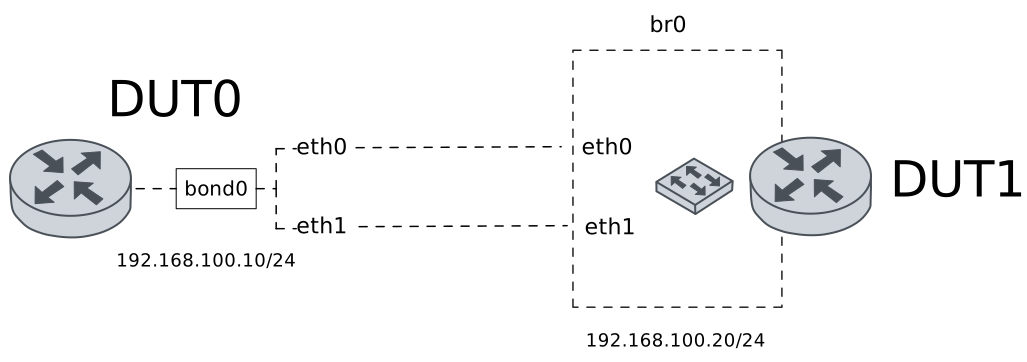
Test Active-Backup
Description
A bonding interface is configured in DUT0 using the active-backup mode. This mode can be used to achieve a higher degree of fault-tolerance.
Scenario
Example 1
Step 1: Set the following configuration in DUT0 :
set interfaces bonding bond0 address 192.168.100.10/24
set interfaces bonding bond0 miimon 100
set interfaces bonding bond0 mode active-backup
set interfaces ethernet eth0p0 bond-group bond0
set interfaces ethernet eth1 bond-group bond0
set system login user admin authentication encrypted-password '$6$GSjsCj8gHLv$/VcqU6FLi6CT2Oxn0MJQ2C2tqnRDrYKNF8HIYWJp68nvXvPdFccDsT04.WtigUONbKYrgKg8d6rEs8PjljMkH0'
Step 2: Set the following configuration in DUT1 :
set interfaces bridge br0 address 192.168.100.20/24
set interfaces bridge br0 stp version rstp
set interfaces ethernet eth0 bridge-group bridge br0
set interfaces ethernet eth1 bridge-group bridge br0
set system login user admin authentication encrypted-password '$6$GSjsCj8gHLv$/VcqU6FLi6CT2Oxn0MJQ2C2tqnRDrYKNF8HIYWJp68nvXvPdFccDsT04.WtigUONbKYrgKg8d6rEs8PjljMkH0'
Step 3: Run the command interfaces bonding show on DUT0 and check whether the output matches the following regular expressions:
bond0\s+192.168.100\.10\/24\s+up\s+upShow output
---------------------------------------------------------------
Name          IP Address          Admin  Oper  Vrf  Description
---------------------------------------------------------------
bond0  192.168.100.10/24          up     up
       fe80::2a0:26ff:fe18:9d/64
Step 4: Run the command interfaces bonding bond0 show ports on DUT0 and check whether the output contains the following tokens:
Bonding Mode: fault-tolerance (active-backup)Show output
Ethernet Channel Bonding Driver: v6.12.49

Bonding Mode: fault-tolerance (active-backup)
Primary Slave: None
Currently Active Slave: eth0p0
MII Status: up
MII Polling Interval (ms): 100
Up Delay (ms): 0
Down Delay (ms): 0
Peer Notification Delay (ms): 0

Slave Interface: eth1
MII Status: down
Speed: Unknown
Duplex: Unknown
Link Failure Count: 0
Permanent HW addr: 00:a0:26:18:00:9d
Slave queue ID: 0

Slave Interface: eth0p0
MII Status: up
Speed: 1000 Mbps
Duplex: full
Link Failure Count: 0
Permanent HW addr: 00:a0:26:18:00:9c
Slave queue ID: 0
Step 5: Ping the IP address 192.168.100.20 from DUT0:
admin@DUT0$ ping 192.168.100.20 count 1 size 56 timeout 1Show output
PING 192.168.100.20 (192.168.100.20) 56(84) bytes of data.
64 bytes from 192.168.100.20: icmp_seq=1 ttl=64 time=344 ms

--- 192.168.100.20 ping statistics ---
1 packets transmitted, 1 received, 0% packet loss, time 0ms
rtt min/avg/max/mdev = 343.749/343.749/343.749/0.000 ms
Warning
Now, it is important to disconnect one of the bonded interfaces.
Step 6: Run the command interfaces ethernet clear on DUT0.
Step 7: Run the command interfaces bonding bond0 show ports on DUT0 and check whether the output matches the following regular expressions:
Currently Active Slave: eth0p0Show output
Ethernet Channel Bonding Driver: v6.12.49

Bonding Mode: fault-tolerance (active-backup)
Primary Slave: None
Currently Active Slave: eth0p0
MII Status: up
MII Polling Interval (ms): 100
Up Delay (ms): 0
Down Delay (ms): 0
Peer Notification Delay (ms): 0

Slave Interface: eth1
MII Status: down
Speed: 1000 Mbps
Duplex: full
Link Failure Count: 1
Permanent HW addr: 00:a0:26:18:00:9d
Slave queue ID: 0

Slave Interface: eth0p0
MII Status: up
Speed: 1000 Mbps
Duplex: full
Link Failure Count: 0
Permanent HW addr: 00:a0:26:18:00:9c
Slave queue ID: 0
Step 8: Ping the IP address 192.168.100.20 from DUT0:
admin@DUT0$ ping 192.168.100.20 count 5 size 56 timeout 1Show output
PING 192.168.100.20 (192.168.100.20) 56(84) bytes of data.
64 bytes from 192.168.100.20: icmp_seq=1 ttl=64 time=0.262 ms
64 bytes from 192.168.100.20: icmp_seq=2 ttl=64 time=0.269 ms
64 bytes from 192.168.100.20: icmp_seq=3 ttl=64 time=0.209 ms
64 bytes from 192.168.100.20: icmp_seq=4 ttl=64 time=0.219 ms
64 bytes from 192.168.100.20: icmp_seq=5 ttl=64 time=0.259 ms

--- 192.168.100.20 ping statistics ---
5 packets transmitted, 5 received, 0% packet loss, time 4080ms
rtt min/avg/max/mdev = 0.209/0.243/0.269/0.024 ms
Step 9: Run the command interfaces ethernet show counters on DUT0 and check whether the output matches the following regular expressions:
eth1 \s+down\s+\d+\s+\d+\s+\d+\s+0\s+0Show output
------------------------------------------------------------------------------
 Name   Oper  Rx Packets  Rx Bytes  Rx Errors  Tx Packets  Tx Bytes  Tx Errors
------------------------------------------------------------------------------
eth0p0  up             5       490          0           5       490          0
eth0p1  down           0         0          0           0         0          0
eth0p2  down           0         0          0           0         0          0
eth0p3  down           0         0          0           0         0          0
eth0p4  down           0         0          0           0         0          0
eth0p5  down           0         0          0           0         0          0
eth0p6  down           0         0          0           0         0          0
eth0p7  down           0         0          0           0         0          0
  eth1  down           0         0          0           0         0          0
  eth2  down           0         0          0           0         0          0
Warning
Now, it is important to disconnect the remaining bonded interface, and reconnect the previous one.
Step 10: Run the command interfaces ethernet clear on DUT0.
Step 11: Run the command interfaces bonding bond0 show ports on DUT0 and check whether the output matches the following regular expressions:
Currently Active Slave: eth1Show output
Ethernet Channel Bonding Driver: v6.12.49

Bonding Mode: fault-tolerance (active-backup)
Primary Slave: None
Currently Active Slave: eth1
MII Status: up
MII Polling Interval (ms): 100
Up Delay (ms): 0
Down Delay (ms): 0
Peer Notification Delay (ms): 0

Slave Interface: eth1
MII Status: up
Speed: 1000 Mbps
Duplex: full
Link Failure Count: 1
Permanent HW addr: 00:a0:26:18:00:9d
Slave queue ID: 0

Slave Interface: eth0p0
MII Status: down
Speed: 1000 Mbps
Duplex: full
Link Failure Count: 1
Permanent HW addr: 00:a0:26:18:00:9c
Slave queue ID: 0
Step 12: Ping the IP address 192.168.100.20 from DUT0:
admin@DUT0$ ping 192.168.100.20 count 5 size 56 timeout 1Show output
PING 192.168.100.20 (192.168.100.20) 56(84) bytes of data.
64 bytes from 192.168.100.20: icmp_seq=1 ttl=64 time=0.482 ms
64 bytes from 192.168.100.20: icmp_seq=2 ttl=64 time=0.231 ms
64 bytes from 192.168.100.20: icmp_seq=3 ttl=64 time=0.243 ms
64 bytes from 192.168.100.20: icmp_seq=4 ttl=64 time=0.316 ms
64 bytes from 192.168.100.20: icmp_seq=5 ttl=64 time=0.263 ms

--- 192.168.100.20 ping statistics ---
5 packets transmitted, 5 received, 0% packet loss, time 4104ms
rtt min/avg/max/mdev = 0.231/0.307/0.482/0.092 ms
Step 13: Run the command interfaces ethernet show counters on DUT0 and check whether the output matches the following regular expressions:
eth0p0 \s+down\s+\d+\s+\d+\s+\d+\s+0\s+0Show output
------------------------------------------------------------------------------
 Name   Oper  Rx Packets  Rx Bytes  Rx Errors  Tx Packets  Tx Bytes  Tx Errors
------------------------------------------------------------------------------
eth0p0  down           0         0          0           0         0          0
eth0p1  down           0         0          0           0         0          0
eth0p2  down           0         0          0           0         0          0
eth0p3  down           0         0          0           0         0          0
eth0p4  down           0         0          0           0         0          0
eth0p5  down           0         0          0           0         0          0
eth0p6  down           0         0          0           0         0          0
eth0p7  down           0         0          0           0         0          0
  eth1  up             6       550          0           6       532          0
  eth2  down           0         0          0           0         0          0
Example 2
Step 1: Set the following configuration in DUT0 :
set interfaces bonding bond0 address 192.168.100.10/24
set interfaces bonding bond0 miimon 100
set interfaces bonding bond0 mode active-backup
set interfaces ethernet eth0p0 bond-group bond0
set interfaces ethernet eth0p4 bond-group bond0
set system login user admin authentication encrypted-password '$6$GSjsCj8gHLv$/VcqU6FLi6CT2Oxn0MJQ2C2tqnRDrYKNF8HIYWJp68nvXvPdFccDsT04.WtigUONbKYrgKg8d6rEs8PjljMkH0'
Step 2: Set the following configuration in DUT1 :
set interfaces bridge br0 address 192.168.100.20/24
set interfaces bridge br0 stp version rstp
set interfaces ethernet eth1 bridge-group bridge br0
set interfaces ethernet eth2 bridge-group bridge br0
set system login user admin authentication encrypted-password '$6$GSjsCj8gHLv$/VcqU6FLi6CT2Oxn0MJQ2C2tqnRDrYKNF8HIYWJp68nvXvPdFccDsT04.WtigUONbKYrgKg8d6rEs8PjljMkH0'
Step 3: Run the command interfaces bonding show on DUT0 and check whether the output matches the following regular expressions:
bond0\s+192.168.100\.10\/24\s+up\s+upShow output
--------------------------------------------------------------
Name          IP Address         Admin  Oper  Vrf  Description
--------------------------------------------------------------
bond0  192.168.100.10/24         up     up
       fe80::a0:26ff:fe18:9f/64
Step 4: Run the command interfaces bonding bond0 show ports on DUT0 and check whether the output contains the following tokens:
Bonding Mode: fault-tolerance (active-backup)Show output
Ethernet Channel Bonding Driver: v6.12.49

Bonding Mode: fault-tolerance (active-backup)
Primary Slave: None
Currently Active Slave: eth0p4
MII Status: up
MII Polling Interval (ms): 100
Up Delay (ms): 0
Down Delay (ms): 0
Peer Notification Delay (ms): 0

Slave Interface: eth0p4
MII Status: up
Speed: 1000 Mbps
Duplex: full
Link Failure Count: 0
Permanent HW addr: 02:a0:26:18:00:9f
Slave queue ID: 0

Slave Interface: eth0p0
MII Status: up
Speed: 1000 Mbps
Duplex: full
Link Failure Count: 0
Permanent HW addr: 00:a0:26:18:00:9c
Slave queue ID: 0
Step 5: Ping the IP address 192.168.100.20 from DUT0:
admin@DUT0$ ping 192.168.100.20 count 1 size 56 timeout 1Show output
PING 192.168.100.20 (192.168.100.20) 56(84) bytes of data.
64 bytes from 192.168.100.20: icmp_seq=1 ttl=64 time=374 ms

--- 192.168.100.20 ping statistics ---
1 packets transmitted, 1 received, 0% packet loss, time 0ms
rtt min/avg/max/mdev = 374.088/374.088/374.088/0.000 ms
Warning
Now, it is important to disconnect one of the bonded interfaces.
Step 6: Run the command interfaces ethernet clear on DUT0.
Step 7: Run the command interfaces bonding bond0 show ports on DUT0 and check whether the output matches the following regular expressions:
Currently Active Slave: eth0p4Show output
Ethernet Channel Bonding Driver: v6.12.49

Bonding Mode: fault-tolerance (active-backup)
Primary Slave: None
Currently Active Slave: eth0p4
MII Status: up
MII Polling Interval (ms): 100
Up Delay (ms): 0
Down Delay (ms): 0
Peer Notification Delay (ms): 0

Slave Interface: eth0p4
MII Status: up
Speed: 1000 Mbps
Duplex: full
Link Failure Count: 0
Permanent HW addr: 02:a0:26:18:00:9f
Slave queue ID: 0

Slave Interface: eth0p0
MII Status: down
Speed: 1000 Mbps
Duplex: full
Link Failure Count: 1
Permanent HW addr: 00:a0:26:18:00:9c
Slave queue ID: 0
Step 8: Ping the IP address 192.168.100.20 from DUT0:
admin@DUT0$ ping 192.168.100.20 count 5 size 56 timeout 1Show output
PING 192.168.100.20 (192.168.100.20) 56(84) bytes of data.
64 bytes from 192.168.100.20: icmp_seq=1 ttl=64 time=0.282 ms
64 bytes from 192.168.100.20: icmp_seq=2 ttl=64 time=0.260 ms
64 bytes from 192.168.100.20: icmp_seq=3 ttl=64 time=0.195 ms
64 bytes from 192.168.100.20: icmp_seq=4 ttl=64 time=0.217 ms
64 bytes from 192.168.100.20: icmp_seq=5 ttl=64 time=0.194 ms

--- 192.168.100.20 ping statistics ---
5 packets transmitted, 5 received, 0% packet loss, time 4096ms
rtt min/avg/max/mdev = 0.194/0.229/0.282/0.035 ms
Step 9: Run the command interfaces ethernet show counters on DUT0 and check whether the output matches the following regular expressions:
eth0p0 \s+down\s+\d+\s+\d+\s+\d+\s+0\s+0Show output
------------------------------------------------------------------------------
 Name   Oper  Rx Packets  Rx Bytes  Rx Errors  Tx Packets  Tx Bytes  Tx Errors
------------------------------------------------------------------------------
eth0p0  down           0         0          0           0         0          0
eth0p1  down           0         0          0           0         0          0
eth0p2  down           0         0          0           0         0          0
eth0p3  down           0         0          0           0         0          0
eth0p4  up             5       490          0           5       490          0
eth0p5  down           0         0          0           0         0          0
eth0p6  down           0         0          0           0         0          0
eth0p7  down           0         0          0           0         0          0
  eth1  down           0         0          0           0         0          0
  eth2  down           0         0          0           0         0          0
Warning
Now, it is important to disconnect the remaining bonded interface, and reconnect the previous one.
Step 10: Run the command interfaces ethernet clear on DUT0.
Step 11: Run the command interfaces bonding bond0 show ports on DUT0 and check whether the output matches the following regular expressions:
Currently Active Slave: eth0p0Show output
Ethernet Channel Bonding Driver: v6.12.49

Bonding Mode: fault-tolerance (active-backup)
Primary Slave: None
Currently Active Slave: eth0p0
MII Status: up
MII Polling Interval (ms): 100
Up Delay (ms): 0
Down Delay (ms): 0
Peer Notification Delay (ms): 0

Slave Interface: eth0p4
MII Status: down
Speed: 1000 Mbps
Duplex: full
Link Failure Count: 1
Permanent HW addr: 02:a0:26:18:00:9f
Slave queue ID: 0

Slave Interface: eth0p0
MII Status: up
Speed: 1000 Mbps
Duplex: full
Link Failure Count: 1
Permanent HW addr: 00:a0:26:18:00:9c
Slave queue ID: 0
Step 12: Ping the IP address 192.168.100.20 from DUT0:
admin@DUT0$ ping 192.168.100.20 count 5 size 56 timeout 1Show output
PING 192.168.100.20 (192.168.100.20) 56(84) bytes of data.
64 bytes from 192.168.100.20: icmp_seq=1 ttl=64 time=0.464 ms
64 bytes from 192.168.100.20: icmp_seq=2 ttl=64 time=0.221 ms
64 bytes from 192.168.100.20: icmp_seq=3 ttl=64 time=0.218 ms
64 bytes from 192.168.100.20: icmp_seq=4 ttl=64 time=0.260 ms
64 bytes from 192.168.100.20: icmp_seq=5 ttl=64 time=0.251 ms

--- 192.168.100.20 ping statistics ---
5 packets transmitted, 5 received, 0% packet loss, time 4092ms
rtt min/avg/max/mdev = 0.218/0.282/0.464/0.092 ms
Step 13: Run the command interfaces ethernet show counters on DUT0 and check whether the output matches the following regular expressions:
eth0p4 \s+down\s+\d+\s+\d+\s+\d+\s+0\s+0Show output
------------------------------------------------------------------------------
 Name   Oper  Rx Packets  Rx Bytes  Rx Errors  Tx Packets  Tx Bytes  Tx Errors
------------------------------------------------------------------------------
eth0p0  up             8      1158          0           9       790          0
eth0p1  down           0         0          0           0         0          0
eth0p2  down           0         0          0           0         0          0
eth0p3  down           0         0          0           0         0          0
eth0p4  down           0         0          0           0         0          0
eth0p5  down           0         0          0           0         0          0
eth0p6  down           0         0          0           0         0          0
eth0p7  down           0         0          0           0         0          0
  eth1  down           0         0          0           0         0          0
  eth2  down           0         0          0           0         0          0