Check Connection
These scenarios cover some aspects related to link-aggregation (that is, combining multiple network connections simultaneously to increase throughput, provide redundancy, or both) in combination with the use of VLANs. In OSDx, this can be achieved by using bonding interfaces and vifs.
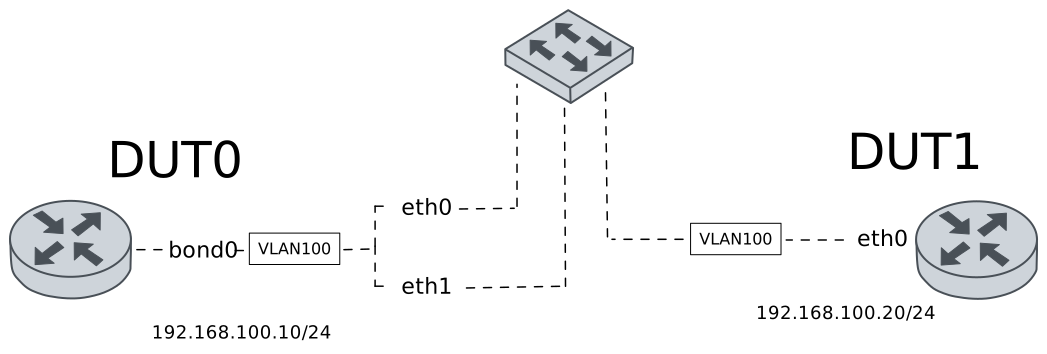
Test Bonding With VLAN
Description
A bonding interface is configured in DUT0 using the xor-hash mode. This mode can be used to achieve load-balancing. This example also show how to configure bonding with VLANs using vifs.
Scenario
Step 1: Set the following configuration in DUT0 :
set interfaces bonding bond0 hash-policy layer3+4
set interfaces bonding bond0 miimon 100
set interfaces bonding bond0 mode xor-hash
set interfaces bonding bond0 vif 100 address 192.168.100.10/24
set interfaces ethernet eth0 bond-group bond0
set interfaces ethernet eth1 bond-group bond0
set system login user admin authentication encrypted-password '$6$GSjsCj8gHLv$/VcqU6FLi6CT2Oxn0MJQ2C2tqnRDrYKNF8HIYWJp68nvXvPdFccDsT04.WtigUONbKYrgKg8d6rEs8PjljMkH0'
Step 2: Set the following configuration in DUT1 :
set interfaces bridge br0 vif 100 address 192.168.100.20/24
set interfaces bridge br0 vlan 100
set interfaces ethernet eth0 bridge-group bridge br0
set interfaces ethernet eth0 bridge-group vlan 100
set interfaces ethernet eth1 bridge-group bridge br0
set interfaces ethernet eth1 bridge-group vlan 100
set system login user admin authentication encrypted-password '$6$GSjsCj8gHLv$/VcqU6FLi6CT2Oxn0MJQ2C2tqnRDrYKNF8HIYWJp68nvXvPdFccDsT04.WtigUONbKYrgKg8d6rEs8PjljMkH0'
Step 3: Run the command interfaces bonding show on DUT0 and check whether the output matches the following regular expressions:
bond0.100\s+192.168.100\.10\/24\s+up\s+upShow output
----------------------------------------------------------------------
  Name              IP Address           Admin  Oper  Vrf  Description
----------------------------------------------------------------------
    bond0  fe80::dcad:beff:feef:6c00/64  up     up
bond0.100  192.168.100.10/24             up     up
           fe80::dcad:beff:feef:6c00/64
Step 4: Run the command interfaces bonding bond0 show ports on DUT0 and check whether the output contains the following tokens:
Bonding Mode: load balancing (xor)Show output
Ethernet Channel Bonding Driver: v6.12.74

Bonding Mode: load balancing (xor)
Transmit Hash Policy: layer3+4 (1)
MII Status: up
MII Polling Interval (ms): 100
Up Delay (ms): 0
Down Delay (ms): 0
Peer Notification Delay (ms): 0

Slave Interface: eth0
MII Status: up
Speed: 10000 Mbps
Duplex: full
Link Failure Count: 0
Permanent HW addr: de:ad:be:ef:6c:00
Slave queue ID: 0

Slave Interface: eth1
MII Status: up
Speed: 10000 Mbps
Duplex: full
Link Failure Count: 0
Permanent HW addr: de:ad:be:ef:6c:01
Slave queue ID: 0
Step 5: Ping the IP address 192.168.100.20 from DUT0:
admin@DUT0$ ping 192.168.100.20 count 1 size 56 timeout 1Show output
PING 192.168.100.20 (192.168.100.20) 56(84) bytes of data.
64 bytes from 192.168.100.20: icmp_seq=1 ttl=64 time=0.318 ms

--- 192.168.100.20 ping statistics ---
1 packets transmitted, 1 received, 0% packet loss, time 0ms
rtt min/avg/max/mdev = 0.318/0.318/0.318/0.000 ms
Note
The example above demostrates how to configure vifs using xor-hash bonding mode. You can use other bonding modes simply by changing the “bonding mode” option.