Check Connection
This scenario shows how to create a bridge interface and enable offloading to perform the forward processing in the hardware switch.
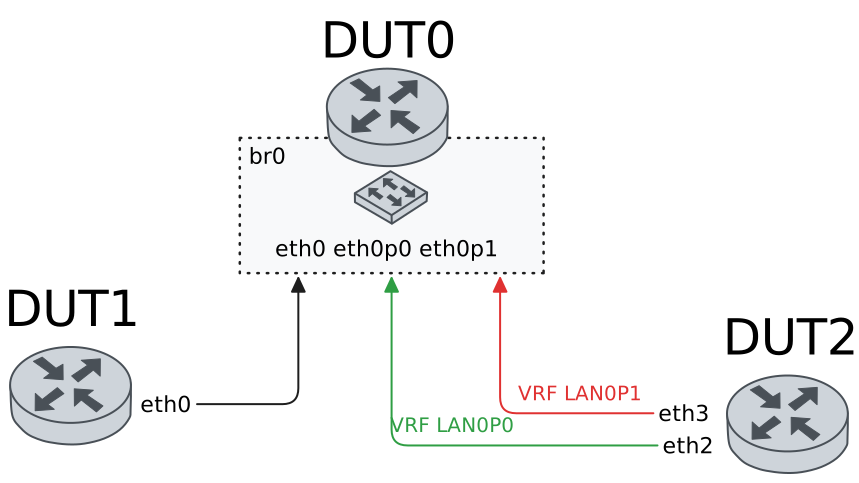
Test Hardware Bridge With Default VLAN
Description
In these scenarios, no VLAN are configured.
Scenario
Example 1
Step 1: Set the following configuration in DUT0 :
set interfaces bridge br0
set interfaces ethernet eth0p0 bridge-group bridge br0
set interfaces ethernet eth0p4 bridge-group bridge br0
set interfaces ethernet eth1 bridge-group bridge br0
set system login user admin authentication encrypted-password '$6$GSjsCj8gHLv$/VcqU6FLi6CT2Oxn0MJQ2C2tqnRDrYKNF8HIYWJp68nvXvPdFccDsT04.WtigUONbKYrgKg8d6rEs8PjljMkH0'
Step 2: Set the following configuration in DUT1 :
set interfaces ethernet eth0 address 192.168.1.2/24
set system login user admin authentication encrypted-password '$6$GSjsCj8gHLv$/VcqU6FLi6CT2Oxn0MJQ2C2tqnRDrYKNF8HIYWJp68nvXvPdFccDsT04.WtigUONbKYrgKg8d6rEs8PjljMkH0'
Step 3: Set the following configuration in DUT2 :
set interfaces ethernet eth1 address 192.168.1.3/24
set interfaces ethernet eth1 vrf LAN_PORT0
set interfaces ethernet eth2 address 192.168.1.4/24
set interfaces ethernet eth2 vrf LAN_PORT1
set system login user admin authentication encrypted-password '$6$GSjsCj8gHLv$/VcqU6FLi6CT2Oxn0MJQ2C2tqnRDrYKNF8HIYWJp68nvXvPdFccDsT04.WtigUONbKYrgKg8d6rEs8PjljMkH0'
set system vrf LAN_PORT0
set system vrf LAN_PORT1
Step 4: Ping the IP address 192.168.1.4 from DUT2:
admin@DUT2$ ping 192.168.1.4 vrf LAN_PORT0 count 1 size 56 timeout 1Show output
ping: Warning: source address might be selected on device other than: LAN_PORT0
PING 192.168.1.4 (192.168.1.4) from 192.168.1.3 LAN_PORT0: 56(84) bytes of data.
64 bytes from 192.168.1.4: icmp_seq=1 ttl=64 time=0.764 ms

--- 192.168.1.4 ping statistics ---
1 packets transmitted, 1 received, 0% packet loss, time 0ms
rtt min/avg/max/mdev = 0.764/0.764/0.764/0.000 ms
Step 5: Ping the IP address 192.168.1.3 from DUT1:
admin@DUT1$ ping 192.168.1.3 count 1 size 56 timeout 1Show output
PING 192.168.1.3 (192.168.1.3) 56(84) bytes of data.
64 bytes from 192.168.1.3: icmp_seq=1 ttl=64 time=1.09 ms

--- 192.168.1.3 ping statistics ---
1 packets transmitted, 1 received, 0% packet loss, time 0ms
rtt min/avg/max/mdev = 1.089/1.089/1.089/0.000 ms
Step 6: Ping the IP address 192.168.1.4 from DUT1:
admin@DUT1$ ping 192.168.1.4 count 1 size 56 timeout 1Show output
PING 192.168.1.4 (192.168.1.4) 56(84) bytes of data.
64 bytes from 192.168.1.4: icmp_seq=1 ttl=64 time=0.862 ms

--- 192.168.1.4 ping statistics ---
1 packets transmitted, 1 received, 0% packet loss, time 0ms
rtt min/avg/max/mdev = 0.862/0.862/0.862/0.000 ms
Example 2
Step 1: Set the following configuration in DUT0 :
set interfaces bridge br0 hardware-offload eth0
set interfaces ethernet eth0p0 bridge-group bridge br0
set interfaces ethernet eth0p4 bridge-group bridge br0
set interfaces ethernet eth1 bridge-group bridge br0
set system login user admin authentication encrypted-password '$6$GSjsCj8gHLv$/VcqU6FLi6CT2Oxn0MJQ2C2tqnRDrYKNF8HIYWJp68nvXvPdFccDsT04.WtigUONbKYrgKg8d6rEs8PjljMkH0'
Step 2: Set the following configuration in DUT1 :
set interfaces ethernet eth0 address 192.168.1.2/24
set system login user admin authentication encrypted-password '$6$GSjsCj8gHLv$/VcqU6FLi6CT2Oxn0MJQ2C2tqnRDrYKNF8HIYWJp68nvXvPdFccDsT04.WtigUONbKYrgKg8d6rEs8PjljMkH0'
Step 3: Set the following configuration in DUT2 :
set interfaces ethernet eth1 address 192.168.1.3/24
set interfaces ethernet eth1 vrf LAN_PORT0
set interfaces ethernet eth2 address 192.168.1.4/24
set interfaces ethernet eth2 vrf LAN_PORT1
set system login user admin authentication encrypted-password '$6$GSjsCj8gHLv$/VcqU6FLi6CT2Oxn0MJQ2C2tqnRDrYKNF8HIYWJp68nvXvPdFccDsT04.WtigUONbKYrgKg8d6rEs8PjljMkH0'
set system vrf LAN_PORT0
set system vrf LAN_PORT1
Step 4: Ping the IP address 192.168.1.4 from DUT2:
admin@DUT2$ ping 192.168.1.4 vrf LAN_PORT0 count 1 size 56 timeout 1Show output
ping: Warning: source address might be selected on device other than: LAN_PORT0
PING 192.168.1.4 (192.168.1.4) from 192.168.1.3 LAN_PORT0: 56(84) bytes of data.
64 bytes from 192.168.1.4: icmp_seq=1 ttl=64 time=0.920 ms

--- 192.168.1.4 ping statistics ---
1 packets transmitted, 1 received, 0% packet loss, time 0ms
rtt min/avg/max/mdev = 0.920/0.920/0.920/0.000 ms
Step 5: Ping the IP address 192.168.1.3 from DUT1:
admin@DUT1$ ping 192.168.1.3 count 1 size 56 timeout 1Show output
PING 192.168.1.3 (192.168.1.3) 56(84) bytes of data.
64 bytes from 192.168.1.3: icmp_seq=1 ttl=64 time=0.686 ms

--- 192.168.1.3 ping statistics ---
1 packets transmitted, 1 received, 0% packet loss, time 0ms
rtt min/avg/max/mdev = 0.686/0.686/0.686/0.000 ms
Step 6: Ping the IP address 192.168.1.4 from DUT1:
admin@DUT1$ ping 192.168.1.4 count 1 size 56 timeout 1Show output
PING 192.168.1.4 (192.168.1.4) 56(84) bytes of data.
64 bytes from 192.168.1.4: icmp_seq=1 ttl=64 time=0.851 ms

--- 192.168.1.4 ping statistics ---
1 packets transmitted, 1 received, 0% packet loss, time 0ms
rtt min/avg/max/mdev = 0.851/0.851/0.851/0.000 ms
Example 3
Step 1: Set the following configuration in DUT0 :
set interfaces bridge br0 address 192.168.1.1/24
set interfaces ethernet eth0p0 bridge-group bridge br0
set interfaces ethernet eth0p4 bridge-group bridge br0
set interfaces ethernet eth1 bridge-group bridge br0
set system login user admin authentication encrypted-password '$6$GSjsCj8gHLv$/VcqU6FLi6CT2Oxn0MJQ2C2tqnRDrYKNF8HIYWJp68nvXvPdFccDsT04.WtigUONbKYrgKg8d6rEs8PjljMkH0'
Step 2: Set the following configuration in DUT1 :
set interfaces ethernet eth0 address 192.168.1.2/24
set system login user admin authentication encrypted-password '$6$GSjsCj8gHLv$/VcqU6FLi6CT2Oxn0MJQ2C2tqnRDrYKNF8HIYWJp68nvXvPdFccDsT04.WtigUONbKYrgKg8d6rEs8PjljMkH0'
Step 3: Set the following configuration in DUT2 :
set interfaces ethernet eth1 address 192.168.1.3/24
set interfaces ethernet eth1 vrf LAN_PORT0
set interfaces ethernet eth2 address 192.168.1.4/24
set interfaces ethernet eth2 vrf LAN_PORT1
set system login user admin authentication encrypted-password '$6$GSjsCj8gHLv$/VcqU6FLi6CT2Oxn0MJQ2C2tqnRDrYKNF8HIYWJp68nvXvPdFccDsT04.WtigUONbKYrgKg8d6rEs8PjljMkH0'
set system vrf LAN_PORT0
set system vrf LAN_PORT1
Step 4: Ping the IP address 192.168.1.4 from DUT2:
admin@DUT2$ ping 192.168.1.4 vrf LAN_PORT0 count 1 size 56 timeout 1Show output
ping: Warning: source address might be selected on device other than: LAN_PORT0
PING 192.168.1.4 (192.168.1.4) from 192.168.1.3 LAN_PORT0: 56(84) bytes of data.
64 bytes from 192.168.1.4: icmp_seq=1 ttl=64 time=1.06 ms

--- 192.168.1.4 ping statistics ---
1 packets transmitted, 1 received, 0% packet loss, time 0ms
rtt min/avg/max/mdev = 1.055/1.055/1.055/0.000 ms
Step 5: Ping the IP address 192.168.1.3 from DUT1:
admin@DUT1$ ping 192.168.1.3 count 1 size 56 timeout 1Show output
PING 192.168.1.3 (192.168.1.3) 56(84) bytes of data.
64 bytes from 192.168.1.3: icmp_seq=1 ttl=64 time=0.602 ms

--- 192.168.1.3 ping statistics ---
1 packets transmitted, 1 received, 0% packet loss, time 0ms
rtt min/avg/max/mdev = 0.602/0.602/0.602/0.000 ms
Step 6: Ping the IP address 192.168.1.4 from DUT1:
admin@DUT1$ ping 192.168.1.4 count 1 size 56 timeout 1Show output
PING 192.168.1.4 (192.168.1.4) 56(84) bytes of data.
64 bytes from 192.168.1.4: icmp_seq=1 ttl=64 time=0.642 ms

--- 192.168.1.4 ping statistics ---
1 packets transmitted, 1 received, 0% packet loss, time 0ms
rtt min/avg/max/mdev = 0.642/0.642/0.642/0.000 ms
Step 7: Ping the IP address 192.168.1.1 from DUT2:
admin@DUT2$ ping 192.168.1.1 vrf LAN_PORT0 count 1 size 56 timeout 1Show output
ping: Warning: source address might be selected on device other than: LAN_PORT0
PING 192.168.1.1 (192.168.1.1) from 192.168.1.3 LAN_PORT0: 56(84) bytes of data.
64 bytes from 192.168.1.1: icmp_seq=1 ttl=64 time=1.78 ms

--- 192.168.1.1 ping statistics ---
1 packets transmitted, 1 received, 0% packet loss, time 0ms
rtt min/avg/max/mdev = 1.776/1.776/1.776/0.000 ms
Step 8: Ping the IP address 192.168.1.1 from DUT2:
admin@DUT2$ ping 192.168.1.1 vrf LAN_PORT1 count 1 size 56 timeout 1Show output
ping: Warning: source address might be selected on device other than: LAN_PORT1
PING 192.168.1.1 (192.168.1.1) from 192.168.1.4 LAN_PORT1: 56(84) bytes of data.
64 bytes from 192.168.1.1: icmp_seq=1 ttl=64 time=1.72 ms

--- 192.168.1.1 ping statistics ---
1 packets transmitted, 1 received, 0% packet loss, time 0ms
rtt min/avg/max/mdev = 1.723/1.723/1.723/0.000 ms
Step 9: Ping the IP address 192.168.1.1 from DUT1:
admin@DUT1$ ping 192.168.1.1 count 1 size 56 timeout 1Show output
PING 192.168.1.1 (192.168.1.1) 56(84) bytes of data.
64 bytes from 192.168.1.1: icmp_seq=1 ttl=64 time=0.698 ms

--- 192.168.1.1 ping statistics ---
1 packets transmitted, 1 received, 0% packet loss, time 0ms
rtt min/avg/max/mdev = 0.698/0.698/0.698/0.000 ms
Example 4
Step 1: Set the following configuration in DUT0 :
set interfaces bridge br0 address 192.168.1.1/24
set interfaces bridge br0 hardware-offload eth0
set interfaces ethernet eth0p0 bridge-group bridge br0
set interfaces ethernet eth0p4 bridge-group bridge br0
set interfaces ethernet eth1 bridge-group bridge br0
set system login user admin authentication encrypted-password '$6$GSjsCj8gHLv$/VcqU6FLi6CT2Oxn0MJQ2C2tqnRDrYKNF8HIYWJp68nvXvPdFccDsT04.WtigUONbKYrgKg8d6rEs8PjljMkH0'
Step 2: Set the following configuration in DUT1 :
set interfaces ethernet eth0 address 192.168.1.2/24
set system login user admin authentication encrypted-password '$6$GSjsCj8gHLv$/VcqU6FLi6CT2Oxn0MJQ2C2tqnRDrYKNF8HIYWJp68nvXvPdFccDsT04.WtigUONbKYrgKg8d6rEs8PjljMkH0'
Step 3: Set the following configuration in DUT2 :
set interfaces ethernet eth1 address 192.168.1.3/24
set interfaces ethernet eth1 vrf LAN_PORT0
set interfaces ethernet eth2 address 192.168.1.4/24
set interfaces ethernet eth2 vrf LAN_PORT1
set system login user admin authentication encrypted-password '$6$GSjsCj8gHLv$/VcqU6FLi6CT2Oxn0MJQ2C2tqnRDrYKNF8HIYWJp68nvXvPdFccDsT04.WtigUONbKYrgKg8d6rEs8PjljMkH0'
set system vrf LAN_PORT0
set system vrf LAN_PORT1
Step 4: Ping the IP address 192.168.1.4 from DUT2:
admin@DUT2$ ping 192.168.1.4 vrf LAN_PORT0 count 1 size 56 timeout 1Show output
ping: Warning: source address might be selected on device other than: LAN_PORT0
PING 192.168.1.4 (192.168.1.4) from 192.168.1.3 LAN_PORT0: 56(84) bytes of data.
64 bytes from 192.168.1.4: icmp_seq=1 ttl=64 time=0.824 ms

--- 192.168.1.4 ping statistics ---
1 packets transmitted, 1 received, 0% packet loss, time 0ms
rtt min/avg/max/mdev = 0.824/0.824/0.824/0.000 ms
Step 5: Ping the IP address 192.168.1.3 from DUT1:
admin@DUT1$ ping 192.168.1.3 count 1 size 56 timeout 1Show output
PING 192.168.1.3 (192.168.1.3) 56(84) bytes of data.
64 bytes from 192.168.1.3: icmp_seq=1 ttl=64 time=0.357 ms

--- 192.168.1.3 ping statistics ---
1 packets transmitted, 1 received, 0% packet loss, time 0ms
rtt min/avg/max/mdev = 0.357/0.357/0.357/0.000 ms
Step 6: Ping the IP address 192.168.1.4 from DUT1:
admin@DUT1$ ping 192.168.1.4 count 1 size 56 timeout 1Show output
PING 192.168.1.4 (192.168.1.4) 56(84) bytes of data.
64 bytes from 192.168.1.4: icmp_seq=1 ttl=64 time=0.816 ms

--- 192.168.1.4 ping statistics ---
1 packets transmitted, 1 received, 0% packet loss, time 0ms
rtt min/avg/max/mdev = 0.816/0.816/0.816/0.000 ms
Step 7: Ping the IP address 192.168.1.1 from DUT2:
admin@DUT2$ ping 192.168.1.1 vrf LAN_PORT0 count 1 size 56 timeout 1Show output
ping: Warning: source address might be selected on device other than: LAN_PORT0
PING 192.168.1.1 (192.168.1.1) from 192.168.1.3 LAN_PORT0: 56(84) bytes of data.
64 bytes from 192.168.1.1: icmp_seq=1 ttl=64 time=1.75 ms

--- 192.168.1.1 ping statistics ---
1 packets transmitted, 1 received, 0% packet loss, time 0ms
rtt min/avg/max/mdev = 1.748/1.748/1.748/0.000 ms
Step 8: Ping the IP address 192.168.1.1 from DUT2:
admin@DUT2$ ping 192.168.1.1 vrf LAN_PORT1 count 1 size 56 timeout 1Show output
ping: Warning: source address might be selected on device other than: LAN_PORT1
PING 192.168.1.1 (192.168.1.1) from 192.168.1.4 LAN_PORT1: 56(84) bytes of data.
64 bytes from 192.168.1.1: icmp_seq=1 ttl=64 time=0.473 ms

--- 192.168.1.1 ping statistics ---
1 packets transmitted, 1 received, 0% packet loss, time 0ms
rtt min/avg/max/mdev = 0.473/0.473/0.473/0.000 ms
Step 9: Ping the IP address 192.168.1.1 from DUT1:
admin@DUT1$ ping 192.168.1.1 count 1 size 56 timeout 1Show output
PING 192.168.1.1 (192.168.1.1) 56(84) bytes of data.
64 bytes from 192.168.1.1: icmp_seq=1 ttl=64 time=0.742 ms

--- 192.168.1.1 ping statistics ---
1 packets transmitted, 1 received, 0% packet loss, time 0ms
rtt min/avg/max/mdev = 0.742/0.742/0.742/0.000 ms
Test Hardware Bridge VLAN Aware
Description
In these scenarios, both DUT1 and DUT2 send tagged traffic (a VLAN-aware bridge is needed).
Scenario
Example 1
Step 1: Set the following configuration in DUT0 :
set interfaces bridge br0
set interfaces ethernet eth0p0 bridge-group bridge br0
set interfaces ethernet eth0p0 bridge-group vlan 100
set interfaces ethernet eth0p4 bridge-group bridge br0
set interfaces ethernet eth0p4 bridge-group vlan 100
set interfaces ethernet eth1 bridge-group bridge br0
set interfaces ethernet eth1 bridge-group vlan 100
set system login user admin authentication encrypted-password '$6$GSjsCj8gHLv$/VcqU6FLi6CT2Oxn0MJQ2C2tqnRDrYKNF8HIYWJp68nvXvPdFccDsT04.WtigUONbKYrgKg8d6rEs8PjljMkH0'
Step 2: Set the following configuration in DUT1 :
set interfaces ethernet eth0 vif 100 address 192.168.1.2/24
set system login user admin authentication encrypted-password '$6$GSjsCj8gHLv$/VcqU6FLi6CT2Oxn0MJQ2C2tqnRDrYKNF8HIYWJp68nvXvPdFccDsT04.WtigUONbKYrgKg8d6rEs8PjljMkH0'
Step 3: Set the following configuration in DUT2 :
set interfaces ethernet eth1 vif 100 address 192.168.1.3/24
set interfaces ethernet eth1 vif 100 vrf LAN_PORT0
set interfaces ethernet eth2 vif 100 address 192.168.1.4/24
set interfaces ethernet eth2 vif 100 vrf LAN_PORT1
set system login user admin authentication encrypted-password '$6$GSjsCj8gHLv$/VcqU6FLi6CT2Oxn0MJQ2C2tqnRDrYKNF8HIYWJp68nvXvPdFccDsT04.WtigUONbKYrgKg8d6rEs8PjljMkH0'
set system vrf LAN_PORT0
set system vrf LAN_PORT1
Step 4: Ping the IP address 192.168.1.4 from DUT2:
admin@DUT2$ ping 192.168.1.4 vrf LAN_PORT0 count 1 size 56 timeout 1Show output
ping: Warning: source address might be selected on device other than: LAN_PORT0
PING 192.168.1.4 (192.168.1.4) from 192.168.1.3 LAN_PORT0: 56(84) bytes of data.
64 bytes from 192.168.1.4: icmp_seq=1 ttl=64 time=0.667 ms

--- 192.168.1.4 ping statistics ---
1 packets transmitted, 1 received, 0% packet loss, time 1ms
rtt min/avg/max/mdev = 0.667/0.667/0.667/0.000 ms
Step 5: Ping the IP address 192.168.1.3 from DUT1:
admin@DUT1$ ping 192.168.1.3 count 1 size 56 timeout 1Show output
PING 192.168.1.3 (192.168.1.3) 56(84) bytes of data.
64 bytes from 192.168.1.3: icmp_seq=1 ttl=64 time=0.544 ms

--- 192.168.1.3 ping statistics ---
1 packets transmitted, 1 received, 0% packet loss, time 0ms
rtt min/avg/max/mdev = 0.544/0.544/0.544/0.000 ms
Step 6: Ping the IP address 192.168.1.4 from DUT1:
admin@DUT1$ ping 192.168.1.4 count 1 size 56 timeout 1Show output
PING 192.168.1.4 (192.168.1.4) 56(84) bytes of data.
64 bytes from 192.168.1.4: icmp_seq=1 ttl=64 time=0.822 ms

--- 192.168.1.4 ping statistics ---
1 packets transmitted, 1 received, 0% packet loss, time 0ms
rtt min/avg/max/mdev = 0.822/0.822/0.822/0.000 ms
Example 2
Step 1: Set the following configuration in DUT0 :
set interfaces bridge br0 hardware-offload eth0
set interfaces ethernet eth0p0 bridge-group bridge br0
set interfaces ethernet eth0p0 bridge-group vlan 100
set interfaces ethernet eth0p4 bridge-group bridge br0
set interfaces ethernet eth0p4 bridge-group vlan 100
set interfaces ethernet eth1 bridge-group bridge br0
set interfaces ethernet eth1 bridge-group vlan 100
set system login user admin authentication encrypted-password '$6$GSjsCj8gHLv$/VcqU6FLi6CT2Oxn0MJQ2C2tqnRDrYKNF8HIYWJp68nvXvPdFccDsT04.WtigUONbKYrgKg8d6rEs8PjljMkH0'
Step 2: Set the following configuration in DUT1 :
set interfaces ethernet eth0 vif 100 address 192.168.1.2/24
set system login user admin authentication encrypted-password '$6$GSjsCj8gHLv$/VcqU6FLi6CT2Oxn0MJQ2C2tqnRDrYKNF8HIYWJp68nvXvPdFccDsT04.WtigUONbKYrgKg8d6rEs8PjljMkH0'
Step 3: Set the following configuration in DUT2 :
set interfaces ethernet eth1 vif 100 address 192.168.1.3/24
set interfaces ethernet eth1 vif 100 vrf LAN_PORT0
set interfaces ethernet eth2 vif 100 address 192.168.1.4/24
set interfaces ethernet eth2 vif 100 vrf LAN_PORT1
set system login user admin authentication encrypted-password '$6$GSjsCj8gHLv$/VcqU6FLi6CT2Oxn0MJQ2C2tqnRDrYKNF8HIYWJp68nvXvPdFccDsT04.WtigUONbKYrgKg8d6rEs8PjljMkH0'
set system vrf LAN_PORT0
set system vrf LAN_PORT1
Step 4: Ping the IP address 192.168.1.4 from DUT2:
admin@DUT2$ ping 192.168.1.4 vrf LAN_PORT0 count 1 size 56 timeout 1Show output
ping: Warning: source address might be selected on device other than: LAN_PORT0
PING 192.168.1.4 (192.168.1.4) from 192.168.1.3 LAN_PORT0: 56(84) bytes of data.
64 bytes from 192.168.1.4: icmp_seq=1 ttl=64 time=0.728 ms

--- 192.168.1.4 ping statistics ---
1 packets transmitted, 1 received, 0% packet loss, time 0ms
rtt min/avg/max/mdev = 0.728/0.728/0.728/0.000 ms
Step 5: Ping the IP address 192.168.1.3 from DUT1:
admin@DUT1$ ping 192.168.1.3 count 1 size 56 timeout 1Show output
PING 192.168.1.3 (192.168.1.3) 56(84) bytes of data.
64 bytes from 192.168.1.3: icmp_seq=1 ttl=64 time=0.897 ms

--- 192.168.1.3 ping statistics ---
1 packets transmitted, 1 received, 0% packet loss, time 0ms
rtt min/avg/max/mdev = 0.897/0.897/0.897/0.000 ms
Step 6: Ping the IP address 192.168.1.4 from DUT1:
admin@DUT1$ ping 192.168.1.4 count 1 size 56 timeout 1Show output
PING 192.168.1.4 (192.168.1.4) 56(84) bytes of data.
64 bytes from 192.168.1.4: icmp_seq=1 ttl=64 time=0.850 ms

--- 192.168.1.4 ping statistics ---
1 packets transmitted, 1 received, 0% packet loss, time 0ms
rtt min/avg/max/mdev = 0.850/0.850/0.850/0.000 ms
Example 3
Step 1: Set the following configuration in DUT0 :
set interfaces bridge br0 vif 100 address 192.168.1.1/24
set interfaces bridge br0 vlan 100
set interfaces ethernet eth0p0 bridge-group bridge br0
set interfaces ethernet eth0p0 bridge-group vlan 100
set interfaces ethernet eth0p4 bridge-group bridge br0
set interfaces ethernet eth0p4 bridge-group vlan 100
set interfaces ethernet eth1 bridge-group bridge br0
set interfaces ethernet eth1 bridge-group vlan 100
set system login user admin authentication encrypted-password '$6$GSjsCj8gHLv$/VcqU6FLi6CT2Oxn0MJQ2C2tqnRDrYKNF8HIYWJp68nvXvPdFccDsT04.WtigUONbKYrgKg8d6rEs8PjljMkH0'
Step 2: Set the following configuration in DUT1 :
set interfaces ethernet eth0 vif 100 address 192.168.1.2/24
set system login user admin authentication encrypted-password '$6$GSjsCj8gHLv$/VcqU6FLi6CT2Oxn0MJQ2C2tqnRDrYKNF8HIYWJp68nvXvPdFccDsT04.WtigUONbKYrgKg8d6rEs8PjljMkH0'
Step 3: Set the following configuration in DUT2 :
set interfaces ethernet eth1 vif 100 address 192.168.1.3/24
set interfaces ethernet eth1 vif 100 vrf LAN_PORT0
set interfaces ethernet eth2 vif 100 address 192.168.1.4/24
set interfaces ethernet eth2 vif 100 vrf LAN_PORT1
set system login user admin authentication encrypted-password '$6$GSjsCj8gHLv$/VcqU6FLi6CT2Oxn0MJQ2C2tqnRDrYKNF8HIYWJp68nvXvPdFccDsT04.WtigUONbKYrgKg8d6rEs8PjljMkH0'
set system vrf LAN_PORT0
set system vrf LAN_PORT1
Step 4: Ping the IP address 192.168.1.4 from DUT2:
admin@DUT2$ ping 192.168.1.4 vrf LAN_PORT0 count 1 size 56 timeout 1Show output
ping: Warning: source address might be selected on device other than: LAN_PORT0
PING 192.168.1.4 (192.168.1.4) from 192.168.1.3 LAN_PORT0: 56(84) bytes of data.
64 bytes from 192.168.1.4: icmp_seq=1 ttl=64 time=1.24 ms

--- 192.168.1.4 ping statistics ---
1 packets transmitted, 1 received, 0% packet loss, time 0ms
rtt min/avg/max/mdev = 1.238/1.238/1.238/0.000 ms
Step 5: Ping the IP address 192.168.1.3 from DUT1:
admin@DUT1$ ping 192.168.1.3 count 1 size 56 timeout 1Show output
PING 192.168.1.3 (192.168.1.3) 56(84) bytes of data.
64 bytes from 192.168.1.3: icmp_seq=1 ttl=64 time=0.889 ms

--- 192.168.1.3 ping statistics ---
1 packets transmitted, 1 received, 0% packet loss, time 0ms
rtt min/avg/max/mdev = 0.889/0.889/0.889/0.000 ms
Step 6: Ping the IP address 192.168.1.4 from DUT1:
admin@DUT1$ ping 192.168.1.4 count 1 size 56 timeout 1Show output
PING 192.168.1.4 (192.168.1.4) 56(84) bytes of data.
64 bytes from 192.168.1.4: icmp_seq=1 ttl=64 time=0.833 ms

--- 192.168.1.4 ping statistics ---
1 packets transmitted, 1 received, 0% packet loss, time 0ms
rtt min/avg/max/mdev = 0.833/0.833/0.833/0.000 ms
Step 7: Ping the IP address 192.168.1.1 from DUT2:
admin@DUT2$ ping 192.168.1.1 vrf LAN_PORT0 count 1 size 56 timeout 1Show output
ping: Warning: source address might be selected on device other than: LAN_PORT0
PING 192.168.1.1 (192.168.1.1) from 192.168.1.3 LAN_PORT0: 56(84) bytes of data.
64 bytes from 192.168.1.1: icmp_seq=1 ttl=64 time=1.53 ms

--- 192.168.1.1 ping statistics ---
1 packets transmitted, 1 received, 0% packet loss, time 0ms
rtt min/avg/max/mdev = 1.528/1.528/1.528/0.000 ms
Step 8: Ping the IP address 192.168.1.1 from DUT2:
admin@DUT2$ ping 192.168.1.1 vrf LAN_PORT1 count 1 size 56 timeout 1Show output
ping: Warning: source address might be selected on device other than: LAN_PORT1
PING 192.168.1.1 (192.168.1.1) from 192.168.1.4 LAN_PORT1: 56(84) bytes of data.
64 bytes from 192.168.1.1: icmp_seq=1 ttl=64 time=1.70 ms

--- 192.168.1.1 ping statistics ---
1 packets transmitted, 1 received, 0% packet loss, time 0ms
rtt min/avg/max/mdev = 1.698/1.698/1.698/0.000 ms
Step 9: Ping the IP address 192.168.1.1 from DUT1:
admin@DUT1$ ping 192.168.1.1 count 1 size 56 timeout 1Show output
PING 192.168.1.1 (192.168.1.1) 56(84) bytes of data.
64 bytes from 192.168.1.1: icmp_seq=1 ttl=64 time=0.785 ms

--- 192.168.1.1 ping statistics ---
1 packets transmitted, 1 received, 0% packet loss, time 0ms
rtt min/avg/max/mdev = 0.785/0.785/0.785/0.000 ms
Example 4
Step 1: Set the following configuration in DUT0 :
set interfaces bridge br0 hardware-offload eth0
set interfaces bridge br0 vif 100 address 192.168.1.1/24
set interfaces bridge br0 vlan 100
set interfaces ethernet eth0p0 bridge-group bridge br0
set interfaces ethernet eth0p0 bridge-group vlan 100
set interfaces ethernet eth0p4 bridge-group bridge br0
set interfaces ethernet eth0p4 bridge-group vlan 100
set interfaces ethernet eth1 bridge-group bridge br0
set interfaces ethernet eth1 bridge-group vlan 100
set system login user admin authentication encrypted-password '$6$GSjsCj8gHLv$/VcqU6FLi6CT2Oxn0MJQ2C2tqnRDrYKNF8HIYWJp68nvXvPdFccDsT04.WtigUONbKYrgKg8d6rEs8PjljMkH0'
Step 2: Set the following configuration in DUT1 :
set interfaces ethernet eth0 vif 100 address 192.168.1.2/24
set system login user admin authentication encrypted-password '$6$GSjsCj8gHLv$/VcqU6FLi6CT2Oxn0MJQ2C2tqnRDrYKNF8HIYWJp68nvXvPdFccDsT04.WtigUONbKYrgKg8d6rEs8PjljMkH0'
Step 3: Set the following configuration in DUT2 :
set interfaces ethernet eth1 vif 100 address 192.168.1.3/24
set interfaces ethernet eth1 vif 100 vrf LAN_PORT0
set interfaces ethernet eth2 vif 100 address 192.168.1.4/24
set interfaces ethernet eth2 vif 100 vrf LAN_PORT1
set system login user admin authentication encrypted-password '$6$GSjsCj8gHLv$/VcqU6FLi6CT2Oxn0MJQ2C2tqnRDrYKNF8HIYWJp68nvXvPdFccDsT04.WtigUONbKYrgKg8d6rEs8PjljMkH0'
set system vrf LAN_PORT0
set system vrf LAN_PORT1
Step 4: Ping the IP address 192.168.1.4 from DUT2:
admin@DUT2$ ping 192.168.1.4 vrf LAN_PORT0 count 1 size 56 timeout 1Show output
ping: Warning: source address might be selected on device other than: LAN_PORT0
PING 192.168.1.4 (192.168.1.4) from 192.168.1.3 LAN_PORT0: 56(84) bytes of data.
64 bytes from 192.168.1.4: icmp_seq=1 ttl=64 time=0.706 ms

--- 192.168.1.4 ping statistics ---
1 packets transmitted, 1 received, 0% packet loss, time 0ms
rtt min/avg/max/mdev = 0.706/0.706/0.706/0.000 ms
Step 5: Ping the IP address 192.168.1.3 from DUT1:
admin@DUT1$ ping 192.168.1.3 count 1 size 56 timeout 1Show output
PING 192.168.1.3 (192.168.1.3) 56(84) bytes of data.
64 bytes from 192.168.1.3: icmp_seq=1 ttl=64 time=0.573 ms

--- 192.168.1.3 ping statistics ---
1 packets transmitted, 1 received, 0% packet loss, time 0ms
rtt min/avg/max/mdev = 0.573/0.573/0.573/0.000 ms
Step 6: Ping the IP address 192.168.1.4 from DUT1:
admin@DUT1$ ping 192.168.1.4 count 1 size 56 timeout 1Show output
PING 192.168.1.4 (192.168.1.4) 56(84) bytes of data.
64 bytes from 192.168.1.4: icmp_seq=1 ttl=64 time=0.833 ms

--- 192.168.1.4 ping statistics ---
1 packets transmitted, 1 received, 0% packet loss, time 0ms
rtt min/avg/max/mdev = 0.833/0.833/0.833/0.000 ms
Step 7: Ping the IP address 192.168.1.1 from DUT2:
admin@DUT2$ ping 192.168.1.1 vrf LAN_PORT0 count 1 size 56 timeout 1Show output
ping: Warning: source address might be selected on device other than: LAN_PORT0
PING 192.168.1.1 (192.168.1.1) from 192.168.1.3 LAN_PORT0: 56(84) bytes of data.
64 bytes from 192.168.1.1: icmp_seq=1 ttl=64 time=1.75 ms

--- 192.168.1.1 ping statistics ---
1 packets transmitted, 1 received, 0% packet loss, time 0ms
rtt min/avg/max/mdev = 1.750/1.750/1.750/0.000 ms
Step 8: Ping the IP address 192.168.1.1 from DUT2:
admin@DUT2$ ping 192.168.1.1 vrf LAN_PORT1 count 1 size 56 timeout 1Show output
ping: Warning: source address might be selected on device other than: LAN_PORT1
PING 192.168.1.1 (192.168.1.1) from 192.168.1.4 LAN_PORT1: 56(84) bytes of data.
64 bytes from 192.168.1.1: icmp_seq=1 ttl=64 time=0.433 ms

--- 192.168.1.1 ping statistics ---
1 packets transmitted, 1 received, 0% packet loss, time 0ms
rtt min/avg/max/mdev = 0.433/0.433/0.433/0.000 ms
Step 9: Ping the IP address 192.168.1.1 from DUT1:
admin@DUT1$ ping 192.168.1.1 count 1 size 56 timeout 1Show output
PING 192.168.1.1 (192.168.1.1) 56(84) bytes of data.
64 bytes from 192.168.1.1: icmp_seq=1 ttl=64 time=0.784 ms

--- 192.168.1.1 ping statistics ---
1 packets transmitted, 1 received, 0% packet loss, time 0ms
rtt min/avg/max/mdev = 0.784/0.784/0.784/0.000 ms
Test Hardware Bridge With PVID And Untagged
Description
In these scenarios, DUT2 sends tagged traffic, but DUT1 does not use VLANs.
Scenario
Example 1
Step 1: Set the following configuration in DUT0 :
set interfaces bridge br0
set interfaces ethernet eth0p0 bridge-group bridge br0
set interfaces ethernet eth0p0 bridge-group vlan 100
set interfaces ethernet eth0p4 bridge-group bridge br0
set interfaces ethernet eth0p4 bridge-group vlan 100
set interfaces ethernet eth1 bridge-group bridge br0
set interfaces ethernet eth1 bridge-group vlan 100 pvid
set interfaces ethernet eth1 bridge-group vlan 100 untagged
set system login user admin authentication encrypted-password '$6$GSjsCj8gHLv$/VcqU6FLi6CT2Oxn0MJQ2C2tqnRDrYKNF8HIYWJp68nvXvPdFccDsT04.WtigUONbKYrgKg8d6rEs8PjljMkH0'
Step 2: Set the following configuration in DUT1 :
set interfaces ethernet eth0 address 192.168.1.2/24
set system login user admin authentication encrypted-password '$6$GSjsCj8gHLv$/VcqU6FLi6CT2Oxn0MJQ2C2tqnRDrYKNF8HIYWJp68nvXvPdFccDsT04.WtigUONbKYrgKg8d6rEs8PjljMkH0'
Step 3: Set the following configuration in DUT2 :
set interfaces ethernet eth1 vif 100 address 192.168.1.3/24
set interfaces ethernet eth1 vif 100 vrf LAN_PORT0
set interfaces ethernet eth2 vif 100 address 192.168.1.4/24
set interfaces ethernet eth2 vif 100 vrf LAN_PORT1
set system login user admin authentication encrypted-password '$6$GSjsCj8gHLv$/VcqU6FLi6CT2Oxn0MJQ2C2tqnRDrYKNF8HIYWJp68nvXvPdFccDsT04.WtigUONbKYrgKg8d6rEs8PjljMkH0'
set system vrf LAN_PORT0
set system vrf LAN_PORT1
Step 4: Ping the IP address 192.168.1.4 from DUT2:
admin@DUT2$ ping 192.168.1.4 vrf LAN_PORT0 count 1 size 56 timeout 1Show output
ping: Warning: source address might be selected on device other than: LAN_PORT0
PING 192.168.1.4 (192.168.1.4) from 192.168.1.3 LAN_PORT0: 56(84) bytes of data.
64 bytes from 192.168.1.4: icmp_seq=1 ttl=64 time=2.10 ms

--- 192.168.1.4 ping statistics ---
1 packets transmitted, 1 received, 0% packet loss, time 0ms
rtt min/avg/max/mdev = 2.096/2.096/2.096/0.000 ms
Step 5: Ping the IP address 192.168.1.3 from DUT1:
admin@DUT1$ ping 192.168.1.3 count 1 size 56 timeout 1Show output
PING 192.168.1.3 (192.168.1.3) 56(84) bytes of data.
64 bytes from 192.168.1.3: icmp_seq=1 ttl=64 time=0.898 ms

--- 192.168.1.3 ping statistics ---
1 packets transmitted, 1 received, 0% packet loss, time 0ms
rtt min/avg/max/mdev = 0.898/0.898/0.898/0.000 ms
Step 6: Ping the IP address 192.168.1.4 from DUT1:
admin@DUT1$ ping 192.168.1.4 count 1 size 56 timeout 1Show output
PING 192.168.1.4 (192.168.1.4) 56(84) bytes of data.
64 bytes from 192.168.1.4: icmp_seq=1 ttl=64 time=0.870 ms

--- 192.168.1.4 ping statistics ---
1 packets transmitted, 1 received, 0% packet loss, time 0ms
rtt min/avg/max/mdev = 0.870/0.870/0.870/0.000 ms
Example 2
Step 1: Set the following configuration in DUT0 :
set interfaces bridge br0 hardware-offload eth0
set interfaces ethernet eth0p0 bridge-group bridge br0
set interfaces ethernet eth0p0 bridge-group vlan 100
set interfaces ethernet eth0p4 bridge-group bridge br0
set interfaces ethernet eth0p4 bridge-group vlan 100
set interfaces ethernet eth1 bridge-group bridge br0
set interfaces ethernet eth1 bridge-group vlan 100 pvid
set interfaces ethernet eth1 bridge-group vlan 100 untagged
set system login user admin authentication encrypted-password '$6$GSjsCj8gHLv$/VcqU6FLi6CT2Oxn0MJQ2C2tqnRDrYKNF8HIYWJp68nvXvPdFccDsT04.WtigUONbKYrgKg8d6rEs8PjljMkH0'
Step 2: Set the following configuration in DUT1 :
set interfaces ethernet eth0 address 192.168.1.2/24
set system login user admin authentication encrypted-password '$6$GSjsCj8gHLv$/VcqU6FLi6CT2Oxn0MJQ2C2tqnRDrYKNF8HIYWJp68nvXvPdFccDsT04.WtigUONbKYrgKg8d6rEs8PjljMkH0'
Step 3: Set the following configuration in DUT2 :
set interfaces ethernet eth1 vif 100 address 192.168.1.3/24
set interfaces ethernet eth1 vif 100 vrf LAN_PORT0
set interfaces ethernet eth2 vif 100 address 192.168.1.4/24
set interfaces ethernet eth2 vif 100 vrf LAN_PORT1
set system login user admin authentication encrypted-password '$6$GSjsCj8gHLv$/VcqU6FLi6CT2Oxn0MJQ2C2tqnRDrYKNF8HIYWJp68nvXvPdFccDsT04.WtigUONbKYrgKg8d6rEs8PjljMkH0'
set system vrf LAN_PORT0
set system vrf LAN_PORT1
Step 4: Ping the IP address 192.168.1.4 from DUT2:
admin@DUT2$ ping 192.168.1.4 vrf LAN_PORT0 count 1 size 56 timeout 1Show output
ping: Warning: source address might be selected on device other than: LAN_PORT0
PING 192.168.1.4 (192.168.1.4) from 192.168.1.3 LAN_PORT0: 56(84) bytes of data.
64 bytes from 192.168.1.4: icmp_seq=1 ttl=64 time=1.05 ms

--- 192.168.1.4 ping statistics ---
1 packets transmitted, 1 received, 0% packet loss, time 0ms
rtt min/avg/max/mdev = 1.053/1.053/1.053/0.000 ms
Step 5: Ping the IP address 192.168.1.3 from DUT1:
admin@DUT1$ ping 192.168.1.3 count 1 size 56 timeout 1Show output
PING 192.168.1.3 (192.168.1.3) 56(84) bytes of data.
64 bytes from 192.168.1.3: icmp_seq=1 ttl=64 time=0.503 ms

--- 192.168.1.3 ping statistics ---
1 packets transmitted, 1 received, 0% packet loss, time 0ms
rtt min/avg/max/mdev = 0.503/0.503/0.503/0.000 ms
Step 6: Ping the IP address 192.168.1.4 from DUT1:
admin@DUT1$ ping 192.168.1.4 count 1 size 56 timeout 1Show output
PING 192.168.1.4 (192.168.1.4) 56(84) bytes of data.
64 bytes from 192.168.1.4: icmp_seq=1 ttl=64 time=0.806 ms

--- 192.168.1.4 ping statistics ---
1 packets transmitted, 1 received, 0% packet loss, time 0ms
rtt min/avg/max/mdev = 0.806/0.806/0.806/0.000 ms
Example 3
Step 1: Set the following configuration in DUT0 :
set interfaces bridge br0 vif 100 address 192.168.1.1/24
set interfaces bridge br0 vlan 100
set interfaces ethernet eth0p0 bridge-group bridge br0
set interfaces ethernet eth0p0 bridge-group vlan 100
set interfaces ethernet eth0p4 bridge-group bridge br0
set interfaces ethernet eth0p4 bridge-group vlan 100
set interfaces ethernet eth1 bridge-group bridge br0
set interfaces ethernet eth1 bridge-group vlan 100 pvid
set interfaces ethernet eth1 bridge-group vlan 100 untagged
set system login user admin authentication encrypted-password '$6$GSjsCj8gHLv$/VcqU6FLi6CT2Oxn0MJQ2C2tqnRDrYKNF8HIYWJp68nvXvPdFccDsT04.WtigUONbKYrgKg8d6rEs8PjljMkH0'
Step 2: Set the following configuration in DUT1 :
set interfaces ethernet eth0 address 192.168.1.2/24
set system login user admin authentication encrypted-password '$6$GSjsCj8gHLv$/VcqU6FLi6CT2Oxn0MJQ2C2tqnRDrYKNF8HIYWJp68nvXvPdFccDsT04.WtigUONbKYrgKg8d6rEs8PjljMkH0'
Step 3: Set the following configuration in DUT2 :
set interfaces ethernet eth1 vif 100 address 192.168.1.3/24
set interfaces ethernet eth1 vif 100 vrf LAN_PORT0
set interfaces ethernet eth2 vif 100 address 192.168.1.4/24
set interfaces ethernet eth2 vif 100 vrf LAN_PORT1
set system login user admin authentication encrypted-password '$6$GSjsCj8gHLv$/VcqU6FLi6CT2Oxn0MJQ2C2tqnRDrYKNF8HIYWJp68nvXvPdFccDsT04.WtigUONbKYrgKg8d6rEs8PjljMkH0'
set system vrf LAN_PORT0
set system vrf LAN_PORT1
Step 4: Ping the IP address 192.168.1.4 from DUT2:
admin@DUT2$ ping 192.168.1.4 vrf LAN_PORT0 count 1 size 56 timeout 1Show output
ping: Warning: source address might be selected on device other than: LAN_PORT0
PING 192.168.1.4 (192.168.1.4) from 192.168.1.3 LAN_PORT0: 56(84) bytes of data.
64 bytes from 192.168.1.4: icmp_seq=1 ttl=64 time=2.06 ms

--- 192.168.1.4 ping statistics ---
1 packets transmitted, 1 received, 0% packet loss, time 0ms
rtt min/avg/max/mdev = 2.062/2.062/2.062/0.000 ms
Step 5: Ping the IP address 192.168.1.3 from DUT1:
admin@DUT1$ ping 192.168.1.3 count 1 size 56 timeout 1Show output
PING 192.168.1.3 (192.168.1.3) 56(84) bytes of data.
64 bytes from 192.168.1.3: icmp_seq=1 ttl=64 time=0.679 ms

--- 192.168.1.3 ping statistics ---
1 packets transmitted, 1 received, 0% packet loss, time 1ms
rtt min/avg/max/mdev = 0.679/0.679/0.679/0.000 ms
Step 6: Ping the IP address 192.168.1.4 from DUT1:
admin@DUT1$ ping 192.168.1.4 count 1 size 56 timeout 1Show output
PING 192.168.1.4 (192.168.1.4) 56(84) bytes of data.
64 bytes from 192.168.1.4: icmp_seq=1 ttl=64 time=0.896 ms

--- 192.168.1.4 ping statistics ---
1 packets transmitted, 1 received, 0% packet loss, time 0ms
rtt min/avg/max/mdev = 0.896/0.896/0.896/0.000 ms
Step 7: Ping the IP address 192.168.1.1 from DUT2:
admin@DUT2$ ping 192.168.1.1 vrf LAN_PORT0 count 1 size 56 timeout 1Show output
ping: Warning: source address might be selected on device other than: LAN_PORT0
PING 192.168.1.1 (192.168.1.1) from 192.168.1.3 LAN_PORT0: 56(84) bytes of data.
64 bytes from 192.168.1.1: icmp_seq=1 ttl=64 time=0.507 ms

--- 192.168.1.1 ping statistics ---
1 packets transmitted, 1 received, 0% packet loss, time 0ms
rtt min/avg/max/mdev = 0.507/0.507/0.507/0.000 ms
Step 8: Ping the IP address 192.168.1.1 from DUT2:
admin@DUT2$ ping 192.168.1.1 vrf LAN_PORT1 count 1 size 56 timeout 1Show output
ping: Warning: source address might be selected on device other than: LAN_PORT1
PING 192.168.1.1 (192.168.1.1) from 192.168.1.4 LAN_PORT1: 56(84) bytes of data.
64 bytes from 192.168.1.1: icmp_seq=1 ttl=64 time=0.614 ms

--- 192.168.1.1 ping statistics ---
1 packets transmitted, 1 received, 0% packet loss, time 0ms
rtt min/avg/max/mdev = 0.614/0.614/0.614/0.000 ms
Step 9: Ping the IP address 192.168.1.1 from DUT1:
admin@DUT1$ ping 192.168.1.1 count 1 size 56 timeout 1Show output
PING 192.168.1.1 (192.168.1.1) 56(84) bytes of data.
64 bytes from 192.168.1.1: icmp_seq=1 ttl=64 time=0.736 ms

--- 192.168.1.1 ping statistics ---
1 packets transmitted, 1 received, 0% packet loss, time 0ms
rtt min/avg/max/mdev = 0.736/0.736/0.736/0.000 ms
Example 4
Step 1: Set the following configuration in DUT0 :
set interfaces bridge br0 hardware-offload eth0
set interfaces bridge br0 vif 100 address 192.168.1.1/24
set interfaces bridge br0 vlan 100
set interfaces ethernet eth0p0 bridge-group bridge br0
set interfaces ethernet eth0p0 bridge-group vlan 100
set interfaces ethernet eth0p4 bridge-group bridge br0
set interfaces ethernet eth0p4 bridge-group vlan 100
set interfaces ethernet eth1 bridge-group bridge br0
set interfaces ethernet eth1 bridge-group vlan 100 pvid
set interfaces ethernet eth1 bridge-group vlan 100 untagged
set system login user admin authentication encrypted-password '$6$GSjsCj8gHLv$/VcqU6FLi6CT2Oxn0MJQ2C2tqnRDrYKNF8HIYWJp68nvXvPdFccDsT04.WtigUONbKYrgKg8d6rEs8PjljMkH0'
Step 2: Set the following configuration in DUT1 :
set interfaces ethernet eth0 address 192.168.1.2/24
set system login user admin authentication encrypted-password '$6$GSjsCj8gHLv$/VcqU6FLi6CT2Oxn0MJQ2C2tqnRDrYKNF8HIYWJp68nvXvPdFccDsT04.WtigUONbKYrgKg8d6rEs8PjljMkH0'
Step 3: Set the following configuration in DUT2 :
set interfaces ethernet eth1 vif 100 address 192.168.1.3/24
set interfaces ethernet eth1 vif 100 vrf LAN_PORT0
set interfaces ethernet eth2 vif 100 address 192.168.1.4/24
set interfaces ethernet eth2 vif 100 vrf LAN_PORT1
set system login user admin authentication encrypted-password '$6$GSjsCj8gHLv$/VcqU6FLi6CT2Oxn0MJQ2C2tqnRDrYKNF8HIYWJp68nvXvPdFccDsT04.WtigUONbKYrgKg8d6rEs8PjljMkH0'
set system vrf LAN_PORT0
set system vrf LAN_PORT1
Step 4: Ping the IP address 192.168.1.4 from DUT2:
admin@DUT2$ ping 192.168.1.4 vrf LAN_PORT0 count 1 size 56 timeout 1Show output
ping: Warning: source address might be selected on device other than: LAN_PORT0
PING 192.168.1.4 (192.168.1.4) from 192.168.1.3 LAN_PORT0: 56(84) bytes of data.
64 bytes from 192.168.1.4: icmp_seq=1 ttl=64 time=0.363 ms

--- 192.168.1.4 ping statistics ---
1 packets transmitted, 1 received, 0% packet loss, time 0ms
rtt min/avg/max/mdev = 0.363/0.363/0.363/0.000 ms
Step 5: Ping the IP address 192.168.1.3 from DUT1:
admin@DUT1$ ping 192.168.1.3 count 1 size 56 timeout 1Show output
PING 192.168.1.3 (192.168.1.3) 56(84) bytes of data.
64 bytes from 192.168.1.3: icmp_seq=1 ttl=64 time=0.585 ms

--- 192.168.1.3 ping statistics ---
1 packets transmitted, 1 received, 0% packet loss, time 0ms
rtt min/avg/max/mdev = 0.585/0.585/0.585/0.000 ms
Step 6: Ping the IP address 192.168.1.4 from DUT1:
admin@DUT1$ ping 192.168.1.4 count 1 size 56 timeout 1Show output
PING 192.168.1.4 (192.168.1.4) 56(84) bytes of data.
64 bytes from 192.168.1.4: icmp_seq=1 ttl=64 time=0.831 ms

--- 192.168.1.4 ping statistics ---
1 packets transmitted, 1 received, 0% packet loss, time 0ms
rtt min/avg/max/mdev = 0.831/0.831/0.831/0.000 ms
Step 7: Ping the IP address 192.168.1.1 from DUT2:
admin@DUT2$ ping 192.168.1.1 vrf LAN_PORT0 count 1 size 56 timeout 1Show output
ping: Warning: source address might be selected on device other than: LAN_PORT0
PING 192.168.1.1 (192.168.1.1) from 192.168.1.3 LAN_PORT0: 56(84) bytes of data.
64 bytes from 192.168.1.1: icmp_seq=1 ttl=64 time=0.515 ms

--- 192.168.1.1 ping statistics ---
1 packets transmitted, 1 received, 0% packet loss, time 0ms
rtt min/avg/max/mdev = 0.515/0.515/0.515/0.000 ms
Step 8: Ping the IP address 192.168.1.1 from DUT2:
admin@DUT2$ ping 192.168.1.1 vrf LAN_PORT1 count 1 size 56 timeout 1Show output
ping: Warning: source address might be selected on device other than: LAN_PORT1
PING 192.168.1.1 (192.168.1.1) from 192.168.1.4 LAN_PORT1: 56(84) bytes of data.
64 bytes from 192.168.1.1: icmp_seq=1 ttl=64 time=0.424 ms

--- 192.168.1.1 ping statistics ---
1 packets transmitted, 1 received, 0% packet loss, time 0ms
rtt min/avg/max/mdev = 0.424/0.424/0.424/0.000 ms
Step 9: Ping the IP address 192.168.1.1 from DUT1:
admin@DUT1$ ping 192.168.1.1 count 1 size 56 timeout 1Show output
PING 192.168.1.1 (192.168.1.1) 56(84) bytes of data.
64 bytes from 192.168.1.1: icmp_seq=1 ttl=64 time=0.756 ms

--- 192.168.1.1 ping statistics ---
1 packets transmitted, 1 received, 0% packet loss, time 0ms
rtt min/avg/max/mdev = 0.756/0.756/0.756/0.000 ms