Check Stp
This scenario shows how to configure Spanning Tree Protocol (STP) on a bridge interface to prevent network loops.
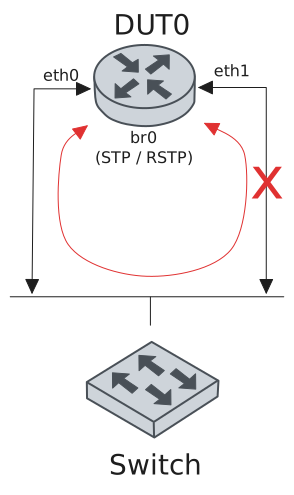
Test Software Bridge With STP
Description
A bridge is configured in DUT0 with all ports attached to it. STP is enabled in order to prevent bridge loops.
Scenario
Step 1: Set the following configuration in DUT1 :
set interfaces bridge br0
set interfaces ethernet eth0 bridge-group bridge br0
set interfaces ethernet eth1 bridge-group bridge br0
set system login user admin authentication encrypted-password '$6$GSjsCj8gHLv$/VcqU6FLi6CT2Oxn0MJQ2C2tqnRDrYKNF8HIYWJp68nvXvPdFccDsT04.WtigUONbKYrgKg8d6rEs8PjljMkH0'
Step 2: Set the following configuration in DUT0 :
set interfaces bridge br0 stp
set interfaces ethernet eth0 bridge-group bridge br0
set interfaces ethernet eth1 bridge-group bridge br0
set system login user admin authentication encrypted-password '$6$GSjsCj8gHLv$/VcqU6FLi6CT2Oxn0MJQ2C2tqnRDrYKNF8HIYWJp68nvXvPdFccDsT04.WtigUONbKYrgKg8d6rEs8PjljMkH0'
Step 3: Run the command interfaces bridge show ports on DUT0 and check whether the output contains the following tokens:
blocking
forwarding
Show output
---------------------------------------------------------------------------------------
bridge  port  state       edge-type  role        cost  tx bpdu  rx bpdu  tx tcn  rx tcn
---------------------------------------------------------------------------------------
br0     eth0  forwarding  auto, p2p  designated  2000       24        2       6       0
br0     eth1  blocking    auto, p2p  backup      2000        2       23       0       6
Test Software Bridge With RSTP
Description
A bridge is configured in DUT0 with all ports attached to it. Rapid STP (RSTP) is enabled in order to prevent bridge loops.
Scenario
Step 1: Set the following configuration in DUT1 :
set interfaces bridge br0
set interfaces ethernet eth0 bridge-group bridge br0
set interfaces ethernet eth1 bridge-group bridge br0
set system login user admin authentication encrypted-password '$6$GSjsCj8gHLv$/VcqU6FLi6CT2Oxn0MJQ2C2tqnRDrYKNF8HIYWJp68nvXvPdFccDsT04.WtigUONbKYrgKg8d6rEs8PjljMkH0'
Step 2: Set the following configuration in DUT0 :
set interfaces bridge br0 stp version rstp
set interfaces ethernet eth0 bridge-group bridge br0
set interfaces ethernet eth1 bridge-group bridge br0
set system login user admin authentication encrypted-password '$6$GSjsCj8gHLv$/VcqU6FLi6CT2Oxn0MJQ2C2tqnRDrYKNF8HIYWJp68nvXvPdFccDsT04.WtigUONbKYrgKg8d6rEs8PjljMkH0'
Step 3: Run the command interfaces bridge show ports on DUT0 and check whether the output contains the following tokens:
blocking
forwarding
Show output
---------------------------------------------------------------------------------------------
bridge  port  state       edge-type        role        cost  tx bpdu  rx bpdu  tx tcn  rx tcn
---------------------------------------------------------------------------------------------
br0     eth0  forwarding  oper, auto, p2p  designated  2000        8        2       0       0
br0     eth1  blocking    auto, p2p        backup      2000        2        7       0       0