Check Pdp Advisor
This scenario verifies that the PDP advisor functionality correctly controls the connectivity of a cellular PDP context. When the advisor is active (true), the PDP is allowed to connect. When the advisor is inactive (false), the PDP connection is prevented. When the advisor is removed from the configuration, the PDP connects normally without advisor control.
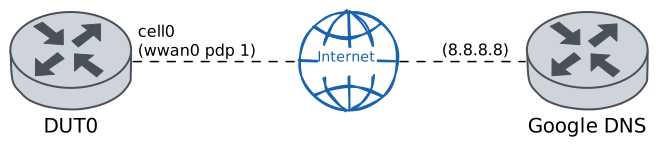
Test PDP Advisor Connectivity Control
Description
In DUT0, a system advisor TEST_ADVISOR is configured with an initial state of true (active), which allows the PDP 1 connection. The test verifies connectivity via ping. Then, the advisor is set to false (inactive), which prevents connections, and the test verifies that connectivity is lost. Finally, the advisor is removed from the PDP configuration, restoring normal connectivity without advisor control.
Scenario
Step 1: Set the following configuration in DUT0 :
set cellular profile CELPROFILE apn movistar.es
set controllers cellular wwan0 encrypted-pin U2FsdGVkX19ipBFRjfles95s5NM1RSVgE3r8D4n+l0A=
set controllers cellular wwan0 pdp 1 advisor TEST_ADVISOR
set controllers cellular wwan0 pdp 1 profile CELPROFILE
set interfaces cellular cell0 address dhcp
set interfaces cellular cell0 phy wwan0 pdp 1
set system advisor TEST_ADVISOR test true
set system login user admin authentication encrypted-password '$6$GSjsCj8gHLv$/VcqU6FLi6CT2Oxn0MJQ2C2tqnRDrYKNF8HIYWJp68nvXvPdFccDsT04.WtigUONbKYrgKg8d6rEs8PjljMkH0'
Note
Once the cellular module is configured with the advisor set to true (active), the PDP connection
should be established normally. This can be verified by checking the network registration, the PDP
connection status, and the cellular interface state.
Step 2: Run the command controllers cellular wwan0 show network-status on DUT0 and check whether the output matches the following regular expressions:
SIM status\s* = OK
Registration state\s* = registered
Show output
SIM status = OK
Registration state = registered
Public Land Mobile Network code = HOME[21407] ACT[21422]
Public Land Mobile Network name = Movistar
Network technology currently in use = lte
Current Service Domain registered = cs-ps (capable cs-ps)
Current Roaming status = off
3GPP Cell ID = 72016415
Radio Band = eutran-20
Channel = 6400
LTE Tracking Area Code (TAC) = 28673
LTE Carrier Aggregation Info:
   Primary Cell Info:
      Band = E-UTRA Band 20
      Frequency = 6400
      Downlink Bandwidth = 10 MHz
      Physical Cell ID = 195
      Scell State = registered
      RSRP (dBm) = -77
      RSRQ (dB) = -7
      RSSI (dBm) = -50
      SINR (dB) = 14
      Uplink Bandwidth = 10 MHz
   Secondary Cell Info #0:
      Band = E-UTRA Band 3
      Frequency = 1301
      Downlink Bandwidth = 20 MHz
      Physical Cell ID = 216
      Scell State = inactive
      RSRP (dBm) = -91
      RSRQ (dB) = -11
      RSSI (dBm) = -70
      SINR (dB) = 6
RX level (dBm) = -53 or greater
Coverage level = 5 (*****)
Step 3: Run the command controllers cellular wwan0 pdp 1 show network-data-connection on DUT0 and check whether the output matches the following regular expressions:
Connection status\s* = connectedShow output
Connection status               = connected
Traffic channel status          = active
Max. TX channel rate (bps)      = 50000000
Max. RX channel rate (bps)      = 300000000
IPv4 address                    = 2.143.59.120
IPv4 mask                       = 255.255.255.240
IPv4 gateway                    = 2.143.59.121
IPv4 primary DNS                = 80.58.61.248
IPv4 secondary DNS              = 80.58.61.249
Step 4: Run the command interfaces cellular cell0 show on DUT0 and check whether the output matches the following regular expressions:
cell0\s+\d+.\d+.\d+.\d+\/\d+\s+up\s+upShow output
-----------------------------------------------------------------
Name           IP Address           Admin  Oper  Vrf  Description
-----------------------------------------------------------------
cell0  2.143.59.120/28              up     up
       fe80::d49d:7ff:fed2:5ec4/64
Step 5: Ping the IP address 8.8.8.8 from DUT0:
admin@DUT0$ ping 8.8.8.8 count 1 size 56 timeout 1Show output
PING 8.8.8.8 (8.8.8.8) 56(84) bytes of data.
64 bytes from 8.8.8.8: icmp_seq=1 ttl=118 time=30.9 ms

--- 8.8.8.8 ping statistics ---
1 packets transmitted, 1 received, 0% packet loss, time 0ms
rtt min/avg/max/mdev = 30.857/30.857/30.857/0.000 ms
Note
When the advisor is set to false (inactive), the PDP connection should be prevented. The
network data connection should be stopped and the cellular interface should go down.
Step 6: Modify the following configuration lines in DUT0 :
set system advisor TEST_ADVISOR test false
Step 7: Run the command controllers cellular wwan0 pdp 1 show network-data-connection on DUT0 and check whether the output matches the following regular expressions:
Connection status\s* = disconnectedShow output
Connection status = disconnected
Step 8: Run the command interfaces cellular cell0 show on DUT0 and check whether the output matches the following regular expressions:
cell0\s+down\s+downShow output
------------------------------------------------
Name   IP Address  Admin  Oper  Vrf  Description
------------------------------------------------
cell0              down   down
Note
When the advisor is removed from the PDP configuration, the PDP should connect unconditionally without advisor control, restoring normal connectivity.
Step 9: Modify the following configuration lines in DUT0 :
delete controllers cellular wwan0 pdp 1 advisor
Step 10: Run the command controllers cellular wwan0 pdp 1 show network-data-connection on DUT0 and check whether the output matches the following regular expressions:
Connection status\s* = connectedShow output
Connection status               = connected
Traffic channel status          = active
Max. TX channel rate (bps)      = 50000000
Max. RX channel rate (bps)      = 300000000
IPv4 address                    = 5.205.230.89
IPv4 mask                       = 255.255.255.252
IPv4 gateway                    = 5.205.230.90
IPv4 primary DNS                = 80.58.61.248
IPv4 secondary DNS              = 80.58.61.249
Step 11: Run the command interfaces cellular cell0 show on DUT0 and check whether the output matches the following regular expressions:
cell0\s+\d+.\d+.\d+.\d+\/\d+\s+up\s+upShow output
-----------------------------------------------------------------
Name           IP Address           Admin  Oper  Vrf  Description
-----------------------------------------------------------------
cell0  5.205.230.89/30              up     up
       fe80::d49d:7ff:fed2:5ec4/64
Step 12: Ping the IP address 8.8.8.8 from DUT0:
admin@DUT0$ ping 8.8.8.8 count 1 size 56 timeout 1Show output
PING 8.8.8.8 (8.8.8.8) 56(84) bytes of data.
64 bytes from 8.8.8.8: icmp_seq=1 ttl=118 time=152 ms

--- 8.8.8.8 ping statistics ---
1 packets transmitted, 1 received, 0% packet loss, time 0ms
rtt min/avg/max/mdev = 151.681/151.681/151.681/0.000 ms
Step 1: Set the following configuration in DUT0 :
set cellular profile CELPROFILE apn movistar.es
set controllers cellular wwan0 sim select socket_1
set controllers cellular wwan0 sim socket socket_1 encrypted-pin U2FsdGVkX19llErquZlj9LDNElROVTig8Pya1n6Oa+w=
set controllers cellular wwan0 sim socket socket_1 pdp 1 advisor TEST_ADVISOR
set controllers cellular wwan0 sim socket socket_1 pdp 1 profile CELPROFILE
set interfaces cellular cell0 address dhcp
set interfaces cellular cell0 phy wwan0 pdp 1
set system advisor TEST_ADVISOR test true
set system login user admin authentication encrypted-password '$6$GSjsCj8gHLv$/VcqU6FLi6CT2Oxn0MJQ2C2tqnRDrYKNF8HIYWJp68nvXvPdFccDsT04.WtigUONbKYrgKg8d6rEs8PjljMkH0'
Note
Once the cellular module is configured with the advisor set to true (active), the PDP connection
should be established normally. This can be verified by checking the network registration, the PDP
connection status, and the cellular interface state.
Step 2: Run the command controllers cellular wwan0 show network-status on DUT0 and check whether the output matches the following regular expressions:
SIM status\s* = OK
Registration state\s* = registered
Show output
SIM status = OK
Registration state = registered
Public Land Mobile Network code = HOME[21407] ACT[21422]
Public Land Mobile Network name = Movistar
Network technology currently in use = lte(+5gnr)
Current Service Domain registered = cs-ps (capable cs-ps)
Current Roaming status = off
3GPP Cell ID = 72016414
Radio Band = eutran-8
Bandwidth = 20
Channel = 1301
LTE Tracking Area Code (TAC) = 28673
EN-DC Available = yes
DCNR Restriction = no
LTE Carrier Aggregation Info:
   Primary Cell Info:
      Band = E-UTRA Band 3
      Frequency = 1301
      Downlink Bandwidth = 20 MHz
      Physical Cell ID = 216
      Scell State = registered
      RSRP (dBm) = -87
      RSRQ (dB) = -8
      RSSI (dBm) = -57
      SINR (dB) = 18
      Uplink Bandwidth = 20 MHz
   Secondary Cell Info #0:
      Band = E-UTRA Band 20
      Frequency = 6400
      Downlink Bandwidth = 10 MHz
      Physical Cell ID = 195
      Scell State = inactive
      RSRP (dBm) = -78
      RSRQ (dB) = -9
      RSSI (dBm) = -60
      SINR (dB) = 10
      Uplink Frequency = 24400
      Uplink Bandwidth = 10 MHz
RX level (dBm) = -61
Coverage level = 5 (*****)
Step 3: Run the command controllers cellular wwan0 pdp 1 show network-data-connection on DUT0 and check whether the output matches the following regular expressions:
Connection status\s* = connectedShow output
Connection status               = connected
Traffic channel status          = active
Max. TX channel rate (bps)      = 0
Max. RX channel rate (bps)      = 0
IPv4 address                    = 176.82.174.168
IPv4 mask                       = 255.255.255.240
IPv4 gateway                    = 176.82.174.169
IPv4 primary DNS                = 80.58.61.248
IPv4 secondary DNS              = 80.58.61.249
Step 4: Run the command interfaces cellular cell0 show on DUT0 and check whether the output matches the following regular expressions:
cell0\s+\d+.\d+.\d+.\d+\/\d+\s+up\s+upShow output
------------------------------------------------------------------
Name            IP Address           Admin  Oper  Vrf  Description
------------------------------------------------------------------
cell0  176.82.174.168/28             up     up
       fe80::e4da:99ff:fea5:1efb/64
Step 5: Ping the IP address 8.8.8.8 from DUT0:
admin@DUT0$ ping 8.8.8.8 count 1 size 56 timeout 1Show output
PING 8.8.8.8 (8.8.8.8) 56(84) bytes of data.
64 bytes from 8.8.8.8: icmp_seq=1 ttl=118 time=34.1 ms

--- 8.8.8.8 ping statistics ---
1 packets transmitted, 1 received, 0% packet loss, time 0ms
rtt min/avg/max/mdev = 34.088/34.088/34.088/0.000 ms
Note
When the advisor is set to false (inactive), the PDP connection should be prevented. The
network data connection should be stopped and the cellular interface should go down.
Step 6: Modify the following configuration lines in DUT0 :
set system advisor TEST_ADVISOR test false
Step 7: Run the command controllers cellular wwan0 pdp 1 show network-data-connection on DUT0 and check whether the output matches the following regular expressions:
Connection status\s* = disconnectedShow output
Connection status = disconnected
Step 8: Run the command interfaces cellular cell0 show on DUT0 and check whether the output matches the following regular expressions:
cell0\s+down\s+downShow output
------------------------------------------------
Name   IP Address  Admin  Oper  Vrf  Description
------------------------------------------------
cell0              down   down
Note
When the advisor is removed from the PDP configuration, the PDP should connect unconditionally without advisor control, restoring normal connectivity.
Step 9: Modify the following configuration lines in DUT0 :
delete controllers cellular wwan0 sim socket socket_1 pdp 1 advisor
Step 10: Run the command controllers cellular wwan0 pdp 1 show network-data-connection on DUT0 and check whether the output matches the following regular expressions:
Connection status\s* = connectedShow output
Connection status               = connected
Traffic channel status          = active
Max. TX channel rate (bps)      = 0
Max. RX channel rate (bps)      = 0
IPv4 address                    = 88.31.125.54
IPv4 mask                       = 255.255.255.252
IPv4 gateway                    = 88.31.125.53
IPv4 primary DNS                = 80.58.61.248
IPv4 secondary DNS              = 80.58.61.249
Step 11: Run the command interfaces cellular cell0 show on DUT0 and check whether the output matches the following regular expressions:
cell0\s+\d+.\d+.\d+.\d+\/\d+\s+up\s+upShow output
------------------------------------------------------------------
Name            IP Address           Admin  Oper  Vrf  Description
------------------------------------------------------------------
cell0  88.31.125.54/30               up     up
       fe80::e4da:99ff:fea5:1efb/64
Step 12: Ping the IP address 8.8.8.8 from DUT0:
admin@DUT0$ ping 8.8.8.8 count 1 size 56 timeout 1Show output
PING 8.8.8.8 (8.8.8.8) 56(84) bytes of data.
64 bytes from 8.8.8.8: icmp_seq=1 ttl=117 time=35.4 ms

--- 8.8.8.8 ping statistics ---
1 packets transmitted, 1 received, 0% packet loss, time 0ms
rtt min/avg/max/mdev = 35.406/35.406/35.406/0.000 ms
Step 1: Set the following configuration in DUT0 :
set cellular profile CELPROFILE apn movistar.es
set controllers cellular wwan0 sim select socket_1
set controllers cellular wwan0 sim socket socket_1 encrypted-pin U2FsdGVkX1/87+6Osj13WOx19oy4G8Fpwgw3lUnpjSQ=
set controllers cellular wwan0 sim socket socket_1 pdp 1 advisor TEST_ADVISOR
set controllers cellular wwan0 sim socket socket_1 pdp 1 profile CELPROFILE
set interfaces cellular cell0 address dhcp
set interfaces cellular cell0 phy wwan0 pdp 1
set system advisor TEST_ADVISOR test true
set system login user admin authentication encrypted-password '$6$GSjsCj8gHLv$/VcqU6FLi6CT2Oxn0MJQ2C2tqnRDrYKNF8HIYWJp68nvXvPdFccDsT04.WtigUONbKYrgKg8d6rEs8PjljMkH0'
Note
Once the cellular module is configured with the advisor set to true (active), the PDP connection
should be established normally. This can be verified by checking the network registration, the PDP
connection status, and the cellular interface state.
Step 2: Run the command controllers cellular wwan0 show network-status on DUT0 and check whether the output matches the following regular expressions:
SIM status\s* = OK
Registration state\s* = registered
Show output
SIM status = OK
Registration state = registered
Public Land Mobile Network code = HOME[21407] ACT[21422]
Public Land Mobile Network name = Movistar
Network technology currently in use = lte(+5gnr)
Current Service Domain registered = cs-ps (capable cs-ps)
Current Roaming status = off
3GPP Cell ID = 72016415
Radio Band = eutran-20
Bandwidth = 10
Channel = 6400
LTE Tracking Area Code (TAC) = 28673
EN-DC Available = yes
DCNR Restriction = no
LTE Carrier Aggregation Info:
   Primary Cell Info:
      Band = E-UTRA Band 20
      Frequency = 6400
      Downlink Bandwidth = 10 MHz
      Physical Cell ID = 195
      Scell State = registered
      RSRP (dBm) = -63
      RSRQ (dB) = -6
      RSSI (dBm) = -40
      SINR (dB) = 16
      Uplink Bandwidth = 10 MHz
   Secondary Cell Info #0:
      Band = E-UTRA Band 3
      Frequency = 1301
      Downlink Bandwidth = 20 MHz
      Physical Cell ID = 216
      Scell State = inactive
      RSRP (dBm) = -110
      RSRQ (dB) = -9
      RSSI (dBm) = -92
      SINR (dB) = 9
      Uplink Frequency = 19301
      Uplink Bandwidth = 20 MHz
RX level (dBm) = -53 or greater
Coverage level = 5 (*****)
Step 3: Run the command controllers cellular wwan0 pdp 1 show network-data-connection on DUT0 and check whether the output matches the following regular expressions:
Connection status\s* = connectedShow output
Connection status               = connected
Traffic channel status          = active
Max. TX channel rate (bps)      = 0
Max. RX channel rate (bps)      = 0
IPv4 address                    = 2.143.32.132
IPv4 mask                       = 255.255.255.248
IPv4 gateway                    = 2.143.32.133
IPv4 primary DNS                = 80.58.61.248
IPv4 secondary DNS              = 80.58.61.249
Step 4: Run the command interfaces cellular cell0 show on DUT0 and check whether the output matches the following regular expressions:
cell0\s+\d+.\d+.\d+.\d+\/\d+\s+up\s+upShow output
------------------------------------------------------------------
Name            IP Address           Admin  Oper  Vrf  Description
------------------------------------------------------------------
cell0  2.143.32.132/29               up     up
       fe80::28cc:fdff:fefc:55cc/64
Step 5: Ping the IP address 8.8.8.8 from DUT0:
admin@DUT0$ ping 8.8.8.8 count 1 size 56 timeout 1Show output
PING 8.8.8.8 (8.8.8.8) 56(84) bytes of data.
64 bytes from 8.8.8.8: icmp_seq=1 ttl=118 time=32.2 ms

--- 8.8.8.8 ping statistics ---
1 packets transmitted, 1 received, 0% packet loss, time 0ms
rtt min/avg/max/mdev = 32.192/32.192/32.192/0.000 ms
Note
When the advisor is set to false (inactive), the PDP connection should be prevented. The
network data connection should be stopped and the cellular interface should go down.
Step 6: Modify the following configuration lines in DUT0 :
set system advisor TEST_ADVISOR test false
Step 7: Run the command controllers cellular wwan0 pdp 1 show network-data-connection on DUT0 and check whether the output matches the following regular expressions:
Connection status\s* = disconnectedShow output
Connection status = disconnected
Step 8: Run the command interfaces cellular cell0 show on DUT0 and check whether the output matches the following regular expressions:
cell0\s+down\s+downShow output
------------------------------------------------
Name   IP Address  Admin  Oper  Vrf  Description
------------------------------------------------
cell0              down   down
Note
When the advisor is removed from the PDP configuration, the PDP should connect unconditionally without advisor control, restoring normal connectivity.
Step 9: Modify the following configuration lines in DUT0 :
delete controllers cellular wwan0 sim socket socket_1 pdp 1 advisor
Step 10: Run the command controllers cellular wwan0 pdp 1 show network-data-connection on DUT0 and check whether the output matches the following regular expressions:
Connection status\s* = connectedShow output
Connection status               = connected
Traffic channel status          = active
Max. TX channel rate (bps)      = 0
Max. RX channel rate (bps)      = 0
IPv4 address                    = 81.47.76.240
IPv4 mask                       = 255.255.255.224
IPv4 gateway                    = 81.47.76.241
IPv4 primary DNS                = 80.58.61.248
IPv4 secondary DNS              = 80.58.61.249
Step 11: Run the command interfaces cellular cell0 show on DUT0 and check whether the output matches the following regular expressions:
cell0\s+\d+.\d+.\d+.\d+\/\d+\s+up\s+upShow output
------------------------------------------------------------------
Name            IP Address           Admin  Oper  Vrf  Description
------------------------------------------------------------------
cell0  81.47.76.240/27               up     up
       fe80::28cc:fdff:fefc:55cc/64
Step 12: Ping the IP address 8.8.8.8 from DUT0:
admin@DUT0$ ping 8.8.8.8 count 1 size 56 timeout 1Show output
PING 8.8.8.8 (8.8.8.8) 56(84) bytes of data.
64 bytes from 8.8.8.8: icmp_seq=1 ttl=117 time=37.5 ms

--- 8.8.8.8 ping statistics ---
1 packets transmitted, 1 received, 0% packet loss, time 0ms
rtt min/avg/max/mdev = 37.451/37.451/37.451/0.000 ms
Step 1: Set the following configuration in DUT0 :
set cellular profile CELPROFILE apn movistar.es
set controllers cellular wwan0 sim select socket_1
set controllers cellular wwan0 sim socket socket_1 encrypted-pin U2FsdGVkX19cPhtI/VbnrM1pRvlQpw/dXRv+LhtG11c=
set controllers cellular wwan0 sim socket socket_1 pdp 1 advisor TEST_ADVISOR
set controllers cellular wwan0 sim socket socket_1 pdp 1 profile CELPROFILE
set interfaces cellular cell0 address dhcp
set interfaces cellular cell0 phy wwan0 pdp 1
set system advisor TEST_ADVISOR test true
set system login user admin authentication encrypted-password '$6$GSjsCj8gHLv$/VcqU6FLi6CT2Oxn0MJQ2C2tqnRDrYKNF8HIYWJp68nvXvPdFccDsT04.WtigUONbKYrgKg8d6rEs8PjljMkH0'
Note
Once the cellular module is configured with the advisor set to true (active), the PDP connection
should be established normally. This can be verified by checking the network registration, the PDP
connection status, and the cellular interface state.
Step 2: Run the command controllers cellular wwan0 show network-status on DUT0 and check whether the output matches the following regular expressions:
SIM status\s* = OK
Registration state\s* = registered
Show output
SIM status = OK
Registration state = registered
Public Land Mobile Network code = HOME[21407] ACT[21422]
Public Land Mobile Network name = Movistar
Network technology currently in use = lte(+5gnr)
Current Service Domain registered = cs-ps (capable cs-ps)
Current Roaming status = off
3GPP Cell ID = 72016415
Radio Band = eutran-20
Bandwidth = 10
Channel = 6400
LTE Tracking Area Code (TAC) = 28673
EN-DC Available = yes
DCNR Restriction = no
LTE Carrier Aggregation Info:
   Primary Cell Info:
      Band = E-UTRA Band 20
      Frequency = 6400
      Downlink Bandwidth = 10 MHz
      Physical Cell ID = 195
      Scell State = registered
      RSRP (dBm) = -83
      RSRQ (dB) = -13
      RSSI (dBm) = -53
      SINR (dB) = 8
      Uplink Bandwidth = 10 MHz
   Secondary Cell Info #0:
      Band = E-UTRA Band 3
      Frequency = 1301
      Downlink Bandwidth = 20 MHz
      Physical Cell ID = 216
      Scell State = inactive
      RSRP (dBm) = -114
      RSRQ (dB) = -11
      RSSI (dBm) = -94
      SINR (dB) = 6
      Uplink Frequency = 19301
      Uplink Bandwidth = 20 MHz
RX level (dBm) = -56
Coverage level = 5 (*****)
Step 3: Run the command controllers cellular wwan0 pdp 1 show network-data-connection on DUT0 and check whether the output matches the following regular expressions:
Connection status\s* = connectedShow output
Connection status               = connected
Traffic channel status          = active
Max. TX channel rate (bps)      = 0
Max. RX channel rate (bps)      = 0
IPv4 address                    = 2.143.53.31
IPv4 mask                       = 255.255.255.192
IPv4 gateway                    = 2.143.53.32
IPv4 primary DNS                = 80.58.61.248
IPv4 secondary DNS              = 80.58.61.249
Step 4: Run the command interfaces cellular cell0 show on DUT0 and check whether the output matches the following regular expressions:
cell0\s+\d+.\d+.\d+.\d+\/\d+\s+up\s+upShow output
-----------------------------------------------------------------
Name           IP Address           Admin  Oper  Vrf  Description
-----------------------------------------------------------------
cell0  2.143.53.31/26               up     up
       fe80::40ac:4ff:feec:347d/64
Step 5: Ping the IP address 8.8.8.8 from DUT0:
admin@DUT0$ ping 8.8.8.8 count 1 size 56 timeout 1Show output
PING 8.8.8.8 (8.8.8.8) 56(84) bytes of data.
64 bytes from 8.8.8.8: icmp_seq=1 ttl=117 time=145 ms

--- 8.8.8.8 ping statistics ---
1 packets transmitted, 1 received, 0% packet loss, time 0ms
rtt min/avg/max/mdev = 144.788/144.788/144.788/0.000 ms
Note
When the advisor is set to false (inactive), the PDP connection should be prevented. The
network data connection should be stopped and the cellular interface should go down.
Step 6: Modify the following configuration lines in DUT0 :
set system advisor TEST_ADVISOR test false
Step 7: Run the command controllers cellular wwan0 pdp 1 show network-data-connection on DUT0 and check whether the output matches the following regular expressions:
Connection status\s* = disconnectedShow output
Connection status = disconnected
Step 8: Run the command interfaces cellular cell0 show on DUT0 and check whether the output matches the following regular expressions:
cell0\s+down\s+downShow output
------------------------------------------------
Name   IP Address  Admin  Oper  Vrf  Description
------------------------------------------------
cell0              down   down
Note
When the advisor is removed from the PDP configuration, the PDP should connect unconditionally without advisor control, restoring normal connectivity.
Step 9: Modify the following configuration lines in DUT0 :
delete controllers cellular wwan0 sim socket socket_1 pdp 1 advisor
Step 10: Run the command controllers cellular wwan0 pdp 1 show network-data-connection on DUT0 and check whether the output matches the following regular expressions:
Connection status\s* = connectedShow output
Connection status               = connected
Traffic channel status          = active
Max. TX channel rate (bps)      = 0
Max. RX channel rate (bps)      = 0
IPv4 address                    = 2.143.34.184
IPv4 mask                       = 255.255.255.240
IPv4 gateway                    = 2.143.34.185
IPv4 primary DNS                = 80.58.61.248
IPv4 secondary DNS              = 80.58.61.249
Step 11: Run the command interfaces cellular cell0 show on DUT0 and check whether the output matches the following regular expressions:
cell0\s+\d+.\d+.\d+.\d+\/\d+\s+up\s+upShow output
-----------------------------------------------------------------
Name           IP Address           Admin  Oper  Vrf  Description
-----------------------------------------------------------------
cell0  2.143.34.184/28              up     up
       fe80::40ac:4ff:feec:347d/64
Step 12: Ping the IP address 8.8.8.8 from DUT0:
admin@DUT0$ ping 8.8.8.8 count 1 size 56 timeout 1Show output
PING 8.8.8.8 (8.8.8.8) 56(84) bytes of data.
64 bytes from 8.8.8.8: icmp_seq=1 ttl=118 time=28.4 ms

--- 8.8.8.8 ping statistics ---
1 packets transmitted, 1 received, 0% packet loss, time 0ms
rtt min/avg/max/mdev = 28.351/28.351/28.351/0.000 ms