Default Router
This scenario shows how to configure a cellular interface and assign a distance to the default route obtained via DHCP.
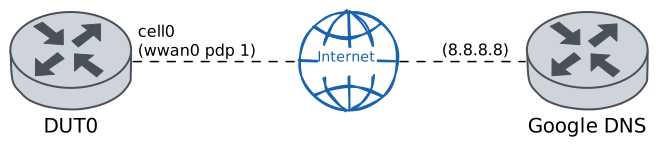
Test DHCP Default Route Distance
Description
DUT0 is connected to the WAN side through the cellular cell0 interface.
Additionally, distance of default route obtained via DHCP client is configured.
Scenario
Step 1: Set the following configuration in DUT0 :
set cellular profile CELPROFILE apn movistar.es
set controllers cellular wwan0 encrypted-pin U2FsdGVkX19i98y+WOuCqewRrvKB5Pq6qv8v8YgjQhw=
set controllers cellular wwan0 pdp 1 profile CELPROFILE
set interfaces cellular cell0 address dhcp
set interfaces cellular cell0 dhcp client receive default-router distance 200
set interfaces cellular cell0 phy wwan0 pdp 1
set system login user admin authentication encrypted-password '$6$GSjsCj8gHLv$/VcqU6FLi6CT2Oxn0MJQ2C2tqnRDrYKNF8HIYWJp68nvXvPdFccDsT04.WtigUONbKYrgKg8d6rEs8PjljMkH0'
Step 2: Run the command controllers cellular wwan0 pdp 1 show network-data-connection on DUT0 and check whether the output matches the following regular expressions:
Connection status\s* = connectedShow output
Connection status               = connected
Traffic channel status          = active
Max. TX channel rate (bps)      = 50000000
Max. RX channel rate (bps)      = 300000000
IPv4 address                    = 176.82.171.185
IPv4 mask                       = 255.255.255.252
IPv4 gateway                    = 176.82.171.186
IPv4 primary DNS                = 80.58.61.248
IPv4 secondary DNS              = 80.58.61.249
Step 3: Run the command protocols ip show route on DUT0 and check whether the output matches the following regular expressions:
S>.*0\.0\.0\.0\/0 \[200\/0\] via .* cell0,.*Show output
Codes: K - kernel route, C - connected, L - local, S - static,
       R - RIP, O - OSPF, I - IS-IS, B - BGP, E - EIGRP, N - NHRP,
       T - Table, v - VNC, V - VNC-Direct, A - Babel, F - PBR,
       f - OpenFabric, t - Table-Direct,
       > - selected route, * - FIB route, q - queued, r - rejected, b - backup
       t - trapped, o - offload failure

IPv4 unicast VRF default:
S>* 0.0.0.0/0 [200/0] via 176.82.171.186, cell0, weight 1, 00:00:02
C>* 176.82.171.184/30 is directly connected, cell0, weight 1, 00:00:02
L>* 176.82.171.185/32 is directly connected, cell0, weight 1, 00:00:02
Step 4: Ping the IP address 8.8.8.8 from DUT0:
admin@DUT0$ ping 8.8.8.8 count 1 size 56 timeout 1Show output
PING 8.8.8.8 (8.8.8.8) 56(84) bytes of data.
64 bytes from 8.8.8.8: icmp_seq=1 ttl=117 time=153 ms

--- 8.8.8.8 ping statistics ---
1 packets transmitted, 1 received, 0% packet loss, time 0ms
rtt min/avg/max/mdev = 153.073/153.073/153.073/0.000 ms
Step 1: Set the following configuration in DUT0 :
set cellular profile CELPROFILE apn movistar.es
set controllers cellular wwan0 sim select socket_1
set controllers cellular wwan0 sim socket socket_1 encrypted-pin U2FsdGVkX1/JtyWWIdOQWBI+gJY+XtnyGYf9s2+XL84=
set controllers cellular wwan0 sim socket socket_1 pdp 1 profile CELPROFILE
set interfaces cellular cell0 address dhcp
set interfaces cellular cell0 dhcp client receive default-router distance 200
set interfaces cellular cell0 phy wwan0 pdp 1
set system login user admin authentication encrypted-password '$6$GSjsCj8gHLv$/VcqU6FLi6CT2Oxn0MJQ2C2tqnRDrYKNF8HIYWJp68nvXvPdFccDsT04.WtigUONbKYrgKg8d6rEs8PjljMkH0'
Step 2: Run the command controllers cellular wwan0 pdp 1 show network-data-connection on DUT0 and check whether the output matches the following regular expressions:
Connection status\s* = connectedShow output
Connection status               = connected
Traffic channel status          = active
Max. TX channel rate (bps)      = 0
Max. RX channel rate (bps)      = 0
IPv4 address                    = 81.47.88.237
IPv4 mask                       = 255.255.255.252
IPv4 gateway                    = 81.47.88.238
IPv4 primary DNS                = 80.58.61.248
IPv4 secondary DNS              = 80.58.61.249
Step 3: Run the command protocols ip show route on DUT0 and check whether the output matches the following regular expressions:
S>.*0\.0\.0\.0\/0 \[200\/0\] via .* cell0,.*Show output
Codes: K - kernel route, C - connected, L - local, S - static,
       R - RIP, O - OSPF, I - IS-IS, B - BGP, E - EIGRP, N - NHRP,
       T - Table, v - VNC, V - VNC-Direct, A - Babel, F - PBR,
       f - OpenFabric, t - Table-Direct,
       > - selected route, * - FIB route, q - queued, r - rejected, b - backup
       t - trapped, o - offload failure

IPv4 unicast VRF default:
S>* 0.0.0.0/0 [200/0] via 81.47.88.238, cell0, weight 1, 00:00:08
C>* 81.47.88.236/30 is directly connected, cell0, weight 1, 00:00:08
L>* 81.47.88.237/32 is directly connected, cell0, weight 1, 00:00:08
Step 4: Ping the IP address 8.8.8.8 from DUT0:
admin@DUT0$ ping 8.8.8.8 count 1 size 56 timeout 1Show output
PING 8.8.8.8 (8.8.8.8) 56(84) bytes of data.
64 bytes from 8.8.8.8: icmp_seq=1 ttl=118 time=35.9 ms

--- 8.8.8.8 ping statistics ---
1 packets transmitted, 1 received, 0% packet loss, time 0ms
rtt min/avg/max/mdev = 35.896/35.896/35.896/0.000 ms
Step 1: Set the following configuration in DUT0 :
set cellular profile CELPROFILE apn movistar.es
set controllers cellular wwan0 sim select socket_1
set controllers cellular wwan0 sim socket socket_1 encrypted-pin U2FsdGVkX1+2OUHLY2d04Qzrrbat+fIcfxxzonxhfGA=
set controllers cellular wwan0 sim socket socket_1 pdp 1 profile CELPROFILE
set interfaces cellular cell0 address dhcp
set interfaces cellular cell0 dhcp client receive default-router distance 200
set interfaces cellular cell0 phy wwan0 pdp 1
set system login user admin authentication encrypted-password '$6$GSjsCj8gHLv$/VcqU6FLi6CT2Oxn0MJQ2C2tqnRDrYKNF8HIYWJp68nvXvPdFccDsT04.WtigUONbKYrgKg8d6rEs8PjljMkH0'
Step 2: Run the command controllers cellular wwan0 pdp 1 show network-data-connection on DUT0 and check whether the output matches the following regular expressions:
Connection status\s* = connectedShow output
Connection status               = connected
Traffic channel status          = active
Max. TX channel rate (bps)      = 0
Max. RX channel rate (bps)      = 0
IPv4 address                    = 5.205.195.235
IPv4 mask                       = 255.255.255.248
IPv4 gateway                    = 5.205.195.236
IPv4 primary DNS                = 80.58.61.248
IPv4 secondary DNS              = 80.58.61.249
Step 3: Run the command protocols ip show route on DUT0 and check whether the output matches the following regular expressions:
S>.*0\.0\.0\.0\/0 \[200\/0\] via .* cell0,.*Show output
Codes: K - kernel route, C - connected, L - local, S - static,
       R - RIP, O - OSPF, I - IS-IS, B - BGP, E - EIGRP, N - NHRP,
       T - Table, v - VNC, V - VNC-Direct, A - Babel, F - PBR,
       f - OpenFabric, t - Table-Direct,
       > - selected route, * - FIB route, q - queued, r - rejected, b - backup
       t - trapped, o - offload failure

IPv4 unicast VRF default:
S>* 0.0.0.0/0 [200/0] via 5.205.195.236, cell0, weight 1, 00:00:02
C>* 5.205.195.232/29 is directly connected, cell0, weight 1, 00:00:02
L>* 5.205.195.235/32 is directly connected, cell0, weight 1, 00:00:02
L   192.168.100.100/32 is directly connected, eth2 inactive, weight 1, 00:35:41
Step 4: Ping the IP address 8.8.8.8 from DUT0:
admin@DUT0$ ping 8.8.8.8 count 1 size 56 timeout 1Show output
PING 8.8.8.8 (8.8.8.8) 56(84) bytes of data.
64 bytes from 8.8.8.8: icmp_seq=1 ttl=117 time=135 ms

--- 8.8.8.8 ping statistics ---
1 packets transmitted, 1 received, 0% packet loss, time 0ms
rtt min/avg/max/mdev = 135.047/135.047/135.047/0.000 ms
Step 1: Set the following configuration in DUT0 :
set cellular profile CELPROFILE apn movistar.es
set controllers cellular wwan0 sim select socket_1
set controllers cellular wwan0 sim socket socket_1 encrypted-pin U2FsdGVkX19sK71s0DlX2R6Q0tplhj3+cAWWJEEX0nU=
set controllers cellular wwan0 sim socket socket_1 pdp 1 profile CELPROFILE
set interfaces cellular cell0 address dhcp
set interfaces cellular cell0 dhcp client receive default-router distance 200
set interfaces cellular cell0 phy wwan0 pdp 1
set system login user admin authentication encrypted-password '$6$GSjsCj8gHLv$/VcqU6FLi6CT2Oxn0MJQ2C2tqnRDrYKNF8HIYWJp68nvXvPdFccDsT04.WtigUONbKYrgKg8d6rEs8PjljMkH0'
Step 2: Run the command controllers cellular wwan0 pdp 1 show network-data-connection on DUT0 and check whether the output matches the following regular expressions:
Connection status\s* = connectedShow output
Connection status               = connected
Traffic channel status          = active
Max. TX channel rate (bps)      = 0
Max. RX channel rate (bps)      = 0
IPv4 address                    = 81.47.89.189
IPv4 mask                       = 255.255.255.252
IPv4 gateway                    = 81.47.89.190
IPv4 primary DNS                = 80.58.61.248
IPv4 secondary DNS              = 80.58.61.249
Step 3: Run the command protocols ip show route on DUT0 and check whether the output matches the following regular expressions:
S>.*0\.0\.0\.0\/0 \[200\/0\] via .* cell0,.*Show output
Codes: K - kernel route, C - connected, L - local, S - static,
       R - RIP, O - OSPF, I - IS-IS, B - BGP, E - EIGRP, N - NHRP,
       T - Table, v - VNC, V - VNC-Direct, A - Babel, F - PBR,
       f - OpenFabric, t - Table-Direct,
       > - selected route, * - FIB route, q - queued, r - rejected, b - backup
       t - trapped, o - offload failure

IPv4 unicast VRF default:
S>* 0.0.0.0/0 [200/0] via 81.47.89.190, cell0, weight 1, 00:00:02
C>* 81.47.89.188/30 is directly connected, cell0, weight 1, 00:00:02
L>* 81.47.89.189/32 is directly connected, cell0, weight 1, 00:00:02
Step 4: Ping the IP address 8.8.8.8 from DUT0:
admin@DUT0$ ping 8.8.8.8 count 1 size 56 timeout 1Show output
PING 8.8.8.8 (8.8.8.8) 56(84) bytes of data.
64 bytes from 8.8.8.8: icmp_seq=1 ttl=117 time=27.9 ms

--- 8.8.8.8 ping statistics ---
1 packets transmitted, 1 received, 0% packet loss, time 0ms
rtt min/avg/max/mdev = 27.860/27.860/27.860/0.000 ms