Nexthop-Self
This scenario demonstrates how to configure nexthop-self for IPv6 BGP neighbors. The nexthop-self command sets the router’s own address as the next-hop for routes advertised to this neighbor. This is commonly used in iBGP to ensure routes learned from eBGP have a reachable next-hop within the iBGP domain.
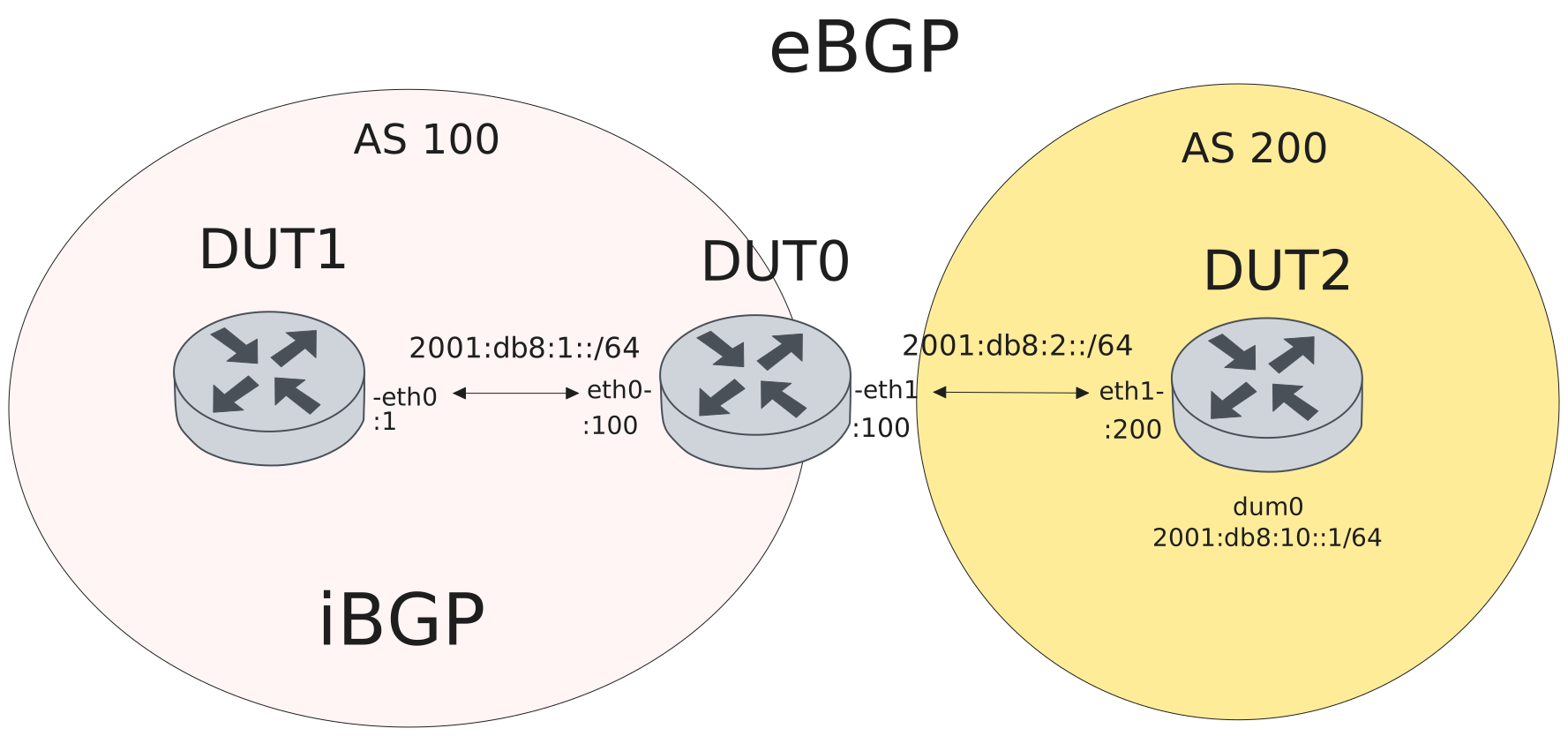
Test iBGP IPv6 - Without nexthop-self reflected route has unreachable next-hop
Description
Test that without nexthop-self, routes advertised to iBGP peer DUT1 keep the
original next-hop (DUT2: 2001:db8:2::200). Since DUT1 has no route to
2001:db8:2::/64, the next-hop is inaccessible and the route is not usable.
Scenario
Step 1: Set the following configuration in DUT0 :
set interfaces ethernet eth0 address '2001:db8:1::100/64'
set interfaces ethernet eth1 address '2001:db8:2::100/64'
set protocols bgp 100 neighbor dut1 address-family ipv6-unicast activate
set protocols bgp 100 neighbor dut1 remote-address '2001:db8:1::1'
set protocols bgp 100 neighbor dut1 remote-as 100
set protocols bgp 100 neighbor dut2 address-family ipv6-unicast activate
set protocols bgp 100 neighbor dut2 address-family ipv6-unicast route-map import PERMIT
set protocols bgp 100 neighbor dut2 remote-address '2001:db8:2::200'
set protocols bgp 100 neighbor dut2 remote-as 200
set protocols bgp 100 parameters router-id 1.1.1.100
set protocols route-map PERMIT rule 1 action permit
set system login user admin authentication encrypted-password '$6$GSjsCj8gHLv$/VcqU6FLi6CT2Oxn0MJQ2C2tqnRDrYKNF8HIYWJp68nvXvPdFccDsT04.WtigUONbKYrgKg8d6rEs8PjljMkH0'
Step 2: Set the following configuration in DUT1 :
set interfaces ethernet eth0 address '2001:db8:1::1/64'
set protocols bgp 100 neighbor peer address-family ipv6-unicast activate
set protocols bgp 100 neighbor peer remote-address '2001:db8:1::100'
set protocols bgp 100 neighbor peer remote-as 100
set protocols bgp 100 parameters router-id 1.1.1.1
set system login user admin authentication encrypted-password '$6$GSjsCj8gHLv$/VcqU6FLi6CT2Oxn0MJQ2C2tqnRDrYKNF8HIYWJp68nvXvPdFccDsT04.WtigUONbKYrgKg8d6rEs8PjljMkH0'
Step 3: Set the following configuration in DUT2 :
set interfaces dummy dum0 address '2001:db8:10::1/64'
set interfaces ethernet eth1 address '2001:db8:2::200/64'
set protocols bgp 200 address-family ipv6-unicast redistribute connected
set protocols bgp 200 neighbor peer address-family ipv6-unicast activate
set protocols bgp 200 neighbor peer address-family ipv6-unicast route-map export PERMIT
set protocols bgp 200 neighbor peer remote-address '2001:db8:2::100'
set protocols bgp 200 neighbor peer remote-as 100
set protocols bgp 200 parameters router-id 1.1.1.200
set protocols route-map PERMIT rule 1 action permit
set system login user admin authentication encrypted-password '$6$GSjsCj8gHLv$/VcqU6FLi6CT2Oxn0MJQ2C2tqnRDrYKNF8HIYWJp68nvXvPdFccDsT04.WtigUONbKYrgKg8d6rEs8PjljMkH0'
Step 4: Run the command protocols bgp show ip summary on DUT0 and check whether the output contains the following tokens:
EstablishedShow output
IPv4 Unicast Summary:
BGP router identifier 1.1.1.100, local AS number 100 VRF default vrf-id 0
BGP table version 0
RIB entries 0, using 0 bytes of memory
Peers 2, using 47 KiB of memory

Neighbor        LocalAddr       V         AS   MsgRcvd   MsgSent   TblVer  InQ OutQ  Up/Down        State   PfxRcd   PfxSnt Desc
2001:db8:1::1   0.0.0.0         4        100         2         2        0    0    0 00:00:00  Established        0        0 N/A
2001:db8:2::200 0.0.0.0         4        200         0         0        0    0    0    never      Connect        0        0 N/A

Total number of neighbors 2
Attention
Verify eBGP and iBGP sessions establish on DUT0.
Step 5: Run the command protocols bgp show ipv6 summary on DUT0 and check whether the output matches the following regular expressions:
2001:db8:1::1.*Established.*\n.*2001:db8:2::200.*EstablishedShow output
IPv6 Unicast Summary:
BGP router identifier 1.1.1.100, local AS number 100 VRF default vrf-id 0
BGP table version 2
RIB entries 3, using 456 bytes of memory
Peers 2, using 47 KiB of memory

Neighbor        LocalAddr       V         AS   MsgRcvd   MsgSent   TblVer  InQ OutQ  Up/Down        State   PfxRcd   PfxSnt Desc
2001:db8:1::1   0.0.0.0         4        100         4         5        2    0    0 00:00:05  Established        0        2 N/A
2001:db8:2::200 0.0.0.0         4        200         6         4        2    0    0 00:00:02  Established        2 (Policy) N/A

Total number of neighbors 2
Note
DUT1 receives the route but next-hop 2001:db8:2::200 is inaccessible (not installed in RIB).
Step 6: Run the command protocols bgp show ipv6 2001:db8:10::/64 on DUT1 and check whether the output matches the following regular expressions:
2001:db8:2::200 \(inaccessibleShow output
BGP routing table entry for 2001:db8:10::/64, version 0
Paths: (1 available, no best path)
  Not advertised to any peer
  200
    2001:db8:2::200 (inaccessible, import-check enabled) from 2001:db8:1::100 (1.1.1.100)
      Origin incomplete, metric 0, localpref 100, invalid, internal
      Last update: Tue May 19 15:02:45 2026
Test iBGP IPv6 - With nexthop-self
Description
Test to verify that with nexthop-self, the next-hop is changed to DUT0’s address. DUT0 receives route from eBGP peer DUT2 and advertises to iBGP peer DUT1. With nexthop-self, DUT1 sees DUT0’s address as the next-hop.
Scenario
Step 1: Set the following configuration in DUT0 :
set interfaces ethernet eth0 address '2001:db8:1::100/64'
set interfaces ethernet eth1 address '2001:db8:2::100/64'
set protocols bgp 100 neighbor dut1 address-family ipv6-unicast activate
set protocols bgp 100 neighbor dut1 address-family ipv6-unicast nexthop-self
set protocols bgp 100 neighbor dut1 remote-address '2001:db8:1::1'
set protocols bgp 100 neighbor dut1 remote-as 100
set protocols bgp 100 neighbor dut2 address-family ipv6-unicast activate
set protocols bgp 100 neighbor dut2 address-family ipv6-unicast route-map import PERMIT
set protocols bgp 100 neighbor dut2 remote-address '2001:db8:2::200'
set protocols bgp 100 neighbor dut2 remote-as 200
set protocols bgp 100 parameters router-id 1.1.1.100
set protocols route-map PERMIT rule 1 action permit
set system login user admin authentication encrypted-password '$6$GSjsCj8gHLv$/VcqU6FLi6CT2Oxn0MJQ2C2tqnRDrYKNF8HIYWJp68nvXvPdFccDsT04.WtigUONbKYrgKg8d6rEs8PjljMkH0'
Step 2: Set the following configuration in DUT1 :
set interfaces ethernet eth0 address '2001:db8:1::1/64'
set protocols bgp 100 neighbor peer address-family ipv6-unicast activate
set protocols bgp 100 neighbor peer remote-address '2001:db8:1::100'
set protocols bgp 100 neighbor peer remote-as 100
set protocols bgp 100 parameters router-id 1.1.1.1
set system login user admin authentication encrypted-password '$6$GSjsCj8gHLv$/VcqU6FLi6CT2Oxn0MJQ2C2tqnRDrYKNF8HIYWJp68nvXvPdFccDsT04.WtigUONbKYrgKg8d6rEs8PjljMkH0'
Step 3: Set the following configuration in DUT2 :
set interfaces dummy dum0 address '2001:db8:10::1/64'
set interfaces ethernet eth1 address '2001:db8:2::200/64'
set protocols bgp 200 address-family ipv6-unicast redistribute connected
set protocols bgp 200 neighbor peer address-family ipv6-unicast activate
set protocols bgp 200 neighbor peer address-family ipv6-unicast route-map export PERMIT
set protocols bgp 200 neighbor peer remote-address '2001:db8:2::100'
set protocols bgp 200 neighbor peer remote-as 100
set protocols bgp 200 parameters router-id 1.1.1.200
set protocols route-map PERMIT rule 1 action permit
set system login user admin authentication encrypted-password '$6$GSjsCj8gHLv$/VcqU6FLi6CT2Oxn0MJQ2C2tqnRDrYKNF8HIYWJp68nvXvPdFccDsT04.WtigUONbKYrgKg8d6rEs8PjljMkH0'
Step 4: Run the command protocols bgp show ip summary on DUT0 and check whether the output contains the following tokens:
EstablishedShow output
IPv4 Unicast Summary:
BGP router identifier 1.1.1.100, local AS number 100 VRF default vrf-id 0
BGP table version 0
RIB entries 0, using 0 bytes of memory
Peers 2, using 47 KiB of memory

Neighbor        LocalAddr       V         AS   MsgRcvd   MsgSent   TblVer  InQ OutQ  Up/Down        State   PfxRcd   PfxSnt Desc
2001:db8:1::1   0.0.0.0         4        100         2         2        0    0    0 00:00:00  Established        0        0 N/A
2001:db8:2::200 0.0.0.0         4        200         0         0        0    0    0    never      Connect        0        0 N/A

Total number of neighbors 2
Attention
Verify eBGP and iBGP sessions establish on DUT0.
Step 5: Run the command protocols bgp show ipv6 summary on DUT0 and check whether the output matches the following regular expressions:
2001:db8:1::1.*Established.*\n.*2001:db8:2::200.*EstablishedShow output
IPv6 Unicast Summary:
BGP router identifier 1.1.1.100, local AS number 100 VRF default vrf-id 0
BGP table version 0
RIB entries 0, using 0 bytes of memory
Peers 2, using 47 KiB of memory

Neighbor        LocalAddr       V         AS   MsgRcvd   MsgSent   TblVer  InQ OutQ  Up/Down        State   PfxRcd   PfxSnt Desc
2001:db8:1::1   0.0.0.0         4        100         4         4        0    0    0 00:00:02  Established        0        0 N/A
2001:db8:2::200 0.0.0.0         4        200         2         2        0    0    0 00:00:01  Established        0 (Policy) N/A

Total number of neighbors 2
Attention
Verify DUT1 receives route 2001:db8:10::/64 with next-hop as DUT0’s address.
Step 6: Run the command protocols bgp show ipv6 2001:db8:10::/64 on DUT1 and check whether the output contains the following tokens:
2001:db8:1::100 from 2001:db8:1::100 (1.1.1.100)Show output
BGP routing table entry for 2001:db8:10::/64, version 2
Paths: (1 available, best #1, table default)
  Not advertised to any peer
  200
    2001:db8:1::100 from 2001:db8:1::100 (1.1.1.100)
      Origin incomplete, metric 0, localpref 100, valid, internal, best (First path received)
      Last update: Tue May 19 15:03:00 2026