Check Igmp Groups With Vrfs
The IGMP protocol can be used to control the delivery of IP multicasts. This protocol prevents hosts on a local network from receiving traffic for a multicast group they have not explicitly joined. Therefore, instead of flooding multicast traffic to all the ports in a broadcast domain (or VLAN), multicast traffic will only be forwarded to the links that have requested them.
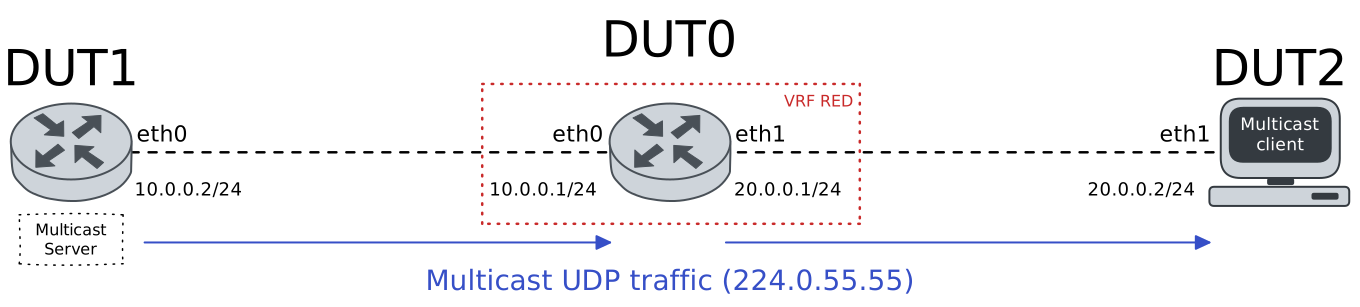
Test IGMP Groups With VRFs
Description
The following scenario shows how to configure DUT0 to forward the multicast traffic generated by DUT1 to DUT2, when the latter has been previously added to the multicast group and using VRFs
Scenario
Step 1: Set the following configuration in DUT0 :
set interfaces ethernet eth0 address 10.0.0.1/24
set interfaces ethernet eth0 vrf RED
set interfaces ethernet eth1 address 20.0.0.1/24
set interfaces ethernet eth1 vrf RED
set system login user admin authentication encrypted-password '$6$GSjsCj8gHLv$/VcqU6FLi6CT2Oxn0MJQ2C2tqnRDrYKNF8HIYWJp68nvXvPdFccDsT04.WtigUONbKYrgKg8d6rEs8PjljMkH0'
set system vrf RED
Step 2: Set the following configuration in DUT1 :
set interfaces ethernet eth0 address 10.0.0.2/24
set interfaces ethernet eth0 traffic policy out TTL
set protocols static route 224.0.0.0/4 interface eth0
set system login user admin authentication encrypted-password '$6$GSjsCj8gHLv$/VcqU6FLi6CT2Oxn0MJQ2C2tqnRDrYKNF8HIYWJp68nvXvPdFccDsT04.WtigUONbKYrgKg8d6rEs8PjljMkH0'
set traffic policy TTL rule 1 set ttl 64
Step 3: Set the following configuration in DUT2 :
set interfaces ethernet eth1 address 20.0.0.2/24
set system login user admin authentication encrypted-password '$6$GSjsCj8gHLv$/VcqU6FLi6CT2Oxn0MJQ2C2tqnRDrYKNF8HIYWJp68nvXvPdFccDsT04.WtigUONbKYrgKg8d6rEs8PjljMkH0'
Step 4: Modify the following configuration lines in DUT0 :
set interfaces ethernet eth0 ip pim
set interfaces ethernet eth1 ip igmp query-interval 24
set interfaces ethernet eth1 ip pim
set protocols vrf RED pim rp address 10.0.0.1 group 224.0.0.0/4
Note
Initially, DUT0 has no information about multicast group 224.0.55.55, since DUT2 has not requested to join that group yet.
Step 5: Run the command interfaces ethernet eth1 ip igmp show statistics json on DUT0 and expect the following output:
Show output
{
  "eth1":{
    "name":"eth1",
    "queryV1":0,
    "queryV2":0,
    "queryV3":0,
    "leaveV2":0,
    "reportV1":0,
    "reportV2":0,
    "reportV3":8,
    "mtraceResponse":0,
    "mtraceRequest":0,
    "unsupported":0,
    "totalReceivedMessages":8,
    "peakGroups":2,
    "totalGroups":2,
    "totalSourceGroups":0,
    "joinsFailed":0,
    "joinsSent":6,
    "generalQueriesSent":1,
    "groupQueriesSent":0
  }
}
Step 6: Run the command protocols vrf RED igmp show groups on DUT0 and check whether the output contains the following tokens:
224.0.55.55Show output
Total IGMP groups: 2
Watermark warn limit(Not Set): 0
Interface        Group           Mode Timer    Srcs V Uptime
eth1             224.0.1.39      EXCL 00:00:57    1 3 00:00:02
eth1             224.0.1.40      EXCL 00:00:57    1 3 00:00:02
Step 7: Run the command protocols vrf RED ip show multicast route on DUT0 and check whether the output does not match the following regular expressions:
[*]\s+224.0.55.55\s+SC\s+IGMPShow output
IP Multicast Routing Table
Flags: S - Sparse, D - Dense, C - Connected, P - Pruned
       R - SGRpt Pruned, F - Register flag, T - SPT-bit set
 Source  Group       Flags  Proto  Input  Output      TTL  Uptime
 *       224.0.1.39  SC     IGMP   eth0   pimreg1018  1    00:00:02
                            IGMP          eth1        1
 *       224.0.1.40  SC     IGMP   eth0   pimreg1018  1    00:00:02
                            IGMP          eth1        1
Note
So, if DUT1 generates multicast traffic for group 224.0.55.55, DUT0 should not forward it to DUT2.
Step 8: Run the command traffic dump monitor interface eth1 on DUT0.
Step 9: Run the command monitor test connection client 224.0.55.55 1234 udp source-port 1235 on DUT1.
Note
After DUT2 requests to join multicast group 224.0.55.55, DUT0 should have information about that group.
Step 10: Run the command monitor test connection server 1234 udp local-address 224.0.55.55 local-interface eth1 multicast on DUT2.
Step 11: Run the command interfaces ethernet eth1 ip igmp show statistics json on DUT0 and expect the following output:
Show output
{
  "eth1":{
    "name":"eth1",
    "queryV1":0,
    "queryV2":0,
    "queryV3":0,
    "leaveV2":0,
    "reportV1":0,
    "reportV2":0,
    "reportV3":18,
    "mtraceResponse":0,
    "mtraceRequest":0,
    "unsupported":0,
    "totalReceivedMessages":18,
    "peakGroups":3,
    "totalGroups":3,
    "totalSourceGroups":0,
    "joinsFailed":0,
    "joinsSent":6,
    "generalQueriesSent":2,
    "groupQueriesSent":0
  }
}
Step 12: Run the command protocols vrf RED igmp show groups on DUT0 and check whether the output contains the following tokens:
224.0.55.55Show output
Total IGMP groups: 3
Watermark warn limit(Not Set): 0
Interface        Group           Mode Timer    Srcs V Uptime
eth1             224.0.1.39      EXCL 00:00:42    1 3 00:00:23
eth1             224.0.1.40      EXCL 00:00:42    1 3 00:00:23
eth1             224.0.55.55     EXCL 00:00:57    1 3 00:00:01
Step 13: Run the command protocols vrf RED ip show multicast route on DUT0 and check whether the output matches the following regular expressions:
[*]\s+224.0.55.55\s+SC\s+IGMPShow output
IP Multicast Routing Table
Flags: S - Sparse, D - Dense, C - Connected, P - Pruned
       R - SGRpt Pruned, F - Register flag, T - SPT-bit set
 Source    Group        Flags  Proto  Input  Output      TTL  Uptime
 *         224.0.1.39   SC     IGMP   eth0   pimreg1018  1    00:00:23
                               IGMP          eth1        1
 *         224.0.1.40   SC     IGMP   eth0   pimreg1018  1    00:00:23
                               IGMP          eth1        1
 *         224.0.55.55  SC     IGMP   eth0   pimreg1018  1    00:00:01
                               IGMP          eth1        1
 10.0.0.2  224.0.55.55  SFT    STAR   eth0   eth1        1    00:00:21
Note
And consequently, if DUT1 generates multicast traffic for group 224.0.55.55, DUT0 should forward it to DUT2, and this traffic should be received by DUT2.
Step 14: Run the command traffic dump monitor interface eth1 on DUT0.
Step 15: Run the command monitor test connection client 224.0.55.55 1234 udp source-port 1235 on DUT1.