Check Pim Sources Filtering
The PIM protocol can be configured to prevent unauthorized sources from registering with an RP.
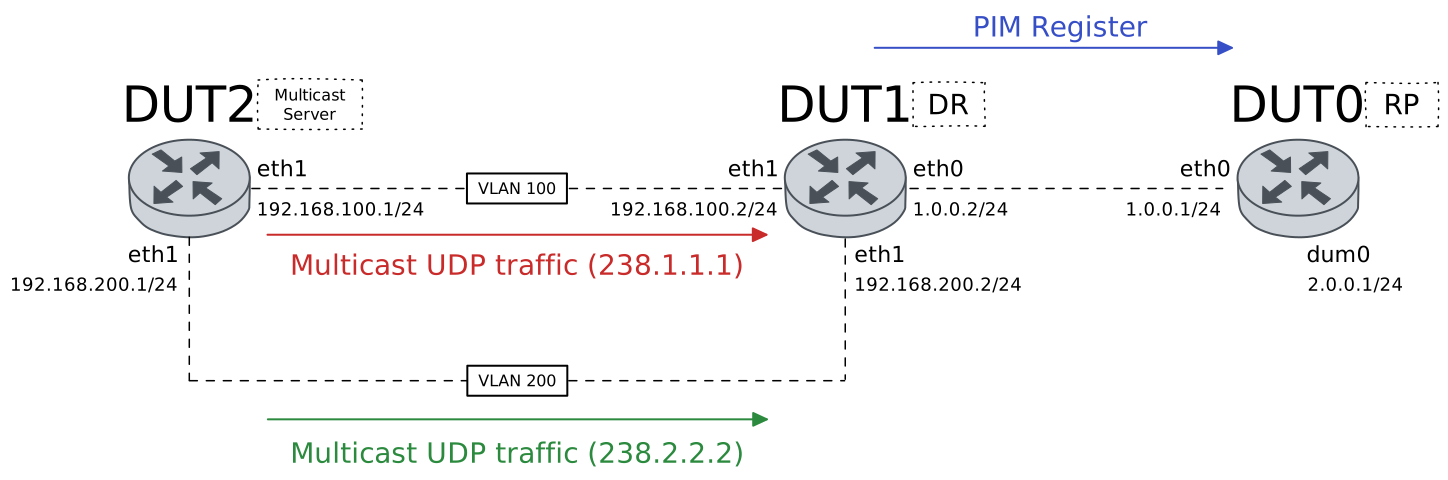
Test PIM Sources Filtering
Description
The following scenario shows how to configure DUT0 as a Rendezvous Point (RP), DUT1 as a Designated Router (DR), and DUT2 as a multicast source host. DUT2 will send two different multicast traffic for each of its two interfaces. And the RP will be configured to deny one of these sources.
Scenario
Step 1: Set the following configuration in DUT0 :
set interfaces dummy dum0 address 2.0.0.1/24
set interfaces dummy dum0 ip pim
set interfaces ethernet eth0 address 1.0.0.1/24
set interfaces ethernet eth0 ip pim
set protocols ip prefix-list PIM_SOURCES rule 1 action deny
set protocols ip prefix-list PIM_SOURCES rule 1 prefix 192.168.100.0/24
set protocols ip prefix-list PIM_SOURCES rule 2 action permit
set protocols ip prefix-list PIM_SOURCES rule 2 prefix 192.168.200.0/24
set protocols pim register-accept-list PIM_SOURCES
set protocols pim rp address 2.0.0.1 group 238.1.1.0/24
set protocols pim rp address 2.0.0.1 group 238.2.2.0/24
set protocols static route 192.168.100.0/24 next-hop 1.0.0.2
set protocols static route 192.168.200.0/24 next-hop 1.0.0.2
set system login user admin authentication encrypted-password '$6$GSjsCj8gHLv$/VcqU6FLi6CT2Oxn0MJQ2C2tqnRDrYKNF8HIYWJp68nvXvPdFccDsT04.WtigUONbKYrgKg8d6rEs8PjljMkH0'
Step 2: Set the following configuration in DUT1 :
set interfaces ethernet eth0 address 1.0.0.2/24
set interfaces ethernet eth0 ip pim
set interfaces ethernet eth1 vif 100 address 192.168.100.2/24
set interfaces ethernet eth1 vif 100 ip pim
set interfaces ethernet eth1 vif 200 address 192.168.200.2/24
set interfaces ethernet eth1 vif 200 ip pim
set protocols pim rp address 2.0.0.1 group 238.1.1.0/24
set protocols pim rp address 2.0.0.1 group 238.2.2.0/24
set protocols static route 2.0.0.0/24 next-hop 1.0.0.1
set system login user admin authentication encrypted-password '$6$GSjsCj8gHLv$/VcqU6FLi6CT2Oxn0MJQ2C2tqnRDrYKNF8HIYWJp68nvXvPdFccDsT04.WtigUONbKYrgKg8d6rEs8PjljMkH0'
Step 3: Set the following configuration in DUT2 :
set interfaces ethernet eth1 vif 100 address 192.168.100.1/24
set interfaces ethernet eth1 vif 100 traffic policy out TTL
set interfaces ethernet eth1 vif 200 address 192.168.200.1/24
set interfaces ethernet eth1 vif 200 traffic policy out TTL
set protocols static route 238.1.1.0/24 interface eth1.100
set protocols static route 238.2.2.0/24 interface eth1.200
set system login user admin authentication encrypted-password '$6$GSjsCj8gHLv$/VcqU6FLi6CT2Oxn0MJQ2C2tqnRDrYKNF8HIYWJp68nvXvPdFccDsT04.WtigUONbKYrgKg8d6rEs8PjljMkH0'
set traffic policy TTL rule 1 set ttl 64
Note
When DUT2 WAN_NETts to transmit multicast traffic for the group 238.1.1.1, DUT2 redirects this traffic to DUT1 through the interface with IP address 192.168.100.1. DUT1 then encapsulates the first message in a PIM (REGISTER) message and redirects it to DUT0 (RP). Thus, the RP is informed that the source 192.168.100.1 WAN_NETts to generate multicast traffic for the group 238.1.1.1.
Step 4: Run the command traffic dump monitor interface eth0 on DUT0.
Step 5: Run the command monitor test connection client 238.1.1.1 1234 udp on DUT2.
Note
After receiving the REGISTER message, DUT0 (RP) checks that source 192.168.100.1 is not authorized and its registration should be denied. So, if we look at the routing table of DUT0, it should not contain an entry to redirect multicast traffic for group 238.1.1.1 with source 192.168.100.1. However, the DUT1 routing table should contain such an entry.
Step 6: Run the command protocols ip show multicast route on DUT0 and check whether the output does not match the following regular expressions:
192.168.100.1\s+238.1.1.1Show output
IP Multicast Routing Table
Flags: S - Sparse, D - Dense, C - Connected, P - Pruned
       R - SGRpt Pruned, F - Register flag, T - SPT-bit set
 Source  Group  Flags  Proto  Input  Output  TTL  Uptime
Step 7: Run the command protocols ip show multicast route on DUT1 and check whether the output matches the following regular expressions:
192.168.100.1\s+238.1.1.1Show output
IP Multicast Routing Table
Flags: S - Sparse, D - Dense, C - Connected, P - Pruned
       R - SGRpt Pruned, F - Register flag, T - SPT-bit set
 Source         Group      Flags  Proto  Input     Output  TTL  Uptime
 192.168.100.1  238.1.1.1  SFP    none   eth1.100  none    0    --:--:--
Note
Just like before, when DUT2 WAN_NETts to transmit multicast traffic for the group 238.2.2.2, DUT2 redirects this traffic to DUT1 through the interface with IP address 192.168.200.1. DUT1 then encapsulates the first message in a PIM (REGISTER) message and redirects it to DUT0 (RP). Thus, the RP is informed that the source 192.168.200.1 WAN_NETts to generate multicast traffic for the 238.2.2.2 group.
Step 8: Run the command traffic dump monitor interface eth0 on DUT0.
Step 9: Run the command monitor test connection client 238.2.2.2 1234 udp on DUT2.
Note
After receiving the REGISTER message, DUT0 (RP) verifies that the source 192.168.200.1 is authorized and should be allowed to register. So if we look at the routing tables of DUT0 and DUT1, both should contain an entry to redirect multicast traffic for group 238.2.2.2 with source 192.168.200.1.
Step 10: Run the command protocols ip show multicast route on DUT0 and check whether the output matches the following regular expressions:
192.168.200.1\s+238.2.2.2Show output
IP Multicast Routing Table
Flags: S - Sparse, D - Dense, C - Connected, P - Pruned
       R - SGRpt Pruned, F - Register flag, T - SPT-bit set
 Source         Group      Flags  Proto  Input  Output  TTL  Uptime
 192.168.200.1  238.2.2.2  SP     none   eth0   none    0    --:--:--
Step 11: Run the command protocols ip show multicast route on DUT1 and check whether the output matches the following regular expressions:
192.168.200.1\s+238.2.2.2Show output
IP Multicast Routing Table
Flags: S - Sparse, D - Dense, C - Connected, P - Pruned
       R - SGRpt Pruned, F - Register flag, T - SPT-bit set
 Source         Group      Flags  Proto  Input     Output  TTL  Uptime
 192.168.100.1  238.1.1.1  SFP    none   eth1.100  none    0    --:--:--
 192.168.200.1  238.2.2.2  SFP    none   eth1.200  none    0    --:--:--