Bfd Static Route6
Tests to check BFD protocol in static routes for IPv6.
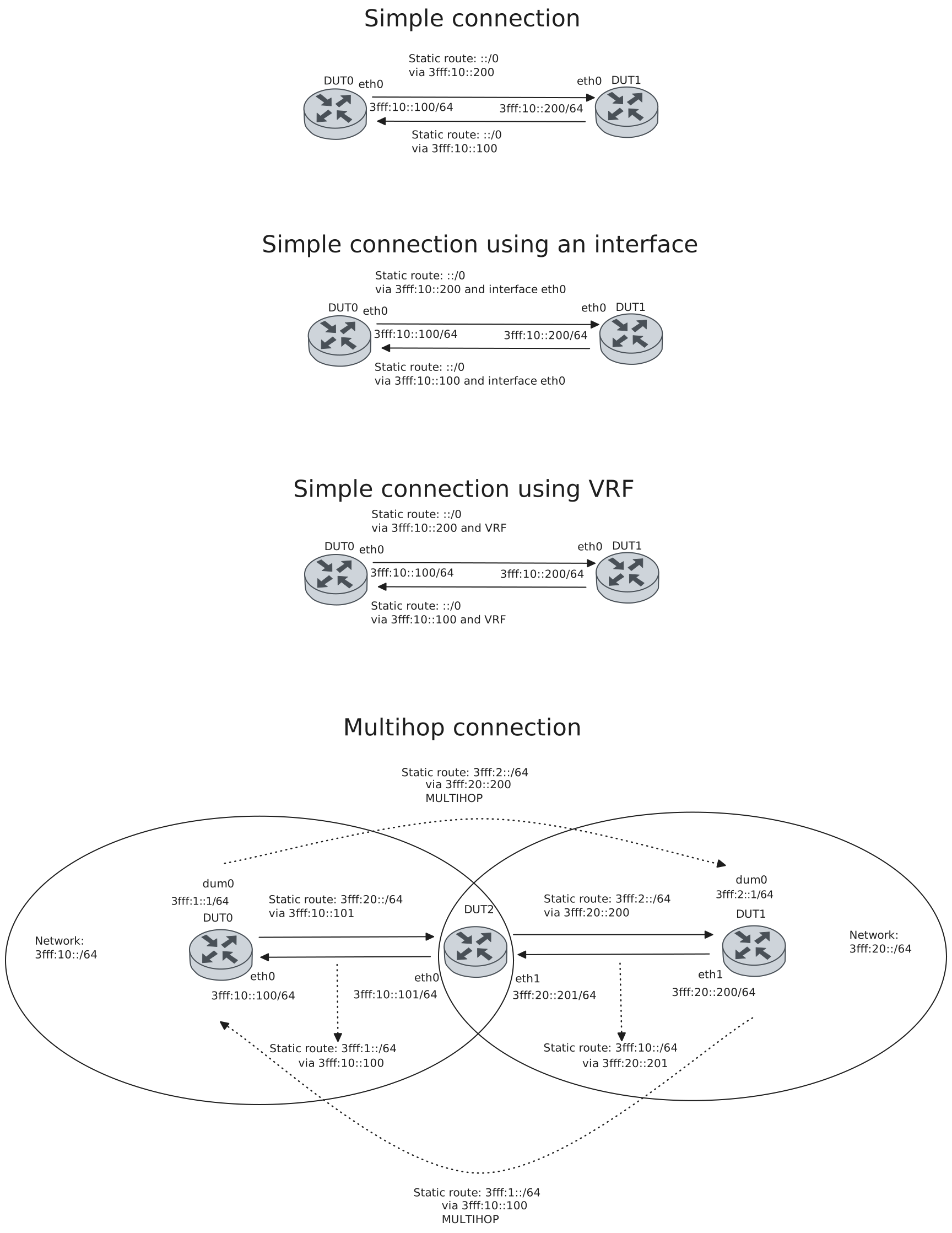
Test Connection With Next Hop IPv6
Description
Tests connection between two devices with BFD in static routes using the gateway as the BFD peer, checking if they are each others peers and their status is up and installed.
Scenario
Step 1: Set the following configuration in DUT0 :
set interfaces ethernet eth0 address '3fff:10::100/64'
set protocols static route6 '::/0' next-hop '3fff:10::200' bfd
set system login user admin authentication encrypted-password '$6$GSjsCj8gHLv$/VcqU6FLi6CT2Oxn0MJQ2C2tqnRDrYKNF8HIYWJp68nvXvPdFccDsT04.WtigUONbKYrgKg8d6rEs8PjljMkH0'
Step 2: Set the following configuration in DUT1 :
set interfaces ethernet eth0 address '3fff:10::200/64'
set protocols static route6 '::/0' next-hop '3fff:10::100' bfd
set system login user admin authentication encrypted-password '$6$GSjsCj8gHLv$/VcqU6FLi6CT2Oxn0MJQ2C2tqnRDrYKNF8HIYWJp68nvXvPdFccDsT04.WtigUONbKYrgKg8d6rEs8PjljMkH0'
Note
Check connectivity
Step 3: Ping the IP address 3fff:10::200 from DUT0:
admin@DUT0$ ping 3fff:10::200 count 1 size 56 timeout 1Show output
PING 3fff:10::200(3fff:10::200) 56 data bytes
64 bytes from 3fff:10::200: icmp_seq=1 ttl=64 time=97.6 ms

--- 3fff:10::200 ping statistics ---
1 packets transmitted, 1 received, 0% packet loss, time 0ms
rtt min/avg/max/mdev = 97.583/97.583/97.583/0.000 ms
Step 4: Ping the IP address 3fff:10::100 from DUT1:
admin@DUT1$ ping 3fff:10::100 count 1 size 56 timeout 1Show output
PING 3fff:10::100(3fff:10::100) 56 data bytes
64 bytes from 3fff:10::100: icmp_seq=1 ttl=64 time=0.237 ms

--- 3fff:10::100 ping statistics ---
1 packets transmitted, 1 received, 0% packet loss, time 0ms
rtt min/avg/max/mdev = 0.237/0.237/0.237/0.000 ms
Note
Check that the operational command ‘protocols bfd show static route’ works, and shows that they are each other’s peers and that their status is installed, indicating that the next-hop router is reachable
Step 5: Run the command protocols bfd show static route on DUT0 and check whether the output matches the following regular expressions:
3fff:10::200
status: installed
Show output
Showing BFD monitored static routes:

  Next hops:
    VRF default IPv4 Unicast:

    VRF default IPv4 Multicast:

    VRF default IPv6 Unicast:
        ::/0 peer 3fff:10::200 (status: installed)
Step 6: Run the command protocols bfd show static route on DUT1 and check whether the output matches the following regular expressions:
3fff:10::100
status: installed
Show output
Showing BFD monitored static routes:

  Next hops:
    VRF default IPv4 Unicast:

    VRF default IPv4 Multicast:

    VRF default IPv6 Unicast:
        ::/0 peer 3fff:10::100 (status: installed)
Note
Check that they are each other’s peers and that their status is up (the BFD session has beedn successfully established)
Step 7: Run the command protocols bfd show peers on DUT0 and check whether the output matches the following regular expressions:
3fff:10::200
Status: up
Show output
BFD Peers:
        peer 3fff:10::200 vrf default
                ID: 1687928173
                Remote ID: 2813521217
                Active mode
                Status: up
                Uptime: 2 second(s)
                Diagnostics: ok
                Remote diagnostics: ok
                Peer Type: dynamic
                RTT min/avg/max: 0/0/0 usec
                Local timers:
                        Detect-multiplier: 3
                        Receive interval: 300ms
                        Transmission interval: 300ms
                        Transmission interval (actual with jitter): 291ms
                        Detection timeout: 900ms
                        Echo receive interval: 50ms
                        Echo transmission interval: disabled
                Remote timers:
                        Detect-multiplier: 3
                        Receive interval: 300ms
                        Transmission interval: 300ms
                        Echo receive interval: 50ms
Step 8: Run the command protocols bfd show peers on DUT1 and check whether the output matches the following regular expressions:
3fff:10::100
Status: up
Show output
BFD Peers:
        peer 3fff:10::100 vrf default
                ID: 2813521217
                Remote ID: 1687928173
                Active mode
                Status: up
                Uptime: 2 second(s)
                Diagnostics: ok
                Remote diagnostics: ok
                Peer Type: dynamic
                RTT min/avg/max: 0/0/0 usec
                Local timers:
                        Detect-multiplier: 3
                        Receive interval: 300ms
                        Transmission interval: 300ms
                        Transmission interval (actual with jitter): 288ms
                        Detection timeout: 900ms
                        Echo receive interval: 50ms
                        Echo transmission interval: disabled
                Remote timers:
                        Detect-multiplier: 3
                        Receive interval: 300ms
                        Transmission interval: 300ms
                        Echo receive interval: 50ms
Test Connection With Next Hop And Interface IPv6
Description
Tests connection between two devices with BFD in static routes using the gateway as the BFD peer and an interface, checking if they are each others peers and their status is up and installed.
Scenario
Step 1: Set the following configuration in DUT0 :
set interfaces ethernet eth0 address '3fff:10::100/64'
set protocols static route6 '::/0' next-hop '3fff:10::200' interface eth0 bfd
set system login user admin authentication encrypted-password '$6$GSjsCj8gHLv$/VcqU6FLi6CT2Oxn0MJQ2C2tqnRDrYKNF8HIYWJp68nvXvPdFccDsT04.WtigUONbKYrgKg8d6rEs8PjljMkH0'
Step 2: Set the following configuration in DUT1 :
set interfaces ethernet eth0 address '3fff:10::200/64'
set protocols static route6 '::/0' next-hop '3fff:10::100' interface eth0 bfd
set system login user admin authentication encrypted-password '$6$GSjsCj8gHLv$/VcqU6FLi6CT2Oxn0MJQ2C2tqnRDrYKNF8HIYWJp68nvXvPdFccDsT04.WtigUONbKYrgKg8d6rEs8PjljMkH0'
Note
Check connectivity
Step 3: Ping the IP address 3fff:10::200 from DUT0:
admin@DUT0$ ping 3fff:10::200 count 1 size 56 timeout 1Show output
PING 3fff:10::200(3fff:10::200) 56 data bytes
64 bytes from 3fff:10::200: icmp_seq=1 ttl=64 time=0.270 ms

--- 3fff:10::200 ping statistics ---
1 packets transmitted, 1 received, 0% packet loss, time 0ms
rtt min/avg/max/mdev = 0.270/0.270/0.270/0.000 ms
Step 4: Ping the IP address 3fff:10::100 from DUT1:
admin@DUT1$ ping 3fff:10::100 count 1 size 56 timeout 1Show output
PING 3fff:10::100(3fff:10::100) 56 data bytes
64 bytes from 3fff:10::100: icmp_seq=1 ttl=64 time=0.495 ms

--- 3fff:10::100 ping statistics ---
1 packets transmitted, 1 received, 0% packet loss, time 0ms
rtt min/avg/max/mdev = 0.495/0.495/0.495/0.000 ms
Note
Check that the operational command ‘protocols bfd show static route’ works, and shows that they are each other’s peers and that their status is installed, indicating that the next-hop router is reachable
Step 5: Run the command protocols bfd show static route on DUT0 and check whether the output matches the following regular expressions:
3fff:10::200
status: installed
Show output
Showing BFD monitored static routes:

  Next hops:
    VRF default IPv4 Unicast:

    VRF default IPv4 Multicast:

    VRF default IPv6 Unicast:
        ::/0 peer 3fff:10::200 (status: installed)
Step 6: Run the command protocols bfd show static route on DUT1 and check whether the output matches the following regular expressions:
3fff:10::100
status: installed
Show output
Showing BFD monitored static routes:

  Next hops:
    VRF default IPv4 Unicast:

    VRF default IPv4 Multicast:

    VRF default IPv6 Unicast:
        ::/0 peer 3fff:10::100 (status: installed)
Note
Check that they are each other’s peers and that their status is up (the BFD session has beedn successfully established)
Step 7: Run the command protocols bfd show peers on DUT0 and check whether the output matches the following regular expressions:
3fff:10::200
Status: up
Show output
BFD Peers:
        peer 3fff:10::200 vrf default interface eth0
                ID: 37200728
                Remote ID: 377626843
                Active mode
                Status: up
                Uptime: 2 second(s)
                Diagnostics: ok
                Remote diagnostics: ok
                Peer Type: dynamic
                RTT min/avg/max: 0/0/0 usec
                Local timers:
                        Detect-multiplier: 3
                        Receive interval: 300ms
                        Transmission interval: 300ms
                        Transmission interval (actual with jitter): 264ms
                        Detection timeout: 900ms
                        Echo receive interval: 50ms
                        Echo transmission interval: disabled
                Remote timers:
                        Detect-multiplier: 3
                        Receive interval: 300ms
                        Transmission interval: 300ms
                        Echo receive interval: 50ms
Step 8: Run the command protocols bfd show peers on DUT1 and check whether the output matches the following regular expressions:
3fff:10::100
Status: up
Show output
BFD Peers:
        peer 3fff:10::100 vrf default interface eth0
                ID: 377626843
                Remote ID: 37200728
                Active mode
                Status: up
                Uptime: 2 second(s)
                Diagnostics: ok
                Remote diagnostics: ok
                Peer Type: dynamic
                RTT min/avg/max: 0/0/0 usec
                Local timers:
                        Detect-multiplier: 3
                        Receive interval: 300ms
                        Transmission interval: 300ms
                        Transmission interval (actual with jitter): 243ms
                        Detection timeout: 900ms
                        Echo receive interval: 50ms
                        Echo transmission interval: disabled
                Remote timers:
                        Detect-multiplier: 3
                        Receive interval: 300ms
                        Transmission interval: 300ms
                        Echo receive interval: 50ms
Test Connection With Next Hop And Next Hop VRF IPv6
Description
Tests connection between two devices with BFD in static routes using the gateway as the BFD peer and a leaked route with a nexthop in the specified VRF ID, checking if they are each others peers and their status is up and installed.
Scenario
Step 1: Set the following configuration in DUT0 :
set interfaces ethernet eth0 address '3fff:10::100/64'
set interfaces ethernet eth0 vrf VRF
set protocols static route6 '::/0' next-hop '3fff:10::200' next-hop-vrf VRF bfd
set system login user admin authentication encrypted-password '$6$GSjsCj8gHLv$/VcqU6FLi6CT2Oxn0MJQ2C2tqnRDrYKNF8HIYWJp68nvXvPdFccDsT04.WtigUONbKYrgKg8d6rEs8PjljMkH0'
set system vrf VRF
Step 2: Set the following configuration in DUT1 :
set interfaces ethernet eth0 address '3fff:10::200/64'
set interfaces ethernet eth0 vrf VRF
set protocols static route6 '::/0' next-hop '3fff:10::100' next-hop-vrf VRF bfd
set system login user admin authentication encrypted-password '$6$GSjsCj8gHLv$/VcqU6FLi6CT2Oxn0MJQ2C2tqnRDrYKNF8HIYWJp68nvXvPdFccDsT04.WtigUONbKYrgKg8d6rEs8PjljMkH0'
set system vrf VRF
Note
Check connectivity
Step 3: Ping the IP address 3fff:10::200 from DUT0:
admin@DUT0$ ping 3fff:10::200 count 1 size 56 timeout 1Show output
PING 3fff:10::200(3fff:10::200) 56 data bytes
64 bytes from 3fff:10::200: icmp_seq=1 ttl=64 time=0.275 ms

--- 3fff:10::200 ping statistics ---
1 packets transmitted, 1 received, 0% packet loss, time 0ms
rtt min/avg/max/mdev = 0.275/0.275/0.275/0.000 ms
Step 4: Ping the IP address 3fff:10::100 from DUT1:
admin@DUT1$ ping 3fff:10::100 count 1 size 56 timeout 1Show output
PING 3fff:10::100(3fff:10::100) 56 data bytes
64 bytes from 3fff:10::100: icmp_seq=1 ttl=64 time=0.405 ms

--- 3fff:10::100 ping statistics ---
1 packets transmitted, 1 received, 0% packet loss, time 0ms
rtt min/avg/max/mdev = 0.405/0.405/0.405/0.000 ms
Note
Check that the operational command ‘protocols bfd show static route’ works, and shows that they are each other’s peers and that their status is installed, indicating that the next-hop router is reachable
Step 5: Run the command protocols bfd show static route on DUT0 and check whether the output matches the following regular expressions:
3fff:10::200
status: installed
Show output
Showing BFD monitored static routes:

  Next hops:
    VRF default IPv4 Unicast:

    VRF default IPv4 Multicast:

    VRF default IPv6 Unicast:
        ::/0 peer 3fff:10::200 (status: installed)
Step 6: Run the command protocols bfd show static route on DUT1 and check whether the output matches the following regular expressions:
3fff:10::100
status: installed
Show output
Showing BFD monitored static routes:

  Next hops:
    VRF default IPv4 Unicast:

    VRF default IPv4 Multicast:

    VRF default IPv6 Unicast:
        ::/0 peer 3fff:10::100 (status: installed)
Note
Check that they are each other’s peers and that their status is up (the BFD session has beedn successfully established)
Step 7: Run the command protocols bfd show peers on DUT0 and check whether the output matches the following regular expressions:
3fff:10::200
Status: up
Show output
BFD Peers:
        peer 3fff:10::200 vrf VRF
                ID: 1337968306
                Remote ID: 587828304
                Active mode
                Status: up
                Uptime: 1 second(s)
                Diagnostics: ok
                Remote diagnostics: ok
                Peer Type: dynamic
                RTT min/avg/max: 0/0/0 usec
                Local timers:
                        Detect-multiplier: 3
                        Receive interval: 300ms
                        Transmission interval: 300ms
                        Transmission interval (actual with jitter): 243ms
                        Detection timeout: 900ms
                        Echo receive interval: 50ms
                        Echo transmission interval: disabled
                Remote timers:
                        Detect-multiplier: 3
                        Receive interval: 300ms
                        Transmission interval: 300ms
                        Echo receive interval: 50ms
Step 8: Run the command protocols bfd show peers on DUT1 and check whether the output matches the following regular expressions:
3fff:10::100
Status: up
Show output
BFD Peers:
        peer 3fff:10::100 vrf VRF
                ID: 587828304
                Remote ID: 1337968306
                Active mode
                Status: up
                Uptime: 1 second(s)
                Diagnostics: ok
                Remote diagnostics: ok
                Peer Type: dynamic
                RTT min/avg/max: 0/0/0 usec
                Local timers:
                        Detect-multiplier: 3
                        Receive interval: 300ms
                        Transmission interval: 300ms
                        Transmission interval (actual with jitter): 294ms
                        Detection timeout: 900ms
                        Echo receive interval: 50ms
                        Echo transmission interval: disabled
                Remote timers:
                        Detect-multiplier: 3
                        Receive interval: 300ms
                        Transmission interval: 300ms
                        Echo receive interval: 50ms
Test Multihop Connection IPv6
Description
Tests multihop connection between two devices in different networks using a third device connected to both networks, checking if they are each others peers and their status is up and installed.
Scenario
Step 1: Set the following configuration in DUT0 :
set interfaces dummy dum0 address '3fff:1::1/64'
set interfaces ethernet eth0 address '3fff:10::100/64'
set protocols static route6 '3fff:20::/64' next-hop '3fff:10::101'
set protocols static route6 '3fff:2::/64' next-hop '3fff:20::200' bfd multihop
set system login user admin authentication encrypted-password '$6$GSjsCj8gHLv$/VcqU6FLi6CT2Oxn0MJQ2C2tqnRDrYKNF8HIYWJp68nvXvPdFccDsT04.WtigUONbKYrgKg8d6rEs8PjljMkH0'
Step 2: Set the following configuration in DUT1 :
set interfaces dummy dum0 address '3fff:2::1/64'
set interfaces ethernet eth1 address '3fff:20::200/64'
set protocols static route6 '3fff:10::/64' next-hop '3fff:20::201'
set protocols static route6 '3fff:1::/64' next-hop '3fff:10::100' bfd multihop
set system login user admin authentication encrypted-password '$6$GSjsCj8gHLv$/VcqU6FLi6CT2Oxn0MJQ2C2tqnRDrYKNF8HIYWJp68nvXvPdFccDsT04.WtigUONbKYrgKg8d6rEs8PjljMkH0'
Step 3: Set the following configuration in DUT2 :
set interfaces ethernet eth0 address '3fff:10::101/64'
set interfaces ethernet eth1 address '3fff:20::201/64'
set protocols static route6 '3fff:1::/64' next-hop '3fff:10::100'
set protocols static route6 '3fff:2::/64' next-hop '3fff:20::200'
set system login user admin authentication encrypted-password '$6$GSjsCj8gHLv$/VcqU6FLi6CT2Oxn0MJQ2C2tqnRDrYKNF8HIYWJp68nvXvPdFccDsT04.WtigUONbKYrgKg8d6rEs8PjljMkH0'
Note
Check connectivity
Step 4: Ping the IP address 3fff:20::200 from DUT0:
admin@DUT0$ ping 3fff:20::200 count 1 size 56 timeout 1Show output
PING 3fff:20::200(3fff:20::200) 56 data bytes
64 bytes from 3fff:20::200: icmp_seq=1 ttl=63 time=376 ms

--- 3fff:20::200 ping statistics ---
1 packets transmitted, 1 received, 0% packet loss, time 0ms
rtt min/avg/max/mdev = 375.569/375.569/375.569/0.000 ms
Step 5: Ping the IP address 3fff:10::100 from DUT1:
admin@DUT1$ ping 3fff:10::100 count 1 size 56 timeout 1Show output
PING 3fff:10::100(3fff:10::100) 56 data bytes
64 bytes from 3fff:10::100: icmp_seq=1 ttl=63 time=0.405 ms

--- 3fff:10::100 ping statistics ---
1 packets transmitted, 1 received, 0% packet loss, time 0ms
rtt min/avg/max/mdev = 0.405/0.405/0.405/0.000 ms
Note
Check that the operational command ‘protocols bfd show static route’ works, and shows that they are each other’s peers and that their status is installed, indicating that the next-hop router is reachable
Step 6: Run the command protocols bfd show static route on DUT0 and check whether the output matches the following regular expressions:
3fff:20::200
status: installed
Show output
Showing BFD monitored static routes:

  Next hops:
    VRF default IPv4 Unicast:

    VRF default IPv4 Multicast:

    VRF default IPv6 Unicast:
        3fff:2::/64 peer 3fff:20::200 (status: installed)
Step 7: Run the command protocols bfd show static route on DUT1 and check whether the output matches the following regular expressions:
3fff:10::100
status: installed
Show output
Showing BFD monitored static routes:

  Next hops:
    VRF default IPv4 Unicast:

    VRF default IPv4 Multicast:

    VRF default IPv6 Unicast:
        3fff:1::/64 peer 3fff:10::100 (status: installed)
Note
Check that they are each other’s peers and that their status is up (the BFD session has beedn successfully established)
Step 8: Run the command protocols bfd show peers on DUT0 and check whether the output matches the following regular expressions:
3fff:20::200
Status: up
Show output
BFD Peers:
        peer 3fff:20::200 multihop local-address 3fff:10::100 vrf default
                ID: 2473270843
                Remote ID: 421331734
                Active mode
                Minimum TTL: 2
                Status: up
                Uptime: 0 second(s)
                Diagnostics: ok
                Remote diagnostics: ok
                Peer Type: dynamic
                RTT min/avg/max: 0/0/0 usec
                Local timers:
                        Detect-multiplier: 3
                        Receive interval: 300ms
                        Transmission interval: 300ms
                        Transmission interval (actual with jitter): 282ms
                        Detection timeout: 900ms
                        Echo receive interval: 50ms
                        Echo transmission interval: disabled
                Remote timers:
                        Detect-multiplier: 3
                        Receive interval: 300ms
                        Transmission interval: 300ms
                        Echo receive interval: 50ms
Step 9: Run the command protocols bfd show peers on DUT1 and check whether the output matches the following regular expressions:
3fff:10::100
Status: up
Show output
BFD Peers:
        peer 3fff:10::100 multihop local-address 3fff:20::200 vrf default
                ID: 421331734
                Remote ID: 2473270843
                Active mode
                Minimum TTL: 2
                Status: up
                Uptime: 1 second(s)
                Diagnostics: ok
                Remote diagnostics: ok
                Peer Type: dynamic
                RTT min/avg/max: 0/0/0 usec
                Local timers:
                        Detect-multiplier: 3
                        Receive interval: 300ms
                        Transmission interval: 300ms
                        Transmission interval (actual with jitter): 300ms
                        Detection timeout: 900ms
                        Echo receive interval: 50ms
                        Echo transmission interval: disabled
                Remote timers:
                        Detect-multiplier: 3
                        Receive interval: 300ms
                        Transmission interval: 300ms
                        Echo receive interval: 50ms
Test DUT0 Source IP IPv6
Description
Captures BFD packets and verifies the source address is correct when packets are sent from DUT0.
Scenario
Step 1: Set the following configuration in DUT0 :
set interfaces ethernet eth0 address '3fff:10::100/64'
set protocols static route6 '::/0' next-hop '3fff:10::200' bfd
set system login user admin authentication encrypted-password '$6$GSjsCj8gHLv$/VcqU6FLi6CT2Oxn0MJQ2C2tqnRDrYKNF8HIYWJp68nvXvPdFccDsT04.WtigUONbKYrgKg8d6rEs8PjljMkH0'
Step 2: Set the following configuration in DUT1 :
set interfaces ethernet eth0 address '3fff:10::200/64'
set protocols static route6 '::/0' next-hop '3fff:10::100' bfd source-ip '3fff:10::100'
set system login user admin authentication encrypted-password '$6$GSjsCj8gHLv$/VcqU6FLi6CT2Oxn0MJQ2C2tqnRDrYKNF8HIYWJp68nvXvPdFccDsT04.WtigUONbKYrgKg8d6rEs8PjljMkH0'
Note
Capture packets and show one to verify that the source address is 3fff:10::100:
Note
Source line:
Show output
30 2026-05-19 13:00:04.916670196 3fff:10::100 → 3fff:10::200 BFD Control 86 Diag: No Diagnostic, State: Down, Flags: 0x00
Test DUT1 Source IP IPv6
Description
Captures BFD packets and verifies the source address is correct when packets are sent from DUT1.
Scenario
Step 1: Set the following configuration in DUT0 :
set interfaces ethernet eth0 address '3fff:10::100/64'
set protocols static route6 '::/0' next-hop '3fff:10::200' bfd source-ip '3fff:10::200'
set system login user admin authentication encrypted-password '$6$GSjsCj8gHLv$/VcqU6FLi6CT2Oxn0MJQ2C2tqnRDrYKNF8HIYWJp68nvXvPdFccDsT04.WtigUONbKYrgKg8d6rEs8PjljMkH0'
Step 2: Set the following configuration in DUT1 :
set interfaces ethernet eth0 address '3fff:10::200/64'
set protocols static route6 '::/0' next-hop '3fff:10::100' bfd
set system login user admin authentication encrypted-password '$6$GSjsCj8gHLv$/VcqU6FLi6CT2Oxn0MJQ2C2tqnRDrYKNF8HIYWJp68nvXvPdFccDsT04.WtigUONbKYrgKg8d6rEs8PjljMkH0'
Note
Capture packets and show one to verify that the source address is 3fff:10::200:
Note
Source line:
Show output
27 2026-05-19 13:00:17.330857805 3fff:10::200 → 3fff:10::100 BFD Control 86 Diag: No Diagnostic, State: Down, Flags: 0x00
Test Profile IPv6
Description
Checks that all BFD profile configured parameters are shown.
Scenario
Step 1: Set the following configuration in DUT0 :
set interfaces ethernet eth0 address '3fff:10::100/64'
set protocols bfd profile PFL detect-multiplier 5
set protocols bfd profile PFL echo-interval 60
set protocols bfd profile PFL passive-mode
set protocols bfd profile PFL receive-interval 400
set protocols bfd profile PFL transmit-interval 400
set protocols static route6 '::/0' next-hop '3fff:10::200' bfd profile PFL
set system login user admin authentication encrypted-password '$6$GSjsCj8gHLv$/VcqU6FLi6CT2Oxn0MJQ2C2tqnRDrYKNF8HIYWJp68nvXvPdFccDsT04.WtigUONbKYrgKg8d6rEs8PjljMkH0'
Step 2: Set the following configuration in DUT1 :
set interfaces ethernet eth0 address '3fff:10::200/64'
set protocols static route6 '::/0' next-hop '3fff:10::100' bfd
set system login user admin authentication encrypted-password '$6$GSjsCj8gHLv$/VcqU6FLi6CT2Oxn0MJQ2C2tqnRDrYKNF8HIYWJp68nvXvPdFccDsT04.WtigUONbKYrgKg8d6rEs8PjljMkH0'
Note
Check connectivity
Step 3: Ping the IP address 3fff:10::200 from DUT0:
admin@DUT0$ ping 3fff:10::200 count 1 size 56 timeout 1Show output
PING 3fff:10::200(3fff:10::200) 56 data bytes
64 bytes from 3fff:10::200: icmp_seq=1 ttl=64 time=89.2 ms

--- 3fff:10::200 ping statistics ---
1 packets transmitted, 1 received, 0% packet loss, time 0ms
rtt min/avg/max/mdev = 89.195/89.195/89.195/0.000 ms
Step 4: Ping the IP address 3fff:10::100 from DUT1:
admin@DUT1$ ping 3fff:10::100 count 1 size 56 timeout 1Show output
PING 3fff:10::100(3fff:10::100) 56 data bytes
64 bytes from 3fff:10::100: icmp_seq=1 ttl=64 time=0.388 ms

--- 3fff:10::100 ping statistics ---
1 packets transmitted, 1 received, 0% packet loss, time 0ms
rtt min/avg/max/mdev = 0.388/0.388/0.388/0.000 ms
Note
Check that they are each other’s peers and that their status is up (the BFD session has beedn successfully established). Check that all configured profile parameters are shown in DUT0
Step 5: Run the command protocols bfd show peers on DUT0 and check whether the output matches the following regular expressions:
3fff:10::200
Status: up
Detect-multiplier: 5
Echo receive interval: disabled
Echo transmission interval: disabled
Passive mode
Receive interval: 400ms
Transmission interval: 400ms
Show output
BFD Peers:
        peer 3fff:10::200 vrf default
                ID: 1684866635
                Remote ID: 3689542951
                Passive mode
                Status: up
                Uptime: 0 second(s)
                Diagnostics: ok
                Remote diagnostics: ok
                Peer Type: dynamic
                RTT min/avg/max: 0/0/0 usec
                Profile: PFL
                Local timers:
                        Detect-multiplier: 5
                        Receive interval: 400ms
                        Transmission interval: 400ms
                        Transmission interval (actual with jitter): 392ms
                        Detection timeout: 1200ms
                        Echo receive interval: disabled
                        Echo transmission interval: disabled
                Remote timers:
                        Detect-multiplier: 3
                        Receive interval: 300ms
                        Transmission interval: 300ms
                        Echo receive interval: 50ms
Step 6: Run the command protocols bfd show peers on DUT1 and check whether the output matches the following regular expressions:
3fff:10::100
Status: up
Show output
BFD Peers:
        peer 3fff:10::100 vrf default
                ID: 3689542951
                Remote ID: 1684866635
                Active mode
                Status: up
                Uptime: 0 second(s)
                Diagnostics: ok
                Remote diagnostics: ok
                Peer Type: dynamic
                RTT min/avg/max: 0/0/0 usec
                Local timers:
                        Detect-multiplier: 3
                        Receive interval: 300ms
                        Transmission interval: 300ms
                        Transmission interval (actual with jitter): 316ms
                        Detection timeout: 2000ms
                        Echo receive interval: 50ms
                        Echo transmission interval: disabled
                Remote timers:
                        Detect-multiplier: 5
                        Receive interval: 400ms
                        Transmission interval: 400ms
                        Echo receive interval: disabled