Relay
This scenario shows how to configure service dhcp-relay. The
relay agent must be used when the DHCP server and the DHCP
clients are not connected to the same layer 2 domain.
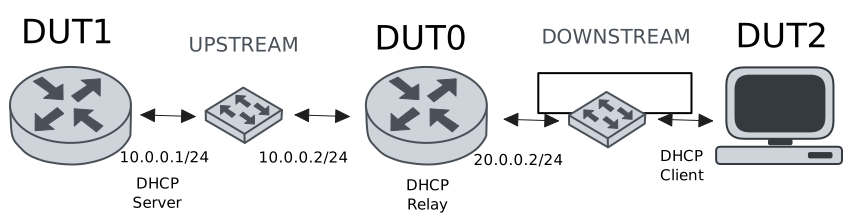
Test DHCP Relay
Description
This example demonstrates how to configure a DHCP relay instance in DUT0 to forward DHCP requests from DUT2 to DUT1.
Scenario
Step 1: Set the following configuration in DUT0 :
set interfaces ethernet eth0 address 10.0.0.2/24
set interfaces ethernet eth1 vif 200 address 20.0.0.2/24
set service dhcp-relay INS downstream-interface eth1.200
set service dhcp-relay INS server 10.0.0.1
set service dhcp-relay INS upstream-interface eth0
set system login user admin authentication encrypted-password '$6$GSjsCj8gHLv$/VcqU6FLi6CT2Oxn0MJQ2C2tqnRDrYKNF8HIYWJp68nvXvPdFccDsT04.WtigUONbKYrgKg8d6rEs8PjljMkH0'
Step 2: Set the following configuration in DUT1 :
set interfaces ethernet eth0 address 10.0.0.1/24
set protocols static route 0.0.0.0/0 next-hop 10.0.0.2
set service dhcp-server shared-network dummy subnet 10.0.0.1/32
set service dhcp-server shared-network remote subnet 20.0.0.0/24 start 20.0.0.50 stop 20.0.0.50
set system login user admin authentication encrypted-password '$6$GSjsCj8gHLv$/VcqU6FLi6CT2Oxn0MJQ2C2tqnRDrYKNF8HIYWJp68nvXvPdFccDsT04.WtigUONbKYrgKg8d6rEs8PjljMkH0'
Step 3: Set the following configuration in DUT2 :
set interfaces ethernet eth1 vif 200 address dhcp
set system login user admin authentication encrypted-password '$6$GSjsCj8gHLv$/VcqU6FLi6CT2Oxn0MJQ2C2tqnRDrYKNF8HIYWJp68nvXvPdFccDsT04.WtigUONbKYrgKg8d6rEs8PjljMkH0'
Step 4: Ping the IP address 10.0.0.1 from DUT0:
admin@DUT0$ ping 10.0.0.1 count 1 size 56 timeout 1Show output
PING 10.0.0.1 (10.0.0.1) 56(84) bytes of data.
64 bytes from 10.0.0.1: icmp_seq=1 ttl=64 time=0.245 ms

--- 10.0.0.1 ping statistics ---
1 packets transmitted, 1 received, 0% packet loss, time 0ms
rtt min/avg/max/mdev = 0.245/0.245/0.245/0.000 ms
Step 5: Run the command interfaces ethernet show on DUT2 and check whether the output contains the following tokens:
20.0.0.50Show output
---------------------------------------------------------------------
  Name             IP Address           Admin  Oper  Vrf  Description
---------------------------------------------------------------------
    eth0                                down   down
    eth1  fe80::dcad:beff:feef:6c21/64  up     up
eth1.200  20.0.0.50/24                  up     up
          fe80::dcad:beff:feef:6c21/64
    eth2                                down   down
    eth3                                down   down
Test DHCP Relay With Giaddr
Description
This example demonstrates how to set the gateway IP address (giaddr) in the IP address. This value must be set in an IP address that the DHCP server can reach.
Scenario
Step 1: Set the following configuration in DUT0 :
set interfaces ethernet eth0 address 10.0.0.2/24
set interfaces ethernet eth1 vif 200 address 20.0.0.2/24
set interfaces ethernet eth1 vif 200 address 20.0.0.3/24
set service dhcp-relay INS downstream-interface eth1.200
set service dhcp-relay INS server 10.0.0.1 giaddr 20.0.0.3
set service dhcp-relay INS upstream-interface eth0
set system login user admin authentication encrypted-password '$6$GSjsCj8gHLv$/VcqU6FLi6CT2Oxn0MJQ2C2tqnRDrYKNF8HIYWJp68nvXvPdFccDsT04.WtigUONbKYrgKg8d6rEs8PjljMkH0'
Step 2: Set the following configuration in DUT1 :
set interfaces ethernet eth0 address 10.0.0.1/24
set protocols static route 0.0.0.0/0 next-hop 10.0.0.2
set service dhcp-server shared-network dummy subnet 10.0.0.1/32
set service dhcp-server shared-network remote subnet 20.0.0.0/24 start 20.0.0.50 stop 20.0.0.50
set system login user admin authentication encrypted-password '$6$GSjsCj8gHLv$/VcqU6FLi6CT2Oxn0MJQ2C2tqnRDrYKNF8HIYWJp68nvXvPdFccDsT04.WtigUONbKYrgKg8d6rEs8PjljMkH0'
Step 3: Set the following configuration in DUT2 :
set interfaces ethernet eth1 vif 200 address dhcp
set system login user admin authentication encrypted-password '$6$GSjsCj8gHLv$/VcqU6FLi6CT2Oxn0MJQ2C2tqnRDrYKNF8HIYWJp68nvXvPdFccDsT04.WtigUONbKYrgKg8d6rEs8PjljMkH0'
Step 4: Ping the IP address 10.0.0.1 from DUT0:
admin@DUT0$ ping 10.0.0.1 count 1 size 56 timeout 1Show output
PING 10.0.0.1 (10.0.0.1) 56(84) bytes of data.
64 bytes from 10.0.0.1: icmp_seq=1 ttl=64 time=0.458 ms

--- 10.0.0.1 ping statistics ---
1 packets transmitted, 1 received, 0% packet loss, time 0ms
rtt min/avg/max/mdev = 0.458/0.458/0.458/0.000 ms
Step 5: Run the command interfaces ethernet show on DUT2 and check whether the output contains the following tokens:
20.0.0.50Show output
---------------------------------------------------------------------
  Name             IP Address           Admin  Oper  Vrf  Description
---------------------------------------------------------------------
    eth0                                down   down
    eth1  fe80::dcad:beff:feef:6c21/64  up     up
eth1.200  20.0.0.50/24                  up     up
          fe80::dcad:beff:feef:6c21/64
    eth2                                down   down
    eth3                                down   down
Step 6: Run the command system journal show | cat on DUT1 and check whether the output matches the following regular expressions:
DHCPACK on 20.0.0.50 to [^\)]+\) via 20.0.0.3Show output
May 19 19:11:49.253130 osdx systemd-journald[2065]: Runtime Journal (/run/log/journal/c781b4f3f2134c23a5bd07e1836f7bfd) is 980.0K, max 6.4M, 5.5M free.
May 19 19:11:49.256497 osdx systemd-journald[2065]: Received client request to rotate journal, rotating.
May 19 19:11:49.256561 osdx systemd-journald[2065]: Vacuuming done, freed 0B of archived journals from /run/log/journal/c781b4f3f2134c23a5bd07e1836f7bfd.
May 19 19:11:49.263204 osdx OSDxCLI[608788]: User 'admin' executed a new command: 'system journal clear'.
May 19 19:11:49.438980 osdx OSDxCLI[608788]: User 'admin' executed a new command: 'system coredump delete all'.
May 19 19:11:50.853356 osdx OSDxCLI[608788]: User 'admin' entered the configuration menu.
May 19 19:11:50.933203 osdx OSDxCLI[608788]: User 'admin' added a new cfg line: 'set interfaces eth0 address 10.0.0.1/24'.
May 19 19:11:51.002405 osdx OSDxCLI[608788]: User 'admin' added a new cfg line: 'set service dhcp-server shared-network dummy subnet 10.0.0.1/32'.
May 19 19:11:51.094432 osdx OSDxCLI[608788]: User 'admin' added a new cfg line: 'set service dhcp-server shared-network remote subnet 20.0.0.0/24 start 20.0.0.50 stop 20.0.0.50'.
May 19 19:11:51.143229 osdx OSDxCLI[608788]: User 'admin' added a new cfg line: 'set protocols static route 0.0.0.0/0 next-hop 10.0.0.2'.
May 19 19:11:51.252191 osdx OSDxCLI[608788]: User 'admin' added a new cfg line: 'show working'.
May 19 19:11:51.306677 osdx ubnt-cfgd[631512]: inactive
May 19 19:11:51.334777 osdx INFO[631523]: FRR daemons did not change
May 19 19:11:51.364581 osdx kernel: 8021q: adding VLAN 0 to HW filter on device eth0
May 19 19:11:51.409893 osdx WARNING[631596]: No supported link modes on interface eth0
May 19 19:11:51.411287 osdx modulelauncher[631596]: osdx.utils.xos cmd error: /sbin/ethtool -A eth0 autoneg on
May 19 19:11:51.411296 osdx modulelauncher[631596]: Command '/sbin/ethtool -A eth0 autoneg on' returned non-zero exit status 76.
May 19 19:11:51.412440 osdx modulelauncher[631596]: osdx.utils.xos cmd error: /sbin/ethtool -s eth0 autoneg on advertise Asym_Pause off Pause off --
May 19 19:11:51.412448 osdx modulelauncher[631596]: Command '/sbin/ethtool -s eth0 autoneg on advertise Asym_Pause off Pause off --' returned non-zero exit status 75.
May 19 19:11:51.536797 osdx systemd[1]: Started dhcpd@main.service - "DHCP Server Service instance main".
May 19 19:11:51.550622 osdx dhcpd[631643]: Wrote 0 leases to leases file.
May 19 19:11:51.588611 osdx dhcpd[631643]: Server starting service.
May 19 19:11:51.683701 osdx cfgd[1789]: [608788]Completed change to active configuration
May 19 19:11:51.684239 osdx OSDxCLI[608788]: User 'admin' committed the configuration.
May 19 19:11:51.698271 osdx OSDxCLI[608788]: User 'admin' left the configuration menu.
May 19 19:11:52.308370 osdx dhcpd[631643]: DHCPDISCOVER from de:ad:be:ef:6c:21 via 20.0.0.3
May 19 19:11:53.309103 osdx dhcpd[631643]: DHCPOFFER on 20.0.0.50 to de:ad:be:ef:6c:21 (osdx) via 20.0.0.3
May 19 19:11:53.309726 osdx dhcpd[631643]: DHCPREQUEST for 20.0.0.50 (10.0.0.1) from de:ad:be:ef:6c:21 (osdx) via 20.0.0.3
May 19 19:11:53.347334 osdx dhcpd[631643]: DHCPACK on 20.0.0.50 to de:ad:be:ef:6c:21 (osdx) via 20.0.0.3
Test DHCP Relay With GRE Tunnel
Description
This example demonstrates how to configure a DHCP relay that forwards DHCP requests to the DHCP server through a GRE tunnel (upstream).
Scenario
Step 1: Set the following configuration in DUT0 :
set interfaces ethernet eth0 address 10.0.0.2/24
set interfaces ethernet eth1 vif 200 address 20.0.0.2/24
set interfaces tunnel tun1 address 1.0.0.2/32
set interfaces tunnel tun1 encapsulation gre
set interfaces tunnel tun1 local-address 10.0.0.2
set interfaces tunnel tun1 local-interface eth0
set interfaces tunnel tun1 nhrp holdtime 5
set interfaces tunnel tun1 nhrp nhs 1.0.0.1 nbma 10.0.0.1
set service dhcp-relay INS downstream-interface eth1.200
set service dhcp-relay INS server 1.0.0.1
set service dhcp-relay INS upstream-interface eth0
set service dhcp-relay INS upstream-interface tun1
set system login user admin authentication encrypted-password '$6$GSjsCj8gHLv$/VcqU6FLi6CT2Oxn0MJQ2C2tqnRDrYKNF8HIYWJp68nvXvPdFccDsT04.WtigUONbKYrgKg8d6rEs8PjljMkH0'
Step 2: Set the following configuration in DUT1 :
set interfaces ethernet eth0 address 10.0.0.1/24
set interfaces tunnel tun1 address 1.0.0.1/32
set interfaces tunnel tun1 encapsulation gre
set interfaces tunnel tun1 local-address 10.0.0.1
set interfaces tunnel tun1 local-interface eth0
set interfaces tunnel tun1 nhrp
set protocols static route 0.0.0.0/0 next-hop 10.0.0.2
set protocols static route 20.0.0.0/24 next-hop 1.0.0.2
set service dhcp-server shared-network dummy subnet 1.0.0.1/32
set service dhcp-server shared-network remote subnet 20.0.0.0/24 start 20.0.0.50 stop 20.0.0.50
set system login user admin authentication encrypted-password '$6$GSjsCj8gHLv$/VcqU6FLi6CT2Oxn0MJQ2C2tqnRDrYKNF8HIYWJp68nvXvPdFccDsT04.WtigUONbKYrgKg8d6rEs8PjljMkH0'
Step 3: Set the following configuration in DUT2 :
set interfaces ethernet eth1 vif 200 address dhcp
set system login user admin authentication encrypted-password '$6$GSjsCj8gHLv$/VcqU6FLi6CT2Oxn0MJQ2C2tqnRDrYKNF8HIYWJp68nvXvPdFccDsT04.WtigUONbKYrgKg8d6rEs8PjljMkH0'
Step 4: Ping the IP address 10.0.0.1 from DUT0:
admin@DUT0$ ping 10.0.0.1 count 1 size 56 timeout 1Show output
PING 10.0.0.1 (10.0.0.1) 56(84) bytes of data.
64 bytes from 10.0.0.1: icmp_seq=1 ttl=64 time=0.516 ms

--- 10.0.0.1 ping statistics ---
1 packets transmitted, 1 received, 0% packet loss, time 0ms
rtt min/avg/max/mdev = 0.516/0.516/0.516/0.000 ms
Step 5: Ping the IP address 1.0.0.1 from DUT0:
admin@DUT0$ ping 1.0.0.1 count 1 size 56 timeout 1Show output
PING 1.0.0.1 (1.0.0.1) 56(84) bytes of data.
64 bytes from 1.0.0.1: icmp_seq=1 ttl=64 time=0.279 ms

--- 1.0.0.1 ping statistics ---
1 packets transmitted, 1 received, 0% packet loss, time 0ms
rtt min/avg/max/mdev = 0.279/0.279/0.279/0.000 ms
Step 6: Run the command interfaces ethernet show on DUT2 and check whether the output contains the following tokens:
20.0.0.50Show output
---------------------------------------------------------------------
  Name             IP Address           Admin  Oper  Vrf  Description
---------------------------------------------------------------------
    eth0                                down   down
    eth1  fe80::dcad:beff:feef:6c21/64  up     up
eth1.200  20.0.0.50/24                  up     up
          fe80::dcad:beff:feef:6c21/64
    eth2                                down   down
    eth3                                down   down
Test DHCP Relay With Multiple Instances
Description
This example demonstrates how to configure multiple DHCP relay instances.
Scenario
Step 1: Set the following configuration in DUT0 :
set interfaces ethernet eth0 address 10.0.0.2/24
set interfaces ethernet eth1 vif 200 address 20.0.0.2/24
set interfaces ethernet eth1 vif 300 address 30.0.0.2/24
set service dhcp-relay INS downstream-interface eth1.200
set service dhcp-relay INS server 10.0.0.1
set service dhcp-relay INS upstream-interface eth0
set service dhcp-relay INS2 downstream-interface eth1.300
set service dhcp-relay INS2 server 10.0.0.1
set service dhcp-relay INS2 upstream-interface eth0
set system login user admin authentication encrypted-password '$6$GSjsCj8gHLv$/VcqU6FLi6CT2Oxn0MJQ2C2tqnRDrYKNF8HIYWJp68nvXvPdFccDsT04.WtigUONbKYrgKg8d6rEs8PjljMkH0'
Step 2: Set the following configuration in DUT1 :
set interfaces ethernet eth0 address 10.0.0.1/24
set protocols static route 0.0.0.0/0 next-hop 10.0.0.2
set service dhcp-server shared-network dummy subnet 10.0.0.1/32
set service dhcp-server shared-network remote subnet 20.0.0.0/24 start 20.0.0.50 stop 20.0.0.50
set service dhcp-server shared-network remote2 subnet 30.0.0.0/24 start 30.0.0.50 stop 30.0.0.50
set system login user admin authentication encrypted-password '$6$GSjsCj8gHLv$/VcqU6FLi6CT2Oxn0MJQ2C2tqnRDrYKNF8HIYWJp68nvXvPdFccDsT04.WtigUONbKYrgKg8d6rEs8PjljMkH0'
Step 3: Set the following configuration in DUT2 :
set interfaces ethernet eth1 vif 200 address dhcp
set interfaces ethernet eth1 vif 300 address dhcp
set system login user admin authentication encrypted-password '$6$GSjsCj8gHLv$/VcqU6FLi6CT2Oxn0MJQ2C2tqnRDrYKNF8HIYWJp68nvXvPdFccDsT04.WtigUONbKYrgKg8d6rEs8PjljMkH0'
Step 4: Ping the IP address 10.0.0.1 from DUT0:
admin@DUT0$ ping 10.0.0.1 count 1 size 56 timeout 1Show output
PING 10.0.0.1 (10.0.0.1) 56(84) bytes of data.
64 bytes from 10.0.0.1: icmp_seq=1 ttl=64 time=0.229 ms

--- 10.0.0.1 ping statistics ---
1 packets transmitted, 1 received, 0% packet loss, time 0ms
rtt min/avg/max/mdev = 0.229/0.229/0.229/0.000 ms
Step 5: Run the command interfaces ethernet show on DUT2 and check whether the output contains the following tokens:
20.0.0.50Show output
---------------------------------------------------------------------
  Name             IP Address           Admin  Oper  Vrf  Description
---------------------------------------------------------------------
    eth0                                down   down
    eth1  fe80::dcad:beff:feef:6c21/64  up     up
eth1.200  20.0.0.50/24                  up     up
          fe80::dcad:beff:feef:6c21/64
eth1.300  30.0.0.50/24                  up     up
          fe80::dcad:beff:feef:6c21/64
    eth2                                down   down
    eth3                                down   down
Step 6: Run the command interfaces ethernet show on DUT2 and check whether the output contains the following tokens:
30.0.0.50Show output
---------------------------------------------------------------------
  Name             IP Address           Admin  Oper  Vrf  Description
---------------------------------------------------------------------
    eth0                                down   down
    eth1  fe80::dcad:beff:feef:6c21/64  up     up
eth1.200  20.0.0.50/24                  up     up
          fe80::dcad:beff:feef:6c21/64
eth1.300  30.0.0.50/24                  up     up
          fe80::dcad:beff:feef:6c21/64
    eth2                                down   down
    eth3                                down   down
Step 7: Run the command system journal show | cat on DUT1 and check whether the output matches the following regular expressions:
DHCPACK on 20.0.0.50 to [^\)]+\) via 20.0.0.2
DHCPACK on 30.0.0.50 to [^\)]+\) via 30.0.0.2
Show output
May 19 19:12:14.241170 osdx systemd-journald[2065]: Runtime Journal (/run/log/journal/c781b4f3f2134c23a5bd07e1836f7bfd) is 928.0K, max 6.4M, 5.5M free.
May 19 19:12:14.241761 osdx systemd-journald[2065]: Received client request to rotate journal, rotating.
May 19 19:12:14.241799 osdx systemd-journald[2065]: Vacuuming done, freed 0B of archived journals from /run/log/journal/c781b4f3f2134c23a5bd07e1836f7bfd.
May 19 19:12:14.251240 osdx OSDxCLI[608788]: User 'admin' executed a new command: 'system journal clear'.
May 19 19:12:14.436254 osdx OSDxCLI[608788]: User 'admin' executed a new command: 'system coredump delete all'.
May 19 19:12:16.041446 osdx OSDxCLI[608788]: User 'admin' entered the configuration menu.
May 19 19:12:16.115004 osdx OSDxCLI[608788]: User 'admin' added a new cfg line: 'set interfaces eth0 address 10.0.0.1/24'.
May 19 19:12:16.193573 osdx OSDxCLI[608788]: User 'admin' added a new cfg line: 'set service dhcp-server shared-network dummy subnet 10.0.0.1/32'.
May 19 19:12:16.253058 osdx OSDxCLI[608788]: User 'admin' added a new cfg line: 'set service dhcp-server shared-network remote subnet 20.0.0.0/24 start 20.0.0.50 stop 20.0.0.50'.
May 19 19:12:16.348179 osdx OSDxCLI[608788]: User 'admin' added a new cfg line: 'set protocols static route 0.0.0.0/0 next-hop 10.0.0.2'.
May 19 19:12:16.416037 osdx OSDxCLI[608788]: User 'admin' added a new cfg line: 'set service dhcp-server shared-network remote2 subnet 30.0.0.0/24 start 30.0.0.50 stop 30.0.0.50'.
May 19 19:12:16.509805 osdx OSDxCLI[608788]: User 'admin' added a new cfg line: 'show working'.
May 19 19:12:16.568385 osdx ubnt-cfgd[632613]: inactive
May 19 19:12:16.598283 osdx INFO[632626]: FRR daemons did not change
May 19 19:12:16.629705 osdx kernel: 8021q: adding VLAN 0 to HW filter on device eth0
May 19 19:12:16.676792 osdx WARNING[632699]: No supported link modes on interface eth0
May 19 19:12:16.678155 osdx modulelauncher[632699]: osdx.utils.xos cmd error: /sbin/ethtool -A eth0 autoneg on
May 19 19:12:16.678164 osdx modulelauncher[632699]: Command '/sbin/ethtool -A eth0 autoneg on' returned non-zero exit status 76.
May 19 19:12:16.679288 osdx modulelauncher[632699]: osdx.utils.xos cmd error: /sbin/ethtool -s eth0 autoneg on advertise Asym_Pause off Pause off --
May 19 19:12:16.679328 osdx modulelauncher[632699]: Command '/sbin/ethtool -s eth0 autoneg on advertise Asym_Pause off Pause off --' returned non-zero exit status 75.
May 19 19:12:16.802459 osdx systemd[1]: Started dhcpd@main.service - "DHCP Server Service instance main".
May 19 19:12:16.933860 osdx dhcpd[632746]: Wrote 0 leases to leases file.
May 19 19:12:16.965284 osdx cfgd[1789]: [608788]Completed change to active configuration
May 19 19:12:16.965804 osdx OSDxCLI[608788]: User 'admin' committed the configuration.
May 19 19:12:16.980065 osdx OSDxCLI[608788]: User 'admin' left the configuration menu.
May 19 19:12:16.981793 osdx dhcpd[632746]: Server starting service.
May 19 19:12:17.637687 osdx dhcpd[632746]: DHCPDISCOVER from de:ad:be:ef:6c:21 via 30.0.0.2
May 19 19:12:17.749118 osdx dhcpd[632746]: DHCPDISCOVER from de:ad:be:ef:6c:21 via 20.0.0.2
May 19 19:12:18.638429 osdx dhcpd[632746]: DHCPOFFER on 30.0.0.50 to de:ad:be:ef:6c:21 (osdx) via 30.0.0.2
May 19 19:12:18.639644 osdx dhcpd[632746]: DHCPREQUEST for 30.0.0.50 (10.0.0.1) from de:ad:be:ef:6c:21 (osdx) via 30.0.0.2
May 19 19:12:18.663444 osdx dhcpd[632746]: DHCPACK on 30.0.0.50 to de:ad:be:ef:6c:21 (osdx) via 30.0.0.2
May 19 19:12:18.749293 osdx dhcpd[632746]: DHCPOFFER on 20.0.0.50 to de:ad:be:ef:6c:21 (osdx) via 20.0.0.2
May 19 19:12:18.749890 osdx dhcpd[632746]: DHCPREQUEST for 20.0.0.50 (10.0.0.1) from de:ad:be:ef:6c:21 (osdx) via 20.0.0.2
May 19 19:12:18.761311 osdx dhcpd[632746]: DHCPACK on 20.0.0.50 to de:ad:be:ef:6c:21 (osdx) via 20.0.0.2