Netflow Forward
These scenarios demonstrate how to configure and use NetFlow to collect and export forwarded TCP flows, covering different modes and NAT/VRF topologies.
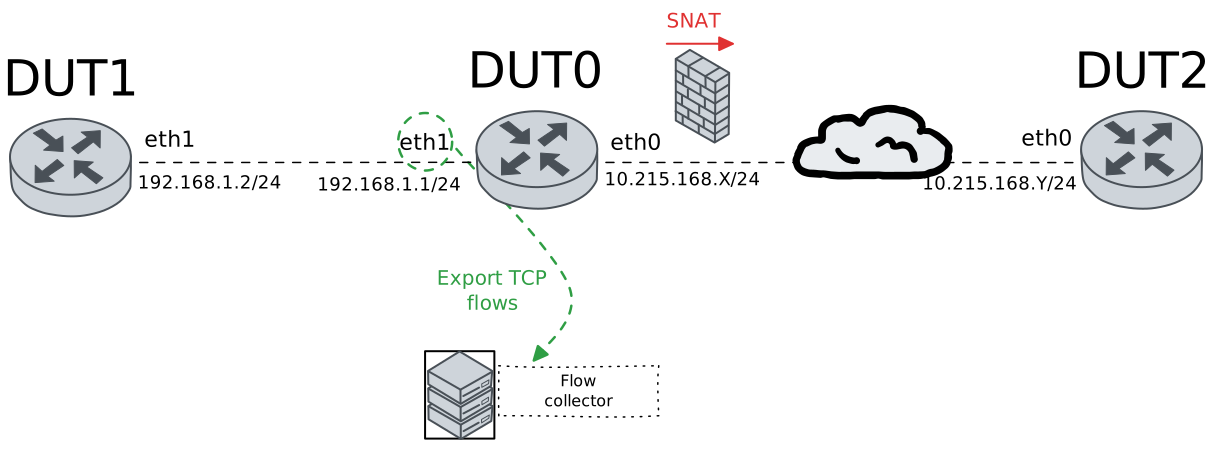
Test NetFlow Forwarding Scenario
Description
These examples demonstrate how to configure and use NetFlow to collect and export TCP forwarded flows across different NAT topologies.
Scenario
Example 1
Step 1: Set the following configuration in DUT0 :
set interfaces ethernet eth0 address 10.215.168.64/24
set interfaces ethernet eth1 address 192.168.1.1/24
set interfaces ethernet eth1 flow egress selector TCP_SEL
set interfaces ethernet eth1 flow ingress selector TCP_SEL
set system login user admin authentication encrypted-password '$6$GSjsCj8gHLv$/VcqU6FLi6CT2Oxn0MJQ2C2tqnRDrYKNF8HIYWJp68nvXvPdFccDsT04.WtigUONbKYrgKg8d6rEs8PjljMkH0'
set system netflow destination 10.215.168.1
set system netflow engine-id 1111
set traffic selector TCP_SEL rule 1 protocol tcp
Step 2: Set the following configuration in DUT1 :
set interfaces ethernet eth1 address 192.168.1.2/24
set protocols static route 0.0.0.0/0 next-hop 192.168.1.1
set system login user admin authentication encrypted-password '$6$GSjsCj8gHLv$/VcqU6FLi6CT2Oxn0MJQ2C2tqnRDrYKNF8HIYWJp68nvXvPdFccDsT04.WtigUONbKYrgKg8d6rEs8PjljMkH0'
Step 3: Set the following configuration in DUT2 :
set interfaces ethernet eth0 address 10.215.168.65/24
set protocols static route 0.0.0.0/0 next-hop 10.215.168.64
set system login user admin authentication encrypted-password '$6$GSjsCj8gHLv$/VcqU6FLi6CT2Oxn0MJQ2C2tqnRDrYKNF8HIYWJp68nvXvPdFccDsT04.WtigUONbKYrgKg8d6rEs8PjljMkH0'
Step 4: Run the command system netflow show status on DUT0 and check whether the output matches the following regular expressions:
Protocol\sversion\s10\s\(ipfix\)
Export:.*Errors 0 pkts
sock0:\s127.0.0.1:2055,.*err: sndbuf reached 0, connect 0, cberr \d+, other 0
Show output
ipt_NETFLOW 2.6, srcversion C7BA00AECA31501CE2B0E82; dir
Protocol version 10 (ipfix), refresh-rate 20, timeout-rate 30, (templates 0, active 1).
Timeouts: active 1800s, inactive 15s. Maxflows 2000000
Flows: active 0 (peak 0 reached 0d3h36m ago), mem 491K, worker delay 25/250 [1..25] (44 ms, 0 us, 0:0 [cpu2]).
Hash: size 62967 (mem 491K), metric 1.00 [1.00, 1.00, 1.00]. InHash: 0 pkt, 0 K, InPDU 0, 0.
Rate: 0 bits/sec, 0 packets/sec; Avg 1 min: 0 bps, 0 pps; 5 min: 0 bps, 0 pps
cpu#     pps; <search found new [metric], trunc frag alloc maxflows>, traffic: <pkt, bytes>, drop: <pkt, bytes>
Total      0;      0      0      0 [0.00],    0    0    0    0, traffic: 0, 0 MB, drop: 0, 0 K
cpu0       0;      0      0      0 [1.00],    0    0    0    0, traffic: 0, 0 MB, drop: 0, 0 K
cpu1       0;      0      0      0 [1.00],    0    0    0    0, traffic: 0, 0 MB, drop: 0, 0 K
cpu2       0;      0      0      0 [1.00],    0    0    0    0, traffic: 0, 0 MB, drop: 0, 0 K
cpu3       0;      0      0      0 [1.00],    0    0    0    0, traffic: 0, 0 MB, drop: 0, 0 K
Export: Rate 188 bytes/s; Total 2 pkts, 0 MB, 0 flows; Errors 0 pkts; Traffic lost 0 pkts, 0 Kbytes, 0 flows.
sock0: 127.0.0.1:2055, sndbuf 212992, filled 1, peak 1; err: sndbuf reached 0, connect 0, cberr 0, other 0
Step 5: Ping the IP address 192.168.1.2 from DUT0:
admin@DUT0$ ping 192.168.1.2 count 1 size 56 timeout 1Show output
PING 192.168.1.2 (192.168.1.2) 56(84) bytes of data.
64 bytes from 192.168.1.2: icmp_seq=1 ttl=64 time=0.414 ms

--- 192.168.1.2 ping statistics ---
1 packets transmitted, 1 received, 0% packet loss, time 0ms
rtt min/avg/max/mdev = 0.414/0.414/0.414/0.000 ms
Step 6: Ping the IP address 10.215.168.65 from DUT0:
admin@DUT0$ ping 10.215.168.65 count 1 size 56 timeout 1Show output
PING 10.215.168.65 (10.215.168.65) 56(84) bytes of data.
64 bytes from 10.215.168.65: icmp_seq=1 ttl=64 time=0.363 ms

--- 10.215.168.65 ping statistics ---
1 packets transmitted, 1 received, 0% packet loss, time 0ms
rtt min/avg/max/mdev = 0.363/0.363/0.363/0.000 ms
Step 7: Initiate a tcp connection from DUT1 to DUT2 and exchange messages between both endpoints
admin@DUT2$ monitor test connection server 8080 tcp
admin@DUT1$ monitor test connection client 10.215.168.65 8080 tcp
Step 8: Run the command system netflow show flows on DUT0 and check whether the output matches the following regular expressions:
3\s+2\s+192.168.1.2:\d+\s+10.215.168.65:8080\s+6(\s+\S+){0}\s+[1-9]\d*
2\s+3\s+10.215.168.65:8080\s+192.168.1.2:\d+\s+6(\s+\S+){0}\s+[1-9]\d*
Show output
-----------------------------
Field     Description
-----------------------------
iif       Input interface
oif       Output interface
src       Source IP:PORT
dst       Destination IP:PORT
protocol  Protocol identifier
pkts      Packets counter
bytes     Bytes counter


-----------------------------------------------------------------------
iif  oif  src                 dst                 protocol  pkts  bytes
-----------------------------------------------------------------------
3    2    192.168.1.2:39654   10.215.168.65:8080  6         6     340
2    3    10.215.168.65:8080  192.168.1.2:39654   6         5     288
Step 9: Run the command system conntrack show protocol tcp on DUT0 and check whether the output matches the following regular expressions:
src=192.168.1.2\s.*dst=10.215.168.65
src=10.215.168.65\s.*dst=192.168.1.2
\[OFFLOAD, packets=[1-9]\d* bytes=\d+ packets=[1-9]\d*
Show output
tcp      6 src=192.168.1.2 dst=10.215.168.65 sport=39654 dport=8080 packets=10 bytes=628 src=10.215.168.65 dst=192.168.1.2 sport=8080 dport=39654 packets=9 bytes=576 [ASSURED] [OFFLOAD, packets=6 bytes=412 packets=6 bytes=412] mark=0 use=6
conntrack v1.4.7 (conntrack-tools): 1 flow entries have been shown.
Step 10: Run the command system netflow show stats on DUT0 and check whether the output matches the following regular expressions:
eth1\s+egress\s+[1-9]\d*
eth1\s+ingress\s+[1-9]\d*
Show output
--------------------------------------------------------------
iface   mode    pkts match  pkts eval  bytes match  bytes eval
--------------------------------------------------------------
eth1   egress            3         11          164         996
eth1   ingress           4          5          216         300
--------------------------------------------------------------
Total                    7         16          380        1296
Example 2
Step 1: Set the following configuration in DUT0 :
set interfaces ethernet eth0 address 10.215.168.64/24
set interfaces ethernet eth0 traffic nat source rule 1 address masquerade
set interfaces ethernet eth0 traffic nat source rule 1 selector TCP_SEL
set interfaces ethernet eth1 address 192.168.1.1/24
set interfaces ethernet eth1 flow egress selector TCP_SEL
set interfaces ethernet eth1 flow ingress selector TCP_SEL
set system login user admin authentication encrypted-password '$6$GSjsCj8gHLv$/VcqU6FLi6CT2Oxn0MJQ2C2tqnRDrYKNF8HIYWJp68nvXvPdFccDsT04.WtigUONbKYrgKg8d6rEs8PjljMkH0'
set system netflow destination 10.215.168.1
set system netflow engine-id 1111
set traffic selector TCP_SEL rule 1 protocol tcp
Step 2: Set the following configuration in DUT1 :
set interfaces ethernet eth1 address 192.168.1.2/24
set protocols static route 0.0.0.0/0 next-hop 192.168.1.1
set system login user admin authentication encrypted-password '$6$GSjsCj8gHLv$/VcqU6FLi6CT2Oxn0MJQ2C2tqnRDrYKNF8HIYWJp68nvXvPdFccDsT04.WtigUONbKYrgKg8d6rEs8PjljMkH0'
Step 3: Set the following configuration in DUT2 :
set interfaces ethernet eth0 address 10.215.168.65/24
set system login user admin authentication encrypted-password '$6$GSjsCj8gHLv$/VcqU6FLi6CT2Oxn0MJQ2C2tqnRDrYKNF8HIYWJp68nvXvPdFccDsT04.WtigUONbKYrgKg8d6rEs8PjljMkH0'
Step 4: Run the command system netflow show status on DUT0 and check whether the output matches the following regular expressions:
Protocol\sversion\s10\s\(ipfix\)
Export:.*Errors 0 pkts
sock0:\s127.0.0.1:2055,.*err: sndbuf reached 0, connect 0, cberr \d+, other 0
Show output
ipt_NETFLOW 2.6, srcversion C7BA00AECA31501CE2B0E82; dir
Protocol version 10 (ipfix), refresh-rate 20, timeout-rate 30, (templates 0, active 1).
Timeouts: active 1800s, inactive 15s. Maxflows 2000000
Flows: active 0 (peak 2 reached 0d0h0m ago), mem 491K, worker delay 25/250 [1..25] (76 ms, 0 us, 0:0 [cpu2]).
Hash: size 62967 (mem 491K), metric 1.00 [1.00, 1.00, 1.00]. InHash: 0 pkt, 0 K, InPDU 0, 0.
Rate: 1152 bits/sec, 2 packets/sec; Avg 1 min: 281 bps, 0 pps; 5 min: 59 bps, 0 pps
cpu#     pps; <search found new [metric], trunc frag alloc maxflows>, traffic: <pkt, bytes>, drop: <pkt, bytes>
Total      2;      0     13      2 [1.00],    0    0    0    0, traffic: 19, 0 MB, drop: 0, 0 K
cpu0       0;      0      2      1 [1.00],    0    0    0    0, traffic: 3, 0 MB, drop: 0, 0 K
cpu1       2;      0     11      1 [1.00],    0    0    0    0, traffic: 16, 0 MB, drop: 0, 0 K
cpu2       0;      0      0      0 [1.00],    0    0    0    0, traffic: 0, 0 MB, drop: 0, 0 K
cpu3       0;      0      0      0 [1.00],    0    0    0    0, traffic: 0, 0 MB, drop: 0, 0 K
Export: Rate 106 bytes/s; Total 5 pkts, 0 MB, 2 flows; Errors 0 pkts; Traffic lost 0 pkts, 0 Kbytes, 0 flows.
sock0: 127.0.0.1:2055, sndbuf 212992, filled 1, peak 1; err: sndbuf reached 0, connect 0, cberr 0, other 0
Step 5: Ping the IP address 192.168.1.2 from DUT0:
admin@DUT0$ ping 192.168.1.2 count 1 size 56 timeout 1Show output
PING 192.168.1.2 (192.168.1.2) 56(84) bytes of data.
64 bytes from 192.168.1.2: icmp_seq=1 ttl=64 time=0.356 ms

--- 192.168.1.2 ping statistics ---
1 packets transmitted, 1 received, 0% packet loss, time 0ms
rtt min/avg/max/mdev = 0.356/0.356/0.356/0.000 ms
Step 6: Ping the IP address 10.215.168.65 from DUT0:
admin@DUT0$ ping 10.215.168.65 count 1 size 56 timeout 1Show output
PING 10.215.168.65 (10.215.168.65) 56(84) bytes of data.
64 bytes from 10.215.168.65: icmp_seq=1 ttl=64 time=0.470 ms

--- 10.215.168.65 ping statistics ---
1 packets transmitted, 1 received, 0% packet loss, time 0ms
rtt min/avg/max/mdev = 0.470/0.470/0.470/0.000 ms
Step 7: Initiate a tcp connection from DUT1 to DUT2 and exchange messages between both endpoints
admin@DUT2$ monitor test connection server 8080 tcp
admin@DUT1$ monitor test connection client 10.215.168.65 8080 tcp
Step 8: Run the command system netflow show flows on DUT0 and check whether the output matches the following regular expressions:
3\s+2\s+192.168.1.2:\d+\s+10.215.168.65:8080\s+6(\s+\S+){0}\s+[1-9]\d*
2\s+3\s+10.215.168.65:8080\s+192.168.1.2:\d+\s+6(\s+\S+){0}\s+[1-9]\d*
Show output
-----------------------------
Field     Description
-----------------------------
iif       Input interface
oif       Output interface
src       Source IP:PORT
dst       Destination IP:PORT
protocol  Protocol identifier
pkts      Packets counter
bytes     Bytes counter


-----------------------------------------------------------------------
iif  oif  src                 dst                 protocol  pkts  bytes
-----------------------------------------------------------------------
2    3    10.215.168.65:8080  192.168.1.2:50240   6         4     216
3    2    192.168.1.2:50240   10.215.168.65:8080  6         5     288
Step 9: Run the command system conntrack show protocol tcp on DUT0 and check whether the output matches the following regular expressions:
src=192.168.1.2\s.*dst=10.215.168.65
src=10.215.168.65\s.*dst=10.215.168.64
\[OFFLOAD, packets=[1-9]\d* bytes=\d+ packets=[1-9]\d*
Show output
tcp      6 src=192.168.1.2 dst=10.215.168.65 sport=50240 dport=8080 packets=10 bytes=628 src=10.215.168.65 dst=10.215.168.64 sport=8080 dport=50240 packets=9 bytes=576 [ASSURED] [OFFLOAD, packets=6 bytes=412 packets=6 bytes=412] mark=0 use=6
conntrack v1.4.7 (conntrack-tools): 1 flow entries have been shown.
Step 10: Run the command system netflow show stats on DUT0 and check whether the output matches the following regular expressions:
eth1\s+egress\s+[1-9]\d*
eth1\s+ingress\s+[1-9]\d*
Show output
--------------------------------------------------------------
iface   mode    pkts match  pkts eval  bytes match  bytes eval
--------------------------------------------------------------
eth1   egress            3         11          164         976
eth1   ingress           4          5          216         300
--------------------------------------------------------------
Total                    7         16          380        1276
Example 3
Step 1: Set the following configuration in DUT0 :
set interfaces ethernet eth0 address 10.215.168.64/24
set interfaces ethernet eth1 address 192.168.1.1/24
set interfaces ethernet eth1 flow egress selector TCP_SEL
set interfaces ethernet eth1 flow ingress selector TCP_SEL
set interfaces ethernet eth1 traffic nat destination rule 1 address 10.215.168.65
set interfaces ethernet eth1 traffic nat destination rule 1 selector TCP_SEL
set system login user admin authentication encrypted-password '$6$GSjsCj8gHLv$/VcqU6FLi6CT2Oxn0MJQ2C2tqnRDrYKNF8HIYWJp68nvXvPdFccDsT04.WtigUONbKYrgKg8d6rEs8PjljMkH0'
set system netflow destination 10.215.168.1
set system netflow engine-id 1111
set traffic selector TCP_SEL rule 1 protocol tcp
Step 2: Set the following configuration in DUT1 :
set interfaces ethernet eth1 address 192.168.1.2/24
set system login user admin authentication encrypted-password '$6$GSjsCj8gHLv$/VcqU6FLi6CT2Oxn0MJQ2C2tqnRDrYKNF8HIYWJp68nvXvPdFccDsT04.WtigUONbKYrgKg8d6rEs8PjljMkH0'
Step 3: Set the following configuration in DUT2 :
set interfaces ethernet eth0 address 10.215.168.65/24
set protocols static route 0.0.0.0/0 next-hop 10.215.168.64
set system login user admin authentication encrypted-password '$6$GSjsCj8gHLv$/VcqU6FLi6CT2Oxn0MJQ2C2tqnRDrYKNF8HIYWJp68nvXvPdFccDsT04.WtigUONbKYrgKg8d6rEs8PjljMkH0'
Step 4: Run the command system netflow show status on DUT0 and check whether the output matches the following regular expressions:
Protocol\sversion\s10\s\(ipfix\)
Export:.*Errors 0 pkts
sock0:\s127.0.0.1:2055,.*err: sndbuf reached 0, connect 0, cberr \d+, other 0
Show output
ipt_NETFLOW 2.6, srcversion C7BA00AECA31501CE2B0E82; dir
Protocol version 10 (ipfix), refresh-rate 20, timeout-rate 30, (templates 0, active 1).
Timeouts: active 1800s, inactive 15s. Maxflows 2000000
Flows: active 0 (peak 2 reached 0d0h0m ago), mem 491K, worker delay 25/250 [1..25] (12 ms, 0 us, 0:0 [cpu0]).
Hash: size 62967 (mem 491K), metric 1.00 [1.00, 1.00, 1.00]. InHash: 0 pkt, 0 K, InPDU 0, 0.
Rate: 2064 bits/sec, 4 packets/sec; Avg 1 min: 510 bps, 0 pps; 5 min: 116 bps, 0 pps
cpu#     pps; <search found new [metric], trunc frag alloc maxflows>, traffic: <pkt, bytes>, drop: <pkt, bytes>
Total      2;      0     26      4 [1.00],    0    0    0    0, traffic: 38, 0 MB, drop: 0, 0 K
cpu0       0;      0      4      2 [1.00],    0    0    0    0, traffic: 6, 0 MB, drop: 0, 0 K
cpu1       0;      0     18      2 [1.00],    0    0    0    0, traffic: 20, 0 MB, drop: 0, 0 K
cpu2       0;      0      2      0 [1.00],    0    0    0    0, traffic: 2, 0 MB, drop: 0, 0 K
cpu3       2;      0      2      0 [1.00],    0    0    0    0, traffic: 10, 0 MB, drop: 0, 0 K
Export: Rate 0 bytes/s; Total 8 pkts, 0 MB, 4 flows; Errors 0 pkts; Traffic lost 0 pkts, 0 Kbytes, 0 flows.
sock0: 127.0.0.1:2055, sndbuf 212992, filled 1, peak 1; err: sndbuf reached 0, connect 0, cberr 0, other 0
Step 5: Ping the IP address 192.168.1.2 from DUT0:
admin@DUT0$ ping 192.168.1.2 count 1 size 56 timeout 1Show output
PING 192.168.1.2 (192.168.1.2) 56(84) bytes of data.
64 bytes from 192.168.1.2: icmp_seq=1 ttl=64 time=0.550 ms

--- 192.168.1.2 ping statistics ---
1 packets transmitted, 1 received, 0% packet loss, time 0ms
rtt min/avg/max/mdev = 0.550/0.550/0.550/0.000 ms
Step 6: Ping the IP address 10.215.168.65 from DUT0:
admin@DUT0$ ping 10.215.168.65 count 1 size 56 timeout 1Show output
PING 10.215.168.65 (10.215.168.65) 56(84) bytes of data.
64 bytes from 10.215.168.65: icmp_seq=1 ttl=64 time=0.467 ms

--- 10.215.168.65 ping statistics ---
1 packets transmitted, 1 received, 0% packet loss, time 0ms
rtt min/avg/max/mdev = 0.467/0.467/0.467/0.000 ms
Step 7: Initiate a tcp connection from DUT1 to DUT2 and exchange messages between both endpoints
admin@DUT2$ monitor test connection server 8080 tcp
admin@DUT1$ monitor test connection client 192.168.1.1 8080 tcp
Step 8: Run the command system netflow show flows on DUT0 and check whether the output matches the following regular expressions:
3\s+2\s+192.168.1.2:\d+\s+10.215.168.65:8080\s+6(\s+\S+){0}\s+[1-9]\d*
2\s+3\s+10.215.168.65:8080\s+192.168.1.2:\d+\s+6(\s+\S+){0}\s+[1-9]\d*
Show output
-----------------------------
Field     Description
-----------------------------
iif       Input interface
oif       Output interface
src       Source IP:PORT
dst       Destination IP:PORT
protocol  Protocol identifier
pkts      Packets counter
bytes     Bytes counter


-----------------------------------------------------------------------
iif  oif  src                 dst                 protocol  pkts  bytes
-----------------------------------------------------------------------
2    3    10.215.168.65:8080  192.168.1.2:37988   6         5     288
3    2    192.168.1.2:37988   10.215.168.65:8080  6         6     340
Step 9: Run the command system conntrack show protocol tcp on DUT0 and check whether the output matches the following regular expressions:
src=192.168.1.2\s.*dst=192.168.1.1
src=10.215.168.65\s.*dst=192.168.1.2
\[OFFLOAD, packets=[1-9]\d* bytes=\d+ packets=[1-9]\d*
Show output
tcp      6 src=192.168.1.2 dst=192.168.1.1 sport=37988 dport=8080 packets=10 bytes=628 src=10.215.168.65 dst=192.168.1.2 sport=8080 dport=37988 packets=9 bytes=576 [ASSURED] [OFFLOAD, packets=6 bytes=412 packets=6 bytes=412] mark=0 use=6
conntrack v1.4.7 (conntrack-tools): 1 flow entries have been shown.
Step 10: Run the command system netflow show stats on DUT0 and check whether the output matches the following regular expressions:
eth1\s+egress\s+[1-9]\d*
eth1\s+ingress\s+[1-9]\d*
Show output
--------------------------------------------------------------
iface   mode    pkts match  pkts eval  bytes match  bytes eval
--------------------------------------------------------------
eth1   egress            3         12          164        1112
eth1   ingress           4          5          216         300
--------------------------------------------------------------
Total                    7         17          380        1412
Example 4
Step 1: Set the following configuration in DUT0 :
set interfaces ethernet eth0 address 10.215.168.64/24
set interfaces ethernet eth0 traffic nat source rule 1 address masquerade
set interfaces ethernet eth0 traffic nat source rule 1 selector TCP_SEL
set interfaces ethernet eth1 address 192.168.1.1/24
set interfaces ethernet eth1 flow egress selector TCP_SEL
set interfaces ethernet eth1 flow ingress selector TCP_SEL
set interfaces ethernet eth1 traffic nat destination rule 1 address 10.215.168.65
set interfaces ethernet eth1 traffic nat destination rule 1 selector TCP_SEL
set system login user admin authentication encrypted-password '$6$GSjsCj8gHLv$/VcqU6FLi6CT2Oxn0MJQ2C2tqnRDrYKNF8HIYWJp68nvXvPdFccDsT04.WtigUONbKYrgKg8d6rEs8PjljMkH0'
set system netflow destination 10.215.168.1
set system netflow engine-id 1111
set traffic selector TCP_SEL rule 1 protocol tcp
Step 2: Set the following configuration in DUT1 :
set interfaces ethernet eth1 address 192.168.1.2/24
set system login user admin authentication encrypted-password '$6$GSjsCj8gHLv$/VcqU6FLi6CT2Oxn0MJQ2C2tqnRDrYKNF8HIYWJp68nvXvPdFccDsT04.WtigUONbKYrgKg8d6rEs8PjljMkH0'
Step 3: Set the following configuration in DUT2 :
set interfaces ethernet eth0 address 10.215.168.65/24
set system login user admin authentication encrypted-password '$6$GSjsCj8gHLv$/VcqU6FLi6CT2Oxn0MJQ2C2tqnRDrYKNF8HIYWJp68nvXvPdFccDsT04.WtigUONbKYrgKg8d6rEs8PjljMkH0'
Step 4: Run the command system netflow show status on DUT0 and check whether the output matches the following regular expressions:
Protocol\sversion\s10\s\(ipfix\)
Export:.*Errors 0 pkts
sock0:\s127.0.0.1:2055,.*err: sndbuf reached 0, connect 0, cberr \d+, other 0
Show output
ipt_NETFLOW 2.6, srcversion C7BA00AECA31501CE2B0E82; dir
Protocol version 10 (ipfix), refresh-rate 20, timeout-rate 30, (templates 0, active 1).
Timeouts: active 1800s, inactive 15s. Maxflows 2000000
Flows: active 0 (peak 2 reached 0d0h0m ago), mem 491K, worker delay 25/250 [1..25] (68 ms, 0 us, 0:0 [cpu1]).
Hash: size 62967 (mem 491K), metric 1.00 [1.00, 1.00, 1.00]. InHash: 0 pkt, 0 K, InPDU 0, 0.
Rate: 2408 bits/sec, 4 packets/sec; Avg 1 min: 691 bps, 0 pps; 5 min: 171 bps, 0 pps
cpu#     pps; <search found new [metric], trunc frag alloc maxflows>, traffic: <pkt, bytes>, drop: <pkt, bytes>
Total      4;      0     39      6 [1.00],    0    0    0    0, traffic: 57, 0 MB, drop: 0, 0 K
cpu0       3;      0     10      3 [1.00],    0    0    0    0, traffic: 21, 0 MB, drop: 0, 0 K
cpu1       1;      0     25      3 [1.00],    0    0    0    0, traffic: 24, 0 MB, drop: 0, 0 K
cpu2       0;      0      2      0 [1.00],    0    0    0    0, traffic: 2, 0 MB, drop: 0, 0 K
cpu3       0;      0      2      0 [1.00],    0    0    0    0, traffic: 10, 0 MB, drop: 0, 0 K
Export: Rate 0 bytes/s; Total 11 pkts, 0 MB, 6 flows; Errors 0 pkts; Traffic lost 0 pkts, 0 Kbytes, 0 flows.
sock0: 127.0.0.1:2055, sndbuf 212992, filled 1, peak 1; err: sndbuf reached 0, connect 0, cberr 0, other 0
Step 5: Ping the IP address 192.168.1.2 from DUT0:
admin@DUT0$ ping 192.168.1.2 count 1 size 56 timeout 1Show output
PING 192.168.1.2 (192.168.1.2) 56(84) bytes of data.
64 bytes from 192.168.1.2: icmp_seq=1 ttl=64 time=0.432 ms

--- 192.168.1.2 ping statistics ---
1 packets transmitted, 1 received, 0% packet loss, time 0ms
rtt min/avg/max/mdev = 0.432/0.432/0.432/0.000 ms
Step 6: Ping the IP address 10.215.168.65 from DUT0:
admin@DUT0$ ping 10.215.168.65 count 1 size 56 timeout 1Show output
PING 10.215.168.65 (10.215.168.65) 56(84) bytes of data.
64 bytes from 10.215.168.65: icmp_seq=1 ttl=64 time=0.342 ms

--- 10.215.168.65 ping statistics ---
1 packets transmitted, 1 received, 0% packet loss, time 0ms
rtt min/avg/max/mdev = 0.342/0.342/0.342/0.000 ms
Step 7: Initiate a tcp connection from DUT1 to DUT2 and exchange messages between both endpoints
admin@DUT2$ monitor test connection server 8080 tcp
admin@DUT1$ monitor test connection client 192.168.1.1 8080 tcp
Step 8: Run the command system netflow show flows on DUT0 and check whether the output matches the following regular expressions:
3\s+2\s+192.168.1.2:\d+\s+10.215.168.65:8080\s+6(\s+\S+){0}\s+[1-9]\d*
2\s+3\s+10.215.168.65:8080\s+192.168.1.2:\d+\s+6(\s+\S+){0}\s+[1-9]\d*
Show output
-----------------------------
Field     Description
-----------------------------
iif       Input interface
oif       Output interface
src       Source IP:PORT
dst       Destination IP:PORT
protocol  Protocol identifier
pkts      Packets counter
bytes     Bytes counter


-----------------------------------------------------------------------
iif  oif  src                 dst                 protocol  pkts  bytes
-----------------------------------------------------------------------
3    2    192.168.1.2:48448   10.215.168.65:8080  6         6     340
2    3    10.215.168.65:8080  192.168.1.2:48448   6         5     288
Step 9: Run the command system conntrack show protocol tcp on DUT0 and check whether the output matches the following regular expressions:
src=192.168.1.2\s.*dst=192.168.1.1
src=10.215.168.65\s.*dst=10.215.168.64
\[OFFLOAD, packets=[1-9]\d* bytes=\d+ packets=[1-9]\d*
Show output
tcp      6 src=192.168.1.2 dst=192.168.1.1 sport=48448 dport=8080 packets=10 bytes=628 src=10.215.168.65 dst=10.215.168.64 sport=8080 dport=48448 packets=9 bytes=576 [ASSURED] [OFFLOAD, packets=6 bytes=412 packets=6 bytes=412] mark=0 use=6
conntrack v1.4.7 (conntrack-tools): 1 flow entries have been shown.
Step 10: Run the command system netflow show stats on DUT0 and check whether the output matches the following regular expressions:
eth1\s+egress\s+[1-9]\d*
eth1\s+ingress\s+[1-9]\d*
Show output
--------------------------------------------------------------
iface   mode    pkts match  pkts eval  bytes match  bytes eval
--------------------------------------------------------------
eth1   egress            3         10          164         904
eth1   ingress           4          5          216         300
--------------------------------------------------------------
Total                    7         15          380        1204
Example 5
Step 1: Set the following configuration in DUT0 :
set interfaces ethernet eth0 address 10.215.168.64/24
set interfaces ethernet eth0 vrf WAN
set interfaces ethernet eth1 address 192.168.1.1/24
set interfaces ethernet eth1 flow egress selector TCP_SEL
set interfaces ethernet eth1 flow ingress selector TCP_SEL
set interfaces ethernet eth1 vrf LAN
set protocols vrf LAN static route 0.0.0.0/0 next-hop-vrf WAN
set protocols vrf WAN static route 192.168.1.0/24 next-hop-vrf LAN
set system login user admin authentication encrypted-password '$6$GSjsCj8gHLv$/VcqU6FLi6CT2Oxn0MJQ2C2tqnRDrYKNF8HIYWJp68nvXvPdFccDsT04.WtigUONbKYrgKg8d6rEs8PjljMkH0'
set system netflow destination 10.215.168.1
set system netflow engine-id 1111
set system netflow local-vrf WAN
set system vrf LAN
set system vrf WAN
set traffic selector TCP_SEL rule 1 protocol tcp
Step 2: Set the following configuration in DUT1 :
set interfaces ethernet eth1 address 192.168.1.2/24
set protocols static route 0.0.0.0/0 next-hop 192.168.1.1
set system login user admin authentication encrypted-password '$6$GSjsCj8gHLv$/VcqU6FLi6CT2Oxn0MJQ2C2tqnRDrYKNF8HIYWJp68nvXvPdFccDsT04.WtigUONbKYrgKg8d6rEs8PjljMkH0'
Step 3: Set the following configuration in DUT2 :
set interfaces ethernet eth0 address 10.215.168.65/24
set protocols static route 0.0.0.0/0 next-hop 10.215.168.64
set system login user admin authentication encrypted-password '$6$GSjsCj8gHLv$/VcqU6FLi6CT2Oxn0MJQ2C2tqnRDrYKNF8HIYWJp68nvXvPdFccDsT04.WtigUONbKYrgKg8d6rEs8PjljMkH0'
Step 4: Run the command system netflow show status on DUT0 and check whether the output matches the following regular expressions:
Protocol\sversion\s10\s\(ipfix\)
Export:.*Errors 0 pkts
sock0:\s127.0.0.1:2055,.*err: sndbuf reached 0, connect 0, cberr \d+, other 0
Show output
ipt_NETFLOW 2.6, srcversion C7BA00AECA31501CE2B0E82; dir
Protocol version 10 (ipfix), refresh-rate 20, timeout-rate 30, (templates 0, active 1).
Timeouts: active 1800s, inactive 15s. Maxflows 2000000
Flows: active 0 (peak 2 reached 0d0h0m ago), mem 491K, worker delay 25/250 [1..25] (64 ms, 0 us, 0:0 [cpu0]).
Hash: size 62967 (mem 491K), metric 1.00 [1.00, 1.00, 1.00]. InHash: 0 pkt, 0 K, InPDU 0, 0.
Rate: 0 bits/sec, 0 packets/sec; Avg 1 min: 725 bps, 0 pps; 5 min: 216 bps, 0 pps
cpu#     pps; <search found new [metric], trunc frag alloc maxflows>, traffic: <pkt, bytes>, drop: <pkt, bytes>
Total      0;      0     52      8 [1.00],    0    0    0    0, traffic: 76, 0 MB, drop: 0, 0 K
cpu0       0;      0     12      4 [1.00],    0    0    0    0, traffic: 24, 0 MB, drop: 0, 0 K
cpu1       0;      0     36      4 [1.00],    0    0    0    0, traffic: 40, 0 MB, drop: 0, 0 K
cpu2       0;      0      2      0 [1.00],    0    0    0    0, traffic: 2, 0 MB, drop: 0, 0 K
cpu3       0;      0      2      0 [1.00],    0    0    0    0, traffic: 10, 0 MB, drop: 0, 0 K
Export: Rate 136 bytes/s; Total 14 pkts, 0 MB, 8 flows; Errors 0 pkts; Traffic lost 0 pkts, 0 Kbytes, 0 flows.
sock0: 127.0.0.1:2055, sndbuf 212992, filled 1, peak 1; err: sndbuf reached 0, connect 0, cberr 0, other 0
Step 5: Ping the IP address 192.168.1.2 from DUT0:
admin@DUT0$ ping 192.168.1.2 vrf LAN count 1 size 56 timeout 1Show output
ping: Warning: source address might be selected on device other than: LAN
PING 192.168.1.2 (192.168.1.2) from 192.168.1.1 LAN: 56(84) bytes of data.
64 bytes from 192.168.1.2: icmp_seq=1 ttl=64 time=0.372 ms

--- 192.168.1.2 ping statistics ---
1 packets transmitted, 1 received, 0% packet loss, time 0ms
rtt min/avg/max/mdev = 0.372/0.372/0.372/0.000 ms
Step 6: Ping the IP address 10.215.168.65 from DUT0:
admin@DUT0$ ping 10.215.168.65 vrf WAN count 1 size 56 timeout 1Show output
ping: Warning: source address might be selected on device other than: WAN
PING 10.215.168.65 (10.215.168.65) from 10.215.168.64 WAN: 56(84) bytes of data.
64 bytes from 10.215.168.65: icmp_seq=1 ttl=64 time=0.512 ms

--- 10.215.168.65 ping statistics ---
1 packets transmitted, 1 received, 0% packet loss, time 0ms
rtt min/avg/max/mdev = 0.512/0.512/0.512/0.000 ms
Step 7: Initiate a tcp connection from DUT1 to DUT2 and exchange messages between both endpoints
admin@DUT2$ monitor test connection server 8080 tcp
admin@DUT1$ monitor test connection client 10.215.168.65 8080 tcp
Step 8: Run the command system netflow show flows on DUT0 and check whether the output matches the following regular expressions:
3\s+2\s+192.168.1.2:\d+\s+10.215.168.65:8080\s+6(\s+\S+){0}\s+[1-9]\d*
2\s+3\s+10.215.168.65:8080\s+192.168.1.2:\d+\s+6(\s+\S+){0}\s+[1-9]\d*
Show output
-----------------------------
Field     Description
-----------------------------
iif       Input interface
oif       Output interface
src       Source IP:PORT
dst       Destination IP:PORT
protocol  Protocol identifier
pkts      Packets counter
bytes     Bytes counter


-----------------------------------------------------------------------
iif  oif  src                 dst                 protocol  pkts  bytes
-----------------------------------------------------------------------
3    2    192.168.1.2:48288   10.215.168.65:8080  6         5     288
2    3    10.215.168.65:8080  192.168.1.2:48288   6         4     216
Step 9: Run the command system conntrack show protocol tcp on DUT0 and check whether the output matches the following regular expressions:
src=192.168.1.2\s.*dst=10.215.168.65
src=10.215.168.65\s.*dst=192.168.1.2
\[OFFLOAD, packets=[1-9]\d* bytes=\d+ packets=[1-9]\d*
vrf=LAN
vrf=WAN
Show output
tcp      6 src=192.168.1.2 dst=10.215.168.65 sport=48288 dport=8080 vrf=LAN packets=11 bytes=680 src=10.215.168.65 dst=192.168.1.2 sport=8080 dport=48288 vrf=WAN packets=9 bytes=576 [ASSURED] [OFFLOAD, packets=7 bytes=464 packets=6 bytes=412] mark=0 use=6
conntrack v1.4.7 (conntrack-tools): 1 flow entries have been shown.
Step 10: Run the command system netflow show stats on DUT0 and check whether the output matches the following regular expressions:
eth1\s+egress\s+[1-9]\d*
eth1\s+ingress\s+[1-9]\d*
Show output
--------------------------------------------------------------
iface   mode    pkts match  pkts eval  bytes match  bytes eval
--------------------------------------------------------------
eth1   egress            3         13          164        1208
eth1   ingress           4          5          216         300
--------------------------------------------------------------
Total                    7         18          380        1508
Example 6
Step 1: Set the following configuration in DUT0 :
set interfaces ethernet eth0 address 10.215.168.64/24
set interfaces ethernet eth0 traffic nat source rule 1 address masquerade
set interfaces ethernet eth0 traffic nat source rule 1 selector TCP_SEL
set interfaces ethernet eth0 vrf WAN
set interfaces ethernet eth1 address 192.168.1.1/24
set interfaces ethernet eth1 flow egress selector TCP_SEL
set interfaces ethernet eth1 flow ingress selector TCP_SEL
set interfaces ethernet eth1 vrf LAN
set protocols vrf LAN static route 0.0.0.0/0 next-hop-vrf WAN
set protocols vrf WAN static route 192.168.1.0/24 next-hop-vrf LAN
set system login user admin authentication encrypted-password '$6$GSjsCj8gHLv$/VcqU6FLi6CT2Oxn0MJQ2C2tqnRDrYKNF8HIYWJp68nvXvPdFccDsT04.WtigUONbKYrgKg8d6rEs8PjljMkH0'
set system netflow destination 10.215.168.1
set system netflow engine-id 1111
set system netflow local-vrf WAN
set system vrf LAN
set system vrf WAN
set traffic selector TCP_SEL rule 1 protocol tcp
Step 2: Set the following configuration in DUT1 :
set interfaces ethernet eth1 address 192.168.1.2/24
set protocols static route 0.0.0.0/0 next-hop 192.168.1.1
set system login user admin authentication encrypted-password '$6$GSjsCj8gHLv$/VcqU6FLi6CT2Oxn0MJQ2C2tqnRDrYKNF8HIYWJp68nvXvPdFccDsT04.WtigUONbKYrgKg8d6rEs8PjljMkH0'
Step 3: Set the following configuration in DUT2 :
set interfaces ethernet eth0 address 10.215.168.65/24
set system login user admin authentication encrypted-password '$6$GSjsCj8gHLv$/VcqU6FLi6CT2Oxn0MJQ2C2tqnRDrYKNF8HIYWJp68nvXvPdFccDsT04.WtigUONbKYrgKg8d6rEs8PjljMkH0'
Step 4: Run the command system netflow show status on DUT0 and check whether the output matches the following regular expressions:
Protocol\sversion\s10\s\(ipfix\)
Export:.*Errors 0 pkts
sock0:\s127.0.0.1:2055,.*err: sndbuf reached 0, connect 0, cberr \d+, other 0
Show output
ipt_NETFLOW 2.6, srcversion C7BA00AECA31501CE2B0E82; dir
Protocol version 10 (ipfix), refresh-rate 20, timeout-rate 30, (templates 0, active 1).
Timeouts: active 1800s, inactive 15s. Maxflows 2000000
Flows: active 0 (peak 2 reached 0d0h0m ago), mem 491K, worker delay 25/250 [1..25] (88 ms, 0 us, 0:0 [cpu2]).
Hash: size 62967 (mem 491K), metric 1.00 [1.00, 1.00, 1.00]. InHash: 0 pkt, 0 K, InPDU 0, 0.
Rate: 1504 bits/sec, 2 packets/sec; Avg 1 min: 853 bps, 0 pps; 5 min: 268 bps, 0 pps
cpu#     pps; <search found new [metric], trunc frag alloc maxflows>, traffic: <pkt, bytes>, drop: <pkt, bytes>
Total      2;      0     69     10 [1.00],    0    0    0    0, traffic: 96, 0 MB, drop: 0, 0 K
cpu0       0;      0     14      5 [1.00],    0    0    0    0, traffic: 27, 0 MB, drop: 0, 0 K
cpu1       0;      0     47      5 [1.00],    0    0    0    0, traffic: 44, 0 MB, drop: 0, 0 K
cpu2       0;      0      4      0 [1.00],    0    0    0    0, traffic: 4, 0 MB, drop: 0, 0 K
cpu3       2;      0      4      0 [1.00],    0    0    0    0, traffic: 21, 0 MB, drop: 0, 0 K
Export: Rate 0 bytes/s; Total 17 pkts, 0 MB, 10 flows; Errors 0 pkts; Traffic lost 0 pkts, 0 Kbytes, 0 flows.
sock0: 127.0.0.1:2055, sndbuf 212992, filled 1, peak 1; err: sndbuf reached 0, connect 0, cberr 0, other 0
Step 5: Ping the IP address 192.168.1.2 from DUT0:
admin@DUT0$ ping 192.168.1.2 vrf LAN count 1 size 56 timeout 1Show output
ping: Warning: source address might be selected on device other than: LAN
PING 192.168.1.2 (192.168.1.2) from 192.168.1.1 LAN: 56(84) bytes of data.
64 bytes from 192.168.1.2: icmp_seq=1 ttl=64 time=0.378 ms

--- 192.168.1.2 ping statistics ---
1 packets transmitted, 1 received, 0% packet loss, time 0ms
rtt min/avg/max/mdev = 0.378/0.378/0.378/0.000 ms
Step 6: Ping the IP address 10.215.168.65 from DUT0:
admin@DUT0$ ping 10.215.168.65 vrf WAN count 1 size 56 timeout 1Show output
ping: Warning: source address might be selected on device other than: WAN
PING 10.215.168.65 (10.215.168.65) from 10.215.168.64 WAN: 56(84) bytes of data.
64 bytes from 10.215.168.65: icmp_seq=1 ttl=64 time=0.314 ms

--- 10.215.168.65 ping statistics ---
1 packets transmitted, 1 received, 0% packet loss, time 0ms
rtt min/avg/max/mdev = 0.314/0.314/0.314/0.000 ms
Step 7: Initiate a tcp connection from DUT1 to DUT2 and exchange messages between both endpoints
admin@DUT2$ monitor test connection server 8080 tcp
admin@DUT1$ monitor test connection client 10.215.168.65 8080 tcp
Step 8: Run the command system netflow show flows on DUT0 and check whether the output matches the following regular expressions:
3\s+2\s+192.168.1.2:\d+\s+10.215.168.65:8080\s+6(\s+\S+){0}\s+[1-9]\d*
2\s+3\s+10.215.168.65:8080\s+192.168.1.2:\d+\s+6(\s+\S+){0}\s+[1-9]\d*
Show output
-----------------------------
Field     Description
-----------------------------
iif       Input interface
oif       Output interface
src       Source IP:PORT
dst       Destination IP:PORT
protocol  Protocol identifier
pkts      Packets counter
bytes     Bytes counter


-----------------------------------------------------------------------
iif  oif  src                 dst                 protocol  pkts  bytes
-----------------------------------------------------------------------
3    2    192.168.1.2:57276   10.215.168.65:8080  6         5     288
2    3    10.215.168.65:8080  192.168.1.2:57276   6         4     216
Step 9: Run the command system conntrack show protocol tcp on DUT0 and check whether the output matches the following regular expressions:
src=192.168.1.2\s.*dst=10.215.168.65
src=10.215.168.65\s.*dst=10.215.168.64
\[OFFLOAD, packets=[1-9]\d* bytes=\d+ packets=[1-9]\d*
vrf=LAN
vrf=WAN
Show output
tcp      6 src=192.168.1.2 dst=10.215.168.65 sport=57276 dport=8080 vrf=LAN packets=10 bytes=628 src=10.215.168.65 dst=10.215.168.64 sport=8080 dport=57276 vrf=WAN packets=9 bytes=576 [ASSURED] [OFFLOAD, packets=6 bytes=412 packets=6 bytes=412] mark=0 use=6
conntrack v1.4.7 (conntrack-tools): 1 flow entries have been shown.
Step 10: Run the command system netflow show stats on DUT0 and check whether the output matches the following regular expressions:
eth1\s+egress\s+[1-9]\d*
eth1\s+ingress\s+[1-9]\d*
Show output
--------------------------------------------------------------
iface   mode    pkts match  pkts eval  bytes match  bytes eval
--------------------------------------------------------------
eth1   egress            3         11          164        1036
eth1   ingress           4          5          216         300
--------------------------------------------------------------
Total                    7         16          380        1336
Example 7
Step 1: Set the following configuration in DUT0 :
set interfaces ethernet eth0 address 10.215.168.64/24
set interfaces ethernet eth0 vrf WAN
set interfaces ethernet eth1 address 192.168.1.1/24
set interfaces ethernet eth1 flow egress selector TCP_SEL
set interfaces ethernet eth1 flow ingress selector TCP_SEL
set interfaces ethernet eth1 traffic nat destination rule 1 address 10.215.168.65
set interfaces ethernet eth1 traffic nat destination rule 1 selector TCP_SEL
set interfaces ethernet eth1 vrf LAN
set protocols vrf LAN static route 0.0.0.0/0 next-hop-vrf WAN
set protocols vrf WAN static route 192.168.1.0/24 next-hop-vrf LAN
set system login user admin authentication encrypted-password '$6$GSjsCj8gHLv$/VcqU6FLi6CT2Oxn0MJQ2C2tqnRDrYKNF8HIYWJp68nvXvPdFccDsT04.WtigUONbKYrgKg8d6rEs8PjljMkH0'
set system netflow destination 10.215.168.1
set system netflow engine-id 1111
set system netflow local-vrf WAN
set system vrf LAN
set system vrf WAN
set traffic selector TCP_SEL rule 1 protocol tcp
Step 2: Set the following configuration in DUT1 :
set interfaces ethernet eth1 address 192.168.1.2/24
set system login user admin authentication encrypted-password '$6$GSjsCj8gHLv$/VcqU6FLi6CT2Oxn0MJQ2C2tqnRDrYKNF8HIYWJp68nvXvPdFccDsT04.WtigUONbKYrgKg8d6rEs8PjljMkH0'
Step 3: Set the following configuration in DUT2 :
set interfaces ethernet eth0 address 10.215.168.65/24
set protocols static route 0.0.0.0/0 next-hop 10.215.168.64
set system login user admin authentication encrypted-password '$6$GSjsCj8gHLv$/VcqU6FLi6CT2Oxn0MJQ2C2tqnRDrYKNF8HIYWJp68nvXvPdFccDsT04.WtigUONbKYrgKg8d6rEs8PjljMkH0'
Step 4: Run the command system netflow show status on DUT0 and check whether the output matches the following regular expressions:
Protocol\sversion\s10\s\(ipfix\)
Export:.*Errors 0 pkts
sock0:\s127.0.0.1:2055,.*err: sndbuf reached 0, connect 0, cberr \d+, other 0
Show output
ipt_NETFLOW 2.6, srcversion C7BA00AECA31501CE2B0E82; dir
Protocol version 10 (ipfix), refresh-rate 20, timeout-rate 30, (templates 0, active 1).
Timeouts: active 1800s, inactive 15s. Maxflows 2000000
Flows: active 0 (peak 2 reached 0d0h0m ago), mem 491K, worker delay 25/250 [1..25] (40 ms, 0 us, 0:0 [cpu1]).
Hash: size 62967 (mem 491K), metric 1.00 [1.00, 1.00, 1.00]. InHash: 0 pkt, 0 K, InPDU 0, 0.
Rate: 0 bits/sec, 0 packets/sec; Avg 1 min: 833 bps, 0 pps; 5 min: 307 bps, 0 pps
cpu#     pps; <search found new [metric], trunc frag alloc maxflows>, traffic: <pkt, bytes>, drop: <pkt, bytes>
Total      0;      0     86     12 [1.00],    0    0    0    0, traffic: 115, 0 MB, drop: 0, 0 K
cpu0       0;      0     16      6 [1.00],    0    0    0    0, traffic: 30, 0 MB, drop: 0, 0 K
cpu1       0;      0     62      6 [1.00],    0    0    0    0, traffic: 60, 0 MB, drop: 0, 0 K
cpu2       0;      0      4      0 [1.00],    0    0    0    0, traffic: 4, 0 MB, drop: 0, 0 K
cpu3       0;      0      4      0 [1.00],    0    0    0    0, traffic: 21, 0 MB, drop: 0, 0 K
Export: Rate 136 bytes/s; Total 20 pkts, 0 MB, 12 flows; Errors 0 pkts; Traffic lost 0 pkts, 0 Kbytes, 0 flows.
sock0: 127.0.0.1:2055, sndbuf 212992, filled 1, peak 1; err: sndbuf reached 0, connect 0, cberr 0, other 0
Step 5: Ping the IP address 192.168.1.2 from DUT0:
admin@DUT0$ ping 192.168.1.2 vrf LAN count 1 size 56 timeout 1Show output
ping: Warning: source address might be selected on device other than: LAN
PING 192.168.1.2 (192.168.1.2) from 192.168.1.1 LAN: 56(84) bytes of data.
64 bytes from 192.168.1.2: icmp_seq=1 ttl=64 time=0.347 ms

--- 192.168.1.2 ping statistics ---
1 packets transmitted, 1 received, 0% packet loss, time 0ms
rtt min/avg/max/mdev = 0.347/0.347/0.347/0.000 ms
Step 6: Ping the IP address 10.215.168.65 from DUT0:
admin@DUT0$ ping 10.215.168.65 vrf WAN count 1 size 56 timeout 1Show output
ping: Warning: source address might be selected on device other than: WAN
PING 10.215.168.65 (10.215.168.65) from 10.215.168.64 WAN: 56(84) bytes of data.
64 bytes from 10.215.168.65: icmp_seq=1 ttl=64 time=0.314 ms

--- 10.215.168.65 ping statistics ---
1 packets transmitted, 1 received, 0% packet loss, time 0ms
rtt min/avg/max/mdev = 0.314/0.314/0.314/0.000 ms
Step 7: Initiate a tcp connection from DUT1 to DUT2 and exchange messages between both endpoints
admin@DUT2$ monitor test connection server 8080 tcp
admin@DUT1$ monitor test connection client 192.168.1.1 8080 tcp
Step 8: Run the command system netflow show flows on DUT0 and check whether the output matches the following regular expressions:
3\s+2\s+192.168.1.2:\d+\s+10.215.168.65:8080\s+6(\s+\S+){0}\s+[1-9]\d*
2\s+3\s+10.215.168.65:8080\s+192.168.1.2:\d+\s+6(\s+\S+){0}\s+[1-9]\d*
Show output
-----------------------------
Field     Description
-----------------------------
iif       Input interface
oif       Output interface
src       Source IP:PORT
dst       Destination IP:PORT
protocol  Protocol identifier
pkts      Packets counter
bytes     Bytes counter


-----------------------------------------------------------------------
iif  oif  src                 dst                 protocol  pkts  bytes
-----------------------------------------------------------------------
2    3    10.215.168.65:8080  192.168.1.2:50974   6         3     164
3    2    192.168.1.2:50974   10.215.168.65:8080  6         4     216
Step 9: Run the command system conntrack show protocol tcp on DUT0 and check whether the output matches the following regular expressions:
src=192.168.1.2\s.*dst=192.168.1.1
src=10.215.168.65\s.*dst=192.168.1.2
\[OFFLOAD, packets=[1-9]\d* bytes=\d+ packets=[1-9]\d*
vrf=LAN
vrf=WAN
Show output
tcp      6 src=192.168.1.2 dst=192.168.1.1 sport=50974 dport=8080 vrf=LAN packets=10 bytes=628 src=10.215.168.65 dst=192.168.1.2 sport=8080 dport=50974 vrf=WAN packets=9 bytes=576 [ASSURED] [OFFLOAD, packets=6 bytes=412 packets=6 bytes=412] mark=0 use=6
conntrack v1.4.7 (conntrack-tools): 1 flow entries have been shown.
Step 10: Run the command system netflow show stats on DUT0 and check whether the output matches the following regular expressions:
eth1\s+egress\s+[1-9]\d*
eth1\s+ingress\s+[1-9]\d*
Show output
--------------------------------------------------------------
iface   mode    pkts match  pkts eval  bytes match  bytes eval
--------------------------------------------------------------
eth1   egress            3         12          164        1196
eth1   ingress           4          5          216         300
--------------------------------------------------------------
Total                    7         17          380        1496
Example 8
Step 1: Set the following configuration in DUT0 :
set interfaces ethernet eth0 address 10.215.168.64/24
set interfaces ethernet eth0 traffic nat source rule 1 address masquerade
set interfaces ethernet eth0 traffic nat source rule 1 selector TCP_SEL
set interfaces ethernet eth0 vrf WAN
set interfaces ethernet eth1 address 192.168.1.1/24
set interfaces ethernet eth1 flow egress selector TCP_SEL
set interfaces ethernet eth1 flow ingress selector TCP_SEL
set interfaces ethernet eth1 traffic nat destination rule 1 address 10.215.168.65
set interfaces ethernet eth1 traffic nat destination rule 1 selector TCP_SEL
set interfaces ethernet eth1 vrf LAN
set protocols vrf LAN static route 0.0.0.0/0 next-hop-vrf WAN
set protocols vrf WAN static route 192.168.1.0/24 next-hop-vrf LAN
set system login user admin authentication encrypted-password '$6$GSjsCj8gHLv$/VcqU6FLi6CT2Oxn0MJQ2C2tqnRDrYKNF8HIYWJp68nvXvPdFccDsT04.WtigUONbKYrgKg8d6rEs8PjljMkH0'
set system netflow destination 10.215.168.1
set system netflow engine-id 1111
set system netflow local-vrf WAN
set system vrf LAN
set system vrf WAN
set traffic selector TCP_SEL rule 1 protocol tcp
Step 2: Set the following configuration in DUT1 :
set interfaces ethernet eth1 address 192.168.1.2/24
set system login user admin authentication encrypted-password '$6$GSjsCj8gHLv$/VcqU6FLi6CT2Oxn0MJQ2C2tqnRDrYKNF8HIYWJp68nvXvPdFccDsT04.WtigUONbKYrgKg8d6rEs8PjljMkH0'
Step 3: Set the following configuration in DUT2 :
set interfaces ethernet eth0 address 10.215.168.65/24
set system login user admin authentication encrypted-password '$6$GSjsCj8gHLv$/VcqU6FLi6CT2Oxn0MJQ2C2tqnRDrYKNF8HIYWJp68nvXvPdFccDsT04.WtigUONbKYrgKg8d6rEs8PjljMkH0'
Step 4: Run the command system netflow show status on DUT0 and check whether the output matches the following regular expressions:
Protocol\sversion\s10\s\(ipfix\)
Export:.*Errors 0 pkts
sock0:\s127.0.0.1:2055,.*err: sndbuf reached 0, connect 0, cberr \d+, other 0
Show output
ipt_NETFLOW 2.6, srcversion C7BA00AECA31501CE2B0E82; dir
Protocol version 10 (ipfix), refresh-rate 20, timeout-rate 30, (templates 0, active 1).
Timeouts: active 1800s, inactive 15s. Maxflows 2000000
Flows: active 0 (peak 2 reached 0d0h1m ago), mem 491K, worker delay 25/250 [1..25] (76 ms, 0 us, 0:0 [cpu3]).
Hash: size 62967 (mem 491K), metric 1.00 [1.00, 1.00, 1.00]. InHash: 0 pkt, 0 K, InPDU 0, 0.
Rate: 0 bits/sec, 0 packets/sec; Avg 1 min: 900 bps, 0 pps; 5 min: 350 bps, 0 pps
cpu#     pps; <search found new [metric], trunc frag alloc maxflows>, traffic: <pkt, bytes>, drop: <pkt, bytes>
Total      0;      0    101     14 [1.00],    0    0    0    0, traffic: 134, 0 MB, drop: 0, 0 K
cpu0       0;      0     18      7 [1.00],    0    0    0    0, traffic: 33, 0 MB, drop: 0, 0 K
cpu1       0;      0     75      7 [1.00],    0    0    0    0, traffic: 76, 0 MB, drop: 0, 0 K
cpu2       0;      0      4      0 [1.00],    0    0    0    0, traffic: 4, 0 MB, drop: 0, 0 K
cpu3       0;      0      4      0 [1.00],    0    0    0    0, traffic: 21, 0 MB, drop: 0, 0 K
Export: Rate 0 bytes/s; Total 23 pkts, 0 MB, 14 flows; Errors 0 pkts; Traffic lost 0 pkts, 0 Kbytes, 0 flows.
sock0: 127.0.0.1:2055, sndbuf 212992, filled 1, peak 1; err: sndbuf reached 0, connect 0, cberr 0, other 0
Step 5: Ping the IP address 192.168.1.2 from DUT0:
admin@DUT0$ ping 192.168.1.2 vrf LAN count 1 size 56 timeout 1Show output
ping: Warning: source address might be selected on device other than: LAN
PING 192.168.1.2 (192.168.1.2) from 192.168.1.1 LAN: 56(84) bytes of data.
64 bytes from 192.168.1.2: icmp_seq=1 ttl=64 time=0.342 ms

--- 192.168.1.2 ping statistics ---
1 packets transmitted, 1 received, 0% packet loss, time 0ms
rtt min/avg/max/mdev = 0.342/0.342/0.342/0.000 ms
Step 6: Ping the IP address 10.215.168.65 from DUT0:
admin@DUT0$ ping 10.215.168.65 vrf WAN count 1 size 56 timeout 1Show output
ping: Warning: source address might be selected on device other than: WAN
PING 10.215.168.65 (10.215.168.65) from 10.215.168.64 WAN: 56(84) bytes of data.
64 bytes from 10.215.168.65: icmp_seq=1 ttl=64 time=0.314 ms

--- 10.215.168.65 ping statistics ---
1 packets transmitted, 1 received, 0% packet loss, time 0ms
rtt min/avg/max/mdev = 0.314/0.314/0.314/0.000 ms
Step 7: Initiate a tcp connection from DUT1 to DUT2 and exchange messages between both endpoints
admin@DUT2$ monitor test connection server 8080 tcp
admin@DUT1$ monitor test connection client 192.168.1.1 8080 tcp
Step 8: Run the command system netflow show flows on DUT0 and check whether the output matches the following regular expressions:
3\s+2\s+192.168.1.2:\d+\s+10.215.168.65:8080\s+6(\s+\S+){0}\s+[1-9]\d*
2\s+3\s+10.215.168.65:8080\s+192.168.1.2:\d+\s+6(\s+\S+){0}\s+[1-9]\d*
Show output
-----------------------------
Field     Description
-----------------------------
iif       Input interface
oif       Output interface
src       Source IP:PORT
dst       Destination IP:PORT
protocol  Protocol identifier
pkts      Packets counter
bytes     Bytes counter


-----------------------------------------------------------------------
iif  oif  src                 dst                 protocol  pkts  bytes
-----------------------------------------------------------------------
2    3    10.215.168.65:8080  192.168.1.2:48524   6         4     216
3    2    192.168.1.2:48524   10.215.168.65:8080  6         5     288
Step 9: Run the command system conntrack show protocol tcp on DUT0 and check whether the output matches the following regular expressions:
src=192.168.1.2\s.*dst=192.168.1.1
src=10.215.168.65\s.*dst=10.215.168.64
\[OFFLOAD, packets=[1-9]\d* bytes=\d+ packets=[1-9]\d*
vrf=LAN
vrf=WAN
Show output
tcp      6 src=192.168.1.2 dst=192.168.1.1 sport=48524 dport=8080 vrf=LAN packets=10 bytes=628 src=10.215.168.65 dst=10.215.168.64 sport=8080 dport=48524 vrf=WAN packets=9 bytes=576 [ASSURED] [OFFLOAD, packets=6 bytes=412 packets=6 bytes=412] mark=0 use=6
conntrack v1.4.7 (conntrack-tools): 1 flow entries have been shown.
Step 10: Run the command system netflow show stats on DUT0 and check whether the output matches the following regular expressions:
eth1\s+egress\s+[1-9]\d*
eth1\s+ingress\s+[1-9]\d*
Show output
--------------------------------------------------------------
iface   mode    pkts match  pkts eval  bytes match  bytes eval
--------------------------------------------------------------
eth1   egress            3         12          164        1152
eth1   ingress           4          5          216         300
--------------------------------------------------------------
Total                    7         17          380        1452