Xfrm Offload
This scenario shows how to configure IPSec policies and offload encryption/decryption processes.
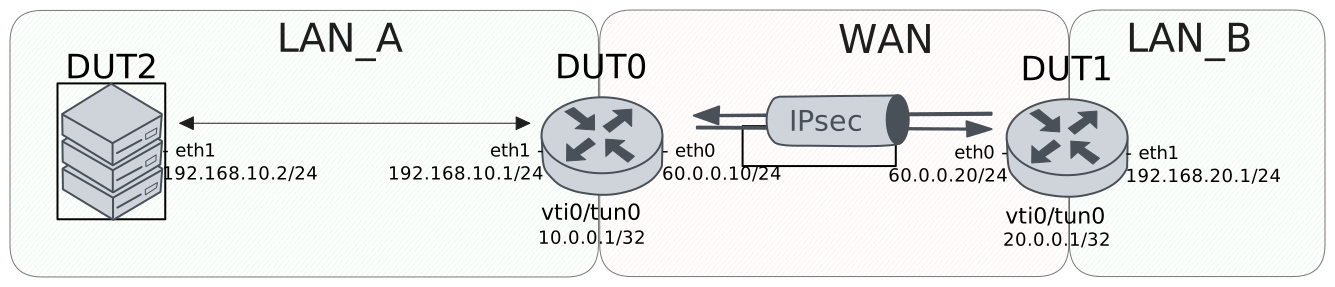
Test XFRM Offload With VTI
Description
In this scenario, the tunnel is established by using a site-to-site peer through VTI interfaces.
Scenario
Step 1: Set the following configuration in DUT0 :
set interfaces ethernet eth0 address 60.0.0.10/24
set interfaces ethernet eth1 address 192.168.10.1/24
set interfaces vti vti0 address 10.0.0.1/32
set interfaces vti vti0 ipsec PEER
set interfaces vti vti0 local-address 60.0.0.10
set protocols static route 0.0.0.0/0 interface vti0
set system login user admin authentication encrypted-password '$6$GSjsCj8gHLv$/VcqU6FLi6CT2Oxn0MJQ2C2tqnRDrYKNF8HIYWJp68nvXvPdFccDsT04.WtigUONbKYrgKg8d6rEs8PjljMkH0'
set system offload timeout 30
set vpn ipsec auth-profile AUTH-SA global-secrets ike-psk test encrypted-secret U2FsdGVkX19LPgw/KydXHf2RPINW2vutDGDSOY9qa6w=
set vpn ipsec auth-profile AUTH-SA local auth ike-psk id test
set vpn ipsec auth-profile AUTH-SA remote auth ike-psk id %any
set vpn ipsec esp-group CHILD-SA proposal 1 encryption aes256gcm128
set vpn ipsec esp-group CHILD-SA proposal 1 pfs dh-group19
set vpn ipsec ike-group IKE-SA key-exchange ikev2
set vpn ipsec ike-group IKE-SA proposal 1 dh-group 19
set vpn ipsec ike-group IKE-SA proposal 1 encryption aes256gcm128
set vpn ipsec ike-group IKE-SA proposal 1 hash sha256
set vpn ipsec site-to-site peer PEER auth-profile AUTH-SA
set vpn ipsec site-to-site peer PEER connection-type on-demand
set vpn ipsec site-to-site peer PEER default-esp-group CHILD-SA
set vpn ipsec site-to-site peer PEER ike-group IKE-SA
set vpn ipsec site-to-site peer PEER local-address 60.0.0.10
set vpn ipsec site-to-site peer PEER remote-address 60.0.0.20
set vpn ipsec site-to-site peer PEER vti local prefix 0.0.0.0/0
set vpn ipsec site-to-site peer PEER vti remote prefix 192.168.20.0/24
Step 2: Set the following configuration in DUT1 :
set interfaces ethernet eth0 address 60.0.0.20/24
set interfaces ethernet eth1 address 192.168.20.1/24
set interfaces vti vti0 address 20.0.0.1/32
set interfaces vti vti0 ipsec PEER
set interfaces vti vti0 local-address 60.0.0.20
set protocols static route 0.0.0.0/0 interface vti0
set system login user admin authentication encrypted-password '$6$GSjsCj8gHLv$/VcqU6FLi6CT2Oxn0MJQ2C2tqnRDrYKNF8HIYWJp68nvXvPdFccDsT04.WtigUONbKYrgKg8d6rEs8PjljMkH0'
set system offload timeout 30
set vpn ipsec auth-profile AUTH-SA global-secrets ike-psk test encrypted-secret U2FsdGVkX18LbLTNlY6GDbhM3oOUIg3UqTLYhjMpK6M=
set vpn ipsec auth-profile AUTH-SA local auth ike-psk id test
set vpn ipsec auth-profile AUTH-SA remote auth ike-psk id %any
set vpn ipsec esp-group CHILD-SA proposal 1 encryption aes256gcm128
set vpn ipsec esp-group CHILD-SA proposal 1 pfs dh-group19
set vpn ipsec ike-group IKE-SA key-exchange ikev2
set vpn ipsec ike-group IKE-SA proposal 1 dh-group 19
set vpn ipsec ike-group IKE-SA proposal 1 encryption aes256gcm128
set vpn ipsec ike-group IKE-SA proposal 1 hash sha256
set vpn ipsec site-to-site peer PEER auth-profile AUTH-SA
set vpn ipsec site-to-site peer PEER connection-type initiate
set vpn ipsec site-to-site peer PEER default-esp-group CHILD-SA
set vpn ipsec site-to-site peer PEER ike-group IKE-SA
set vpn ipsec site-to-site peer PEER local-address 60.0.0.20
set vpn ipsec site-to-site peer PEER remote-address 60.0.0.10
set vpn ipsec site-to-site peer PEER vti local prefix 192.168.20.0/24
set vpn ipsec site-to-site peer PEER vti remote prefix 0.0.0.0/0
Step 3: Run the command vpn ipsec show sa on DUT0 and check whether the output contains the following tokens:
INSTALLEDShow output
vpn-peer-PEER: #1, ESTABLISHED, IKEv2, 5baeb1f1e1155049_i 51432225d08c3b43_r*
  local  'test' @ 60.0.0.10[500]
  remote 'test' @ 60.0.0.20[500]
  AES_GCM_16-256/PRF_HMAC_SHA2_256/ECP_256
  established 0s ago, rekeying in 22612s
  peer-PEER-tunnel-VTI: #2, reqid 1, INSTALLED, TUNNEL, ESP:AES_GCM_16-256
    installed 0s ago, rekeying in 3262s, expires in 3960s
    in  ca6cd6a2 (0x90000000),      0 bytes,     0 packets
    out c805d505 (0x90000000),      0 bytes,     0 packets
    local  0.0.0.0/0
    remote 192.168.20.0/24
Step 4: Run the command system conntrack clear on DUT0.
Step 5: Initiate a udp connection from DUT0 to DUT1 and exchange messages between both endpoints
admin@DUT1$ monitor test connection server 5050 udp local-address 192.168.20.1
admin@DUT0$ monitor test connection client 192.168.20.1 5050 udp source-port 6060
Step 6: Run the command system conntrack show on DUT0 and check whether the output matches the following regular expressions:
unknown\s+50.*[OFFLOAD, [^]]*packets=[1-9]\d* bytes=[1-9]\d* [^]]*packets=[1-9]\d* bytes=[1-9]\d*]Show output
udp      17 29 src=10.0.0.1 dst=192.168.20.1 sport=6060 dport=5050 packets=5 bytes=240 src=192.168.20.1 dst=10.0.0.1 sport=5050 dport=6060 packets=5 bytes=240 mark=0 use=1
unknown  50 src=60.0.0.10 dst=60.0.0.20 packets=5 bytes=520 src=60.0.0.20 dst=60.0.0.10 packets=5 bytes=520 [OFFLOAD, packets=3 bytes=312 packets=3 bytes=312] mark=0 use=2
conntrack v1.4.7 (conntrack-tools): 2 flow entries have been shown.
Step 7: Run the command vpn ipsec show sa on DUT0 and check whether the output matches the following regular expressions:
in.*\s+[^0]\d+ packets
out.*\s+[^0]\d+ packets
Show output
vpn-peer-PEER: #1, ESTABLISHED, IKEv2, 5baeb1f1e1155049_i 51432225d08c3b43_r*
  local  'test' @ 60.0.0.10[500]
  remote 'test' @ 60.0.0.20[500]
  AES_GCM_16-256/PRF_HMAC_SHA2_256/ECP_256
  established 3s ago, rekeying in 22609s
  peer-PEER-tunnel-VTI: #2, reqid 1, INSTALLED, TUNNEL, ESP:AES_GCM_16-256
    installed 3s ago, rekeying in 3259s, expires in 3957s
    in  ca6cd6a2 (0x90000000),    240 bytes,     5 packets,     0s ago
    out c805d505 (0x90000000),    240 bytes,     5 packets,     0s ago
    local  0.0.0.0/0
    remote 192.168.20.0/24
Step 8: Set the following configuration in DUT2 :
set interfaces ethernet eth1 address 192.168.10.2/24
set protocols static route 0.0.0.0/0 next-hop 192.168.10.1
set system login user admin authentication encrypted-password '$6$GSjsCj8gHLv$/VcqU6FLi6CT2Oxn0MJQ2C2tqnRDrYKNF8HIYWJp68nvXvPdFccDsT04.WtigUONbKYrgKg8d6rEs8PjljMkH0'
Step 9: Ping the IP address 192.168.20.1 from DUT2:
admin@DUT2$ ping 192.168.20.1 count 1 size 56 timeout 1Show output
PING 192.168.20.1 (192.168.20.1) 56(84) bytes of data.
64 bytes from 192.168.20.1: icmp_seq=1 ttl=63 time=0.618 ms

--- 192.168.20.1 ping statistics ---
1 packets transmitted, 1 received, 0% packet loss, time 0ms
rtt min/avg/max/mdev = 0.618/0.618/0.618/0.000 ms
Step 10: Run the command system conntrack clear on DUT0.
Step 11: Initiate a udp connection from DUT2 to DUT1 and exchange messages between both endpoints
admin@DUT1$ monitor test connection server 5050 udp local-address 192.168.20.1
admin@DUT2$ monitor test connection client 192.168.20.1 5050 udp source-port 6060
Step 12: Run the command system conntrack show on DUT0 and check whether the output matches the following regular expressions:
unknown\s+50.*[OFFLOAD, [^]]*packets=[1-9]\d* bytes=[1-9]\d* [^]]*packets=[1-9]\d* bytes=[1-9]\d*]
udp\s+17.*[OFFLOAD, [^]]*packets=[1-9]\d* bytes=[1-9]\d* [^]]*packets=[1-9]\d* bytes=[1-9]\d*]
Show output
unknown  50 src=60.0.0.10 dst=60.0.0.20 packets=5 bytes=520 src=60.0.0.20 dst=60.0.0.10 packets=5 bytes=520 [OFFLOAD, packets=3 bytes=312 packets=3 bytes=312] mark=0 use=2
udp      17 src=192.168.10.2 dst=192.168.20.1 sport=6060 dport=5050 packets=5 bytes=240 src=192.168.20.1 dst=192.168.10.2 sport=5050 dport=6060 packets=5 bytes=240 [OFFLOAD, packets=3 bytes=144 packets=4 bytes=192] mark=0 use=2
conntrack v1.4.7 (conntrack-tools): 2 flow entries have been shown.
Step 13: Run the command system conntrack clear on DUT0.
Step 14: Initiate a udp connection from DUT1 to DUT2 and exchange messages between both endpoints
admin@DUT2$ monitor test connection server 5050 udp local-address 192.168.10.2
admin@DUT1$ monitor test connection client 192.168.10.2 5050 udp source-port 6060 local-address 192.168.20.1
Step 15: Initiate a udp connection from DUT2 to DUT1 and exchange messages between both endpoints
admin@DUT1$ monitor test connection server 6060 udp local-address 192.168.20.1
admin@DUT2$ monitor test connection client 192.168.20.1 6060 udp source-port 5050
Step 16: Run the command system conntrack show on DUT0 and check whether the output matches the following regular expressions:
unknown\s+50.*[OFFLOAD, [^]]*packets=[1-9]\d* bytes=[1-9]\d* [^]]*packets=[1-9]\d* bytes=[1-9]\d*]
udp\s+17.*[OFFLOAD, [^]]*packets=[1-9]\d* bytes=[1-9]\d* [^]]*packets=[1-9]\d* bytes=[1-9]\d*]
Show output
unknown  50 src=60.0.0.20 dst=60.0.0.10 packets=10 bytes=1040 src=60.0.0.10 dst=60.0.0.20 packets=10 bytes=1040 [OFFLOAD, packets=7 bytes=728 packets=8 bytes=832] mark=0 use=2
udp      17 src=192.168.20.1 dst=192.168.10.2 sport=6060 dport=5050 packets=10 bytes=480 src=192.168.10.2 dst=192.168.20.1 sport=5050 dport=6060 packets=10 bytes=480 [OFFLOAD, packets=8 bytes=384 packets=9 bytes=432] mark=0 use=2
conntrack v1.4.7 (conntrack-tools): 2 flow entries have been shown.
Test XFRM Offload With DMVPN Transport Mode
Description
In this scenario, the tunnel is established by using NHRP. Transport mode is used for IPSec policies.
Scenario
Step 1: Set the following configuration in DUT0 :
set interfaces ethernet eth0 address 60.0.0.10/24
set interfaces ethernet eth1 address 192.168.10.1/24
set interfaces tunnel tun1 address 10.0.0.1/32
set interfaces tunnel tun1 encapsulation gre
set interfaces tunnel tun1 local-address 60.0.0.10
set interfaces tunnel tun1 local-interface eth0
set interfaces tunnel tun1 nhrp ipsec NHRP
set protocols static route 192.168.20.0/24 next-hop 20.0.0.1
set system login user admin authentication encrypted-password '$6$GSjsCj8gHLv$/VcqU6FLi6CT2Oxn0MJQ2C2tqnRDrYKNF8HIYWJp68nvXvPdFccDsT04.WtigUONbKYrgKg8d6rEs8PjljMkH0'
set system offload timeout 30
set vpn ipsec auth-profile AUTH-SA global-secrets ike-psk test encrypted-secret U2FsdGVkX1+Pz63VS7bqI/vtm8RKcPA1aaxAo2m/sPo=
set vpn ipsec auth-profile AUTH-SA local auth ike-psk id test
set vpn ipsec auth-profile AUTH-SA remote auth ike-psk id %any
set vpn ipsec dmvpn-profile NHRP auth-profile AUTH-SA
set vpn ipsec dmvpn-profile NHRP esp-group CHILD-SA
set vpn ipsec dmvpn-profile NHRP ike-group IKE-SA
set vpn ipsec esp-group CHILD-SA mode transport
set vpn ipsec esp-group CHILD-SA proposal 1 encryption aes256gcm128
set vpn ipsec esp-group CHILD-SA proposal 1 pfs dh-group19
set vpn ipsec ike-group IKE-SA key-exchange ikev2
set vpn ipsec ike-group IKE-SA proposal 1 dh-group 19
set vpn ipsec ike-group IKE-SA proposal 1 encryption aes256gcm128
set vpn ipsec ike-group IKE-SA proposal 1 hash sha256
Step 2: Set the following configuration in DUT1 :
set interfaces ethernet eth0 address 60.0.0.20/24
set interfaces ethernet eth1 address 192.168.20.1/24
set interfaces tunnel tun1 address 20.0.0.1/32
set interfaces tunnel tun1 encapsulation gre
set interfaces tunnel tun1 local-address 60.0.0.20
set interfaces tunnel tun1 local-interface eth0
set interfaces tunnel tun1 nhrp ipsec NHRP
set interfaces tunnel tun1 nhrp nhs 10.0.0.1 nbma 60.0.0.10
set protocols static route 192.168.10.0/24 next-hop 10.0.0.1
set system login user admin authentication encrypted-password '$6$GSjsCj8gHLv$/VcqU6FLi6CT2Oxn0MJQ2C2tqnRDrYKNF8HIYWJp68nvXvPdFccDsT04.WtigUONbKYrgKg8d6rEs8PjljMkH0'
set system offload timeout 30
set vpn ipsec auth-profile AUTH-SA global-secrets ike-psk test encrypted-secret U2FsdGVkX1/oSo0uUrI8mpPPuQiXhU0PEJfXAn7N43k=
set vpn ipsec auth-profile AUTH-SA local auth ike-psk id test
set vpn ipsec auth-profile AUTH-SA remote auth ike-psk id %any
set vpn ipsec dmvpn-profile NHRP auth-profile AUTH-SA
set vpn ipsec dmvpn-profile NHRP esp-group CHILD-SA
set vpn ipsec dmvpn-profile NHRP ike-group IKE-SA
set vpn ipsec esp-group CHILD-SA mode transport
set vpn ipsec esp-group CHILD-SA proposal 1 encryption aes256gcm128
set vpn ipsec esp-group CHILD-SA proposal 1 pfs dh-group19
set vpn ipsec ike-group IKE-SA key-exchange ikev2
set vpn ipsec ike-group IKE-SA proposal 1 dh-group 19
set vpn ipsec ike-group IKE-SA proposal 1 encryption aes256gcm128
set vpn ipsec ike-group IKE-SA proposal 1 hash sha256
Step 3: Run the command vpn ipsec show sa on DUT0 and check whether the output contains the following tokens:
INSTALLEDShow output
NHRP: #1, ESTABLISHED, IKEv2, 84b4ba72e981f555_i 5bf61e75fd7e1def_r*
  local  'test' @ 60.0.0.10[500]
  remote 'test' @ 60.0.0.20[500]
  AES_GCM_16-256/PRF_HMAC_SHA2_256/ECP_256
  established 1s ago, rekeying in 22152s
  NHRP: #1, reqid 1, INSTALLED, TRANSPORT, ESP:AES_GCM_16-256
    installed 1s ago, rekeying in 3438s, expires in 3959s
    in  cb6703c6,     96 bytes,     1 packets,     0s ago
    out cf9a5251,    116 bytes,     1 packets,     0s ago
    local  60.0.0.10/32[gre]
    remote 60.0.0.20/32[gre]
Step 4: Run the command system conntrack clear on DUT0.
Step 5: Initiate a udp connection from DUT0 to DUT1 and exchange messages between both endpoints
admin@DUT1$ monitor test connection server 5050 udp local-address 192.168.20.1
admin@DUT0$ monitor test connection client 192.168.20.1 5050 udp source-port 6060
Step 6: Run the command system conntrack show on DUT0 and check whether the output matches the following regular expressions:
unknown\s+50.*[OFFLOAD, [^]]*packets=[1-9]\d* bytes=[1-9]\d* [^]]*packets=[1-9]\d* bytes=[1-9]\d*]
gre\s+47.*[OFFLOAD, [^]]*packets=[1-9]\d* bytes=[1-9]\d* [^]]*packets=[1-9]\d* bytes=[1-9]\d*]
Show output
udp      17 29 src=10.0.0.1 dst=192.168.20.1 sport=6060 dport=5050 packets=5 bytes=240 src=192.168.20.1 dst=10.0.0.1 sport=5050 dport=6060 packets=5 bytes=240 mark=0 use=1
unknown  50 src=60.0.0.10 dst=60.0.0.20 packets=5 bytes=540 src=60.0.0.20 dst=60.0.0.10 packets=5 bytes=540 [OFFLOAD, packets=3 bytes=324 packets=3 bytes=324] mark=0 use=2
gre      47 src=60.0.0.10 dst=60.0.0.20 packets=5 bytes=360 src=60.0.0.20 dst=60.0.0.10 packets=5 bytes=360 [ASSURED] [OFFLOAD, packets=3 bytes=216 packets=3 bytes=216] mark=0 use=2
conntrack v1.4.7 (conntrack-tools): 3 flow entries have been shown.
Step 7: Run the command vpn ipsec show sa on DUT0 and check whether the output matches the following regular expressions:
in.*\s+[^0]\d+ packets
out.*\s+[^0]\d+ packets
Show output
NHRP: #1, ESTABLISHED, IKEv2, 84b4ba72e981f555_i 5bf61e75fd7e1def_r*
  local  'test' @ 60.0.0.10[500]
  remote 'test' @ 60.0.0.20[500]
  AES_GCM_16-256/PRF_HMAC_SHA2_256/ECP_256
  established 4s ago, rekeying in 22149s
  NHRP: #1, reqid 1, INSTALLED, TRANSPORT, ESP:AES_GCM_16-256
    installed 4s ago, rekeying in 3435s, expires in 3956s
    in  cb6703c6,    356 bytes,     6 packets,     0s ago
    out cf9a5251,    376 bytes,     6 packets,     0s ago
    local  60.0.0.10/32[gre]
    remote 60.0.0.20/32[gre]
Step 8: Set the following configuration in DUT2 :
set interfaces ethernet eth1 address 192.168.10.2/24
set protocols static route 0.0.0.0/0 next-hop 192.168.10.1
set system login user admin authentication encrypted-password '$6$GSjsCj8gHLv$/VcqU6FLi6CT2Oxn0MJQ2C2tqnRDrYKNF8HIYWJp68nvXvPdFccDsT04.WtigUONbKYrgKg8d6rEs8PjljMkH0'
Step 9: Ping the IP address 192.168.20.1 from DUT2:
admin@DUT2$ ping 192.168.20.1 count 1 size 56 timeout 1Show output
PING 192.168.20.1 (192.168.20.1) 56(84) bytes of data.
64 bytes from 192.168.20.1: icmp_seq=1 ttl=63 time=1.22 ms

--- 192.168.20.1 ping statistics ---
1 packets transmitted, 1 received, 0% packet loss, time 0ms
rtt min/avg/max/mdev = 1.220/1.220/1.220/0.000 ms
Step 10: Run the command system conntrack clear on DUT0.
Step 11: Initiate a udp connection from DUT2 to DUT1 and exchange messages between both endpoints
admin@DUT1$ monitor test connection server 5050 udp local-address 192.168.20.1
admin@DUT2$ monitor test connection client 192.168.20.1 5050 udp source-port 6060
Step 12: Run the command system conntrack show on DUT0 and check whether the output matches the following regular expressions:
unknown\s+50.*[OFFLOAD, [^]]*packets=[1-9]\d* bytes=[1-9]\d* [^]]*packets=[1-9]\d* bytes=[1-9]\d*]
gre\s+47.*[OFFLOAD, [^]]*packets=[1-9]\d* bytes=[1-9]\d* [^]]*packets=[1-9]\d* bytes=[1-9]\d*]
udp\s+17.*[OFFLOAD, [^]]*packets=[1-9]\d* bytes=[1-9]\d* [^]]*packets=[1-9]\d* bytes=[1-9]\d*]
Show output
unknown  50 src=60.0.0.10 dst=60.0.0.20 packets=5 bytes=540 src=60.0.0.20 dst=60.0.0.10 packets=5 bytes=540 [OFFLOAD, packets=3 bytes=324 packets=3 bytes=324] mark=0 use=2
udp      17 src=192.168.10.2 dst=192.168.20.1 sport=6060 dport=5050 packets=5 bytes=240 src=192.168.20.1 dst=192.168.10.2 sport=5050 dport=6060 packets=5 bytes=240 [OFFLOAD, packets=3 bytes=144 packets=4 bytes=192] mark=0 use=2
gre      47 src=60.0.0.10 dst=60.0.0.20 packets=5 bytes=360 src=60.0.0.20 dst=60.0.0.10 packets=5 bytes=360 [ASSURED] [OFFLOAD, packets=3 bytes=216 packets=3 bytes=216] mark=0 use=2
conntrack v1.4.7 (conntrack-tools): 3 flow entries have been shown.
Step 13: Run the command system conntrack clear on DUT0.
Step 14: Initiate a udp connection from DUT1 to DUT2 and exchange messages between both endpoints
admin@DUT2$ monitor test connection server 5050 udp local-address 192.168.10.2
admin@DUT1$ monitor test connection client 192.168.10.2 5050 udp source-port 6060 local-address 192.168.20.1
Step 15: Initiate a udp connection from DUT2 to DUT1 and exchange messages between both endpoints
admin@DUT1$ monitor test connection server 6060 udp local-address 192.168.20.1
admin@DUT2$ monitor test connection client 192.168.20.1 6060 udp source-port 5050
Step 16: Run the command system conntrack show on DUT0 and check whether the output matches the following regular expressions:
unknown\s+50.*[OFFLOAD, [^]]*packets=[1-9]\d* bytes=[1-9]\d* [^]]*packets=[1-9]\d* bytes=[1-9]\d*]
gre\s+47.*[OFFLOAD, [^]]*packets=[1-9]\d* bytes=[1-9]\d* [^]]*packets=[1-9]\d* bytes=[1-9]\d*]
udp\s+17.*[OFFLOAD, [^]]*packets=[1-9]\d* bytes=[1-9]\d* [^]]*packets=[1-9]\d* bytes=[1-9]\d*]
Show output
unknown  50 src=60.0.0.20 dst=60.0.0.10 packets=10 bytes=1080 src=60.0.0.10 dst=60.0.0.20 packets=10 bytes=1080 [OFFLOAD, packets=7 bytes=756 packets=8 bytes=864] mark=0 use=2
gre      47 src=60.0.0.20 dst=60.0.0.10 packets=10 bytes=720 src=60.0.0.10 dst=60.0.0.20 packets=10 bytes=720 [ASSURED] [OFFLOAD, packets=7 bytes=504 packets=8 bytes=576] mark=0 use=2
udp      17 src=192.168.20.1 dst=192.168.10.2 sport=6060 dport=5050 packets=10 bytes=480 src=192.168.10.2 dst=192.168.20.1 sport=5050 dport=6060 packets=10 bytes=480 [OFFLOAD, packets=8 bytes=384 packets=9 bytes=432] mark=0 use=2
conntrack v1.4.7 (conntrack-tools): 3 flow entries have been shown.
Test XFRM Offload With Site To Site
Description
In this scenario, the tunnel is established by using a site-to-site peer.
Scenario
Step 1: Set the following configuration in DUT0 :
set interfaces ethernet eth0 address 60.0.0.10/24
set interfaces ethernet eth1 address 192.168.10.1/24
set protocols static route 0.0.0.0/0 next-hop 60.0.0.20
set system login user admin authentication encrypted-password '$6$GSjsCj8gHLv$/VcqU6FLi6CT2Oxn0MJQ2C2tqnRDrYKNF8HIYWJp68nvXvPdFccDsT04.WtigUONbKYrgKg8d6rEs8PjljMkH0'
set system offload timeout 30
set vpn ipsec auth-profile AUTH-SA global-secrets ike-psk test encrypted-secret U2FsdGVkX1+TwR36StILT6BICbpbpa4kj5rX4SlcrC4=
set vpn ipsec auth-profile AUTH-SA local auth ike-psk id test
set vpn ipsec auth-profile AUTH-SA remote auth ike-psk id %any
set vpn ipsec esp-group CHILD-SA proposal 1 encryption aes256gcm128
set vpn ipsec esp-group CHILD-SA proposal 1 pfs dh-group19
set vpn ipsec ike-group IKE-SA key-exchange ikev2
set vpn ipsec ike-group IKE-SA proposal 1 dh-group 19
set vpn ipsec ike-group IKE-SA proposal 1 encryption aes256gcm128
set vpn ipsec ike-group IKE-SA proposal 1 hash sha256
set vpn ipsec site-to-site peer PEER auth-profile AUTH-SA
set vpn ipsec site-to-site peer PEER connection-type on-demand
set vpn ipsec site-to-site peer PEER default-esp-group CHILD-SA
set vpn ipsec site-to-site peer PEER ike-group IKE-SA
set vpn ipsec site-to-site peer PEER local-address 60.0.0.10
set vpn ipsec site-to-site peer PEER remote-address 60.0.0.20
set vpn ipsec site-to-site peer PEER tunnel 1 local prefix 192.168.10.0/24
set vpn ipsec site-to-site peer PEER tunnel 1 remote prefix 192.168.20.0/24
Step 2: Set the following configuration in DUT1 :
set interfaces ethernet eth0 address 60.0.0.20/24
set interfaces ethernet eth1 address 192.168.20.1/24
set protocols static route 0.0.0.0/0 next-hop 60.0.0.10
set system login user admin authentication encrypted-password '$6$GSjsCj8gHLv$/VcqU6FLi6CT2Oxn0MJQ2C2tqnRDrYKNF8HIYWJp68nvXvPdFccDsT04.WtigUONbKYrgKg8d6rEs8PjljMkH0'
set system offload timeout 30
set vpn ipsec auth-profile AUTH-SA global-secrets ike-psk test encrypted-secret U2FsdGVkX19TTY0NR548lTVGk3F+qjD/FqdH8A5L3Rc=
set vpn ipsec auth-profile AUTH-SA local auth ike-psk id test
set vpn ipsec auth-profile AUTH-SA remote auth ike-psk id %any
set vpn ipsec esp-group CHILD-SA proposal 1 encryption aes256gcm128
set vpn ipsec esp-group CHILD-SA proposal 1 pfs dh-group19
set vpn ipsec ike-group IKE-SA key-exchange ikev2
set vpn ipsec ike-group IKE-SA proposal 1 dh-group 19
set vpn ipsec ike-group IKE-SA proposal 1 encryption aes256gcm128
set vpn ipsec ike-group IKE-SA proposal 1 hash sha256
set vpn ipsec site-to-site peer PEER auth-profile AUTH-SA
set vpn ipsec site-to-site peer PEER connection-type initiate
set vpn ipsec site-to-site peer PEER default-esp-group CHILD-SA
set vpn ipsec site-to-site peer PEER ike-group IKE-SA
set vpn ipsec site-to-site peer PEER local-address 60.0.0.20
set vpn ipsec site-to-site peer PEER remote-address 60.0.0.10
set vpn ipsec site-to-site peer PEER tunnel 1 local prefix 192.168.20.0/24
set vpn ipsec site-to-site peer PEER tunnel 1 remote prefix 192.168.10.0/24
Step 3: Run the command vpn ipsec show sa on DUT0 and check whether the output contains the following tokens:
INSTALLEDShow output
vpn-peer-PEER: #1, ESTABLISHED, IKEv2, e9d6e9ce7745f12d_i e43230b8d6e11692_r*
  local  'test' @ 60.0.0.10[500]
  remote 'test' @ 60.0.0.20[500]
  AES_GCM_16-256/PRF_HMAC_SHA2_256/ECP_256
  established 1s ago, rekeying in 17458s
  peer-PEER-tunnel-1: #2, reqid 1, INSTALLED, TUNNEL, ESP:AES_GCM_16-256
    installed 1s ago, rekeying in 3245s, expires in 3959s
    in  ce16787e,      0 bytes,     0 packets
    out cc171c8b,      0 bytes,     0 packets
    local  192.168.10.0/24
    remote 192.168.20.0/24
Step 4: Set the following configuration in DUT2 :
set interfaces ethernet eth1 address 192.168.10.2/24
set protocols static route 0.0.0.0/0 next-hop 192.168.10.1
set system login user admin authentication encrypted-password '$6$GSjsCj8gHLv$/VcqU6FLi6CT2Oxn0MJQ2C2tqnRDrYKNF8HIYWJp68nvXvPdFccDsT04.WtigUONbKYrgKg8d6rEs8PjljMkH0'
Step 5: Ping the IP address 192.168.20.1 from DUT2:
admin@DUT2$ ping 192.168.20.1 count 1 size 56 timeout 1Show output
PING 192.168.20.1 (192.168.20.1) 56(84) bytes of data.
64 bytes from 192.168.20.1: icmp_seq=1 ttl=63 time=0.817 ms

--- 192.168.20.1 ping statistics ---
1 packets transmitted, 1 received, 0% packet loss, time 0ms
rtt min/avg/max/mdev = 0.817/0.817/0.817/0.000 ms
Step 6: Run the command system conntrack clear on DUT0.
Step 7: Initiate a udp connection from DUT2 to DUT1 and exchange messages between both endpoints
admin@DUT1$ monitor test connection server 5050 udp local-address 192.168.20.1
admin@DUT2$ monitor test connection client 192.168.20.1 5050 udp source-port 6060
Step 8: Run the command system conntrack show on DUT0 and check whether the output matches the following regular expressions:
unknown\s+50.*[OFFLOAD, [^]]*packets=[1-9]\d* bytes=[1-9]\d* [^]]*packets=[1-9]\d* bytes=[1-9]\d*]
udp\s+17.*[OFFLOAD, [^]]*packets=[1-9]\d* bytes=[1-9]\d* [^]]*packets=[1-9]\d* bytes=[1-9]\d*]
Show output
unknown  50 src=60.0.0.10 dst=60.0.0.20 packets=5 bytes=520 src=60.0.0.20 dst=60.0.0.10 packets=5 bytes=520 [OFFLOAD, packets=3 bytes=312 packets=3 bytes=312] mark=0 use=2
udp      17 src=192.168.10.2 dst=192.168.20.1 sport=6060 dport=5050 packets=5 bytes=240 src=192.168.20.1 dst=192.168.10.2 sport=5050 dport=6060 packets=5 bytes=240 [OFFLOAD, packets=2 bytes=96 packets=3 bytes=144] mark=0 use=2
conntrack v1.4.7 (conntrack-tools): 2 flow entries have been shown.
Step 9: Run the command system conntrack clear on DUT0.
Step 10: Initiate a udp connection from DUT1 to DUT2 and exchange messages between both endpoints
admin@DUT2$ monitor test connection server 5050 udp local-address 192.168.10.2
admin@DUT1$ monitor test connection client 192.168.10.2 5050 udp source-port 6060 local-address 192.168.20.1
Step 11: Initiate a udp connection from DUT2 to DUT1 and exchange messages between both endpoints
admin@DUT1$ monitor test connection server 6060 udp local-address 192.168.20.1
admin@DUT2$ monitor test connection client 192.168.20.1 6060 udp source-port 5050
Step 12: Run the command system conntrack show on DUT0 and check whether the output matches the following regular expressions:
unknown\s+50.*[OFFLOAD, [^]]*packets=[1-9]\d* bytes=[1-9]\d* [^]]*packets=[1-9]\d* bytes=[1-9]\d*]
udp\s+17.*[OFFLOAD, [^]]*packets=[1-9]\d* bytes=[1-9]\d* [^]]*packets=[1-9]\d* bytes=[1-9]\d*]
Show output
unknown  50 src=60.0.0.20 dst=60.0.0.10 packets=10 bytes=1040 src=60.0.0.10 dst=60.0.0.20 packets=10 bytes=1040 [OFFLOAD, packets=7 bytes=728 packets=8 bytes=832] mark=0 use=2
udp      17 src=192.168.20.1 dst=192.168.10.2 sport=6060 dport=5050 packets=10 bytes=480 src=192.168.10.2 dst=192.168.20.1 sport=5050 dport=6060 packets=10 bytes=480 [OFFLOAD, packets=7 bytes=336 packets=7 bytes=336] mark=0 use=2
conntrack v1.4.7 (conntrack-tools): 2 flow entries have been shown.