Address Group
The following scenario shows how to configure a traffic group
with different MAC addresses. traffic selectors can be
configured to filter network packets based on their source / destination
MAC address.
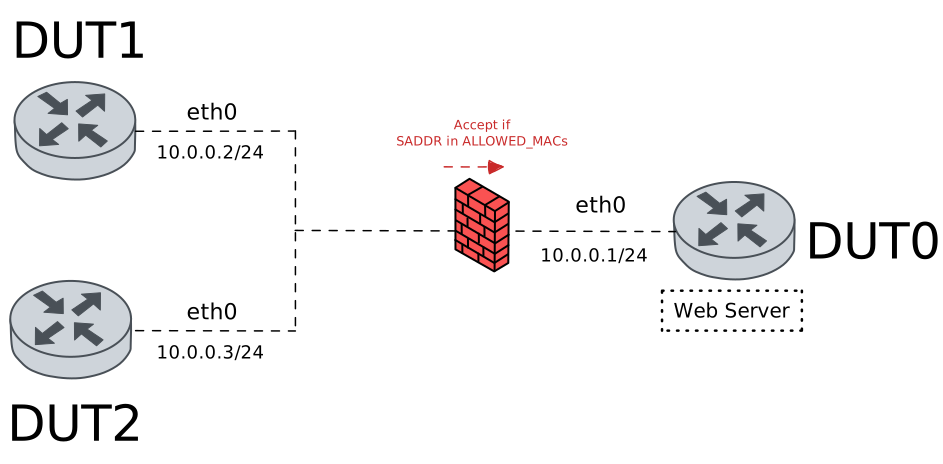
Test Traffic Group With MAC Addresses
Description
In this scenario, a link traffic policy is configured
to deny non-matching packets in DUT0 (‘eth0’ interface).
Packets are filtered using a traffic selector and a
traffic group.
Scenario
Step 1: Set the following configuration in DUT0 :
set interfaces ethernet eth0 address 10.0.0.1/24
set interfaces ethernet eth0 traffic policy link-in ACCEPT_ALLOWED
set system login user admin authentication encrypted-password '$6$GSjsCj8gHLv$/VcqU6FLi6CT2Oxn0MJQ2C2tqnRDrYKNF8HIYWJp68nvXvPdFccDsT04.WtigUONbKYrgKg8d6rEs8PjljMkH0'
set traffic group mac-address ALLOWED_MACS element 'DE:AD:BE:EF:6C:10'
set traffic group mac-address ALLOWED_MACS element 'de:ad:be:ef:6c:30-de:ad:be:ef:6c:40'
set traffic policy ACCEPT_ALLOWED rule 1 action accept
set traffic policy ACCEPT_ALLOWED rule 1 selector SEL_ALLOWED
set traffic policy ACCEPT_ALLOWED rule 2 action drop
set traffic selector SEL_ALLOWED rule 1 source mac-address-group ALLOWED_MACS
Step 2: Set the following configuration in DUT1 :
set interfaces ethernet eth0 address 10.0.0.2/24
set system login user admin authentication encrypted-password '$6$GSjsCj8gHLv$/VcqU6FLi6CT2Oxn0MJQ2C2tqnRDrYKNF8HIYWJp68nvXvPdFccDsT04.WtigUONbKYrgKg8d6rEs8PjljMkH0'
Step 3: Set the following configuration in DUT2 :
set interfaces ethernet eth0 address 10.0.0.3/24
set system login user admin authentication encrypted-password '$6$GSjsCj8gHLv$/VcqU6FLi6CT2Oxn0MJQ2C2tqnRDrYKNF8HIYWJp68nvXvPdFccDsT04.WtigUONbKYrgKg8d6rEs8PjljMkH0'
Step 4: Run the command interfaces ethernet show detail on DUT1 and check whether the output contains the following tokens:
DE:AD:BE:EF:6C:10Show output
----------------------------------------------------------------------------------------------------------------
Name  Idx           IP Address           Admin  Oper  Link  MTU   Vrf  Upper  Lower    Type        Phys addr
----------------------------------------------------------------------------------------------------------------
eth0  2    10.0.0.2/24                   up     up    up    1500                     ethernet  de:ad:be:ef:6c:10
           fe80::dcad:beff:feef:6c10/64
eth1  3                                  down   down  down  1500                     ethernet  de:ad:be:ef:6c:11
eth2  4                                  down   down  down  1500                     ethernet  de:ad:be:ef:6c:12
eth3  5                                  down   down  down  1500                     ethernet  de:ad:be:ef:6c:13
Step 5: Run the command interfaces ethernet show detail on DUT2 and check whether the output contains the following tokens:
DE:AD:BE:EF:6C:20Show output
----------------------------------------------------------------------------------------------
Name  Idx  IP Address  Admin  Oper  Link  MTU   Vrf  Upper  Lower    Type        Phys addr
----------------------------------------------------------------------------------------------
eth0  2                down   down  down  1500                     ethernet  de:ad:be:ef:6c:20
eth1  3                down   down  down  1500                     ethernet  de:ad:be:ef:6c:21
eth2  4                down   down  down  1500                     ethernet  de:ad:be:ef:6c:22
eth3  5                down   down  down  1500                     ethernet  de:ad:be:ef:6c:23
Step 6: Ping the IP address 10.0.0.1 from DUT1:
admin@DUT1$ ping 10.0.0.1 count 1 size 56 timeout 1Show output
PING 10.0.0.1 (10.0.0.1) 56(84) bytes of data.
64 bytes from 10.0.0.1: icmp_seq=1 ttl=64 time=1.42 ms

--- 10.0.0.1 ping statistics ---
1 packets transmitted, 1 received, 0% packet loss, time 0ms
rtt min/avg/max/mdev = 1.419/1.419/1.419/0.000 ms
Step 7: Initiate a tcp connection from DUT1 to DUT0 and exchange messages between both endpoints
admin@DUT0$ monitor test connection server 8080 tcp
admin@DUT1$ monitor test connection client 10.0.0.1 8080 tcp local-interface eth0
Step 8: Expect a failure in the following command:
Initiate a tcp connection from DUT2 to DUT0 and exchange messages between both endpoints
admin@DUT0$ monitor test connection server 8080 tcp
admin@DUT2$ monitor test connection client 10.0.0.1 8080 tcp local-interface eth0