Vlan Preclassification
The following scenario shows how to pre-classify packets using traffic policies. This reduces packet processing time and improves system performance.
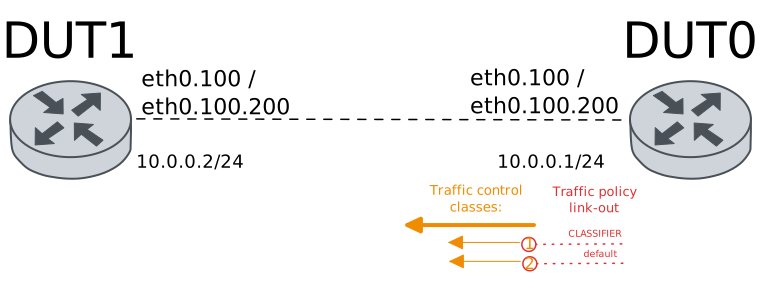
Test VLAN Pre-Classify Out (802.1Q)
Description
A traffic policy is configured in DUT0 (interface
eth0). This policy enables vlan
pre-classification in the link-out hook; i.e., all
packets leaving this interface are processed.
Traffic policy is responsible of setting the class Id
for traffic control in egress. Traffic selector filter
based on ethernet protocol (802.1Q) and VLAN Id (100).
Scenario
Step 1: Set the following configuration in DUT0 :
set interfaces ethernet eth0 mtu 1390
set interfaces ethernet eth0 traffic control out HTB
set interfaces ethernet eth0 traffic policy link-out CLASSIFIER
set interfaces ethernet eth0 vif 100 address 10.0.0.1/24
set system login user admin authentication encrypted-password '$6$GSjsCj8gHLv$/VcqU6FLi6CT2Oxn0MJQ2C2tqnRDrYKNF8HIYWJp68nvXvPdFccDsT04.WtigUONbKYrgKg8d6rEs8PjljMkH0'
set traffic control HTB type htb bandwidth 100
set traffic control HTB type htb class 1 bandwidth percentage 100
set traffic control HTB type htb class 2 bandwidth percentage 10
set traffic control HTB type htb default-class 2
set traffic policy CLASSIFIER rule 1 selector VLAN
set traffic policy CLASSIFIER rule 1 set class 1
set traffic selector VLAN rule 1 ether-type 8021q
set traffic selector VLAN rule 1 vlan id 100
Step 2: Set the following configuration in DUT1 :
set interfaces ethernet eth0 mtu 1390
set interfaces ethernet eth0 vif 100 address 10.0.0.2/24
set system login user admin authentication encrypted-password '$6$GSjsCj8gHLv$/VcqU6FLi6CT2Oxn0MJQ2C2tqnRDrYKNF8HIYWJp68nvXvPdFccDsT04.WtigUONbKYrgKg8d6rEs8PjljMkH0'
Step 3: Ping the IP address 10.0.0.2 from DUT0:
admin@DUT0$ ping 10.0.0.2 count 1 size 56 timeout 1Show output
PING 10.0.0.2 (10.0.0.2) 56(84) bytes of data.
64 bytes from 10.0.0.2: icmp_seq=1 ttl=64 time=0.758 ms

--- 10.0.0.2 ping statistics ---
1 packets transmitted, 1 received, 0% packet loss, time 0ms
rtt min/avg/max/mdev = 0.758/0.758/0.758/0.000 ms
Step 4: Run the command traffic control clear on DUT0 and expect no output.
Step 5: Initiate a bandwidth test from DUT0 to DUT1
admin@DUT1$ monitor test performance server port 5001
admin@DUT0$ monitor test performance client 10.0.0.2 duration 5 port 5001 parallel 1
Expect the following output on
DUT0:Connecting to host 10.0.0.2, port 5001 [ 5] local 10.0.0.1 port 40202 connected to 10.0.0.2 port 5001 [ ID] Interval Transfer Bitrate Retr Cwnd [ 5] 0.00-1.00 sec 13.7 MBytes 115 Mbits/sec 237 74.5 KBytes [ 5] 1.00-2.00 sec 11.3 MBytes 95.1 Mbits/sec 57 101 KBytes [ 5] 2.00-3.00 sec 11.8 MBytes 98.6 Mbits/sec 58 101 KBytes [ 5] 3.00-4.00 sec 11.4 MBytes 95.6 Mbits/sec 79 99.3 KBytes [ 5] 4.00-5.00 sec 11.3 MBytes 95.1 Mbits/sec 85 87.5 KBytes - - - - - - - - - - - - - - - - - - - - - - - - - [ ID] Interval Transfer Bitrate Retr [ 5] 0.00-5.00 sec 59.5 MBytes 99.9 Mbits/sec 516 sender [ 5] 0.00-5.00 sec 58.2 MBytes 97.7 Mbits/sec receiver iperf Done.
Step 6: Run the command traffic control show on DUT0 and check whether the output matches the following regular expressions:
class 1\s+1:0\s+\d+\s+[1-9]\d{3,}
class 2 \(default\)\s+1:0\s+\d+\s+\d{1,2}\s
Show output
Traffic control for interface 'eth0' - 'egress' mode

------------------------------------------------------------------------------------
ID   traffic control        type         parent  bytes sent  pkts sent  pkts dropped
------------------------------------------------------------------------------------
1:0  HTB              htb                root      64162724      45726            15
1:1  HTB              class 1            1:0       64162244      45722             0
1:2  HTB              class 2 (default)  1:0            480          4             0
2:0  -                htb                1:1       64162244      45722            15
3:0  -                htb                1:2            480          4             0
Step 7: Modify the following configuration lines in DUT0 :
delete interfaces ethernet eth0 vif 100
set interfaces ethernet eth0 vif 101 address 10.0.0.1/24
Step 8: Modify the following configuration lines in DUT1 :
delete interfaces ethernet eth0 vif 100
set interfaces ethernet eth0 vif 101 address 10.0.0.2/24
Step 9: Run the command traffic control clear on DUT0 and expect no output.
Step 10: Initiate a bandwidth test from DUT0 to DUT1
admin@DUT1$ monitor test performance server port 5001
admin@DUT0$ monitor test performance client 10.0.0.2 duration 5 port 5001 parallel 1
Expect the following output on
DUT0:Connecting to host 10.0.0.2, port 5001 [ 5] local 10.0.0.1 port 35394 connected to 10.0.0.2 port 5001 [ ID] Interval Transfer Bitrate Retr Cwnd [ 5] 0.00-1.00 sec 1.71 MBytes 14.4 Mbits/sec 95 13.1 KBytes [ 5] 1.00-2.00 sec 1.10 MBytes 9.25 Mbits/sec 39 9.15 KBytes [ 5] 2.00-3.00 sec 1.10 MBytes 9.25 Mbits/sec 28 11.8 KBytes [ 5] 3.00-4.00 sec 1.10 MBytes 9.25 Mbits/sec 38 10.5 KBytes [ 5] 4.00-5.00 sec 1.10 MBytes 9.25 Mbits/sec 29 10.5 KBytes - - - - - - - - - - - - - - - - - - - - - - - - - [ ID] Interval Transfer Bitrate Retr [ 5] 0.00-5.00 sec 6.12 MBytes 10.3 Mbits/sec 229 sender [ 5] 0.00-5.00 sec 5.82 MBytes 9.77 Mbits/sec receiver iperf Done.
Step 11: Run the command traffic control show on DUT0 and check whether the output matches the following regular expressions:
class 1\s+1:0\s+\d+\s+\d{1,2}\s
class 2 \(default\)\s+1:0\s+\d+\s+[1-9]\d{3,}
Show output
Traffic control for interface 'eth0' - 'egress' mode

------------------------------------------------------------------------------------
ID   traffic control        type         parent  bytes sent  pkts sent  pkts dropped
------------------------------------------------------------------------------------
1:0  HTB              htb                root       6421720       4595            38
1:1  HTB              class 1            1:0              0          0             0
1:2  HTB              class 2 (default)  1:0        6421720       4595             0
2:0  -                htb                1:1              0          0             0
3:0  -                htb                1:2        6421720       4595            38
Test VLAN Pre-Classify Out (QinQ)
Description
A traffic policy is configured in DUT0 (interface
eth0). This policy enables vlan
pre-classification in the link-out hook; i.e., all
packets leaving this interface are processed.
Traffic policy is responsible of setting the class Id
for traffic control in egress. Traffic selector filter
based on QinQ (802.1ad over 802.1Q), VLAN Id (100) and
C-VLAN Id (200)
Scenario
Step 1: Set the following configuration in DUT0 :
set interfaces ethernet eth0 mtu 1390
set interfaces ethernet eth0 traffic control out HTB
set interfaces ethernet eth0 traffic policy link-out CLASSIFIER
set interfaces ethernet eth0 vif 100 ethertype 802.1ad
set interfaces ethernet eth0 vif 100 vif-c 200 address 10.0.0.1/24
set system login user admin authentication encrypted-password '$6$GSjsCj8gHLv$/VcqU6FLi6CT2Oxn0MJQ2C2tqnRDrYKNF8HIYWJp68nvXvPdFccDsT04.WtigUONbKYrgKg8d6rEs8PjljMkH0'
set traffic control HTB type htb bandwidth 100
set traffic control HTB type htb class 1 bandwidth percentage 100
set traffic control HTB type htb class 2 bandwidth percentage 10
set traffic control HTB type htb default-class 2
set traffic policy CLASSIFIER rule 1 selector VLAN
set traffic policy CLASSIFIER rule 1 set class 1
set traffic selector VLAN rule 1 ether-type 8021ad
set traffic selector VLAN rule 1 vlan id 100
set traffic selector VLAN rule 1 vlan inner-id 200
set traffic selector VLAN rule 1 vlan protocol 8021q
Step 2: Set the following configuration in DUT1 :
set interfaces ethernet eth0 mtu 1390
set interfaces ethernet eth0 vif 100 ethertype 802.1ad
set interfaces ethernet eth0 vif 100 vif-c 200 address 10.0.0.2/24
set system login user admin authentication encrypted-password '$6$GSjsCj8gHLv$/VcqU6FLi6CT2Oxn0MJQ2C2tqnRDrYKNF8HIYWJp68nvXvPdFccDsT04.WtigUONbKYrgKg8d6rEs8PjljMkH0'
Step 3: Ping the IP address 10.0.0.2 from DUT0:
admin@DUT0$ ping 10.0.0.2 count 1 size 56 timeout 1Show output
PING 10.0.0.2 (10.0.0.2) 56(84) bytes of data.
64 bytes from 10.0.0.2: icmp_seq=1 ttl=64 time=0.896 ms

--- 10.0.0.2 ping statistics ---
1 packets transmitted, 1 received, 0% packet loss, time 0ms
rtt min/avg/max/mdev = 0.896/0.896/0.896/0.000 ms
Step 4: Run the command traffic control clear on DUT0 and expect no output.
Step 5: Initiate a bandwidth test from DUT0 to DUT1
admin@DUT1$ monitor test performance server port 5001
admin@DUT0$ monitor test performance client 10.0.0.2 duration 5 port 5001 parallel 1
Expect the following output on
DUT0:Connecting to host 10.0.0.2, port 5001 [ 5] local 10.0.0.1 port 38684 connected to 10.0.0.2 port 5001 [ ID] Interval Transfer Bitrate Retr Cwnd [ 5] 0.00-1.00 sec 13.4 MBytes 112 Mbits/sec 122 95.4 KBytes [ 5] 1.00-2.00 sec 11.3 MBytes 95.1 Mbits/sec 64 116 KBytes [ 5] 2.00-3.00 sec 11.3 MBytes 94.4 Mbits/sec 58 114 KBytes [ 5] 3.00-4.00 sec 11.6 MBytes 96.9 Mbits/sec 82 82.3 KBytes [ 5] 4.00-5.00 sec 11.1 MBytes 93.8 Mbits/sec 49 95.4 KBytes - - - - - - - - - - - - - - - - - - - - - - - - - [ ID] Interval Transfer Bitrate Retr [ 5] 0.00-5.00 sec 58.7 MBytes 98.5 Mbits/sec 375 sender [ 5] 0.00-5.01 sec 58.1 MBytes 97.3 Mbits/sec receiver iperf Done.
Step 6: Run the command traffic control show on DUT0 and check whether the output matches the following regular expressions:
class 1\s+1:0\s+\d+\s+[1-9]\d{3,}
class 2 \(default\)\s+1:0\s+\d+\s+\d{1,2}\s
Show output
Traffic control for interface 'eth0' - 'egress' mode

------------------------------------------------------------------------------------
ID   traffic control        type         parent  bytes sent  pkts sent  pkts dropped
------------------------------------------------------------------------------------
1:0  HTB              htb                root      64194935      45612            13
1:1  HTB              class 1            1:0       64194655      45610             0
1:2  HTB              class 2 (default)  1:0            280          2             0
2:0  -                htb                1:1       64194655      45610            13
3:0  -                htb                1:2            280          2             0
Step 7: Modify the following configuration lines in DUT0 :
delete interfaces ethernet eth0 vif 100 vif-c 200
set interfaces ethernet eth0 vif 100 vif-c 201 address 10.0.0.1/24
Step 8: Modify the following configuration lines in DUT1 :
delete interfaces ethernet eth0 vif 100 vif-c 200
set interfaces ethernet eth0 vif 100 vif-c 201 address 10.0.0.2/24
Step 9: Run the command traffic control clear on DUT0 and expect no output.
Step 10: Initiate a bandwidth test from DUT0 to DUT1
admin@DUT1$ monitor test performance server port 5001
admin@DUT0$ monitor test performance client 10.0.0.2 duration 5 port 5001 parallel 1
Expect the following output on
DUT0:Connecting to host 10.0.0.2, port 5001 [ 5] local 10.0.0.1 port 54410 connected to 10.0.0.2 port 5001 [ ID] Interval Transfer Bitrate Retr Cwnd [ 5] 0.00-1.00 sec 1.38 MBytes 11.6 Mbits/sec 41 7.84 KBytes [ 5] 1.00-2.00 sec 1.17 MBytes 9.77 Mbits/sec 46 13.1 KBytes [ 5] 2.00-3.00 sec 1.10 MBytes 9.26 Mbits/sec 38 9.15 KBytes [ 5] 3.00-4.00 sec 1.16 MBytes 9.76 Mbits/sec 23 14.4 KBytes [ 5] 4.00-5.00 sec 1.10 MBytes 9.25 Mbits/sec 35 13.1 KBytes - - - - - - - - - - - - - - - - - - - - - - - - - [ ID] Interval Transfer Bitrate Retr [ 5] 0.00-5.00 sec 5.92 MBytes 9.93 Mbits/sec 183 sender [ 5] 0.00-5.01 sec 5.81 MBytes 9.74 Mbits/sec receiver iperf Done.
Step 11: Run the command traffic control show on DUT0 and check whether the output matches the following regular expressions:
class 1\s+1:0\s+\d+\s+\d{1,2}\s
class 2 \(default\)\s+1:0\s+\d+\s+[1-9]\d{3,}
Show output
Traffic control for interface 'eth0' - 'egress' mode

------------------------------------------------------------------------------------
ID   traffic control        type         parent  bytes sent  pkts sent  pkts dropped
------------------------------------------------------------------------------------
1:0  HTB              htb                root       6428316       4586            41
1:1  HTB              class 1            1:0              0          0             0
1:2  HTB              class 2 (default)  1:0        6428316       4586             0
2:0  -                htb                1:1              0          0             0
3:0  -                htb                1:2        6428316       4586            41
Test VLAN Pre-Classify Out (QinQ) with PCP matches
Description
A traffic policy is configured in DUT0 (interface
eth0). This policy enables vlan
pre-classification in the link-out hook; i.e., all
packets leaving this interface are processed.
Traffic policy is responsible of setting the class Id
for traffic control in egress. Traffic selector filter
based on QinQ (802.1ad over 802.1Q), VLAN Id (100),
VLAN PCP (3), C-VLAN Id (200) and C-VLAN PCP (5).
Scenario
Step 1: Set the following configuration in DUT0 :
set interfaces ethernet eth0 mtu 1390
set interfaces ethernet eth0 traffic control out HTB
set interfaces ethernet eth0 traffic policy link-out CLASSIFIER
set interfaces ethernet eth0 vif 100 ethertype 802.1ad
set interfaces ethernet eth0 vif 100 traffic policy link-out OUTER_COS
set interfaces ethernet eth0 vif 100 vif-c 200 address 10.0.0.1/24
set interfaces ethernet eth0 vif 100 vif-c 200 traffic policy link-out INNER_COS
set system login user admin authentication encrypted-password '$6$GSjsCj8gHLv$/VcqU6FLi6CT2Oxn0MJQ2C2tqnRDrYKNF8HIYWJp68nvXvPdFccDsT04.WtigUONbKYrgKg8d6rEs8PjljMkH0'
set traffic control HTB type htb bandwidth 100
set traffic control HTB type htb class 1 bandwidth percentage 100
set traffic control HTB type htb class 2 bandwidth percentage 10
set traffic control HTB type htb default-class 2
set traffic policy CLASSIFIER rule 1 selector VLAN
set traffic policy CLASSIFIER rule 1 set class 1
set traffic policy INNER_COS rule 1 set cos-mark 5
set traffic policy OUTER_COS rule 1 set cos-mark 3
set traffic selector VLAN rule 1 ether-type 8021ad
set traffic selector VLAN rule 1 vlan id 100
set traffic selector VLAN rule 1 vlan inner-id 200
set traffic selector VLAN rule 1 vlan inner-pcp 5
set traffic selector VLAN rule 1 vlan pcp 3
set traffic selector VLAN rule 1 vlan protocol 8021q
Step 2: Set the following configuration in DUT1 :
set interfaces ethernet eth0 mtu 1390
set interfaces ethernet eth0 vif 100 ethertype 802.1ad
set interfaces ethernet eth0 vif 100 vif-c 200 address 10.0.0.2/24
set system login user admin authentication encrypted-password '$6$GSjsCj8gHLv$/VcqU6FLi6CT2Oxn0MJQ2C2tqnRDrYKNF8HIYWJp68nvXvPdFccDsT04.WtigUONbKYrgKg8d6rEs8PjljMkH0'
Step 3: Ping the IP address 10.0.0.2 from DUT0:
admin@DUT0$ ping 10.0.0.2 count 1 size 56 timeout 1Show output
PING 10.0.0.2 (10.0.0.2) 56(84) bytes of data.
64 bytes from 10.0.0.2: icmp_seq=1 ttl=64 time=1.34 ms

--- 10.0.0.2 ping statistics ---
1 packets transmitted, 1 received, 0% packet loss, time 0ms
rtt min/avg/max/mdev = 1.341/1.341/1.341/0.000 ms
Step 4: Run the command traffic control clear on DUT0 and expect no output.
Step 5: Initiate a bandwidth test from DUT0 to DUT1
admin@DUT1$ monitor test performance server port 5001
admin@DUT0$ monitor test performance client 10.0.0.2 duration 5 port 5001 parallel 1
Expect the following output on
DUT0:Connecting to host 10.0.0.2, port 5001 [ 5] local 10.0.0.1 port 50942 connected to 10.0.0.2 port 5001 [ ID] Interval Transfer Bitrate Retr Cwnd [ 5] 0.00-1.00 sec 13.5 MBytes 113 Mbits/sec 178 82.3 KBytes [ 5] 1.00-2.00 sec 11.3 MBytes 95.1 Mbits/sec 81 77.1 KBytes [ 5] 2.00-3.00 sec 11.2 MBytes 94.0 Mbits/sec 82 71.9 KBytes [ 5] 3.00-4.00 sec 11.5 MBytes 96.1 Mbits/sec 81 83.6 KBytes [ 5] 4.00-5.00 sec 11.1 MBytes 93.5 Mbits/sec 70 90.2 KBytes - - - - - - - - - - - - - - - - - - - - - - - - - [ ID] Interval Transfer Bitrate Retr [ 5] 0.00-5.00 sec 58.6 MBytes 98.3 Mbits/sec 492 sender [ 5] 0.00-5.00 sec 58.0 MBytes 97.3 Mbits/sec receiver iperf Done.
Step 6: Run the command traffic control show on DUT0 and check whether the output matches the following regular expressions:
class 1\s+1:0\s+\d+\s+[1-9]\d{3,}
class 2 \(default\)\s+1:0\s+\d+\s+\d{1,2}\s
Show output
Traffic control for interface 'eth0' - 'egress' mode

------------------------------------------------------------------------------------
ID   traffic control        type         parent  bytes sent  pkts sent  pkts dropped
------------------------------------------------------------------------------------
1:0  HTB              htb                root      64120802      45563            16
1:1  HTB              class 1            1:0       64120582      45561             0
1:2  HTB              class 2 (default)  1:0            220          2             0
2:0  -                htb                1:1       64120582      45561            16
3:0  -                htb                1:2            220          2             0
Step 7: Modify the following configuration lines in DUT0 :
delete interfaces ethernet eth0 vif 100 vif-c 200 address
set interfaces ethernet eth0 vif 100 vif-c 201 address 10.0.0.1/24
Step 8: Modify the following configuration lines in DUT1 :
delete interfaces ethernet eth0 vif 100 vif-c 200
set interfaces ethernet eth0 vif 100 vif-c 201 address 10.0.0.2/24
Step 9: Run the command traffic control clear on DUT0 and expect no output.
Step 10: Initiate a bandwidth test from DUT0 to DUT1
admin@DUT1$ monitor test performance server port 5001
admin@DUT0$ monitor test performance client 10.0.0.2 duration 5 port 5001 parallel 1
Expect the following output on
DUT0:Connecting to host 10.0.0.2, port 5001 [ 5] local 10.0.0.1 port 33944 connected to 10.0.0.2 port 5001 [ ID] Interval Transfer Bitrate Retr Cwnd [ 5] 0.00-1.00 sec 1.66 MBytes 13.9 Mbits/sec 96 11.8 KBytes [ 5] 1.00-2.00 sec 1.10 MBytes 9.25 Mbits/sec 43 10.5 KBytes [ 5] 2.00-3.00 sec 1.10 MBytes 9.25 Mbits/sec 40 14.4 KBytes [ 5] 3.00-4.00 sec 1.10 MBytes 9.25 Mbits/sec 35 11.8 KBytes [ 5] 4.00-5.00 sec 1.10 MBytes 9.25 Mbits/sec 30 10.5 KBytes - - - - - - - - - - - - - - - - - - - - - - - - - [ ID] Interval Transfer Bitrate Retr [ 5] 0.00-5.00 sec 6.07 MBytes 10.2 Mbits/sec 244 sender [ 5] 0.00-5.00 sec 5.81 MBytes 9.74 Mbits/sec receiver iperf Done.
Step 11: Run the command traffic control show on DUT0 and check whether the output matches the following regular expressions:
class 1\s+1:0\s+\d+\s+\d{1,2}\s
class 2 \(default\)\s+1:0\s+\d+\s+[1-9]\d{3,}
Show output
Traffic control for interface 'eth0' - 'egress' mode

------------------------------------------------------------------------------------
ID   traffic control        type         parent  bytes sent  pkts sent  pkts dropped
------------------------------------------------------------------------------------
1:0  HTB              htb                root       6423394       4584            39
1:1  HTB              class 1            1:0              0          0             0
1:2  HTB              class 2 (default)  1:0        6423394       4584             0
2:0  -                htb                1:1              0          0             0
3:0  -                htb                1:2        6423394       4584            39