Same-Remote
This scenario shows how to configure a VPN responder that can receive incoming connections from the same virtual IP address.
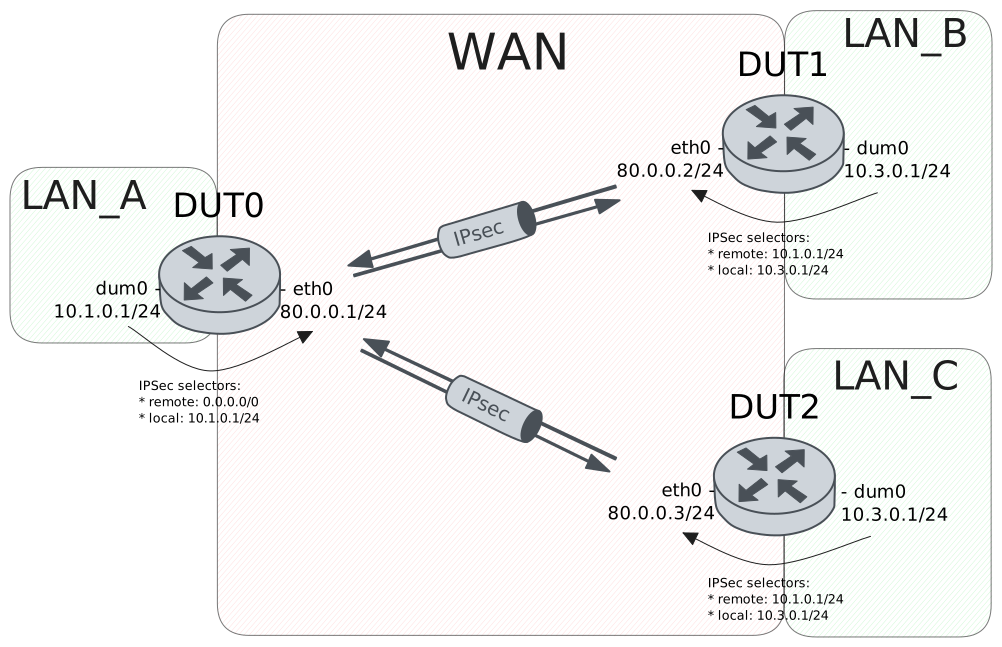
Test Site-To-Site With Same Remote Address
Description
VPN site-to-site configuration to connect two subnets to an end-point using the same virtual IP address.
Scenario
Attention
In order to make this scenario work, the device needs a way to respond and reinject traffic through the appropriate VPN tunnel. This can be achieved by copying the packet mark into the conntrack mark and restoring it later. Therefore, the following configuration lines are needed:
Show output
set vpn ipsec esp-group CHILD-SA mark-in unique
set vpn ipsec esp-group CHILD-SA mark-out unique
set traffic policy IN_MARK_TO_FLOW rule 1 copy mark connmark
set traffic policy OUT_FLOW_TO_MARK rule 1 copy connmark mark
set interfaces eth0 traffic policy in IN_MARK_TO_FLOW
set interfaces dum0 traffic policy local-out OUT_FLOW_TO_MARK
Step 1: Set the following configuration in DUT0 :
set interfaces dummy dum0 address 10.1.0.1/24
set interfaces dummy dum0 traffic policy local-out OUT_FLOW_TO_MARK
set interfaces ethernet eth0 address 80.0.0.1/24
set interfaces ethernet eth0 traffic policy in IN_MARK_TO_FLOW
set protocols static route 0.0.0.0/0 interface dum0
set system login user admin authentication encrypted-password '$6$GSjsCj8gHLv$/VcqU6FLi6CT2Oxn0MJQ2C2tqnRDrYKNF8HIYWJp68nvXvPdFccDsT04.WtigUONbKYrgKg8d6rEs8PjljMkH0'
set traffic policy IN_MARK_TO_FLOW rule 1 copy mark connmark
set traffic policy OUT_FLOW_TO_MARK rule 1 copy connmark mark
set vpn ipsec auth-profile AUTH-SA global-secrets ike-psk %any encrypted-secret U2FsdGVkX195tK172d5jPt7lJD/BkYKV3+anuSuR2CU=
set vpn ipsec auth-profile AUTH-SA local auth ike-psk id %any
set vpn ipsec auth-profile AUTH-SA remote auth ike-psk id %any
set vpn ipsec esp-group CHILD-SA mark-in unique
set vpn ipsec esp-group CHILD-SA mark-out unique
set vpn ipsec esp-group CHILD-SA proposal 1 encryption aes256gcm128
set vpn ipsec esp-group CHILD-SA proposal 1 pfs dh-group19
set vpn ipsec ike-group IKE-SA key-exchange ikev2
set vpn ipsec ike-group IKE-SA proposal 1 dh-group 19
set vpn ipsec ike-group IKE-SA proposal 1 encryption aes256gcm128
set vpn ipsec ike-group IKE-SA proposal 1 hash sha256
set vpn ipsec site-to-site peer PEER auth-profile AUTH-SA
set vpn ipsec site-to-site peer PEER connection-type respond
set vpn ipsec site-to-site peer PEER default-esp-group CHILD-SA
set vpn ipsec site-to-site peer PEER ike-group IKE-SA
set vpn ipsec site-to-site peer PEER local-address 80.0.0.1
set vpn ipsec site-to-site peer PEER tunnel 1 local prefix 10.1.0.0/24
set vpn ipsec site-to-site peer PEER tunnel 1 local-interface dum0
set vpn ipsec site-to-site peer PEER tunnel 1 remote prefix 0.0.0.0/0
Step 2: Set the following configuration in DUT1 :
set interfaces dummy dum0 address 10.3.0.1/24
set interfaces ethernet eth0 address 80.0.0.2/24
set protocols static route 0.0.0.0/0 next-hop 80.0.0.1
set system login user admin authentication encrypted-password '$6$GSjsCj8gHLv$/VcqU6FLi6CT2Oxn0MJQ2C2tqnRDrYKNF8HIYWJp68nvXvPdFccDsT04.WtigUONbKYrgKg8d6rEs8PjljMkH0'
set vpn ipsec auth-profile AUTH-SA global-secrets ike-psk %any encrypted-secret U2FsdGVkX1/BVU4+ZtASb1Gowmmpq8QFLLwIQBlhyK4=
set vpn ipsec auth-profile AUTH-SA local auth ike-psk id %any
set vpn ipsec auth-profile AUTH-SA remote auth ike-psk id %any
set vpn ipsec esp-group CHILD-SA proposal 1 encryption aes256gcm128
set vpn ipsec esp-group CHILD-SA proposal 1 pfs dh-group19
set vpn ipsec ike-group IKE-SA key-exchange ikev2
set vpn ipsec ike-group IKE-SA proposal 1 dh-group 19
set vpn ipsec ike-group IKE-SA proposal 1 encryption aes256gcm128
set vpn ipsec ike-group IKE-SA proposal 1 hash sha256
set vpn ipsec site-to-site peer PEER auth-profile AUTH-SA
set vpn ipsec site-to-site peer PEER connection-type initiate
set vpn ipsec site-to-site peer PEER default-esp-group CHILD-SA
set vpn ipsec site-to-site peer PEER ike-group IKE-SA
set vpn ipsec site-to-site peer PEER local-address 80.0.0.2
set vpn ipsec site-to-site peer PEER remote-address 80.0.0.1
set vpn ipsec site-to-site peer PEER tunnel 1 local prefix 10.3.0.0/24
set vpn ipsec site-to-site peer PEER tunnel 1 remote prefix 10.1.0.0/24
Step 3: Set the following configuration in DUT2 :
set interfaces dummy dum0 address 10.3.0.1/24
set interfaces ethernet eth0 address 80.0.0.3/24
set protocols static route 0.0.0.0/0 next-hop 80.0.0.1
set system login user admin authentication encrypted-password '$6$GSjsCj8gHLv$/VcqU6FLi6CT2Oxn0MJQ2C2tqnRDrYKNF8HIYWJp68nvXvPdFccDsT04.WtigUONbKYrgKg8d6rEs8PjljMkH0'
set vpn ipsec auth-profile AUTH-SA global-secrets ike-psk %any encrypted-secret U2FsdGVkX19T9fQCp6jKYEa1RfBVTDmUsL/4QHWMWNs=
set vpn ipsec auth-profile AUTH-SA local auth ike-psk id %any
set vpn ipsec auth-profile AUTH-SA remote auth ike-psk id %any
set vpn ipsec esp-group CHILD-SA proposal 1 encryption aes256gcm128
set vpn ipsec esp-group CHILD-SA proposal 1 pfs dh-group19
set vpn ipsec ike-group IKE-SA key-exchange ikev2
set vpn ipsec ike-group IKE-SA proposal 1 dh-group 19
set vpn ipsec ike-group IKE-SA proposal 1 encryption aes256gcm128
set vpn ipsec ike-group IKE-SA proposal 1 hash sha256
set vpn ipsec site-to-site peer PEER auth-profile AUTH-SA
set vpn ipsec site-to-site peer PEER connection-type initiate
set vpn ipsec site-to-site peer PEER default-esp-group CHILD-SA
set vpn ipsec site-to-site peer PEER ike-group IKE-SA
set vpn ipsec site-to-site peer PEER local-address 80.0.0.3
set vpn ipsec site-to-site peer PEER remote-address 80.0.0.1
set vpn ipsec site-to-site peer PEER tunnel 1 local prefix 10.3.0.0/24
set vpn ipsec site-to-site peer PEER tunnel 1 remote prefix 10.1.0.0/24
Step 4: Ping the IP address 80.0.0.2 from DUT0:
admin@DUT0$ ping 80.0.0.2 count 1 size 56 timeout 1Show output
PING 80.0.0.2 (80.0.0.2) 56(84) bytes of data.
64 bytes from 80.0.0.2: icmp_seq=1 ttl=64 time=0.249 ms

--- 80.0.0.2 ping statistics ---
1 packets transmitted, 1 received, 0% packet loss, time 0ms
rtt min/avg/max/mdev = 0.249/0.249/0.249/0.000 ms
Step 5: Ping the IP address 80.0.0.3 from DUT0:
admin@DUT0$ ping 80.0.0.3 count 1 size 56 timeout 1Show output
PING 80.0.0.3 (80.0.0.3) 56(84) bytes of data.
64 bytes from 80.0.0.3: icmp_seq=1 ttl=64 time=0.236 ms

--- 80.0.0.3 ping statistics ---
1 packets transmitted, 1 received, 0% packet loss, time 0ms
rtt min/avg/max/mdev = 0.236/0.236/0.236/0.000 ms
Step 6: Run the command vpn ipsec show sa on DUT0 and check whether the output contains the following tokens:
80.0.0.2
80.0.0.3
Show output
vpn-peer-PEER: #1, ESTABLISHED, IKEv2, 08224fa46b748c79_i 81dfe0928d2f097f_r*
  local  '80.0.0.1' @ 80.0.0.1[500]
  remote '80.0.0.2' @ 80.0.0.2[500]
  AES_GCM_16-256/PRF_HMAC_SHA2_256/ECP_256
  established 3s ago, rekeying in 15845s
  peer-PEER-tunnel-1: #1, reqid 1, INSTALLED, TUNNEL, ESP:AES_GCM_16-256
    installed 3s ago, rekeying in 3273s, expires in 3957s
    in  c102c622 (0x00000001),      0 bytes,     0 packets
    out c2495f61 (0x00000001),      0 bytes,     0 packets
    local  10.1.0.0/24
    remote 10.3.0.0/24
vpn-peer-PEER: #2, ESTABLISHED, IKEv2, 5fe009e4240c7d99_i ccf6d0180d39c793_r*
  local  '80.0.0.1' @ 80.0.0.1[500]
  remote '80.0.0.3' @ 80.0.0.3[500]
  AES_GCM_16-256/PRF_HMAC_SHA2_256/ECP_256
  established 1s ago, rekeying in 16763s
  peer-PEER-tunnel-1: #2, reqid 2, INSTALLED, TUNNEL, ESP:AES_GCM_16-256
    installed 1s ago, rekeying in 3283s, expires in 3959s
    in  c5785c7b (0x00000002),      0 bytes,     0 packets
    out cac11669 (0x00000002),      0 bytes,     0 packets
    local  10.1.0.0/24
    remote 10.3.0.0/24
Step 7: Ping the IP address 10.1.0.1 from DUT1:
admin@DUT1$ ping 10.1.0.1 local-address 10.3.0.1 count 1 size 56 timeout 1Show output
PING 10.1.0.1 (10.1.0.1) from 10.3.0.1 : 56(84) bytes of data.
64 bytes from 10.1.0.1: icmp_seq=1 ttl=64 time=0.705 ms

--- 10.1.0.1 ping statistics ---
1 packets transmitted, 1 received, 0% packet loss, time 0ms
rtt min/avg/max/mdev = 0.705/0.705/0.705/0.000 ms
Step 8: Ping the IP address 10.1.0.1 from DUT2:
admin@DUT2$ ping 10.1.0.1 local-address 10.3.0.1 count 1 size 56 timeout 1Show output
PING 10.1.0.1 (10.1.0.1) from 10.3.0.1 : 56(84) bytes of data.
64 bytes from 10.1.0.1: icmp_seq=1 ttl=64 time=0.648 ms

--- 10.1.0.1 ping statistics ---
1 packets transmitted, 1 received, 0% packet loss, time 0ms
rtt min/avg/max/mdev = 0.648/0.648/0.648/0.000 ms
Step 9: Run the command vpn ipsec show sa remote 80.0.0.2 on DUT0 and check whether the output matches the following regular expressions:
[1-9]\d? packetsShow output
vpn-peer-PEER: #1, ESTABLISHED, IKEv2, 08224fa46b748c79_i 81dfe0928d2f097f_r*
  local  '80.0.0.1' @ 80.0.0.1[500]
  remote '80.0.0.2' @ 80.0.0.2[500]
  AES_GCM_16-256/PRF_HMAC_SHA2_256/ECP_256
  established 3s ago, rekeying in 15845s
  peer-PEER-tunnel-1: #1, reqid 1, INSTALLED, TUNNEL, ESP:AES_GCM_16-256
    installed 3s ago, rekeying in 3273s, expires in 3957s
    in  c102c622 (0x00000001),     84 bytes,     1 packets,     0s ago
    out c2495f61 (0x00000001),     84 bytes,     1 packets,     0s ago
    local  10.1.0.0/24
    remote 10.3.0.0/24
Step 10: Run the command vpn ipsec show sa remote 80.0.0.3 on DUT0 and check whether the output matches the following regular expressions:
[1-9]\d? packetsShow output
vpn-peer-PEER: #2, ESTABLISHED, IKEv2, 5fe009e4240c7d99_i ccf6d0180d39c793_r*
  local  '80.0.0.1' @ 80.0.0.1[500]
  remote '80.0.0.3' @ 80.0.0.3[500]
  AES_GCM_16-256/PRF_HMAC_SHA2_256/ECP_256
  established 1s ago, rekeying in 16763s
  peer-PEER-tunnel-1: #2, reqid 2, INSTALLED, TUNNEL, ESP:AES_GCM_16-256
    installed 1s ago, rekeying in 3283s, expires in 3959s
    in  c5785c7b (0x00000002),     84 bytes,     1 packets,     0s ago
    out cac11669 (0x00000002),     84 bytes,     1 packets,     0s ago
    local  10.1.0.0/24
    remote 10.3.0.0/24
Attention
The command vpn show ipsec policy can be used to debug
the IPSec selectors that have been installed in OSDx devices.
Example for device DUT0:
Show output
src 10.1.0.0/24 dst 10.3.0.0/24 dev dum0
        dir out priority 375421
        mark 0x2/0xffffffff
        tmpl src 80.0.0.1 dst 80.0.0.3
                proto esp spi 0xcac11669 reqid 2 mode tunnel
src 10.3.0.0/24 dst 10.1.0.0/24
        dir fwd priority 375423
        mark 0x2/0xffffffff
        tmpl src 80.0.0.3 dst 80.0.0.1
                proto esp reqid 2 mode tunnel
src 10.3.0.0/24 dst 10.1.0.0/24
        dir in priority 375423
        mark 0x2/0xffffffff
        tmpl src 80.0.0.3 dst 80.0.0.1
                proto esp reqid 2 mode tunnel
src 10.1.0.0/24 dst 10.3.0.0/24 dev dum0
        dir out priority 375421
        mark 0x1/0xffffffff
        tmpl src 80.0.0.1 dst 80.0.0.2
                proto esp spi 0xc2495f61 reqid 1 mode tunnel
src 10.3.0.0/24 dst 10.1.0.0/24
        dir fwd priority 375423
        mark 0x1/0xffffffff
        tmpl src 80.0.0.2 dst 80.0.0.1
                proto esp reqid 1 mode tunnel
src 10.3.0.0/24 dst 10.1.0.0/24
        dir in priority 375423
        mark 0x1/0xffffffff
        tmpl src 80.0.0.2 dst 80.0.0.1
                proto esp reqid 1 mode tunnel
src 0.0.0.0/0 dst 0.0.0.0/0
        socket in priority 0
src 0.0.0.0/0 dst 0.0.0.0/0
        socket out priority 0
src 0.0.0.0/0 dst 0.0.0.0/0
        socket in priority 0
src 0.0.0.0/0 dst 0.0.0.0/0
        socket out priority 0
src ::/0 dst ::/0
        socket in priority 0
src ::/0 dst ::/0
        socket out priority 0
src ::/0 dst ::/0
        socket in priority 0
src ::/0 dst ::/0
        socket out priority 0