Xfrm-Interface
Test suite to check IPsec with xfrm interface
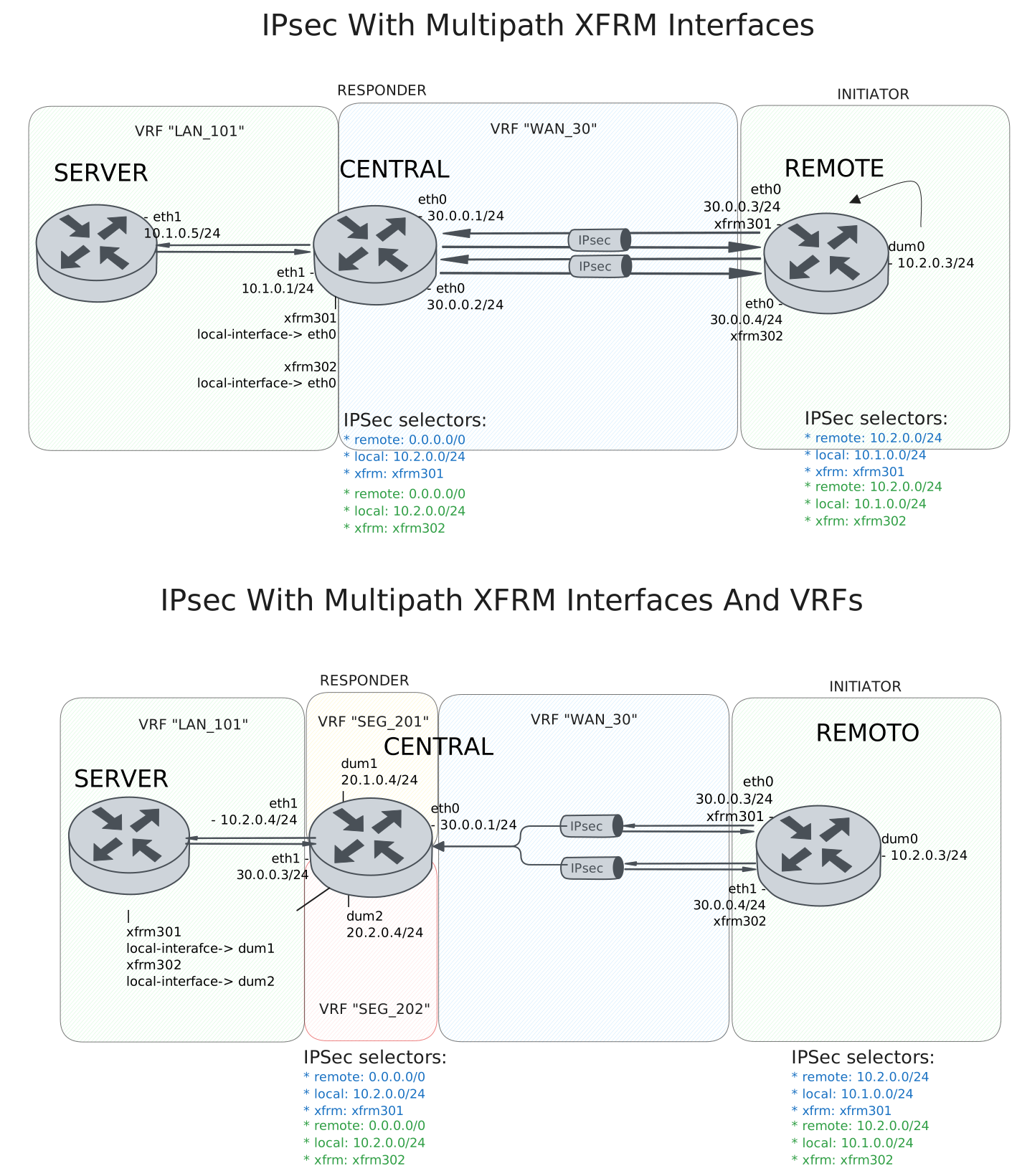
Test IPsec With Multipath XFRM Interfaces
Description
DUT0 and DUT1 are connected to each other through multiple IPsec tunnels with the same local and remote prefixes.
In this test case, we will check IPsec tunnels are correctly installing through two peers directly connected to the DUT0 and DUT1 devices.
Scenario
Step 1: Set the following configuration in DUT0 :
set interfaces ethernet eth0 address 30.0.0.1/24
set interfaces ethernet eth0 address 30.0.0.2/24
set interfaces ethernet eth0 vrf WAN_30
set interfaces ethernet eth1 address 10.1.0.1/24
set interfaces ethernet eth1 vrf LAN_101
set interfaces xfrm xfrm301 local-interface eth0
set interfaces xfrm xfrm301 mtu 1400
set interfaces xfrm xfrm301 multipath traffic-steering reverse
set interfaces xfrm xfrm301 vrf LAN_101
set interfaces xfrm xfrm302 local-interface eth0
set interfaces xfrm xfrm302 mtu 1400
set interfaces xfrm xfrm302 multipath traffic-steering reverse
set interfaces xfrm xfrm302 vrf LAN_101
set protocols vrf WAN_30 static route 10.1.0.0/24 next-hop-vrf LAN_101
set service ssh
set system login user admin authentication encrypted-password '$6$GSjsCj8gHLv$/VcqU6FLi6CT2Oxn0MJQ2C2tqnRDrYKNF8HIYWJp68nvXvPdFccDsT04.WtigUONbKYrgKg8d6rEs8PjljMkH0'
set system vrf LAN_101
set system vrf WAN_30
set system vrf main
set vpn ipsec auth-profile AUTH-SA global-secrets ike-psk test encrypted-secret U2FsdGVkX1+p0RzRKx63czFqCx0vzNB5icQvwMBS1UY=
set vpn ipsec auth-profile AUTH-SA local auth ike-psk id test
set vpn ipsec auth-profile AUTH-SA remote auth ike-psk id %any
set vpn ipsec esp-group CHILD-SA mode tunnel
set vpn ipsec esp-group CHILD-SA proposal 1 encryption aes256gcm128
set vpn ipsec esp-group CHILD-SA proposal 1 pfs dh-group19
set vpn ipsec ike-group IKE-SA key-exchange ikev2
set vpn ipsec ike-group IKE-SA proposal 1 dh-group 19
set vpn ipsec ike-group IKE-SA proposal 1 encryption aes256gcm128
set vpn ipsec ike-group IKE-SA proposal 1 hash sha256
set vpn ipsec site-to-site peer PEER301 auth-profile AUTH-SA
set vpn ipsec site-to-site peer PEER301 connection-type respond
set vpn ipsec site-to-site peer PEER301 default-esp-group CHILD-SA
set vpn ipsec site-to-site peer PEER301 ike-group IKE-SA
set vpn ipsec site-to-site peer PEER301 local-address 30.0.0.1
set vpn ipsec site-to-site peer PEER301 remote-address %any
set vpn ipsec site-to-site peer PEER301 tunnel 1 install-routes LAN_101
set vpn ipsec site-to-site peer PEER301 tunnel 1 local prefix 10.1.0.0/24
set vpn ipsec site-to-site peer PEER301 tunnel 1 remote prefix 0.0.0.0/0
set vpn ipsec site-to-site peer PEER301 tunnel 1 xfrm-interface-out xfrm301
set vpn ipsec site-to-site peer PEER302 auth-profile AUTH-SA
set vpn ipsec site-to-site peer PEER302 connection-type respond
set vpn ipsec site-to-site peer PEER302 default-esp-group CHILD-SA
set vpn ipsec site-to-site peer PEER302 ike-group IKE-SA
set vpn ipsec site-to-site peer PEER302 local-address 30.0.0.2
set vpn ipsec site-to-site peer PEER302 remote-address %any
set vpn ipsec site-to-site peer PEER302 tunnel 1 install-routes LAN_101
set vpn ipsec site-to-site peer PEER302 tunnel 1 local prefix 10.1.0.0/24
set vpn ipsec site-to-site peer PEER302 tunnel 1 remote prefix 0.0.0.0/0
set vpn ipsec site-to-site peer PEER302 tunnel 1 xfrm-interface-out xfrm302
Step 2: Set the following configuration in DUT1 :
set interfaces dummy dum0 address 10.2.0.3/24
set interfaces ethernet eth0 address 30.0.0.3/24
set interfaces ethernet eth0 address 30.0.0.4/24
set interfaces xfrm xfrm301 mtu 1400
set interfaces xfrm xfrm302 mtu 1400
set service ssh
set system login user admin authentication encrypted-password '$6$GSjsCj8gHLv$/VcqU6FLi6CT2Oxn0MJQ2C2tqnRDrYKNF8HIYWJp68nvXvPdFccDsT04.WtigUONbKYrgKg8d6rEs8PjljMkH0'
set system vrf main
set vpn ipsec auth-profile AUTH-SA global-secrets ike-psk test encrypted-secret U2FsdGVkX19Mt2kTkMQEv5bGDgGjdpsI6aUlQMZ/zAM=
set vpn ipsec auth-profile AUTH-SA local auth ike-psk id test
set vpn ipsec auth-profile AUTH-SA remote auth ike-psk id %any
set vpn ipsec esp-group CHILD-SA mode tunnel
set vpn ipsec esp-group CHILD-SA proposal 1 encryption aes256gcm128
set vpn ipsec esp-group CHILD-SA proposal 1 pfs dh-group19
set vpn ipsec ike-group IKE-SA key-exchange ikev2
set vpn ipsec ike-group IKE-SA proposal 1 dh-group 19
set vpn ipsec ike-group IKE-SA proposal 1 encryption aes256gcm128
set vpn ipsec ike-group IKE-SA proposal 1 hash sha256
set vpn ipsec site-to-site peer PEER301 auth-profile AUTH-SA
set vpn ipsec site-to-site peer PEER301 connection-type initiate
set vpn ipsec site-to-site peer PEER301 default-esp-group CHILD-SA
set vpn ipsec site-to-site peer PEER301 ike-group IKE-SA
set vpn ipsec site-to-site peer PEER301 local-address 30.0.0.3
set vpn ipsec site-to-site peer PEER301 remote-address 30.0.0.1
set vpn ipsec site-to-site peer PEER301 tunnel 1 install-routes main
set vpn ipsec site-to-site peer PEER301 tunnel 1 local prefix 10.2.0.0/24
set vpn ipsec site-to-site peer PEER301 tunnel 1 remote prefix 10.1.0.0/24
set vpn ipsec site-to-site peer PEER301 tunnel 1 xfrm-interface-out xfrm301
set vpn ipsec site-to-site peer PEER302 auth-profile AUTH-SA
set vpn ipsec site-to-site peer PEER302 connection-type initiate
set vpn ipsec site-to-site peer PEER302 default-esp-group CHILD-SA
set vpn ipsec site-to-site peer PEER302 ike-group IKE-SA
set vpn ipsec site-to-site peer PEER302 local-address 30.0.0.4
set vpn ipsec site-to-site peer PEER302 remote-address 30.0.0.2
set vpn ipsec site-to-site peer PEER302 tunnel 1 install-routes main
set vpn ipsec site-to-site peer PEER302 tunnel 1 local prefix 10.2.0.0/24
set vpn ipsec site-to-site peer PEER302 tunnel 1 remote prefix 10.1.0.0/24
set vpn ipsec site-to-site peer PEER302 tunnel 1 xfrm-interface-out xfrm302
Step 3: Set the following configuration in DUT2 :
set interfaces ethernet eth1 address 10.1.0.5/24
set protocols static route 10.2.0.0/24 next-hop 10.1.0.1
set service ssh
set system login user admin authentication encrypted-password '$6$GSjsCj8gHLv$/VcqU6FLi6CT2Oxn0MJQ2C2tqnRDrYKNF8HIYWJp68nvXvPdFccDsT04.WtigUONbKYrgKg8d6rEs8PjljMkH0'
Note
Check that the IPsec tunnels are established and the routes are installed. The routes should be installed in the VRF LAN_101.
Step 4: Run the command protocols vrf LAN_101 ip show route on DUT0 and check whether the output matches the following regular expressions:
K>\* 10\.2\.0\.0/24 \[0\/0\] is directly connected.*xfrm\d+.*\n.*xfrm\d+Show output
Codes: K - kernel route, C - connected, L - local, S - static,
       R - RIP, O - OSPF, I - IS-IS, B - BGP, E - EIGRP, N - NHRP,
       T - Table, v - VNC, V - VNC-Direct, A - Babel, F - PBR,
       f - OpenFabric, t - Table-Direct,
       > - selected route, * - FIB route, q - queued, r - rejected, b - backup
       t - trapped, o - offload failure

IPv4 unicast VRF LAN_101:
K>* 0.0.0.0/0 [255/8192] unreachable (ICMP unreachable), weight 1, 00:00:06
C>* 10.1.0.0/24 is directly connected, eth1, weight 1, 00:00:04
L>* 10.1.0.1/32 is directly connected, eth1, weight 1, 00:00:04
K>* 10.2.0.0/24 [0/0] is directly connected, xfrm302, weight 1, 00:00:01
  *                   is directly connected, xfrm301, weight 1, 00:00:01
K>* 127.0.0.0/8 [0/0] is directly connected, LAN_101, weight 1, 00:00:06
Note
Check that both IPsec tunnels are established and traffic steering is working as expected. Once the remote client is trying to connect randomly from either of the two tunnels, hub always responds with the same tunnel.
Step 5: Run the command vpn ipsec clear sa on DUT0 and expect the following output:
Show output
Deleting IPSec SAs... 100.00%
Closed tunnels: 2
Step 6: Initiate an SSH connection from DUT1 to IP address 10.1.0.5 using user admin:
admin@DUT1$ ssh admin@10.1.0.5 option StrictHostKeyChecking=no option UserKnownHostsFile=/dev/null local-address 10.2.0.3Show output
Warning: Permanently added '10.1.0.5' (ECDSA) to the list of known hosts.
admin@10.1.0.5's password:
Welcome to Teldat OSDx v4.2.10.0

This system includes free software.
Contact Teldat for licenses information and source code.

Last login: Tue May 19 19:19:50 2026 from 40.0.0.2
admin@osdx$
Step 7: Run the command vpn ipsec show sa on DUT0 and expect the following output:
Show output
vpn-peer-PEER302: #3, ESTABLISHED, IKEv2, 6e4ce02bf53d721c_i f8ac2105166e5100_r*
  local  'test' @ 30.0.0.2[500]
  remote 'test' @ 30.0.0.4[500]
  AES_GCM_16-256/PRF_HMAC_SHA2_256/ECP_256
  established 0s ago, rekeying in 24152s
  peer-PEER302-tunnel-1: #3, reqid 1, INSTALLED, TUNNEL, ESP:AES_GCM_16-256
    installed 0s ago, rekeying in 3260s, expires in 3960s
    in  c3b831b1 (-|0x0000012f),      0 bytes,     0 packets
    out c166826b (-|0x0000012f),      0 bytes,     0 packets
    local  10.1.0.0/24
    remote 10.2.0.0/24
vpn-peer-PEER301: #4, ESTABLISHED, IKEv2, a8aaafb166a41eb5_i 5c13ade363aae876_r*
  local  'test' @ 30.0.0.1[500]
  remote 'test' @ 30.0.0.3[500]
  AES_GCM_16-256/PRF_HMAC_SHA2_256/ECP_256
  established 0s ago, rekeying in 16150s
  peer-PEER301-tunnel-1: #4, reqid 2, INSTALLED, TUNNEL, ESP:AES_GCM_16-256
    installed 0s ago, rekeying in 3399s, expires in 3960s
    in  c584eae5 (-|0x0000012e),   5057 bytes,    24 packets,     1s ago
    out c761f9fa (-|0x0000012e),   4845 bytes,    21 packets,     1s ago
    local  10.1.0.0/24
    remote 10.2.0.0/24
Step 8: Run the command vpn ipsec clear sa on DUT0 and expect the following output:
Show output
Deleting IPSec SAs... 100.00%
Closed tunnels: 2
Step 9: Initiate an SSH connection from DUT1 to IP address 10.1.0.5 using user admin:
admin@DUT1$ ssh admin@10.1.0.5 option StrictHostKeyChecking=no option UserKnownHostsFile=/dev/null local-address 10.2.0.3Show output
Warning: Permanently added '10.1.0.5' (ECDSA) to the list of known hosts.
admin@10.1.0.5's password:
Welcome to Teldat OSDx v4.2.10.0

This system includes free software.
Contact Teldat for licenses information and source code.

Last login: Tue May 19 20:32:47 2026 from 10.2.0.3
admin@osdx$
Step 10: Run the command vpn ipsec show sa on DUT0 and expect the following output:
Show output
vpn-peer-PEER301: #6, ESTABLISHED, IKEv2, 667bc8cbcced110b_i c8ac802f4e9250b9_r*
  local  'test' @ 30.0.0.1[500]
  remote 'test' @ 30.0.0.3[500]
  AES_GCM_16-256/PRF_HMAC_SHA2_256/ECP_256
  established 1s ago, rekeying in 15414s
  peer-PEER301-tunnel-1: #6, reqid 2, INSTALLED, TUNNEL, ESP:AES_GCM_16-256
    installed 1s ago, rekeying in 3436s, expires in 3959s
    in  c0b7ba93 (-|0x0000012e),   5057 bytes,    24 packets,     0s ago
    out c74d4c45 (-|0x0000012e),   4793 bytes,    20 packets,     0s ago
    local  10.1.0.0/24
    remote 10.2.0.0/24
vpn-peer-PEER302: #5, ESTABLISHED, IKEv2, c842c1539d2d8e57_i 1f12a5823ba2e956_r*
  local  'test' @ 30.0.0.2[500]
  remote 'test' @ 30.0.0.4[500]
  AES_GCM_16-256/PRF_HMAC_SHA2_256/ECP_256
  established 1s ago, rekeying in 24074s
  peer-PEER302-tunnel-1: #5, reqid 1, INSTALLED, TUNNEL, ESP:AES_GCM_16-256
    installed 1s ago, rekeying in 3321s, expires in 3959s
    in  c5805cd2 (-|0x0000012f),      0 bytes,     0 packets
    out cf84d82f (-|0x0000012f),      0 bytes,     0 packets
    local  10.1.0.0/24
    remote 10.2.0.0/24
Note
Testing the traffic from the hub to the spoke. The difference is that the IPsec tunnel chosen by the hub not always the same as the one chosen by the spoke. So if the spoke responds to the hub through the another tunnel, the hub needs to change the tunnel to the one used by the spoke.
Step 11: Run the command vpn ipsec clear sa on DUT0 and expect the following output:
Show output
Deleting IPSec SAs... 100.00%
Closed tunnels: 2
Step 12: Initiate an SSH connection from DUT2 to IP address 10.2.0.3 using user admin:
admin@DUT2$ ssh admin@10.2.0.3 option StrictHostKeyChecking=no option UserKnownHostsFile=/dev/null local-address 10.1.0.5Show output
Warning: Permanently added '10.2.0.3' (ECDSA) to the list of known hosts.
admin@10.2.0.3's password:
Welcome to Teldat OSDx v4.2.10.0

This system includes free software.
Contact Teldat for licenses information and source code.

Last login: Tue May 19 20:23:20 2026
admin@osdx$
Step 13: Run the command vpn ipsec show sa on DUT0 and expect the following output:
Show output
vpn-peer-PEER302: #8, ESTABLISHED, IKEv2, f7f05a03f55360a0_i 7b80cdb65c15090a_r*
  local  'test' @ 30.0.0.2[500]
  remote 'test' @ 30.0.0.4[500]
  AES_GCM_16-256/PRF_HMAC_SHA2_256/ECP_256
  established 0s ago, rekeying in 16576s
  peer-PEER302-tunnel-1: #8, reqid 1, INSTALLED, TUNNEL, ESP:AES_GCM_16-256
    installed 0s ago, rekeying in 3329s, expires in 3960s
    in  cbbc8cd8 (-|0x0000012f),   4929 bytes,    22 packets,     0s ago
    out c1703eb0 (-|0x0000012f),   5417 bytes,    27 packets,     0s ago
    local  10.1.0.0/24
    remote 10.2.0.0/24
vpn-peer-PEER301: #7, ESTABLISHED, IKEv2, b1cd11257b1d7507_i 7b26be2ffc5b085a_r*
  local  'test' @ 30.0.0.1[500]
  remote 'test' @ 30.0.0.3[500]
  AES_GCM_16-256/PRF_HMAC_SHA2_256/ECP_256
  established 0s ago, rekeying in 17275s
  peer-PEER301-tunnel-1: #7, reqid 2, INSTALLED, TUNNEL, ESP:AES_GCM_16-256
    installed 0s ago, rekeying in 3426s, expires in 3960s
    in  cc1a316d (-|0x0000012e),      0 bytes,     0 packets
    out c1a4dc7c (-|0x0000012e),     60 bytes,     1 packets,     1s ago
    local  10.1.0.0/24
    remote 10.2.0.0/24
Step 14: Run the command vpn ipsec clear sa on DUT0 and expect the following output:
Show output
Deleting IPSec SAs... 100.00%
Closed tunnels: 2
Step 15: Initiate an SSH connection from DUT2 to IP address 10.2.0.3 using user admin:
admin@DUT2$ ssh admin@10.2.0.3 option StrictHostKeyChecking=no option UserKnownHostsFile=/dev/null local-address 10.1.0.5Show output
Warning: Permanently added '10.2.0.3' (ECDSA) to the list of known hosts.
admin@10.2.0.3's password:
Welcome to Teldat OSDx v4.2.10.0

This system includes free software.
Contact Teldat for licenses information and source code.

Last login: Tue May 19 20:32:49 2026 from 10.1.0.5
admin@osdx$
Step 16: Run the command vpn ipsec show sa on DUT0 and expect the following output:
Show output
vpn-peer-PEER302: #9, ESTABLISHED, IKEv2, e9f3571bf2050a08_i 36a1055ca9107255_r*
  local  'test' @ 30.0.0.2[500]
  remote 'test' @ 30.0.0.4[500]
  AES_GCM_16-256/PRF_HMAC_SHA2_256/ECP_256
  established 1s ago, rekeying in 22013s
  peer-PEER302-tunnel-1: #9, reqid 1, INSTALLED, TUNNEL, ESP:AES_GCM_16-256
    installed 1s ago, rekeying in 3404s, expires in 3959s
    in  c4ab6cdb (-|0x0000012f),   4961 bytes,    22 packets,     0s ago
    out c2300750 (-|0x0000012f),   4997 bytes,    23 packets,     0s ago
    local  10.1.0.0/24
    remote 10.2.0.0/24
vpn-peer-PEER301: #10, ESTABLISHED, IKEv2, 358bef12bc669569_i a92a6023d5cbc6e5_r*
  local  'test' @ 30.0.0.1[500]
  remote 'test' @ 30.0.0.3[500]
  AES_GCM_16-256/PRF_HMAC_SHA2_256/ECP_256
  established 1s ago, rekeying in 14809s
  peer-PEER301-tunnel-1: #10, reqid 2, INSTALLED, TUNNEL, ESP:AES_GCM_16-256
    installed 1s ago, rekeying in 3395s, expires in 3959s
    in  c7dc769e (-|0x0000012e),      0 bytes,     0 packets
    out c2522fee (-|0x0000012e),     60 bytes,     1 packets,     0s ago
    local  10.1.0.0/24
    remote 10.2.0.0/24
Test IPsec With Multipath XFRM Interfaces And VRFs
Description
The difference here is that the hub peer has its addresses behind the VRFs, it is not directly connected like in the previous test case.
Scenario
Step 1: Set the following configuration in DUT0 :
set interfaces dummy dum1 address 20.1.0.1/24
set interfaces dummy dum1 vrf SEG_201
set interfaces dummy dum2 address 20.2.0.1/24
set interfaces dummy dum2 vrf SEG_202
set interfaces ethernet eth0 address 30.0.0.1/24
set interfaces ethernet eth0 vrf WAN_30
set interfaces ethernet eth1 address 10.1.0.1/24
set interfaces ethernet eth1 vrf LAN_101
set interfaces xfrm xfrm301 local-interface dum1
set interfaces xfrm xfrm301 mtu 1400
set interfaces xfrm xfrm301 multipath traffic-steering reverse
set interfaces xfrm xfrm301 vrf LAN_101
set interfaces xfrm xfrm302 local-interface dum2
set interfaces xfrm xfrm302 mtu 1400
set interfaces xfrm xfrm302 multipath traffic-steering reverse
set interfaces xfrm xfrm302 vrf LAN_101
set protocols vrf SEG_201 static route 0.0.0.0/0 next-hop-vrf WAN_30
set protocols vrf SEG_201 static route 10.1.0.0/24 next-hop-vrf LAN_101
set protocols vrf SEG_202 static route 0.0.0.0/0 next-hop-vrf WAN_30
set protocols vrf SEG_202 static route 10.1.0.0/24 next-hop-vrf LAN_101
set protocols vrf WAN_30 static route 20.1.0.0/24 next-hop-vrf SEG_201
set protocols vrf WAN_30 static route 20.2.0.0/24 next-hop-vrf SEG_202
set service ssh
set system login user admin authentication encrypted-password '$6$GSjsCj8gHLv$/VcqU6FLi6CT2Oxn0MJQ2C2tqnRDrYKNF8HIYWJp68nvXvPdFccDsT04.WtigUONbKYrgKg8d6rEs8PjljMkH0'
set system vrf LAN_101
set system vrf SEG_201
set system vrf SEG_202
set system vrf WAN_30
set system vrf main
set vpn ipsec auth-profile AUTH-SA global-secrets ike-psk test encrypted-secret U2FsdGVkX1+9cpwNJJL0bf5/QW2bWx5MsDaB3wzN2u8=
set vpn ipsec auth-profile AUTH-SA local auth ike-psk id test
set vpn ipsec auth-profile AUTH-SA remote auth ike-psk id %any
set vpn ipsec esp-group CHILD-SA mode tunnel
set vpn ipsec esp-group CHILD-SA proposal 1 encryption aes256gcm128
set vpn ipsec esp-group CHILD-SA proposal 1 pfs dh-group19
set vpn ipsec ike-group IKE-SA key-exchange ikev2
set vpn ipsec ike-group IKE-SA proposal 1 dh-group 19
set vpn ipsec ike-group IKE-SA proposal 1 encryption aes256gcm128
set vpn ipsec ike-group IKE-SA proposal 1 hash sha256
set vpn ipsec site-to-site peer PEER301 auth-profile AUTH-SA
set vpn ipsec site-to-site peer PEER301 connection-type respond
set vpn ipsec site-to-site peer PEER301 default-esp-group CHILD-SA
set vpn ipsec site-to-site peer PEER301 ike-group IKE-SA
set vpn ipsec site-to-site peer PEER301 local-address 20.1.0.1
set vpn ipsec site-to-site peer PEER301 remote-address %any
set vpn ipsec site-to-site peer PEER301 tunnel 1 install-routes LAN_101
set vpn ipsec site-to-site peer PEER301 tunnel 1 local prefix 10.1.0.0/24
set vpn ipsec site-to-site peer PEER301 tunnel 1 remote prefix 0.0.0.0/0
set vpn ipsec site-to-site peer PEER301 tunnel 1 xfrm-interface-out xfrm301
set vpn ipsec site-to-site peer PEER302 auth-profile AUTH-SA
set vpn ipsec site-to-site peer PEER302 connection-type respond
set vpn ipsec site-to-site peer PEER302 default-esp-group CHILD-SA
set vpn ipsec site-to-site peer PEER302 ike-group IKE-SA
set vpn ipsec site-to-site peer PEER302 local-address 20.2.0.1
set vpn ipsec site-to-site peer PEER302 remote-address %any
set vpn ipsec site-to-site peer PEER302 tunnel 1 install-routes LAN_101
set vpn ipsec site-to-site peer PEER302 tunnel 1 local prefix 10.1.0.0/24
set vpn ipsec site-to-site peer PEER302 tunnel 1 remote prefix 0.0.0.0/0
set vpn ipsec site-to-site peer PEER302 tunnel 1 xfrm-interface-out xfrm302
Step 2: Set the following configuration in DUT1 :
set interfaces dummy dum0 address 10.2.0.3/24
set interfaces ethernet eth0 address 30.0.0.3/24
set interfaces ethernet eth0 address 30.0.0.4/24
set interfaces xfrm xfrm301 mtu 1400
set interfaces xfrm xfrm302 mtu 1400
set protocols static route 20.1.0.0/24 next-hop 30.0.0.1
set protocols static route 20.2.0.0/24 next-hop 30.0.0.1
set service ssh
set system login user admin authentication encrypted-password '$6$GSjsCj8gHLv$/VcqU6FLi6CT2Oxn0MJQ2C2tqnRDrYKNF8HIYWJp68nvXvPdFccDsT04.WtigUONbKYrgKg8d6rEs8PjljMkH0'
set system vrf main
set vpn ipsec auth-profile AUTH-SA global-secrets ike-psk test encrypted-secret U2FsdGVkX1/fAkVToE0dlFOJt33jzYH0U1WQrnvXyl4=
set vpn ipsec auth-profile AUTH-SA local auth ike-psk id test
set vpn ipsec auth-profile AUTH-SA remote auth ike-psk id %any
set vpn ipsec esp-group CHILD-SA mode tunnel
set vpn ipsec esp-group CHILD-SA proposal 1 encryption aes256gcm128
set vpn ipsec esp-group CHILD-SA proposal 1 pfs dh-group19
set vpn ipsec ike-group IKE-SA key-exchange ikev2
set vpn ipsec ike-group IKE-SA proposal 1 dh-group 19
set vpn ipsec ike-group IKE-SA proposal 1 encryption aes256gcm128
set vpn ipsec ike-group IKE-SA proposal 1 hash sha256
set vpn ipsec site-to-site peer PEER301 auth-profile AUTH-SA
set vpn ipsec site-to-site peer PEER301 connection-type initiate
set vpn ipsec site-to-site peer PEER301 default-esp-group CHILD-SA
set vpn ipsec site-to-site peer PEER301 ike-group IKE-SA
set vpn ipsec site-to-site peer PEER301 local-address 30.0.0.3
set vpn ipsec site-to-site peer PEER301 remote-address 20.1.0.1
set vpn ipsec site-to-site peer PEER301 tunnel 1 install-routes main
set vpn ipsec site-to-site peer PEER301 tunnel 1 local prefix 10.2.0.0/24
set vpn ipsec site-to-site peer PEER301 tunnel 1 remote prefix 10.1.0.0/24
set vpn ipsec site-to-site peer PEER301 tunnel 1 xfrm-interface-out xfrm301
set vpn ipsec site-to-site peer PEER302 auth-profile AUTH-SA
set vpn ipsec site-to-site peer PEER302 connection-type initiate
set vpn ipsec site-to-site peer PEER302 default-esp-group CHILD-SA
set vpn ipsec site-to-site peer PEER302 ike-group IKE-SA
set vpn ipsec site-to-site peer PEER302 local-address 30.0.0.4
set vpn ipsec site-to-site peer PEER302 remote-address 20.2.0.1
set vpn ipsec site-to-site peer PEER302 tunnel 1 install-routes main
set vpn ipsec site-to-site peer PEER302 tunnel 1 local prefix 10.2.0.0/24
set vpn ipsec site-to-site peer PEER302 tunnel 1 remote prefix 10.1.0.0/24
set vpn ipsec site-to-site peer PEER302 tunnel 1 xfrm-interface-out xfrm302
Step 3: Set the following configuration in DUT2 :
set interfaces ethernet eth1 address 10.1.0.5/24
set protocols static route 10.2.0.0/24 next-hop 10.1.0.1
set service ssh
set system login user admin authentication encrypted-password '$6$GSjsCj8gHLv$/VcqU6FLi6CT2Oxn0MJQ2C2tqnRDrYKNF8HIYWJp68nvXvPdFccDsT04.WtigUONbKYrgKg8d6rEs8PjljMkH0'
Note
Check that the IPsec tunnels are established and the routes are installed. The routes should be installed in the VRF LAN_101.
Step 4: Run the command protocols vrf LAN_101 ip show route on DUT0 and check whether the output matches the following regular expressions:
K>\* 10\.2\.0\.0/24 \[0\/0\] is directly connected.*xfrm\d+.*\n.*xfrm\d+Show output
Codes: K - kernel route, C - connected, L - local, S - static,
       R - RIP, O - OSPF, I - IS-IS, B - BGP, E - EIGRP, N - NHRP,
       T - Table, v - VNC, V - VNC-Direct, A - Babel, F - PBR,
       f - OpenFabric, t - Table-Direct,
       > - selected route, * - FIB route, q - queued, r - rejected, b - backup
       t - trapped, o - offload failure

IPv4 unicast VRF LAN_101:
K>* 0.0.0.0/0 [255/8192] unreachable (ICMP unreachable), weight 1, 00:00:06
C>* 10.1.0.0/24 is directly connected, eth1, weight 1, 00:00:05
L>* 10.1.0.1/32 is directly connected, eth1, weight 1, 00:00:05
K>* 10.2.0.0/24 [0/0] is directly connected, xfrm302, weight 1, 00:00:01
  *                   is directly connected, xfrm301, weight 1, 00:00:01
K>* 127.0.0.0/8 [0/0] is directly connected, LAN_101, weight 1, 00:00:06
Note
Check that both IPsec tunnels are established and traffic steering is working as expected. Once the remote client is trying to connect randomly from either of the two tunnels, hub always responds with the same tunnel.
Step 5: Run the command vpn ipsec clear sa on DUT0 and expect the following output:
Show output
Deleting IPSec SAs... 100.00%
Closed tunnels: 2
Step 6: Initiate an SSH connection from DUT1 to IP address 10.1.0.5 using user admin:
admin@DUT1$ ssh admin@10.1.0.5 option StrictHostKeyChecking=no option UserKnownHostsFile=/dev/null local-address 10.2.0.3Show output
Warning: Permanently added '10.1.0.5' (ECDSA) to the list of known hosts.
admin@10.1.0.5's password:
Welcome to Teldat OSDx v4.2.10.0

This system includes free software.
Contact Teldat for licenses information and source code.

Last login: Tue May 19 20:32:48 2026 from 10.2.0.3
admin@osdx$
Step 7: Run the command vpn ipsec show sa on DUT0 and expect the following output:
Show output
vpn-peer-PEER302: #4, ESTABLISHED, IKEv2, 31fcf0bae652212e_i 5080e2fed4917a5c_r*
  local  'test' @ 20.2.0.1[500]
  remote 'test' @ 30.0.0.4[500]
  AES_GCM_16-256/PRF_HMAC_SHA2_256/ECP_256
  established 1s ago, rekeying in 21764s
  peer-PEER302-tunnel-1: #4, reqid 1, INSTALLED, TUNNEL, ESP:AES_GCM_16-256
    installed 1s ago, rekeying in 3372s, expires in 3959s
    in  ce3730e4 (-|0x0000012f),   5005 bytes,    23 packets,     0s ago
    out c0ffc006 (-|0x0000012f),   4881 bytes,    21 packets,     0s ago
    local  10.1.0.0/24
    remote 10.2.0.0/24
vpn-peer-PEER301: #3, ESTABLISHED, IKEv2, e03371c22ab8a705_i 11921d69dfe64508_r*
  local  'test' @ 20.1.0.1[500]
  remote 'test' @ 30.0.0.3[500]
  AES_GCM_16-256/PRF_HMAC_SHA2_256/ECP_256
  established 1s ago, rekeying in 13215s
  peer-PEER301-tunnel-1: #3, reqid 2, INSTALLED, TUNNEL, ESP:AES_GCM_16-256
    installed 1s ago, rekeying in 3246s, expires in 3959s
    in  c84c9ea4 (-|0x0000012e),      0 bytes,     0 packets
    out c6ce4fbd (-|0x0000012e),      0 bytes,     0 packets
    local  10.1.0.0/24
    remote 10.2.0.0/24
Step 8: Run the command vpn ipsec clear sa on DUT0 and expect the following output:
Show output
Deleting IPSec SAs... 100.00%
Closed tunnels: 2
Step 9: Initiate an SSH connection from DUT1 to IP address 10.1.0.5 using user admin:
admin@DUT1$ ssh admin@10.1.0.5 option StrictHostKeyChecking=no option UserKnownHostsFile=/dev/null local-address 10.2.0.3Show output
Warning: Permanently added '10.1.0.5' (ECDSA) to the list of known hosts.
admin@10.1.0.5's password:
Welcome to Teldat OSDx v4.2.10.0

This system includes free software.
Contact Teldat for licenses information and source code.

Last login: Tue May 19 20:33:06 2026 from 10.2.0.3
admin@osdx$
Step 10: Run the command vpn ipsec show sa on DUT0 and expect the following output:
Show output
vpn-peer-PEER302: #5, ESTABLISHED, IKEv2, a8d2f22409fdccc5_i a210d7665622c831_r*
  local  'test' @ 20.2.0.1[500]
  remote 'test' @ 30.0.0.4[500]
  AES_GCM_16-256/PRF_HMAC_SHA2_256/ECP_256
  established 0s ago, rekeying in 22025s
  peer-PEER302-tunnel-1: #5, reqid 1, INSTALLED, TUNNEL, ESP:AES_GCM_16-256
    installed 0s ago, rekeying in 3253s, expires in 3960s
    in  c11d187f (-|0x0000012f),      0 bytes,     0 packets
    out c4e528d8 (-|0x0000012f),      0 bytes,     0 packets
    local  10.1.0.0/24
    remote 10.2.0.0/24
vpn-peer-PEER301: #6, ESTABLISHED, IKEv2, b866d7615935fd95_i 77d9cb37a749c2e3_r*
  local  'test' @ 20.1.0.1[500]
  remote 'test' @ 30.0.0.3[500]
  AES_GCM_16-256/PRF_HMAC_SHA2_256/ECP_256
  established 0s ago, rekeying in 16626s
  peer-PEER301-tunnel-1: #6, reqid 2, INSTALLED, TUNNEL, ESP:AES_GCM_16-256
    installed 0s ago, rekeying in 3378s, expires in 3960s
    in  c775833a (-|0x0000012e),   5057 bytes,    24 packets,     0s ago
    out c5cc41fe (-|0x0000012e),   4793 bytes,    20 packets,     0s ago
    local  10.1.0.0/24
    remote 10.2.0.0/24
Note
Testing the traffic from the hub to the spoke. The difference is that the IPsec tunnel chosen by the hub not always the same as the one chosen by the spoke. So if the spoke responds to the hub through the another tunnel, the hub needs to change the tunnel to the one used by the spoke.
Step 11: Run the command vpn ipsec clear sa on DUT0 and expect the following output:
Show output
Deleting IPSec SAs... 100.00%
Closed tunnels: 2
Step 12: Initiate an SSH connection from DUT2 to IP address 10.2.0.3 using user admin:
admin@DUT2$ ssh admin@10.2.0.3 option StrictHostKeyChecking=no option UserKnownHostsFile=/dev/null local-address 10.1.0.5Show output
Warning: Permanently added '10.2.0.3' (ECDSA) to the list of known hosts.
admin@10.2.0.3's password:
Welcome to Teldat OSDx v4.2.10.0

This system includes free software.
Contact Teldat for licenses information and source code.

Last login: Tue May 19 20:32:49 2026 from 10.1.0.5
admin@osdx$
Step 13: Run the command vpn ipsec show sa on DUT0 and expect the following output:
Show output
vpn-peer-PEER301: #8, ESTABLISHED, IKEv2, 4305743a86412018_i 6ba13a95b8b424da_r*
  local  'test' @ 20.1.0.1[500]
  remote 'test' @ 30.0.0.3[500]
  AES_GCM_16-256/PRF_HMAC_SHA2_256/ECP_256
  established 1s ago, rekeying in 25896s
  peer-PEER301-tunnel-1: #8, reqid 2, INSTALLED, TUNNEL, ESP:AES_GCM_16-256
    installed 1s ago, rekeying in 3324s, expires in 3959s
    in  c419fe42 (-|0x0000012e),      0 bytes,     0 packets
    out c56cc149 (-|0x0000012e),     60 bytes,     1 packets,     1s ago
    local  10.1.0.0/24
    remote 10.2.0.0/24
vpn-peer-PEER302: #7, ESTABLISHED, IKEv2, 73c40b003e943ae4_i cefa5502f9906c11_r*
  local  'test' @ 20.2.0.1[500]
  remote 'test' @ 30.0.0.4[500]
  AES_GCM_16-256/PRF_HMAC_SHA2_256/ECP_256
  established 1s ago, rekeying in 20559s
  peer-PEER302-tunnel-1: #7, reqid 1, INSTALLED, TUNNEL, ESP:AES_GCM_16-256
    installed 1s ago, rekeying in 3277s, expires in 3959s
    in  cd81b25e (-|0x0000012f),   4917 bytes,    21 packets,     1s ago
    out c897af12 (-|0x0000012f),   5049 bytes,    24 packets,     1s ago
    local  10.1.0.0/24
    remote 10.2.0.0/24
Step 14: Run the command vpn ipsec clear sa on DUT0 and expect the following output:
Show output
Deleting IPSec SAs... 100.00%
Closed tunnels: 2
Step 15: Initiate an SSH connection from DUT2 to IP address 10.2.0.3 using user admin:
admin@DUT2$ ssh admin@10.2.0.3 option StrictHostKeyChecking=no option UserKnownHostsFile=/dev/null local-address 10.1.0.5Show output
Warning: Permanently added '10.2.0.3' (ECDSA) to the list of known hosts.
admin@10.2.0.3's password:
Welcome to Teldat OSDx v4.2.10.0

This system includes free software.
Contact Teldat for licenses information and source code.

Last login: Tue May 19 20:33:07 2026 from 10.1.0.5
admin@osdx$
Step 16: Run the command vpn ipsec show sa on DUT0 and expect the following output:
Show output
vpn-peer-PEER302: #10, ESTABLISHED, IKEv2, 0f9990e99fbc3457_i 6131d14eecb8268c_r*
  local  'test' @ 20.2.0.1[500]
  remote 'test' @ 30.0.0.4[500]
  AES_GCM_16-256/PRF_HMAC_SHA2_256/ECP_256
  established 1s ago, rekeying in 18659s
  peer-PEER302-tunnel-1: #10, reqid 1, INSTALLED, TUNNEL, ESP:AES_GCM_16-256
    installed 1s ago, rekeying in 3296s, expires in 3959s
    in  c09a0011 (-|0x0000012f),      0 bytes,     0 packets
    out c9c451d6 (-|0x0000012f),      0 bytes,     0 packets
    local  10.1.0.0/24
    remote 10.2.0.0/24
vpn-peer-PEER301: #9, ESTABLISHED, IKEv2, ada19688bcde318d_i 47103bf33bdf20c7_r*
  local  'test' @ 20.1.0.1[500]
  remote 'test' @ 30.0.0.3[500]
  AES_GCM_16-256/PRF_HMAC_SHA2_256/ECP_256
  established 1s ago, rekeying in 20526s
  peer-PEER301-tunnel-1: #9, reqid 2, INSTALLED, TUNNEL, ESP:AES_GCM_16-256
    installed 1s ago, rekeying in 3349s, expires in 3959s
    in  c4fb99e8 (-|0x0000012e),   4793 bytes,    20 packets,     0s ago
    out cbae42ee (-|0x0000012e),   5005 bytes,    23 packets,     0s ago
    local  10.1.0.0/24
    remote 10.2.0.0/24