Check Connection
This scenario shows how to create a bridge interface and enable offloading to perform the forward processing in the hardware switch.
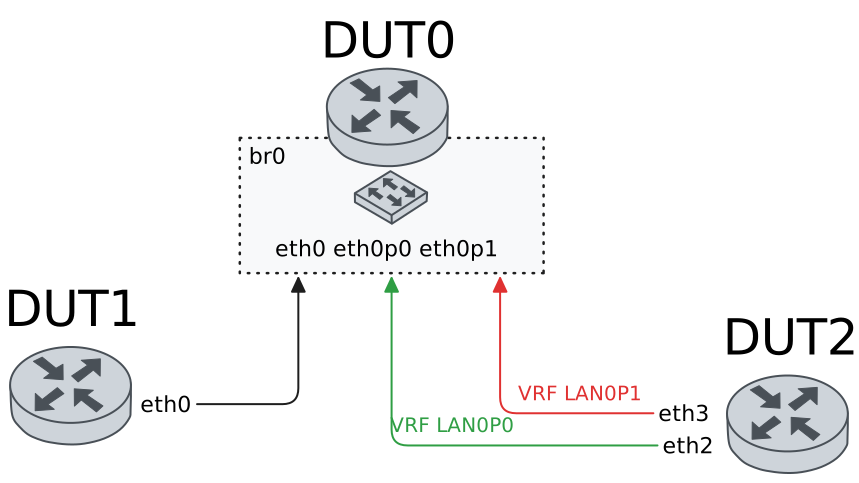
Test Hardware Bridge VLAN Aware
Description
In these scenarios, both DUT1 and DUT2 send tagged traffic (a VLAN-aware bridge is needed).
Scenario
Example 1
Step 1: Set the following configuration in DUT0 :
set interfaces bridge br0
set interfaces ethernet eth0p0 bridge-group bridge br0
set interfaces ethernet eth0p0 bridge-group vlan 100
set interfaces ethernet eth0p4 bridge-group bridge br0
set interfaces ethernet eth0p4 bridge-group vlan 100
set interfaces ethernet eth1 bridge-group bridge br0
set interfaces ethernet eth1 bridge-group vlan 100
set system login user admin authentication encrypted-password '$6$GSjsCj8gHLv$/VcqU6FLi6CT2Oxn0MJQ2C2tqnRDrYKNF8HIYWJp68nvXvPdFccDsT04.WtigUONbKYrgKg8d6rEs8PjljMkH0'
Step 2: Set the following configuration in DUT1 :
set interfaces ethernet eth0 vif 100 address 192.168.1.2/24
set system login user admin authentication encrypted-password '$6$GSjsCj8gHLv$/VcqU6FLi6CT2Oxn0MJQ2C2tqnRDrYKNF8HIYWJp68nvXvPdFccDsT04.WtigUONbKYrgKg8d6rEs8PjljMkH0'
Step 3: Set the following configuration in DUT2 :
set interfaces ethernet eth1 vif 100 address 192.168.1.3/24
set interfaces ethernet eth1 vif 100 vrf LAN_PORT0
set interfaces ethernet eth2 vif 100 address 192.168.1.4/24
set interfaces ethernet eth2 vif 100 vrf LAN_PORT1
set system login user admin authentication encrypted-password '$6$GSjsCj8gHLv$/VcqU6FLi6CT2Oxn0MJQ2C2tqnRDrYKNF8HIYWJp68nvXvPdFccDsT04.WtigUONbKYrgKg8d6rEs8PjljMkH0'
set system vrf LAN_PORT0
set system vrf LAN_PORT1
Step 4: Ping the IP address 192.168.1.4 from DUT2:
admin@DUT2$ ping 192.168.1.4 vrf LAN_PORT0 count 1 size 56 timeout 1Show output
ping: Warning: source address might be selected on device other than: LAN_PORT0
PING 192.168.1.4 (192.168.1.4) from 192.168.1.3 LAN_PORT0: 56(84) bytes of data.
64 bytes from 192.168.1.4: icmp_seq=1 ttl=64 time=0.831 ms

--- 192.168.1.4 ping statistics ---
1 packets transmitted, 1 received, 0% packet loss, time 0ms
rtt min/avg/max/mdev = 0.831/0.831/0.831/0.000 ms
Step 5: Ping the IP address 192.168.1.3 from DUT1:
admin@DUT1$ ping 192.168.1.3 count 1 size 56 timeout 1Show output
PING 192.168.1.3 (192.168.1.3) 56(84) bytes of data.
64 bytes from 192.168.1.3: icmp_seq=1 ttl=64 time=0.906 ms

--- 192.168.1.3 ping statistics ---
1 packets transmitted, 1 received, 0% packet loss, time 0ms
rtt min/avg/max/mdev = 0.906/0.906/0.906/0.000 ms
Step 6: Ping the IP address 192.168.1.4 from DUT1:
admin@DUT1$ ping 192.168.1.4 count 1 size 56 timeout 1Show output
PING 192.168.1.4 (192.168.1.4) 56(84) bytes of data.
64 bytes from 192.168.1.4: icmp_seq=1 ttl=64 time=1.63 ms

--- 192.168.1.4 ping statistics ---
1 packets transmitted, 1 received, 0% packet loss, time 0ms
rtt min/avg/max/mdev = 1.628/1.628/1.628/0.000 ms
Example 2
Step 1: Set the following configuration in DUT0 :
set interfaces bridge br0 hardware-offload eth0
set interfaces ethernet eth0p0 bridge-group bridge br0
set interfaces ethernet eth0p0 bridge-group vlan 100
set interfaces ethernet eth0p4 bridge-group bridge br0
set interfaces ethernet eth0p4 bridge-group vlan 100
set interfaces ethernet eth1 bridge-group bridge br0
set interfaces ethernet eth1 bridge-group vlan 100
set system login user admin authentication encrypted-password '$6$GSjsCj8gHLv$/VcqU6FLi6CT2Oxn0MJQ2C2tqnRDrYKNF8HIYWJp68nvXvPdFccDsT04.WtigUONbKYrgKg8d6rEs8PjljMkH0'
Step 2: Set the following configuration in DUT1 :
set interfaces ethernet eth0 vif 100 address 192.168.1.2/24
set system login user admin authentication encrypted-password '$6$GSjsCj8gHLv$/VcqU6FLi6CT2Oxn0MJQ2C2tqnRDrYKNF8HIYWJp68nvXvPdFccDsT04.WtigUONbKYrgKg8d6rEs8PjljMkH0'
Step 3: Set the following configuration in DUT2 :
set interfaces ethernet eth1 vif 100 address 192.168.1.3/24
set interfaces ethernet eth1 vif 100 vrf LAN_PORT0
set interfaces ethernet eth2 vif 100 address 192.168.1.4/24
set interfaces ethernet eth2 vif 100 vrf LAN_PORT1
set system login user admin authentication encrypted-password '$6$GSjsCj8gHLv$/VcqU6FLi6CT2Oxn0MJQ2C2tqnRDrYKNF8HIYWJp68nvXvPdFccDsT04.WtigUONbKYrgKg8d6rEs8PjljMkH0'
set system vrf LAN_PORT0
set system vrf LAN_PORT1
Step 4: Ping the IP address 192.168.1.4 from DUT2:
admin@DUT2$ ping 192.168.1.4 vrf LAN_PORT0 count 1 size 56 timeout 1Show output
ping: Warning: source address might be selected on device other than: LAN_PORT0
PING 192.168.1.4 (192.168.1.4) from 192.168.1.3 LAN_PORT0: 56(84) bytes of data.
64 bytes from 192.168.1.4: icmp_seq=1 ttl=64 time=0.699 ms

--- 192.168.1.4 ping statistics ---
1 packets transmitted, 1 received, 0% packet loss, time 0ms
rtt min/avg/max/mdev = 0.699/0.699/0.699/0.000 ms
Step 5: Ping the IP address 192.168.1.3 from DUT1:
admin@DUT1$ ping 192.168.1.3 count 1 size 56 timeout 1Show output
PING 192.168.1.3 (192.168.1.3) 56(84) bytes of data.
64 bytes from 192.168.1.3: icmp_seq=1 ttl=64 time=0.579 ms

--- 192.168.1.3 ping statistics ---
1 packets transmitted, 1 received, 0% packet loss, time 0ms
rtt min/avg/max/mdev = 0.579/0.579/0.579/0.000 ms
Step 6: Ping the IP address 192.168.1.4 from DUT1:
admin@DUT1$ ping 192.168.1.4 count 1 size 56 timeout 1Show output
PING 192.168.1.4 (192.168.1.4) 56(84) bytes of data.
64 bytes from 192.168.1.4: icmp_seq=1 ttl=64 time=1.07 ms

--- 192.168.1.4 ping statistics ---
1 packets transmitted, 1 received, 0% packet loss, time 0ms
rtt min/avg/max/mdev = 1.066/1.066/1.066/0.000 ms
Example 3
Step 1: Set the following configuration in DUT0 :
set interfaces bridge br0 vif 100 address 192.168.1.1/24
set interfaces bridge br0 vlan 100
set interfaces ethernet eth0p0 bridge-group bridge br0
set interfaces ethernet eth0p0 bridge-group vlan 100
set interfaces ethernet eth0p4 bridge-group bridge br0
set interfaces ethernet eth0p4 bridge-group vlan 100
set interfaces ethernet eth1 bridge-group bridge br0
set interfaces ethernet eth1 bridge-group vlan 100
set system login user admin authentication encrypted-password '$6$GSjsCj8gHLv$/VcqU6FLi6CT2Oxn0MJQ2C2tqnRDrYKNF8HIYWJp68nvXvPdFccDsT04.WtigUONbKYrgKg8d6rEs8PjljMkH0'
Step 2: Set the following configuration in DUT1 :
set interfaces ethernet eth0 vif 100 address 192.168.1.2/24
set system login user admin authentication encrypted-password '$6$GSjsCj8gHLv$/VcqU6FLi6CT2Oxn0MJQ2C2tqnRDrYKNF8HIYWJp68nvXvPdFccDsT04.WtigUONbKYrgKg8d6rEs8PjljMkH0'
Step 3: Set the following configuration in DUT2 :
set interfaces ethernet eth1 vif 100 address 192.168.1.3/24
set interfaces ethernet eth1 vif 100 vrf LAN_PORT0
set interfaces ethernet eth2 vif 100 address 192.168.1.4/24
set interfaces ethernet eth2 vif 100 vrf LAN_PORT1
set system login user admin authentication encrypted-password '$6$GSjsCj8gHLv$/VcqU6FLi6CT2Oxn0MJQ2C2tqnRDrYKNF8HIYWJp68nvXvPdFccDsT04.WtigUONbKYrgKg8d6rEs8PjljMkH0'
set system vrf LAN_PORT0
set system vrf LAN_PORT1
Step 4: Ping the IP address 192.168.1.4 from DUT2:
admin@DUT2$ ping 192.168.1.4 vrf LAN_PORT0 count 1 size 56 timeout 1Show output
ping: Warning: source address might be selected on device other than: LAN_PORT0
PING 192.168.1.4 (192.168.1.4) from 192.168.1.3 LAN_PORT0: 56(84) bytes of data.
64 bytes from 192.168.1.4: icmp_seq=1 ttl=64 time=1.76 ms

--- 192.168.1.4 ping statistics ---
1 packets transmitted, 1 received, 0% packet loss, time 0ms
rtt min/avg/max/mdev = 1.760/1.760/1.760/0.000 ms
Step 5: Ping the IP address 192.168.1.3 from DUT1:
admin@DUT1$ ping 192.168.1.3 count 1 size 56 timeout 1Show output
PING 192.168.1.3 (192.168.1.3) 56(84) bytes of data.
64 bytes from 192.168.1.3: icmp_seq=1 ttl=64 time=1.03 ms

--- 192.168.1.3 ping statistics ---
1 packets transmitted, 1 received, 0% packet loss, time 0ms
rtt min/avg/max/mdev = 1.029/1.029/1.029/0.000 ms
Step 6: Ping the IP address 192.168.1.4 from DUT1:
admin@DUT1$ ping 192.168.1.4 count 1 size 56 timeout 1Show output
PING 192.168.1.4 (192.168.1.4) 56(84) bytes of data.
64 bytes from 192.168.1.4: icmp_seq=1 ttl=64 time=0.898 ms

--- 192.168.1.4 ping statistics ---
1 packets transmitted, 1 received, 0% packet loss, time 0ms
rtt min/avg/max/mdev = 0.898/0.898/0.898/0.000 ms
Step 7: Ping the IP address 192.168.1.1 from DUT2:
admin@DUT2$ ping 192.168.1.1 vrf LAN_PORT0 count 1 size 56 timeout 1Show output
ping: Warning: source address might be selected on device other than: LAN_PORT0
PING 192.168.1.1 (192.168.1.1) from 192.168.1.3 LAN_PORT0: 56(84) bytes of data.
64 bytes from 192.168.1.1: icmp_seq=1 ttl=64 time=1.37 ms

--- 192.168.1.1 ping statistics ---
1 packets transmitted, 1 received, 0% packet loss, time 0ms
rtt min/avg/max/mdev = 1.367/1.367/1.367/0.000 ms
Step 8: Ping the IP address 192.168.1.1 from DUT2:
admin@DUT2$ ping 192.168.1.1 vrf LAN_PORT1 count 1 size 56 timeout 1Show output
ping: Warning: source address might be selected on device other than: LAN_PORT1
PING 192.168.1.1 (192.168.1.1) from 192.168.1.4 LAN_PORT1: 56(84) bytes of data.
64 bytes from 192.168.1.1: icmp_seq=1 ttl=64 time=1.33 ms

--- 192.168.1.1 ping statistics ---
1 packets transmitted, 1 received, 0% packet loss, time 0ms
rtt min/avg/max/mdev = 1.327/1.327/1.327/0.000 ms
Step 9: Ping the IP address 192.168.1.1 from DUT1:
admin@DUT1$ ping 192.168.1.1 count 1 size 56 timeout 1Show output
PING 192.168.1.1 (192.168.1.1) 56(84) bytes of data.
64 bytes from 192.168.1.1: icmp_seq=1 ttl=64 time=0.820 ms

--- 192.168.1.1 ping statistics ---
1 packets transmitted, 1 received, 0% packet loss, time 0ms
rtt min/avg/max/mdev = 0.820/0.820/0.820/0.000 ms
Example 4
Step 1: Set the following configuration in DUT0 :
set interfaces bridge br0 hardware-offload eth0
set interfaces bridge br0 vif 100 address 192.168.1.1/24
set interfaces bridge br0 vlan 100
set interfaces ethernet eth0p0 bridge-group bridge br0
set interfaces ethernet eth0p0 bridge-group vlan 100
set interfaces ethernet eth0p4 bridge-group bridge br0
set interfaces ethernet eth0p4 bridge-group vlan 100
set interfaces ethernet eth1 bridge-group bridge br0
set interfaces ethernet eth1 bridge-group vlan 100
set system login user admin authentication encrypted-password '$6$GSjsCj8gHLv$/VcqU6FLi6CT2Oxn0MJQ2C2tqnRDrYKNF8HIYWJp68nvXvPdFccDsT04.WtigUONbKYrgKg8d6rEs8PjljMkH0'
Step 2: Set the following configuration in DUT1 :
set interfaces ethernet eth0 vif 100 address 192.168.1.2/24
set system login user admin authentication encrypted-password '$6$GSjsCj8gHLv$/VcqU6FLi6CT2Oxn0MJQ2C2tqnRDrYKNF8HIYWJp68nvXvPdFccDsT04.WtigUONbKYrgKg8d6rEs8PjljMkH0'
Step 3: Set the following configuration in DUT2 :
set interfaces ethernet eth1 vif 100 address 192.168.1.3/24
set interfaces ethernet eth1 vif 100 vrf LAN_PORT0
set interfaces ethernet eth2 vif 100 address 192.168.1.4/24
set interfaces ethernet eth2 vif 100 vrf LAN_PORT1
set system login user admin authentication encrypted-password '$6$GSjsCj8gHLv$/VcqU6FLi6CT2Oxn0MJQ2C2tqnRDrYKNF8HIYWJp68nvXvPdFccDsT04.WtigUONbKYrgKg8d6rEs8PjljMkH0'
set system vrf LAN_PORT0
set system vrf LAN_PORT1
Step 4: Ping the IP address 192.168.1.4 from DUT2:
admin@DUT2$ ping 192.168.1.4 vrf LAN_PORT0 count 1 size 56 timeout 1Show output
ping: Warning: source address might be selected on device other than: LAN_PORT0
PING 192.168.1.4 (192.168.1.4) from 192.168.1.3 LAN_PORT0: 56(84) bytes of data.
64 bytes from 192.168.1.4: icmp_seq=1 ttl=64 time=0.559 ms

--- 192.168.1.4 ping statistics ---
1 packets transmitted, 1 received, 0% packet loss, time 0ms
rtt min/avg/max/mdev = 0.559/0.559/0.559/0.000 ms
Step 5: Ping the IP address 192.168.1.3 from DUT1:
admin@DUT1$ ping 192.168.1.3 count 1 size 56 timeout 1Show output
PING 192.168.1.3 (192.168.1.3) 56(84) bytes of data.
64 bytes from 192.168.1.3: icmp_seq=1 ttl=64 time=0.574 ms

--- 192.168.1.3 ping statistics ---
1 packets transmitted, 1 received, 0% packet loss, time 0ms
rtt min/avg/max/mdev = 0.574/0.574/0.574/0.000 ms
Step 6: Ping the IP address 192.168.1.4 from DUT1:
admin@DUT1$ ping 192.168.1.4 count 1 size 56 timeout 1Show output
PING 192.168.1.4 (192.168.1.4) 56(84) bytes of data.
64 bytes from 192.168.1.4: icmp_seq=1 ttl=64 time=1.01 ms

--- 192.168.1.4 ping statistics ---
1 packets transmitted, 1 received, 0% packet loss, time 0ms
rtt min/avg/max/mdev = 1.007/1.007/1.007/0.000 ms
Step 7: Ping the IP address 192.168.1.1 from DUT2:
admin@DUT2$ ping 192.168.1.1 vrf LAN_PORT0 count 1 size 56 timeout 1Show output
ping: Warning: source address might be selected on device other than: LAN_PORT0
PING 192.168.1.1 (192.168.1.1) from 192.168.1.3 LAN_PORT0: 56(84) bytes of data.
64 bytes from 192.168.1.1: icmp_seq=1 ttl=64 time=0.633 ms

--- 192.168.1.1 ping statistics ---
1 packets transmitted, 1 received, 0% packet loss, time 0ms
rtt min/avg/max/mdev = 0.633/0.633/0.633/0.000 ms
Step 8: Ping the IP address 192.168.1.1 from DUT2:
admin@DUT2$ ping 192.168.1.1 vrf LAN_PORT1 count 1 size 56 timeout 1Show output
ping: Warning: source address might be selected on device other than: LAN_PORT1
PING 192.168.1.1 (192.168.1.1) from 192.168.1.4 LAN_PORT1: 56(84) bytes of data.
64 bytes from 192.168.1.1: icmp_seq=1 ttl=64 time=0.695 ms

--- 192.168.1.1 ping statistics ---
1 packets transmitted, 1 received, 0% packet loss, time 0ms
rtt min/avg/max/mdev = 0.695/0.695/0.695/0.000 ms
Step 9: Ping the IP address 192.168.1.1 from DUT1:
admin@DUT1$ ping 192.168.1.1 count 1 size 56 timeout 1Show output
PING 192.168.1.1 (192.168.1.1) 56(84) bytes of data.
64 bytes from 192.168.1.1: icmp_seq=1 ttl=64 time=0.901 ms

--- 192.168.1.1 ping statistics ---
1 packets transmitted, 1 received, 0% packet loss, time 0ms
rtt min/avg/max/mdev = 0.901/0.901/0.901/0.000 ms
Test Hardware Bridge With PVID And Untagged
Description
In these scenarios, DUT2 sends tagged traffic, but DUT1 does not use VLANs.
Scenario
Example 1
Step 1: Set the following configuration in DUT0 :
set interfaces bridge br0
set interfaces ethernet eth0p0 bridge-group bridge br0
set interfaces ethernet eth0p0 bridge-group vlan 100
set interfaces ethernet eth0p4 bridge-group bridge br0
set interfaces ethernet eth0p4 bridge-group vlan 100
set interfaces ethernet eth1 bridge-group bridge br0
set interfaces ethernet eth1 bridge-group vlan 100 pvid
set interfaces ethernet eth1 bridge-group vlan 100 untagged
set system login user admin authentication encrypted-password '$6$GSjsCj8gHLv$/VcqU6FLi6CT2Oxn0MJQ2C2tqnRDrYKNF8HIYWJp68nvXvPdFccDsT04.WtigUONbKYrgKg8d6rEs8PjljMkH0'
Step 2: Set the following configuration in DUT1 :
set interfaces ethernet eth0 address 192.168.1.2/24
set system login user admin authentication encrypted-password '$6$GSjsCj8gHLv$/VcqU6FLi6CT2Oxn0MJQ2C2tqnRDrYKNF8HIYWJp68nvXvPdFccDsT04.WtigUONbKYrgKg8d6rEs8PjljMkH0'
Step 3: Set the following configuration in DUT2 :
set interfaces ethernet eth1 vif 100 address 192.168.1.3/24
set interfaces ethernet eth1 vif 100 vrf LAN_PORT0
set interfaces ethernet eth2 vif 100 address 192.168.1.4/24
set interfaces ethernet eth2 vif 100 vrf LAN_PORT1
set system login user admin authentication encrypted-password '$6$GSjsCj8gHLv$/VcqU6FLi6CT2Oxn0MJQ2C2tqnRDrYKNF8HIYWJp68nvXvPdFccDsT04.WtigUONbKYrgKg8d6rEs8PjljMkH0'
set system vrf LAN_PORT0
set system vrf LAN_PORT1
Step 4: Ping the IP address 192.168.1.4 from DUT2:
admin@DUT2$ ping 192.168.1.4 vrf LAN_PORT0 count 1 size 56 timeout 1Show output
ping: Warning: source address might be selected on device other than: LAN_PORT0
PING 192.168.1.4 (192.168.1.4) from 192.168.1.3 LAN_PORT0: 56(84) bytes of data.
64 bytes from 192.168.1.4: icmp_seq=1 ttl=64 time=1.01 ms

--- 192.168.1.4 ping statistics ---
1 packets transmitted, 1 received, 0% packet loss, time 0ms
rtt min/avg/max/mdev = 1.005/1.005/1.005/0.000 ms
Step 5: Ping the IP address 192.168.1.3 from DUT1:
admin@DUT1$ ping 192.168.1.3 count 1 size 56 timeout 1Show output
PING 192.168.1.3 (192.168.1.3) 56(84) bytes of data.
64 bytes from 192.168.1.3: icmp_seq=1 ttl=64 time=1.06 ms

--- 192.168.1.3 ping statistics ---
1 packets transmitted, 1 received, 0% packet loss, time 0ms
rtt min/avg/max/mdev = 1.059/1.059/1.059/0.000 ms
Step 6: Ping the IP address 192.168.1.4 from DUT1:
admin@DUT1$ ping 192.168.1.4 count 1 size 56 timeout 1Show output
PING 192.168.1.4 (192.168.1.4) 56(84) bytes of data.
64 bytes from 192.168.1.4: icmp_seq=1 ttl=64 time=1.00 ms

--- 192.168.1.4 ping statistics ---
1 packets transmitted, 1 received, 0% packet loss, time 0ms
rtt min/avg/max/mdev = 1.003/1.003/1.003/0.000 ms
Example 2
Step 1: Set the following configuration in DUT0 :
set interfaces bridge br0 hardware-offload eth0
set interfaces ethernet eth0p0 bridge-group bridge br0
set interfaces ethernet eth0p0 bridge-group vlan 100
set interfaces ethernet eth0p4 bridge-group bridge br0
set interfaces ethernet eth0p4 bridge-group vlan 100
set interfaces ethernet eth1 bridge-group bridge br0
set interfaces ethernet eth1 bridge-group vlan 100 pvid
set interfaces ethernet eth1 bridge-group vlan 100 untagged
set system login user admin authentication encrypted-password '$6$GSjsCj8gHLv$/VcqU6FLi6CT2Oxn0MJQ2C2tqnRDrYKNF8HIYWJp68nvXvPdFccDsT04.WtigUONbKYrgKg8d6rEs8PjljMkH0'
Step 2: Set the following configuration in DUT1 :
set interfaces ethernet eth0 address 192.168.1.2/24
set system login user admin authentication encrypted-password '$6$GSjsCj8gHLv$/VcqU6FLi6CT2Oxn0MJQ2C2tqnRDrYKNF8HIYWJp68nvXvPdFccDsT04.WtigUONbKYrgKg8d6rEs8PjljMkH0'
Step 3: Set the following configuration in DUT2 :
set interfaces ethernet eth1 vif 100 address 192.168.1.3/24
set interfaces ethernet eth1 vif 100 vrf LAN_PORT0
set interfaces ethernet eth2 vif 100 address 192.168.1.4/24
set interfaces ethernet eth2 vif 100 vrf LAN_PORT1
set system login user admin authentication encrypted-password '$6$GSjsCj8gHLv$/VcqU6FLi6CT2Oxn0MJQ2C2tqnRDrYKNF8HIYWJp68nvXvPdFccDsT04.WtigUONbKYrgKg8d6rEs8PjljMkH0'
set system vrf LAN_PORT0
set system vrf LAN_PORT1
Step 4: Ping the IP address 192.168.1.4 from DUT2:
admin@DUT2$ ping 192.168.1.4 vrf LAN_PORT0 count 1 size 56 timeout 1Show output
ping: Warning: source address might be selected on device other than: LAN_PORT0
PING 192.168.1.4 (192.168.1.4) from 192.168.1.3 LAN_PORT0: 56(84) bytes of data.
64 bytes from 192.168.1.4: icmp_seq=1 ttl=64 time=5.73 ms

--- 192.168.1.4 ping statistics ---
1 packets transmitted, 1 received, 0% packet loss, time 0ms
rtt min/avg/max/mdev = 5.725/5.725/5.725/0.000 ms
Step 5: Ping the IP address 192.168.1.3 from DUT1:
admin@DUT1$ ping 192.168.1.3 count 1 size 56 timeout 1Show output
PING 192.168.1.3 (192.168.1.3) 56(84) bytes of data.
64 bytes from 192.168.1.3: icmp_seq=1 ttl=64 time=3.37 ms

--- 192.168.1.3 ping statistics ---
1 packets transmitted, 1 received, 0% packet loss, time 0ms
rtt min/avg/max/mdev = 3.374/3.374/3.374/0.000 ms
Step 6: Ping the IP address 192.168.1.4 from DUT1:
admin@DUT1$ ping 192.168.1.4 count 1 size 56 timeout 1Show output
PING 192.168.1.4 (192.168.1.4) 56(84) bytes of data.
64 bytes from 192.168.1.4: icmp_seq=1 ttl=64 time=1.65 ms

--- 192.168.1.4 ping statistics ---
1 packets transmitted, 1 received, 0% packet loss, time 0ms
rtt min/avg/max/mdev = 1.645/1.645/1.645/0.000 ms
Example 3
Step 1: Set the following configuration in DUT0 :
set interfaces bridge br0 vif 100 address 192.168.1.1/24
set interfaces bridge br0 vlan 100
set interfaces ethernet eth0p0 bridge-group bridge br0
set interfaces ethernet eth0p0 bridge-group vlan 100
set interfaces ethernet eth0p4 bridge-group bridge br0
set interfaces ethernet eth0p4 bridge-group vlan 100
set interfaces ethernet eth1 bridge-group bridge br0
set interfaces ethernet eth1 bridge-group vlan 100 pvid
set interfaces ethernet eth1 bridge-group vlan 100 untagged
set system login user admin authentication encrypted-password '$6$GSjsCj8gHLv$/VcqU6FLi6CT2Oxn0MJQ2C2tqnRDrYKNF8HIYWJp68nvXvPdFccDsT04.WtigUONbKYrgKg8d6rEs8PjljMkH0'
Step 2: Set the following configuration in DUT1 :
set interfaces ethernet eth0 address 192.168.1.2/24
set system login user admin authentication encrypted-password '$6$GSjsCj8gHLv$/VcqU6FLi6CT2Oxn0MJQ2C2tqnRDrYKNF8HIYWJp68nvXvPdFccDsT04.WtigUONbKYrgKg8d6rEs8PjljMkH0'
Step 3: Set the following configuration in DUT2 :
set interfaces ethernet eth1 vif 100 address 192.168.1.3/24
set interfaces ethernet eth1 vif 100 vrf LAN_PORT0
set interfaces ethernet eth2 vif 100 address 192.168.1.4/24
set interfaces ethernet eth2 vif 100 vrf LAN_PORT1
set system login user admin authentication encrypted-password '$6$GSjsCj8gHLv$/VcqU6FLi6CT2Oxn0MJQ2C2tqnRDrYKNF8HIYWJp68nvXvPdFccDsT04.WtigUONbKYrgKg8d6rEs8PjljMkH0'
set system vrf LAN_PORT0
set system vrf LAN_PORT1
Step 4: Ping the IP address 192.168.1.4 from DUT2:
admin@DUT2$ ping 192.168.1.4 vrf LAN_PORT0 count 1 size 56 timeout 1Show output
ping: Warning: source address might be selected on device other than: LAN_PORT0
PING 192.168.1.4 (192.168.1.4) from 192.168.1.3 LAN_PORT0: 56(84) bytes of data.
64 bytes from 192.168.1.4: icmp_seq=1 ttl=64 time=0.838 ms

--- 192.168.1.4 ping statistics ---
1 packets transmitted, 1 received, 0% packet loss, time 0ms
rtt min/avg/max/mdev = 0.838/0.838/0.838/0.000 ms
Step 5: Ping the IP address 192.168.1.3 from DUT1:
admin@DUT1$ ping 192.168.1.3 count 1 size 56 timeout 1Show output
PING 192.168.1.3 (192.168.1.3) 56(84) bytes of data.
64 bytes from 192.168.1.3: icmp_seq=1 ttl=64 time=0.665 ms

--- 192.168.1.3 ping statistics ---
1 packets transmitted, 1 received, 0% packet loss, time 0ms
rtt min/avg/max/mdev = 0.665/0.665/0.665/0.000 ms
Step 6: Ping the IP address 192.168.1.4 from DUT1:
admin@DUT1$ ping 192.168.1.4 count 1 size 56 timeout 1Show output
PING 192.168.1.4 (192.168.1.4) 56(84) bytes of data.
64 bytes from 192.168.1.4: icmp_seq=1 ttl=64 time=0.893 ms

--- 192.168.1.4 ping statistics ---
1 packets transmitted, 1 received, 0% packet loss, time 0ms
rtt min/avg/max/mdev = 0.893/0.893/0.893/0.000 ms
Step 7: Ping the IP address 192.168.1.1 from DUT2:
admin@DUT2$ ping 192.168.1.1 vrf LAN_PORT0 count 1 size 56 timeout 1Show output
ping: Warning: source address might be selected on device other than: LAN_PORT0
PING 192.168.1.1 (192.168.1.1) from 192.168.1.3 LAN_PORT0: 56(84) bytes of data.
64 bytes from 192.168.1.1: icmp_seq=1 ttl=64 time=0.560 ms

--- 192.168.1.1 ping statistics ---
1 packets transmitted, 1 received, 0% packet loss, time 0ms
rtt min/avg/max/mdev = 0.560/0.560/0.560/0.000 ms
Step 8: Ping the IP address 192.168.1.1 from DUT2:
admin@DUT2$ ping 192.168.1.1 vrf LAN_PORT1 count 1 size 56 timeout 1Show output
ping: Warning: source address might be selected on device other than: LAN_PORT1
PING 192.168.1.1 (192.168.1.1) from 192.168.1.4 LAN_PORT1: 56(84) bytes of data.
64 bytes from 192.168.1.1: icmp_seq=1 ttl=64 time=1.38 ms

--- 192.168.1.1 ping statistics ---
1 packets transmitted, 1 received, 0% packet loss, time 0ms
rtt min/avg/max/mdev = 1.381/1.381/1.381/0.000 ms
Step 9: Ping the IP address 192.168.1.1 from DUT1:
admin@DUT1$ ping 192.168.1.1 count 1 size 56 timeout 1Show output
PING 192.168.1.1 (192.168.1.1) 56(84) bytes of data.
64 bytes from 192.168.1.1: icmp_seq=1 ttl=64 time=0.761 ms

--- 192.168.1.1 ping statistics ---
1 packets transmitted, 1 received, 0% packet loss, time 0ms
rtt min/avg/max/mdev = 0.761/0.761/0.761/0.000 ms
Example 4
Step 1: Set the following configuration in DUT0 :
set interfaces bridge br0 hardware-offload eth0
set interfaces bridge br0 vif 100 address 192.168.1.1/24
set interfaces bridge br0 vlan 100
set interfaces ethernet eth0p0 bridge-group bridge br0
set interfaces ethernet eth0p0 bridge-group vlan 100
set interfaces ethernet eth0p4 bridge-group bridge br0
set interfaces ethernet eth0p4 bridge-group vlan 100
set interfaces ethernet eth1 bridge-group bridge br0
set interfaces ethernet eth1 bridge-group vlan 100 pvid
set interfaces ethernet eth1 bridge-group vlan 100 untagged
set system login user admin authentication encrypted-password '$6$GSjsCj8gHLv$/VcqU6FLi6CT2Oxn0MJQ2C2tqnRDrYKNF8HIYWJp68nvXvPdFccDsT04.WtigUONbKYrgKg8d6rEs8PjljMkH0'
Step 2: Set the following configuration in DUT1 :
set interfaces ethernet eth0 address 192.168.1.2/24
set system login user admin authentication encrypted-password '$6$GSjsCj8gHLv$/VcqU6FLi6CT2Oxn0MJQ2C2tqnRDrYKNF8HIYWJp68nvXvPdFccDsT04.WtigUONbKYrgKg8d6rEs8PjljMkH0'
Step 3: Set the following configuration in DUT2 :
set interfaces ethernet eth1 vif 100 address 192.168.1.3/24
set interfaces ethernet eth1 vif 100 vrf LAN_PORT0
set interfaces ethernet eth2 vif 100 address 192.168.1.4/24
set interfaces ethernet eth2 vif 100 vrf LAN_PORT1
set system login user admin authentication encrypted-password '$6$GSjsCj8gHLv$/VcqU6FLi6CT2Oxn0MJQ2C2tqnRDrYKNF8HIYWJp68nvXvPdFccDsT04.WtigUONbKYrgKg8d6rEs8PjljMkH0'
set system vrf LAN_PORT0
set system vrf LAN_PORT1
Step 4: Ping the IP address 192.168.1.4 from DUT2:
admin@DUT2$ ping 192.168.1.4 vrf LAN_PORT0 count 1 size 56 timeout 1Show output
ping: Warning: source address might be selected on device other than: LAN_PORT0
PING 192.168.1.4 (192.168.1.4) from 192.168.1.3 LAN_PORT0: 56(84) bytes of data.
64 bytes from 192.168.1.4: icmp_seq=1 ttl=64 time=0.482 ms

--- 192.168.1.4 ping statistics ---
1 packets transmitted, 1 received, 0% packet loss, time 0ms
rtt min/avg/max/mdev = 0.482/0.482/0.482/0.000 ms
Step 5: Ping the IP address 192.168.1.3 from DUT1:
admin@DUT1$ ping 192.168.1.3 count 1 size 56 timeout 1Show output
PING 192.168.1.3 (192.168.1.3) 56(84) bytes of data.
64 bytes from 192.168.1.3: icmp_seq=1 ttl=64 time=0.562 ms

--- 192.168.1.3 ping statistics ---
1 packets transmitted, 1 received, 0% packet loss, time 0ms
rtt min/avg/max/mdev = 0.562/0.562/0.562/0.000 ms
Step 6: Ping the IP address 192.168.1.4 from DUT1:
admin@DUT1$ ping 192.168.1.4 count 1 size 56 timeout 1Show output
PING 192.168.1.4 (192.168.1.4) 56(84) bytes of data.
64 bytes from 192.168.1.4: icmp_seq=1 ttl=64 time=0.904 ms

--- 192.168.1.4 ping statistics ---
1 packets transmitted, 1 received, 0% packet loss, time 0ms
rtt min/avg/max/mdev = 0.904/0.904/0.904/0.000 ms
Step 7: Ping the IP address 192.168.1.1 from DUT2:
admin@DUT2$ ping 192.168.1.1 vrf LAN_PORT0 count 1 size 56 timeout 1Show output
ping: Warning: source address might be selected on device other than: LAN_PORT0
PING 192.168.1.1 (192.168.1.1) from 192.168.1.3 LAN_PORT0: 56(84) bytes of data.
64 bytes from 192.168.1.1: icmp_seq=1 ttl=64 time=0.549 ms

--- 192.168.1.1 ping statistics ---
1 packets transmitted, 1 received, 0% packet loss, time 0ms
rtt min/avg/max/mdev = 0.549/0.549/0.549/0.000 ms
Step 8: Ping the IP address 192.168.1.1 from DUT2:
admin@DUT2$ ping 192.168.1.1 vrf LAN_PORT1 count 1 size 56 timeout 1Show output
ping: Warning: source address might be selected on device other than: LAN_PORT1
PING 192.168.1.1 (192.168.1.1) from 192.168.1.4 LAN_PORT1: 56(84) bytes of data.
64 bytes from 192.168.1.1: icmp_seq=1 ttl=64 time=1.47 ms

--- 192.168.1.1 ping statistics ---
1 packets transmitted, 1 received, 0% packet loss, time 0ms
rtt min/avg/max/mdev = 1.473/1.473/1.473/0.000 ms
Step 9: Ping the IP address 192.168.1.1 from DUT1:
admin@DUT1$ ping 192.168.1.1 count 1 size 56 timeout 1Show output
PING 192.168.1.1 (192.168.1.1) 56(84) bytes of data.
64 bytes from 192.168.1.1: icmp_seq=1 ttl=64 time=0.771 ms

--- 192.168.1.1 ping statistics ---
1 packets transmitted, 1 received, 0% packet loss, time 0ms
rtt min/avg/max/mdev = 0.771/0.771/0.771/0.000 ms