Timeout
This scenario shows how to configure the MAB timeout parameter.
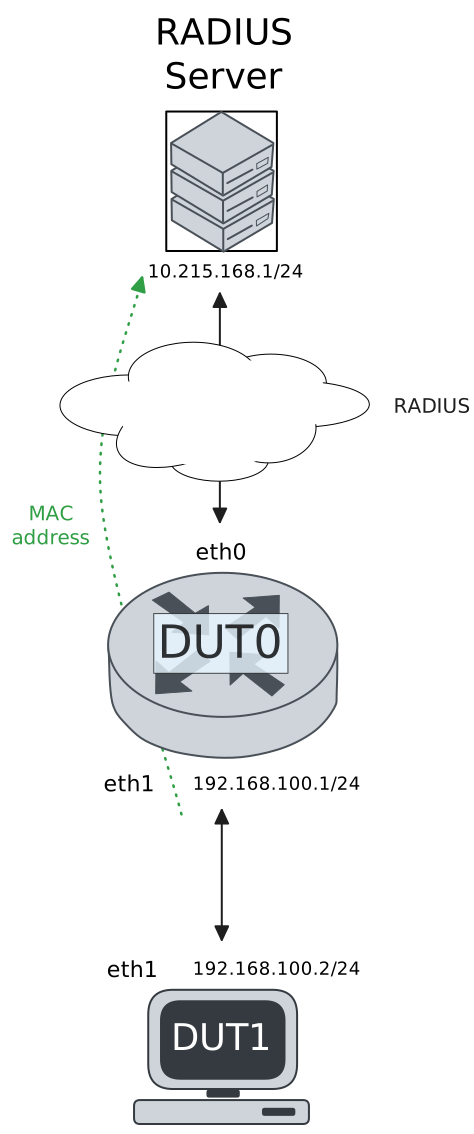
Test Slow MAB Transition
Description
This scenario shows how to configure a slow 802.1x to MAB transition.
Scenario
Step 1: Set the following configuration in DUT0 :
set interfaces ethernet eth0 address 10.215.168.64/24
set interfaces ethernet eth1 address 192.168.100.1/24
set interfaces ethernet eth1 authenticator 802.1x max-retransmissions 5
set interfaces ethernet eth1 authenticator aaa authentication list1
set interfaces ethernet eth1 authenticator log-level debug
set interfaces ethernet eth1 authenticator mab timeout 60
set interfaces ethernet eth1 authenticator mode 802.1x-MAB
set interfaces ethernet eth1 authenticator quiet-period 60
set interfaces ethernet eth1 authenticator reauth-period 0
set system aaa group radius radgroup1 server serv1
set system aaa list list1 method 1 group radius radgroup1
set system aaa server radius serv1 address 10.215.168.1
set system aaa server radius serv1 encrypted-key U2FsdGVkX1/3e+bZ4PkDTSZEDdhO2X7duQUW7fwZIrxf+U///DQePlg3pKrrNfSNYiINgbQ+05BMbci8A0vtOA==
set system login user admin authentication encrypted-password '$6$GSjsCj8gHLv$/VcqU6FLi6CT2Oxn0MJQ2C2tqnRDrYKNF8HIYWJp68nvXvPdFccDsT04.WtigUONbKYrgKg8d6rEs8PjljMkH0'
Step 2: Ping the IP address 10.215.168.1 from DUT0:
admin@DUT0$ ping 10.215.168.1 count 1 size 56 timeout 1Show output
PING 10.215.168.1 (10.215.168.1) 56(84) bytes of data.
64 bytes from 10.215.168.1: icmp_seq=1 ttl=64 time=0.382 ms

--- 10.215.168.1 ping statistics ---
1 packets transmitted, 1 received, 0% packet loss, time 0ms
rtt min/avg/max/mdev = 0.382/0.382/0.382/0.000 ms
Step 3: Set the following configuration in DUT1 :
set interfaces ethernet eth1 address 192.168.100.2/24
set interfaces ethernet eth1 supplicant encrypted-password U2FsdGVkX1/fPfafNlt0cN1GihSEHPpuWhqSioEJ1ug=
set interfaces ethernet eth1 supplicant username wrong
set system login user admin authentication encrypted-password '$6$GSjsCj8gHLv$/VcqU6FLi6CT2Oxn0MJQ2C2tqnRDrYKNF8HIYWJp68nvXvPdFccDsT04.WtigUONbKYrgKg8d6rEs8PjljMkH0'
Step 4: Run the command interfaces ethernet eth1 authenticator show stats on DUT0 and check whether the output matches the following regular expressions:
Authentication Successes\s+1
Authentication Mode\s+MAB
Show output
-------------------------------------------
         Field                  Value
-------------------------------------------
Access Challenges                         8
Authentication Backend               RADIUS
Authentication Failures                   1
Authentication Mode                     MAB
Authentication Status      Authorized (MAB)
Authentication Successes                  1
EAPoL frames (Rx)                        10
EAPoL frames (Tx)                        10
Quiet Period                             60
Reauthenticate                        FALSE
Reauthenticate Period                     0
Session Time                              0
Session User MAC          de:ad:be:ef:6c:11
Session User Name                     wrong
Step 5: Ping the IP address 192.168.100.1 from DUT1:
admin@DUT1$ ping 192.168.100.1 count 1 size 56 timeout 1Show output
PING 192.168.100.1 (192.168.100.1) 56(84) bytes of data.
64 bytes from 192.168.100.1: icmp_seq=1 ttl=64 time=0.441 ms

--- 192.168.100.1 ping statistics ---
1 packets transmitted, 1 received, 0% packet loss, time 0ms
rtt min/avg/max/mdev = 0.441/0.441/0.441/0.000 ms
Test Fast MAB Transition
Description
This scenario shows how to configure a fast 802.1x to MAB transition.
Scenario
Step 1: Set the following configuration in DUT0 :
set interfaces ethernet eth0 address 10.215.168.64/24
set interfaces ethernet eth1 address 192.168.100.1/24
set interfaces ethernet eth1 authenticator 802.1x max-retransmissions 2
set interfaces ethernet eth1 authenticator aaa authentication list1
set interfaces ethernet eth1 authenticator log-level debug
set interfaces ethernet eth1 authenticator mab timeout 5
set interfaces ethernet eth1 authenticator mode 802.1x-MAB
set interfaces ethernet eth1 authenticator quiet-period 60
set interfaces ethernet eth1 authenticator reauth-period 0
set system aaa group radius radgroup1 server serv1
set system aaa list list1 method 1 group radius radgroup1
set system aaa server radius serv1 address 10.215.168.1
set system aaa server radius serv1 encrypted-key U2FsdGVkX19MTMuJ1yQg+ZYIng3ZOzTZ1NJU8qd03c9xXq+iXWAnHJrpKsopdDQPynUXzcBUGoEhfney+6pyrg==
set system login user admin authentication encrypted-password '$6$GSjsCj8gHLv$/VcqU6FLi6CT2Oxn0MJQ2C2tqnRDrYKNF8HIYWJp68nvXvPdFccDsT04.WtigUONbKYrgKg8d6rEs8PjljMkH0'
Step 2: Ping the IP address 10.215.168.1 from DUT0:
admin@DUT0$ ping 10.215.168.1 count 1 size 56 timeout 1Show output
PING 10.215.168.1 (10.215.168.1) 56(84) bytes of data.
64 bytes from 10.215.168.1: icmp_seq=1 ttl=64 time=0.218 ms

--- 10.215.168.1 ping statistics ---
1 packets transmitted, 1 received, 0% packet loss, time 0ms
rtt min/avg/max/mdev = 0.218/0.218/0.218/0.000 ms
Step 3: Set the following configuration in DUT1 :
set interfaces ethernet eth1 address 192.168.100.2/24
set interfaces ethernet eth1 supplicant encrypted-password U2FsdGVkX19Bwsjm7wCN/UYryjW95RhxqjvGji5x6F0=
set interfaces ethernet eth1 supplicant username wrong
set system login user admin authentication encrypted-password '$6$GSjsCj8gHLv$/VcqU6FLi6CT2Oxn0MJQ2C2tqnRDrYKNF8HIYWJp68nvXvPdFccDsT04.WtigUONbKYrgKg8d6rEs8PjljMkH0'
Step 4: Run the command interfaces ethernet eth1 authenticator show stats on DUT0 and check whether the output matches the following regular expressions:
Authentication Successes\s+1
Authentication Mode\s+MAB
Show output
-------------------------------------------
         Field                  Value
-------------------------------------------
Access Challenges                         8
Authentication Backend               RADIUS
Authentication Failures                   1
Authentication Mode                     MAB
Authentication Status      Authorized (MAB)
Authentication Successes                  1
EAPoL frames (Rx)                        10
EAPoL frames (Tx)                        10
Quiet Period                             60
Reauthenticate                        FALSE
Reauthenticate Period                     0
Session Time                              0
Session User MAC          de:ad:be:ef:6c:11
Session User Name                     wrong
Step 5: Ping the IP address 192.168.100.1 from DUT1:
admin@DUT1$ ping 192.168.100.1 count 1 size 56 timeout 1Show output
PING 192.168.100.1 (192.168.100.1) 56(84) bytes of data.
64 bytes from 192.168.100.1: icmp_seq=1 ttl=64 time=0.703 ms

--- 192.168.100.1 ping statistics ---
1 packets transmitted, 1 received, 0% packet loss, time 0ms
rtt min/avg/max/mdev = 0.703/0.703/0.703/0.000 ms