Network Access Server
This scenario shows different Network Access Server (NAS) configurations: server failover and VRF-aware communication.
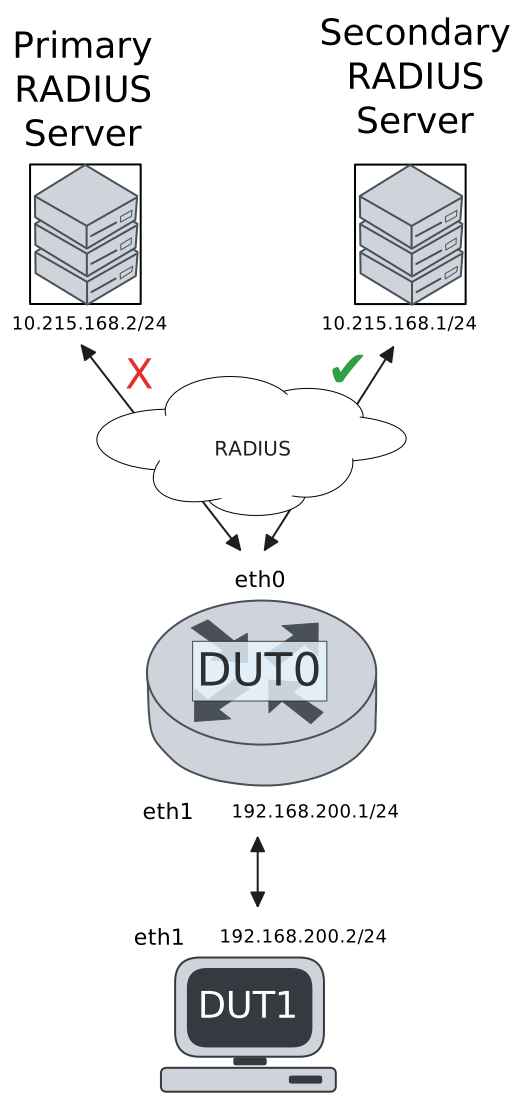
Test 802.1X Authentication Against NAS Through a VRF-Aware Interface
Description
This scenario shows how to configure 802.1X authentication. It focuses on Authenticator/NAS communication, when performed via an VRF-aware Ethernet interface.
Scenario
Step 1: Set the following configuration in DUT0 :
set interfaces ethernet eth0 address 10.215.168.64/24
set interfaces ethernet eth0 vrf WAN
set interfaces ethernet eth1 address 192.168.100.1/24
set interfaces ethernet eth1 authenticator 802.1x max-retransmissions 2
set interfaces ethernet eth1 authenticator aaa authentication list1
set interfaces ethernet eth1 authenticator log-level debug
set interfaces ethernet eth1 authenticator mode only-802.1x
set interfaces ethernet eth1 authenticator quiet-period 60
set interfaces ethernet eth1 authenticator reauth-period 0
set system aaa group radius radgroup1 local-vrf WAN
set system aaa group radius radgroup1 server serv1
set system aaa list list1 method 1 group radius radgroup1
set system aaa server radius serv1 address 10.215.168.1
set system aaa server radius serv1 encrypted-key U2FsdGVkX19IsIKUogrj82yl7duzM3BHO7/INKYhYyoGiXVAAMG0Mja90+jZFJLaIjLojouzwsa27+M1H2ySlw==
set system login user admin authentication encrypted-password '$6$GSjsCj8gHLv$/VcqU6FLi6CT2Oxn0MJQ2C2tqnRDrYKNF8HIYWJp68nvXvPdFccDsT04.WtigUONbKYrgKg8d6rEs8PjljMkH0'
set system vrf WAN
Step 2: Ping the IP address 10.215.168.1 from DUT0:
admin@DUT0$ ping 10.215.168.1 vrf WAN count 1 size 56 timeout 1Show output
ping: Warning: source address might be selected on device other than: WAN
PING 10.215.168.1 (10.215.168.1) from 10.215.168.64 WAN: 56(84) bytes of data.
64 bytes from 10.215.168.1: icmp_seq=1 ttl=64 time=1.10 ms

--- 10.215.168.1 ping statistics ---
1 packets transmitted, 1 received, 0% packet loss, time 0ms
rtt min/avg/max/mdev = 1.095/1.095/1.095/0.000 ms
Step 3: Set the following configuration in DUT1 :
set interfaces ethernet eth1 address 192.168.100.2/24
set interfaces ethernet eth1 supplicant encrypted-password U2FsdGVkX1/BdZ66zla9VYxVpcMRJjyZSbRNmN2J9eI=
set interfaces ethernet eth1 supplicant username testing
set system login user admin authentication encrypted-password '$6$GSjsCj8gHLv$/VcqU6FLi6CT2Oxn0MJQ2C2tqnRDrYKNF8HIYWJp68nvXvPdFccDsT04.WtigUONbKYrgKg8d6rEs8PjljMkH0'
Step 4: Run the command interfaces ethernet eth1 supplicant show status on DUT1 and check whether the output contains the following tokens:
AuthorizedShow output
---------------------------------------------------
        Field                      Value
---------------------------------------------------
EAP State                                   SUCCESS
EAP TLS Cipher          ECDHE-RSA-AES256-GCM-SHA384
EAP TLS Version                             TLSv1.2
PAE State                             AUTHENTICATED
Supplicant Port Status                   Authorized
WPA State                                 COMPLETED
Step 5: Run the command interfaces ethernet eth1 supplicant show stats on DUT1 and check whether the output matches the following regular expressions:
Port Status\s+AuthorizedShow output
-------------------------------
       Field           Value
-------------------------------
EAPoL Frames (Rx)            11
EAPoL Frames (Tx)            11
Invalid Frames (Rx)           0
Logoff Frames (Tx)            0
Port Status          Authorized
Req Frames (Rx)               9
Req ID Frames (Rx)            1
Resp Frames (Tx)             10
Start Frames (Tx)             1
Step 6: Run the command interfaces ethernet eth1 authenticator show stats on DUT0 and check whether the output matches the following regular expressions:
Authentication Successes\s+1
Authentication Mode\s+802\.1X
Show output
---------------------------------------------
         Field                   Value
---------------------------------------------
Access Challenges                           9
Authentication Backend                 RADIUS
Authentication Failures                     0
Authentication Mode                    802.1X
Authentication Status     Authorized (802.1X)
Authentication Successes                    1
EAPoL frames (Rx)                          11
EAPoL frames (Tx)                          11
Quiet Period                               60
Reauthenticate                          FALSE
Reauthenticate Period                       0
Session Time                                0
Session User MAC            de:ad:be:ef:6c:11
Session User Name                     testing
Step 7: Ping the IP address 192.168.100.1 from DUT1:
admin@DUT1$ ping 192.168.100.1 count 1 size 56 timeout 1Show output
PING 192.168.100.1 (192.168.100.1) 56(84) bytes of data.
64 bytes from 192.168.100.1: icmp_seq=1 ttl=64 time=0.721 ms

--- 192.168.100.1 ping statistics ---
1 packets transmitted, 1 received, 0% packet loss, time 0ms
rtt min/avg/max/mdev = 0.721/0.721/0.721/0.000 ms
Test MAB Authentication Against NAS Through a VRF-Aware Interface
Description
This scenario shows how to configure MAB authentication. It focuses on Authenticator/NAS communication, when performed via an VRF-aware Ethernet interface.
Scenario
Step 1: Set the following configuration in DUT0 :
set interfaces ethernet eth0 address 10.215.168.64/24
set interfaces ethernet eth0 vrf WAN
set interfaces ethernet eth1 address 192.168.100.1/24
set interfaces ethernet eth1 authenticator aaa authentication list1
set interfaces ethernet eth1 authenticator log-level debug
set interfaces ethernet eth1 authenticator mode only-MAB
set interfaces ethernet eth1 authenticator quiet-period 60
set interfaces ethernet eth1 authenticator reauth-period 0
set system aaa group radius radgroup1 local-vrf WAN
set system aaa group radius radgroup1 server serv1
set system aaa list list1 method 1 group radius radgroup1
set system aaa server radius serv1 address 10.215.168.1
set system aaa server radius serv1 encrypted-key U2FsdGVkX1+HfAPzrbvmI9WDQJLwmTGlsaxoKrJmkPzX1XAlEMoMSTMnQO7RQ+F5s1waGPsr7tI3Myl+PH/HUA==
set system login user admin authentication encrypted-password '$6$GSjsCj8gHLv$/VcqU6FLi6CT2Oxn0MJQ2C2tqnRDrYKNF8HIYWJp68nvXvPdFccDsT04.WtigUONbKYrgKg8d6rEs8PjljMkH0'
set system vrf WAN
Step 2: Ping the IP address 10.215.168.1 from DUT0:
admin@DUT0$ ping 10.215.168.1 vrf WAN count 1 size 56 timeout 1Show output
ping: Warning: source address might be selected on device other than: WAN
PING 10.215.168.1 (10.215.168.1) from 10.215.168.64 WAN: 56(84) bytes of data.
64 bytes from 10.215.168.1: icmp_seq=1 ttl=64 time=0.914 ms

--- 10.215.168.1 ping statistics ---
1 packets transmitted, 1 received, 0% packet loss, time 0ms
rtt min/avg/max/mdev = 0.914/0.914/0.914/0.000 ms
Step 3: Set the following configuration in DUT1 :
set interfaces ethernet eth1 address 192.168.100.2/24
set system login user admin authentication encrypted-password '$6$GSjsCj8gHLv$/VcqU6FLi6CT2Oxn0MJQ2C2tqnRDrYKNF8HIYWJp68nvXvPdFccDsT04.WtigUONbKYrgKg8d6rEs8PjljMkH0'
Step 4: Ping the IP address 192.168.100.1 from DUT1:
admin@DUT1$ ping 192.168.100.1 count 1 size 56 timeout 1Show output
PING 192.168.100.1 (192.168.100.1) 56(84) bytes of data.
64 bytes from 192.168.100.1: icmp_seq=1 ttl=64 time=0.459 ms

--- 192.168.100.1 ping statistics ---
1 packets transmitted, 1 received, 0% packet loss, time 0ms
rtt min/avg/max/mdev = 0.459/0.459/0.459/0.000 ms
Step 5: Run the command interfaces ethernet eth1 authenticator show stats on DUT0 and check whether the output matches the following regular expressions:
Authentication Successes\s+1
Authentication Mode\s+MAB
Show output
-------------------------------------------
         Field                  Value
-------------------------------------------
Access Challenges                         0
Authentication Backend               RADIUS
Authentication Failures                   0
Authentication Mode                     MAB
Authentication Status      Authorized (MAB)
Authentication Successes                  1
EAPoL frames (Rx)                         0
EAPoL frames (Tx)                         0
Quiet Period                             60
Reauthenticate                        FALSE
Reauthenticate Period                     0
Session Time                              0
Session User MAC          de:ad:be:ef:6c:11
Session User Name                       N/A
Step 6: Ping the IP address 192.168.100.1 from DUT1:
admin@DUT1$ ping 192.168.100.1 count 1 size 56 timeout 1Show output
PING 192.168.100.1 (192.168.100.1) 56(84) bytes of data.
64 bytes from 192.168.100.1: icmp_seq=1 ttl=64 time=0.333 ms

--- 192.168.100.1 ping statistics ---
1 packets transmitted, 1 received, 0% packet loss, time 0ms
rtt min/avg/max/mdev = 0.333/0.333/0.333/0.000 ms
Test 802.1X Authentication With Server Failover
Description
This scenario shows how to configure 802.1X authentication. The primary Nework Access Server is not reachable, so the secondary one is used instead.
Scenario
Step 1: Set the following configuration in DUT0 :
set interfaces ethernet eth0 address 10.215.168.64/24
set interfaces ethernet eth0 vrf WAN
set interfaces ethernet eth1 address 192.168.100.1/24
set interfaces ethernet eth1 authenticator 802.1x max-retransmissions 2
set interfaces ethernet eth1 authenticator aaa authentication list1
set interfaces ethernet eth1 authenticator log-level debug
set interfaces ethernet eth1 authenticator mode only-802.1x
set interfaces ethernet eth1 authenticator quiet-period 60
set interfaces ethernet eth1 authenticator reauth-period 0
set system aaa group radius radgroup0 local-vrf WAN
set system aaa group radius radgroup0 server MAIN
set system aaa group radius radgroup1 local-vrf WAN
set system aaa group radius radgroup1 server serv1
set system aaa list list1 method 0 group radius radgroup0
set system aaa list list1 method 1 group radius radgroup1
set system aaa server radius MAIN address 10.215.168.2
set system aaa server radius MAIN encrypted-key U2FsdGVkX1+hZC+5EI/KiPNyecOOazpp6D+yAuxt/wt19wrIWPjYcBnJnO98RN9+3x3aOsPsIwD50bDFKrrJSg==
set system aaa server radius serv1 address 10.215.168.1
set system aaa server radius serv1 encrypted-key U2FsdGVkX1/z+sIZ19gq1jNUyXUPyR5u1i+HmD38ujNTZio0KwLvw5IMdFIcOCHTOCBToUacsYU1Ov9HGObH9w==
set system login user admin authentication encrypted-password '$6$GSjsCj8gHLv$/VcqU6FLi6CT2Oxn0MJQ2C2tqnRDrYKNF8HIYWJp68nvXvPdFccDsT04.WtigUONbKYrgKg8d6rEs8PjljMkH0'
set system vrf WAN
Step 2: Ping the IP address 10.215.168.1 from DUT0:
admin@DUT0$ ping 10.215.168.1 vrf WAN count 1 size 56 timeout 1Show output
ping: Warning: source address might be selected on device other than: WAN
PING 10.215.168.1 (10.215.168.1) from 10.215.168.64 WAN: 56(84) bytes of data.
64 bytes from 10.215.168.1: icmp_seq=1 ttl=64 time=0.272 ms

--- 10.215.168.1 ping statistics ---
1 packets transmitted, 1 received, 0% packet loss, time 0ms
rtt min/avg/max/mdev = 0.272/0.272/0.272/0.000 ms
Step 3: Set the following configuration in DUT1 :
set interfaces ethernet eth1 address 192.168.100.2/24
set interfaces ethernet eth1 supplicant encrypted-password U2FsdGVkX19pUmMY8GKhBssFXEUSI7ytNDxusJ+fYiM=
set interfaces ethernet eth1 supplicant username testing
set system login user admin authentication encrypted-password '$6$GSjsCj8gHLv$/VcqU6FLi6CT2Oxn0MJQ2C2tqnRDrYKNF8HIYWJp68nvXvPdFccDsT04.WtigUONbKYrgKg8d6rEs8PjljMkH0'
Step 4: Run the command interfaces ethernet eth1 supplicant show status on DUT1 and check whether the output contains the following tokens:
AuthorizedShow output
---------------------------------------------------
        Field                      Value
---------------------------------------------------
EAP State                                   SUCCESS
EAP TLS Cipher          ECDHE-RSA-AES256-GCM-SHA384
EAP TLS Version                             TLSv1.2
PAE State                             AUTHENTICATED
Supplicant Port Status                   Authorized
WPA State                                 COMPLETED
Step 5: Run the command interfaces ethernet eth1 supplicant show stats on DUT1 and check whether the output matches the following regular expressions:
Port Status\s+AuthorizedShow output
-------------------------------
       Field           Value
-------------------------------
EAPoL Frames (Rx)            11
EAPoL Frames (Tx)            11
Invalid Frames (Rx)           0
Logoff Frames (Tx)            0
Port Status          Authorized
Req Frames (Rx)               9
Req ID Frames (Rx)            1
Resp Frames (Tx)             10
Start Frames (Tx)             1
Step 6: Run the command interfaces ethernet eth1 authenticator show stats on DUT0 and check whether the output matches the following regular expressions:
Authentication Successes\s+1
Authentication Mode\s+802\.1X
Show output
---------------------------------------------
         Field                   Value
---------------------------------------------
Access Challenges                           9
Authentication Backend                 RADIUS
Authentication Failures                     0
Authentication Mode                    802.1X
Authentication Status     Authorized (802.1X)
Authentication Successes                    1
EAPoL frames (Rx)                          11
EAPoL frames (Tx)                          11
Quiet Period                               60
Reauthenticate                          FALSE
Reauthenticate Period                       0
Session Time                                0
Session User MAC            de:ad:be:ef:6c:11
Session User Name                     testing
Step 7: Ping the IP address 192.168.100.1 from DUT1:
admin@DUT1$ ping 192.168.100.1 count 1 size 56 timeout 1Show output
PING 192.168.100.1 (192.168.100.1) 56(84) bytes of data.
64 bytes from 192.168.100.1: icmp_seq=1 ttl=64 time=0.696 ms

--- 192.168.100.1 ping statistics ---
1 packets transmitted, 1 received, 0% packet loss, time 0ms
rtt min/avg/max/mdev = 0.696/0.696/0.696/0.000 ms
Step 8: Run the command system journal show | grep "osdx hostapd" on DUT0 and check whether the output contains the following tokens:
No response from Authentication server 10.215.168.2Show output
Jun 03 08:55:47.993077 osdx hostapd[57299]: eth1: IEEE 802.11 Fetching hardware channel/rate support not supported.
Jun 03 08:55:47.993091 osdx hostapd[57299]: eth1: RADIUS Authentication server 10.215.168.2:1812
Jun 03 08:55:47.993369 osdx hostapd[57299]: connect[radius]: No route to host
Jun 03 08:55:47.993147 osdx hostapd[57299]: eth1: IEEE 802.1X Initializing IEEE 802.1X: mode=802.1X, eap_server=0, eap_quiet_period=60, eap_max_retrans=2
Jun 03 08:55:47.993151 osdx hostapd[57299]: eth1: IEEE 802.1X IEEE 802.1X: Enabling packet capture discovery mode
Jun 03 08:55:48.016940 osdx hostapd[57299]: Discovery mode enabled on eth1
Jun 03 08:55:48.017044 osdx hostapd[57299]: eth1: interface state UNINITIALIZED->ENABLED
Jun 03 08:55:48.017044 osdx hostapd[57299]: eth1: AP-ENABLED
Jun 03 08:55:51.361618 osdx hostapd[57300]: eth1: STA de:ad:be:ef:6c:11 IEEE 802.1X: New STA de:ad:be:ef:6c:11 added
Jun 03 08:55:51.361631 osdx hostapd[57300]: eth1: IEEE 802.1X IEEE 802.1X: Disabling packet capture discovery mode
Jun 03 08:55:51.389016 osdx hostapd[57300]: eth1: STA de:ad:be:ef:6c:11 IEEE 802.1X: start authentication
Jun 03 08:55:51.389049 osdx hostapd[57300]: eth1: STA 01:80:c2:00:00:03 IEEE 802.1X: disabling transmission of periodic EAP-Request frames
Jun 03 08:55:51.389070 osdx hostapd[57300]: eth1: STA de:ad:be:ef:6c:11 IEEE 802.1X: received EAPOL-Start from STA
Jun 03 08:55:51.389084 osdx hostapd[57300]: eth1: STA de:ad:be:ef:6c:11 IEEE 802.1X: unauthorizing port
Jun 03 08:55:51.389093 osdx hostapd[57300]: eth1: STA 01:80:c2:00:00:03 IEEE 802.1X: Trying RADIUS authentication
Jun 03 08:55:51.389108 osdx hostapd[57300]: IEEE 802.1X: OSDX-EAP: getDecision: no identity known yet -> CONTINUE
Jun 03 08:55:51.389121 osdx hostapd[57300]: eth1: STA de:ad:be:ef:6c:11 IEEE 802.1X: Sending EAP Packet (identifier 134)
Jun 03 08:55:51.389507 osdx hostapd[57300]: eth1: STA de:ad:be:ef:6c:11 IEEE 802.1X: received EAP packet (code=2 id=134 len=12) from STA: EAP Response-Identity (1)
Jun 03 08:55:51.389517 osdx hostapd[57300]: IEEE 802.1X: OSDX-EAP: getDecision: -> PASSTHROUGH
Jun 03 08:55:51.389522 osdx hostapd[57300]: eth1: STA de:ad:be:ef:6c:11 IEEE 802.1X: STA identity 'testing'
Jun 03 08:55:51.389549 osdx hostapd[57300]: eth1: RADIUS Authentication server 10.215.168.2:1812
Jun 03 08:55:51.391377 osdx hostapd[57300]: eth1: RADIUS Sending RADIUS message to authentication server
Jun 03 08:55:51.391414 osdx hostapd[57300]: eth1: RADIUS Next RADIUS client retransmit in 1 seconds
Jun 03 08:55:52.391493 osdx hostapd[57300]: eth1: STA de:ad:be:ef:6c:11 RADIUS: Resending RADIUS message (id=0)
Jun 03 08:55:52.391516 osdx hostapd[57300]: eth1: RADIUS Next RADIUS client retransmit in 2 seconds
Jun 03 08:55:54.391605 osdx hostapd[57300]: eth1: STA de:ad:be:ef:6c:11 RADIUS: Resending RADIUS message (id=0)
Jun 03 08:55:54.391635 osdx hostapd[57300]: eth1: RADIUS Next RADIUS client retransmit in 4 seconds
Jun 03 08:55:58.392115 osdx hostapd[57300]: eth1: RADIUS No response from Authentication server 10.215.168.2:1812 - failover (1º round)
Jun 03 08:55:58.392133 osdx hostapd[57300]: eth1: RADIUS Authentication server 10.215.168.1:1812
Jun 03 08:55:58.392181 osdx hostapd[57300]: eth1: STA de:ad:be:ef:6c:11 RADIUS: Resending RADIUS message (id=0)
Jun 03 08:55:58.392209 osdx hostapd[57300]: eth1: RADIUS Next RADIUS client retransmit in 2 seconds
Jun 03 08:55:58.392550 osdx hostapd[57300]: eth1: RADIUS Received 80 bytes from RADIUS server
Jun 03 08:55:58.392554 osdx hostapd[57300]: eth1: RADIUS Received RADIUS message
Jun 03 08:55:58.392558 osdx hostapd[57300]: eth1: STA de:ad:be:ef:6c:11 RADIUS: Received RADIUS packet matched with a pending request, round trip time 0.00 sec
Jun 03 08:55:58.392608 osdx hostapd[57300]: eth1: STA de:ad:be:ef:6c:11 IEEE 802.1X: decapsulated EAP packet (code=1 id=135 len=22) from RADIUS server: EAP-Request-MD5 (4)
Jun 03 08:55:58.392618 osdx hostapd[57300]: eth1: STA de:ad:be:ef:6c:11 IEEE 802.1X: Sending EAP Packet (identifier 135)
Jun 03 08:55:58.393024 osdx hostapd[57300]: eth1: STA de:ad:be:ef:6c:11 IEEE 802.1X: received EAP packet (code=2 id=135 len=6) from STA: EAP Response-unknown (3)
Jun 03 08:55:58.393106 osdx hostapd[57300]: eth1: RADIUS Sending RADIUS message to authentication server
Jun 03 08:55:58.393131 osdx hostapd[57300]: eth1: RADIUS Next RADIUS client retransmit in 1 seconds
Jun 03 08:55:58.393433 osdx hostapd[57300]: eth1: RADIUS Received 64 bytes from RADIUS server
Jun 03 08:55:58.393442 osdx hostapd[57300]: eth1: RADIUS Received RADIUS message
Jun 03 08:55:58.393446 osdx hostapd[57300]: eth1: STA de:ad:be:ef:6c:11 RADIUS: Received RADIUS packet matched with a pending request, round trip time 0.00 sec
Jun 03 08:55:58.393472 osdx hostapd[57300]: eth1: STA de:ad:be:ef:6c:11 IEEE 802.1X: decapsulated EAP packet (code=1 id=136 len=6) from RADIUS server: EAP-Request-PEAP (25)
Jun 03 08:55:58.393480 osdx hostapd[57300]: eth1: STA de:ad:be:ef:6c:11 IEEE 802.1X: Sending EAP Packet (identifier 136)
Jun 03 08:55:58.393925 osdx hostapd[57300]: eth1: STA de:ad:be:ef:6c:11 IEEE 802.1X: received EAP packet (code=2 id=136 len=194) from STA: EAP Response-PEAP (25)
Jun 03 08:55:58.393992 osdx hostapd[57300]: eth1: RADIUS Sending RADIUS message to authentication server
Jun 03 08:55:58.394011 osdx hostapd[57300]: eth1: RADIUS Next RADIUS client retransmit in 1 seconds
Jun 03 08:55:58.395369 osdx hostapd[57300]: eth1: RADIUS Received 1068 bytes from RADIUS server
Jun 03 08:55:58.395379 osdx hostapd[57300]: eth1: RADIUS Received RADIUS message
Jun 03 08:55:58.395383 osdx hostapd[57300]: eth1: STA de:ad:be:ef:6c:11 RADIUS: Received RADIUS packet matched with a pending request, round trip time 0.00 sec
Jun 03 08:55:58.395412 osdx hostapd[57300]: eth1: STA de:ad:be:ef:6c:11 IEEE 802.1X: decapsulated EAP packet (code=1 id=137 len=1004) from RADIUS server: EAP-Request-PEAP (25)
Jun 03 08:55:58.395421 osdx hostapd[57300]: eth1: STA de:ad:be:ef:6c:11 IEEE 802.1X: Sending EAP Packet (identifier 137)
Jun 03 08:55:58.395698 osdx hostapd[57300]: eth1: STA de:ad:be:ef:6c:11 IEEE 802.1X: received EAP packet (code=2 id=137 len=6) from STA: EAP Response-PEAP (25)
Jun 03 08:55:58.395750 osdx hostapd[57300]: eth1: RADIUS Sending RADIUS message to authentication server
Jun 03 08:55:58.395767 osdx hostapd[57300]: eth1: RADIUS Next RADIUS client retransmit in 1 seconds
Jun 03 08:55:58.395934 osdx hostapd[57300]: eth1: RADIUS Received 229 bytes from RADIUS server
Jun 03 08:55:58.395941 osdx hostapd[57300]: eth1: RADIUS Received RADIUS message
Jun 03 08:55:58.395945 osdx hostapd[57300]: eth1: STA de:ad:be:ef:6c:11 RADIUS: Received RADIUS packet matched with a pending request, round trip time 0.00 sec
Jun 03 08:55:58.395965 osdx hostapd[57300]: eth1: STA de:ad:be:ef:6c:11 IEEE 802.1X: decapsulated EAP packet (code=1 id=138 len=171) from RADIUS server: EAP-Request-PEAP (25)
Jun 03 08:55:58.395972 osdx hostapd[57300]: eth1: STA de:ad:be:ef:6c:11 IEEE 802.1X: Sending EAP Packet (identifier 138)
Jun 03 08:55:58.397915 osdx hostapd[57300]: eth1: STA de:ad:be:ef:6c:11 IEEE 802.1X: received EAP packet (code=2 id=138 len=103) from STA: EAP Response-PEAP (25)
Jun 03 08:55:58.397996 osdx hostapd[57300]: eth1: RADIUS Sending RADIUS message to authentication server
Jun 03 08:55:58.398013 osdx hostapd[57300]: eth1: RADIUS Next RADIUS client retransmit in 1 seconds
Jun 03 08:55:58.398367 osdx hostapd[57300]: eth1: RADIUS Received 115 bytes from RADIUS server
Jun 03 08:55:58.398373 osdx hostapd[57300]: eth1: RADIUS Received RADIUS message
Jun 03 08:55:58.398376 osdx hostapd[57300]: eth1: STA de:ad:be:ef:6c:11 RADIUS: Received RADIUS packet matched with a pending request, round trip time 0.00 sec
Jun 03 08:55:58.398397 osdx hostapd[57300]: eth1: STA de:ad:be:ef:6c:11 IEEE 802.1X: decapsulated EAP packet (code=1 id=139 len=57) from RADIUS server: EAP-Request-PEAP (25)
Jun 03 08:55:58.398404 osdx hostapd[57300]: eth1: STA de:ad:be:ef:6c:11 IEEE 802.1X: Sending EAP Packet (identifier 139)
Jun 03 08:55:58.398757 osdx hostapd[57300]: eth1: STA de:ad:be:ef:6c:11 IEEE 802.1X: received EAP packet (code=2 id=139 len=6) from STA: EAP Response-PEAP (25)
Jun 03 08:55:58.398805 osdx hostapd[57300]: eth1: RADIUS Sending RADIUS message to authentication server
Jun 03 08:55:58.398821 osdx hostapd[57300]: eth1: RADIUS Next RADIUS client retransmit in 1 seconds
Jun 03 08:55:58.398994 osdx hostapd[57300]: eth1: RADIUS Received 98 bytes from RADIUS server
Jun 03 08:55:58.398999 osdx hostapd[57300]: eth1: RADIUS Received RADIUS message
Jun 03 08:55:58.399002 osdx hostapd[57300]: eth1: STA de:ad:be:ef:6c:11 RADIUS: Received RADIUS packet matched with a pending request, round trip time 0.00 sec
Jun 03 08:55:58.399017 osdx hostapd[57300]: eth1: STA de:ad:be:ef:6c:11 IEEE 802.1X: decapsulated EAP packet (code=1 id=140 len=40) from RADIUS server: EAP-Request-PEAP (25)
Jun 03 08:55:58.399022 osdx hostapd[57300]: eth1: STA de:ad:be:ef:6c:11 IEEE 802.1X: Sending EAP Packet (identifier 140)
Jun 03 08:55:58.399236 osdx hostapd[57300]: eth1: STA de:ad:be:ef:6c:11 IEEE 802.1X: received EAP packet (code=2 id=140 len=43) from STA: EAP Response-PEAP (25)
Jun 03 08:55:58.399278 osdx hostapd[57300]: eth1: RADIUS Sending RADIUS message to authentication server
Jun 03 08:55:58.399292 osdx hostapd[57300]: eth1: RADIUS Next RADIUS client retransmit in 1 seconds
Jun 03 08:55:58.399472 osdx hostapd[57300]: eth1: RADIUS Received 131 bytes from RADIUS server
Jun 03 08:55:58.399477 osdx hostapd[57300]: eth1: RADIUS Received RADIUS message
Jun 03 08:55:58.399480 osdx hostapd[57300]: eth1: STA de:ad:be:ef:6c:11 RADIUS: Received RADIUS packet matched with a pending request, round trip time 0.00 sec
Jun 03 08:55:58.399495 osdx hostapd[57300]: eth1: STA de:ad:be:ef:6c:11 IEEE 802.1X: decapsulated EAP packet (code=1 id=141 len=73) from RADIUS server: EAP-Request-PEAP (25)
Jun 03 08:55:58.399501 osdx hostapd[57300]: eth1: STA de:ad:be:ef:6c:11 IEEE 802.1X: Sending EAP Packet (identifier 141)
Jun 03 08:55:58.399770 osdx hostapd[57300]: eth1: STA de:ad:be:ef:6c:11 IEEE 802.1X: received EAP packet (code=2 id=141 len=97) from STA: EAP Response-PEAP (25)
Jun 03 08:55:58.399808 osdx hostapd[57300]: eth1: RADIUS Sending RADIUS message to authentication server
Jun 03 08:55:58.399820 osdx hostapd[57300]: eth1: RADIUS Next RADIUS client retransmit in 1 seconds
Jun 03 08:55:58.400024 osdx hostapd[57300]: eth1: RADIUS Received 140 bytes from RADIUS server
Jun 03 08:55:58.400034 osdx hostapd[57300]: eth1: RADIUS Received RADIUS message
Jun 03 08:55:58.400038 osdx hostapd[57300]: eth1: STA de:ad:be:ef:6c:11 RADIUS: Received RADIUS packet matched with a pending request, round trip time 0.00 sec
Jun 03 08:55:58.400061 osdx hostapd[57300]: eth1: STA de:ad:be:ef:6c:11 IEEE 802.1X: decapsulated EAP packet (code=1 id=142 len=82) from RADIUS server: EAP-Request-PEAP (25)
Jun 03 08:55:58.400068 osdx hostapd[57300]: eth1: STA de:ad:be:ef:6c:11 IEEE 802.1X: Sending EAP Packet (identifier 142)
Jun 03 08:55:58.400299 osdx hostapd[57300]: eth1: STA de:ad:be:ef:6c:11 IEEE 802.1X: received EAP packet (code=2 id=142 len=37) from STA: EAP Response-PEAP (25)
Jun 03 08:55:58.400344 osdx hostapd[57300]: eth1: RADIUS Sending RADIUS message to authentication server
Jun 03 08:55:58.400359 osdx hostapd[57300]: eth1: RADIUS Next RADIUS client retransmit in 1 seconds
Jun 03 08:55:58.400523 osdx hostapd[57300]: eth1: RADIUS Received 104 bytes from RADIUS server
Jun 03 08:55:58.400528 osdx hostapd[57300]: eth1: RADIUS Received RADIUS message
Jun 03 08:55:58.400531 osdx hostapd[57300]: eth1: STA de:ad:be:ef:6c:11 RADIUS: Received RADIUS packet matched with a pending request, round trip time 0.00 sec
Jun 03 08:55:58.400546 osdx hostapd[57300]: eth1: STA de:ad:be:ef:6c:11 IEEE 802.1X: decapsulated EAP packet (code=1 id=143 len=46) from RADIUS server: EAP-Request-PEAP (25)
Jun 03 08:55:58.400553 osdx hostapd[57300]: eth1: STA de:ad:be:ef:6c:11 IEEE 802.1X: Sending EAP Packet (identifier 143)
Jun 03 08:55:58.400797 osdx hostapd[57300]: eth1: STA de:ad:be:ef:6c:11 IEEE 802.1X: received EAP packet (code=2 id=143 len=46) from STA: EAP Response-PEAP (25)
Jun 03 08:55:58.400841 osdx hostapd[57300]: eth1: RADIUS Sending RADIUS message to authentication server
Jun 03 08:55:58.400854 osdx hostapd[57300]: eth1: RADIUS Next RADIUS client retransmit in 1 seconds
Jun 03 08:55:58.401094 osdx hostapd[57300]: eth1: RADIUS Received 175 bytes from RADIUS server
Jun 03 08:55:58.401100 osdx hostapd[57300]: eth1: RADIUS Received RADIUS message
Jun 03 08:55:58.401103 osdx hostapd[57300]: eth1: STA de:ad:be:ef:6c:11 RADIUS: Received RADIUS packet matched with a pending request, round trip time 0.00 sec
Jun 03 08:55:58.401138 osdx hostapd[57300]: eth1: STA de:ad:be:ef:6c:11 IEEE 802.1X: old identity 'testing' updated with User-Name from Access-Accept 'testing'
Jun 03 08:55:58.401144 osdx hostapd[57300]: eth1: STA de:ad:be:ef:6c:11 IEEE 802.1X: decapsulated EAP packet (code=3 id=143 len=4) from RADIUS server: EAP Success
Jun 03 08:55:58.401165 osdx hostapd[57300]: eth1: STA de:ad:be:ef:6c:11 IEEE 802.1X: Sending EAP Packet (identifier 143)
Jun 03 08:55:58.401180 osdx hostapd[57300]: eth1: STA de:ad:be:ef:6c:11 IEEE 802.1X: authorizing port
Jun 03 08:55:58.401183 osdx hostapd[57300]: eth1: STA de:ad:be:ef:6c:11 RADIUS: starting accounting session 3BB025ABD260F4A8
Jun 03 08:55:58.401186 osdx hostapd[57300]: eth1: STA de:ad:be:ef:6c:11 IEEE 802.1X: authenticated - EAP type: 25 (PEAP)
Test MAB Authentication With Server Failover
Description
This scenario shows how to configure MAB authentication. The primary Nework Access Server is not reachable, so the secondary one is used instead.
Scenario
Step 1: Set the following configuration in DUT0 :
set interfaces ethernet eth0 address 10.215.168.64/24
set interfaces ethernet eth0 vrf WAN
set interfaces ethernet eth1 address 192.168.100.1/24
set interfaces ethernet eth1 authenticator aaa authentication list1
set interfaces ethernet eth1 authenticator log-level debug
set interfaces ethernet eth1 authenticator mode only-MAB
set interfaces ethernet eth1 authenticator quiet-period 60
set interfaces ethernet eth1 authenticator reauth-period 0
set system aaa group radius radgroup0 local-vrf WAN
set system aaa group radius radgroup0 server MAIN
set system aaa group radius radgroup1 local-vrf WAN
set system aaa group radius radgroup1 server serv1
set system aaa list list1 method 0 group radius radgroup0
set system aaa list list1 method 1 group radius radgroup1
set system aaa server radius MAIN address 10.215.168.2
set system aaa server radius MAIN encrypted-key U2FsdGVkX18JTtm1nyG5LumoHfVN6s/Etvg2Lf3/BhdVbrt8JkljRw9Jqycq0sps3lLca0EBPN4DXeKMd9bM3w==
set system aaa server radius serv1 address 10.215.168.1
set system aaa server radius serv1 encrypted-key U2FsdGVkX19mhcpV4fpJ1SCobqlNygCm44DX8qgzp2ykrGhQh/A/Cwp3q+OA97HDJITzw/Jg5uLIFXIjJ/GSvw==
set system login user admin authentication encrypted-password '$6$GSjsCj8gHLv$/VcqU6FLi6CT2Oxn0MJQ2C2tqnRDrYKNF8HIYWJp68nvXvPdFccDsT04.WtigUONbKYrgKg8d6rEs8PjljMkH0'
set system vrf WAN
Step 2: Ping the IP address 10.215.168.1 from DUT0:
admin@DUT0$ ping 10.215.168.1 vrf WAN count 1 size 56 timeout 1Show output
ping: Warning: source address might be selected on device other than: WAN
PING 10.215.168.1 (10.215.168.1) from 10.215.168.64 WAN: 56(84) bytes of data.
64 bytes from 10.215.168.1: icmp_seq=1 ttl=64 time=1.05 ms

--- 10.215.168.1 ping statistics ---
1 packets transmitted, 1 received, 0% packet loss, time 0ms
rtt min/avg/max/mdev = 1.047/1.047/1.047/0.000 ms
Step 3: Set the following configuration in DUT1 :
set interfaces ethernet eth1 address 192.168.100.2/24
set system login user admin authentication encrypted-password '$6$GSjsCj8gHLv$/VcqU6FLi6CT2Oxn0MJQ2C2tqnRDrYKNF8HIYWJp68nvXvPdFccDsT04.WtigUONbKYrgKg8d6rEs8PjljMkH0'
Step 4: Run the command interfaces ethernet eth1 authenticator show stats on DUT0 and check whether the output matches the following regular expressions:
Authentication Successes\s+1
Authentication Mode\s+MAB
Show output
-------------------------------------------
         Field                  Value
-------------------------------------------
Access Challenges                         0
Authentication Backend               RADIUS
Authentication Failures                   0
Authentication Mode                     MAB
Authentication Status      Authorized (MAB)
Authentication Successes                  1
EAPoL frames (Rx)                         0
EAPoL frames (Tx)                         0
Quiet Period                             60
Reauthenticate                        FALSE
Reauthenticate Period                     0
Session Time                              0
Session User MAC          de:ad:be:ef:6c:11
Session User Name                       N/A
Step 5: Ping the IP address 192.168.100.1 from DUT1:
admin@DUT1$ ping 192.168.100.1 count 1 size 56 timeout 1Show output
PING 192.168.100.1 (192.168.100.1) 56(84) bytes of data.
64 bytes from 192.168.100.1: icmp_seq=1 ttl=64 time=0.255 ms

--- 192.168.100.1 ping statistics ---
1 packets transmitted, 1 received, 0% packet loss, time 0ms
rtt min/avg/max/mdev = 0.255/0.255/0.255/0.000 ms
Step 6: Run the command system journal show | grep "osdx hostapd" on DUT0 and check whether the output contains the following tokens:
No response from Authentication server 10.215.168.2Show output
Jun 03 08:56:09.596605 osdx hostapd[57993]: eth1: IEEE 802.11 Fetching hardware channel/rate support not supported.
Jun 03 08:56:09.596629 osdx hostapd[57993]: eth1: RADIUS Authentication server 10.215.168.2:1812
Jun 03 08:56:09.596962 osdx hostapd[57993]: connect[radius]: No route to host
Jun 03 08:56:09.596673 osdx hostapd[57993]: eth1: IEEE 802.1X Initializing IEEE 802.1X: mode=MAB-only, eap_server=0, eap_quiet_period=60, eap_max_retrans=5
Jun 03 08:56:09.596688 osdx hostapd[57993]: eth1: IEEE 802.1X IEEE 802.1X: Enabling packet capture discovery mode
Jun 03 08:56:09.616376 osdx hostapd[57993]: Discovery mode enabled on eth1
Jun 03 08:56:09.616472 osdx hostapd[57993]: eth1: interface state UNINITIALIZED->ENABLED
Jun 03 08:56:09.616472 osdx hostapd[57993]: eth1: AP-ENABLED
Jun 03 08:56:14.616628 osdx hostapd[57994]: eth1: STA de:ad:be:ef:6c:11 DRIVER: Device discovered, triggering MAB authentication
Jun 03 08:56:14.616670 osdx hostapd[57994]: eth1: STA de:ad:be:ef:6c:11 IEEE 802.1X: New STA de:ad:be:ef:6c:11 added
Jun 03 08:56:14.616679 osdx hostapd[57994]: eth1: IEEE 802.1X IEEE 802.1X: Disabling packet capture discovery mode
Jun 03 08:56:14.632405 osdx hostapd[57994]: eth1: STA de:ad:be:ef:6c:11 IEEE 802.1X: MAB-only mode: Starting MAB authentication
Jun 03 08:56:14.632438 osdx hostapd[57994]: eth1: STA de:ad:be:ef:6c:11 IEEE 802.1X: MAB: Starting RADIUS query
Jun 03 08:56:14.632452 osdx hostapd[57994]: eth1: STA de:ad:be:ef:6c:11 IEEE 802.1X: MAB: User-Name = de:ad:be:ef:6c:11
Jun 03 08:56:14.634165 osdx hostapd[57994]: eth1: STA de:ad:be:ef:6c:11 IEEE 802.1X: MAB: User-Password = de:ad:be:ef:6c:11
Jun 03 08:56:14.634176 osdx hostapd[57994]: eth1: RADIUS Authentication server 10.215.168.2:1812
Jun 03 08:56:14.634246 osdx hostapd[57994]: eth1: RADIUS Sending RADIUS message to authentication server
Jun 03 08:56:14.634281 osdx hostapd[57994]: eth1: RADIUS Next RADIUS client retransmit in 1 seconds
Jun 03 08:56:15.634367 osdx hostapd[57994]: eth1: STA de:ad:be:ef:6c:11 RADIUS: Resending RADIUS message (id=128)
Jun 03 08:56:15.634399 osdx hostapd[57994]: eth1: RADIUS Next RADIUS client retransmit in 2 seconds
Jun 03 08:56:17.634625 osdx hostapd[57994]: eth1: STA de:ad:be:ef:6c:11 RADIUS: Resending RADIUS message (id=128)
Jun 03 08:56:17.634657 osdx hostapd[57994]: eth1: RADIUS Next RADIUS client retransmit in 4 seconds
Jun 03 08:56:21.635607 osdx hostapd[57994]: eth1: RADIUS No response from Authentication server 10.215.168.2:1812 - failover (1º round)
Jun 03 08:56:21.635627 osdx hostapd[57994]: eth1: RADIUS Authentication server 10.215.168.1:1812
Jun 03 08:56:21.635678 osdx hostapd[57994]: eth1: STA de:ad:be:ef:6c:11 RADIUS: Resending RADIUS message (id=128)
Jun 03 08:56:21.635712 osdx hostapd[57994]: eth1: RADIUS Next RADIUS client retransmit in 2 seconds
Jun 03 08:56:21.636042 osdx hostapd[57994]: eth1: RADIUS Received 20 bytes from RADIUS server
Jun 03 08:56:21.636054 osdx hostapd[57994]: eth1: RADIUS Received RADIUS message
Jun 03 08:56:21.636059 osdx hostapd[57994]: eth1: STA de:ad:be:ef:6c:11 RADIUS: Received RADIUS packet matched with a pending request, round trip time 0.00 sec
Jun 03 08:56:21.636064 osdx hostapd[57994]: eth1: STA de:ad:be:ef:6c:11 IEEE 802.1X: MAB: Processing RADIUS response
Jun 03 08:56:21.636102 osdx hostapd[57994]: eth1: STA de:ad:be:ef:6c:11 IEEE 802.1X: MAB: Identity set to 'de:ad:be:ef:6c:11'
Jun 03 08:56:21.636124 osdx hostapd[57994]: eth1: STA de:ad:be:ef:6c:11 IEEE 802.1X: MAB: station successfully authenticated
Jun 03 08:56:21.636128 osdx hostapd[57994]: eth1: IEEE 802.1X IEEE 802.1X: Discovery already disabled
Jun 03 08:56:21.636139 osdx hostapd[57994]: eth1: STA de:ad:be:ef:6c:11 IEEE 802.1X: authorizing port
Jun 03 08:56:21.636143 osdx hostapd[57994]: eth1: STA de:ad:be:ef:6c:11 RADIUS: starting accounting session E10B42AB9B7FD07A