Relay
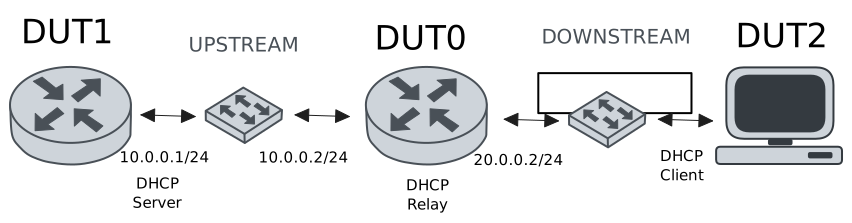
This scenario shows how to configure service dhcp-relay. The
relay agent must be used when the DHCP server and the DHCP
clients are not connected to the same layer 2 domain.
Test DHCP Relay
Description
This example demonstrates how to configure a DHCP relay instance in DUT0 to forward DHCP requests from DUT2 to DUT1.
Scenario
Step 1: Set the following configuration in DUT0 :
set interfaces ethernet eth0 address 10.0.0.2/24
set interfaces ethernet eth1 vif 200 address 20.0.0.2/24
set service dhcp-relay INS downstream-interface eth1.200
set service dhcp-relay INS server 10.0.0.1
set service dhcp-relay INS upstream-interface eth0
set system login user admin authentication encrypted-password '$6$GSjsCj8gHLv$/VcqU6FLi6CT2Oxn0MJQ2C2tqnRDrYKNF8HIYWJp68nvXvPdFccDsT04.WtigUONbKYrgKg8d6rEs8PjljMkH0'
Step 2: Set the following configuration in DUT1 :
set interfaces ethernet eth0 address 10.0.0.1/24
set protocols static route 0.0.0.0/0 next-hop 10.0.0.2
set service dhcp-server shared-network dummy subnet 10.0.0.1/32
set service dhcp-server shared-network remote subnet 20.0.0.0/24 start 20.0.0.50 stop 20.0.0.50
set system login user admin authentication encrypted-password '$6$GSjsCj8gHLv$/VcqU6FLi6CT2Oxn0MJQ2C2tqnRDrYKNF8HIYWJp68nvXvPdFccDsT04.WtigUONbKYrgKg8d6rEs8PjljMkH0'
Step 3: Set the following configuration in DUT2 :
set interfaces ethernet eth1 vif 200 address dhcp
set system login user admin authentication encrypted-password '$6$GSjsCj8gHLv$/VcqU6FLi6CT2Oxn0MJQ2C2tqnRDrYKNF8HIYWJp68nvXvPdFccDsT04.WtigUONbKYrgKg8d6rEs8PjljMkH0'
Step 4: Ping the IP address 10.0.0.1 from DUT0:
admin@DUT0$ ping 10.0.0.1 count 1 size 56 timeout 1Show output
PING 10.0.0.1 (10.0.0.1) 56(84) bytes of data.
64 bytes from 10.0.0.1: icmp_seq=1 ttl=64 time=0.392 ms

--- 10.0.0.1 ping statistics ---
1 packets transmitted, 1 received, 0% packet loss, time 0ms
rtt min/avg/max/mdev = 0.392/0.392/0.392/0.000 ms
Step 5: Run the command interfaces ethernet show on DUT2 and check whether the output contains the following tokens:
20.0.0.50Show output
---------------------------------------------------------------------
  Name             IP Address           Admin  Oper  Vrf  Description
---------------------------------------------------------------------
    eth0                                down   down
    eth1  fe80::dcad:beff:feef:6c21/64  up     up
eth1.200  20.0.0.50/24                  up     up
          fe80::dcad:beff:feef:6c21/64
    eth2                                down   down
    eth3                                down   down
Test DHCP Relay With Giaddr
Description
This example demonstrates how to set the gateway IP address (giaddr) in the IP address. This value must be set in an IP address that the DHCP server can reach.
Scenario
Step 1: Set the following configuration in DUT0 :
set interfaces ethernet eth0 address 10.0.0.2/24
set interfaces ethernet eth1 vif 200 address 20.0.0.2/24
set interfaces ethernet eth1 vif 200 address 20.0.0.3/24
set service dhcp-relay INS downstream-interface eth1.200
set service dhcp-relay INS server 10.0.0.1 giaddr 20.0.0.3
set service dhcp-relay INS upstream-interface eth0
set system login user admin authentication encrypted-password '$6$GSjsCj8gHLv$/VcqU6FLi6CT2Oxn0MJQ2C2tqnRDrYKNF8HIYWJp68nvXvPdFccDsT04.WtigUONbKYrgKg8d6rEs8PjljMkH0'
Step 2: Set the following configuration in DUT1 :
set interfaces ethernet eth0 address 10.0.0.1/24
set protocols static route 0.0.0.0/0 next-hop 10.0.0.2
set service dhcp-server shared-network dummy subnet 10.0.0.1/32
set service dhcp-server shared-network remote subnet 20.0.0.0/24 start 20.0.0.50 stop 20.0.0.50
set system login user admin authentication encrypted-password '$6$GSjsCj8gHLv$/VcqU6FLi6CT2Oxn0MJQ2C2tqnRDrYKNF8HIYWJp68nvXvPdFccDsT04.WtigUONbKYrgKg8d6rEs8PjljMkH0'
Step 3: Set the following configuration in DUT2 :
set interfaces ethernet eth1 vif 200 address dhcp
set system login user admin authentication encrypted-password '$6$GSjsCj8gHLv$/VcqU6FLi6CT2Oxn0MJQ2C2tqnRDrYKNF8HIYWJp68nvXvPdFccDsT04.WtigUONbKYrgKg8d6rEs8PjljMkH0'
Step 4: Ping the IP address 10.0.0.1 from DUT0:
admin@DUT0$ ping 10.0.0.1 count 1 size 56 timeout 1Show output
PING 10.0.0.1 (10.0.0.1) 56(84) bytes of data.
64 bytes from 10.0.0.1: icmp_seq=1 ttl=64 time=0.146 ms

--- 10.0.0.1 ping statistics ---
1 packets transmitted, 1 received, 0% packet loss, time 0ms
rtt min/avg/max/mdev = 0.146/0.146/0.146/0.000 ms
Step 5: Run the command interfaces ethernet show on DUT2 and check whether the output contains the following tokens:
20.0.0.50Show output
---------------------------------------------------------------------
  Name             IP Address           Admin  Oper  Vrf  Description
---------------------------------------------------------------------
    eth0                                down   down
    eth1  fe80::dcad:beff:feef:6c21/64  up     up
eth1.200  20.0.0.50/24                  up     up
          fe80::dcad:beff:feef:6c21/64
    eth2                                down   down
    eth3                                down   down
Step 6: Run the command system journal show | cat on DUT1 and check whether the output matches the following regular expressions:
DHCPACK on 20.0.0.50 to [^\)]+\) via 20.0.0.3Show output
Jun 03 17:45:31.266647 osdx systemd-journald[2044]: Runtime Journal (/run/log/journal/5f949ce1ec2e4c3196487af568d04dde) is 928.0K, max 6.4M, 5.5M free.
Jun 03 17:45:31.268382 osdx systemd-journald[2044]: Received client request to rotate journal, rotating.
Jun 03 17:45:31.268439 osdx systemd-journald[2044]: Vacuuming done, freed 0B of archived journals from /run/log/journal/5f949ce1ec2e4c3196487af568d04dde.
Jun 03 17:45:31.276311 osdx OSDxCLI[623229]: User 'admin' executed a new command: 'system journal clear'.
Jun 03 17:45:31.491400 osdx OSDxCLI[623229]: User 'admin' executed a new command: 'system coredump delete all'.
Jun 03 17:45:33.219349 osdx OSDxCLI[623229]: User 'admin' entered the configuration menu.
Jun 03 17:45:33.311352 osdx OSDxCLI[623229]: User 'admin' added a new cfg line: 'set interfaces eth0 address 10.0.0.1/24'.
Jun 03 17:45:33.390715 osdx OSDxCLI[623229]: User 'admin' added a new cfg line: 'set service dhcp-server shared-network dummy subnet 10.0.0.1/32'.
Jun 03 17:45:33.445272 osdx OSDxCLI[623229]: User 'admin' added a new cfg line: 'set service dhcp-server shared-network remote subnet 20.0.0.0/24 start 20.0.0.50 stop 20.0.0.50'.
Jun 03 17:45:33.540563 osdx OSDxCLI[623229]: User 'admin' added a new cfg line: 'set protocols static route 0.0.0.0/0 next-hop 10.0.0.2'.
Jun 03 17:45:33.643353 osdx OSDxCLI[623229]: User 'admin' added a new cfg line: 'show working'.
Jun 03 17:45:33.708503 osdx ubnt-cfgd[714066]: inactive
Jun 03 17:45:33.741615 osdx INFO[714077]: FRR daemons did not change
Jun 03 17:45:33.772780 osdx kernel: 8021q: adding VLAN 0 to HW filter on device eth0
Jun 03 17:45:33.835022 osdx WARNING[714150]: No supported link modes on interface eth0
Jun 03 17:45:33.836928 osdx modulelauncher[714150]: osdx.utils.xos cmd error: /sbin/ethtool -A eth0 autoneg on
Jun 03 17:45:33.837010 osdx modulelauncher[714150]: Command '/sbin/ethtool -A eth0 autoneg on' returned non-zero exit status 76.
Jun 03 17:45:33.838308 osdx modulelauncher[714150]: osdx.utils.xos cmd error: /sbin/ethtool -s eth0 autoneg on advertise Asym_Pause off Pause off --
Jun 03 17:45:33.838437 osdx modulelauncher[714150]: Command '/sbin/ethtool -s eth0 autoneg on advertise Asym_Pause off Pause off --' returned non-zero exit status 75.
Jun 03 17:45:33.940872 osdx systemd[1]: Started dhcpd@main.service - "DHCP Server Service instance main".
Jun 03 17:45:33.943146 osdx dhcpd[714197]: Wrote 0 leases to leases file.
Jun 03 17:45:33.968822 osdx dhcpd[714197]: Server starting service.
Jun 03 17:45:34.109478 osdx cfgd[1768]: [623229]Completed change to active configuration
Jun 03 17:45:34.120319 osdx OSDxCLI[623229]: User 'admin' committed the configuration.
Jun 03 17:45:34.154086 osdx OSDxCLI[623229]: User 'admin' left the configuration menu.
Jun 03 17:45:34.803256 osdx dhcpd[714197]: DHCPDISCOVER from de:ad:be:ef:6c:21 via 20.0.0.3
Jun 03 17:45:35.803509 osdx dhcpd[714197]: DHCPOFFER on 20.0.0.50 to de:ad:be:ef:6c:21 (osdx) via 20.0.0.3
Jun 03 17:45:35.804198 osdx dhcpd[714197]: DHCPREQUEST for 20.0.0.50 (10.0.0.1) from de:ad:be:ef:6c:21 (osdx) via 20.0.0.3
Jun 03 17:45:35.844752 osdx dhcpd[714197]: DHCPACK on 20.0.0.50 to de:ad:be:ef:6c:21 (osdx) via 20.0.0.3
Test DHCP Relay With GRE Tunnel
Description
This example demonstrates how to configure a DHCP relay that forwards DHCP requests to the DHCP server through a GRE tunnel (upstream).
Scenario
Step 1: Set the following configuration in DUT0 :
set interfaces ethernet eth0 address 10.0.0.2/24
set interfaces ethernet eth1 vif 200 address 20.0.0.2/24
set interfaces tunnel tun1 address 1.0.0.2/32
set interfaces tunnel tun1 encapsulation gre
set interfaces tunnel tun1 local-address 10.0.0.2
set interfaces tunnel tun1 local-interface eth0
set interfaces tunnel tun1 nhrp holdtime 5
set interfaces tunnel tun1 nhrp nhs 1.0.0.1 nbma 10.0.0.1
set service dhcp-relay INS downstream-interface eth1.200
set service dhcp-relay INS server 1.0.0.1
set service dhcp-relay INS upstream-interface eth0
set service dhcp-relay INS upstream-interface tun1
set system login user admin authentication encrypted-password '$6$GSjsCj8gHLv$/VcqU6FLi6CT2Oxn0MJQ2C2tqnRDrYKNF8HIYWJp68nvXvPdFccDsT04.WtigUONbKYrgKg8d6rEs8PjljMkH0'
Step 2: Set the following configuration in DUT1 :
set interfaces ethernet eth0 address 10.0.0.1/24
set interfaces tunnel tun1 address 1.0.0.1/32
set interfaces tunnel tun1 encapsulation gre
set interfaces tunnel tun1 local-address 10.0.0.1
set interfaces tunnel tun1 local-interface eth0
set interfaces tunnel tun1 nhrp
set protocols static route 0.0.0.0/0 next-hop 10.0.0.2
set protocols static route 20.0.0.0/24 next-hop 1.0.0.2
set service dhcp-server shared-network dummy subnet 1.0.0.1/32
set service dhcp-server shared-network remote subnet 20.0.0.0/24 start 20.0.0.50 stop 20.0.0.50
set system login user admin authentication encrypted-password '$6$GSjsCj8gHLv$/VcqU6FLi6CT2Oxn0MJQ2C2tqnRDrYKNF8HIYWJp68nvXvPdFccDsT04.WtigUONbKYrgKg8d6rEs8PjljMkH0'
Step 3: Set the following configuration in DUT2 :
set interfaces ethernet eth1 vif 200 address dhcp
set system login user admin authentication encrypted-password '$6$GSjsCj8gHLv$/VcqU6FLi6CT2Oxn0MJQ2C2tqnRDrYKNF8HIYWJp68nvXvPdFccDsT04.WtigUONbKYrgKg8d6rEs8PjljMkH0'
Step 4: Ping the IP address 10.0.0.1 from DUT0:
admin@DUT0$ ping 10.0.0.1 count 1 size 56 timeout 1Show output
PING 10.0.0.1 (10.0.0.1) 56(84) bytes of data.
64 bytes from 10.0.0.1: icmp_seq=1 ttl=64 time=0.323 ms

--- 10.0.0.1 ping statistics ---
1 packets transmitted, 1 received, 0% packet loss, time 0ms
rtt min/avg/max/mdev = 0.323/0.323/0.323/0.000 ms
Step 5: Ping the IP address 1.0.0.1 from DUT0:
admin@DUT0$ ping 1.0.0.1 count 1 size 56 timeout 1Show output
PING 1.0.0.1 (1.0.0.1) 56(84) bytes of data.
64 bytes from 1.0.0.1: icmp_seq=1 ttl=64 time=0.352 ms

--- 1.0.0.1 ping statistics ---
1 packets transmitted, 1 received, 0% packet loss, time 0ms
rtt min/avg/max/mdev = 0.352/0.352/0.352/0.000 ms
Step 6: Run the command interfaces ethernet show on DUT2 and check whether the output contains the following tokens:
20.0.0.50Show output
---------------------------------------------------------------------
  Name             IP Address           Admin  Oper  Vrf  Description
---------------------------------------------------------------------
    eth0                                down   down
    eth1  fe80::dcad:beff:feef:6c21/64  up     up
eth1.200  20.0.0.50/24                  up     up
          fe80::dcad:beff:feef:6c21/64
    eth2                                down   down
    eth3                                down   down
Test DHCP Relay With Multiple Instances
Description
This example demonstrates how to configure multiple DHCP relay instances.
Scenario
Step 1: Set the following configuration in DUT0 :
set interfaces ethernet eth0 address 10.0.0.2/24
set interfaces ethernet eth1 vif 200 address 20.0.0.2/24
set interfaces ethernet eth1 vif 300 address 30.0.0.2/24
set service dhcp-relay INS downstream-interface eth1.200
set service dhcp-relay INS server 10.0.0.1
set service dhcp-relay INS upstream-interface eth0
set service dhcp-relay INS2 downstream-interface eth1.300
set service dhcp-relay INS2 server 10.0.0.1
set service dhcp-relay INS2 upstream-interface eth0
set system login user admin authentication encrypted-password '$6$GSjsCj8gHLv$/VcqU6FLi6CT2Oxn0MJQ2C2tqnRDrYKNF8HIYWJp68nvXvPdFccDsT04.WtigUONbKYrgKg8d6rEs8PjljMkH0'
Step 2: Set the following configuration in DUT1 :
set interfaces ethernet eth0 address 10.0.0.1/24
set protocols static route 0.0.0.0/0 next-hop 10.0.0.2
set service dhcp-server shared-network dummy subnet 10.0.0.1/32
set service dhcp-server shared-network remote subnet 20.0.0.0/24 start 20.0.0.50 stop 20.0.0.50
set service dhcp-server shared-network remote2 subnet 30.0.0.0/24 start 30.0.0.50 stop 30.0.0.50
set system login user admin authentication encrypted-password '$6$GSjsCj8gHLv$/VcqU6FLi6CT2Oxn0MJQ2C2tqnRDrYKNF8HIYWJp68nvXvPdFccDsT04.WtigUONbKYrgKg8d6rEs8PjljMkH0'
Step 3: Set the following configuration in DUT2 :
set interfaces ethernet eth1 vif 200 address dhcp
set interfaces ethernet eth1 vif 300 address dhcp
set system login user admin authentication encrypted-password '$6$GSjsCj8gHLv$/VcqU6FLi6CT2Oxn0MJQ2C2tqnRDrYKNF8HIYWJp68nvXvPdFccDsT04.WtigUONbKYrgKg8d6rEs8PjljMkH0'
Step 4: Ping the IP address 10.0.0.1 from DUT0:
admin@DUT0$ ping 10.0.0.1 count 1 size 56 timeout 1Show output
PING 10.0.0.1 (10.0.0.1) 56(84) bytes of data.
64 bytes from 10.0.0.1: icmp_seq=1 ttl=64 time=0.476 ms

--- 10.0.0.1 ping statistics ---
1 packets transmitted, 1 received, 0% packet loss, time 0ms
rtt min/avg/max/mdev = 0.476/0.476/0.476/0.000 ms
Step 5: Run the command interfaces ethernet show on DUT2 and check whether the output contains the following tokens:
20.0.0.50Show output
---------------------------------------------------------------------
  Name             IP Address           Admin  Oper  Vrf  Description
---------------------------------------------------------------------
    eth0                                down   down
    eth1  fe80::dcad:beff:feef:6c21/64  up     up
eth1.200  20.0.0.50/24                  up     up
          fe80::dcad:beff:feef:6c21/64
eth1.300  30.0.0.50/24                  up     up
          fe80::dcad:beff:feef:6c21/64
    eth2                                down   down
    eth3                                down   down
Step 6: Run the command interfaces ethernet show on DUT2 and check whether the output contains the following tokens:
30.0.0.50Show output
---------------------------------------------------------------------
  Name             IP Address           Admin  Oper  Vrf  Description
---------------------------------------------------------------------
    eth0                                down   down
    eth1  fe80::dcad:beff:feef:6c21/64  up     up
eth1.200  20.0.0.50/24                  up     up
          fe80::dcad:beff:feef:6c21/64
eth1.300  30.0.0.50/24                  up     up
          fe80::dcad:beff:feef:6c21/64
    eth2                                down   down
    eth3                                down   down
Step 7: Run the command system journal show | cat on DUT1 and check whether the output matches the following regular expressions:
DHCPACK on 20.0.0.50 to [^\)]+\) via 20.0.0.2
DHCPACK on 30.0.0.50 to [^\)]+\) via 30.0.0.2
Show output
Jun 03 17:46:00.296183 osdx systemd-journald[2044]: Runtime Journal (/run/log/journal/5f949ce1ec2e4c3196487af568d04dde) is 928.0K, max 6.4M, 5.5M free.
Jun 03 17:46:00.303492 osdx systemd-journald[2044]: Received client request to rotate journal, rotating.
Jun 03 17:46:00.303591 osdx systemd-journald[2044]: Vacuuming done, freed 0B of archived journals from /run/log/journal/5f949ce1ec2e4c3196487af568d04dde.
Jun 03 17:46:00.312425 osdx OSDxCLI[623229]: User 'admin' executed a new command: 'system journal clear'.
Jun 03 17:46:00.627979 osdx OSDxCLI[623229]: User 'admin' executed a new command: 'system coredump delete all'.
Jun 03 17:46:02.588963 osdx OSDxCLI[623229]: User 'admin' entered the configuration menu.
Jun 03 17:46:02.673229 osdx OSDxCLI[623229]: User 'admin' added a new cfg line: 'set interfaces eth0 address 10.0.0.1/24'.
Jun 03 17:46:02.758689 osdx OSDxCLI[623229]: User 'admin' added a new cfg line: 'set service dhcp-server shared-network dummy subnet 10.0.0.1/32'.
Jun 03 17:46:02.821469 osdx OSDxCLI[623229]: User 'admin' added a new cfg line: 'set service dhcp-server shared-network remote subnet 20.0.0.0/24 start 20.0.0.50 stop 20.0.0.50'.
Jun 03 17:46:02.931206 osdx OSDxCLI[623229]: User 'admin' added a new cfg line: 'set protocols static route 0.0.0.0/0 next-hop 10.0.0.2'.
Jun 03 17:46:02.993384 osdx OSDxCLI[623229]: User 'admin' added a new cfg line: 'set service dhcp-server shared-network remote2 subnet 30.0.0.0/24 start 30.0.0.50 stop 30.0.0.50'.
Jun 03 17:46:03.107752 osdx OSDxCLI[623229]: User 'admin' added a new cfg line: 'show working'.
Jun 03 17:46:03.178119 osdx ubnt-cfgd[715165]: inactive
Jun 03 17:46:03.221729 osdx INFO[715178]: FRR daemons did not change
Jun 03 17:46:03.254913 osdx kernel: 8021q: adding VLAN 0 to HW filter on device eth0
Jun 03 17:46:03.325479 osdx WARNING[715251]: No supported link modes on interface eth0
Jun 03 17:46:03.327095 osdx modulelauncher[715251]: osdx.utils.xos cmd error: /sbin/ethtool -A eth0 autoneg on
Jun 03 17:46:03.327111 osdx modulelauncher[715251]: Command '/sbin/ethtool -A eth0 autoneg on' returned non-zero exit status 76.
Jun 03 17:46:03.328415 osdx modulelauncher[715251]: osdx.utils.xos cmd error: /sbin/ethtool -s eth0 autoneg on advertise Asym_Pause off Pause off --
Jun 03 17:46:03.328426 osdx modulelauncher[715251]: Command '/sbin/ethtool -s eth0 autoneg on advertise Asym_Pause off Pause off --' returned non-zero exit status 75.
Jun 03 17:46:03.462294 osdx dhcpd[715298]: Wrote 0 leases to leases file.
Jun 03 17:46:03.459497 osdx systemd[1]: Started dhcpd@main.service - "DHCP Server Service instance main".
Jun 03 17:46:03.515099 osdx dhcpd[715298]: Server starting service.
Jun 03 17:46:03.632810 osdx cfgd[1768]: [623229]Completed change to active configuration
Jun 03 17:46:03.644379 osdx OSDxCLI[623229]: User 'admin' committed the configuration.
Jun 03 17:46:03.661469 osdx OSDxCLI[623229]: User 'admin' left the configuration menu.
Jun 03 17:46:04.502384 osdx dhcpd[715298]: DHCPDISCOVER from de:ad:be:ef:6c:21 via 30.0.0.2
Jun 03 17:46:04.701845 osdx dhcpd[715298]: DHCPDISCOVER from de:ad:be:ef:6c:21 via 20.0.0.2
Jun 03 17:46:05.503855 osdx dhcpd[715298]: DHCPOFFER on 30.0.0.50 to de:ad:be:ef:6c:21 (osdx) via 30.0.0.2
Jun 03 17:46:05.504581 osdx dhcpd[715298]: DHCPREQUEST for 30.0.0.50 (10.0.0.1) from de:ad:be:ef:6c:21 (osdx) via 30.0.0.2
Jun 03 17:46:05.511925 osdx dhcpd[715298]: DHCPACK on 30.0.0.50 to de:ad:be:ef:6c:21 (osdx) via 30.0.0.2
Jun 03 17:46:05.701991 osdx dhcpd[715298]: DHCPOFFER on 20.0.0.50 to de:ad:be:ef:6c:21 (osdx) via 20.0.0.2
Jun 03 17:46:05.702825 osdx dhcpd[715298]: DHCPREQUEST for 20.0.0.50 (10.0.0.1) from de:ad:be:ef:6c:21 (osdx) via 20.0.0.2
Jun 03 17:46:05.717579 osdx dhcpd[715298]: DHCPACK on 20.0.0.50 to de:ad:be:ef:6c:21 (osdx) via 20.0.0.2