General Tests
The following scenario shows how to place an OSDx router between two machines to allow them to communicate with each other and to provide protection when accessing one another and the external WAN.
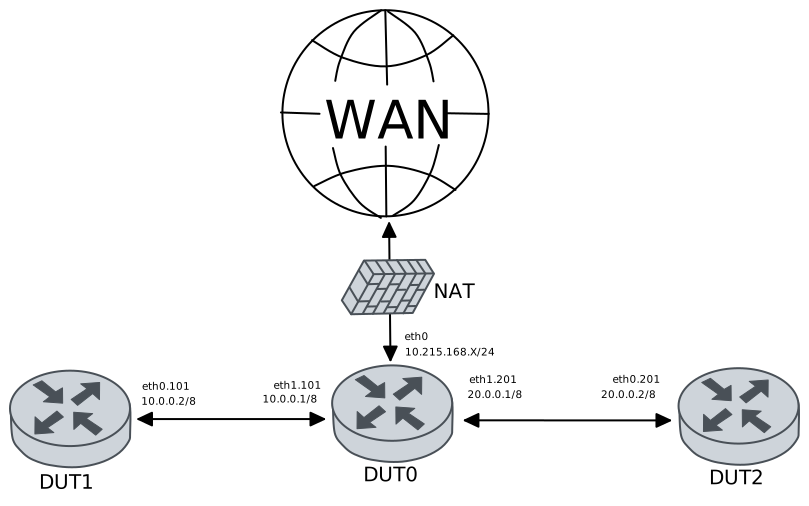
Test Simple Ruleset With Queues
Description
Configures the three DUTs that will be used and checks that they are capable of pinging each other but not of connecting via SSH, since these connections are being dropped by the firewall.
Scenario
Step 1: Set the following configuration in DUT0 :
set interfaces ethernet eth0 address 10.215.168.64/24
set interfaces ethernet eth0 traffic nat source rule 1 address masquerade
set interfaces ethernet eth1 vif 101 address 40.0.0.1/8
set interfaces ethernet eth1 vif 101 traffic policy in FW_PLAN
set interfaces ethernet eth1 vif 201 address 20.0.0.1/8
set interfaces ethernet eth1 vif 201 traffic policy in FW_PLAN
set protocols static route 0.0.0.0/0 next-hop 10.215.168.1
set service dns static host-name WAN inet 10.215.168.1
set service firewall FW logging level config
set service firewall FW logging outputs fast
set service firewall FW mode inline queue FW_Q
set service firewall FW ruleset file 'running://base.rules'
set service firewall FW validator-timeout 20
set system login user admin authentication encrypted-password '$6$GSjsCj8gHLv$/VcqU6FLi6CT2Oxn0MJQ2C2tqnRDrYKNF8HIYWJp68nvXvPdFccDsT04.WtigUONbKYrgKg8d6rEs8PjljMkH0'
set traffic policy FW_PLAN rule 1 action enqueue FW_Q
set traffic queue FW_Q elements 1
Step 2: Ping the IP address 40.0.0.2 from DUT0:
admin@DUT0$ ping 40.0.0.2 count 1 size 56 timeout 1Show output
PING 40.0.0.2 (40.0.0.2) 56(84) bytes of data.
64 bytes from 40.0.0.2: icmp_seq=1 ttl=64 time=0.267 ms

--- 40.0.0.2 ping statistics ---
1 packets transmitted, 1 received, 0% packet loss, time 0ms
rtt min/avg/max/mdev = 0.267/0.267/0.267/0.000 ms
Step 3: Ping the IP address 20.0.0.2 from DUT0:
admin@DUT0$ ping 20.0.0.2 count 1 size 56 timeout 1Show output
PING 20.0.0.2 (20.0.0.2) 56(84) bytes of data.
64 bytes from 20.0.0.2: icmp_seq=1 ttl=64 time=0.484 ms

--- 20.0.0.2 ping statistics ---
1 packets transmitted, 1 received, 0% packet loss, time 0ms
rtt min/avg/max/mdev = 0.484/0.484/0.484/0.000 ms
Step 4: Ping the IP address 20.0.0.2 from DUT1:
admin@DUT1$ ping 20.0.0.2 count 1 size 56 timeout 1Show output
PING 20.0.0.2 (20.0.0.2) 56(84) bytes of data.
64 bytes from 20.0.0.2: icmp_seq=1 ttl=63 time=0.876 ms

--- 20.0.0.2 ping statistics ---
1 packets transmitted, 1 received, 0% packet loss, time 0ms
rtt min/avg/max/mdev = 0.876/0.876/0.876/0.000 ms
Step 5: Ping the IP address 40.0.0.2 from DUT2:
admin@DUT2$ ping 40.0.0.2 count 1 size 56 timeout 1Show output
PING 40.0.0.2 (40.0.0.2) 56(84) bytes of data.
64 bytes from 40.0.0.2: icmp_seq=1 ttl=63 time=0.705 ms

--- 40.0.0.2 ping statistics ---
1 packets transmitted, 1 received, 0% packet loss, time 0ms
rtt min/avg/max/mdev = 0.705/0.705/0.705/0.000 ms
Step 6: Expect a failure in the following command:
Initiate an SSH connection from DUT1 to IP address 20.0.0.2 using user admin:
admin@DUT1$ ssh admin@20.0.0.2 option StrictHostKeyChecking=no option UserKnownHostsFile=/dev/null option ConnectTimeout=1 option ServerAliveInterval=1 option ServerAliveCountMax=1
Step 7: Expect a failure in the following command:
Initiate an SSH connection from DUT2 to IP address 40.0.0.2 using user admin:
admin@DUT2$ ssh admin@40.0.0.2 option StrictHostKeyChecking=no option UserKnownHostsFile=/dev/null option ConnectTimeout=1 option ServerAliveInterval=1 option ServerAliveCountMax=1
Step 8: Run the command service firewall FW show logging fast | tail on DUT0 and check whether the output matches the following regular expressions:
(?m)^.+[Drop].+(SSH not allowed in this network).+$Show output
06/03/2026-17:49:12.684279  [Drop] [**] [1:2:0] SSH not allowed in this network [**] [Classification: (null)] [Priority: 3] {TCP} 20.0.0.2:50174 -> 40.0.0.2:22
06/03/2026-17:49:12.878477  [Drop] [**] [1:2:0] SSH not allowed in this network [**] [Classification: (null)] [Priority: 3] {TCP} 20.0.0.2:50174 -> 40.0.0.2:22
06/03/2026-17:49:13.516265  [Drop] [**] [1:2:0] SSH not allowed in this network [**] [Classification: (null)] [Priority: 3] {TCP} 20.0.0.2:50174 -> 40.0.0.2:22
06/03/2026-17:49:13.710446  [Drop] [**] [1:2:0] SSH not allowed in this network [**] [Classification: (null)] [Priority: 3] {TCP} 20.0.0.2:50174 -> 40.0.0.2:22
06/03/2026-17:49:14.990268  [Drop] [**] [1:2:0] SSH not allowed in this network [**] [Classification: (null)] [Priority: 3] {TCP} 40.0.0.2:33102 -> 20.0.0.2:22
06/03/2026-17:49:15.148635  [Drop] [**] [1:2:0] SSH not allowed in this network [**] [Classification: (null)] [Priority: 3] {TCP} 40.0.0.2:33102 -> 20.0.0.2:22
06/03/2026-17:49:15.180324  [Drop] [**] [1:2:0] SSH not allowed in this network [**] [Classification: (null)] [Priority: 3] {TCP} 20.0.0.2:50174 -> 40.0.0.2:22
06/03/2026-17:49:15.374482  [Drop] [**] [1:2:0] SSH not allowed in this network [**] [Classification: (null)] [Priority: 3] {TCP} 20.0.0.2:50174 -> 40.0.0.2:22
06/03/2026-17:49:18.476261  [Drop] [**] [1:2:0] SSH not allowed in this network [**] [Classification: (null)] [Priority: 3] {TCP} 20.0.0.2:50174 -> 40.0.0.2:22
06/03/2026-17:49:18.830437  [Drop] [**] [1:2:0] SSH not allowed in this network [**] [Classification: (null)] [Priority: 3] {TCP} 20.0.0.2:50174 -> 40.0.0.2:22
Test Simple Ruleset With Custom Action-order
Description
Configures the three DUTs that will be used and checks that initially they are capable of pinging each other but after changing the priority of rule actions, ICMP traffic is not passed, but dropped by the firewall.
Scenario
Step 1: Set the following configuration in DUT0 :
set interfaces ethernet eth0 address 10.215.168.64/24
set interfaces ethernet eth0 traffic nat source rule 1 address masquerade
set interfaces ethernet eth1 vif 101 address 40.0.0.1/8
set interfaces ethernet eth1 vif 101 traffic policy in FW_PLAN
set interfaces ethernet eth1 vif 201 address 20.0.0.1/8
set interfaces ethernet eth1 vif 201 traffic policy in FW_PLAN
set protocols static route 0.0.0.0/0 next-hop 10.215.168.1
set service dns static host-name WAN inet 10.215.168.1
set service firewall FW logging level config
set service firewall FW logging outputs fast
set service firewall FW mode inline queue FW_Q
set service firewall FW ruleset file 'running://base.rules'
set service firewall FW validator-timeout 20
set system login user admin authentication encrypted-password '$6$GSjsCj8gHLv$/VcqU6FLi6CT2Oxn0MJQ2C2tqnRDrYKNF8HIYWJp68nvXvPdFccDsT04.WtigUONbKYrgKg8d6rEs8PjljMkH0'
set traffic policy FW_PLAN rule 1 action enqueue FW_Q
set traffic queue FW_Q elements 1
Step 2: Ping the IP address 40.0.0.2 from DUT0:
admin@DUT0$ ping 40.0.0.2 count 1 size 56 timeout 1Show output
PING 40.0.0.2 (40.0.0.2) 56(84) bytes of data.
64 bytes from 40.0.0.2: icmp_seq=1 ttl=64 time=0.769 ms

--- 40.0.0.2 ping statistics ---
1 packets transmitted, 1 received, 0% packet loss, time 0ms
rtt min/avg/max/mdev = 0.769/0.769/0.769/0.000 ms
Step 3: Ping the IP address 20.0.0.2 from DUT0:
admin@DUT0$ ping 20.0.0.2 count 1 size 56 timeout 1Show output
PING 20.0.0.2 (20.0.0.2) 56(84) bytes of data.
64 bytes from 20.0.0.2: icmp_seq=1 ttl=64 time=0.955 ms

--- 20.0.0.2 ping statistics ---
1 packets transmitted, 1 received, 0% packet loss, time 0ms
rtt min/avg/max/mdev = 0.955/0.955/0.955/0.000 ms
Step 4: Ping the IP address 20.0.0.2 from DUT1:
admin@DUT1$ ping 20.0.0.2 count 1 size 56 timeout 1Show output
PING 20.0.0.2 (20.0.0.2) 56(84) bytes of data.
64 bytes from 20.0.0.2: icmp_seq=1 ttl=63 time=0.852 ms

--- 20.0.0.2 ping statistics ---
1 packets transmitted, 1 received, 0% packet loss, time 0ms
rtt min/avg/max/mdev = 0.852/0.852/0.852/0.000 ms
Step 5: Ping the IP address 40.0.0.2 from DUT2:
admin@DUT2$ ping 40.0.0.2 count 1 size 56 timeout 1Show output
PING 40.0.0.2 (40.0.0.2) 56(84) bytes of data.
64 bytes from 40.0.0.2: icmp_seq=1 ttl=63 time=1.47 ms

--- 40.0.0.2 ping statistics ---
1 packets transmitted, 1 received, 0% packet loss, time 0ms
rtt min/avg/max/mdev = 1.468/1.468/1.468/0.000 ms
Step 6: Modify the following configuration lines in DUT0 :
set service firewall FW action-order 'drop, reject, alert, pass'
Step 7: Expect a failure in the following command:
Ping the IP address 20.0.0.2 from DUT1:
admin@DUT1$ ping 20.0.0.2 count 1 size 56 timeout 1Show output
PING 20.0.0.2 (20.0.0.2) 56(84) bytes of data.

--- 20.0.0.2 ping statistics ---
1 packets transmitted, 0 received, 100% packet loss, time 0ms
Step 8: Expect a failure in the following command:
Ping the IP address 40.0.0.2 from DUT2:
admin@DUT2$ ping 40.0.0.2 count 1 size 56 timeout 1Show output
PING 40.0.0.2 (40.0.0.2) 56(84) bytes of data.

--- 40.0.0.2 ping statistics ---
1 packets transmitted, 0 received, 100% packet loss, time 0ms
Step 9: Run the command service firewall FW show logging fast | tail on DUT0 and check whether the output matches the following regular expressions:
(?m)^.+[Drop].+(ICMP traffic dropped).+$Show output
06/03/2026-17:49:45.864934  [Drop] [**] [1:30:0] ICMP traffic dropped [**] [Classification: (null)] [Priority: 3] {ICMP} 40.0.0.2:8 -> 20.0.0.2:0
06/03/2026-17:49:46.976835  [Drop] [**] [1:30:0] ICMP traffic dropped [**] [Classification: (null)] [Priority: 3] {ICMP} 20.0.0.2:8 -> 40.0.0.2:0
Test Simple Ruleset Using Routing With Marks
Description
Configures the three DUTs that will be used. In this test the traffic is routed using marks in DUT0 (like SD-WAN scenarios). Then, checks that initially ping works from DUT1 to DUT2 but after changing the priority of rule actions, ICMP traffic is not passed, but dropped by the firewall.
Scenario
Step 1: Set the following configuration in DUT0 :
set interfaces ethernet eth0 address 10.215.168.64/24
set interfaces ethernet eth0 traffic nat source rule 1 address masquerade
set interfaces ethernet eth1 vif 101 address 40.0.0.1/8
set interfaces ethernet eth1 vif 101 traffic policy in LAN_IN
set interfaces ethernet eth1 vif 101 vrf LAN
set interfaces ethernet eth1 vif 201 address 20.0.0.1/8
set interfaces ethernet eth1 vif 201 traffic nat source rule 1 address masquerade
set interfaces ethernet eth1 vif 201 traffic policy in WAN_IN
set interfaces ethernet eth1 vif 201 vrf WAN
set protocols static route 0.0.0.0/0 next-hop 10.215.168.1
set protocols vrf AP static route 0.0.0.0/0 next-hop-vrf WAN
set service dns static host-name WAN inet 10.215.168.1
set service firewall FW logging level config
set service firewall FW logging outputs fast
set service firewall FW mode inline queue FW_Q
set service firewall FW ruleset file 'running://base.rules'
set service firewall FW validator-timeout 20
set system login user admin authentication encrypted-password '$6$GSjsCj8gHLv$/VcqU6FLi6CT2Oxn0MJQ2C2tqnRDrYKNF8HIYWJp68nvXvPdFccDsT04.WtigUONbKYrgKg8d6rEs8PjljMkH0'
set system traffic policy in FW_POLICY priority very-low
set system vrf AP
set system vrf LAN
set system vrf WAN
set traffic policy FW_POLICY rule 1 action enqueue FW_Q
set traffic policy FW_POLICY rule 1 selector AP_CONNMARK
set traffic policy LAN_IN rule 1 selector ICMP
set traffic policy LAN_IN rule 1 set vrf AP connmark-cache
set traffic policy WAN_IN rule 1 selector AP_CONNMARK
set traffic policy WAN_IN rule 1 set vrf LAN
set traffic queue FW_Q elements 1
set traffic selector AP_CONNMARK rule 1 vrf-connmark AP
set traffic selector ICMP rule 1 protocol icmp
Step 2: Ping the IP address 20.0.0.2 from DUT1:
admin@DUT1$ ping 20.0.0.2 count 1 size 56 timeout 1Show output
PING 20.0.0.2 (20.0.0.2) 56(84) bytes of data.
64 bytes from 20.0.0.2: icmp_seq=1 ttl=63 time=1.10 ms

--- 20.0.0.2 ping statistics ---
1 packets transmitted, 1 received, 0% packet loss, time 0ms
rtt min/avg/max/mdev = 1.098/1.098/1.098/0.000 ms
Step 3: Modify the following configuration lines in DUT0 :
set service firewall FW action-order 'drop, reject, alert, pass'
Step 4: Expect a failure in the following command:
Ping the IP address 20.0.0.2 from DUT1:
admin@DUT1$ ping 20.0.0.2 count 1 size 56 timeout 1Show output
PING 20.0.0.2 (20.0.0.2) 56(84) bytes of data.

--- 20.0.0.2 ping statistics ---
1 packets transmitted, 0 received, 100% packet loss, time 0ms
Step 5: Run the command service firewall FW show logging fast | tail on DUT0 and check whether the output matches the following regular expressions:
(?m)^.+[Drop].+(ICMP traffic dropped).+$Show output
06/03/2026-17:50:14.189054 [Drop] [**] [1:30:0] ICMP traffic dropped [**] [Classification: (null)] [Priority: 3] {ICMP} 40.0.0.2:8 -> 20.0.0.2:0
Test Simple Ruleset With Queues IDS Mode
Description
Configures the three DUTs that will be used and checks that they are capable of pinging each other and of connecting via SSH. Since the firewall is set to IDS mode, these connections are not being dropped.
Scenario
Step 1: Set the following configuration in DUT0 :
set interfaces ethernet eth0 address 10.215.168.64/24
set interfaces ethernet eth0 traffic nat source rule 1 address masquerade
set interfaces ethernet eth1 vif 101 address 40.0.0.1/8
set interfaces ethernet eth1 vif 201 address 20.0.0.1/8
set protocols static route 0.0.0.0/0 next-hop 10.215.168.1
set service dns static host-name WAN inet 10.215.168.1
set service firewall FW logging outputs fast
set service firewall FW mode monitor interfaces eth0,eth1
set service firewall FW ruleset file 'running://base.rules'
set system login user admin authentication encrypted-password '$6$GSjsCj8gHLv$/VcqU6FLi6CT2Oxn0MJQ2C2tqnRDrYKNF8HIYWJp68nvXvPdFccDsT04.WtigUONbKYrgKg8d6rEs8PjljMkH0'
Step 2: Ping the IP address 40.0.0.2 from DUT0:
admin@DUT0$ ping 40.0.0.2 count 1 size 56 timeout 1Show output
PING 40.0.0.2 (40.0.0.2) 56(84) bytes of data.
64 bytes from 40.0.0.2: icmp_seq=1 ttl=64 time=0.374 ms

--- 40.0.0.2 ping statistics ---
1 packets transmitted, 1 received, 0% packet loss, time 0ms
rtt min/avg/max/mdev = 0.374/0.374/0.374/0.000 ms
Step 3: Ping the IP address 20.0.0.2 from DUT0:
admin@DUT0$ ping 20.0.0.2 count 1 size 56 timeout 1Show output
PING 20.0.0.2 (20.0.0.2) 56(84) bytes of data.
64 bytes from 20.0.0.2: icmp_seq=1 ttl=64 time=0.360 ms

--- 20.0.0.2 ping statistics ---
1 packets transmitted, 1 received, 0% packet loss, time 0ms
rtt min/avg/max/mdev = 0.360/0.360/0.360/0.000 ms
Step 4: Ping the IP address 20.0.0.2 from DUT1:
admin@DUT1$ ping 20.0.0.2 count 1 size 56 timeout 1Show output
PING 20.0.0.2 (20.0.0.2) 56(84) bytes of data.
64 bytes from 20.0.0.2: icmp_seq=1 ttl=63 time=0.519 ms

--- 20.0.0.2 ping statistics ---
1 packets transmitted, 1 received, 0% packet loss, time 0ms
rtt min/avg/max/mdev = 0.519/0.519/0.519/0.000 ms
Step 5: Ping the IP address 40.0.0.2 from DUT2:
admin@DUT2$ ping 40.0.0.2 count 1 size 56 timeout 1Show output
PING 40.0.0.2 (40.0.0.2) 56(84) bytes of data.
64 bytes from 40.0.0.2: icmp_seq=1 ttl=63 time=0.546 ms

--- 40.0.0.2 ping statistics ---
1 packets transmitted, 1 received, 0% packet loss, time 0ms
rtt min/avg/max/mdev = 0.546/0.546/0.546/0.000 ms
Step 6: Run the command service firewall FW show reload-stats on DUT0 and expect the following output:
Show output
---------------------------------------------------
    Last reload      Successful rules  Failed rules
---------------------------------------------------
2026-06-03 17:50:35                 3             0
Step 7: Initiate an SSH connection from DUT1 to IP address 20.0.0.2 using user admin:
admin@DUT1$ ssh admin@20.0.0.2 option StrictHostKeyChecking=no option UserKnownHostsFile=/dev/null option ConnectTimeout=1 option ServerAliveInterval=1 option ServerAliveCountMax=1Show output
Warning: Permanently added '20.0.0.2' (ECDSA) to the list of known hosts.
admin@20.0.0.2's password:
Welcome to Teldat OSDx v4.2.10.1

This system includes free software.
Contact Teldat for licenses information and source code.

Last login: Wed Jun  3 12:10:07 2026
admin@osdx$
Step 8: Initiate an SSH connection from DUT2 to IP address 40.0.0.2 using user admin:
admin@DUT2$ ssh admin@40.0.0.2 option StrictHostKeyChecking=no option UserKnownHostsFile=/dev/null option ConnectTimeout=1 option ServerAliveInterval=1 option ServerAliveCountMax=1Show output
Warning: Permanently added '40.0.0.2' (ECDSA) to the list of known hosts.
admin@40.0.0.2's password:
Welcome to Teldat OSDx v4.2.10.1

This system includes free software.
Contact Teldat for licenses information and source code.

Last login: Wed Jun  3 16:05:47 2026
admin@osdx$
Step 9: Run the command service firewall FW show logging fast | tail on DUT0 and check whether the output matches the following regular expressions:
(?m)^.+[wDrop].+(SSH not allowed in this network).+$Show output
06/03/2026-17:50:38.379684  [wDrop] [**] [1:2:0] SSH not allowed in this network [**] [Classification: (null)] [Priority: 3] {TCP} 20.0.0.2:44466 -> 40.0.0.2:22
06/03/2026-17:50:38.380073  [wDrop] [**] [1:2:0] SSH not allowed in this network [**] [Classification: (null)] [Priority: 3] {TCP} 20.0.0.2:44466 -> 40.0.0.2:22
06/03/2026-17:50:38.380237  [wDrop] [**] [1:2:0] SSH not allowed in this network [**] [Classification: (null)] [Priority: 3] {TCP} 20.0.0.2:44466 -> 40.0.0.2:22
06/03/2026-17:50:38.382131  [wDrop] [**] [1:2:0] SSH not allowed in this network [**] [Classification: (null)] [Priority: 3] {TCP} 20.0.0.2:44466 -> 40.0.0.2:22
06/03/2026-17:50:38.461331  [wDrop] [**] [1:2:0] SSH not allowed in this network [**] [Classification: (null)] [Priority: 3] {TCP} 20.0.0.2:44466 -> 40.0.0.2:22
06/03/2026-17:50:38.468083  [wDrop] [**] [1:2:0] SSH not allowed in this network [**] [Classification: (null)] [Priority: 3] {TCP} 20.0.0.2:44466 -> 40.0.0.2:22
06/03/2026-17:50:38.468198  [wDrop] [**] [1:2:0] SSH not allowed in this network [**] [Classification: (null)] [Priority: 3] {TCP} 20.0.0.2:44466 -> 40.0.0.2:22
06/03/2026-17:50:38.468266  [wDrop] [**] [1:2:0] SSH not allowed in this network [**] [Classification: (null)] [Priority: 3] {TCP} 20.0.0.2:44466 -> 40.0.0.2:22
06/03/2026-17:50:38.468203  [wDrop] [**] [1:2:0] SSH not allowed in this network [**] [Classification: (null)] [Priority: 3] {TCP} 20.0.0.2:44466 -> 40.0.0.2:22
06/03/2026-17:50:38.469969  [wDrop] [**] [1:2:0] SSH not allowed in this network [**] [Classification: (null)] [Priority: 3] {TCP} 20.0.0.2:44466 -> 40.0.0.2:22
Test Encrypted Ruleset
Description
Configures the three DUTs, encrypts an arbitrary ruleset file and checks that the firewall is handling said file as expected. The firewall behaves the same way as for Test Simple Ruleset With Queues but with an encrypted ruleset.
Scenario
Step 1: Run the command file copy http://10.215.168.1/~robot/base-enc.rules running:// force on DUT0 and expect the following output:
Show output
  % Total    % Received % Xferd  Average Speed   Time    Time     Time  Current
                                 Dload  Upload   Total   Spent    Left  Speed
100   272  100   272    0     0  43722      0 --:--:-- --:--:-- --:--:-- 45333
Step 2: Set the following configuration in DUT0 :
set interfaces ethernet eth0 address 10.215.168.64/24
set interfaces ethernet eth0 traffic nat source rule 1 address masquerade
set interfaces ethernet eth1 vif 101 address 40.0.0.1/8
set interfaces ethernet eth1 vif 101 traffic policy in FW_PLAN
set interfaces ethernet eth1 vif 201 address 20.0.0.1/8
set interfaces ethernet eth1 vif 201 traffic policy in FW_PLAN
set protocols static route 0.0.0.0/0 next-hop 10.215.168.1
set service dns static host-name WAN inet 10.215.168.1
set service firewall FW logging level config
set service firewall FW logging outputs fast
set service firewall FW mode inline queue FW_Q
set service firewall FW ruleset file 'running://base-enc.rules' digest sha512
set service firewall FW ruleset file 'running://base-enc.rules' encrypted-password U2FsdGVkX1/yZ/bYGeWBIiSv+nXG8j5fcJ9L7jzU/pb3jkud8iMSE02r6jKJBtcn
set service firewall FW ruleset file 'running://base-enc.rules' iterations 100000
set service firewall FW ruleset file 'running://base-enc.rules' key-length 256
set service firewall FW validator-timeout 20
set system login user admin authentication encrypted-password '$6$GSjsCj8gHLv$/VcqU6FLi6CT2Oxn0MJQ2C2tqnRDrYKNF8HIYWJp68nvXvPdFccDsT04.WtigUONbKYrgKg8d6rEs8PjljMkH0'
set traffic policy FW_PLAN rule 1 action enqueue FW_Q
set traffic queue FW_Q elements 1
Step 3: Ping the IP address 40.0.0.2 from DUT0:
admin@DUT0$ ping 40.0.0.2 count 1 size 56 timeout 1Show output
PING 40.0.0.2 (40.0.0.2) 56(84) bytes of data.
64 bytes from 40.0.0.2: icmp_seq=1 ttl=64 time=0.859 ms

--- 40.0.0.2 ping statistics ---
1 packets transmitted, 1 received, 0% packet loss, time 0ms
rtt min/avg/max/mdev = 0.859/0.859/0.859/0.000 ms
Step 4: Ping the IP address 20.0.0.2 from DUT0:
admin@DUT0$ ping 20.0.0.2 count 1 size 56 timeout 1Show output
PING 20.0.0.2 (20.0.0.2) 56(84) bytes of data.
64 bytes from 20.0.0.2: icmp_seq=1 ttl=64 time=0.617 ms

--- 20.0.0.2 ping statistics ---
1 packets transmitted, 1 received, 0% packet loss, time 0ms
rtt min/avg/max/mdev = 0.617/0.617/0.617/0.000 ms
Step 5: Ping the IP address 20.0.0.2 from DUT1:
admin@DUT1$ ping 20.0.0.2 count 1 size 56 timeout 1Show output
PING 20.0.0.2 (20.0.0.2) 56(84) bytes of data.
64 bytes from 20.0.0.2: icmp_seq=1 ttl=63 time=0.894 ms

--- 20.0.0.2 ping statistics ---
1 packets transmitted, 1 received, 0% packet loss, time 0ms
rtt min/avg/max/mdev = 0.894/0.894/0.894/0.000 ms
Step 6: Ping the IP address 40.0.0.2 from DUT2:
admin@DUT2$ ping 40.0.0.2 count 1 size 56 timeout 1Show output
PING 40.0.0.2 (40.0.0.2) 56(84) bytes of data.
64 bytes from 40.0.0.2: icmp_seq=1 ttl=63 time=1.48 ms

--- 40.0.0.2 ping statistics ---
1 packets transmitted, 1 received, 0% packet loss, time 0ms
rtt min/avg/max/mdev = 1.479/1.479/1.479/0.000 ms
Step 7: Expect a failure in the following command:
Initiate an SSH connection from DUT1 to IP address 20.0.0.2 using user admin:
admin@DUT1$ ssh admin@20.0.0.2 option StrictHostKeyChecking=no option UserKnownHostsFile=/dev/null option ConnectTimeout=1 option ServerAliveInterval=1 option ServerAliveCountMax=1
Step 8: Expect a failure in the following command:
Initiate an SSH connection from DUT2 to IP address 40.0.0.2 using user admin:
admin@DUT2$ ssh admin@40.0.0.2 option StrictHostKeyChecking=no option UserKnownHostsFile=/dev/null option ConnectTimeout=1 option ServerAliveInterval=1 option ServerAliveCountMax=1
Step 9: Run the command service firewall FW show logging fast | tail on DUT0 and check whether the output matches the following regular expressions:
(?m)^.+[Drop].+(SSH not allowed in this network).+$Show output
06/03/2026-17:51:13.431036  [Drop] [**] [1:2:0] SSH not allowed in this network [**] [Classification: (null)] [Priority: 3] {TCP} 20.0.0.2:46420 -> 40.0.0.2:22
06/03/2026-17:51:13.625222  [Drop] [**] [1:2:0] SSH not allowed in this network [**] [Classification: (null)] [Priority: 3] {TCP} 20.0.0.2:46420 -> 40.0.0.2:22
06/03/2026-17:51:14.262982  [Drop] [**] [1:2:0] SSH not allowed in this network [**] [Classification: (null)] [Priority: 3] {TCP} 20.0.0.2:46420 -> 40.0.0.2:22
06/03/2026-17:51:14.457252  [Drop] [**] [1:2:0] SSH not allowed in this network [**] [Classification: (null)] [Priority: 3] {TCP} 20.0.0.2:46420 -> 40.0.0.2:22
06/03/2026-17:51:15.832938  [Drop] [**] [1:2:0] SSH not allowed in this network [**] [Classification: (null)] [Priority: 3] {TCP} 40.0.0.2:59270 -> 20.0.0.2:22
06/03/2026-17:51:15.926989  [Drop] [**] [1:2:0] SSH not allowed in this network [**] [Classification: (null)] [Priority: 3] {TCP} 20.0.0.2:46420 -> 40.0.0.2:22
06/03/2026-17:51:15.991182  [Drop] [**] [1:2:0] SSH not allowed in this network [**] [Classification: (null)] [Priority: 3] {TCP} 40.0.0.2:59270 -> 20.0.0.2:22
06/03/2026-17:51:16.121119  [Drop] [**] [1:2:0] SSH not allowed in this network [**] [Classification: (null)] [Priority: 3] {TCP} 20.0.0.2:46420 -> 40.0.0.2:22
06/03/2026-17:51:19.318992  [Drop] [**] [1:2:0] SSH not allowed in this network [**] [Classification: (null)] [Priority: 3] {TCP} 20.0.0.2:46420 -> 40.0.0.2:22
06/03/2026-17:51:19.417339  [Drop] [**] [1:2:0] SSH not allowed in this network [**] [Classification: (null)] [Priority: 3] {TCP} 20.0.0.2:46420 -> 40.0.0.2:22
Test Encrypted Patch
Description
Configures three DUTs, encrypts a patch that allows SSH communication between the DUTs and enables bypass. The original input file was:
drop ssh any any -> any any (msg: "SSH not allowed in this network"; sid: 2;)
pass icmp any any -> any any (msg: "ICMP traffic ignored"; sid: 3;)
After applying the following patch:
1c1
< drop ssh any any -> any any (msg: "SSH not allowed in this network"; sid: 2;)
---
> alert ssh any any -> any any (msg: "SSH traffic detected - bypassing"; bypass; sid: 2;)
The resulting file must be:
alert ssh any any -> any any (msg: "SSH traffic detected - bypassing"; bypass; sid: 2;)
pass icmp any any -> any any (msg: "ICMP traffic ignored"; sid: 3;)
This not only allows SSH traffic but also enables the bypass feature (not tested here yet).
Scenario
Step 1: Run the command file copy http://10.215.168.1/~robot/base-enc.rules running:// force on DUT0 and expect the following output:
Show output
  % Total    % Received % Xferd  Average Speed   Time    Time     Time  Current
                                 Dload  Upload   Total   Spent    Left  Speed
100   272  100   272    0     0  80856      0 --:--:-- --:--:-- --:--:-- 90666
Step 2: Run the command file copy http://10.215.168.1/~robot/base-enc.diff1 running:// force on DUT0 and expect the following output:
Show output
  % Total    % Received % Xferd  Average Speed   Time    Time     Time  Current
                                 Dload  Upload   Total   Spent    Left  Speed
100   256  100   256    0     0  37279      0 --:--:-- --:--:-- --:--:-- 42666
Step 3: Set the following configuration in DUT0 :
set interfaces ethernet eth0 address 10.215.168.64/24
set interfaces ethernet eth0 traffic nat source rule 1 address masquerade
set interfaces ethernet eth1 vif 101 address 40.0.0.1/8
set interfaces ethernet eth1 vif 101 traffic policy in FW_PLAN
set interfaces ethernet eth1 vif 201 address 20.0.0.1/8
set interfaces ethernet eth1 vif 201 traffic policy in FW_PLAN
set protocols static route 0.0.0.0/0 next-hop 10.215.168.1
set service dns static host-name WAN inet 10.215.168.1
set service firewall FW logging level config
set service firewall FW logging outputs fast
set service firewall FW mode inline queue FW_Q
set service firewall FW ruleset file 'running://base-enc.rules' digest sha512
set service firewall FW ruleset file 'running://base-enc.rules' encrypted-password U2FsdGVkX1+m7rZMMDzTz8Gk5hae7vG1yU1XFqZxGAesIoFqGOSZAedRbcEVT4AE
set service firewall FW ruleset file 'running://base-enc.rules' iterations 100000
set service firewall FW ruleset file 'running://base-enc.rules' key-length 256
set service firewall FW ruleset patch 'running://base-enc.diff1' digest sha512
set service firewall FW ruleset patch 'running://base-enc.diff1' encrypted-password U2FsdGVkX1/0Xkcepc0ffK8hTUzSTOUNYzJyD0a6xiDeOR6RfJB7Npyu0Eozb4Z+
set service firewall FW ruleset patch 'running://base-enc.diff1' iterations 100000
set service firewall FW ruleset patch 'running://base-enc.diff1' key-length 256
set service firewall FW validator-timeout 20
set system login user admin authentication encrypted-password '$6$GSjsCj8gHLv$/VcqU6FLi6CT2Oxn0MJQ2C2tqnRDrYKNF8HIYWJp68nvXvPdFccDsT04.WtigUONbKYrgKg8d6rEs8PjljMkH0'
set traffic policy FW_PLAN rule 1 action enqueue FW_Q
set traffic queue FW_Q elements 1
Step 4: Ping the IP address 40.0.0.2 from DUT0:
admin@DUT0$ ping 40.0.0.2 count 1 size 56 timeout 1Show output
PING 40.0.0.2 (40.0.0.2) 56(84) bytes of data.
64 bytes from 40.0.0.2: icmp_seq=1 ttl=64 time=0.411 ms

--- 40.0.0.2 ping statistics ---
1 packets transmitted, 1 received, 0% packet loss, time 0ms
rtt min/avg/max/mdev = 0.411/0.411/0.411/0.000 ms
Step 5: Ping the IP address 20.0.0.2 from DUT0:
admin@DUT0$ ping 20.0.0.2 count 1 size 56 timeout 1Show output
PING 20.0.0.2 (20.0.0.2) 56(84) bytes of data.
64 bytes from 20.0.0.2: icmp_seq=1 ttl=64 time=0.497 ms

--- 20.0.0.2 ping statistics ---
1 packets transmitted, 1 received, 0% packet loss, time 0ms
rtt min/avg/max/mdev = 0.497/0.497/0.497/0.000 ms
Step 6: Ping the IP address 20.0.0.2 from DUT1:
admin@DUT1$ ping 20.0.0.2 count 1 size 56 timeout 1Show output
PING 20.0.0.2 (20.0.0.2) 56(84) bytes of data.
64 bytes from 20.0.0.2: icmp_seq=1 ttl=63 time=2.08 ms

--- 20.0.0.2 ping statistics ---
1 packets transmitted, 1 received, 0% packet loss, time 0ms
rtt min/avg/max/mdev = 2.081/2.081/2.081/0.000 ms
Step 7: Ping the IP address 40.0.0.2 from DUT2:
admin@DUT2$ ping 40.0.0.2 count 1 size 56 timeout 1Show output
PING 40.0.0.2 (40.0.0.2) 56(84) bytes of data.
64 bytes from 40.0.0.2: icmp_seq=1 ttl=63 time=0.832 ms

--- 40.0.0.2 ping statistics ---
1 packets transmitted, 1 received, 0% packet loss, time 0ms
rtt min/avg/max/mdev = 0.832/0.832/0.832/0.000 ms
Step 8: Initiate an SSH connection from DUT1 to IP address 20.0.0.2 using user admin:
admin@DUT1$ ssh admin@20.0.0.2 option StrictHostKeyChecking=no option UserKnownHostsFile=/dev/null option ConnectTimeout=1 option ServerAliveInterval=1 option ServerAliveCountMax=1Show output
Warning: Permanently added '20.0.0.2' (ECDSA) to the list of known hosts.
admin@20.0.0.2's password:
Welcome to Teldat OSDx v4.2.10.1

This system includes free software.
Contact Teldat for licenses information and source code.

Last login: Wed Jun  3 17:50:38 2026 from 40.0.0.2
admin@osdx$
Step 9: Initiate an SSH connection from DUT2 to IP address 40.0.0.2 using user admin:
admin@DUT2$ ssh admin@40.0.0.2 option StrictHostKeyChecking=no option UserKnownHostsFile=/dev/null option ConnectTimeout=1 option ServerAliveInterval=1 option ServerAliveCountMax=1Show output
Warning: Permanently added '40.0.0.2' (ECDSA) to the list of known hosts.
admin@40.0.0.2's password:
Welcome to Teldat OSDx v4.2.10.1

This system includes free software.
Contact Teldat for licenses information and source code.

Last login: Wed Jun  3 17:50:38 2026 from 20.0.0.2
admin@osdx$
Step 10: Run the command service firewall FW show logging fast | tail on DUT0 and check whether the output matches the following regular expressions:
(?m)^.+(SSH traffic detected - bypassing).+$Show output
06/03/2026-17:51:47.732110  [**] [1:2:0] SSH traffic detected - bypassing [**] [Classification: (null)] [Priority: 3] {TCP} 40.0.0.2:51086 -> 20.0.0.2:22
06/03/2026-17:51:48.218230  [**] [1:2:0] SSH traffic detected - bypassing [**] [Classification: (null)] [Priority: 3] {TCP} 20.0.0.2:39280 -> 40.0.0.2:22
Test Compressed Ruleset With Patch
Description
Configures three DUTs, places a patch between the DUTs that allows SSH
communication, and enables bypass. In addition, there are two source
rules that are compressed into a tar.gz file whose content is used
by the firewall to define the rules. One of the files is named base.rules``and
is the file that the patch is meant for. The second one
is ``test-performance.rules whose contents are:: The original input file was:
alert tcp any any -> any 5001 (msg: "Skipping test network performance TCP traffic"; bypass; flow: established, to_server; sid: 4;)
This rule simply bypasses traffic that is deemed “performance traffic”,
which is directly associated with the monitor test performance command.
Scenario
Step 1: Run the command file copy http://10.215.168.1/~robot/ruleset.tar.gz running:// force on DUT0 and expect the following output:
Show output
  % Total    % Received % Xferd  Average Speed   Time    Time     Time  Current
                                 Dload  Upload   Total   Spent    Left  Speed
100   350  100   350    0     0  46704      0 --:--:-- --:--:-- --:--:-- 50000
Step 2: Run the command file copy http://10.215.168.1/~robot/base.diff1 running:// force on DUT0 and expect the following output:
Show output
  % Total    % Received % Xferd  Average Speed   Time    Time     Time  Current
                                 Dload  Upload   Total   Spent    Left  Speed
100   238  100   238    0     0  40503      0 --:--:-- --:--:-- --:--:-- 47600
Step 3: Set the following configuration in DUT0 :
set interfaces ethernet eth0 address 10.215.168.64/24
set interfaces ethernet eth0 traffic nat source rule 1 address masquerade
set interfaces ethernet eth1 vif 101 address 40.0.0.1/8
set interfaces ethernet eth1 vif 101 traffic policy in FW_PLAN
set interfaces ethernet eth1 vif 201 address 20.0.0.1/8
set interfaces ethernet eth1 vif 201 traffic policy in FW_PLAN
set protocols static route 0.0.0.0/0 next-hop 10.215.168.1
set service dns static host-name WAN inet 10.215.168.1
set service firewall FW logging level config
set service firewall FW logging outputs fast
set service firewall FW mode inline queue FW_Q
set service firewall FW ruleset compressed 'running://ruleset.tar.gz'
set service firewall FW ruleset patch 'running://base.diff1'
set service firewall FW validator-timeout 20
set system login user admin authentication encrypted-password '$6$GSjsCj8gHLv$/VcqU6FLi6CT2Oxn0MJQ2C2tqnRDrYKNF8HIYWJp68nvXvPdFccDsT04.WtigUONbKYrgKg8d6rEs8PjljMkH0'
set traffic policy FW_PLAN rule 1 action enqueue FW_Q
set traffic queue FW_Q elements 1
Step 4: Ping the IP address 40.0.0.2 from DUT0:
admin@DUT0$ ping 40.0.0.2 count 1 size 56 timeout 1Show output
PING 40.0.0.2 (40.0.0.2) 56(84) bytes of data.
64 bytes from 40.0.0.2: icmp_seq=1 ttl=64 time=0.512 ms

--- 40.0.0.2 ping statistics ---
1 packets transmitted, 1 received, 0% packet loss, time 0ms
rtt min/avg/max/mdev = 0.512/0.512/0.512/0.000 ms
Step 5: Ping the IP address 20.0.0.2 from DUT0:
admin@DUT0$ ping 20.0.0.2 count 1 size 56 timeout 1Show output
PING 20.0.0.2 (20.0.0.2) 56(84) bytes of data.
64 bytes from 20.0.0.2: icmp_seq=1 ttl=64 time=0.654 ms

--- 20.0.0.2 ping statistics ---
1 packets transmitted, 1 received, 0% packet loss, time 0ms
rtt min/avg/max/mdev = 0.654/0.654/0.654/0.000 ms
Step 6: Ping the IP address 20.0.0.2 from DUT1:
admin@DUT1$ ping 20.0.0.2 count 1 size 56 timeout 1Show output
PING 20.0.0.2 (20.0.0.2) 56(84) bytes of data.
64 bytes from 20.0.0.2: icmp_seq=1 ttl=63 time=0.888 ms

--- 20.0.0.2 ping statistics ---
1 packets transmitted, 1 received, 0% packet loss, time 0ms
rtt min/avg/max/mdev = 0.888/0.888/0.888/0.000 ms
Step 7: Ping the IP address 40.0.0.2 from DUT2:
admin@DUT2$ ping 40.0.0.2 count 1 size 56 timeout 1Show output
PING 40.0.0.2 (40.0.0.2) 56(84) bytes of data.
64 bytes from 40.0.0.2: icmp_seq=1 ttl=63 time=0.707 ms

--- 40.0.0.2 ping statistics ---
1 packets transmitted, 1 received, 0% packet loss, time 0ms
rtt min/avg/max/mdev = 0.707/0.707/0.707/0.000 ms
Step 8: Initiate an SSH connection from DUT1 to IP address 20.0.0.2 using user admin:
admin@DUT1$ ssh admin@20.0.0.2 option StrictHostKeyChecking=no option UserKnownHostsFile=/dev/null option ConnectTimeout=1 option ServerAliveInterval=1 option ServerAliveCountMax=1Show output
Warning: Permanently added '20.0.0.2' (ECDSA) to the list of known hosts.
admin@20.0.0.2's password:
Welcome to Teldat OSDx v4.2.10.1

This system includes free software.
Contact Teldat for licenses information and source code.

Last login: Wed Jun  3 17:51:47 2026 from 40.0.0.2
admin@osdx$
Step 9: Initiate an SSH connection from DUT2 to IP address 40.0.0.2 using user admin:
admin@DUT2$ ssh admin@40.0.0.2 option StrictHostKeyChecking=no option UserKnownHostsFile=/dev/null option ConnectTimeout=1 option ServerAliveInterval=1 option ServerAliveCountMax=1Show output
Warning: Permanently added '40.0.0.2' (ECDSA) to the list of known hosts.
admin@40.0.0.2's password:
Welcome to Teldat OSDx v4.2.10.1

This system includes free software.
Contact Teldat for licenses information and source code.

Last login: Wed Jun  3 17:51:48 2026 from 20.0.0.2
admin@osdx$
Step 10: Run the command service firewall FW show logging fast | tail on DUT0 and check whether the output matches the following regular expressions:
(?m)^.+(SSH traffic detected - bypassing).+$Show output
06/03/2026-17:52:09.594723  [**] [1:2:0] SSH traffic detected - bypassing [**] [Classification: (null)] [Priority: 3] {TCP} 40.0.0.2:46592 -> 20.0.0.2:22
06/03/2026-17:52:10.042530  [**] [1:2:0] SSH traffic detected - bypassing [**] [Classification: (null)] [Priority: 3] {TCP} 20.0.0.2:37620 -> 40.0.0.2:22
Step 11: Initiate a bandwidth test from DUT2 to DUT1
admin@DUT1$ monitor test performance server port 5001
admin@DUT2$ monitor test performance client 40.0.0.2 duration 1 port 5001 parallel 1
Expect the following output on
DUT2:Connecting to host 40.0.0.2, port 5001 [ 5] local 20.0.0.2 port 34850 connected to 40.0.0.2 port 5001 [ ID] Interval Transfer Bitrate Retr Cwnd [ 5] 0.00-1.00 sec 117 MBytes 982 Mbits/sec 0 1.61 MBytes - - - - - - - - - - - - - - - - - - - - - - - - - [ ID] Interval Transfer Bitrate Retr [ 5] 0.00-1.00 sec 117 MBytes 982 Mbits/sec 0 sender [ 5] 0.00-1.01 sec 116 MBytes 967 Mbits/sec receiver iperf Done.
Step 12: Run the command service firewall FW show logging fast | tail on DUT0 and check whether the output matches the following regular expressions:
(?m)^.+(Skipping test network performance TCP traffic).+$Show output
06/03/2026-17:52:09.594723  [**] [1:2:0] SSH traffic detected - bypassing [**] [Classification: (null)] [Priority: 3] {TCP} 40.0.0.2:46592 -> 20.0.0.2:22
06/03/2026-17:52:10.042530  [**] [1:2:0] SSH traffic detected - bypassing [**] [Classification: (null)] [Priority: 3] {TCP} 20.0.0.2:37620 -> 40.0.0.2:22
06/03/2026-17:52:10.696159  [**] [1:40:0] Skipping test network performance TCP traffic [**] [Classification: (null)] [Priority: 3] {TCP} 20.0.0.2:34846 -> 40.0.0.2:5001
06/03/2026-17:52:10.700862  [**] [1:40:0] Skipping test network performance TCP traffic [**] [Classification: (null)] [Priority: 3] {TCP} 20.0.0.2:34850 -> 40.0.0.2:5001
Test Single File In Compressed Ruleset
Description
Compresses two ruleset files but only chooses the test-performance.rules
from within the compressed file. Lastly, checks that performance traffic is detected but
no message is generated for SSH traffic, indicating that only one file is
being used.
Scenario
Step 1: Run the command file copy http://10.215.168.1/~robot/ruleset.tar.gz running:// force on DUT0 and expect the following output:
Show output
  % Total    % Received % Xferd  Average Speed   Time    Time     Time  Current
                                 Dload  Upload   Total   Spent    Left  Speed
100   350  100   350    0     0   114k      0 --:--:-- --:--:-- --:--:--  170k
Step 2: Set the following configuration in DUT0 :
set interfaces ethernet eth0 address 10.215.168.64/24
set interfaces ethernet eth0 traffic nat source rule 1 address masquerade
set interfaces ethernet eth1 vif 101 address 40.0.0.1/8
set interfaces ethernet eth1 vif 101 traffic policy in FW_PLAN
set interfaces ethernet eth1 vif 201 address 20.0.0.1/8
set interfaces ethernet eth1 vif 201 traffic policy in FW_PLAN
set protocols static route 0.0.0.0/0 next-hop 10.215.168.1
set service dns static host-name WAN inet 10.215.168.1
set service firewall FW logging level config
set service firewall FW logging outputs fast
set service firewall FW mode inline queue FW_Q
set service firewall FW ruleset compressed 'running://ruleset.tar.gz' file test-performance.rules
set service firewall FW validator-timeout 20
set system login user admin authentication encrypted-password '$6$GSjsCj8gHLv$/VcqU6FLi6CT2Oxn0MJQ2C2tqnRDrYKNF8HIYWJp68nvXvPdFccDsT04.WtigUONbKYrgKg8d6rEs8PjljMkH0'
set traffic policy FW_PLAN rule 1 action enqueue FW_Q
set traffic queue FW_Q elements 1
Step 3: Ping the IP address 40.0.0.2 from DUT0:
admin@DUT0$ ping 40.0.0.2 count 1 size 56 timeout 1Show output
PING 40.0.0.2 (40.0.0.2) 56(84) bytes of data.
64 bytes from 40.0.0.2: icmp_seq=1 ttl=64 time=0.457 ms

--- 40.0.0.2 ping statistics ---
1 packets transmitted, 1 received, 0% packet loss, time 0ms
rtt min/avg/max/mdev = 0.457/0.457/0.457/0.000 ms
Step 4: Ping the IP address 20.0.0.2 from DUT0:
admin@DUT0$ ping 20.0.0.2 count 1 size 56 timeout 1Show output
PING 20.0.0.2 (20.0.0.2) 56(84) bytes of data.
64 bytes from 20.0.0.2: icmp_seq=1 ttl=64 time=0.371 ms

--- 20.0.0.2 ping statistics ---
1 packets transmitted, 1 received, 0% packet loss, time 0ms
rtt min/avg/max/mdev = 0.371/0.371/0.371/0.000 ms
Step 5: Ping the IP address 20.0.0.2 from DUT1:
admin@DUT1$ ping 20.0.0.2 count 1 size 56 timeout 1Show output
PING 20.0.0.2 (20.0.0.2) 56(84) bytes of data.
64 bytes from 20.0.0.2: icmp_seq=1 ttl=63 time=0.720 ms

--- 20.0.0.2 ping statistics ---
1 packets transmitted, 1 received, 0% packet loss, time 0ms
rtt min/avg/max/mdev = 0.720/0.720/0.720/0.000 ms
Step 6: Ping the IP address 40.0.0.2 from DUT2:
admin@DUT2$ ping 40.0.0.2 count 1 size 56 timeout 1Show output
PING 40.0.0.2 (40.0.0.2) 56(84) bytes of data.
64 bytes from 40.0.0.2: icmp_seq=1 ttl=63 time=0.640 ms

--- 40.0.0.2 ping statistics ---
1 packets transmitted, 1 received, 0% packet loss, time 0ms
rtt min/avg/max/mdev = 0.640/0.640/0.640/0.000 ms
Step 7: Initiate an SSH connection from DUT1 to IP address 20.0.0.2 using user admin:
admin@DUT1$ ssh admin@20.0.0.2 option StrictHostKeyChecking=no option UserKnownHostsFile=/dev/null option ConnectTimeout=1 option ServerAliveInterval=1 option ServerAliveCountMax=1Show output
Warning: Permanently added '20.0.0.2' (ECDSA) to the list of known hosts.
admin@20.0.0.2's password:
Welcome to Teldat OSDx v4.2.10.1

This system includes free software.
Contact Teldat for licenses information and source code.

Last login: Wed Jun  3 17:52:09 2026 from 40.0.0.2
admin@osdx$
Step 8: Initiate an SSH connection from DUT2 to IP address 40.0.0.2 using user admin:
admin@DUT2$ ssh admin@40.0.0.2 option StrictHostKeyChecking=no option UserKnownHostsFile=/dev/null option ConnectTimeout=1 option ServerAliveInterval=1 option ServerAliveCountMax=1Show output
Warning: Permanently added '40.0.0.2' (ECDSA) to the list of known hosts.
admin@40.0.0.2's password:
Welcome to Teldat OSDx v4.2.10.1

This system includes free software.
Contact Teldat for licenses information and source code.

Last login: Wed Jun  3 17:52:10 2026 from 20.0.0.2
admin@osdx$
Step 9: Run the command service firewall FW show logging fast | tail on DUT0 and check whether the output does not match the following regular expressions:
(?m)^.+(SSH traffic detected - bypassing).+$Show output
No fast logs yet for client "FW"
Step 10: Initiate a bandwidth test from DUT2 to DUT1
admin@DUT1$ monitor test performance server port 5001
admin@DUT2$ monitor test performance client 40.0.0.2 duration 1 port 5001 parallel 1
Expect the following output on
DUT2:Connecting to host 40.0.0.2, port 5001 [ 5] local 20.0.0.2 port 47300 connected to 40.0.0.2 port 5001 [ ID] Interval Transfer Bitrate Retr Cwnd [ 5] 0.00-1.00 sec 118 MBytes 994 Mbits/sec 0 1.61 MBytes - - - - - - - - - - - - - - - - - - - - - - - - - [ ID] Interval Transfer Bitrate Retr [ 5] 0.00-1.00 sec 118 MBytes 994 Mbits/sec 0 sender [ 5] 0.00-1.01 sec 117 MBytes 972 Mbits/sec receiver iperf Done.
Step 11: Run the command service firewall FW show logging fast | tail on DUT0 and check whether the output matches the following regular expressions:
(?m)^.+(Skipping test network performance TCP traffic).+$Show output
06/03/2026-17:52:36.316130  [**] [1:40:0] Skipping test network performance TCP traffic [**] [Classification: (null)] [Priority: 3] {TCP} 20.0.0.2:47288 -> 40.0.0.2:5001
06/03/2026-17:52:36.317812  [**] [1:40:0] Skipping test network performance TCP traffic [**] [Classification: (null)] [Priority: 3] {TCP} 20.0.0.2:47300 -> 40.0.0.2:5001
Test Selectors
Description
Builds a scenario with three DUTs in which some selectors are applied to traffic depending on the network detected. This allows specific selector-based rules to be applied to traffic and with only one firewall instance.
To demonstrate this behavior, two labels will be set:
WANlabel that is applied to every packet going outside the local network.
LANlabel that marks every packet present in the underlying network.
For this purpose, a whole scenario will be used to enable all the features to work:
A compressed, encrypted ruleset will be created that contains
base.rulesas well astest-performance.rules.A patch that will upgrade
base.rulesso it contains rules based on labels. The expected final result will be:alert ssh any any -> any any (msg: "Local SSH traffic - bypassing..."; selector: LOCAL; bypass; sid: 1; flow: established, to_server;) drop ip any any -> any any (msg:"GPL ATTACK_RESPONSE id check returned root"; content:"uid=0|28|root|29|"; classtype:bad-unknown; sid:2100498; rev:7; metadata:created_at 2010_09_23, updated_at 2010_09_23; selector: WAN;) pass icmp any any -> any any (msg: "ICMP traffic ignored"; sid: 3;) drop tcp any any -> any 5000 (msg: "Dropping TCP performance test traffic"; selector: WAN, LOCAL; sid: 4; flow: established, to_server;)
Hence, the following will be tested:
SSH connection is working between the LAN nodes - DUT1 and DUT2
It is impossible to get the
nids.htmlfile (i.e., a malicious file) from the WAN.ICMP messages are allowed from any node within the network.
Traffic performance tests are allowed for both the WAN and LOCAL selectors but not on port 5000.
Scenario
Step 1: Run the command file copy http://10.215.168.1/~robot/ruleset.tar.gz.aes256 running://ruleset.tar.gz force on DUT0 and expect the following output:
Show output
  % Total    % Received % Xferd  Average Speed   Time    Time     Time  Current
                                 Dload  Upload   Total   Spent    Left  Speed
100   368  100   368    0     0  50348      0 --:--:-- --:--:-- --:--:-- 52571
Step 2: Run the command file copy http://10.215.168.1/~robot/base.diff2-aes256 running:// force on DUT0 and expect the following output:
Show output
  % Total    % Received % Xferd  Average Speed   Time    Time     Time  Current
                                 Dload  Upload   Total   Spent    Left  Speed
100   528  100   528    0     0  85243      0 --:--:-- --:--:-- --:--:-- 88000
Step 3: Set the following configuration in DUT0 :
set interfaces ethernet eth0 address 10.215.168.64/24
set interfaces ethernet eth0 traffic nat source rule 1 address masquerade
set interfaces ethernet eth0 traffic policy in FW_PWAN
set interfaces ethernet eth0 traffic policy out FW_PWAN
set interfaces ethernet eth1 vif 101 address 40.0.0.1/8
set interfaces ethernet eth1 vif 101 traffic policy in FW_PLAN
set interfaces ethernet eth1 vif 201 address 20.0.0.1/8
set interfaces ethernet eth1 vif 201 traffic policy in FW_PLAN
set protocols static route 0.0.0.0/0 next-hop 10.215.168.1
set service dns static host-name WAN inet 10.215.168.1
set service firewall FW logging level config
set service firewall FW logging outputs fast
set service firewall FW mode inline queue FW_Q
set service firewall FW ruleset compressed 'running://ruleset.tar.gz' digest sha512
set service firewall FW ruleset compressed 'running://ruleset.tar.gz' encrypted-password U2FsdGVkX1/CGQ8AcWg7lDf5nlIvAsPpwa8qfziczJ/Rk0z9/I2m6w9MgDrCSZ/B
set service firewall FW ruleset compressed 'running://ruleset.tar.gz' iterations 100000
set service firewall FW ruleset compressed 'running://ruleset.tar.gz' key-length 256
set service firewall FW ruleset patch 'running://base.diff2-aes256' digest sha512
set service firewall FW ruleset patch 'running://base.diff2-aes256' encrypted-password U2FsdGVkX1920U8/0B8htBjCUsj/kTm7b83CpJTreaiZo6MgpVipILMd9uschscq
set service firewall FW ruleset patch 'running://base.diff2-aes256' iterations 100000
set service firewall FW ruleset patch 'running://base.diff2-aes256' key-length 256
set service firewall FW validator-timeout 20
set system login user admin authentication encrypted-password '$6$GSjsCj8gHLv$/VcqU6FLi6CT2Oxn0MJQ2C2tqnRDrYKNF8HIYWJp68nvXvPdFccDsT04.WtigUONbKYrgKg8d6rEs8PjljMkH0'
set traffic group address LAN element 20.0.0.0/24
set traffic group address LAN element 40.0.0.0/24
set traffic label LOCAL
set traffic label WAN
set traffic policy FW_PLAN rule 1 action enqueue FW_Q
set traffic policy FW_PLAN rule 1 selector LAN
set traffic policy FW_PLAN rule 1 set label LOCAL
set traffic policy FW_PWAN rule 1 action enqueue FW_Q
set traffic policy FW_PWAN rule 1 set label WAN
set traffic queue FW_Q elements 1
set traffic selector LAN rule 1 destination address-group LAN
set traffic selector LAN rule 1 source address-group LAN
Step 4: Ping the IP address 40.0.0.2 from DUT0:
admin@DUT0$ ping 40.0.0.2 count 1 size 56 timeout 1Show output
PING 40.0.0.2 (40.0.0.2) 56(84) bytes of data.
64 bytes from 40.0.0.2: icmp_seq=1 ttl=64 time=2.18 ms

--- 40.0.0.2 ping statistics ---
1 packets transmitted, 1 received, 0% packet loss, time 0ms
rtt min/avg/max/mdev = 2.178/2.178/2.178/0.000 ms
Step 5: Ping the IP address 20.0.0.2 from DUT0:
admin@DUT0$ ping 20.0.0.2 count 1 size 56 timeout 1Show output
PING 20.0.0.2 (20.0.0.2) 56(84) bytes of data.
64 bytes from 20.0.0.2: icmp_seq=1 ttl=64 time=0.731 ms

--- 20.0.0.2 ping statistics ---
1 packets transmitted, 1 received, 0% packet loss, time 0ms
rtt min/avg/max/mdev = 0.731/0.731/0.731/0.000 ms
Step 6: Ping the IP address 20.0.0.2 from DUT1:
admin@DUT1$ ping 20.0.0.2 count 1 size 56 timeout 1Show output
PING 20.0.0.2 (20.0.0.2) 56(84) bytes of data.
64 bytes from 20.0.0.2: icmp_seq=1 ttl=63 time=1.37 ms

--- 20.0.0.2 ping statistics ---
1 packets transmitted, 1 received, 0% packet loss, time 0ms
rtt min/avg/max/mdev = 1.372/1.372/1.372/0.000 ms
Step 7: Ping the IP address 40.0.0.2 from DUT2:
admin@DUT2$ ping 40.0.0.2 count 1 size 56 timeout 1Show output
PING 40.0.0.2 (40.0.0.2) 56(84) bytes of data.
64 bytes from 40.0.0.2: icmp_seq=1 ttl=63 time=0.761 ms

--- 40.0.0.2 ping statistics ---
1 packets transmitted, 1 received, 0% packet loss, time 0ms
rtt min/avg/max/mdev = 0.761/0.761/0.761/0.000 ms
Step 8: Initiate an SSH connection from DUT1 to IP address 20.0.0.2 using user admin:
admin@DUT1$ ssh admin@20.0.0.2 option StrictHostKeyChecking=no option UserKnownHostsFile=/dev/null option ConnectTimeout=1 option ServerAliveInterval=1 option ServerAliveCountMax=1Show output
Warning: Permanently added '20.0.0.2' (ECDSA) to the list of known hosts.
admin@20.0.0.2's password:
Welcome to Teldat OSDx v4.2.10.1

This system includes free software.
Contact Teldat for licenses information and source code.

Last login: Wed Jun  3 17:52:36 2026 from 40.0.0.2
admin@osdx$
Step 9: Initiate an SSH connection from DUT2 to IP address 40.0.0.2 using user admin:
admin@DUT2$ ssh admin@40.0.0.2 option StrictHostKeyChecking=no option UserKnownHostsFile=/dev/null option ConnectTimeout=1 option ServerAliveInterval=1 option ServerAliveCountMax=1Show output
Warning: Permanently added '40.0.0.2' (ECDSA) to the list of known hosts.
admin@40.0.0.2's password:
Welcome to Teldat OSDx v4.2.10.1

This system includes free software.
Contact Teldat for licenses information and source code.

Last login: Wed Jun  3 17:52:36 2026 from 20.0.0.2
admin@osdx$
Step 10: Run the command service firewall FW show logging fast | tail on DUT0 and check whether the output matches the following regular expressions:
(?m)^.+(Local SSH traffic - bypassing...).+$Show output
06/03/2026-17:53:03.974603  [**] [1:1:0] Local SSH traffic - bypassing... [**] [Classification: (null)] [Priority: 3] {TCP} 40.0.0.2:57148 -> 20.0.0.2:22
06/03/2026-17:53:04.512444  [**] [1:1:0] Local SSH traffic - bypassing... [**] [Classification: (null)] [Priority: 3] {TCP} 20.0.0.2:49524 -> 40.0.0.2:22
Step 11: Expect a failure in the following command:
Initiate an SSH connection from DUT1 to IP address 10.215.168.1 using user admin:
admin@DUT1$ ssh admin@10.215.168.1 option StrictHostKeyChecking=no option UserKnownHostsFile=/dev/null option ConnectTimeout=1 option ServerAliveInterval=1 option ServerAliveCountMax=1
Step 12: Expect a failure in the following command:
Initiate an SSH connection from DUT2 to IP address 10.215.168.1 using user admin:
admin@DUT2$ ssh admin@10.215.168.1 option StrictHostKeyChecking=no option UserKnownHostsFile=/dev/null option ConnectTimeout=1 option ServerAliveInterval=1 option ServerAliveCountMax=1
Step 13: Run the command service firewall FW show logging fast | tail on DUT0 and check whether the output matches the following regular expressions:
(?m)^.+(Outgoing TCP traffic to port 22 from LAN to WAN).+$Show output
06/03/2026-17:53:03.974603  [**] [1:1:0] Local SSH traffic - bypassing... [**] [Classification: (null)] [Priority: 3] {TCP} 40.0.0.2:57148 -> 20.0.0.2:22
06/03/2026-17:53:04.512444  [**] [1:1:0] Local SSH traffic - bypassing... [**] [Classification: (null)] [Priority: 3] {TCP} 20.0.0.2:49524 -> 40.0.0.2:22
06/03/2026-17:53:05.114876  [Drop] [**] [1:5:0] Outgoing TCP traffic to port 22 from LAN to WAN [**] [Classification: (null)] [Priority: 3] {TCP} 40.0.0.2:52028 -> 10.215.168.1:22
06/03/2026-17:53:15.245402  [Drop] [**] [1:5:0] Outgoing TCP traffic to port 22 from LAN to WAN [**] [Classification: (null)] [Priority: 3] {TCP} 20.0.0.2:52984 -> 10.215.168.1:22
Step 14: Initiate a bandwidth test from DUT2 to DUT1
admin@DUT1$ monitor test performance server port 5001
admin@DUT2$ monitor test performance client 40.0.0.2 duration 10 port 5001 parallel 1
Expect the following output on
DUT2:Connecting to host 40.0.0.2, port 5001 [ 5] local 20.0.0.2 port 33176 connected to 40.0.0.2 port 5001 [ ID] Interval Transfer Bitrate Retr Cwnd [ 5] 0.00-1.00 sec 94.0 MBytes 788 Mbits/sec 0 1.61 MBytes [ 5] 1.00-2.00 sec 109 MBytes 912 Mbits/sec 0 1.61 MBytes [ 5] 2.00-3.00 sec 95.0 MBytes 797 Mbits/sec 0 1.61 MBytes [ 5] 3.00-4.00 sec 105 MBytes 881 Mbits/sec 0 1.61 MBytes [ 5] 4.00-5.00 sec 115 MBytes 965 Mbits/sec 115 1.23 MBytes [ 5] 5.00-6.00 sec 126 MBytes 1.06 Gbits/sec 0 1.35 MBytes [ 5] 6.00-7.00 sec 102 MBytes 860 Mbits/sec 0 1.43 MBytes [ 5] 7.00-8.00 sec 116 MBytes 975 Mbits/sec 0 1.50 MBytes [ 5] 8.00-9.00 sec 112 MBytes 944 Mbits/sec 0 1.54 MBytes [ 5] 9.00-10.00 sec 104 MBytes 870 Mbits/sec 0 1.54 MBytes - - - - - - - - - - - - - - - - - - - - - - - - - [ ID] Interval Transfer Bitrate Retr [ 5] 0.00-10.00 sec 1.05 GBytes 905 Mbits/sec 115 sender [ 5] 0.00-10.01 sec 1.05 GBytes 903 Mbits/sec receiver iperf Done.
Step 15: Initiate a bandwidth test from DUT2 to DUT1
admin@DUT1$ monitor test performance server port 5000
admin@DUT2$ monitor test performance client 40.0.0.2 duration 10 port 5000 parallel 1
Expect the following output on
DUT2:^C- - - - - - - - - - - - - - - - - - - - - - - - - [ ID] Interval Transfer Bitrate Retr iperf3: interrupt - the client has terminated admin@osdx$
Step 16: Run the command service firewall FW show logging fast | tail on DUT0 and check whether the output matches the following regular expressions:
(?m)^.+(Dropping TCP performance test traffic).+$Show output
06/03/2026-17:53:25.733955  [**] [1:40:0] Skipping test network performance TCP traffic [**] [Classification: (null)] [Priority: 3] {TCP} 20.0.0.2:33168 -> 40.0.0.2:5001
06/03/2026-17:53:25.737544  [**] [1:40:0] Skipping test network performance TCP traffic [**] [Classification: (null)] [Priority: 3] {TCP} 20.0.0.2:33176 -> 40.0.0.2:5001
06/03/2026-17:53:36.083599  [Drop] [**] [1:4:0] Dropping TCP performance test traffic [**] [Classification: (null)] [Priority: 3] {TCP} 20.0.0.2:53592 -> 40.0.0.2:5000
06/03/2026-17:53:36.288371  [Drop] [**] [1:4:0] Dropping TCP performance test traffic [**] [Classification: (null)] [Priority: 3] {TCP} 20.0.0.2:53592 -> 40.0.0.2:5000
06/03/2026-17:53:36.496337  [Drop] [**] [1:4:0] Dropping TCP performance test traffic [**] [Classification: (null)] [Priority: 3] {TCP} 20.0.0.2:53592 -> 40.0.0.2:5000
06/03/2026-17:53:36.936308  [Drop] [**] [1:4:0] Dropping TCP performance test traffic [**] [Classification: (null)] [Priority: 3] {TCP} 20.0.0.2:53592 -> 40.0.0.2:5000
06/03/2026-17:53:37.768297  [Drop] [**] [1:4:0] Dropping TCP performance test traffic [**] [Classification: (null)] [Priority: 3] {TCP} 20.0.0.2:53592 -> 40.0.0.2:5000
06/03/2026-17:53:39.121199  [Drop] [**] [1:4:0] Dropping TCP performance test traffic [**] [Classification: (null)] [Priority: 3] {TCP} 20.0.0.2:53592 -> 40.0.0.2:5000
06/03/2026-17:53:39.121646  [Drop] [**] [1:4:0] Dropping TCP performance test traffic [**] [Classification: (null)] [Priority: 3] {TCP} 20.0.0.2:53592 -> 40.0.0.2:5000
06/03/2026-17:53:39.130413  [Drop] [**] [1:4:0] Dropping TCP performance test traffic [**] [Classification: (null)] [Priority: 3] {TCP} 20.0.0.2:53592 -> 40.0.0.2:5000
Test Hashset
Description
Configures the three DUTs although only DUT0 is used for the test. First, a probe file is downloaded by DUT0. The probe file is detected by the service firewall running in DUT0 and md5, sha1 and sha256 hashes are logged. Lastly, the service firewall is configured for blocking the download of the probe file when is recognized through the configured md5, sha1 or sha256 hashset files.
Scenario
Step 1: Set the following configuration in DUT0 :
set interfaces ethernet eth0 address 10.215.168.64/24
set interfaces ethernet eth0 traffic nat source rule 1 address masquerade
set interfaces ethernet eth0 traffic policy in FW_PWAN
set interfaces ethernet eth0 traffic policy out FW_PWAN
set interfaces ethernet eth1 vif 101 address 40.0.0.1/8
set interfaces ethernet eth1 vif 201 address 20.0.0.1/8
set protocols static route 0.0.0.0/0 next-hop 10.215.168.1
set service dns static host-name WAN inet 10.215.168.1
set service firewall FW logging level config
set service firewall FW logging outputs eve types files force-hash md5
set service firewall FW logging outputs eve types files force-hash sha1
set service firewall FW logging outputs eve types files force-hash sha256
set service firewall FW logging outputs fast
set service firewall FW mode inline queue FW_Q
set service firewall FW ruleset file 'running://http-alert.rules'
set service firewall FW validator-timeout 20
set system login user admin authentication encrypted-password '$6$GSjsCj8gHLv$/VcqU6FLi6CT2Oxn0MJQ2C2tqnRDrYKNF8HIYWJp68nvXvPdFccDsT04.WtigUONbKYrgKg8d6rEs8PjljMkH0'
set traffic policy FW_PWAN rule 1 action enqueue FW_Q
set traffic queue FW_Q elements 1
Step 2: Ping the IP address 40.0.0.2 from DUT0:
admin@DUT0$ ping 40.0.0.2 count 1 size 56 timeout 1Show output
PING 40.0.0.2 (40.0.0.2) 56(84) bytes of data.
64 bytes from 40.0.0.2: icmp_seq=1 ttl=64 time=0.373 ms

--- 40.0.0.2 ping statistics ---
1 packets transmitted, 1 received, 0% packet loss, time 0ms
rtt min/avg/max/mdev = 0.373/0.373/0.373/0.000 ms
Step 3: Ping the IP address 20.0.0.2 from DUT0:
admin@DUT0$ ping 20.0.0.2 count 1 size 56 timeout 1Show output
PING 20.0.0.2 (20.0.0.2) 56(84) bytes of data.
64 bytes from 20.0.0.2: icmp_seq=1 ttl=64 time=0.326 ms

--- 20.0.0.2 ping statistics ---
1 packets transmitted, 1 received, 0% packet loss, time 0ms
rtt min/avg/max/mdev = 0.326/0.326/0.326/0.000 ms
Step 4: Ping the IP address 20.0.0.2 from DUT1:
admin@DUT1$ ping 20.0.0.2 count 1 size 56 timeout 1Show output
PING 20.0.0.2 (20.0.0.2) 56(84) bytes of data.
64 bytes from 20.0.0.2: icmp_seq=1 ttl=63 time=0.516 ms

--- 20.0.0.2 ping statistics ---
1 packets transmitted, 1 received, 0% packet loss, time 0ms
rtt min/avg/max/mdev = 0.516/0.516/0.516/0.000 ms
Step 5: Ping the IP address 40.0.0.2 from DUT2:
admin@DUT2$ ping 40.0.0.2 count 1 size 56 timeout 1Show output
PING 40.0.0.2 (40.0.0.2) 56(84) bytes of data.
64 bytes from 40.0.0.2: icmp_seq=1 ttl=63 time=0.526 ms

--- 40.0.0.2 ping statistics ---
1 packets transmitted, 1 received, 0% packet loss, time 0ms
rtt min/avg/max/mdev = 0.526/0.526/0.526/0.000 ms
Step 6: Run the command file show running://http-alert.rules on DUT0 and expect the following output:
Show output
alert http any any -> any any (msg:"HTTP ALERT Test by Teldat"; sid:10001 ; rev: 1;)
Step 7: Run the command file copy http://10.215.168.1/~robot/nids.html running:// force on DUT0 and expect the following output:
Show output
  % Total    % Received % Xferd  Average Speed   Time    Time     Time  Current
                                 Dload  Upload   Total   Spent    Left  Speed
100   220  100   220    0     0  58231      0 --:--:-- --:--:-- --:--:-- 73333
Step 8: Run the command service firewall FW show logging eve | grep -E "HTTP ALERT Test by Teldat.*md5.*:.*c533c963702d7e99b2aa52713d3cf63c" on DUT0 and check whether the output matches the following regular expressions:
(?m)^.+("signature_id":10001).+$Show output
{"timestamp":"2026-06-03T17:54:05.108720+0000","flow_id":1589839357359899,"event_type":"alert","src_ip":"10.215.168.1","src_port":80,"dest_ip":"10.215.168.64","dest_port":46582,"proto":"TCP","pkt_src":"wire/pcap","alert":{"action":"allowed","gid":1,"signature_id":10001,"rev":1,"signature":"HTTP ALERT Test by Teldat","category":"","severity":3},"http":{"hostname":"10.215.168.1","url":"/~robot/nids.
html","http_user_agent":"PycURL/7.45.2 libcurl/7.88.1 OpenSSL/3.0.19 zlib/1.2.13 brotli/1.0.9 zstd/1.5.4 libidn2/2.3.3 libpsl/0.21.2 (+libidn2/2.3.3) libssh2/1.10.0 nghttp2/1.52.0 librtmp/2.3 OpenLDAP/2.5.13","http_content_type":"text/html","http_method":"GET","protocol":"HTTP/1.1","status":200,"length":220},"files":[{"filename":"/~robot/nids.html","gaps":false,"state":"CLOSED","md5":"c533c963702d
7e99b2aa52713d3cf63c","sha1":"edbfd7fc5eba4b93b8299e4b31352578a74f5773","sha256":"11b4ce07fad40ff666d4c67fe9f9aa7eacecbb3876c0c8c5ee0298202bd9cd6d","stored":false,"size":220,"tx_id":0}],"app_proto":"http","direction":"to_client","flow":{"pkts_toserver":3,"pkts_toclient":3,"bytes_toserver":427,"bytes_toclient":621,"start":"2026-06-03T17:54:05.108019+0000","src_ip":"10.215.168.64","dest_ip":"10.215.
168.1","src_port":46582,"dest_port":80}}
Step 9: Run the command service firewall FW show logging eve | grep -E "HTTP ALERT Test by Teldat.*sha1.*:.*edbfd7fc5eba4b93b8299e4b31352578a74f5773" on DUT0 and check whether the output matches the following regular expressions:
(?m)^.+("signature_id":10001).+$Show output
{"timestamp":"2026-06-03T17:54:05.108720+0000","flow_id":1589839357359899,"event_type":"alert","src_ip":"10.215.168.1","src_port":80,"dest_ip":"10.215.168.64","dest_port":46582,"proto":"TCP","pkt_src":"wire/pcap","alert":{"action":"allowed","gid":1,"signature_id":10001,"rev":1,"signature":"HTTP ALERT Test by Teldat","category":"","severity":3},"http":{"hostname":"10.215.168.1","url":"/~robot/nids.
html","http_user_agent":"PycURL/7.45.2 libcurl/7.88.1 OpenSSL/3.0.19 zlib/1.2.13 brotli/1.0.9 zstd/1.5.4 libidn2/2.3.3 libpsl/0.21.2 (+libidn2/2.3.3) libssh2/1.10.0 nghttp2/1.52.0 librtmp/2.3 OpenLDAP/2.5.13","http_content_type":"text/html","http_method":"GET","protocol":"HTTP/1.1","status":200,"length":220},"files":[{"filename":"/~robot/nids.html","gaps":false,"state":"CLOSED","md5":"c533c963702d
7e99b2aa52713d3cf63c","sha1":"edbfd7fc5eba4b93b8299e4b31352578a74f5773","sha256":"11b4ce07fad40ff666d4c67fe9f9aa7eacecbb3876c0c8c5ee0298202bd9cd6d","stored":false,"size":220,"tx_id":0}],"app_proto":"http","direction":"to_client","flow":{"pkts_toserver":3,"pkts_toclient":3,"bytes_toserver":427,"bytes_toclient":621,"start":"2026-06-03T17:54:05.108019+0000","src_ip":"10.215.168.64","dest_ip":"10.215.
168.1","src_port":46582,"dest_port":80}}
Step 10: Run the command service firewall FW show logging eve | grep -E "HTTP ALERT Test by Teldat.*sha256.*:.*11b4ce07fad40ff666d4c67fe9f9aa7eacecbb3876c0c8c5ee0298202bd9cd6d" on DUT0 and check whether the output matches the following regular expressions:
(?m)^.+("signature_id":10001).+$Show output
{"timestamp":"2026-06-03T17:54:05.108720+0000","flow_id":1589839357359899,"event_type":"alert","src_ip":"10.215.168.1","src_port":80,"dest_ip":"10.215.168.64","dest_port":46582,"proto":"TCP","pkt_src":"wire/pcap","alert":{"action":"allowed","gid":1,"signature_id":10001,"rev":1,"signature":"HTTP ALERT Test by Teldat","category":"","severity":3},"http":{"hostname":"10.215.168.1","url":"/~robot/nids.
html","http_user_agent":"PycURL/7.45.2 libcurl/7.88.1 OpenSSL/3.0.19 zlib/1.2.13 brotli/1.0.9 zstd/1.5.4 libidn2/2.3.3 libpsl/0.21.2 (+libidn2/2.3.3) libssh2/1.10.0 nghttp2/1.52.0 librtmp/2.3 OpenLDAP/2.5.13","http_content_type":"text/html","http_method":"GET","protocol":"HTTP/1.1","status":200,"length":220},"files":[{"filename":"/~robot/nids.html","gaps":false,"state":"CLOSED","md5":"c533c963702d
7e99b2aa52713d3cf63c","sha1":"edbfd7fc5eba4b93b8299e4b31352578a74f5773","sha256":"11b4ce07fad40ff666d4c67fe9f9aa7eacecbb3876c0c8c5ee0298202bd9cd6d","stored":false,"size":220,"tx_id":0}],"app_proto":"http","direction":"to_client","flow":{"pkts_toserver":3,"pkts_toclient":3,"bytes_toserver":427,"bytes_toclient":621,"start":"2026-06-03T17:54:05.108019+0000","src_ip":"10.215.168.64","dest_ip":"10.215.
168.1","src_port":46582,"dest_port":80}}
Step 11: Run the command file copy http://10.215.168.1/~robot/hashset-md5.list running:// force on DUT0 and expect the following output:
Show output
  % Total    % Received % Xferd  Average Speed   Time    Time     Time  Current
                                 Dload  Upload   Total   Spent    Left  Speed
100    33  100    33    0     0   8636      0 --:--:-- --:--:-- --:--:-- 11000
Step 12: Run the command file copy http://10.215.168.1/~robot/filehash-md5-drop.rules running:// force on DUT0 and expect the following output:
Show output
  % Total    % Received % Xferd  Average Speed   Time    Time     Time  Current
                                 Dload  Upload   Total   Spent    Left  Speed
100   113  100   113    0     0  25752      0 --:--:-- --:--:-- --:--:-- 28250
Step 13: Run the command file show running://hashset-md5.list on DUT0 and expect the following output:
Show output
c533c963702d7e99b2aa52713d3cf63c
Step 14: Run the command file show running://filehash-md5-drop.rules on DUT0 and expect the following output:
Show output
drop http any any -> any any (msg:"HTTP MD5 DROP Test by Teldat"; filemd5:hashset-md5.list; sid:10002 ; rev: 1;)
Step 15: Modify the following configuration lines in DUT0 :
set service firewall FW hashset file 'running://hashset-md5.list'
set service firewall FW ruleset file 'running://filehash-md5-drop.rules'
Step 16: Run the command file copy http://10.215.168.1/~robot/nids.html running:// force on DUT0, press Ctrl+C after 10 seconds and expect the following output:
Show output
  % Total    % Received % Xferd  Average Speed   Time    Time     Time  Current
                                 Dload  Upload   Total   Spent    Left  Speed
  0     0    0     0    0     0      0      0 --:--:--  0:00:09 --:--:--     0^C


Operation aborted by user.

admin@osdx$
Step 17: Run the command service firewall FW show logging eve | grep -E "HTTP MD5 DROP Test by Teldat.*md5.*:.*c533c963702d7e99b2aa52713d3cf63c" on DUT0 and check whether the output matches the following regular expressions:
(?m)^.+("signature_id":10002).+$Show output
{"timestamp":"2026-06-03T17:54:09.521730+0000","flow_id":549518196503527,"event_type":"alert","src_ip":"10.215.168.1","src_port":80,"dest_ip":"10.215.168.64","dest_port":46622,"proto":"TCP","pkt_src":"wire/pcap","tx_id":0,"alert":{"action":"blocked","gid":1,"signature_id":10002,"rev":1,"signature":"HTTP MD5 DROP Test by Teldat","category":"","severity":3},"http":{"hostname":"10.215.168.1","url":"/
~robot/nids.html","http_user_agent":"PycURL/7.45.2 libcurl/7.88.1 OpenSSL/3.0.19 zlib/1.2.13 brotli/1.0.9 zstd/1.5.4 libidn2/2.3.3 libpsl/0.21.2 (+libidn2/2.3.3) libssh2/1.10.0 nghttp2/1.52.0 librtmp/2.3 OpenLDAP/2.5.13","http_content_type":"text/html","http_method":"GET","protocol":"HTTP/1.1","status":200,"length":220},"files":[{"filename":"/~robot/nids.html","gaps":false,"state":"CLOSED","md5":"
c533c963702d7e99b2aa52713d3cf63c","sha1":"edbfd7fc5eba4b93b8299e4b31352578a74f5773","sha256":"11b4ce07fad40ff666d4c67fe9f9aa7eacecbb3876c0c8c5ee0298202bd9cd6d","stored":false,"size":220,"tx_id":0}],"app_proto":"http","direction":"to_client","flow":{"pkts_toserver":3,"pkts_toclient":3,"bytes_toserver":427,"bytes_toclient":621,"start":"2026-06-03T17:54:09.521160+0000","src_ip":"10.215.168.64","dest_
ip":"10.215.168.1","src_port":46622,"dest_port":80}}
Step 18: Run the command file copy http://10.215.168.1/~robot/hashset-sha1.list running:// force on DUT0 and expect the following output:
Show output
  % Total    % Received % Xferd  Average Speed   Time    Time     Time  Current
                                 Dload  Upload   Total   Spent    Left  Speed
100    40  100    40    0     0   5640      0 --:--:-- --:--:-- --:--:--  5714
Step 19: Run the command file copy http://10.215.168.1/~robot/filehash-sha1-drop.rules running:// force on DUT0 and expect the following output:
Show output
  % Total    % Received % Xferd  Average Speed   Time    Time     Time  Current
                                 Dload  Upload   Total   Spent    Left  Speed
100   116  100   116    0     0  29036      0 --:--:-- --:--:-- --:--:-- 38666
Step 20: Run the command file show running://hashset-sha1.list on DUT0 and expect the following output:
Show output
edbfd7fc5eba4b93b8299e4b31352578a74f5773
Step 21: Run the command file show running://filehash-sha1-drop.rules on DUT0 and expect the following output:
Show output
drop http any any -> any any (msg:"HTTP SHA1 DROP Test by Teldat"; filesha1:hashset-sha1.list; sid:10003 ; rev: 1;)
Step 22: Modify the following configuration lines in DUT0 :
delete service firewall FW hashset file 'running://hashset-md5.list'
delete service firewall FW ruleset file 'running://filehash-md5-drop.rules'
set service firewall FW hashset file 'running://hashset-sha1.list'
set service firewall FW ruleset file 'running://filehash-sha1-drop.rules'
Step 23: Run the command file copy http://10.215.168.1/~robot/nids.html running:// force on DUT0, press Ctrl+C after 10 seconds and expect the following output:
Show output
  % Total    % Received % Xferd  Average Speed   Time    Time     Time  Current
                                 Dload  Upload   Total   Spent    Left  Speed
  0     0    0     0    0     0      0      0 --:--:--  0:00:09 --:--:--     0^C


Operation aborted by user.

admin@osdx$
Step 24: Run the command service firewall FW show logging eve | grep -E "HTTP SHA1 DROP Test by Teldat.*md5.*:.*edbfd7fc5eba4b93b8299e4b31352578a74f5773" on DUT0 and check whether the output matches the following regular expressions:
(?m)^.+("signature_id":10003).+$Show output
{"timestamp":"2026-06-03T17:54:23.576387+0000","flow_id":2191298268210640,"event_type":"alert","src_ip":"10.215.168.1","src_port":80,"dest_ip":"10.215.168.64","dest_port":45240,"proto":"TCP","pkt_src":"wire/pcap","tx_id":0,"alert":{"action":"blocked","gid":1,"signature_id":10003,"rev":1,"signature":"HTTP SHA1 DROP Test by Teldat","category":"","severity":3},"http":{"hostname":"10.215.168.1","url":
"/~robot/nids.html","http_user_agent":"PycURL/7.45.2 libcurl/7.88.1 OpenSSL/3.0.19 zlib/1.2.13 brotli/1.0.9 zstd/1.5.4 libidn2/2.3.3 libpsl/0.21.2 (+libidn2/2.3.3) libssh2/1.10.0 nghttp2/1.52.0 librtmp/2.3 OpenLDAP/2.5.13","http_content_type":"text/html","http_method":"GET","protocol":"HTTP/1.1","status":200,"length":220},"files":[{"filename":"/~robot/nids.html","gaps":false,"state":"CLOSED","md5"
:"c533c963702d7e99b2aa52713d3cf63c","sha1":"edbfd7fc5eba4b93b8299e4b31352578a74f5773","sha256":"11b4ce07fad40ff666d4c67fe9f9aa7eacecbb3876c0c8c5ee0298202bd9cd6d","stored":false,"size":220,"tx_id":0}],"app_proto":"http","direction":"to_client","flow":{"pkts_toserver":3,"pkts_toclient":3,"bytes_toserver":427,"bytes_toclient":621,"start":"2026-06-03T17:54:23.575737+0000","src_ip":"10.215.168.64","des
t_ip":"10.215.168.1","src_port":45240,"dest_port":80}}
Step 25: Run the command file copy http://10.215.168.1/~robot/hashset-sha256.list running:// force on DUT0 and expect the following output:
Show output
  % Total    % Received % Xferd  Average Speed   Time    Time     Time  Current
                                 Dload  Upload   Total   Spent    Left  Speed
100    65  100    65    0     0  20472      0 --:--:-- --:--:-- --:--:-- 21666
Step 26: Run the command file copy http://10.215.168.1/~robot/filehash-sha256-drop.rules running:// force on DUT0 and expect the following output:
Show output
  % Total    % Received % Xferd  Average Speed   Time    Time     Time  Current
                                 Dload  Upload   Total   Spent    Left  Speed
100   122  100   122    0     0  38364      0 --:--:-- --:--:-- --:--:-- 40666
Step 27: Run the command file show running://hashset-sha256.list on DUT0 and expect the following output:
Show output
11b4ce07fad40ff666d4c67fe9f9aa7eacecbb3876c0c8c5ee0298202bd9cd6d
Step 28: Run the command file show running://filehash-sha256-drop.rules on DUT0 and expect the following output:
Show output
drop http any any -> any any (msg:"HTTP SHA256 DROP Test by Teldat"; filesha256:hashset-sha256.list; sid:10004 ; rev: 1;)
Step 29: Modify the following configuration lines in DUT0 :
delete service firewall FW hashset file 'running://hashset-sha1.list'
delete service firewall FW ruleset file 'running://filehash-sha1-drop.rules'
set service firewall FW hashset file 'running://hashset-sha256.list'
set service firewall FW ruleset file 'running://filehash-sha256-drop.rules'
Step 30: Run the command file copy http://10.215.168.1/~robot/nids.html running:// force on DUT0, press Ctrl+C after 10 seconds and expect the following output:
Show output
  % Total    % Received % Xferd  Average Speed   Time    Time     Time  Current
                                 Dload  Upload   Total   Spent    Left  Speed
  0     0    0     0    0     0      0      0 --:--:--  0:00:09 --:--:--     0^C


Operation aborted by user.

admin@osdx$
Step 31: Run the command service firewall FW show logging eve | grep -E "HTTP SHA256 DROP Test by Teldat.*md5.*:.*11b4ce07fad40ff666d4c67fe9f9aa7eacecbb3876c0c8c5ee0298202bd9cd6d" on DUT0 and check whether the output matches the following regular expressions:
(?m)^.+("signature_id":10004).+$Show output
{"timestamp":"2026-06-03T17:54:38.262319+0000","flow_id":1967558058738917,"event_type":"alert","src_ip":"10.215.168.1","src_port":80,"dest_ip":"10.215.168.64","dest_port":36612,"proto":"TCP","pkt_src":"wire/pcap","tx_id":0,"alert":{"action":"blocked","gid":1,"signature_id":10004,"rev":1,"signature":"HTTP SHA256 DROP Test by Teldat","category":"","severity":3},"http":{"hostname":"10.215.168.1","url
":"/~robot/nids.html","http_user_agent":"PycURL/7.45.2 libcurl/7.88.1 OpenSSL/3.0.19 zlib/1.2.13 brotli/1.0.9 zstd/1.5.4 libidn2/2.3.3 libpsl/0.21.2 (+libidn2/2.3.3) libssh2/1.10.0 nghttp2/1.52.0 librtmp/2.3 OpenLDAP/2.5.13","http_content_type":"text/html","http_method":"GET","protocol":"HTTP/1.1","status":200,"length":220},"files":[{"filename":"/~robot/nids.html","gaps":false,"state":"CLOSED","md
5":"c533c963702d7e99b2aa52713d3cf63c","sha1":"edbfd7fc5eba4b93b8299e4b31352578a74f5773","sha256":"11b4ce07fad40ff666d4c67fe9f9aa7eacecbb3876c0c8c5ee0298202bd9cd6d","stored":false,"size":220,"tx_id":0}],"app_proto":"http","direction":"to_client","flow":{"pkts_toserver":3,"pkts_toclient":3,"bytes_toserver":427,"bytes_toclient":621,"start":"2026-06-03T17:54:38.261499+0000","src_ip":"10.215.168.64","d
est_ip":"10.215.168.1","src_port":36612,"dest_port":80}}