Basic
The following scenario shows how to configure a LWDRR qdisc.
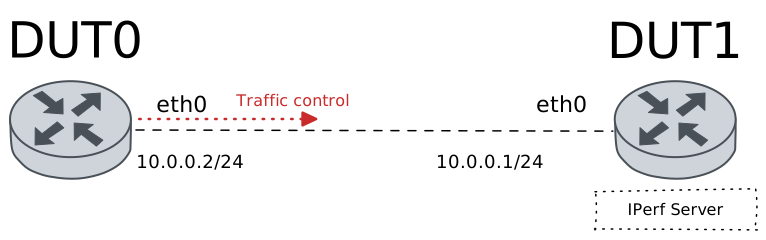
Test LWDRR QDisc
Description
In this scenario, a Lockless Weighted Deficit Round Robin (LWDRR) qdisc is configured in DUT0 (‘eth0’ interface) to achieve bandwidth sharing among weighted classes. Three classes are created with different matches (filters). Each match is allocated to a single class and evaluated in order.
Scenario
Step 1: Set the following configuration in DUT0 :
set interfaces ethernet eth0 address 10.0.0.2/24
set interfaces ethernet eth0 traffic control out QDISC
set system login user admin authentication encrypted-password '$6$GSjsCj8gHLv$/VcqU6FLi6CT2Oxn0MJQ2C2tqnRDrYKNF8HIYWJp68nvXvPdFccDsT04.WtigUONbKYrgKg8d6rEs8PjljMkH0'
set traffic control QDISC type lwdrr bandwidth 100
set traffic control QDISC type lwdrr burst 200ms
set traffic control QDISC type lwdrr class 1 bandwidth percentage 50
set traffic control QDISC type lwdrr class 1 burst 100ms
set traffic control QDISC type lwdrr class 1 description 'Web traffic'
set traffic control QDISC type lwdrr class 1 weight 100
set traffic control QDISC type lwdrr class 10 bandwidth percentage 10
set traffic control QDISC type lwdrr class 10 limit 5000
set traffic control QDISC type lwdrr class 10 weight 30
set traffic control QDISC type lwdrr class 2 bandwidth percentage 20
set traffic control QDISC type lwdrr class 2 priority 3
set traffic control QDISC type lwdrr class 2 weight 60
set traffic control QDISC type lwdrr default-class 10
set traffic control QDISC type lwdrr match 1 class 1
set traffic control QDISC type lwdrr match 1 ip destination port 8080
set traffic control QDISC type lwdrr match 2 class 2
set traffic control QDISC type lwdrr match 2 ip protocol tcp
set traffic control QDISC type lwdrr quantum 1500
Step 2: Set the following configuration in DUT1 :
set interfaces ethernet eth0 address 10.0.0.1/24
set system login user admin authentication encrypted-password '$6$GSjsCj8gHLv$/VcqU6FLi6CT2Oxn0MJQ2C2tqnRDrYKNF8HIYWJp68nvXvPdFccDsT04.WtigUONbKYrgKg8d6rEs8PjljMkH0'
Step 3: Ping the IP address 10.0.0.1 from DUT0:
admin@DUT0$ ping 10.0.0.1 count 1 size 56 timeout 1Show output
PING 10.0.0.1 (10.0.0.1) 56(84) bytes of data.
64 bytes from 10.0.0.1: icmp_seq=1 ttl=64 time=5.14 ms

--- 10.0.0.1 ping statistics ---
1 packets transmitted, 1 received, 0% packet loss, time 0ms
rtt min/avg/max/mdev = 5.142/5.142/5.142/0.000 ms
Step 4: Initiate a bandwidth test from DUT0 to DUT1
admin@DUT1$ monitor test performance server port 8080
admin@DUT0$ monitor test performance client 10.0.0.1 duration 5 port 8080 parallel 1
Expect the following output on
DUT0:Connecting to host 10.0.0.1, port 8080 [ 5] local 10.0.0.2 port 54382 connected to 10.0.0.1 port 8080 [ ID] Interval Transfer Bitrate Retr Cwnd [ 5] 0.00-1.00 sec 7.03 MBytes 59.0 Mbits/sec 1 168 KBytes [ 5] 1.00-2.00 sec 5.65 MBytes 47.4 Mbits/sec 41 141 KBytes [ 5] 2.00-3.00 sec 5.97 MBytes 50.0 Mbits/sec 0 165 KBytes [ 5] 3.00-4.00 sec 5.41 MBytes 45.4 Mbits/sec 0 191 KBytes [ 5] 4.00-5.00 sec 5.78 MBytes 48.5 Mbits/sec 0 211 KBytes - - - - - - - - - - - - - - - - - - - - - - - - - [ ID] Interval Transfer Bitrate Retr [ 5] 0.00-5.00 sec 29.8 MBytes 50.1 Mbits/sec 42 sender [ 5] 0.00-5.02 sec 29.0 MBytes 48.6 Mbits/sec receiver iperf Done.
Step 5: Initiate a bandwidth test from DUT0 to DUT1
admin@DUT1$ monitor test performance server port 1234
admin@DUT0$ monitor test performance client 10.0.0.1 duration 5 port 1234 parallel 1
Expect the following output on
DUT0:Connecting to host 10.0.0.1, port 1234 [ 5] local 10.0.0.2 port 42594 connected to 10.0.0.1 port 1234 [ ID] Interval Transfer Bitrate Retr Cwnd [ 5] 0.00-1.00 sec 3.86 MBytes 32.3 Mbits/sec 0 219 KBytes [ 5] 1.00-2.00 sec 1.99 MBytes 16.7 Mbits/sec 0 219 KBytes [ 5] 2.00-3.00 sec 2.49 MBytes 20.9 Mbits/sec 0 219 KBytes [ 5] 3.00-4.00 sec 2.49 MBytes 20.9 Mbits/sec 0 219 KBytes [ 5] 4.00-5.00 sec 1.99 MBytes 16.7 Mbits/sec 0 219 KBytes - - - - - - - - - - - - - - - - - - - - - - - - - [ ID] Interval Transfer Bitrate Retr [ 5] 0.00-5.00 sec 12.8 MBytes 21.5 Mbits/sec 0 sender [ 5] 0.00-5.05 sec 11.9 MBytes 19.8 Mbits/sec receiver iperf Done.
Step 6: Run the command traffic control show on DUT0 and check whether the output contains the following tokens:
class 1
class 2
class 10 (default)
Show output
Traffic control for interface 'eth0' - 'egress' mode

--------------------------------------------------------------------------------------
 ID   traffic control         type         parent  bytes sent  pkts sent  pkts dropped
--------------------------------------------------------------------------------------
1:0   QDISC            lwdrr               root      45376668        831             0
1:1   QDISC            class 1             1:0       32107110        584             0
1:2   QDISC            class 2             1:0       13268528        238             0
1:10  QDISC            class 10 (default)  1:0           1030          9             0
Attention
The previous command output should include packets for the different
LWDRR classes. If not, obtaining debugging information may prove useful.
This can be achieved by setting the following configuration commands:
set traffic control <NAME> type lwdrr match 1 log <PREFIX> or
set traffic policy <NAME> rule 1 log prefix <PREFIX>.
After generating some traffic, the system journal monitor command
can be used to review log messages.