Connlimit
The following scenario shows how to filter packets based on the number of simultaneous connections.
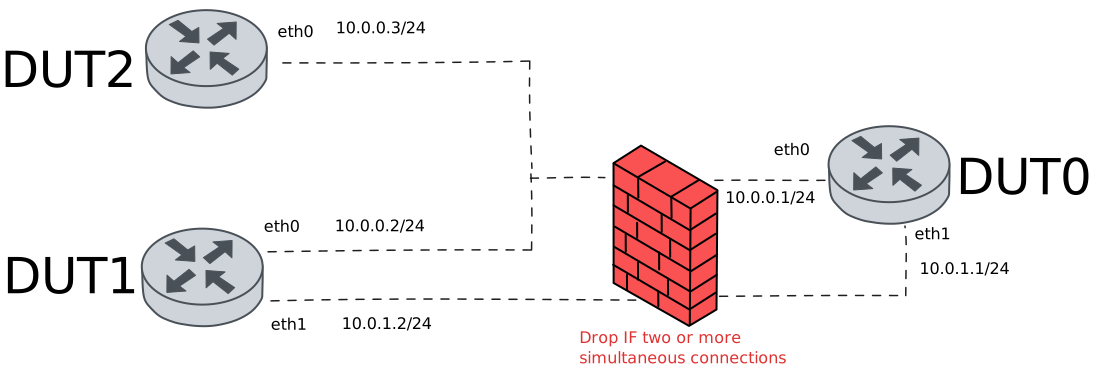
Test System Drop Over Connections
Description
This scenario shows how to limit the number of simultaneous system connections using traffic selectors
Scenario
Note
In the example below, we use NSM operation on both DUT1 and DUT2 devices to establish two ICMP connections.
Step 1: Set the following configuration in DUT0 :
set interfaces ethernet eth0 address 10.0.0.1/24
set interfaces ethernet eth1 address 10.0.1.1/24
set system login user admin authentication encrypted-password '$6$GSjsCj8gHLv$/VcqU6FLi6CT2Oxn0MJQ2C2tqnRDrYKNF8HIYWJp68nvXvPdFccDsT04.WtigUONbKYrgKg8d6rEs8PjljMkH0'
set system traffic policy local-in DROP_CONNLIMIT
set traffic policy DROP_CONNLIMIT rule 1 action drop
set traffic policy DROP_CONNLIMIT rule 1 selector CONNLIMIT_SEL
set traffic selector CONNLIMIT_SEL rule 1 connlimit 2
set traffic selector CONNLIMIT_SEL rule 1 protocol icmp
set traffic selector CONNLIMIT_SEL rule 1 state new
Step 2: Set the following configuration in DUT1 :
set interfaces ethernet eth0 address 10.0.0.2/24
set interfaces ethernet eth1 address 10.0.1.2/24
set service nsm operation TEST_OPER_1 destination-address 10.0.0.1
set service nsm operation TEST_OPER_1 interval 0.10
set service nsm operation TEST_OPER_1 type icmp
set system login user admin authentication encrypted-password '$6$GSjsCj8gHLv$/VcqU6FLi6CT2Oxn0MJQ2C2tqnRDrYKNF8HIYWJp68nvXvPdFccDsT04.WtigUONbKYrgKg8d6rEs8PjljMkH0'
Step 3: Set the following configuration in DUT2 :
set interfaces ethernet eth0 address 10.0.0.3/24
set service nsm operation TEST_OPER_1 destination-address 10.0.0.1
set service nsm operation TEST_OPER_1 interval 0.10
set service nsm operation TEST_OPER_1 type icmp
set system login user admin authentication encrypted-password '$6$GSjsCj8gHLv$/VcqU6FLi6CT2Oxn0MJQ2C2tqnRDrYKNF8HIYWJp68nvXvPdFccDsT04.WtigUONbKYrgKg8d6rEs8PjljMkH0'
Step 4: Run the command system conntrack show protocol icmp destination 10.0.0.1 on DUT1 and expect the following output:
Show output
icmp     1 29 src=10.0.0.2 dst=10.0.0.1 type=8 code=0 id=17329 packets=18 bytes=576 src=10.0.0.1 dst=10.0.0.2 type=0 code=0 id=17329 packets=18 bytes=576 mark=0 use=1
conntrack v1.4.7 (conntrack-tools): 1 flow entries have been shown.
Step 5: Run the command service nsm operation show on DUT1 and expect the following output:
Show output
-------------------------------------------------------------------------------------------
 Operation   Alarm  Status    RTT(s)    Jitter(s)   Loss(%)   Window  Toggled  Prev-toggled
-------------------------------------------------------------------------------------------
TEST_OPER_1  ---    ---     0.000409    0.000147    0.000000  2/2     ---      ---
Step 6: Run the command system conntrack show protocol icmp destination 10.0.0.1 on DUT2 and expect the following output:
Show output
icmp     1 29 src=10.0.0.3 dst=10.0.0.1 type=8 code=0 id=56867 packets=8 bytes=256 src=10.0.0.1 dst=10.0.0.3 type=0 code=0 id=56867 packets=8 bytes=256 mark=0 use=1
conntrack v1.4.7 (conntrack-tools): 1 flow entries have been shown.
Step 7: Run the command service nsm operation show on DUT2 and expect the following output:
Show output
-------------------------------------------------------------------------------------------
 Operation   Alarm  Status    RTT(s)    Jitter(s)   Loss(%)   Window  Toggled  Prev-toggled
-------------------------------------------------------------------------------------------
TEST_OPER_1  ---    ---     0.003577    0.004229    0.000000  2/2     ---      ---
Step 8: Expect a failure in the following command:
Ping the IP address 10.0.0.1 from DUT1:
admin@DUT1$ ping 10.0.0.1 count 5 size 56 timeout 1Show output
PING 10.0.0.1 (10.0.0.1) 56(84) bytes of data.

--- 10.0.0.1 ping statistics ---
5 packets transmitted, 0 received, 100% packet loss, time 4082ms
Step 9: Expect a failure in the following command:
Ping the IP address 10.0.1.1 from DUT1:
admin@DUT1$ ping 10.0.1.1 count 5 size 56 timeout 1Show output
PING 10.0.1.1 (10.0.1.1) 56(84) bytes of data.

--- 10.0.1.1 ping statistics ---
5 packets transmitted, 0 received, 100% packet loss, time 4081ms
Note
In this case, both pings fail because the policy is applied at system level.
Test Interface Drop Over Connections
Description
This scenario shows how to limit the number of simultaneous interface connections using traffic selectors
Scenario
Note
In the example below, we use NSM operation on both DUT1 and DUT2 devices to establish two ICMP connections.
Step 1: Set the following configuration in DUT0 :
set interfaces ethernet eth0 address 10.0.0.1/24
set interfaces ethernet eth0 traffic policy local-in DROP_CONNLIMIT
set interfaces ethernet eth1 address 10.0.1.1/24
set system login user admin authentication encrypted-password '$6$GSjsCj8gHLv$/VcqU6FLi6CT2Oxn0MJQ2C2tqnRDrYKNF8HIYWJp68nvXvPdFccDsT04.WtigUONbKYrgKg8d6rEs8PjljMkH0'
set traffic policy DROP_CONNLIMIT rule 1 action drop
set traffic policy DROP_CONNLIMIT rule 1 selector CONNLIMIT_SEL
set traffic selector CONNLIMIT_SEL rule 1 connlimit 2
set traffic selector CONNLIMIT_SEL rule 1 protocol icmp
set traffic selector CONNLIMIT_SEL rule 1 state new
Step 2: Set the following configuration in DUT1 :
set interfaces ethernet eth0 address 10.0.0.2/24
set interfaces ethernet eth1 address 10.0.1.2/24
set service nsm operation TEST_OPER_1 destination-address 10.0.0.1
set service nsm operation TEST_OPER_1 interval 0.10
set service nsm operation TEST_OPER_1 type icmp
set system login user admin authentication encrypted-password '$6$GSjsCj8gHLv$/VcqU6FLi6CT2Oxn0MJQ2C2tqnRDrYKNF8HIYWJp68nvXvPdFccDsT04.WtigUONbKYrgKg8d6rEs8PjljMkH0'
Step 3: Set the following configuration in DUT2 :
set interfaces ethernet eth0 address 10.0.0.3/24
set service nsm operation TEST_OPER_1 destination-address 10.0.0.1
set service nsm operation TEST_OPER_1 interval 0.10
set service nsm operation TEST_OPER_1 type icmp
set system login user admin authentication encrypted-password '$6$GSjsCj8gHLv$/VcqU6FLi6CT2Oxn0MJQ2C2tqnRDrYKNF8HIYWJp68nvXvPdFccDsT04.WtigUONbKYrgKg8d6rEs8PjljMkH0'
Step 4: Run the command system conntrack show protocol icmp destination 10.0.0.1 on DUT1 and expect the following output:
Show output
icmp     1 29 src=10.0.0.2 dst=10.0.0.1 type=8 code=0 id=17813 packets=16 bytes=512 src=10.0.0.1 dst=10.0.0.2 type=0 code=0 id=17813 packets=16 bytes=512 mark=0 use=1
conntrack v1.4.7 (conntrack-tools): 1 flow entries have been shown.
Step 5: Run the command service nsm operation show on DUT1 and expect the following output:
Show output
-------------------------------------------------------------------------------------------
 Operation   Alarm  Status    RTT(s)    Jitter(s)   Loss(%)   Window  Toggled  Prev-toggled
-------------------------------------------------------------------------------------------
TEST_OPER_1  ---    ---     0.000283    0.000024    0.000000  2/2     ---      ---
Step 6: Run the command system conntrack show protocol icmp destination 10.0.0.1 on DUT2 and expect the following output:
Show output
icmp     1 29 src=10.0.0.3 dst=10.0.0.1 type=8 code=0 id=57227 packets=7 bytes=224 src=10.0.0.1 dst=10.0.0.3 type=0 code=0 id=57227 packets=7 bytes=224 mark=0 use=1
conntrack v1.4.7 (conntrack-tools): 1 flow entries have been shown.
Step 7: Run the command service nsm operation show on DUT2 and expect the following output:
Show output
-------------------------------------------------------------------------------------------
 Operation   Alarm  Status    RTT(s)    Jitter(s)   Loss(%)   Window  Toggled  Prev-toggled
-------------------------------------------------------------------------------------------
TEST_OPER_1  ---    ---     0.000277    0.000046    0.000000  2/2     ---      ---
Step 8: Expect a failure in the following command:
Ping the IP address 10.0.0.1 from DUT1:
admin@DUT1$ ping 10.0.0.1 count 5 size 56 timeout 1Show output
PING 10.0.0.1 (10.0.0.1) 56(84) bytes of data.

--- 10.0.0.1 ping statistics ---
5 packets transmitted, 0 received, 100% packet loss, time 4085ms
Step 9: Ping the IP address 10.0.1.1 from DUT1:
admin@DUT1$ ping 10.0.1.1 count 5 size 56 timeout 1Show output
PING 10.0.1.1 (10.0.1.1) 56(84) bytes of data.
64 bytes from 10.0.1.1: icmp_seq=1 ttl=64 time=0.346 ms
64 bytes from 10.0.1.1: icmp_seq=2 ttl=64 time=0.192 ms
64 bytes from 10.0.1.1: icmp_seq=3 ttl=64 time=0.316 ms
64 bytes from 10.0.1.1: icmp_seq=4 ttl=64 time=0.236 ms
64 bytes from 10.0.1.1: icmp_seq=5 ttl=64 time=0.350 ms

--- 10.0.1.1 ping statistics ---
5 packets transmitted, 5 received, 0% packet loss, time 4097ms
rtt min/avg/max/mdev = 0.192/0.288/0.350/0.063 ms
Note
In this case, the second ping succeeds because the policy is applied at interface level.
Test Interface Log Under Connections
Description
This scenario shows how to log new incomming connections using traffic selectors
Scenario
Note
In the example below, we use NSM operation on both DUT1 and DUT2 devices to establish two ICMP connections.
Step 1: Set the following configuration in DUT0 :
set interfaces ethernet eth0 address 10.0.0.1/24
set interfaces ethernet eth0 traffic policy local-in DROP_CONNLIMIT
set interfaces ethernet eth1 address 10.0.1.1/24
set system login user admin authentication encrypted-password '$6$GSjsCj8gHLv$/VcqU6FLi6CT2Oxn0MJQ2C2tqnRDrYKNF8HIYWJp68nvXvPdFccDsT04.WtigUONbKYrgKg8d6rEs8PjljMkH0'
set traffic policy DROP_CONNLIMIT rule 1 action accept
set traffic policy DROP_CONNLIMIT rule 1 log prefix Incomming_connection
set traffic policy DROP_CONNLIMIT rule 1 selector CONNLIMIT_SEL
set traffic selector CONNLIMIT_SEL rule 1 not connlimit 2
set traffic selector CONNLIMIT_SEL rule 1 protocol icmp
set traffic selector CONNLIMIT_SEL rule 1 state new
Step 2: Set the following configuration in DUT1 :
set interfaces ethernet eth0 address 10.0.0.2/24
set interfaces ethernet eth1 address 10.0.1.2/24
set service nsm operation TEST_OPER_1 destination-address 10.0.0.1
set service nsm operation TEST_OPER_1 interval 0.10
set service nsm operation TEST_OPER_1 type icmp
set system login user admin authentication encrypted-password '$6$GSjsCj8gHLv$/VcqU6FLi6CT2Oxn0MJQ2C2tqnRDrYKNF8HIYWJp68nvXvPdFccDsT04.WtigUONbKYrgKg8d6rEs8PjljMkH0'
Step 3: Set the following configuration in DUT2 :
set interfaces ethernet eth0 address 10.0.0.3/24
set service nsm operation TEST_OPER_1 destination-address 10.0.0.1
set service nsm operation TEST_OPER_1 interval 0.10
set service nsm operation TEST_OPER_1 type icmp
set system login user admin authentication encrypted-password '$6$GSjsCj8gHLv$/VcqU6FLi6CT2Oxn0MJQ2C2tqnRDrYKNF8HIYWJp68nvXvPdFccDsT04.WtigUONbKYrgKg8d6rEs8PjljMkH0'
Step 4: Run the command system conntrack show protocol icmp destination 10.0.0.1 on DUT1 and expect the following output:
Show output
icmp     1 29 src=10.0.0.2 dst=10.0.0.1 type=8 code=0 id=18305 packets=15 bytes=480 src=10.0.0.1 dst=10.0.0.2 type=0 code=0 id=18305 packets=15 bytes=480 mark=0 use=1
conntrack v1.4.7 (conntrack-tools): 1 flow entries have been shown.
Step 5: Run the command service nsm operation show on DUT1 and expect the following output:
Show output
-------------------------------------------------------------------------------------------
 Operation   Alarm  Status    RTT(s)    Jitter(s)   Loss(%)   Window  Toggled  Prev-toggled
-------------------------------------------------------------------------------------------
TEST_OPER_1  ---    ---     0.000270    0.000018    0.000000  2/2     ---      ---
Step 6: Run the command system conntrack show protocol icmp destination 10.0.0.1 on DUT2 and expect the following output:
Show output
icmp     1 29 src=10.0.0.3 dst=10.0.0.1 type=8 code=0 id=57587 packets=7 bytes=224 src=10.0.0.1 dst=10.0.0.3 type=0 code=0 id=57587 packets=7 bytes=224 mark=0 use=1
conntrack v1.4.7 (conntrack-tools): 1 flow entries have been shown.
Step 7: Run the command service nsm operation show on DUT2 and expect the following output:
Show output
-------------------------------------------------------------------------------------------
 Operation   Alarm  Status    RTT(s)    Jitter(s)   Loss(%)   Window  Toggled  Prev-toggled
-------------------------------------------------------------------------------------------
TEST_OPER_1  ---    ---     0.000471    0.000451    0.000000  2/2     ---      ---
Step 8: Ping the IP address 10.0.1.1 from DUT1:
admin@DUT1$ ping 10.0.1.1 count 5 size 56 timeout 1Show output
PING 10.0.1.1 (10.0.1.1) 56(84) bytes of data.
64 bytes from 10.0.1.1: icmp_seq=1 ttl=64 time=0.489 ms
64 bytes from 10.0.1.1: icmp_seq=2 ttl=64 time=0.288 ms
64 bytes from 10.0.1.1: icmp_seq=3 ttl=64 time=0.276 ms
64 bytes from 10.0.1.1: icmp_seq=4 ttl=64 time=0.207 ms
64 bytes from 10.0.1.1: icmp_seq=5 ttl=64 time=0.259 ms

--- 10.0.1.1 ping statistics ---
5 packets transmitted, 5 received, 0% packet loss, time 4100ms
rtt min/avg/max/mdev = 0.207/0.303/0.489/0.096 ms
Step 9: Run the command system journal show | grep ACCEPT on DUT0 and expect the following output:
Show output
Jun 03 10:36:52.154561 osdx kernel: [Incomming_connection-1] ACCEPT IN=eth0 OUT= MAC=de:ad:be:ef:6c:00:de:ad:be:ef:6c:10:08:00 SRC=10.0.0.2 DST=10.0.0.1 LEN=32 TOS=0x00 PREC=0x00 TTL=64 ID=12307 DF PROTO=ICMP TYPE=8 CODE=0 ID=18305 SEQ=1
Jun 03 10:36:53.257988 osdx kernel: [Incomming_connection-1] ACCEPT IN=eth0 OUT= MAC=de:ad:be:ef:6c:00:de:ad:be:ef:6c:20:08:00 SRC=10.0.0.3 DST=10.0.0.1 LEN=32 TOS=0x00 PREC=0x00 TTL=64 ID=57326 DF PROTO=ICMP TYPE=8 CODE=0 ID=57587 SEQ=1
Note
As you can see in the output of the previous command, only the first two incoming connections are logged in the journal.