Site-To-Site
This scenario shows how to configure and connect two subnets
with each other through a VPN tunnel and automatically configure
the negotiated remote prefixes as routes. DUT0 acts as a
responder and DUT1 as a initiator.
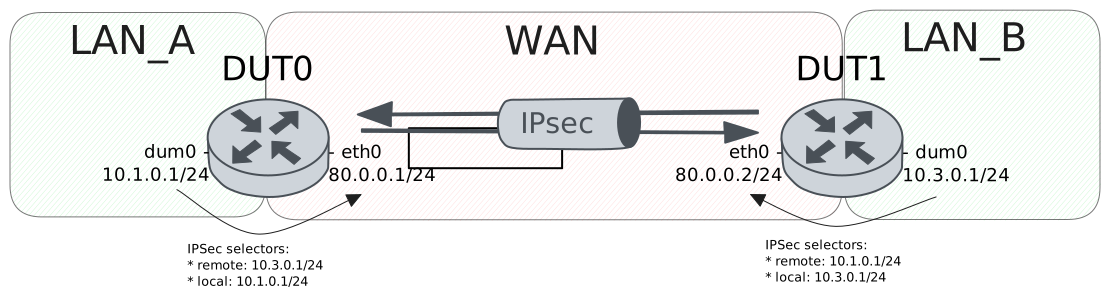
Test Site-To-Site With Basic Route Installation
Description
In this scenario, both devices install routes
for the VPN traffic in the main table.
Scenario
Step 1: Run the command protocols ip show route on DUT0 and check whether the output does not contain the following tokens:
K>* 10.3.0.0/24Show output
Codes: K - kernel route, C - connected, L - local, S - static,
       R - RIP, O - OSPF, I - IS-IS, B - BGP, E - EIGRP, N - NHRP,
       T - Table, v - VNC, V - VNC-Direct, A - Babel, F - PBR,
       f - OpenFabric, t - Table-Direct,
       > - selected route, * - FIB route, q - queued, r - rejected, b - backup
       t - trapped, o - offload failure

IPv4 unicast VRF default:
L   20.0.0.2/32 is directly connected, unknown inactive, weight 1, 01:26:50
Step 2: Set the following configuration in DUT0 :
set interfaces dummy dum0 address 10.1.0.1/24
set interfaces ethernet eth0 address 80.0.0.1/24
set system login user admin authentication encrypted-password '$6$GSjsCj8gHLv$/VcqU6FLi6CT2Oxn0MJQ2C2tqnRDrYKNF8HIYWJp68nvXvPdFccDsT04.WtigUONbKYrgKg8d6rEs8PjljMkH0'
set system vrf main
set vpn ipsec auth-profile AUTH-SA global-secrets ike-psk %any encrypted-secret U2FsdGVkX18kJRBm0ggStktzNd79K7/q9frYTXXuB/Y=
set vpn ipsec auth-profile AUTH-SA local auth ike-psk id %any
set vpn ipsec auth-profile AUTH-SA remote auth ike-psk id %any
set vpn ipsec esp-group CHILD-SA mode tunnel
set vpn ipsec esp-group CHILD-SA proposal 1 encryption aes256gcm128
set vpn ipsec esp-group CHILD-SA proposal 1 pfs dh-group19
set vpn ipsec ike-group IKE-SA key-exchange ikev2
set vpn ipsec ike-group IKE-SA proposal 1 dh-group 19
set vpn ipsec ike-group IKE-SA proposal 1 encryption aes256gcm128
set vpn ipsec ike-group IKE-SA proposal 1 hash sha256
set vpn ipsec site-to-site peer PEER auth-profile AUTH-SA
set vpn ipsec site-to-site peer PEER connection-type respond
set vpn ipsec site-to-site peer PEER default-esp-group CHILD-SA
set vpn ipsec site-to-site peer PEER ike-group IKE-SA
set vpn ipsec site-to-site peer PEER local-address 80.0.0.1
set vpn ipsec site-to-site peer PEER remote-address 80.0.0.2
set vpn ipsec site-to-site peer PEER tunnel 1 install-routes main
set vpn ipsec site-to-site peer PEER tunnel 1 local prefix 10.1.0.0/24
set vpn ipsec site-to-site peer PEER tunnel 1 remote prefix 10.3.0.0/24
Step 3: Set the following configuration in DUT1 :
set interfaces dummy dum0 address 10.3.0.1/24
set interfaces ethernet eth0 address 80.0.0.2/24
set protocols static route 0.0.0.0/0 next-hop 80.0.0.1
set system login user admin authentication encrypted-password '$6$GSjsCj8gHLv$/VcqU6FLi6CT2Oxn0MJQ2C2tqnRDrYKNF8HIYWJp68nvXvPdFccDsT04.WtigUONbKYrgKg8d6rEs8PjljMkH0'
set system vrf main
set vpn ipsec auth-profile AUTH-SA global-secrets ike-psk %any encrypted-secret U2FsdGVkX19/OFZm1/fAqtKSgIWIjeIBcJcTGmdxwAc=
set vpn ipsec auth-profile AUTH-SA local auth ike-psk id %any
set vpn ipsec auth-profile AUTH-SA remote auth ike-psk id %any
set vpn ipsec esp-group CHILD-SA mode tunnel
set vpn ipsec esp-group CHILD-SA proposal 1 encryption aes256gcm128
set vpn ipsec esp-group CHILD-SA proposal 1 pfs dh-group19
set vpn ipsec ike-group IKE-SA key-exchange ikev2
set vpn ipsec ike-group IKE-SA proposal 1 dh-group 19
set vpn ipsec ike-group IKE-SA proposal 1 encryption aes256gcm128
set vpn ipsec ike-group IKE-SA proposal 1 hash sha256
set vpn ipsec site-to-site peer PEER auth-profile AUTH-SA
set vpn ipsec site-to-site peer PEER connection-type initiate
set vpn ipsec site-to-site peer PEER default-esp-group CHILD-SA
set vpn ipsec site-to-site peer PEER ike-group IKE-SA
set vpn ipsec site-to-site peer PEER local-address 80.0.0.2
set vpn ipsec site-to-site peer PEER remote-address 80.0.0.1
set vpn ipsec site-to-site peer PEER tunnel 1 install-routes main
set vpn ipsec site-to-site peer PEER tunnel 1 local prefix 10.3.0.0/24
set vpn ipsec site-to-site peer PEER tunnel 1 remote prefix 10.1.0.0/24
Step 4: Ping the IP address 80.0.0.1 from DUT1:
admin@DUT1$ ping 80.0.0.1 count 1 size 56 timeout 1Show output
PING 80.0.0.1 (80.0.0.1) 56(84) bytes of data.
64 bytes from 80.0.0.1: icmp_seq=1 ttl=64 time=0.525 ms

--- 80.0.0.1 ping statistics ---
1 packets transmitted, 1 received, 0% packet loss, time 0ms
rtt min/avg/max/mdev = 0.525/0.525/0.525/0.000 ms
Step 5: Ping the IP address 80.0.0.2 from DUT0:
admin@DUT0$ ping 80.0.0.2 count 1 size 56 timeout 1Show output
PING 80.0.0.2 (80.0.0.2) 56(84) bytes of data.
64 bytes from 80.0.0.2: icmp_seq=1 ttl=64 time=0.296 ms

--- 80.0.0.2 ping statistics ---
1 packets transmitted, 1 received, 0% packet loss, time 0ms
rtt min/avg/max/mdev = 0.296/0.296/0.296/0.000 ms
Step 6: Run the command vpn ipsec show sa on DUT0 and check whether the output matches the following regular expressions:
peer-PEER-tunnel-\d+.+INSTALLEDShow output
vpn-peer-PEER: #1, ESTABLISHED, IKEv2, 64003bec7797b6fe_i 676ef259ab5545e0_r*
  local  '80.0.0.1' @ 80.0.0.1[500]
  remote '80.0.0.2' @ 80.0.0.2[500]
  AES_GCM_16-256/PRF_HMAC_SHA2_256/ECP_256
  established 0s ago, rekeying in 15924s
  peer-PEER-tunnel-1: #1, reqid 1, INSTALLED, TUNNEL, ESP:AES_GCM_16-256
    installed 0s ago, rekeying in 3507s, expires in 3960s
    in  cf0ad83f,      0 bytes,     0 packets
    out c12cd714,      0 bytes,     0 packets
    local  10.1.0.0/24
    remote 10.3.0.0/24
Step 7: Run the command protocols ip show route on DUT0 and check whether the output contains the following tokens:
K>* 10.3.0.0/24Show output
Codes: K - kernel route, C - connected, L - local, S - static,
       R - RIP, O - OSPF, I - IS-IS, B - BGP, E - EIGRP, N - NHRP,
       T - Table, v - VNC, V - VNC-Direct, A - Babel, F - PBR,
       f - OpenFabric, t - Table-Direct,
       > - selected route, * - FIB route, q - queued, r - rejected, b - backup
       t - trapped, o - offload failure

IPv4 unicast VRF default:
C>* 10.1.0.0/24 is directly connected, dum0, weight 1, 00:00:06
L>* 10.1.0.1/32 is directly connected, dum0, weight 1, 00:00:06
K>* 10.3.0.0/24 [0/0] via 80.0.0.2, eth0, weight 1, 00:00:00
L   20.0.0.2/32 is directly connected, unknown inactive, weight 1, 01:26:59
C>* 80.0.0.0/24 is directly connected, eth0, weight 1, 00:00:06
L>* 80.0.0.1/32 is directly connected, eth0, weight 1, 00:00:06
Step 8: Run the command vpn ipsec clear sa on DUT1 and expect the following output:
Show output
Deleting IPSec SAs... 100.00%
Closed tunnels: 1
Step 9: Run the command vpn ipsec initiate peer PEER on DUT1 and expect the following output:
Show output
Initiating IPSec SAs... 100.00%
Initiated tunnels: 1
Step 10: Ping the IP address 10.1.0.1 from DUT1:
admin@DUT1$ ping 10.1.0.1 local-address 10.3.0.1 count 1 size 56 timeout 1Show output
PING 10.1.0.1 (10.1.0.1) from 10.3.0.1 : 56(84) bytes of data.
64 bytes from 10.1.0.1: icmp_seq=1 ttl=64 time=0.680 ms

--- 10.1.0.1 ping statistics ---
1 packets transmitted, 1 received, 0% packet loss, time 0ms
rtt min/avg/max/mdev = 0.680/0.680/0.680/0.000 ms
Step 11: Initiate a tcp connection from DUT1 to DUT0 and exchange messages between both endpoints
admin@DUT0$ monitor test connection server 8080 tcp
admin@DUT1$ monitor test connection client 10.1.0.1 8080 tcp local-address 10.3.0.1
Step 12: Run the command vpn ipsec show sa on DUT0 and check whether the output matches the following regular expressions:
[1-9]\d? packetsShow output
vpn-peer-PEER: #2, ESTABLISHED, IKEv2, 2908a5c6c7908674_i 8f14b3839b1d4261_r*
  local  '80.0.0.1' @ 80.0.0.1[500]
  remote '80.0.0.2' @ 80.0.0.2[500]
  AES_GCM_16-256/PRF_HMAC_SHA2_256/ECP_256
  established 3s ago, rekeying in 25614s
  peer-PEER-tunnel-1: #2, reqid 1, INSTALLED, TUNNEL, ESP:AES_GCM_16-256
    installed 3s ago, rekeying in 3283s, expires in 3957s
    in  c2ba4a90,    920 bytes,    15 packets,     1s ago
    out cde5702c,    868 bytes,    14 packets,     1s ago
    local  10.1.0.0/24
    remote 10.3.0.0/24
Test Site-To-Site With VRF Route Installation
Description
In this scenario, DUT0 install reoutes
in a separate VRF called LAN.
Scenario
Step 1: Run the command protocols vrf LAN ip show route on DUT0 and check whether the output does not contain the following tokens:
K>* 10.3.0.0/24Show output
% VRF LAN not found
Step 2: Set the following configuration in DUT0 :
set interfaces dummy dum0 address 10.1.0.1/24
set interfaces dummy dum0 vrf LAN
set interfaces ethernet eth0 address 80.0.0.1/24
set interfaces ethernet eth0 vrf WAN
set protocols vrf WAN static route 10.1.0.0/24 next-hop-vrf LAN
set system login user admin authentication encrypted-password '$6$GSjsCj8gHLv$/VcqU6FLi6CT2Oxn0MJQ2C2tqnRDrYKNF8HIYWJp68nvXvPdFccDsT04.WtigUONbKYrgKg8d6rEs8PjljMkH0'
set system vrf LAN
set system vrf WAN
set vpn ipsec auth-profile AUTH-SA global-secrets ike-psk %any encrypted-secret U2FsdGVkX1+DpUTjL/7836kdcExOHgaSP3O0+i/+nlc=
set vpn ipsec auth-profile AUTH-SA local auth ike-psk id %any
set vpn ipsec auth-profile AUTH-SA remote auth ike-psk id %any
set vpn ipsec esp-group CHILD-SA mode tunnel
set vpn ipsec esp-group CHILD-SA proposal 1 encryption aes256gcm128
set vpn ipsec esp-group CHILD-SA proposal 1 pfs dh-group19
set vpn ipsec ike-group IKE-SA key-exchange ikev2
set vpn ipsec ike-group IKE-SA proposal 1 dh-group 19
set vpn ipsec ike-group IKE-SA proposal 1 encryption aes256gcm128
set vpn ipsec ike-group IKE-SA proposal 1 hash sha256
set vpn ipsec site-to-site peer PEER auth-profile AUTH-SA
set vpn ipsec site-to-site peer PEER connection-type respond
set vpn ipsec site-to-site peer PEER default-esp-group CHILD-SA
set vpn ipsec site-to-site peer PEER ike-group IKE-SA
set vpn ipsec site-to-site peer PEER local-address 80.0.0.1
set vpn ipsec site-to-site peer PEER remote-address 80.0.0.2
set vpn ipsec site-to-site peer PEER tunnel 1 install-routes LAN
set vpn ipsec site-to-site peer PEER tunnel 1 local prefix 10.1.0.0/24
set vpn ipsec site-to-site peer PEER tunnel 1 remote prefix 10.3.0.0/24
Step 3: Set the following configuration in DUT1 :
set interfaces dummy dum0 address 10.3.0.1/24
set interfaces ethernet eth0 address 80.0.0.2/24
set protocols static route 0.0.0.0/0 next-hop 80.0.0.1
set system login user admin authentication encrypted-password '$6$GSjsCj8gHLv$/VcqU6FLi6CT2Oxn0MJQ2C2tqnRDrYKNF8HIYWJp68nvXvPdFccDsT04.WtigUONbKYrgKg8d6rEs8PjljMkH0'
set system vrf main
set vpn ipsec auth-profile AUTH-SA global-secrets ike-psk %any encrypted-secret U2FsdGVkX1+ddS/TqfKetiDa4WR/2FKWsF91FBMsgQU=
set vpn ipsec auth-profile AUTH-SA local auth ike-psk id %any
set vpn ipsec auth-profile AUTH-SA remote auth ike-psk id %any
set vpn ipsec esp-group CHILD-SA mode tunnel
set vpn ipsec esp-group CHILD-SA proposal 1 encryption aes256gcm128
set vpn ipsec esp-group CHILD-SA proposal 1 pfs dh-group19
set vpn ipsec ike-group IKE-SA key-exchange ikev2
set vpn ipsec ike-group IKE-SA proposal 1 dh-group 19
set vpn ipsec ike-group IKE-SA proposal 1 encryption aes256gcm128
set vpn ipsec ike-group IKE-SA proposal 1 hash sha256
set vpn ipsec site-to-site peer PEER auth-profile AUTH-SA
set vpn ipsec site-to-site peer PEER connection-type initiate
set vpn ipsec site-to-site peer PEER default-esp-group CHILD-SA
set vpn ipsec site-to-site peer PEER ike-group IKE-SA
set vpn ipsec site-to-site peer PEER local-address 80.0.0.2
set vpn ipsec site-to-site peer PEER remote-address 80.0.0.1
set vpn ipsec site-to-site peer PEER tunnel 1 install-routes main
set vpn ipsec site-to-site peer PEER tunnel 1 local prefix 10.3.0.0/24
set vpn ipsec site-to-site peer PEER tunnel 1 remote prefix 10.1.0.0/24
Step 4: Ping the IP address 80.0.0.1 from DUT1:
admin@DUT1$ ping 80.0.0.1 count 1 size 56 timeout 1Show output
PING 80.0.0.1 (80.0.0.1) 56(84) bytes of data.
64 bytes from 80.0.0.1: icmp_seq=1 ttl=64 time=0.468 ms

--- 80.0.0.1 ping statistics ---
1 packets transmitted, 1 received, 0% packet loss, time 0ms
rtt min/avg/max/mdev = 0.468/0.468/0.468/0.000 ms
Step 5: Ping the IP address 80.0.0.2 from DUT0:
admin@DUT0$ ping 80.0.0.2 vrf WAN count 1 size 56 timeout 1Show output
ping: Warning: source address might be selected on device other than: WAN
PING 80.0.0.2 (80.0.0.2) from 80.0.0.1 WAN: 56(84) bytes of data.
64 bytes from 80.0.0.2: icmp_seq=1 ttl=64 time=0.380 ms

--- 80.0.0.2 ping statistics ---
1 packets transmitted, 1 received, 0% packet loss, time 0ms
rtt min/avg/max/mdev = 0.380/0.380/0.380/0.000 ms
Step 6: Run the command vpn ipsec show sa on DUT0 and check whether the output matches the following regular expressions:
peer-PEER-tunnel-\d+.+INSTALLEDShow output
vpn-peer-PEER: #1, ESTABLISHED, IKEv2, 66c9bd8263f930dd_i 7840e704fa1f55a8_r*
  local  '80.0.0.1' @ 80.0.0.1[500]
  remote '80.0.0.2' @ 80.0.0.2[500]
  AES_GCM_16-256/PRF_HMAC_SHA2_256/ECP_256
  established 1s ago, rekeying in 15422s
  peer-PEER-tunnel-1: #1, reqid 1, INSTALLED, TUNNEL, ESP:AES_GCM_16-256
    installed 1s ago, rekeying in 3530s, expires in 3959s
    in  c5b7343f,      0 bytes,     0 packets
    out c50c573d,      0 bytes,     0 packets
    local  10.1.0.0/24
    remote 10.3.0.0/24
Step 7: Run the command protocols vrf LAN ip show route on DUT0 and check whether the output contains the following tokens:
K>* 10.3.0.0/24Show output
Codes: K - kernel route, C - connected, L - local, S - static,
       R - RIP, O - OSPF, I - IS-IS, B - BGP, E - EIGRP, N - NHRP,
       T - Table, v - VNC, V - VNC-Direct, A - Babel, F - PBR,
       f - OpenFabric, t - Table-Direct,
       > - selected route, * - FIB route, q - queued, r - rejected, b - backup
       t - trapped, o - offload failure

IPv4 unicast VRF LAN:
K>* 0.0.0.0/0 [255/8192] unreachable (ICMP unreachable), weight 1, 00:00:06
C>* 10.1.0.0/24 is directly connected, dum0, weight 1, 00:00:06
L>* 10.1.0.1/32 is directly connected, dum0, weight 1, 00:00:06
K>* 10.3.0.0/24 [0/0] via 80.0.0.2, eth0 (vrf WAN), weight 1, 00:00:01
K>* 127.0.0.0/8 [0/0] is directly connected, LAN, weight 1, 00:00:06
Step 8: Run the command vpn ipsec clear sa on DUT1 and expect the following output:
Show output
Deleting IPSec SAs... 100.00%
Closed tunnels: 1
Step 9: Run the command vpn ipsec initiate peer PEER on DUT1 and expect the following output:
Show output
Initiating IPSec SAs... 100.00%
Initiated tunnels: 1
Step 10: Ping the IP address 10.1.0.1 from DUT1:
admin@DUT1$ ping 10.1.0.1 local-address 10.3.0.1 count 1 size 56 timeout 1Show output
PING 10.1.0.1 (10.1.0.1) from 10.3.0.1 : 56(84) bytes of data.
64 bytes from 10.1.0.1: icmp_seq=1 ttl=64 time=0.751 ms

--- 10.1.0.1 ping statistics ---
1 packets transmitted, 1 received, 0% packet loss, time 0ms
rtt min/avg/max/mdev = 0.751/0.751/0.751/0.000 ms
Step 11: Initiate a tcp connection from DUT1 to DUT0 and exchange messages between both endpoints
admin@DUT0$ monitor test connection server 8080 tcp vrf LAN
admin@DUT1$ monitor test connection client 10.1.0.1 8080 tcp local-address 10.3.0.1
Step 12: Run the command vpn ipsec show sa on DUT0 and check whether the output matches the following regular expressions:
[1-9]\d? packetsShow output
vpn-peer-PEER: #2, ESTABLISHED, IKEv2, e8fc9e301081ce9b_i 15e3d019e987e28b_r*
  local  '80.0.0.1' @ 80.0.0.1[500]
  remote '80.0.0.2' @ 80.0.0.2[500]
  AES_GCM_16-256/PRF_HMAC_SHA2_256/ECP_256
  established 3s ago, rekeying in 20821s
  peer-PEER-tunnel-1: #2, reqid 1, INSTALLED, TUNNEL, ESP:AES_GCM_16-256
    installed 3s ago, rekeying in 3367s, expires in 3957s
    in  cbc77b7f,    816 bytes,    13 packets,     1s ago
    out c0076019,    712 bytes,    11 packets,     1s ago
    local  10.1.0.0/24
    remote 10.3.0.0/24
Test Site-To-Site With Route Installation And Metrics
Description
In this scenario, DUT0 installs routes with
differents metrics for both IPsec peers. The point is
to check if the routes are installed correctly and most
importantly, whenever the prioritized route is down, the
backup route is used.
Scenario
Step 1: Run the command protocols ip show route on DUT0 and check whether the output does not contain the following tokens:
K>* 10.3.0.0/24Show output
Codes: K - kernel route, C - connected, L - local, S - static,
       R - RIP, O - OSPF, I - IS-IS, B - BGP, E - EIGRP, N - NHRP,
       T - Table, v - VNC, V - VNC-Direct, A - Babel, F - PBR,
       f - OpenFabric, t - Table-Direct,
       > - selected route, * - FIB route, q - queued, r - rejected, b - backup
       t - trapped, o - offload failure

IPv4 unicast VRF default:
L   20.0.0.2/32 is directly connected, unknown inactive, weight 1, 01:27:28
Step 2: Set the following configuration in DUT0 :
set interfaces dummy dum0 address 10.1.0.1/24
set interfaces ethernet eth0 address 80.0.0.1/24
set interfaces ethernet eth1 address 90.0.0.1/24
set system login user admin authentication encrypted-password '$6$GSjsCj8gHLv$/VcqU6FLi6CT2Oxn0MJQ2C2tqnRDrYKNF8HIYWJp68nvXvPdFccDsT04.WtigUONbKYrgKg8d6rEs8PjljMkH0'
set system vrf main
set vpn ipsec auth-profile AUTH-SA global-secrets ike-psk %any encrypted-secret U2FsdGVkX1/vehHa6+YVVn2ulfcQJr3Ch/Kb1Wazi7c=
set vpn ipsec auth-profile AUTH-SA local auth ike-psk id %any
set vpn ipsec auth-profile AUTH-SA remote auth ike-psk id %any
set vpn ipsec esp-group CHILD-SA mode tunnel
set vpn ipsec esp-group CHILD-SA proposal 1 encryption aes256gcm128
set vpn ipsec esp-group CHILD-SA proposal 1 pfs dh-group19
set vpn ipsec ike-group IKE-SA key-exchange ikev2
set vpn ipsec ike-group IKE-SA proposal 1 dh-group 19
set vpn ipsec ike-group IKE-SA proposal 1 encryption aes256gcm128
set vpn ipsec ike-group IKE-SA proposal 1 hash sha256
set vpn ipsec logging log-types any log-level 2
set vpn ipsec site-to-site peer PEER auth-profile AUTH-SA
set vpn ipsec site-to-site peer PEER connection-type respond
set vpn ipsec site-to-site peer PEER default-esp-group CHILD-SA
set vpn ipsec site-to-site peer PEER ike-group IKE-SA
set vpn ipsec site-to-site peer PEER local-address 80.0.0.1
set vpn ipsec site-to-site peer PEER remote-address 80.0.0.2
set vpn ipsec site-to-site peer PEER tunnel 1 install-routes main
set vpn ipsec site-to-site peer PEER tunnel 1 local prefix 10.1.0.0/24
set vpn ipsec site-to-site peer PEER tunnel 1 remote prefix 10.3.0.0/24
set vpn ipsec site-to-site peer PEER tunnel 1 route-priority 10
set vpn ipsec site-to-site peer PEER1 auth-profile AUTH-SA
set vpn ipsec site-to-site peer PEER1 connection-type respond
set vpn ipsec site-to-site peer PEER1 default-esp-group CHILD-SA
set vpn ipsec site-to-site peer PEER1 ike-group IKE-SA
set vpn ipsec site-to-site peer PEER1 local-address 90.0.0.1
set vpn ipsec site-to-site peer PEER1 remote-address 90.0.0.3
set vpn ipsec site-to-site peer PEER1 tunnel 1 install-routes main
set vpn ipsec site-to-site peer PEER1 tunnel 1 local prefix 10.1.0.0/24
set vpn ipsec site-to-site peer PEER1 tunnel 1 remote prefix 10.3.0.0/24
set vpn ipsec site-to-site peer PEER1 tunnel 1 route-priority 100
Step 3: Set the following configuration in DUT1 :
set interfaces dummy dum0 address 10.3.0.1/24
set interfaces ethernet eth0 address 80.0.0.2/24
set protocols static route 0.0.0.0/0 next-hop 80.0.0.1
set system login user admin authentication encrypted-password '$6$GSjsCj8gHLv$/VcqU6FLi6CT2Oxn0MJQ2C2tqnRDrYKNF8HIYWJp68nvXvPdFccDsT04.WtigUONbKYrgKg8d6rEs8PjljMkH0'
set system vrf main
set vpn ipsec auth-profile AUTH-SA global-secrets ike-psk %any encrypted-secret U2FsdGVkX19c+OF3/4GjOD/XArtSq1OoRFjyTG377Jo=
set vpn ipsec auth-profile AUTH-SA local auth ike-psk id %any
set vpn ipsec auth-profile AUTH-SA remote auth ike-psk id %any
set vpn ipsec esp-group CHILD-SA mode tunnel
set vpn ipsec esp-group CHILD-SA proposal 1 encryption aes256gcm128
set vpn ipsec esp-group CHILD-SA proposal 1 pfs dh-group19
set vpn ipsec ike-group IKE-SA key-exchange ikev2
set vpn ipsec ike-group IKE-SA proposal 1 dh-group 19
set vpn ipsec ike-group IKE-SA proposal 1 encryption aes256gcm128
set vpn ipsec ike-group IKE-SA proposal 1 hash sha256
set vpn ipsec site-to-site peer PEER auth-profile AUTH-SA
set vpn ipsec site-to-site peer PEER connection-type initiate
set vpn ipsec site-to-site peer PEER default-esp-group CHILD-SA
set vpn ipsec site-to-site peer PEER ike-group IKE-SA
set vpn ipsec site-to-site peer PEER local-address 80.0.0.2
set vpn ipsec site-to-site peer PEER remote-address 80.0.0.1
set vpn ipsec site-to-site peer PEER tunnel 1 install-routes main
set vpn ipsec site-to-site peer PEER tunnel 1 local prefix 10.3.0.0/24
set vpn ipsec site-to-site peer PEER tunnel 1 remote prefix 10.1.0.0/24
Step 4: Set the following configuration in DUT2 :
set interfaces dummy dum0 address 10.3.0.1/24
set interfaces ethernet eth1 address 90.0.0.3/24
set protocols static route 0.0.0.0/0 next-hop 90.0.0.1
set system login user admin authentication encrypted-password '$6$GSjsCj8gHLv$/VcqU6FLi6CT2Oxn0MJQ2C2tqnRDrYKNF8HIYWJp68nvXvPdFccDsT04.WtigUONbKYrgKg8d6rEs8PjljMkH0'
set vpn ipsec auth-profile AUTH-SA global-secrets ike-psk %any encrypted-secret U2FsdGVkX19r2uhXlmIuE/HY5tr0hNxxcwjm42E9C+U=
set vpn ipsec auth-profile AUTH-SA local auth ike-psk id %any
set vpn ipsec auth-profile AUTH-SA remote auth ike-psk id %any
set vpn ipsec esp-group CHILD-SA mode tunnel
set vpn ipsec esp-group CHILD-SA proposal 1 encryption aes256gcm128
set vpn ipsec esp-group CHILD-SA proposal 1 pfs dh-group19
set vpn ipsec ike-group IKE-SA key-exchange ikev2
set vpn ipsec ike-group IKE-SA proposal 1 dh-group 19
set vpn ipsec ike-group IKE-SA proposal 1 encryption aes256gcm128
set vpn ipsec ike-group IKE-SA proposal 1 hash sha256
set vpn ipsec site-to-site peer PEER auth-profile AUTH-SA
set vpn ipsec site-to-site peer PEER connection-type initiate
set vpn ipsec site-to-site peer PEER default-esp-group CHILD-SA
set vpn ipsec site-to-site peer PEER ike-group IKE-SA
set vpn ipsec site-to-site peer PEER local-address 90.0.0.3
set vpn ipsec site-to-site peer PEER remote-address 90.0.0.1
set vpn ipsec site-to-site peer PEER tunnel 1 local prefix 10.3.0.0/24
set vpn ipsec site-to-site peer PEER tunnel 1 remote prefix 10.1.0.0/24
Step 5: Ping the IP address 80.0.0.1 from DUT1:
admin@DUT1$ ping 80.0.0.1 count 1 size 56 timeout 1Show output
PING 80.0.0.1 (80.0.0.1) 56(84) bytes of data.
64 bytes from 80.0.0.1: icmp_seq=1 ttl=64 time=0.288 ms

--- 80.0.0.1 ping statistics ---
1 packets transmitted, 1 received, 0% packet loss, time 0ms
rtt min/avg/max/mdev = 0.288/0.288/0.288/0.000 ms
Step 6: Ping the IP address 80.0.0.2 from DUT0:
admin@DUT0$ ping 80.0.0.2 count 1 size 56 timeout 1Show output
PING 80.0.0.2 (80.0.0.2) 56(84) bytes of data.
64 bytes from 80.0.0.2: icmp_seq=1 ttl=64 time=0.462 ms

--- 80.0.0.2 ping statistics ---
1 packets transmitted, 1 received, 0% packet loss, time 0ms
rtt min/avg/max/mdev = 0.462/0.462/0.462/0.000 ms
Step 7: Ping the IP address 90.0.0.3 from DUT2:
admin@DUT2$ ping 90.0.0.3 count 1 size 56 timeout 1Show output
PING 90.0.0.3 (90.0.0.3) 56(84) bytes of data.
64 bytes from 90.0.0.3: icmp_seq=1 ttl=64 time=0.029 ms

--- 90.0.0.3 ping statistics ---
1 packets transmitted, 1 received, 0% packet loss, time 0ms
rtt min/avg/max/mdev = 0.029/0.029/0.029/0.000 ms
Step 8: Run the command vpn ipsec show sa on DUT0 and check whether the output matches the following regular expressions:
peer-PEER-tunnel-\d+.+INSTALLEDShow output
vpn-peer-PEER1: #2, ESTABLISHED, IKEv2, 41a8acaef44c4608_i 039fec5c5208143e_r*
  local  '90.0.0.1' @ 90.0.0.1[500]
  remote '90.0.0.3' @ 90.0.0.3[500]
  AES_GCM_16-256/PRF_HMAC_SHA2_256/ECP_256
  established 1s ago, rekeying in 25851s
  peer-PEER1-tunnel-1: #2, reqid 1, INSTALLED, TUNNEL, ESP:AES_GCM_16-256
    installed 1s ago, rekeying in 3259s, expires in 3959s
    in  c50458e3,      0 bytes,     0 packets
    out ccb164e0,      0 bytes,     0 packets
    local  10.1.0.0/24
    remote 10.3.0.0/24
vpn-peer-PEER: #1, ESTABLISHED, IKEv2, c101f1b0bae6366c_i 45666561b42f6a96_r*
  local  '80.0.0.1' @ 80.0.0.1[500]
  remote '80.0.0.2' @ 80.0.0.2[500]
  AES_GCM_16-256/PRF_HMAC_SHA2_256/ECP_256
  established 6s ago, rekeying in 20351s
  peer-PEER-tunnel-1: #1, reqid 1, INSTALLED, TUNNEL, ESP:AES_GCM_16-256
    installed 6s ago, rekeying in 3265s, expires in 3954s
    in  c50bfd6e,      0 bytes,     0 packets
    out c020228d,      0 bytes,     0 packets
    local  10.1.0.0/24
    remote 10.3.0.0/24
Step 9: Run the command protocols ip show route on DUT0 and check whether the output contains the following tokens:
K>* 10.3.0.0/24Show output
Codes: K - kernel route, C - connected, L - local, S - static,
       R - RIP, O - OSPF, I - IS-IS, B - BGP, E - EIGRP, N - NHRP,
       T - Table, v - VNC, V - VNC-Direct, A - Babel, F - PBR,
       f - OpenFabric, t - Table-Direct,
       > - selected route, * - FIB route, q - queued, r - rejected, b - backup
       t - trapped, o - offload failure

IPv4 unicast VRF default:
C>* 10.1.0.0/24 is directly connected, dum0, weight 1, 00:00:12
L>* 10.1.0.1/32 is directly connected, dum0, weight 1, 00:00:12
K * 10.3.0.0/24 [0/100] via 90.0.0.3, eth1, weight 1, 00:00:01
K>* 10.3.0.0/24 [0/10] via 80.0.0.2, eth0, weight 1, 00:00:06
L   20.0.0.2/32 is directly connected, unknown inactive, weight 1, 01:27:44
C>* 80.0.0.0/24 is directly connected, eth0, weight 1, 00:00:12
L>* 80.0.0.1/32 is directly connected, eth0, weight 1, 00:00:12
C>* 90.0.0.0/24 is directly connected, eth1, weight 1, 00:00:12
L>* 90.0.0.1/32 is directly connected, eth1, weight 1, 00:00:12
Step 10: Run the command show system route ip on DUT0 and check whether the output contains the following tokens:
10.3.0.0/24 via 90.0.0.3 dev eth1 proto static metric 100
10.3.0.0/24 via 80.0.0.2 dev eth0 proto static metric 10
Show output
10.1.0.0/24 dev dum0 proto kernel scope link src 10.1.0.1
10.3.0.0/24 via 80.0.0.2 dev eth0 proto static metric 10
10.3.0.0/24 via 90.0.0.3 dev eth1 proto static metric 100
80.0.0.0/24 dev eth0 proto kernel scope link src 80.0.0.1
90.0.0.0/24 dev eth1 proto kernel scope link src 90.0.0.1
Note
The tunnel with the lowest metric configured in the route-priority parameter should be the one used to route the traffic.
Step 11: Run the command vpn ipsec clear sa on DUT1 and expect the following output:
Show output
Deleting IPSec SAs... 100.00%
Closed tunnels: 1
Step 12: Run the command vpn ipsec initiate peer PEER on DUT1 and expect the following output:
Show output
Initiating IPSec SAs... 100.00%
Initiated tunnels: 1
Step 13: Ping the IP address 10.1.0.1 from DUT1:
admin@DUT1$ ping 10.1.0.1 local-address 10.3.0.1 count 1 size 56 timeout 1Show output
PING 10.1.0.1 (10.1.0.1) from 10.3.0.1 : 56(84) bytes of data.
64 bytes from 10.1.0.1: icmp_seq=1 ttl=64 time=0.859 ms

--- 10.1.0.1 ping statistics ---
1 packets transmitted, 1 received, 0% packet loss, time 0ms
rtt min/avg/max/mdev = 0.859/0.859/0.859/0.000 ms
Step 14: Initiate a tcp connection from DUT1 to DUT0 and exchange messages between both endpoints
admin@DUT0$ monitor test connection server 8080 tcp
admin@DUT1$ monitor test connection client 10.1.0.1 8080 tcp local-address 10.3.0.1
Step 15: Run the command vpn ipsec show sa on DUT0 and check whether the output matches the following regular expressions:
[1-9]\d? packetsShow output
vpn-peer-PEER1: #2, ESTABLISHED, IKEv2, 41a8acaef44c4608_i 039fec5c5208143e_r*
  local  '90.0.0.1' @ 90.0.0.1[500]
  remote '90.0.0.3' @ 90.0.0.3[500]
  AES_GCM_16-256/PRF_HMAC_SHA2_256/ECP_256
  established 4s ago, rekeying in 25848s
  peer-PEER1-tunnel-1: #2, reqid 1, INSTALLED, TUNNEL, ESP:AES_GCM_16-256
    installed 4s ago, rekeying in 3256s, expires in 3956s
    in  c50458e3,      0 bytes,     0 packets
    out ccb164e0,      0 bytes,     0 packets
    local  10.1.0.0/24
    remote 10.3.0.0/24
vpn-peer-PEER: #3, ESTABLISHED, IKEv2, 96b0e60213a065b2_i dc49fb084af285f8_r*
  local  '80.0.0.1' @ 80.0.0.1[500]
  remote '80.0.0.2' @ 80.0.0.2[500]
  AES_GCM_16-256/PRF_HMAC_SHA2_256/ECP_256
  established 3s ago, rekeying in 18983s
  peer-PEER-tunnel-1: #3, reqid 1, INSTALLED, TUNNEL, ESP:AES_GCM_16-256
    installed 3s ago, rekeying in 3413s, expires in 3957s
    in  c860eba4,    764 bytes,    12 packets,     0s ago
    out c240a6c7,    816 bytes,    13 packets,     0s ago
    local  10.1.0.0/24
    remote 10.3.0.0/24
Note
Now we will shutdown the tunnel with the lowest metric from DUT1 and check if the traffic is routed through the backup tunnel.
Step 16: Run the command vpn ipsec clear sa on DUT1 and expect the following output:
Show output
Deleting IPSec SAs... 100.00%
Closed tunnels: 1
Step 17: Run the command vpn ipsec clear sa on DUT2 and expect the following output:
Show output
Deleting IPSec SAs... 100.00%
Closed tunnels: 1
Step 18: Run the command vpn ipsec initiate peer PEER on DUT2 and expect the following output:
Show output
Initiating IPSec SAs... 100.00%
Initiated tunnels: 1
Step 19: Ping the IP address 10.1.0.1 from DUT2:
admin@DUT2$ ping 10.1.0.1 local-address 10.3.0.1 count 1 size 56 timeout 1Show output
PING 10.1.0.1 (10.1.0.1) from 10.3.0.1 : 56(84) bytes of data.
64 bytes from 10.1.0.1: icmp_seq=1 ttl=64 time=0.687 ms

--- 10.1.0.1 ping statistics ---
1 packets transmitted, 1 received, 0% packet loss, time 0ms
rtt min/avg/max/mdev = 0.687/0.687/0.687/0.000 ms
Step 20: Initiate a tcp connection from DUT2 to DUT0 and exchange messages between both endpoints
admin@DUT0$ monitor test connection server 8080 tcp
admin@DUT2$ monitor test connection client 10.1.0.1 8080 tcp local-address 10.3.0.1
Step 21: Run the command vpn ipsec show sa on DUT0 and check whether the output matches the following regular expressions:
[1-9]\d? packetsShow output
vpn-peer-PEER1: #4, ESTABLISHED, IKEv2, c28143c1d4e5a5c4_i 4978d24dfa955420_r*
  local  '90.0.0.1' @ 90.0.0.1[500]
  remote '90.0.0.3' @ 90.0.0.3[500]
  AES_GCM_16-256/PRF_HMAC_SHA2_256/ECP_256
  established 3s ago, rekeying in 15514s
  peer-PEER1-tunnel-1: #4, reqid 1, INSTALLED, TUNNEL, ESP:AES_GCM_16-256
    installed 3s ago, rekeying in 3370s, expires in 3957s
    in  cc5e128b,    816 bytes,    13 packets,     0s ago
    out caea3450,    816 bytes,    13 packets,     0s ago
    local  10.1.0.0/24
    remote 10.3.0.0/24
Step 22: Run the command show system route ip on DUT0 and check whether the output contains the following tokens:
10.3.0.0/24 via 90.0.0.3 dev eth1 proto static metric 100Show output
10.1.0.0/24 dev dum0 proto kernel scope link src 10.1.0.1
10.3.0.0/24 via 90.0.0.3 dev eth1 proto static metric 100
80.0.0.0/24 dev eth0 proto kernel scope link src 80.0.0.1
90.0.0.0/24 dev eth1 proto kernel scope link src 90.0.0.1
Step 23: Run the command show system route ip on DUT0 and check whether the output does not contain the following tokens:
10.3.0.0/24 via 80.0.0.2 dev eth0 proto static metric 10Show output
10.1.0.0/24 dev dum0 proto kernel scope link src 10.1.0.1
10.3.0.0/24 via 90.0.0.3 dev eth1 proto static metric 100
80.0.0.0/24 dev eth0 proto kernel scope link src 80.0.0.1
90.0.0.0/24 dev eth1 proto kernel scope link src 90.0.0.1