Site-To-Site
This scenario shows how to connect different subnets using site-to-site VPN configuration. One device is VRF-aware, so WAN and LAN interfaces belong to different routing tables.
Test Site-To-Site VRF-Aware
Description
In this scenario, the WAN interface (eth0)
and the LAN interface (dum0) are bound to
different VRFs.
Scenario
Step 1: Set the following configuration in DUT0 :
set interfaces dummy dum0 address 10.1.0.1/24
set interfaces dummy dum0 vrf TUNNEL1
set interfaces ethernet eth0 address 80.0.0.1/24
set interfaces ethernet eth0 vrf WAN
set protocols vrf TUNNEL1 static route 0.0.0.0/0 interface eth0
set protocols vrf TUNNEL1 static route 10.3.0.0/24 interface dum0
set protocols vrf WAN static route 10.1.0.0/24 next-hop-vrf TUNNEL1
set system login user admin authentication encrypted-password '$6$GSjsCj8gHLv$/VcqU6FLi6CT2Oxn0MJQ2C2tqnRDrYKNF8HIYWJp68nvXvPdFccDsT04.WtigUONbKYrgKg8d6rEs8PjljMkH0'
set system vrf TUNNEL1
set system vrf WAN
set vpn ipsec auth-profile AUTH-SA global-secrets ike-psk %any encrypted-secret U2FsdGVkX1/yoazWGpjz4K3VeRPSB1tt6VfU/j9n5FE=
set vpn ipsec auth-profile AUTH-SA local auth ike-psk id %any
set vpn ipsec auth-profile AUTH-SA remote auth ike-psk id %any
set vpn ipsec esp-group CHILD-SA mode tunnel
set vpn ipsec esp-group CHILD-SA proposal 1 encryption aes256gcm128
set vpn ipsec esp-group CHILD-SA proposal 1 pfs dh-group19
set vpn ipsec ike-group IKE-SA key-exchange ikev2
set vpn ipsec ike-group IKE-SA proposal 1 dh-group 19
set vpn ipsec ike-group IKE-SA proposal 1 encryption aes256gcm128
set vpn ipsec ike-group IKE-SA proposal 1 hash sha256
set vpn ipsec site-to-site peer PEER auth-profile AUTH-SA
set vpn ipsec site-to-site peer PEER connection-type respond
set vpn ipsec site-to-site peer PEER default-esp-group CHILD-SA
set vpn ipsec site-to-site peer PEER ike-group IKE-SA
set vpn ipsec site-to-site peer PEER local-address 80.0.0.1
set vpn ipsec site-to-site peer PEER remote-address 80.0.0.2
set vpn ipsec site-to-site peer PEER tunnel 1 local prefix 10.1.0.0/24
set vpn ipsec site-to-site peer PEER tunnel 1 local-vrf TUNNEL1
set vpn ipsec site-to-site peer PEER tunnel 1 remote prefix 10.3.0.0/24
Step 2: Set the following configuration in DUT1 :
set interfaces dummy dum0 address 10.3.0.1/24
set interfaces ethernet eth0 address 80.0.0.2/24
set protocols static route 0.0.0.0/0 interface dum0
set system login user admin authentication encrypted-password '$6$GSjsCj8gHLv$/VcqU6FLi6CT2Oxn0MJQ2C2tqnRDrYKNF8HIYWJp68nvXvPdFccDsT04.WtigUONbKYrgKg8d6rEs8PjljMkH0'
set vpn ipsec auth-profile AUTH-SA global-secrets ike-psk %any encrypted-secret U2FsdGVkX18VF770WLwhXENyCpVjjRyAoqCRWaTO3Uc=
set vpn ipsec auth-profile AUTH-SA local auth ike-psk id %any
set vpn ipsec auth-profile AUTH-SA remote auth ike-psk id %any
set vpn ipsec esp-group CHILD-SA mode tunnel
set vpn ipsec esp-group CHILD-SA proposal 1 encryption aes256gcm128
set vpn ipsec esp-group CHILD-SA proposal 1 pfs dh-group19
set vpn ipsec ike-group IKE-SA key-exchange ikev2
set vpn ipsec ike-group IKE-SA proposal 1 dh-group 19
set vpn ipsec ike-group IKE-SA proposal 1 encryption aes256gcm128
set vpn ipsec ike-group IKE-SA proposal 1 hash sha256
set vpn ipsec site-to-site peer PEER auth-profile AUTH-SA
set vpn ipsec site-to-site peer PEER connection-type initiate
set vpn ipsec site-to-site peer PEER default-esp-group CHILD-SA
set vpn ipsec site-to-site peer PEER ike-group IKE-SA
set vpn ipsec site-to-site peer PEER local-address 80.0.0.2
set vpn ipsec site-to-site peer PEER remote-address 80.0.0.1
set vpn ipsec site-to-site peer PEER tunnel 1 local prefix 10.3.0.0/24
set vpn ipsec site-to-site peer PEER tunnel 1 local-interface dum0
set vpn ipsec site-to-site peer PEER tunnel 1 remote prefix 10.1.0.0/24
Step 3: Ping the IP address 80.0.0.1 from DUT1:
admin@DUT1$ ping 80.0.0.1 count 1 size 56 timeout 1Show output
PING 80.0.0.1 (80.0.0.1) 56(84) bytes of data.
64 bytes from 80.0.0.1: icmp_seq=1 ttl=64 time=0.382 ms

--- 80.0.0.1 ping statistics ---
1 packets transmitted, 1 received, 0% packet loss, time 0ms
rtt min/avg/max/mdev = 0.382/0.382/0.382/0.000 ms
Step 4: Ping the IP address 80.0.0.2 from DUT0:
admin@DUT0$ ping 80.0.0.2 vrf WAN count 1 size 56 timeout 1Show output
ping: Warning: source address might be selected on device other than: WAN
PING 80.0.0.2 (80.0.0.2) from 80.0.0.1 WAN: 56(84) bytes of data.
64 bytes from 80.0.0.2: icmp_seq=1 ttl=64 time=0.353 ms

--- 80.0.0.2 ping statistics ---
1 packets transmitted, 1 received, 0% packet loss, time 0ms
rtt min/avg/max/mdev = 0.353/0.353/0.353/0.000 ms
Step 5: Run the command vpn ipsec show sa on DUT0 and check whether the output matches the following regular expressions:
peer-PEER-tunnel-\d+.+INSTALLEDShow output
vpn-peer-PEER: #1, ESTABLISHED, IKEv2, 370bb13c8b8983d8_i ba0a6b1472d58222_r*
  local  '80.0.0.1' @ 80.0.0.1[500]
  remote '80.0.0.2' @ 80.0.0.2[500]
  AES_GCM_16-256/PRF_HMAC_SHA2_256/ECP_256
  established 1s ago, rekeying in 18781s
  peer-PEER-tunnel-1: #1, reqid 1, INSTALLED, TUNNEL, ESP:AES_GCM_16-256
    installed 1s ago, rekeying in 3315s, expires in 3959s
    in  c36f417e,      0 bytes,     0 packets
    out cb452b6f,      0 bytes,     0 packets
    local  10.1.0.0/24
    remote 10.3.0.0/24
Step 6: Ping the IP address 10.1.0.1 from DUT1:
admin@DUT1$ ping 10.1.0.1 local-address 10.3.0.1 count 1 size 56 timeout 1Show output
PING 10.1.0.1 (10.1.0.1) from 10.3.0.1 : 56(84) bytes of data.
64 bytes from 10.1.0.1: icmp_seq=1 ttl=64 time=0.615 ms

--- 10.1.0.1 ping statistics ---
1 packets transmitted, 1 received, 0% packet loss, time 0ms
rtt min/avg/max/mdev = 0.615/0.615/0.615/0.000 ms
Step 7: Run the command vpn ipsec show sa on DUT0 and check whether the output matches the following regular expressions:
[1-9]\d? packetsShow output
vpn-peer-PEER: #1, ESTABLISHED, IKEv2, 370bb13c8b8983d8_i ba0a6b1472d58222_r*
  local  '80.0.0.1' @ 80.0.0.1[500]
  remote '80.0.0.2' @ 80.0.0.2[500]
  AES_GCM_16-256/PRF_HMAC_SHA2_256/ECP_256
  established 1s ago, rekeying in 18781s
  peer-PEER-tunnel-1: #1, reqid 1, INSTALLED, TUNNEL, ESP:AES_GCM_16-256
    installed 1s ago, rekeying in 3315s, expires in 3959s
    in  c36f417e,     84 bytes,     1 packets,     0s ago
    out cb452b6f,     84 bytes,     1 packets,     0s ago
    local  10.1.0.0/24
    remote 10.3.0.0/24
Attention
The command vpn show ipsec policy can be used to debug
the IPSec selectors that have been installed in OSDx devices.
Example for device DUT0:
Show output
src 10.1.0.0/24 dst 10.3.0.0/24 dev TUNNEL1
        dir out priority 375421
        tmpl src 80.0.0.1 dst 80.0.0.2
                proto esp spi 0xcb452b6f reqid 1 mode tunnel
src 10.3.0.0/24 dst 10.1.0.0/24
        dir fwd priority 375423
        tmpl src 80.0.0.2 dst 80.0.0.1
                proto esp reqid 1 mode tunnel
src 10.3.0.0/24 dst 10.1.0.0/24
        dir in priority 375423
        tmpl src 80.0.0.2 dst 80.0.0.1
                proto esp reqid 1 mode tunnel
src 0.0.0.0/0 dst 0.0.0.0/0
        socket in priority 0
src 0.0.0.0/0 dst 0.0.0.0/0
        socket out priority 0
src 0.0.0.0/0 dst 0.0.0.0/0
        socket in priority 0
src 0.0.0.0/0 dst 0.0.0.0/0
        socket out priority 0
src ::/0 dst ::/0
        socket in priority 0
src ::/0 dst ::/0
        socket out priority 0
src ::/0 dst ::/0
        socket in priority 0
src ::/0 dst ::/0
        socket out priority 0
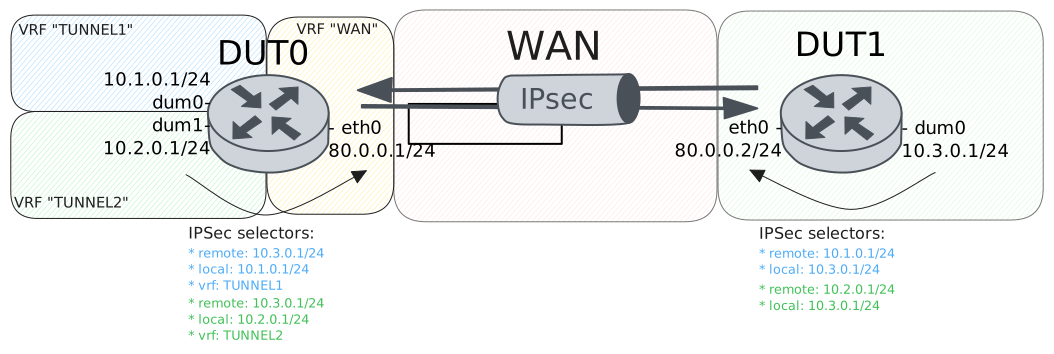
Test Site-To-Site Multi-VRF
Description
In this scenario, two dummy interfaces are created and bound to different VRFs. The remote end-point should be able to establish an IPSec tunnel to both of them.
Scenario
Step 1: Set the following configuration in DUT0 :
set interfaces dummy dum0 address 10.1.0.1/24
set interfaces dummy dum0 vrf TUNNEL1
set interfaces dummy dum1 address 10.2.0.1/24
set interfaces dummy dum1 vrf TUNNEL2
set interfaces ethernet eth0 address 80.0.0.1/24
set interfaces ethernet eth0 vrf WAN
set protocols vrf TUNNEL1 static route 0.0.0.0/0 interface eth0
set protocols vrf TUNNEL1 static route 10.3.0.0/24 interface dum0
set protocols vrf TUNNEL2 static route 0.0.0.0/0 interface eth0
set protocols vrf TUNNEL2 static route 10.3.0.0/24 interface dum1
set protocols vrf WAN static route 10.1.0.0/24 next-hop-vrf TUNNEL1
set protocols vrf WAN static route 10.2.0.0/24 next-hop-vrf TUNNEL2
set system login user admin authentication encrypted-password '$6$GSjsCj8gHLv$/VcqU6FLi6CT2Oxn0MJQ2C2tqnRDrYKNF8HIYWJp68nvXvPdFccDsT04.WtigUONbKYrgKg8d6rEs8PjljMkH0'
set system vrf TUNNEL1
set system vrf TUNNEL2
set system vrf WAN
set vpn ipsec auth-profile AUTH-SA global-secrets ike-psk %any encrypted-secret U2FsdGVkX1875VxaPEXVH1Isr8lgmCeM0l5XvInbF2I=
set vpn ipsec auth-profile AUTH-SA local auth ike-psk id %any
set vpn ipsec auth-profile AUTH-SA remote auth ike-psk id %any
set vpn ipsec esp-group CHILD-SA mode tunnel
set vpn ipsec esp-group CHILD-SA proposal 1 encryption aes256gcm128
set vpn ipsec esp-group CHILD-SA proposal 1 pfs dh-group19
set vpn ipsec ike-group IKE-SA key-exchange ikev2
set vpn ipsec ike-group IKE-SA proposal 1 dh-group 19
set vpn ipsec ike-group IKE-SA proposal 1 encryption aes256gcm128
set vpn ipsec ike-group IKE-SA proposal 1 hash sha256
set vpn ipsec site-to-site peer PEER auth-profile AUTH-SA
set vpn ipsec site-to-site peer PEER connection-type respond
set vpn ipsec site-to-site peer PEER default-esp-group CHILD-SA
set vpn ipsec site-to-site peer PEER ike-group IKE-SA
set vpn ipsec site-to-site peer PEER local-address 80.0.0.1
set vpn ipsec site-to-site peer PEER remote-address 80.0.0.2
set vpn ipsec site-to-site peer PEER tunnel 1 local prefix 10.1.0.0/24
set vpn ipsec site-to-site peer PEER tunnel 1 local-vrf TUNNEL1
set vpn ipsec site-to-site peer PEER tunnel 1 remote prefix 10.3.0.0/24
set vpn ipsec site-to-site peer PEER tunnel 2 local prefix 10.2.0.0/24
set vpn ipsec site-to-site peer PEER tunnel 2 local-vrf TUNNEL2
set vpn ipsec site-to-site peer PEER tunnel 2 remote prefix 10.3.0.0/24
Step 2: Set the following configuration in DUT1 :
set interfaces dummy dum0 address 10.3.0.1/24
set interfaces ethernet eth0 address 80.0.0.2/24
set protocols static route 0.0.0.0/0 interface dum0
set system login user admin authentication encrypted-password '$6$GSjsCj8gHLv$/VcqU6FLi6CT2Oxn0MJQ2C2tqnRDrYKNF8HIYWJp68nvXvPdFccDsT04.WtigUONbKYrgKg8d6rEs8PjljMkH0'
set vpn ipsec auth-profile AUTH-SA global-secrets ike-psk %any encrypted-secret U2FsdGVkX19jy6pGCph1f3CuPmg2swwpC4/I7H+y2Xs=
set vpn ipsec auth-profile AUTH-SA local auth ike-psk id %any
set vpn ipsec auth-profile AUTH-SA remote auth ike-psk id %any
set vpn ipsec esp-group CHILD-SA mode tunnel
set vpn ipsec esp-group CHILD-SA proposal 1 encryption aes256gcm128
set vpn ipsec esp-group CHILD-SA proposal 1 pfs dh-group19
set vpn ipsec ike-group IKE-SA key-exchange ikev2
set vpn ipsec ike-group IKE-SA proposal 1 dh-group 19
set vpn ipsec ike-group IKE-SA proposal 1 encryption aes256gcm128
set vpn ipsec ike-group IKE-SA proposal 1 hash sha256
set vpn ipsec site-to-site peer PEER auth-profile AUTH-SA
set vpn ipsec site-to-site peer PEER connection-type initiate
set vpn ipsec site-to-site peer PEER default-esp-group CHILD-SA
set vpn ipsec site-to-site peer PEER ike-group IKE-SA
set vpn ipsec site-to-site peer PEER local-address 80.0.0.2
set vpn ipsec site-to-site peer PEER remote-address 80.0.0.1
set vpn ipsec site-to-site peer PEER tunnel 1 local prefix 10.3.0.0/24
set vpn ipsec site-to-site peer PEER tunnel 1 local-interface dum0
set vpn ipsec site-to-site peer PEER tunnel 1 remote prefix 10.1.0.0/24
set vpn ipsec site-to-site peer PEER tunnel 2 local prefix 10.3.0.0/24
set vpn ipsec site-to-site peer PEER tunnel 2 local-interface dum0
set vpn ipsec site-to-site peer PEER tunnel 2 remote prefix 10.2.0.0/24
Step 3: Ping the IP address 80.0.0.1 from DUT1:
admin@DUT1$ ping 80.0.0.1 count 1 size 56 timeout 1Show output
PING 80.0.0.1 (80.0.0.1) 56(84) bytes of data.
64 bytes from 80.0.0.1: icmp_seq=1 ttl=64 time=0.419 ms

--- 80.0.0.1 ping statistics ---
1 packets transmitted, 1 received, 0% packet loss, time 0ms
rtt min/avg/max/mdev = 0.419/0.419/0.419/0.000 ms
Step 4: Ping the IP address 80.0.0.2 from DUT0:
admin@DUT0$ ping 80.0.0.2 vrf WAN count 1 size 56 timeout 1Show output
ping: Warning: source address might be selected on device other than: WAN
PING 80.0.0.2 (80.0.0.2) from 80.0.0.1 WAN: 56(84) bytes of data.
64 bytes from 80.0.0.2: icmp_seq=1 ttl=64 time=1.57 ms

--- 80.0.0.2 ping statistics ---
1 packets transmitted, 1 received, 0% packet loss, time 0ms
rtt min/avg/max/mdev = 1.572/1.572/1.572/0.000 ms
Step 5: Run the command vpn ipsec show sa on DUT0 and check whether the output matches the following regular expressions:
peer-PEER-tunnel-1.+INSTALLED
peer-PEER-tunnel-2.+INSTALLED
Show output
vpn-peer-PEER: #1, ESTABLISHED, IKEv2, 923e0d1dcaf8890f_i 9855ae5b04f30ba3_r*
  local  '80.0.0.1' @ 80.0.0.1[500]
  remote '80.0.0.2' @ 80.0.0.2[500]
  AES_GCM_16-256/PRF_HMAC_SHA2_256/ECP_256
  established 0s ago, rekeying in 14507s
  peer-PEER-tunnel-1: #1, reqid 1, INSTALLED, TUNNEL, ESP:AES_GCM_16-256
    installed 0s ago, rekeying in 3432s, expires in 3960s
    in  cfe19996,      0 bytes,     0 packets
    out c80f14c0,      0 bytes,     0 packets
    local  10.1.0.0/24
    remote 10.3.0.0/24
  peer-PEER-tunnel-2: #2, reqid 2, INSTALLED, TUNNEL, ESP:AES_GCM_16-256/ECP_256
    installed 0s ago, rekeying in 3291s, expires in 3960s
    in  ce63011d,      0 bytes,     0 packets
    out c8a46d13,      0 bytes,     0 packets
    local  10.2.0.0/24
    remote 10.3.0.0/24
Step 6: Ping the IP address 10.1.0.1 from DUT1:
admin@DUT1$ ping 10.1.0.1 local-address 10.3.0.1 count 1 size 56 timeout 1Show output
PING 10.1.0.1 (10.1.0.1) from 10.3.0.1 : 56(84) bytes of data.
64 bytes from 10.1.0.1: icmp_seq=1 ttl=64 time=0.601 ms

--- 10.1.0.1 ping statistics ---
1 packets transmitted, 1 received, 0% packet loss, time 0ms
rtt min/avg/max/mdev = 0.601/0.601/0.601/0.000 ms
Step 7: Ping the IP address 10.2.0.1 from DUT1:
admin@DUT1$ ping 10.2.0.1 local-address 10.3.0.1 count 1 size 56 timeout 1Show output
PING 10.2.0.1 (10.2.0.1) from 10.3.0.1 : 56(84) bytes of data.
64 bytes from 10.2.0.1: icmp_seq=1 ttl=64 time=0.369 ms

--- 10.2.0.1 ping statistics ---
1 packets transmitted, 1 received, 0% packet loss, time 0ms
rtt min/avg/max/mdev = 0.369/0.369/0.369/0.000 ms
Step 8: Run the command vpn ipsec show sa on DUT0 and expect the following output:
Show output
vpn-peer-PEER: #1, ESTABLISHED, IKEv2, 923e0d1dcaf8890f_i 9855ae5b04f30ba3_r*
  local  '80.0.0.1' @ 80.0.0.1[500]
  remote '80.0.0.2' @ 80.0.0.2[500]
  AES_GCM_16-256/PRF_HMAC_SHA2_256/ECP_256
  established 1s ago, rekeying in 14506s
  peer-PEER-tunnel-1: #1, reqid 1, INSTALLED, TUNNEL, ESP:AES_GCM_16-256
    installed 1s ago, rekeying in 3431s, expires in 3959s
    in  cfe19996,     84 bytes,     1 packets,     0s ago
    out c80f14c0,     84 bytes,     1 packets,     0s ago
    local  10.1.0.0/24
    remote 10.3.0.0/24
  peer-PEER-tunnel-2: #2, reqid 2, INSTALLED, TUNNEL, ESP:AES_GCM_16-256/ECP_256
    installed 1s ago, rekeying in 3290s, expires in 3959s
    in  ce63011d,     84 bytes,     1 packets,     0s ago
    out c8a46d13,     84 bytes,     1 packets,     0s ago
    local  10.2.0.0/24
    remote 10.3.0.0/24
Attention
The command vpn show ipsec policy can be used to debug
the IPSec selectors that have been installed in OSDx devices.
Example for device DUT0:
Show output
src 10.2.0.0/24 dst 10.3.0.0/24 dev TUNNEL2
        dir out priority 375421
        tmpl src 80.0.0.1 dst 80.0.0.2
                proto esp spi 0xc8a46d13 reqid 2 mode tunnel
src 10.3.0.0/24 dst 10.2.0.0/24
        dir fwd priority 375423
        tmpl src 80.0.0.2 dst 80.0.0.1
                proto esp reqid 2 mode tunnel
src 10.3.0.0/24 dst 10.2.0.0/24
        dir in priority 375423
        tmpl src 80.0.0.2 dst 80.0.0.1
                proto esp reqid 2 mode tunnel
src 10.1.0.0/24 dst 10.3.0.0/24 dev TUNNEL1
        dir out priority 375421
        tmpl src 80.0.0.1 dst 80.0.0.2
                proto esp spi 0xc80f14c0 reqid 1 mode tunnel
src 10.3.0.0/24 dst 10.1.0.0/24
        dir fwd priority 375423
        tmpl src 80.0.0.2 dst 80.0.0.1
                proto esp reqid 1 mode tunnel
src 10.3.0.0/24 dst 10.1.0.0/24
        dir in priority 375423
        tmpl src 80.0.0.2 dst 80.0.0.1
                proto esp reqid 1 mode tunnel
src 0.0.0.0/0 dst 0.0.0.0/0
        socket in priority 0
src 0.0.0.0/0 dst 0.0.0.0/0
        socket out priority 0
src 0.0.0.0/0 dst 0.0.0.0/0
        socket in priority 0
src 0.0.0.0/0 dst 0.0.0.0/0
        socket out priority 0
src ::/0 dst ::/0
        socket in priority 0
src ::/0 dst ::/0
        socket out priority 0
src ::/0 dst ::/0
        socket in priority 0
src ::/0 dst ::/0
        socket out priority 0