Xfrm-Interface
Test suite to check IPsec with xfrm interface
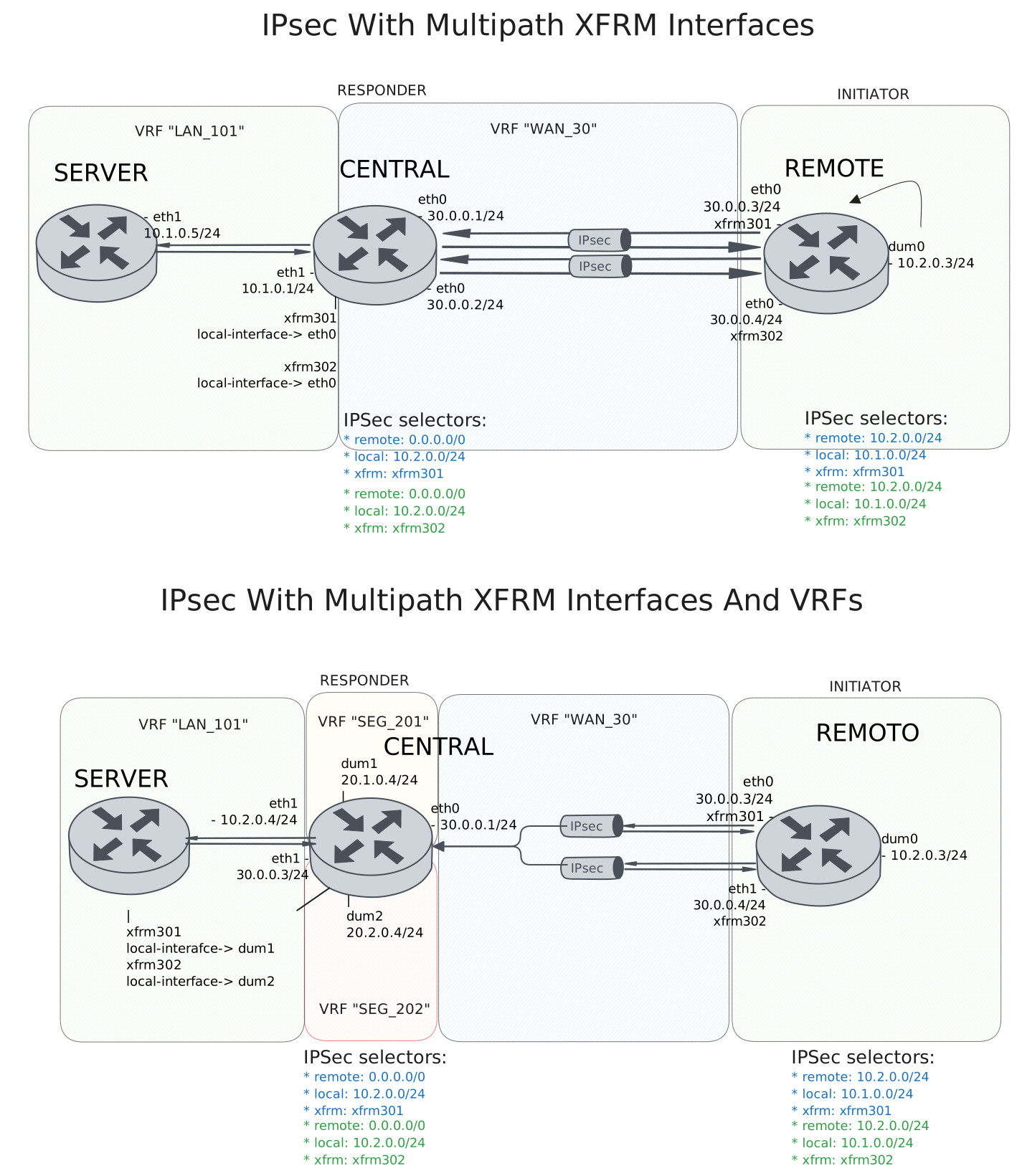
Test IPsec With Multipath XFRM Interfaces
Description
DUT0 and DUT1 are connected to each other through multiple IPsec tunnels with the same local and remote prefixes.
In this test case, we will check IPsec tunnels are correctly installing through two peers directly connected to the DUT0 and DUT1 devices.
Scenario
Step 1: Set the following configuration in DUT0 :
set interfaces ethernet eth0 address 30.0.0.1/24
set interfaces ethernet eth0 address 30.0.0.2/24
set interfaces ethernet eth0 vrf WAN_30
set interfaces ethernet eth1 address 10.1.0.1/24
set interfaces ethernet eth1 vrf LAN_101
set interfaces xfrm xfrm301 local-interface eth0
set interfaces xfrm xfrm301 mtu 1400
set interfaces xfrm xfrm301 multipath traffic-steering reverse
set interfaces xfrm xfrm301 vrf LAN_101
set interfaces xfrm xfrm302 local-interface eth0
set interfaces xfrm xfrm302 mtu 1400
set interfaces xfrm xfrm302 multipath traffic-steering reverse
set interfaces xfrm xfrm302 vrf LAN_101
set protocols vrf WAN_30 static route 10.1.0.0/24 next-hop-vrf LAN_101
set service ssh
set system login user admin authentication encrypted-password '$6$GSjsCj8gHLv$/VcqU6FLi6CT2Oxn0MJQ2C2tqnRDrYKNF8HIYWJp68nvXvPdFccDsT04.WtigUONbKYrgKg8d6rEs8PjljMkH0'
set system vrf LAN_101
set system vrf WAN_30
set system vrf main
set vpn ipsec auth-profile AUTH-SA global-secrets ike-psk test encrypted-secret U2FsdGVkX1/py8e3fN0JSadQDabS9KfAef55Trgejaw=
set vpn ipsec auth-profile AUTH-SA local auth ike-psk id test
set vpn ipsec auth-profile AUTH-SA remote auth ike-psk id %any
set vpn ipsec esp-group CHILD-SA mode tunnel
set vpn ipsec esp-group CHILD-SA proposal 1 encryption aes256gcm128
set vpn ipsec esp-group CHILD-SA proposal 1 pfs dh-group19
set vpn ipsec ike-group IKE-SA key-exchange ikev2
set vpn ipsec ike-group IKE-SA proposal 1 dh-group 19
set vpn ipsec ike-group IKE-SA proposal 1 encryption aes256gcm128
set vpn ipsec ike-group IKE-SA proposal 1 hash sha256
set vpn ipsec site-to-site peer PEER301 auth-profile AUTH-SA
set vpn ipsec site-to-site peer PEER301 connection-type respond
set vpn ipsec site-to-site peer PEER301 default-esp-group CHILD-SA
set vpn ipsec site-to-site peer PEER301 ike-group IKE-SA
set vpn ipsec site-to-site peer PEER301 local-address 30.0.0.1
set vpn ipsec site-to-site peer PEER301 remote-address %any
set vpn ipsec site-to-site peer PEER301 tunnel 1 install-routes LAN_101
set vpn ipsec site-to-site peer PEER301 tunnel 1 local prefix 10.1.0.0/24
set vpn ipsec site-to-site peer PEER301 tunnel 1 remote prefix 0.0.0.0/0
set vpn ipsec site-to-site peer PEER301 tunnel 1 xfrm-interface-out xfrm301
set vpn ipsec site-to-site peer PEER302 auth-profile AUTH-SA
set vpn ipsec site-to-site peer PEER302 connection-type respond
set vpn ipsec site-to-site peer PEER302 default-esp-group CHILD-SA
set vpn ipsec site-to-site peer PEER302 ike-group IKE-SA
set vpn ipsec site-to-site peer PEER302 local-address 30.0.0.2
set vpn ipsec site-to-site peer PEER302 remote-address %any
set vpn ipsec site-to-site peer PEER302 tunnel 1 install-routes LAN_101
set vpn ipsec site-to-site peer PEER302 tunnel 1 local prefix 10.1.0.0/24
set vpn ipsec site-to-site peer PEER302 tunnel 1 remote prefix 0.0.0.0/0
set vpn ipsec site-to-site peer PEER302 tunnel 1 xfrm-interface-out xfrm302
Step 2: Set the following configuration in DUT1 :
set interfaces dummy dum0 address 10.2.0.3/24
set interfaces ethernet eth0 address 30.0.0.3/24
set interfaces ethernet eth0 address 30.0.0.4/24
set interfaces xfrm xfrm301 mtu 1400
set interfaces xfrm xfrm302 mtu 1400
set service ssh
set system login user admin authentication encrypted-password '$6$GSjsCj8gHLv$/VcqU6FLi6CT2Oxn0MJQ2C2tqnRDrYKNF8HIYWJp68nvXvPdFccDsT04.WtigUONbKYrgKg8d6rEs8PjljMkH0'
set system vrf main
set vpn ipsec auth-profile AUTH-SA global-secrets ike-psk test encrypted-secret U2FsdGVkX1+1OgJnMpeKqfTbxhD07J8+jhoL8apPv2Y=
set vpn ipsec auth-profile AUTH-SA local auth ike-psk id test
set vpn ipsec auth-profile AUTH-SA remote auth ike-psk id %any
set vpn ipsec esp-group CHILD-SA mode tunnel
set vpn ipsec esp-group CHILD-SA proposal 1 encryption aes256gcm128
set vpn ipsec esp-group CHILD-SA proposal 1 pfs dh-group19
set vpn ipsec ike-group IKE-SA key-exchange ikev2
set vpn ipsec ike-group IKE-SA proposal 1 dh-group 19
set vpn ipsec ike-group IKE-SA proposal 1 encryption aes256gcm128
set vpn ipsec ike-group IKE-SA proposal 1 hash sha256
set vpn ipsec site-to-site peer PEER301 auth-profile AUTH-SA
set vpn ipsec site-to-site peer PEER301 connection-type initiate
set vpn ipsec site-to-site peer PEER301 default-esp-group CHILD-SA
set vpn ipsec site-to-site peer PEER301 ike-group IKE-SA
set vpn ipsec site-to-site peer PEER301 local-address 30.0.0.3
set vpn ipsec site-to-site peer PEER301 remote-address 30.0.0.1
set vpn ipsec site-to-site peer PEER301 tunnel 1 install-routes main
set vpn ipsec site-to-site peer PEER301 tunnel 1 local prefix 10.2.0.0/24
set vpn ipsec site-to-site peer PEER301 tunnel 1 remote prefix 10.1.0.0/24
set vpn ipsec site-to-site peer PEER301 tunnel 1 xfrm-interface-out xfrm301
set vpn ipsec site-to-site peer PEER302 auth-profile AUTH-SA
set vpn ipsec site-to-site peer PEER302 connection-type initiate
set vpn ipsec site-to-site peer PEER302 default-esp-group CHILD-SA
set vpn ipsec site-to-site peer PEER302 ike-group IKE-SA
set vpn ipsec site-to-site peer PEER302 local-address 30.0.0.4
set vpn ipsec site-to-site peer PEER302 remote-address 30.0.0.2
set vpn ipsec site-to-site peer PEER302 tunnel 1 install-routes main
set vpn ipsec site-to-site peer PEER302 tunnel 1 local prefix 10.2.0.0/24
set vpn ipsec site-to-site peer PEER302 tunnel 1 remote prefix 10.1.0.0/24
set vpn ipsec site-to-site peer PEER302 tunnel 1 xfrm-interface-out xfrm302
Step 3: Set the following configuration in DUT2 :
set interfaces ethernet eth1 address 10.1.0.5/24
set protocols static route 10.2.0.0/24 next-hop 10.1.0.1
set service ssh
set system login user admin authentication encrypted-password '$6$GSjsCj8gHLv$/VcqU6FLi6CT2Oxn0MJQ2C2tqnRDrYKNF8HIYWJp68nvXvPdFccDsT04.WtigUONbKYrgKg8d6rEs8PjljMkH0'
Note
Check that the IPsec tunnels are established and the routes are installed. The routes should be installed in the VRF LAN_101.
Step 4: Run the command protocols vrf LAN_101 ip show route on DUT0 and check whether the output matches the following regular expressions:
K>\* 10\.2\.0\.0/24 \[0\/0\] is directly connected.*xfrm\d+.*\n.*xfrm\d+Show output
Codes: K - kernel route, C - connected, L - local, S - static,
       R - RIP, O - OSPF, I - IS-IS, B - BGP, E - EIGRP, N - NHRP,
       T - Table, v - VNC, V - VNC-Direct, A - Babel, F - PBR,
       f - OpenFabric, t - Table-Direct,
       > - selected route, * - FIB route, q - queued, r - rejected, b - backup
       t - trapped, o - offload failure

IPv4 unicast VRF LAN_101:
K>* 0.0.0.0/0 [255/8192] unreachable (ICMP unreachable), weight 1, 00:00:07
C>* 10.1.0.0/24 is directly connected, eth1, weight 1, 00:00:05
L>* 10.1.0.1/32 is directly connected, eth1, weight 1, 00:00:05
K>* 10.2.0.0/24 [0/0] is directly connected, xfrm302, weight 1, 00:00:01
  *                   is directly connected, xfrm301, weight 1, 00:00:01
K>* 127.0.0.0/8 [0/0] is directly connected, LAN_101, weight 1, 00:00:07
Note
Check that both IPsec tunnels are established and traffic steering is working as expected. Once the remote client is trying to connect randomly from either of the two tunnels, hub always responds with the same tunnel.
Step 5: Run the command vpn ipsec clear sa on DUT0 and expect the following output:
Show output
Deleting IPSec SAs... 100.00%
Closed tunnels: 2
Step 6: Initiate an SSH connection from DUT1 to IP address 10.1.0.5 using user admin:
admin@DUT1$ ssh admin@10.1.0.5 option StrictHostKeyChecking=no option UserKnownHostsFile=/dev/null local-address 10.2.0.3Show output
Warning: Permanently added '10.1.0.5' (ECDSA) to the list of known hosts.
admin@10.1.0.5's password:
Welcome to Teldat OSDx v4.2.10.1

This system includes free software.
Contact Teldat for licenses information and source code.

Last login: Wed Jun  3 17:53:03 2026 from 40.0.0.2
admin@osdx$
Step 7: Run the command vpn ipsec show sa on DUT0 and expect the following output:
Show output
vpn-peer-PEER302: #4, ESTABLISHED, IKEv2, 6cec283ee9fe1435_i 90d28aee9b133922_r*
  local  'test' @ 30.0.0.2[500]
  remote 'test' @ 30.0.0.4[500]
  AES_GCM_16-256/PRF_HMAC_SHA2_256/ECP_256
  established 0s ago, rekeying in 15588s
  peer-PEER302-tunnel-1: #4, reqid 1, INSTALLED, TUNNEL, ESP:AES_GCM_16-256
    installed 0s ago, rekeying in 3355s, expires in 3960s
    in  cda25ae2 (-|0x0000012f),   5057 bytes,    24 packets,     1s ago
    out cd950473 (-|0x0000012f),   4793 bytes,    20 packets,     1s ago
    local  10.1.0.0/24
    remote 10.2.0.0/24
vpn-peer-PEER301: #3, ESTABLISHED, IKEv2, 9335fb8ef9dea5d8_i 3791ce8e7515fed4_r*
  local  'test' @ 30.0.0.1[500]
  remote 'test' @ 30.0.0.3[500]
  AES_GCM_16-256/PRF_HMAC_SHA2_256/ECP_256
  established 0s ago, rekeying in 13621s
  peer-PEER301-tunnel-1: #3, reqid 2, INSTALLED, TUNNEL, ESP:AES_GCM_16-256
    installed 0s ago, rekeying in 3425s, expires in 3960s
    in  c78be478 (-|0x0000012e),      0 bytes,     0 packets
    out cd21c632 (-|0x0000012e),      0 bytes,     0 packets
    local  10.1.0.0/24
    remote 10.2.0.0/24
Step 8: Run the command vpn ipsec clear sa on DUT0 and expect the following output:
Show output
Deleting IPSec SAs... 100.00%
Closed tunnels: 2
Step 9: Initiate an SSH connection from DUT1 to IP address 10.1.0.5 using user admin:
admin@DUT1$ ssh admin@10.1.0.5 option StrictHostKeyChecking=no option UserKnownHostsFile=/dev/null local-address 10.2.0.3Show output
Warning: Permanently added '10.1.0.5' (ECDSA) to the list of known hosts.
admin@10.1.0.5's password:
Welcome to Teldat OSDx v4.2.10.1

This system includes free software.
Contact Teldat for licenses information and source code.

Last login: Wed Jun  3 19:14:19 2026 from 10.2.0.3
admin@osdx$
Step 10: Run the command vpn ipsec show sa on DUT0 and expect the following output:
Show output
vpn-peer-PEER301: #6, ESTABLISHED, IKEv2, 707ca312ded42c7e_i bf8bf2cda9e854c9_r*
  local  'test' @ 30.0.0.1[500]
  remote 'test' @ 30.0.0.3[500]
  AES_GCM_16-256/PRF_HMAC_SHA2_256/ECP_256
  established 1s ago, rekeying in 16586s
  peer-PEER301-tunnel-1: #6, reqid 2, INSTALLED, TUNNEL, ESP:AES_GCM_16-256
    installed 1s ago, rekeying in 3470s, expires in 3959s
    in  c6e4d50f (-|0x0000012e),   5005 bytes,    23 packets,     0s ago
    out c9044531 (-|0x0000012e),   4873 bytes,    21 packets,     0s ago
    local  10.1.0.0/24
    remote 10.2.0.0/24
vpn-peer-PEER302: #5, ESTABLISHED, IKEv2, d319b73be185bd08_i bfa780f6247b5b5f_r*
  local  'test' @ 30.0.0.2[500]
  remote 'test' @ 30.0.0.4[500]
  AES_GCM_16-256/PRF_HMAC_SHA2_256/ECP_256
  established 1s ago, rekeying in 17690s
  peer-PEER302-tunnel-1: #5, reqid 1, INSTALLED, TUNNEL, ESP:AES_GCM_16-256
    installed 1s ago, rekeying in 3292s, expires in 3959s
    in  c3436668 (-|0x0000012f),      0 bytes,     0 packets
    out c2659462 (-|0x0000012f),      0 bytes,     0 packets
    local  10.1.0.0/24
    remote 10.2.0.0/24
Note
Testing the traffic from the hub to the spoke. The difference is that the IPsec tunnel chosen by the hub not always the same as the one chosen by the spoke. So if the spoke responds to the hub through the another tunnel, the hub needs to change the tunnel to the one used by the spoke.
Step 11: Run the command vpn ipsec clear sa on DUT0 and expect the following output:
Show output
Deleting IPSec SAs... 100.00%
Closed tunnels: 2
Step 12: Initiate an SSH connection from DUT2 to IP address 10.2.0.3 using user admin:
admin@DUT2$ ssh admin@10.2.0.3 option StrictHostKeyChecking=no option UserKnownHostsFile=/dev/null local-address 10.1.0.5Show output
Warning: Permanently added '10.2.0.3' (ECDSA) to the list of known hosts.
admin@10.2.0.3's password:
Welcome to Teldat OSDx v4.2.10.1

This system includes free software.
Contact Teldat for licenses information and source code.

Last login: Wed Jun  3 18:42:44 2026
admin@osdx$
Step 13: Run the command vpn ipsec show sa on DUT0 and expect the following output:
Show output
vpn-peer-PEER302: #8, ESTABLISHED, IKEv2, d31c87bef057c3ea_i d5349a30abf9e3b2_r*
  local  'test' @ 30.0.0.2[500]
  remote 'test' @ 30.0.0.4[500]
  AES_GCM_16-256/PRF_HMAC_SHA2_256/ECP_256
  established 1s ago, rekeying in 21317s
  peer-PEER302-tunnel-1: #8, reqid 1, INSTALLED, TUNNEL, ESP:AES_GCM_16-256
    installed 1s ago, rekeying in 3443s, expires in 3959s
    in  c8b1d45c (-|0x0000012f),   4929 bytes,    22 packets,     0s ago
    out cf94ab03 (-|0x0000012f),   5425 bytes,    27 packets,     0s ago
    local  10.1.0.0/24
    remote 10.2.0.0/24
vpn-peer-PEER301: #7, ESTABLISHED, IKEv2, c78df85c39e8b464_i cf8f5a8943295964_r*
  local  'test' @ 30.0.0.1[500]
  remote 'test' @ 30.0.0.3[500]
  AES_GCM_16-256/PRF_HMAC_SHA2_256/ECP_256
  established 1s ago, rekeying in 19635s
  peer-PEER301-tunnel-1: #7, reqid 2, INSTALLED, TUNNEL, ESP:AES_GCM_16-256
    installed 1s ago, rekeying in 3364s, expires in 3959s
    in  c4f7c3d5 (-|0x0000012e),      0 bytes,     0 packets
    out c51146bc (-|0x0000012e),      0 bytes,     0 packets
    local  10.1.0.0/24
    remote 10.2.0.0/24
Step 14: Run the command vpn ipsec clear sa on DUT0 and expect the following output:
Show output
Deleting IPSec SAs... 100.00%
Closed tunnels: 2
Step 15: Initiate an SSH connection from DUT2 to IP address 10.2.0.3 using user admin:
admin@DUT2$ ssh admin@10.2.0.3 option StrictHostKeyChecking=no option UserKnownHostsFile=/dev/null local-address 10.1.0.5Show output
Warning: Permanently added '10.2.0.3' (ECDSA) to the list of known hosts.
admin@10.2.0.3's password:
Welcome to Teldat OSDx v4.2.10.1

This system includes free software.
Contact Teldat for licenses information and source code.

Last login: Wed Jun  3 19:14:21 2026 from 10.1.0.5
admin@osdx$
Step 16: Run the command vpn ipsec show sa on DUT0 and expect the following output:
Show output
vpn-peer-PEER301: #10, ESTABLISHED, IKEv2, 0db3e02e0318bea1_i b3bda3b9f28d7c04_r*
  local  'test' @ 30.0.0.1[500]
  remote 'test' @ 30.0.0.3[500]
  AES_GCM_16-256/PRF_HMAC_SHA2_256/ECP_256
  established 0s ago, rekeying in 14368s
  peer-PEER301-tunnel-1: #10, reqid 2, INSTALLED, TUNNEL, ESP:AES_GCM_16-256
    installed 0s ago, rekeying in 3266s, expires in 3960s
    in  cf187e31 (-|0x0000012e),   4793 bytes,    20 packets,     1s ago
    out ce430ec8 (-|0x0000012e),   5109 bytes,    25 packets,     1s ago
    local  10.1.0.0/24
    remote 10.2.0.0/24
vpn-peer-PEER302: #9, ESTABLISHED, IKEv2, 6909a8ef9f986d38_i 58a0e273c146ef8e_r*
  local  'test' @ 30.0.0.2[500]
  remote 'test' @ 30.0.0.4[500]
  AES_GCM_16-256/PRF_HMAC_SHA2_256/ECP_256
  established 0s ago, rekeying in 16419s
  peer-PEER302-tunnel-1: #9, reqid 1, INSTALLED, TUNNEL, ESP:AES_GCM_16-256
    installed 0s ago, rekeying in 3321s, expires in 3960s
    in  c71ccb5b (-|0x0000012f),      0 bytes,     0 packets
    out cd5c0112 (-|0x0000012f),      0 bytes,     0 packets
    local  10.1.0.0/24
    remote 10.2.0.0/24
Test IPsec With Multipath XFRM Interfaces And VRFs
Description
The difference here is that the hub peer has its addresses behind the VRFs, it is not directly connected like in the previous test case.
Scenario
Step 1: Set the following configuration in DUT0 :
set interfaces dummy dum1 address 20.1.0.1/24
set interfaces dummy dum1 vrf SEG_201
set interfaces dummy dum2 address 20.2.0.1/24
set interfaces dummy dum2 vrf SEG_202
set interfaces ethernet eth0 address 30.0.0.1/24
set interfaces ethernet eth0 vrf WAN_30
set interfaces ethernet eth1 address 10.1.0.1/24
set interfaces ethernet eth1 vrf LAN_101
set interfaces xfrm xfrm301 local-interface dum1
set interfaces xfrm xfrm301 mtu 1400
set interfaces xfrm xfrm301 multipath traffic-steering reverse
set interfaces xfrm xfrm301 vrf LAN_101
set interfaces xfrm xfrm302 local-interface dum2
set interfaces xfrm xfrm302 mtu 1400
set interfaces xfrm xfrm302 multipath traffic-steering reverse
set interfaces xfrm xfrm302 vrf LAN_101
set protocols vrf SEG_201 static route 0.0.0.0/0 next-hop-vrf WAN_30
set protocols vrf SEG_201 static route 10.1.0.0/24 next-hop-vrf LAN_101
set protocols vrf SEG_202 static route 0.0.0.0/0 next-hop-vrf WAN_30
set protocols vrf SEG_202 static route 10.1.0.0/24 next-hop-vrf LAN_101
set protocols vrf WAN_30 static route 20.1.0.0/24 next-hop-vrf SEG_201
set protocols vrf WAN_30 static route 20.2.0.0/24 next-hop-vrf SEG_202
set service ssh
set system login user admin authentication encrypted-password '$6$GSjsCj8gHLv$/VcqU6FLi6CT2Oxn0MJQ2C2tqnRDrYKNF8HIYWJp68nvXvPdFccDsT04.WtigUONbKYrgKg8d6rEs8PjljMkH0'
set system vrf LAN_101
set system vrf SEG_201
set system vrf SEG_202
set system vrf WAN_30
set system vrf main
set vpn ipsec auth-profile AUTH-SA global-secrets ike-psk test encrypted-secret U2FsdGVkX18galkH7B3TvL1WwaJSINEvG4l+HEJAicw=
set vpn ipsec auth-profile AUTH-SA local auth ike-psk id test
set vpn ipsec auth-profile AUTH-SA remote auth ike-psk id %any
set vpn ipsec esp-group CHILD-SA mode tunnel
set vpn ipsec esp-group CHILD-SA proposal 1 encryption aes256gcm128
set vpn ipsec esp-group CHILD-SA proposal 1 pfs dh-group19
set vpn ipsec ike-group IKE-SA key-exchange ikev2
set vpn ipsec ike-group IKE-SA proposal 1 dh-group 19
set vpn ipsec ike-group IKE-SA proposal 1 encryption aes256gcm128
set vpn ipsec ike-group IKE-SA proposal 1 hash sha256
set vpn ipsec site-to-site peer PEER301 auth-profile AUTH-SA
set vpn ipsec site-to-site peer PEER301 connection-type respond
set vpn ipsec site-to-site peer PEER301 default-esp-group CHILD-SA
set vpn ipsec site-to-site peer PEER301 ike-group IKE-SA
set vpn ipsec site-to-site peer PEER301 local-address 20.1.0.1
set vpn ipsec site-to-site peer PEER301 remote-address %any
set vpn ipsec site-to-site peer PEER301 tunnel 1 install-routes LAN_101
set vpn ipsec site-to-site peer PEER301 tunnel 1 local prefix 10.1.0.0/24
set vpn ipsec site-to-site peer PEER301 tunnel 1 remote prefix 0.0.0.0/0
set vpn ipsec site-to-site peer PEER301 tunnel 1 xfrm-interface-out xfrm301
set vpn ipsec site-to-site peer PEER302 auth-profile AUTH-SA
set vpn ipsec site-to-site peer PEER302 connection-type respond
set vpn ipsec site-to-site peer PEER302 default-esp-group CHILD-SA
set vpn ipsec site-to-site peer PEER302 ike-group IKE-SA
set vpn ipsec site-to-site peer PEER302 local-address 20.2.0.1
set vpn ipsec site-to-site peer PEER302 remote-address %any
set vpn ipsec site-to-site peer PEER302 tunnel 1 install-routes LAN_101
set vpn ipsec site-to-site peer PEER302 tunnel 1 local prefix 10.1.0.0/24
set vpn ipsec site-to-site peer PEER302 tunnel 1 remote prefix 0.0.0.0/0
set vpn ipsec site-to-site peer PEER302 tunnel 1 xfrm-interface-out xfrm302
Step 2: Set the following configuration in DUT1 :
set interfaces dummy dum0 address 10.2.0.3/24
set interfaces ethernet eth0 address 30.0.0.3/24
set interfaces ethernet eth0 address 30.0.0.4/24
set interfaces xfrm xfrm301 mtu 1400
set interfaces xfrm xfrm302 mtu 1400
set protocols static route 20.1.0.0/24 next-hop 30.0.0.1
set protocols static route 20.2.0.0/24 next-hop 30.0.0.1
set service ssh
set system login user admin authentication encrypted-password '$6$GSjsCj8gHLv$/VcqU6FLi6CT2Oxn0MJQ2C2tqnRDrYKNF8HIYWJp68nvXvPdFccDsT04.WtigUONbKYrgKg8d6rEs8PjljMkH0'
set system vrf main
set vpn ipsec auth-profile AUTH-SA global-secrets ike-psk test encrypted-secret U2FsdGVkX1+CE3+4o8eh5+0hSxsxJxcGiNTX8vRUcyY=
set vpn ipsec auth-profile AUTH-SA local auth ike-psk id test
set vpn ipsec auth-profile AUTH-SA remote auth ike-psk id %any
set vpn ipsec esp-group CHILD-SA mode tunnel
set vpn ipsec esp-group CHILD-SA proposal 1 encryption aes256gcm128
set vpn ipsec esp-group CHILD-SA proposal 1 pfs dh-group19
set vpn ipsec ike-group IKE-SA key-exchange ikev2
set vpn ipsec ike-group IKE-SA proposal 1 dh-group 19
set vpn ipsec ike-group IKE-SA proposal 1 encryption aes256gcm128
set vpn ipsec ike-group IKE-SA proposal 1 hash sha256
set vpn ipsec site-to-site peer PEER301 auth-profile AUTH-SA
set vpn ipsec site-to-site peer PEER301 connection-type initiate
set vpn ipsec site-to-site peer PEER301 default-esp-group CHILD-SA
set vpn ipsec site-to-site peer PEER301 ike-group IKE-SA
set vpn ipsec site-to-site peer PEER301 local-address 30.0.0.3
set vpn ipsec site-to-site peer PEER301 remote-address 20.1.0.1
set vpn ipsec site-to-site peer PEER301 tunnel 1 install-routes main
set vpn ipsec site-to-site peer PEER301 tunnel 1 local prefix 10.2.0.0/24
set vpn ipsec site-to-site peer PEER301 tunnel 1 remote prefix 10.1.0.0/24
set vpn ipsec site-to-site peer PEER301 tunnel 1 xfrm-interface-out xfrm301
set vpn ipsec site-to-site peer PEER302 auth-profile AUTH-SA
set vpn ipsec site-to-site peer PEER302 connection-type initiate
set vpn ipsec site-to-site peer PEER302 default-esp-group CHILD-SA
set vpn ipsec site-to-site peer PEER302 ike-group IKE-SA
set vpn ipsec site-to-site peer PEER302 local-address 30.0.0.4
set vpn ipsec site-to-site peer PEER302 remote-address 20.2.0.1
set vpn ipsec site-to-site peer PEER302 tunnel 1 install-routes main
set vpn ipsec site-to-site peer PEER302 tunnel 1 local prefix 10.2.0.0/24
set vpn ipsec site-to-site peer PEER302 tunnel 1 remote prefix 10.1.0.0/24
set vpn ipsec site-to-site peer PEER302 tunnel 1 xfrm-interface-out xfrm302
Step 3: Set the following configuration in DUT2 :
set interfaces ethernet eth1 address 10.1.0.5/24
set protocols static route 10.2.0.0/24 next-hop 10.1.0.1
set service ssh
set system login user admin authentication encrypted-password '$6$GSjsCj8gHLv$/VcqU6FLi6CT2Oxn0MJQ2C2tqnRDrYKNF8HIYWJp68nvXvPdFccDsT04.WtigUONbKYrgKg8d6rEs8PjljMkH0'
Note
Check that the IPsec tunnels are established and the routes are installed. The routes should be installed in the VRF LAN_101.
Step 4: Run the command protocols vrf LAN_101 ip show route on DUT0 and check whether the output matches the following regular expressions:
K>\* 10\.2\.0\.0/24 \[0\/0\] is directly connected.*xfrm\d+.*\n.*xfrm\d+Show output
Codes: K - kernel route, C - connected, L - local, S - static,
       R - RIP, O - OSPF, I - IS-IS, B - BGP, E - EIGRP, N - NHRP,
       T - Table, v - VNC, V - VNC-Direct, A - Babel, F - PBR,
       f - OpenFabric, t - Table-Direct,
       > - selected route, * - FIB route, q - queued, r - rejected, b - backup
       t - trapped, o - offload failure

IPv4 unicast VRF LAN_101:
K>* 0.0.0.0/0 [255/8192] unreachable (ICMP unreachable), weight 1, 00:00:07
C>* 10.1.0.0/24 is directly connected, eth1, weight 1, 00:00:06
L>* 10.1.0.1/32 is directly connected, eth1, weight 1, 00:00:06
K>* 10.2.0.0/24 [0/0] is directly connected, xfrm302, weight 1, 00:00:01
  *                   is directly connected, xfrm301, weight 1, 00:00:01
K>* 127.0.0.0/8 [0/0] is directly connected, LAN_101, weight 1, 00:00:07
Note
Check that both IPsec tunnels are established and traffic steering is working as expected. Once the remote client is trying to connect randomly from either of the two tunnels, hub always responds with the same tunnel.
Step 5: Run the command vpn ipsec clear sa on DUT0 and expect the following output:
Show output
Deleting IPSec SAs... 100.00%
Closed tunnels: 2
Step 6: Initiate an SSH connection from DUT1 to IP address 10.1.0.5 using user admin:
admin@DUT1$ ssh admin@10.1.0.5 option StrictHostKeyChecking=no option UserKnownHostsFile=/dev/null local-address 10.2.0.3Show output
Warning: Permanently added '10.1.0.5' (ECDSA) to the list of known hosts.
admin@10.1.0.5's password:
Welcome to Teldat OSDx v4.2.10.1

This system includes free software.
Contact Teldat for licenses information and source code.

Last login: Wed Jun  3 19:14:20 2026 from 10.2.0.3
admin@osdx$
Step 7: Run the command vpn ipsec show sa on DUT0 and expect the following output:
Show output
vpn-peer-PEER302: #3, ESTABLISHED, IKEv2, ac6c7d0f3b26d598_i 34c1d599e69216c3_r*
  local  'test' @ 20.2.0.1[500]
  remote 'test' @ 30.0.0.4[500]
  AES_GCM_16-256/PRF_HMAC_SHA2_256/ECP_256
  established 1s ago, rekeying in 20389s
  peer-PEER302-tunnel-1: #3, reqid 1, INSTALLED, TUNNEL, ESP:AES_GCM_16-256
    installed 1s ago, rekeying in 3262s, expires in 3959s
    in  c6515f8d (-|0x0000012f),      0 bytes,     0 packets
    out cda6d188 (-|0x0000012f),      0 bytes,     0 packets
    local  10.1.0.0/24
    remote 10.2.0.0/24
vpn-peer-PEER301: #4, ESTABLISHED, IKEv2, 9eefcce2ffd8f2cf_i 2a51f1d60a1a0b28_r*
  local  'test' @ 20.1.0.1[500]
  remote 'test' @ 30.0.0.3[500]
  AES_GCM_16-256/PRF_HMAC_SHA2_256/ECP_256
  established 0s ago, rekeying in 16693s
  peer-PEER301-tunnel-1: #4, reqid 2, INSTALLED, TUNNEL, ESP:AES_GCM_16-256
    installed 0s ago, rekeying in 3296s, expires in 3960s
    in  cb1b20d7 (-|0x0000012e),   5057 bytes,    24 packets,     0s ago
    out c51cd4dc (-|0x0000012e),   4793 bytes,    20 packets,     0s ago
    local  10.1.0.0/24
    remote 10.2.0.0/24
Step 8: Run the command vpn ipsec clear sa on DUT0 and expect the following output:
Show output
Deleting IPSec SAs... 100.00%
Closed tunnels: 2
Step 9: Initiate an SSH connection from DUT1 to IP address 10.1.0.5 using user admin:
admin@DUT1$ ssh admin@10.1.0.5 option StrictHostKeyChecking=no option UserKnownHostsFile=/dev/null local-address 10.2.0.3Show output
Warning: Permanently added '10.1.0.5' (ECDSA) to the list of known hosts.
admin@10.1.0.5's password:
Welcome to Teldat OSDx v4.2.10.1

This system includes free software.
Contact Teldat for licenses information and source code.

Last login: Wed Jun  3 19:14:41 2026 from 10.2.0.3
admin@osdx$
Step 10: Run the command vpn ipsec show sa on DUT0 and expect the following output:
Show output
vpn-peer-PEER301: #6, ESTABLISHED, IKEv2, 62b4a3a37de9d549_i 523c6316a85fcc24_r*
  local  'test' @ 20.1.0.1[500]
  remote 'test' @ 30.0.0.3[500]
  AES_GCM_16-256/PRF_HMAC_SHA2_256/ECP_256
  established 1s ago, rekeying in 19200s
  peer-PEER301-tunnel-1: #6, reqid 2, INSTALLED, TUNNEL, ESP:AES_GCM_16-256
    installed 1s ago, rekeying in 3319s, expires in 3959s
    in  ce1fb62f (-|0x0000012e),   5057 bytes,    24 packets,     0s ago
    out c4ae7892 (-|0x0000012e),   4793 bytes,    20 packets,     0s ago
    local  10.1.0.0/24
    remote 10.2.0.0/24
vpn-peer-PEER302: #5, ESTABLISHED, IKEv2, f50126d6371c2f82_i 7c8f012d68f92733_r*
  local  'test' @ 20.2.0.1[500]
  remote 'test' @ 30.0.0.4[500]
  AES_GCM_16-256/PRF_HMAC_SHA2_256/ECP_256
  established 1s ago, rekeying in 17751s
  peer-PEER302-tunnel-1: #5, reqid 1, INSTALLED, TUNNEL, ESP:AES_GCM_16-256
    installed 1s ago, rekeying in 3291s, expires in 3959s
    in  c4cc7050 (-|0x0000012f),      0 bytes,     0 packets
    out c1d2d7f0 (-|0x0000012f),      0 bytes,     0 packets
    local  10.1.0.0/24
    remote 10.2.0.0/24
Note
Testing the traffic from the hub to the spoke. The difference is that the IPsec tunnel chosen by the hub not always the same as the one chosen by the spoke. So if the spoke responds to the hub through the another tunnel, the hub needs to change the tunnel to the one used by the spoke.
Step 11: Run the command vpn ipsec clear sa on DUT0 and expect the following output:
Show output
Deleting IPSec SAs... 100.00%
Closed tunnels: 2
Step 12: Initiate an SSH connection from DUT2 to IP address 10.2.0.3 using user admin:
admin@DUT2$ ssh admin@10.2.0.3 option StrictHostKeyChecking=no option UserKnownHostsFile=/dev/null local-address 10.1.0.5Show output
Warning: Permanently added '10.2.0.3' (ECDSA) to the list of known hosts.
admin@10.2.0.3's password:
Welcome to Teldat OSDx v4.2.10.1

This system includes free software.
Contact Teldat for licenses information and source code.

Last login: Wed Jun  3 19:14:21 2026 from 10.1.0.5
admin@osdx$
Step 13: Run the command vpn ipsec show sa on DUT0 and expect the following output:
Show output
vpn-peer-PEER302: #8, ESTABLISHED, IKEv2, eb1179dd259443cb_i 483b61a2a1ad8ebd_r*
  local  'test' @ 20.2.0.1[500]
  remote 'test' @ 30.0.0.4[500]
  AES_GCM_16-256/PRF_HMAC_SHA2_256/ECP_256
  established 1s ago, rekeying in 24995s
  peer-PEER302-tunnel-1: #8, reqid 1, INSTALLED, TUNNEL, ESP:AES_GCM_16-256
    installed 1s ago, rekeying in 3282s, expires in 3959s
    in  c98fa871 (-|0x0000012f),   4881 bytes,    21 packets,     0s ago
    out c9b05a8f (-|0x0000012f),   5109 bytes,    25 packets,     0s ago
    local  10.1.0.0/24
    remote 10.2.0.0/24
vpn-peer-PEER301: #7, ESTABLISHED, IKEv2, 201c7a7399257ac6_i 0967cbc6f51b3077_r*
  local  'test' @ 20.1.0.1[500]
  remote 'test' @ 30.0.0.3[500]
  AES_GCM_16-256/PRF_HMAC_SHA2_256/ECP_256
  established 1s ago, rekeying in 13073s
  peer-PEER301-tunnel-1: #7, reqid 2, INSTALLED, TUNNEL, ESP:AES_GCM_16-256
    installed 1s ago, rekeying in 3257s, expires in 3959s
    in  c6b91227 (-|0x0000012e),      0 bytes,     0 packets
    out c0dfa4b2 (-|0x0000012e),      0 bytes,     0 packets
    local  10.1.0.0/24
    remote 10.2.0.0/24
Step 14: Run the command vpn ipsec clear sa on DUT0 and expect the following output:
Show output
Deleting IPSec SAs... 100.00%
Closed tunnels: 2
Step 15: Initiate an SSH connection from DUT2 to IP address 10.2.0.3 using user admin:
admin@DUT2$ ssh admin@10.2.0.3 option StrictHostKeyChecking=no option UserKnownHostsFile=/dev/null local-address 10.1.0.5Show output
Warning: Permanently added '10.2.0.3' (ECDSA) to the list of known hosts.
admin@10.2.0.3's password:
Welcome to Teldat OSDx v4.2.10.1

This system includes free software.
Contact Teldat for licenses information and source code.

Last login: Wed Jun  3 19:14:43 2026 from 10.1.0.5
admin@osdx$
Step 16: Run the command vpn ipsec show sa on DUT0 and expect the following output:
Show output
vpn-peer-PEER301: #10, ESTABLISHED, IKEv2, e9438e628b14b34a_i f4b304fb166f1c61_r*
  local  'test' @ 20.1.0.1[500]
  remote 'test' @ 30.0.0.3[500]
  AES_GCM_16-256/PRF_HMAC_SHA2_256/ECP_256
  established 0s ago, rekeying in 17070s
  peer-PEER301-tunnel-1: #10, reqid 2, INSTALLED, TUNNEL, ESP:AES_GCM_16-256
    installed 0s ago, rekeying in 3360s, expires in 3960s
    in  c76d60bd (-|0x0000012e),   4793 bytes,    20 packets,     0s ago
    out cb7a4d11 (-|0x0000012e),   5049 bytes,    24 packets,     0s ago
    local  10.1.0.0/24
    remote 10.2.0.0/24
vpn-peer-PEER302: #9, ESTABLISHED, IKEv2, d97f490c721c637c_i 08bc1630ad250fe9_r*
  local  'test' @ 20.2.0.1[500]
  remote 'test' @ 30.0.0.4[500]
  AES_GCM_16-256/PRF_HMAC_SHA2_256/ECP_256
  established 0s ago, rekeying in 13336s
  peer-PEER302-tunnel-1: #9, reqid 1, INSTALLED, TUNNEL, ESP:AES_GCM_16-256
    installed 0s ago, rekeying in 3345s, expires in 3960s
    in  cccb230f (-|0x0000012f),      0 bytes,     0 packets
    out c761f535 (-|0x0000012f),     60 bytes,     1 packets,     1s ago
    local  10.1.0.0/24
    remote 10.2.0.0/24