Hash-Policy
These scenarios cover some aspects related to link-aggregation. This particular one covers the hash-policy configuration needed to setup the desired load balancing. In OSDx, this can be achieved using bonding interfaces in either xor-hash or 802.3ad modes, or transmit-load-balance and adaptive-load-balance in static mode.
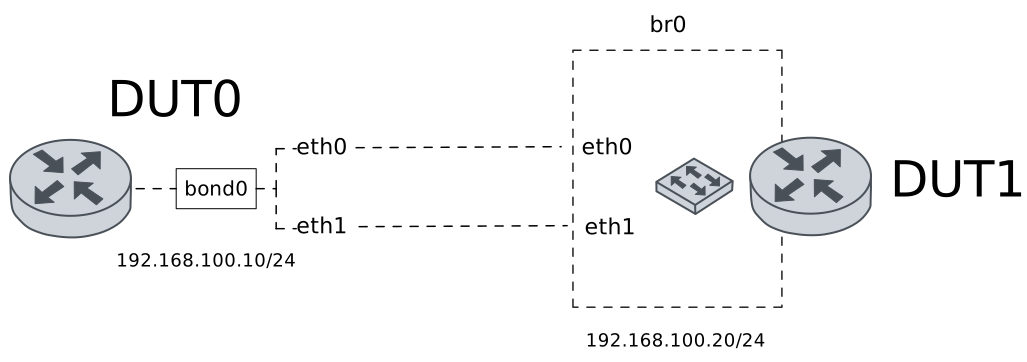
Test Hash-Policy
Description
A bonding interface is configured in DUT0 using xor-hash mode. This scenario shows how to set the hash-policy option to manage load balancing.
Scenario
Step 1: Set the following configuration in DUT0 :
set interfaces bonding bond0 address 192.168.100.10/24
set interfaces bonding bond0 miimon 100
set interfaces bonding bond0 mode xor-hash
set interfaces ethernet eth0 bond-group bond0
set interfaces ethernet eth1 bond-group bond0
set system login user admin authentication encrypted-password '$6$GSjsCj8gHLv$/VcqU6FLi6CT2Oxn0MJQ2C2tqnRDrYKNF8HIYWJp68nvXvPdFccDsT04.WtigUONbKYrgKg8d6rEs8PjljMkH0'
Step 2: Set the following configuration in DUT1 :
set interfaces bridge br0 address 192.168.100.20/24
set interfaces bridge br0 stp version rstp
set interfaces ethernet eth0 bridge-group bridge br0
set interfaces ethernet eth1 bridge-group bridge br0
set system login user admin authentication encrypted-password '$6$GSjsCj8gHLv$/VcqU6FLi6CT2Oxn0MJQ2C2tqnRDrYKNF8HIYWJp68nvXvPdFccDsT04.WtigUONbKYrgKg8d6rEs8PjljMkH0'
Step 3: Run the command interfaces bonding show on DUT0 and check whether the output matches the following regular expressions:
bond0\s+192.168.100\.10\/24\s+up\s+upShow output
------------------------------------------------------------------
Name            IP Address           Admin  Oper  Vrf  Description
------------------------------------------------------------------
bond0  192.168.100.10/24             up     up
fe80::dcad:beff:feef:6c00/64
Step 4: Run the command interfaces bonding bond0 show ports on DUT0 and check whether the output contains the following tokens:
Bonding Mode: load balancing (xor)Show output
Ethernet Channel Bonding Driver: v6.12.90

Bonding Mode: load balancing (xor)
Transmit Hash Policy: layer2 (0)
MII Status: up
MII Polling Interval (ms): 100
Up Delay (ms): 0
Down Delay (ms): 0
Peer Notification Delay (ms): 0

Slave Interface: eth0
MII Status: up
Speed: 10000 Mbps
Duplex: full
Link Failure Count: 0
Permanent HW addr: de:ad:be:ef:6c:00
Slave queue ID: 0

Slave Interface: eth1
MII Status: up
Speed: 10000 Mbps
Duplex: full
Link Failure Count: 0
Permanent HW addr: de:ad:be:ef:6c:01
Slave queue ID: 0
Step 5: Ping the IP address 192.168.100.20 from DUT0:
admin@DUT0$ ping 192.168.100.20 count 1 size 56 timeout 1Show output
PING 192.168.100.20 (192.168.100.20) 56(84) bytes of data.
64 bytes from 192.168.100.20: icmp_seq=1 ttl=64 time=445 ms

--- 192.168.100.20 ping statistics ---
1 packets transmitted, 1 received, 0% packet loss, time 0ms
rtt min/avg/max/mdev = 445.179/445.179/445.179/0.000 ms
Step 6: Run the command interfaces bonding bond0 show ports on DUT0 and check whether the output contains the following tokens:
Transmit Hash Policy: layer2 (0)Show output
Ethernet Channel Bonding Driver: v6.12.90

Bonding Mode: load balancing (xor)
Transmit Hash Policy: layer2 (0)
MII Status: up
MII Polling Interval (ms): 100
Up Delay (ms): 0
Down Delay (ms): 0
Peer Notification Delay (ms): 0

Slave Interface: eth0
MII Status: up
Speed: 10000 Mbps
Duplex: full
Link Failure Count: 0
Permanent HW addr: de:ad:be:ef:6c:00
Slave queue ID: 0

Slave Interface: eth1
MII Status: up
Speed: 10000 Mbps
Duplex: full
Link Failure Count: 0
Permanent HW addr: de:ad:be:ef:6c:01
Slave queue ID: 0
Step 7: Run the command interfaces ethernet clear on DUT0.
Step 8: Initiate a bandwidth test from DUT0 to DUT1
admin@DUT1$ monitor test performance server port 5001
admin@DUT0$ monitor test performance client 192.168.100.20 duration 5 port 5001 parallel 10
Expect the following output on
DUT0:Connecting to host 192.168.100.20, port 5001 [ 5] local 192.168.100.10 port 51546 connected to 192.168.100.20 port 5001 [ 7] local 192.168.100.10 port 51556 connected to 192.168.100.20 port 5001 [ 9] local 192.168.100.10 port 51572 connected to 192.168.100.20 port 5001 [ 11] local 192.168.100.10 port 51574 connected to 192.168.100.20 port 5001 [ 13] local 192.168.100.10 port 51578 connected to 192.168.100.20 port 5001 [ 15] local 192.168.100.10 port 51580 connected to 192.168.100.20 port 5001 [ 17] local 192.168.100.10 port 51592 connected to 192.168.100.20 port 5001 [ 19] local 192.168.100.10 port 51606 connected to 192.168.100.20 port 5001 [ 21] local 192.168.100.10 port 51622 connected to 192.168.100.20 port 5001 [ 23] local 192.168.100.10 port 51630 connected to 192.168.100.20 port 5001 [ ID] Interval Transfer Bitrate Retr Cwnd [ 5] 0.00-1.00 sec 30.7 MBytes 257 Mbits/sec 44 185 KBytes [ 7] 0.00-1.00 sec 29.1 MBytes 244 Mbits/sec 84 168 KBytes [ 9] 0.00-1.00 sec 31.1 MBytes 261 Mbits/sec 24 141 KBytes [ 11] 0.00-1.00 sec 31.2 MBytes 261 Mbits/sec 133 134 KBytes [ 13] 0.00-1.00 sec 31.1 MBytes 261 Mbits/sec 30 202 KBytes [ 15] 0.00-1.00 sec 23.5 MBytes 197 Mbits/sec 89 106 KBytes [ 17] 0.00-1.00 sec 21.0 MBytes 176 Mbits/sec 35 140 KBytes [ 19] 0.00-1.00 sec 34.7 MBytes 291 Mbits/sec 68 230 KBytes [ 21] 0.00-1.00 sec 33.1 MBytes 278 Mbits/sec 74 153 KBytes [ 23] 0.00-1.00 sec 31.2 MBytes 262 Mbits/sec 104 208 KBytes [SUM] 0.00-1.00 sec 297 MBytes 2.49 Gbits/sec 685 - - - - - - - - - - - - - - - - - - - - - - - - - [ 5] 1.00-2.00 sec 40.1 MBytes 337 Mbits/sec 15 199 KBytes [ 7] 1.00-2.00 sec 38.3 MBytes 321 Mbits/sec 3 180 KBytes [ 9] 1.00-2.00 sec 36.0 MBytes 302 Mbits/sec 1 175 KBytes [ 11] 1.00-2.00 sec 37.3 MBytes 313 Mbits/sec 4 188 KBytes [ 13] 1.00-2.00 sec 38.8 MBytes 325 Mbits/sec 41 205 KBytes [ 15] 1.00-2.00 sec 35.3 MBytes 296 Mbits/sec 0 180 KBytes [ 17] 1.00-2.00 sec 36.8 MBytes 309 Mbits/sec 4 178 KBytes [ 19] 1.00-2.00 sec 41.6 MBytes 349 Mbits/sec 0 274 KBytes [ 21] 1.00-2.00 sec 38.3 MBytes 321 Mbits/sec 0 218 KBytes [ 23] 1.00-2.00 sec 40.3 MBytes 338 Mbits/sec 0 262 KBytes [SUM] 1.00-2.00 sec 383 MBytes 3.21 Gbits/sec 68 - - - - - - - - - - - - - - - - - - - - - - - - - [ 5] 2.00-3.00 sec 33.9 MBytes 284 Mbits/sec 15 156 KBytes [ 7] 2.00-3.00 sec 32.7 MBytes 274 Mbits/sec 40 150 KBytes [ 9] 2.00-3.00 sec 32.4 MBytes 272 Mbits/sec 34 153 KBytes [ 11] 2.00-3.00 sec 32.5 MBytes 273 Mbits/sec 54 153 KBytes [ 13] 2.00-3.00 sec 34.1 MBytes 286 Mbits/sec 53 163 KBytes [ 15] 2.00-3.00 sec 33.0 MBytes 277 Mbits/sec 45 151 KBytes [ 17] 2.00-3.00 sec 33.1 MBytes 278 Mbits/sec 67 154 KBytes [ 19] 2.00-3.00 sec 36.5 MBytes 306 Mbits/sec 91 184 KBytes [ 21] 2.00-3.00 sec 34.4 MBytes 288 Mbits/sec 78 161 KBytes [ 23] 2.00-3.00 sec 35.9 MBytes 301 Mbits/sec 62 177 KBytes [SUM] 2.00-3.00 sec 338 MBytes 2.84 Gbits/sec 539 - - - - - - - - - - - - - - - - - - - - - - - - - [ 5] 3.00-4.00 sec 24.5 MBytes 205 Mbits/sec 56 94.7 KBytes [ 7] 3.00-4.00 sec 26.9 MBytes 226 Mbits/sec 12 109 KBytes [ 9] 3.00-4.00 sec 28.6 MBytes 240 Mbits/sec 67 129 KBytes [ 11] 3.00-4.00 sec 25.7 MBytes 216 Mbits/sec 15 160 KBytes [ 13] 3.00-4.00 sec 26.6 MBytes 223 Mbits/sec 52 112 KBytes [ 15] 3.00-4.00 sec 26.4 MBytes 221 Mbits/sec 10 148 KBytes [ 17] 3.00-4.00 sec 25.9 MBytes 217 Mbits/sec 44 110 KBytes [ 19] 3.00-4.00 sec 27.2 MBytes 228 Mbits/sec 36 221 KBytes [ 21] 3.00-4.00 sec 29.1 MBytes 244 Mbits/sec 0 256 KBytes [ 23] 3.00-4.00 sec 27.7 MBytes 232 Mbits/sec 32 156 KBytes [SUM] 3.00-4.00 sec 268 MBytes 2.25 Gbits/sec 324 - - - - - - - - - - - - - - - - - - - - - - - - - [ 5] 4.00-5.00 sec 27.7 MBytes 232 Mbits/sec 22 132 KBytes [ 7] 4.00-5.00 sec 29.0 MBytes 244 Mbits/sec 6 182 KBytes [ 9] 4.00-5.00 sec 30.6 MBytes 257 Mbits/sec 0 245 KBytes [ 11] 4.00-5.00 sec 30.2 MBytes 253 Mbits/sec 55 198 KBytes [ 13] 4.00-5.00 sec 28.5 MBytes 239 Mbits/sec 18 184 KBytes [ 15] 4.00-5.00 sec 29.6 MBytes 248 Mbits/sec 84 192 KBytes [ 17] 4.00-5.00 sec 28.0 MBytes 235 Mbits/sec 45 178 KBytes [ 19] 4.00-5.00 sec 31.3 MBytes 262 Mbits/sec 11 215 KBytes [ 21] 4.00-5.00 sec 31.6 MBytes 265 Mbits/sec 43 171 KBytes [ 23] 4.00-5.00 sec 29.6 MBytes 249 Mbits/sec 7 199 KBytes [SUM] 4.00-5.00 sec 296 MBytes 2.48 Gbits/sec 291 - - - - - - - - - - - - - - - - - - - - - - - - - [ ID] Interval Transfer Bitrate Retr [ 5] 0.00-5.00 sec 157 MBytes 263 Mbits/sec 152 sender [ 5] 0.00-5.00 sec 155 MBytes 260 Mbits/sec receiver [ 7] 0.00-5.00 sec 156 MBytes 262 Mbits/sec 145 sender [ 7] 0.00-5.00 sec 154 MBytes 259 Mbits/sec receiver [ 9] 0.00-5.00 sec 159 MBytes 266 Mbits/sec 126 sender [ 9] 0.00-5.00 sec 157 MBytes 264 Mbits/sec receiver [ 11] 0.00-5.00 sec 157 MBytes 263 Mbits/sec 261 sender [ 11] 0.00-5.00 sec 156 MBytes 261 Mbits/sec receiver [ 13] 0.00-5.00 sec 159 MBytes 267 Mbits/sec 194 sender [ 13] 0.00-5.00 sec 158 MBytes 265 Mbits/sec receiver [ 15] 0.00-5.00 sec 148 MBytes 248 Mbits/sec 228 sender [ 15] 0.00-5.00 sec 146 MBytes 246 Mbits/sec receiver [ 17] 0.00-5.00 sec 145 MBytes 243 Mbits/sec 195 sender [ 17] 0.00-5.00 sec 144 MBytes 241 Mbits/sec receiver [ 19] 0.00-5.00 sec 171 MBytes 287 Mbits/sec 206 sender [ 19] 0.00-5.00 sec 170 MBytes 285 Mbits/sec receiver [ 21] 0.00-5.00 sec 166 MBytes 279 Mbits/sec 195 sender [ 21] 0.00-5.00 sec 165 MBytes 276 Mbits/sec receiver [ 23] 0.00-5.00 sec 165 MBytes 276 Mbits/sec 205 sender [ 23] 0.00-5.00 sec 163 MBytes 274 Mbits/sec receiver [SUM] 0.00-5.00 sec 1.55 GBytes 2.65 Gbits/sec 1907 sender [SUM] 0.00-5.00 sec 1.53 GBytes 2.63 Gbits/sec receiver iperf Done.
Step 9: Run the command interfaces ethernet show counters on DUT0 and check whether the output matches the following regular expressions:
\s+up\s+(?:[1-9]?\d)\s+\d+\s+\d+\s+(?:[1-9]?\d)
\s+up\s+\d{4,}\s+\d+\s+\d+\s+\d{4,}
Show output
------------------------------------------------------------------------------
Name  Oper  Rx Packets  Rx Bytes  Rx Errors  Tx Packets   Tx Bytes   Tx Errors
------------------------------------------------------------------------------
eth0  up        182718  12086504          0     1139736  1723878766          0
eth1  up             0         0          0           0           0          0
eth2  down           0         0          0           0           0          0
eth3  down           0         0          0           0           0          0
Note
As you can see, traffic is going out through only one of the bonded interfaces.
Step 10: Modify the following configuration lines in DUT0 :
set interfaces bonding bond0 hash-policy layer3+4
Step 11: Run the command interfaces bonding show on DUT0 and check whether the output matches the following regular expressions:
bond0\s+192.168.100\.10\/24\s+up\s+upShow output
------------------------------------------------------------------
Name            IP Address           Admin  Oper  Vrf  Description
------------------------------------------------------------------
bond0  192.168.100.10/24             up     up
fe80::dcad:beff:feef:6c00/64
Step 12: Run the command interfaces bonding bond0 show ports on DUT0 and check whether the output contains the following tokens:
Bonding Mode: load balancing (xor)Show output
Ethernet Channel Bonding Driver: v6.12.90

Bonding Mode: load balancing (xor)
Transmit Hash Policy: layer3+4 (1)
MII Status: up
MII Polling Interval (ms): 100
Up Delay (ms): 0
Down Delay (ms): 0
Peer Notification Delay (ms): 0

Slave Interface: eth0
MII Status: up
Speed: 10000 Mbps
Duplex: full
Link Failure Count: 0
Permanent HW addr: de:ad:be:ef:6c:00
Slave queue ID: 0

Slave Interface: eth1
MII Status: up
Speed: 10000 Mbps
Duplex: full
Link Failure Count: 0
Permanent HW addr: de:ad:be:ef:6c:01
Slave queue ID: 0
Step 13: Ping the IP address 192.168.100.20 from DUT0:
admin@DUT0$ ping 192.168.100.20 count 1 size 56 timeout 1Show output
PING 192.168.100.20 (192.168.100.20) 56(84) bytes of data.
64 bytes from 192.168.100.20: icmp_seq=1 ttl=64 time=0.458 ms

--- 192.168.100.20 ping statistics ---
1 packets transmitted, 1 received, 0% packet loss, time 0ms
rtt min/avg/max/mdev = 0.458/0.458/0.458/0.000 ms
Step 14: Run the command interfaces bonding bond0 show ports on DUT0 and check whether the output contains the following tokens:
Transmit Hash Policy: layer3+4 (1)Show output
Ethernet Channel Bonding Driver: v6.12.90

Bonding Mode: load balancing (xor)
Transmit Hash Policy: layer3+4 (1)
MII Status: up
MII Polling Interval (ms): 100
Up Delay (ms): 0
Down Delay (ms): 0
Peer Notification Delay (ms): 0

Slave Interface: eth0
MII Status: up
Speed: 10000 Mbps
Duplex: full
Link Failure Count: 0
Permanent HW addr: de:ad:be:ef:6c:00
Slave queue ID: 0

Slave Interface: eth1
MII Status: up
Speed: 10000 Mbps
Duplex: full
Link Failure Count: 0
Permanent HW addr: de:ad:be:ef:6c:01
Slave queue ID: 0
Step 15: Run the command interfaces ethernet clear on DUT0.
Step 16: Initiate a bandwidth test from DUT0 to DUT1
admin@DUT1$ monitor test performance server port 5001
admin@DUT0$ monitor test performance client 192.168.100.20 duration 5 port 5001 parallel 10
Expect the following output on
DUT0:Connecting to host 192.168.100.20, port 5001 [ 5] local 192.168.100.10 port 33000 connected to 192.168.100.20 port 5001 [ 7] local 192.168.100.10 port 33016 connected to 192.168.100.20 port 5001 [ 9] local 192.168.100.10 port 33032 connected to 192.168.100.20 port 5001 [ 11] local 192.168.100.10 port 33044 connected to 192.168.100.20 port 5001 [ 13] local 192.168.100.10 port 33060 connected to 192.168.100.20 port 5001 [ 15] local 192.168.100.10 port 33062 connected to 192.168.100.20 port 5001 [ 17] local 192.168.100.10 port 33064 connected to 192.168.100.20 port 5001 [ 19] local 192.168.100.10 port 33068 connected to 192.168.100.20 port 5001 [ 21] local 192.168.100.10 port 33082 connected to 192.168.100.20 port 5001 [ 23] local 192.168.100.10 port 33084 connected to 192.168.100.20 port 5001 [ ID] Interval Transfer Bitrate Retr Cwnd [ 5] 0.00-1.00 sec 25.3 MBytes 213 Mbits/sec 0 529 KBytes [ 7] 0.00-1.00 sec 21.5 MBytes 180 Mbits/sec 0 346 KBytes [ 9] 0.00-1.00 sec 20.9 MBytes 176 Mbits/sec 0 356 KBytes [ 11] 0.00-1.00 sec 22.8 MBytes 191 Mbits/sec 0 379 KBytes [ 13] 0.00-1.00 sec 21.5 MBytes 181 Mbits/sec 0 351 KBytes [ 15] 0.00-1.00 sec 75.9 MBytes 636 Mbits/sec 0 971 KBytes [ 17] 0.00-1.00 sec 22.9 MBytes 192 Mbits/sec 0 402 KBytes [ 19] 0.00-1.00 sec 19.7 MBytes 165 Mbits/sec 0 359 KBytes [ 21] 0.00-1.00 sec 63.0 MBytes 528 Mbits/sec 0 939 KBytes [ 23] 0.00-1.00 sec 23.1 MBytes 194 Mbits/sec 0 430 KBytes [SUM] 0.00-1.00 sec 317 MBytes 2.66 Gbits/sec 0 - - - - - - - - - - - - - - - - - - - - - - - - - [ 5] 1.00-2.00 sec 21.1 MBytes 177 Mbits/sec 0 529 KBytes [ 7] 1.00-2.00 sec 21.0 MBytes 176 Mbits/sec 0 378 KBytes [ 9] 1.00-2.00 sec 21.3 MBytes 178 Mbits/sec 0 400 KBytes [ 11] 1.00-2.00 sec 21.4 MBytes 180 Mbits/sec 0 410 KBytes [ 13] 1.00-2.00 sec 20.3 MBytes 170 Mbits/sec 0 383 KBytes [ 15] 1.00-2.00 sec 83.8 MBytes 703 Mbits/sec 98 885 KBytes [ 17] 1.00-2.00 sec 21.1 MBytes 177 Mbits/sec 0 440 KBytes [ 19] 1.00-2.00 sec 21.2 MBytes 178 Mbits/sec 0 410 KBytes [ 21] 1.00-2.00 sec 73.8 MBytes 619 Mbits/sec 158 827 KBytes [ 23] 1.00-2.00 sec 21.3 MBytes 178 Mbits/sec 0 471 KBytes [SUM] 1.00-2.00 sec 326 MBytes 2.74 Gbits/sec 256 - - - - - - - - - - - - - - - - - - - - - - - - - [ 5] 2.00-3.00 sec 19.3 MBytes 162 Mbits/sec 86 283 KBytes [ 7] 2.00-3.00 sec 19.1 MBytes 160 Mbits/sec 111 181 KBytes [ 9] 2.00-3.00 sec 20.3 MBytes 170 Mbits/sec 72 342 KBytes [ 11] 2.00-3.00 sec 18.3 MBytes 154 Mbits/sec 87 230 KBytes [ 13] 2.00-3.00 sec 19.9 MBytes 167 Mbits/sec 78 320 KBytes [ 15] 2.00-3.00 sec 73.8 MBytes 618 Mbits/sec 0 966 KBytes [ 17] 2.00-3.00 sec 19.1 MBytes 160 Mbits/sec 96 253 KBytes [ 19] 2.00-3.00 sec 18.8 MBytes 158 Mbits/sec 75 242 KBytes [ 21] 2.00-3.00 sec 67.5 MBytes 566 Mbits/sec 0 921 KBytes [ 23] 2.00-3.00 sec 18.1 MBytes 152 Mbits/sec 60 269 KBytes [SUM] 2.00-3.00 sec 294 MBytes 2.47 Gbits/sec 665 - - - - - - - - - - - - - - - - - - - - - - - - - [ 5] 3.00-4.00 sec 20.3 MBytes 171 Mbits/sec 0 297 KBytes [ 7] 3.00-4.00 sec 19.5 MBytes 164 Mbits/sec 0 218 KBytes [ 9] 3.00-4.00 sec 19.9 MBytes 167 Mbits/sec 0 342 KBytes [ 11] 3.00-4.00 sec 20.6 MBytes 173 Mbits/sec 0 253 KBytes [ 13] 3.00-4.00 sec 19.9 MBytes 167 Mbits/sec 0 365 KBytes [ 15] 3.00-4.00 sec 81.2 MBytes 682 Mbits/sec 0 1.03 MBytes [ 17] 3.00-4.00 sec 20.1 MBytes 168 Mbits/sec 0 264 KBytes [ 19] 3.00-4.00 sec 19.7 MBytes 165 Mbits/sec 0 264 KBytes [ 21] 3.00-4.00 sec 68.8 MBytes 577 Mbits/sec 0 990 KBytes [ 23] 3.00-4.00 sec 20.3 MBytes 171 Mbits/sec 0 288 KBytes [SUM] 3.00-4.00 sec 310 MBytes 2.60 Gbits/sec 0 - - - - - - - - - - - - - - - - - - - - - - - - - [ 5] 4.00-5.00 sec 18.9 MBytes 158 Mbits/sec 0 311 KBytes [ 7] 4.00-5.00 sec 18.3 MBytes 154 Mbits/sec 0 236 KBytes [ 9] 4.00-5.00 sec 19.1 MBytes 161 Mbits/sec 0 342 KBytes [ 11] 4.00-5.00 sec 18.6 MBytes 156 Mbits/sec 0 264 KBytes [ 13] 4.00-5.00 sec 19.0 MBytes 159 Mbits/sec 0 365 KBytes [ 15] 4.00-5.00 sec 71.2 MBytes 598 Mbits/sec 0 1.07 MBytes [ 17] 4.00-5.00 sec 19.2 MBytes 161 Mbits/sec 0 264 KBytes [ 19] 4.00-5.00 sec 19.0 MBytes 160 Mbits/sec 0 283 KBytes [ 21] 4.00-5.00 sec 68.8 MBytes 577 Mbits/sec 0 1.01 MBytes [ 23] 4.00-5.00 sec 19.3 MBytes 162 Mbits/sec 0 300 KBytes [SUM] 4.00-5.00 sec 291 MBytes 2.44 Gbits/sec 0 - - - - - - - - - - - - - - - - - - - - - - - - - [ ID] Interval Transfer Bitrate Retr [ 5] 0.00-5.00 sec 105 MBytes 176 Mbits/sec 86 sender [ 5] 0.00-5.02 sec 102 MBytes 171 Mbits/sec receiver [ 7] 0.00-5.00 sec 99.4 MBytes 167 Mbits/sec 111 sender [ 7] 0.00-5.02 sec 97.9 MBytes 164 Mbits/sec receiver [ 9] 0.00-5.00 sec 102 MBytes 170 Mbits/sec 72 sender [ 9] 0.00-5.02 sec 99.0 MBytes 166 Mbits/sec receiver [ 11] 0.00-5.00 sec 102 MBytes 171 Mbits/sec 87 sender [ 11] 0.00-5.02 sec 99.8 MBytes 167 Mbits/sec receiver [ 13] 0.00-5.00 sec 101 MBytes 169 Mbits/sec 78 sender [ 13] 0.00-5.02 sec 98.2 MBytes 164 Mbits/sec receiver [ 15] 0.00-5.00 sec 386 MBytes 647 Mbits/sec 98 sender [ 15] 0.00-5.02 sec 383 MBytes 640 Mbits/sec receiver [ 17] 0.00-5.00 sec 102 MBytes 172 Mbits/sec 96 sender [ 17] 0.00-5.02 sec 100 MBytes 167 Mbits/sec receiver [ 19] 0.00-5.00 sec 98.4 MBytes 165 Mbits/sec 75 sender [ 19] 0.00-5.02 sec 96.1 MBytes 161 Mbits/sec receiver [ 21] 0.00-5.00 sec 342 MBytes 573 Mbits/sec 158 sender [ 21] 0.00-5.02 sec 339 MBytes 567 Mbits/sec receiver [ 23] 0.00-5.00 sec 102 MBytes 171 Mbits/sec 60 sender [ 23] 0.00-5.02 sec 99.5 MBytes 166 Mbits/sec receiver [SUM] 0.00-5.00 sec 1.50 GBytes 2.58 Gbits/sec 921 sender [SUM] 0.00-5.02 sec 1.48 GBytes 2.53 Gbits/sec receiver iperf Done.
Step 17: Run the command interfaces ethernet show counters on DUT0 and check whether the output matches the following regular expressions:
eth0\s+up\s+\d{4,}\s+\d+\s+\d+\s+\d{4,}
eth1\s+up\s+\d{4,}\s+\d+\s+\d+\s+\d{4,}
Show output
-----------------------------------------------------------------------------
Name  Oper  Rx Packets  Rx Bytes  Rx Errors  Tx Packets  Tx Bytes   Tx Errors
-----------------------------------------------------------------------------
eth0  up         45302   2997354          0      576685  872949305          0
eth1  up         53756   3546744          0      523962  793235702          0
eth2  down           0         0          0           0          0          0
eth3  down           0         0          0           0          0          0
Note
As you can see, this time traffic is going out through both bonded interfaces.