Check Connection
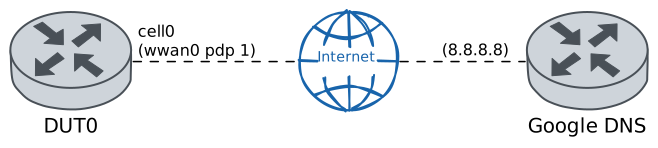
This scenario shows how to configure a cellular interface and then check for network connectivity by pinging Google’s DNS public server. In addition, some operational commands are executed and the information displayed by them is checked.
Test ICMP Connectivity
Description
In DUT0, the cellular module wwan0 is configured with the PIN code required by the inserted SIM card. Additionally, a Packet Data Protocol (PDP) is configured with the APN corresponding to the SIM card’s operator. Then, the cellular interface cell0 is associated with this PDP and configured to obtain its IP addressing through DHCP. Once it’s configured, the ‘Ping’ command is used to check connectivity with Google’s DNS public server.
Scenario
Step 1: Set the following configuration in DUT0 :
set cellular profile CELPROFILE apn movistar.es
set controllers cellular wwan0 encrypted-pin U2FsdGVkX1+kjk7eC6GlMcC2CoAGETiHLxs1nOx8YaE=
set controllers cellular wwan0 pdp 1 profile CELPROFILE
set interfaces cellular cell0 address dhcp
set interfaces cellular cell0 phy wwan0 pdp 1
set system login user admin authentication encrypted-password '$6$GSjsCj8gHLv$/VcqU6FLi6CT2Oxn0MJQ2C2tqnRDrYKNF8HIYWJp68nvXvPdFccDsT04.WtigUONbKYrgKg8d6rEs8PjljMkH0'
Note
Once the cellular module is configured, checking whether the SIM and registration states are correct can be done with the following operational command.
Step 2: Run the command controllers cellular wwan0 show network-status on DUT0 and check whether the output matches the following regular expressions:
SIM status\s* = OK
Registration state\s* = registered
Show output
SIM status = OK
Registration state = registered
Public Land Mobile Network code = HOME[21407] ACT[21422]
Public Land Mobile Network name = Movistar
Network technology currently in use = lte
Current Service Domain registered = cs-ps (capable cs-ps)
Current Roaming status = off
3GPP Cell ID = 72016415
Radio Band = eutran-20
Channel = 6400
LTE Tracking Area Code (TAC) = 28673
LTE Carrier Aggregation Info:
Primary Cell Info:
Band = E-UTRA Band 20
Frequency = 6400
Downlink Bandwidth = 10 MHz
Physical Cell ID = 195
Scell State = registered
RSRP (dBm) = -77
RSRQ (dB) = -7
RSSI (dBm) = -54
SINR (dB) = 20
Uplink Bandwidth = 10 MHz
Secondary Cell Info #0:
Band = E-UTRA Band 3
Frequency = 1301
Downlink Bandwidth = 20 MHz
Physical Cell ID = 216
Scell State = inactive
RSRP (dBm) = -84
RSRQ (dB) = -12
RSSI (dBm) = -61
SINR (dB) = 23
RX level (dBm) = -78
Coverage level = 5 (*****)
Note
On the other hand, checking whether the cellular interface has correctly established the network connection can be done with the following command.
Step 3: Run the command controllers cellular wwan0 pdp 1 show network-data-connection on DUT0 and check whether the output matches the following regular expressions:
Connection status\s* = connectedShow output
Connection status               = connected
Traffic channel status          = active
Max. TX channel rate (bps)      = 50000000
Max. RX channel rate (bps)      = 300000000
IPv4 address                    = 88.31.127.253
IPv4 mask                       = 255.255.255.252
IPv4 gateway                    = 88.31.127.254
IPv4 primary DNS                = 80.58.61.248
IPv4 secondary DNS              = 80.58.61.249
Note
Additionally, with the previous operational command, the IP address provided by the operator to be used by the cellular interface is displayed. With the following command, it is possible to check if the DHCP client has correctly configured the cellular interface.
Step 4: Run the command interfaces cellular cell0 show on DUT0 and check whether the output matches the following regular expressions:
cell0\s+\d+.\d+.\d+.\d+\/\d+\s+up\s+upShow output
------------------------------------------------------------------
Name            IP Address           Admin  Oper  Vrf  Description
------------------------------------------------------------------
cell0  88.31.127.253/30              up     up
fe80::58fa:99ff:fe16:b9c8/64
Note
Once all of the above has been verified, we can be sure that the cellular interface has been correctly configured and there is network connectivity. The latter can be verified, for example, by pinging Google's DNS public server.
Step 5: Ping the IP address 8.8.8.8 from DUT0:
admin@DUT0$ ping 8.8.8.8 count 1 size 56 timeout 1Show output
PING 8.8.8.8 (8.8.8.8) 56(84) bytes of data.
64 bytes from 8.8.8.8: icmp_seq=1 ttl=117 time=29.1 ms

--- 8.8.8.8 ping statistics ---
1 packets transmitted, 1 received, 0% packet loss, time 0ms
rtt min/avg/max/mdev = 29.071/29.071/29.071/0.000 ms
Note
More details of the cellular interface can be obtained through the following operational commands.
Step 6: Run the command controllers cellular wwan0 show cell-info on DUT0 and check whether the output matches the following regular expressions:
GSM\/EDGE info|UMTS info|LTE intrafrequency info|LTE interfrequency info|LTE info - Neighboring GSM|LTE info - Neighboring WCDMA|UMTS Cell ID|UMTS info - Neighboring LTEShow output
LTE intrafrequency info:
UE in idle mode                   = no
PLMN ID coded                     = 21407
Tracking Area Code                = 28673
Global cell ID                    = 72016415
E-UTRA absolute RF channel number = 6400
LTE serving cell ID               = 195
Cell #0
Physical cell ID        = 195
Current RSRQ (dB)       = -8.500000
Current RSRP (dBm)      = -77.700000
Current RSSI (dBm)      = -53.900000
Cell selection Rx Level = 0
Cell #1
Physical cell ID        = 260
Current RSRQ (dB)       = -12.300000
Current RSRP (dBm)      = -86.300000
Current RSSI (dBm)      = -63.500000
Cell selection Rx Level = 0
LTE interfrequency info:
UE in idle mode = no
Frequency #0
E-UTRA absolute RF channel number      = 1301
Cell selection Rx Level low threshold  = 0
Cell selection Rx Level high threshold = 0
Cell reselection priority              = 0
Cell #0
Physical cell ID        = 216
Current RSRQ (dB)       = -7.200000
Current RSRP (dBm)      = -85.600000
Current RSSI (dBm)      = -70.000000
Cell selection Rx Level = 0
LTE info - Neighboring GSM:
UE in idle mode = no
LTE info - Neighboring WCDMA:
UE in idle mode = no
Step 7: Run the command controllers cellular wwan0 show device-info on DUT0 and check whether the output matches the following regular expressions:
Module Manufacturer\s* = .*\nModule Model\s* = .*Show output
Module Manufacturer          = Quectel
Module Model                 = EM06E
Module Firmware              = EM06ELAR04A20M4G
Hardware Revision            = 20000
Modem/App Firmware           = EM06ELAR04A20M4G_01.001.01.001
IMEI                         = 866680042577850
IMSI                         = 214075519082725
ICCID                        = 8934076700110220627F
Radio Interfaces             = umts, lte
Data Service Capability      = non-simultaneous-cs-ps
Maximum TX/RX rate supported = 50000/100000 Kbps
Step 8: Run the command controllers cellular wwan0 show temperature on DUT0 and check whether the output matches the following regular expressions:
Temperature\s* = \d+Show output
Temperature = 42
Step 9: Run the command controllers cellular wwan0 show preferred-bands on DUT0 and check whether the output matches the following regular expressions:
Bands preference\s* = .*\nLTE bands preference\s* = .*Show output
Bands preference           = wcdma-2100, wcdma-dcs-1800, wcdma-850-us, wcdma-900
LTE bands preference       = 1, 3, 5, 7, 8, 20, 28, 32, 38, 40, 41
Step 10: Run the command controllers cellular wwan0 show signal-quality on DUT0 and check whether the output matches the following regular expressions:
(CDMA|EVDO|GSM\/GPRS|WCDMA|LTE):\n\s+RSSI \(dBm\)\s* = -?\d+Show output
LTE:
RSSI (dBm) = -55
RSRP (dBm) = -78
RSRQ (dB)  = -7
SNR (dB)   = 13.000000
Step 11: Run the command controllers cellular wwan0 show supported-bands on DUT0 and check whether the output matches the following regular expressions:
Bands\s* = .*\nLTE bands\s* = .*Show output
Bands           = wcdma-2100, wcdma-dcs-1800, wcdma-850-us, wcdma-900
LTE bands       = 1, 3, 5, 7, 8, 20, 28, 32, 38, 40, 41
Note
Finally, some information can be obtained from the cellular interface via SNMP requests. The following information is provided: the quality of the reception signal, the cell location area code (LAC), the radio access technology used, the tracking area code (TAC), the cell identifier used, and the active radio band.
Step 12: Modify the following configuration lines in DUT0 :
set service snmp community 'COMMUNITY2TEST!'
Step 13: Run the command service snmp walk local-agent v2c COMMUNITY2TEST! oid TELDAT-OSDX-MONDB-SYSTEM-MIB::telOSDxMonDBSystemCellularStatus on DUT0 and check whether the output matches the following regular expressions:
TELDAT-OSDX-MONDB-SYSTEM-MIB::telOSDxMonDBSystemCellularStatusSignalQuality\."wwan0" = INTEGER: -?\d+
TELDAT-OSDX-MONDB-SYSTEM-MIB::telOSDxMonDBSystemCellularStatusCellLocationAreaCode\."wwan0" = INTEGER: \d+
TELDAT-OSDX-MONDB-SYSTEM-MIB::telOSDxMonDBSystemCellularStatusRadioTechnology\."wwan0" = STRING: .+
TELDAT-OSDX-MONDB-SYSTEM-MIB::telOSDxMonDBSystemCellularStatusTrackingAreaCode\."wwan0" = STRING: \d+
TELDAT-OSDX-MONDB-SYSTEM-MIB::telOSDxMonDBSystemCellularStatusCellId\."wwan0" = INTEGER: \d+
TELDAT-OSDX-MONDB-SYSTEM-MIB::telOSDxMonDBSystemCellularStatusRadioBand\."wwan0" = STRING: .+
Show output
TELDAT-OSDX-MONDB-SYSTEM-MIB::telOSDxMonDBSystemCellularStatusTag."wwan0" = STRING: wwan0
TELDAT-OSDX-MONDB-SYSTEM-MIB::telOSDxMonDBSystemCellularStatusSignalQuality."wwan0" = INTEGER: -55
TELDAT-OSDX-MONDB-SYSTEM-MIB::telOSDxMonDBSystemCellularStatusCellLocationAreaCode."wwan0" = INTEGER: 28673
TELDAT-OSDX-MONDB-SYSTEM-MIB::telOSDxMonDBSystemCellularStatusRadioTechnology."wwan0" = STRING: E-UTRAN LTE
TELDAT-OSDX-MONDB-SYSTEM-MIB::telOSDxMonDBSystemCellularStatusTrackingAreaCode."wwan0" = STRING: 28673
TELDAT-OSDX-MONDB-SYSTEM-MIB::telOSDxMonDBSystemCellularStatusCellId."wwan0" = INTEGER: 72016415
TELDAT-OSDX-MONDB-SYSTEM-MIB::telOSDxMonDBSystemCellularStatusRadioBand."wwan0" = STRING: eutran-20
TELDAT-OSDX-MONDB-SYSTEM-MIB::telOSDxMonDBSystemCellularStatusSinr5gEndc."wwan0" = STRING:
TELDAT-OSDX-MONDB-SYSTEM-MIB::telOSDxMonDBSystemCellularStatusRsrq5gEndc."wwan0" = INTEGER: 0
TELDAT-OSDX-MONDB-SYSTEM-MIB::telOSDxMonDBSystemCellularStatusEcno."wwan0" = STRING:
TELDAT-OSDX-MONDB-SYSTEM-MIB::telOSDxMonDBSystemCellularStatusSinrPrimary."wwan0" = STRING: 12.800000
TELDAT-OSDX-MONDB-SYSTEM-MIB::telOSDxMonDBSystemCellularStatusRsrp5gEndc."wwan0" = INTEGER: 0
TELDAT-OSDX-MONDB-SYSTEM-MIB::telOSDxMonDBSystemCellularStatusRsrpPrimary."wwan0" = INTEGER: -78
TELDAT-OSDX-MONDB-SYSTEM-MIB::telOSDxMonDBSystemCellularStatusRscp."wwan0" = INTEGER: 0
TELDAT-OSDX-MONDB-SYSTEM-MIB::telOSDxMonDBSystemCellularStatusRsrqPrimary."wwan0" = INTEGER: -7
Step 1: Set the following configuration in DUT0 :
set cellular profile CELPROFILE apn movistar.es
set controllers cellular wwan0 sim select socket_1
set controllers cellular wwan0 sim socket socket_1 encrypted-pin U2FsdGVkX19J0kXS2cCtavlVXsLGyqZcr2EMXHOKjQw=
set controllers cellular wwan0 sim socket socket_1 pdp 1 profile CELPROFILE
set interfaces cellular cell0 address dhcp
set interfaces cellular cell0 phy wwan0 pdp 1
set system login user admin authentication encrypted-password '$6$GSjsCj8gHLv$/VcqU6FLi6CT2Oxn0MJQ2C2tqnRDrYKNF8HIYWJp68nvXvPdFccDsT04.WtigUONbKYrgKg8d6rEs8PjljMkH0'
Note
Once the cellular module is configured, checking whether the SIM and registration states are correct can be done with the following operational command.
Step 2: Run the command controllers cellular wwan0 show network-status on DUT0 and check whether the output matches the following regular expressions:
SIM status\s* = OK
Registration state\s* = registered
Show output
SIM status = OK
Registration state = registered
Public Land Mobile Network code = HOME[21407] ACT[21422]
Public Land Mobile Network name = Movistar
Network technology currently in use = lte(+5gnr)
Current Service Domain registered = cs-ps (capable cs-ps)
Current Roaming status = off
3GPP Cell ID = 73254686
Radio Band = eutran-3
Bandwidth = 20
Channel = 1301
LTE Tracking Area Code (TAC) = 28673
EN-DC Available = yes
DCNR Restriction = no
LTE Carrier Aggregation Info:
Primary Cell Info:
Band = E-UTRA Band 3
Frequency = 1301
Downlink Bandwidth = 20 MHz
Physical Cell ID = 216
Scell State = registered
RSRP (dBm) = -80
RSRQ (dB) = -6
RSSI (dBm) = -54
SINR (dB) = 20
Uplink Bandwidth = 20 MHz
Secondary Cell Info #0:
Band = E-UTRA Band 8
Frequency = 3600
Downlink Bandwidth = 10 MHz
Physical Cell ID = 210
Scell State = inactive
RSRP (dBm) = -89
RSRQ (dB) = -12
RSSI (dBm) = -66
SINR (dB) = -3
RX level (dBm) = -81
Coverage level = 5 (*****)
Note
On the other hand, checking whether the cellular interface has correctly established the network connection can be done with the following command.
Step 3: Run the command controllers cellular wwan0 pdp 1 show network-data-connection on DUT0 and check whether the output matches the following regular expressions:
Connection status\s* = connectedShow output
Connection status               = connected
Traffic channel status          = active
Max. TX channel rate (bps)      = 0
Max. RX channel rate (bps)      = 0
IPv4 address                    = 2.143.37.49
IPv4 mask                       = 255.255.255.252
IPv4 gateway                    = 2.143.37.50
IPv4 primary DNS                = 80.58.61.248
IPv4 secondary DNS              = 80.58.61.249
Note
Additionally, with the previous operational command, the IP address provided by the operator to be used by the cellular interface is displayed. With the following command, it is possible to check if the DHCP client has correctly configured the cellular interface.
Step 4: Run the command interfaces cellular cell0 show on DUT0 and check whether the output matches the following regular expressions:
cell0\s+\d+.\d+.\d+.\d+\/\d+\s+up\s+upShow output
-----------------------------------------------------------------
Name           IP Address           Admin  Oper  Vrf  Description
-----------------------------------------------------------------
cell0  2.143.37.49/30               up     up
fe80::1884:d6ff:fe5f:e77/64
Note
Once all of the above has been verified, we can be sure that the cellular interface has been correctly configured and there is network connectivity. The latter can be verified, for example, by pinging Google's DNS public server.
Step 5: Ping the IP address 8.8.8.8 from DUT0:
admin@DUT0$ ping 8.8.8.8 count 1 size 56 timeout 1Show output
PING 8.8.8.8 (8.8.8.8) 56(84) bytes of data.
64 bytes from 8.8.8.8: icmp_seq=1 ttl=118 time=29.4 ms

--- 8.8.8.8 ping statistics ---
1 packets transmitted, 1 received, 0% packet loss, time 0ms
rtt min/avg/max/mdev = 29.438/29.438/29.438/0.000 ms
Note
More details of the cellular interface can be obtained through the following operational commands.
Step 6: Run the command controllers cellular wwan0 show cell-info on DUT0 and check whether the output matches the following regular expressions:
GSM\/EDGE info|UMTS info|LTE intrafrequency info|LTE interfrequency info|LTE info - Neighboring GSM|LTE info - Neighboring WCDMA|UMTS Cell ID|UMTS info - Neighboring LTEShow output
LTE intrafrequency info:
UE in idle mode                   = no
PLMN ID coded                     = 21407
Tracking Area Code                = 28673
Global cell ID                    = 73254686
E-UTRA absolute RF channel number = 1301
LTE serving cell ID               = 216
Cell #0
Physical cell ID        = 216
Current RSRQ (dB)       = -7.100000
Current RSRP (dBm)      = -80.900000
Current RSSI (dBm)      = -54.200000
Cell selection Rx Level = 0
Cell #1
Physical cell ID        = 3
Current RSRQ (dB)       = -16.600000
Current RSRP (dBm)      = -92.400000
Current RSSI (dBm)      = -65.400000
Cell selection Rx Level = 0
LTE interfrequency info:
UE in idle mode = no
Frequency #0
E-UTRA absolute RF channel number      = 3600
Cell selection Rx Level low threshold  = 0
Cell selection Rx Level high threshold = 0
Cell reselection priority              = 0
Cell #0
Physical cell ID        = 210
Current RSRQ (dB)       = -14.500000
Current RSRP (dBm)      = -89.000000
Current RSSI (dBm)      = -63.500000
Cell selection Rx Level = 0
Cell #1
Physical cell ID        = 35
Current RSRQ (dB)       = -13.100000
Current RSRP (dBm)      = -85.800000
Current RSSI (dBm)      = -63.500000
Cell selection Rx Level = 0
LTE info - Neighboring GSM:
UE in idle mode = no
LTE info - Neighboring WCDMA:
UE in idle mode = no
Step 7: Run the command controllers cellular wwan0 show device-info on DUT0 and check whether the output matches the following regular expressions:
Module Manufacturer\s* = .*\nModule Model\s* = .*Show output
Module Manufacturer          = Quectel
Module Model                 = RM520N-GL
Module Firmware              = RM520NGLAAR03A01M4G
Hardware Revision            = 20000
Modem/App Firmware           = RM520NGLAAR03A01M4G_01.202.01.202
IMEI                         = 868371053265449
IMSI                         = 214071001209119
ICCID                        = 8934071700076645499F
Radio Interfaces             = umts, lte, 5gnr
Data Service Capability      = non-simultaneous-cs-ps
Maximum TX/RX rate supported = 250000/3300000 Kbps
Step 8: Run the command controllers cellular wwan0 show temperature on DUT0 and check whether the output matches the following regular expressions:
Temperature\s* = \d+Show output
Temperature = 35
Step 9: Run the command controllers cellular wwan0 show preferred-bands on DUT0 and check whether the output matches the following regular expressions:
Bands preference\s* = .*\nLTE bands preference\s* = .*Show output
Bands preference           = wcdma-2100, wcdma-pcs-1900, wcdma-1700-us, wcdma-850-us, wcdma-800, wcdma-900, wcdma-850-japan
LTE bands preference       = 1, 2, 3, 4, 5, 7, 8, 12, 13, 14, 17, 18, 19, 20, 25, 26, 28, 29, 30, 32, 34, 38, 39, 40, 41, 42, 43, 46, 48, 66, 71
5G-NR SA bands preference  = 1, 2, 3, 5, 7, 8, 12, 13, 14, 18, 20, 25, 26, 28, 29, 30, 38, 40, 41, 48, 66, 70, 71, 75, 76, 77, 78, 79
5G-NR NSA bands preference = 1, 2, 3, 5, 7, 8, 12, 13, 14, 18, 20, 25, 26, 28, 29, 30, 38, 40, 41, 48, 66, 70, 71, 75, 76, 77, 78, 79
Step 10: Run the command controllers cellular wwan0 show signal-quality on DUT0 and check whether the output matches the following regular expressions:
(CDMA|EVDO|GSM\/GPRS|WCDMA|LTE):\n\s+RSSI \(dBm\)\s* = -?\d+Show output
LTE:
RSSI (dBm) = -51
RSRP (dBm) = -81
RSRQ (dB)  = -7
SNR (dB)   = 19.800000
Step 11: Run the command controllers cellular wwan0 show supported-bands on DUT0 and check whether the output matches the following regular expressions:
Bands\s* = .*\nLTE bands\s* = .*Show output
Bands           = wcdma-2100, wcdma-pcs-1900, wcdma-1700-us, wcdma-850-us, wcdma-800, wcdma-900, wcdma-850-japan
LTE bands       = 1, 2, 3, 4, 5, 7, 8, 12, 13, 14, 17, 18, 19, 20, 25, 26, 28, 29, 30, 32, 34, 38, 39, 40, 41, 42, 43, 46, 48, 66, 71
5G-NR SA bands  = 1, 2, 3, 5, 7, 8, 12, 13, 14, 18, 20, 25, 26, 28, 29, 30, 38, 40, 41, 48, 66, 70, 71, 75, 76, 77, 78, 79
5G-NR NSA bands = 1, 2, 3, 5, 7, 8, 12, 13, 14, 18, 20, 25, 26, 28, 29, 30, 38, 40, 41, 48, 66, 70, 71, 75, 76, 77, 78, 79
Note
Finally, some information can be obtained from the cellular interface via SNMP requests. The following information is provided: the quality of the reception signal, the cell location area code (LAC), the radio access technology used, the tracking area code (TAC), the cell identifier used, and the active radio band.
Step 12: Modify the following configuration lines in DUT0 :
set service snmp community 'COMMUNITY2TEST!'
Step 13: Run the command service snmp walk local-agent v2c COMMUNITY2TEST! oid TELDAT-OSDX-MONDB-SYSTEM-MIB::telOSDxMonDBSystemCellularStatus on DUT0 and check whether the output matches the following regular expressions:
TELDAT-OSDX-MONDB-SYSTEM-MIB::telOSDxMonDBSystemCellularStatusSignalQuality\."wwan0" = INTEGER: -?\d+
TELDAT-OSDX-MONDB-SYSTEM-MIB::telOSDxMonDBSystemCellularStatusCellLocationAreaCode\."wwan0" = INTEGER: \d+
TELDAT-OSDX-MONDB-SYSTEM-MIB::telOSDxMonDBSystemCellularStatusRadioTechnology\."wwan0" = STRING: .+
TELDAT-OSDX-MONDB-SYSTEM-MIB::telOSDxMonDBSystemCellularStatusTrackingAreaCode\."wwan0" = STRING: \d+
TELDAT-OSDX-MONDB-SYSTEM-MIB::telOSDxMonDBSystemCellularStatusCellId\."wwan0" = INTEGER: \d+
TELDAT-OSDX-MONDB-SYSTEM-MIB::telOSDxMonDBSystemCellularStatusRadioBand\."wwan0" = STRING: .+
Show output
TELDAT-OSDX-MONDB-SYSTEM-MIB::telOSDxMonDBSystemCellularStatusTag."wwan0" = STRING: wwan0
TELDAT-OSDX-MONDB-SYSTEM-MIB::telOSDxMonDBSystemCellularStatusSignalQuality."wwan0" = INTEGER: -51
TELDAT-OSDX-MONDB-SYSTEM-MIB::telOSDxMonDBSystemCellularStatusCellLocationAreaCode."wwan0" = INTEGER: 28673
TELDAT-OSDX-MONDB-SYSTEM-MIB::telOSDxMonDBSystemCellularStatusRadioTechnology."wwan0" = STRING: LTE+5GNR
TELDAT-OSDX-MONDB-SYSTEM-MIB::telOSDxMonDBSystemCellularStatusTrackingAreaCode."wwan0" = STRING: 28673
TELDAT-OSDX-MONDB-SYSTEM-MIB::telOSDxMonDBSystemCellularStatusCellId."wwan0" = INTEGER: 73254686
TELDAT-OSDX-MONDB-SYSTEM-MIB::telOSDxMonDBSystemCellularStatusRadioBand."wwan0" = STRING: eutran-3
TELDAT-OSDX-MONDB-SYSTEM-MIB::telOSDxMonDBSystemCellularStatusSinr5gEndc."wwan0" = STRING:
TELDAT-OSDX-MONDB-SYSTEM-MIB::telOSDxMonDBSystemCellularStatusRsrq5gEndc."wwan0" = INTEGER: 0
TELDAT-OSDX-MONDB-SYSTEM-MIB::telOSDxMonDBSystemCellularStatusEcno."wwan0" = STRING:
TELDAT-OSDX-MONDB-SYSTEM-MIB::telOSDxMonDBSystemCellularStatusSinrPrimary."wwan0" = STRING: 19.400000
TELDAT-OSDX-MONDB-SYSTEM-MIB::telOSDxMonDBSystemCellularStatusRsrp5gEndc."wwan0" = INTEGER: 0
TELDAT-OSDX-MONDB-SYSTEM-MIB::telOSDxMonDBSystemCellularStatusRsrpPrimary."wwan0" = INTEGER: -81
TELDAT-OSDX-MONDB-SYSTEM-MIB::telOSDxMonDBSystemCellularStatusRscp."wwan0" = INTEGER: 0
TELDAT-OSDX-MONDB-SYSTEM-MIB::telOSDxMonDBSystemCellularStatusRsrqPrimary."wwan0" = INTEGER: -7
Step 1: Set the following configuration in DUT0 :
set cellular profile CELPROFILE apn movistar.es
set controllers cellular wwan0 sim select socket_1
set controllers cellular wwan0 sim socket socket_1 encrypted-pin U2FsdGVkX19VQS/RcCdXyV66YIuzW8H/ztOTEL1cFNg=
set controllers cellular wwan0 sim socket socket_1 pdp 1 profile CELPROFILE
set interfaces cellular cell0 address dhcp
set interfaces cellular cell0 phy wwan0 pdp 1
set system login user admin authentication encrypted-password '$6$GSjsCj8gHLv$/VcqU6FLi6CT2Oxn0MJQ2C2tqnRDrYKNF8HIYWJp68nvXvPdFccDsT04.WtigUONbKYrgKg8d6rEs8PjljMkH0'
Note
Once the cellular module is configured, checking whether the SIM and registration states are correct can be done with the following operational command.
Step 2: Run the command controllers cellular wwan0 show network-status on DUT0 and check whether the output matches the following regular expressions:
SIM status\s* = OK
Registration state\s* = registered
Show output
SIM status = OK
Registration state = registered
Public Land Mobile Network code = HOME[21407] ACT[21422]
Public Land Mobile Network name = Movistar
Network technology currently in use = lte(+5gnr)
Current Service Domain registered = cs-ps (capable cs-ps)
Current Roaming status = off
3GPP Cell ID = 72016415
Radio Band = eutran-20
Bandwidth = 10
Channel = 6400
LTE Tracking Area Code (TAC) = 28673
EN-DC Available = yes
DCNR Restriction = no
LTE Carrier Aggregation Info:
Primary Cell Info:
Band = E-UTRA Band 20
Frequency = 6400
Downlink Bandwidth = 10 MHz
Physical Cell ID = 195
Scell State = registered
RSRP (dBm) = -66
RSRQ (dB) = -6
RSSI (dBm) = -43
SINR (dB) = 16
Uplink Bandwidth = 10 MHz
Secondary Cell Info #0:
Band = E-UTRA Band 3
Frequency = 1301
Downlink Bandwidth = 20 MHz
Physical Cell ID = 216
Scell State = inactive
RSRP (dBm) = -78
RSRQ (dB) = -10
RSSI (dBm) = -59
SINR (dB) = 18
RX level (dBm) = -65
Coverage level = 5 (*****)
Note
On the other hand, checking whether the cellular interface has correctly established the network connection can be done with the following command.
Step 3: Run the command controllers cellular wwan0 pdp 1 show network-data-connection on DUT0 and check whether the output matches the following regular expressions:
Connection status\s* = connectedShow output
Connection status               = connected
Traffic channel status          = active
Max. TX channel rate (bps)      = 0
Max. RX channel rate (bps)      = 0
IPv4 address                    = 37.12.4.11
IPv4 mask                       = 255.255.255.248
IPv4 gateway                    = 37.12.4.12
IPv4 primary DNS                = 80.58.61.248
IPv4 secondary DNS              = 80.58.61.249
Note
Additionally, with the previous operational command, the IP address provided by the operator to be used by the cellular interface is displayed. With the following command, it is possible to check if the DHCP client has correctly configured the cellular interface.
Step 4: Run the command interfaces cellular cell0 show on DUT0 and check whether the output matches the following regular expressions:
cell0\s+\d+.\d+.\d+.\d+\/\d+\s+up\s+upShow output
-----------------------------------------------------------------
Name           IP Address           Admin  Oper  Vrf  Description
-----------------------------------------------------------------
cell0  37.12.4.11/29                up     up
fe80::b066:c2ff:fef9:dd3/64
Note
Once all of the above has been verified, we can be sure that the cellular interface has been correctly configured and there is network connectivity. The latter can be verified, for example, by pinging Google's DNS public server.
Step 5: Ping the IP address 8.8.8.8 from DUT0:
admin@DUT0$ ping 8.8.8.8 count 1 size 56 timeout 1Show output
PING 8.8.8.8 (8.8.8.8) 56(84) bytes of data.
64 bytes from 8.8.8.8: icmp_seq=1 ttl=117 time=39.6 ms

--- 8.8.8.8 ping statistics ---
1 packets transmitted, 1 received, 0% packet loss, time 0ms
rtt min/avg/max/mdev = 39.638/39.638/39.638/0.000 ms
Note
More details of the cellular interface can be obtained through the following operational commands.
Step 6: Run the command controllers cellular wwan0 show cell-info on DUT0 and check whether the output matches the following regular expressions:
GSM\/EDGE info|UMTS info|LTE intrafrequency info|LTE interfrequency info|LTE info - Neighboring GSM|LTE info - Neighboring WCDMA|UMTS Cell ID|UMTS info - Neighboring LTEShow output
LTE intrafrequency info:
UE in idle mode                   = no
PLMN ID coded                     = 21407
Tracking Area Code                = 28673
Global cell ID                    = 72016415
E-UTRA absolute RF channel number = 6400
LTE serving cell ID               = 195
Cell #0
Physical cell ID        = 195
Current RSRQ (dB)       = -7.400000
Current RSRP (dBm)      = -66.200000
Current RSSI (dBm)      = -42.100000
Cell selection Rx Level = 0
LTE interfrequency info:
UE in idle mode = no
Frequency #0
E-UTRA absolute RF channel number      = 1301
Cell selection Rx Level low threshold  = 0
Cell selection Rx Level high threshold = 0
Cell reselection priority              = 0
Cell #0
Physical cell ID        = 216
Current RSRQ (dB)       = -8.400000
Current RSRP (dBm)      = -78.400000
Current RSSI (dBm)      = -63.100000
Cell selection Rx Level = 0
Cell #1
Physical cell ID        = 299
Current RSRQ (dB)       = -20.000000
Current RSRP (dBm)      = -101.900000
Current RSSI (dBm)      = -63.100000
Cell selection Rx Level = 0
LTE info - Neighboring GSM:
UE in idle mode = no
LTE info - Neighboring WCDMA:
UE in idle mode = no
Step 7: Run the command controllers cellular wwan0 show device-info on DUT0 and check whether the output matches the following regular expressions:
Module Manufacturer\s* = .*\nModule Model\s* = .*Show output
Module Manufacturer          = Quectel
Module Model                 = RM520N-GL
Module Firmware              = RM520NGLAAR03A01M4G
Hardware Revision            = 20000
Modem/App Firmware           = RM520NGLAAR03A01M4G_A0.300.A0.300
IMEI                         = 868371055763052
IMSI                         = 214071330144340
ICCID                        = 8934076700149871366F
Radio Interfaces             = umts, lte, 5gnr
Data Service Capability      = non-simultaneous-cs-ps
Maximum TX/RX rate supported = 250000/3300000 Kbps
Step 8: Run the command controllers cellular wwan0 show temperature on DUT0 and check whether the output matches the following regular expressions:
Temperature\s* = \d+Show output
Temperature = 34
Step 9: Run the command controllers cellular wwan0 show preferred-bands on DUT0 and check whether the output matches the following regular expressions:
Bands preference\s* = .*\nLTE bands preference\s* = .*Show output
Bands preference           = wcdma-2100, wcdma-pcs-1900, wcdma-1700-us, wcdma-850-us, wcdma-900, wcdma-850-japan
LTE bands preference       = 1, 2, 3, 4, 5, 7, 8, 12, 13, 14, 17, 18, 19, 20, 25, 26, 28, 29, 30, 32, 34, 38, 39, 40, 41, 42, 43, 46, 48, 66, 71
5G-NR SA bands preference  = 1, 2, 3, 5, 7, 8, 12, 13, 14, 18, 20, 25, 26, 28, 29, 30, 38, 40, 41, 48, 66, 70, 71, 75, 76, 77, 78, 79
5G-NR NSA bands preference = 1, 2, 3, 5, 7, 8, 12, 13, 14, 18, 20, 25, 26, 28, 29, 30, 38, 40, 41, 48, 66, 70, 71, 75, 76, 77, 78, 79
Step 10: Run the command controllers cellular wwan0 show signal-quality on DUT0 and check whether the output matches the following regular expressions:
(CDMA|EVDO|GSM\/GPRS|WCDMA|LTE):\n\s+RSSI \(dBm\)\s* = -?\d+Show output
LTE:
RSSI (dBm) = -43
RSRP (dBm) = -65
RSRQ (dB)  = -8
SNR (dB)   = 16.400000
Step 11: Run the command controllers cellular wwan0 show supported-bands on DUT0 and check whether the output matches the following regular expressions:
Bands\s* = .*\nLTE bands\s* = .*Show output
Bands           = wcdma-2100, wcdma-pcs-1900, wcdma-1700-us, wcdma-850-us, wcdma-800, wcdma-900, wcdma-850-japan
LTE bands       = 1, 2, 3, 4, 5, 7, 8, 12, 13, 14, 17, 18, 19, 20, 25, 26, 28, 29, 30, 32, 34, 38, 39, 40, 41, 42, 43, 46, 48, 66, 71
5G-NR SA bands  = 1, 2, 3, 5, 7, 8, 12, 13, 14, 18, 20, 25, 26, 28, 29, 30, 38, 40, 41, 48, 66, 70, 71, 75, 76, 77, 78, 79
5G-NR NSA bands = 1, 2, 3, 5, 7, 8, 12, 13, 14, 18, 20, 25, 26, 28, 29, 30, 38, 40, 41, 48, 66, 70, 71, 75, 76, 77, 78, 79
Note
Finally, some information can be obtained from the cellular interface via SNMP requests. The following information is provided: the quality of the reception signal, the cell location area code (LAC), the radio access technology used, the tracking area code (TAC), the cell identifier used, and the active radio band.
Step 12: Modify the following configuration lines in DUT0 :
set service snmp community 'COMMUNITY2TEST!'
Step 13: Run the command service snmp walk local-agent v2c COMMUNITY2TEST! oid TELDAT-OSDX-MONDB-SYSTEM-MIB::telOSDxMonDBSystemCellularStatus on DUT0 and check whether the output matches the following regular expressions:
TELDAT-OSDX-MONDB-SYSTEM-MIB::telOSDxMonDBSystemCellularStatusSignalQuality\."wwan0" = INTEGER: -?\d+
TELDAT-OSDX-MONDB-SYSTEM-MIB::telOSDxMonDBSystemCellularStatusCellLocationAreaCode\."wwan0" = INTEGER: \d+
TELDAT-OSDX-MONDB-SYSTEM-MIB::telOSDxMonDBSystemCellularStatusRadioTechnology\."wwan0" = STRING: .+
TELDAT-OSDX-MONDB-SYSTEM-MIB::telOSDxMonDBSystemCellularStatusTrackingAreaCode\."wwan0" = STRING: \d+
TELDAT-OSDX-MONDB-SYSTEM-MIB::telOSDxMonDBSystemCellularStatusCellId\."wwan0" = INTEGER: \d+
TELDAT-OSDX-MONDB-SYSTEM-MIB::telOSDxMonDBSystemCellularStatusRadioBand\."wwan0" = STRING: .+
Show output
TELDAT-OSDX-MONDB-SYSTEM-MIB::telOSDxMonDBSystemCellularStatusTag."wwan0" = STRING: wwan0
TELDAT-OSDX-MONDB-SYSTEM-MIB::telOSDxMonDBSystemCellularStatusSignalQuality."wwan0" = INTEGER: -43
TELDAT-OSDX-MONDB-SYSTEM-MIB::telOSDxMonDBSystemCellularStatusCellLocationAreaCode."wwan0" = INTEGER: 28673
TELDAT-OSDX-MONDB-SYSTEM-MIB::telOSDxMonDBSystemCellularStatusRadioTechnology."wwan0" = STRING: LTE+5GNR
TELDAT-OSDX-MONDB-SYSTEM-MIB::telOSDxMonDBSystemCellularStatusTrackingAreaCode."wwan0" = STRING: 28673
TELDAT-OSDX-MONDB-SYSTEM-MIB::telOSDxMonDBSystemCellularStatusCellId."wwan0" = INTEGER: 72016415
TELDAT-OSDX-MONDB-SYSTEM-MIB::telOSDxMonDBSystemCellularStatusRadioBand."wwan0" = STRING: eutran-20
TELDAT-OSDX-MONDB-SYSTEM-MIB::telOSDxMonDBSystemCellularStatusSinr5gEndc."wwan0" = STRING:
TELDAT-OSDX-MONDB-SYSTEM-MIB::telOSDxMonDBSystemCellularStatusRsrq5gEndc."wwan0" = INTEGER: 0
TELDAT-OSDX-MONDB-SYSTEM-MIB::telOSDxMonDBSystemCellularStatusEcno."wwan0" = STRING:
TELDAT-OSDX-MONDB-SYSTEM-MIB::telOSDxMonDBSystemCellularStatusSinrPrimary."wwan0" = STRING: 16.200000
TELDAT-OSDX-MONDB-SYSTEM-MIB::telOSDxMonDBSystemCellularStatusRsrp5gEndc."wwan0" = INTEGER: 0
TELDAT-OSDX-MONDB-SYSTEM-MIB::telOSDxMonDBSystemCellularStatusRsrpPrimary."wwan0" = INTEGER: -65
TELDAT-OSDX-MONDB-SYSTEM-MIB::telOSDxMonDBSystemCellularStatusRscp."wwan0" = INTEGER: 0
TELDAT-OSDX-MONDB-SYSTEM-MIB::telOSDxMonDBSystemCellularStatusRsrqPrimary."wwan0" = INTEGER: -8
Step 1: Set the following configuration in DUT0 :
set cellular profile CELPROFILE apn movistar.es
set controllers cellular wwan0 sim select socket_1
set controllers cellular wwan0 sim socket socket_1 encrypted-pin U2FsdGVkX1+62oNSZ7st6ksGahQ/TfrFielfTGLdOFo=
set controllers cellular wwan0 sim socket socket_1 pdp 1 profile CELPROFILE
set interfaces cellular cell0 address dhcp
set interfaces cellular cell0 phy wwan0 pdp 1
set system login user admin authentication encrypted-password '$6$GSjsCj8gHLv$/VcqU6FLi6CT2Oxn0MJQ2C2tqnRDrYKNF8HIYWJp68nvXvPdFccDsT04.WtigUONbKYrgKg8d6rEs8PjljMkH0'
Note
Once the cellular module is configured, checking whether the SIM and registration states are correct can be done with the following operational command.
Step 2: Run the command controllers cellular wwan0 show network-status on DUT0 and check whether the output matches the following regular expressions:
SIM status\s* = OK
Registration state\s* = registered
Show output
SIM status = OK
Registration state = registered
Public Land Mobile Network code = HOME[21407] ACT[21422]
Public Land Mobile Network name = Movistar
Network technology currently in use = lte(+5gnr)
Current Service Domain registered = cs-ps (capable cs-ps)
Current Roaming status = off
3GPP Cell ID = 72016415
Radio Band = eutran-20
Bandwidth = 10
Channel = 6400
LTE Tracking Area Code (TAC) = 28673
EN-DC Available = yes
DCNR Restriction = no
LTE Carrier Aggregation Info:
Primary Cell Info:
Band = E-UTRA Band 20
Frequency = 6400
Downlink Bandwidth = 10 MHz
Physical Cell ID = 195
Scell State = registered
RSRP (dBm) = -72
RSRQ (dB) = -11
RSSI (dBm) = -44
SINR (dB) = 12
Uplink Bandwidth = 10 MHz
Secondary Cell Info #0:
Band = E-UTRA Band 3
Frequency = 1301
Downlink Bandwidth = 20 MHz
Physical Cell ID = 216
Scell State = inactive
RSRP (dBm) = -84
RSRQ (dB) = -7
RSSI (dBm) = -67
SINR (dB) = 17
RX level (dBm) = -74
Coverage level = 4 (**** )
Note
On the other hand, checking whether the cellular interface has correctly established the network connection can be done with the following command.
Step 3: Run the command controllers cellular wwan0 pdp 1 show network-data-connection on DUT0 and check whether the output matches the following regular expressions:
Connection status\s* = connectedShow output
Connection status               = connected
Traffic channel status          = active
Max. TX channel rate (bps)      = 0
Max. RX channel rate (bps)      = 0
IPv4 address                    = 37.12.8.26
IPv4 mask                       = 255.255.255.252
IPv4 gateway                    = 37.12.8.25
IPv4 primary DNS                = 80.58.61.248
IPv4 secondary DNS              = 80.58.61.249
Note
Additionally, with the previous operational command, the IP address provided by the operator to be used by the cellular interface is displayed. With the following command, it is possible to check if the DHCP client has correctly configured the cellular interface.
Step 4: Run the command interfaces cellular cell0 show on DUT0 and check whether the output matches the following regular expressions:
cell0\s+\d+.\d+.\d+.\d+\/\d+\s+up\s+upShow output
-------------------------------------------------------------
Name         IP Address         Admin  Oper  Vrf  Description
-------------------------------------------------------------
cell0  37.12.8.26/30            up     up
fe80::50:f4ff:fe00:1/64
Note
Once all of the above has been verified, we can be sure that the cellular interface has been correctly configured and there is network connectivity. The latter can be verified, for example, by pinging Google's DNS public server.
Step 5: Ping the IP address 8.8.8.8 from DUT0:
admin@DUT0$ ping 8.8.8.8 count 1 size 56 timeout 1Show output
PING 8.8.8.8 (8.8.8.8) 56(84) bytes of data.
64 bytes from 8.8.8.8: icmp_seq=1 ttl=116 time=34.4 ms

--- 8.8.8.8 ping statistics ---
1 packets transmitted, 1 received, 0% packet loss, time 0ms
rtt min/avg/max/mdev = 34.351/34.351/34.351/0.000 ms
Note
More details of the cellular interface can be obtained through the following operational commands.
Step 6: Run the command controllers cellular wwan0 show cell-info on DUT0 and check whether the output matches the following regular expressions:
GSM\/EDGE info|UMTS info|LTE intrafrequency info|LTE interfrequency info|LTE info - Neighboring GSM|LTE info - Neighboring WCDMA|UMTS Cell ID|UMTS info - Neighboring LTEShow output
LTE intrafrequency info:
UE in idle mode                   = no
PLMN ID coded                     = 21407
Tracking Area Code                = 28673
Global cell ID                    = 72016415
E-UTRA absolute RF channel number = 6400
LTE serving cell ID               = 195
Cell #0
Physical cell ID        = 195
Current RSRQ (dB)       = -7.700000
Current RSRP (dBm)      = -73.100000
Current RSSI (dBm)      = -48.500000
Cell selection Rx Level = 0
Cell #1
Physical cell ID        = 260
Current RSRQ (dB)       = -18.900000
Current RSRP (dBm)      = -80.100000
Current RSSI (dBm)      = -54.100000
Cell selection Rx Level = 0
LTE interfrequency info:
UE in idle mode = no
Frequency #0
E-UTRA absolute RF channel number      = 1301
Cell selection Rx Level low threshold  = 0
Cell selection Rx Level high threshold = 0
Cell reselection priority              = 0
Cell #0
Physical cell ID        = 216
Current RSRQ (dB)       = -8.500000
Current RSRP (dBm)      = -84.700000
Current RSSI (dBm)      = -68.100000
Cell selection Rx Level = 0
Cell #1
Physical cell ID        = 98
Current RSRQ (dB)       = -20.000000
Current RSRP (dBm)      = -106.300000
Current RSSI (dBm)      = -69.100000
Cell selection Rx Level = 0
LTE info - Neighboring GSM:
UE in idle mode = no
LTE info - Neighboring WCDMA:
UE in idle mode = no
Step 7: Run the command controllers cellular wwan0 show device-info on DUT0 and check whether the output matches the following regular expressions:
Module Manufacturer\s* = .*\nModule Model\s* = .*Show output
Module Manufacturer          = Quectel
Module Model                 = RM520N-GL
Module Firmware              = RM520NGLAAR03A01M4G
Hardware Revision            = 20000
Modem/App Firmware           = RM520NGLAAR03A01M4G_A0.300.A0.300
IMEI                         = 868371056606847
IMSI                         = 214070612262638
ICCID                        = 8934076700158866406F
Radio Interfaces             = umts, lte, 5gnr
Data Service Capability      = non-simultaneous-cs-ps
Maximum TX/RX rate supported = 250000/3300000 Kbps
Step 8: Run the command controllers cellular wwan0 show temperature on DUT0 and check whether the output matches the following regular expressions:
Temperature\s* = \d+Show output
Temperature = 42
Step 9: Run the command controllers cellular wwan0 show preferred-bands on DUT0 and check whether the output matches the following regular expressions:
Bands preference\s* = .*\nLTE bands preference\s* = .*Show output
Bands preference           = wcdma-2100, wcdma-pcs-1900, wcdma-1700-us, wcdma-850-us, wcdma-900, wcdma-850-japan
LTE bands preference       = 1, 2, 3, 4, 5, 7, 8, 12, 13, 14, 17, 18, 19, 20, 25, 26, 28, 29, 30, 32, 34, 38, 39, 40, 41, 42, 43, 46, 48, 66, 71
5G-NR SA bands preference  = 1, 2, 3, 5, 7, 8, 12, 13, 14, 18, 20, 25, 26, 28, 29, 30, 38, 40, 41, 48, 66, 70, 71, 75, 76, 77, 78, 79
5G-NR NSA bands preference = 1, 2, 3, 5, 7, 8, 12, 13, 14, 18, 20, 25, 26, 28, 29, 30, 38, 40, 41, 48, 66, 70, 71, 75, 76, 77, 78, 79
Step 10: Run the command controllers cellular wwan0 show signal-quality on DUT0 and check whether the output matches the following regular expressions:
(CDMA|EVDO|GSM\/GPRS|WCDMA|LTE):\n\s+RSSI \(dBm\)\s* = -?\d+Show output
LTE:
RSSI (dBm) = -48
RSRP (dBm) = -74
RSRQ (dB)  = -9
SNR (dB)   = 12.800000
Step 11: Run the command controllers cellular wwan0 show supported-bands on DUT0 and check whether the output matches the following regular expressions:
Bands\s* = .*\nLTE bands\s* = .*Show output
Bands           = wcdma-2100, wcdma-pcs-1900, wcdma-1700-us, wcdma-850-us, wcdma-800, wcdma-900, wcdma-850-japan
LTE bands       = 1, 2, 3, 4, 5, 7, 8, 12, 13, 14, 17, 18, 19, 20, 25, 26, 28, 29, 30, 32, 34, 38, 39, 40, 41, 42, 43, 46, 48, 66, 71
5G-NR SA bands  = 1, 2, 3, 5, 7, 8, 12, 13, 14, 18, 20, 25, 26, 28, 29, 30, 38, 40, 41, 48, 66, 70, 71, 75, 76, 77, 78, 79
5G-NR NSA bands = 1, 2, 3, 5, 7, 8, 12, 13, 14, 18, 20, 25, 26, 28, 29, 30, 38, 40, 41, 48, 66, 70, 71, 75, 76, 77, 78, 79
Note
Finally, some information can be obtained from the cellular interface via SNMP requests. The following information is provided: the quality of the reception signal, the cell location area code (LAC), the radio access technology used, the tracking area code (TAC), the cell identifier used, and the active radio band.
Step 12: Modify the following configuration lines in DUT0 :
set service snmp community 'COMMUNITY2TEST!'
Step 13: Run the command service snmp walk local-agent v2c COMMUNITY2TEST! oid TELDAT-OSDX-MONDB-SYSTEM-MIB::telOSDxMonDBSystemCellularStatus on DUT0 and check whether the output matches the following regular expressions:
TELDAT-OSDX-MONDB-SYSTEM-MIB::telOSDxMonDBSystemCellularStatusSignalQuality\."wwan0" = INTEGER: -?\d+
TELDAT-OSDX-MONDB-SYSTEM-MIB::telOSDxMonDBSystemCellularStatusCellLocationAreaCode\."wwan0" = INTEGER: \d+
TELDAT-OSDX-MONDB-SYSTEM-MIB::telOSDxMonDBSystemCellularStatusRadioTechnology\."wwan0" = STRING: .+
TELDAT-OSDX-MONDB-SYSTEM-MIB::telOSDxMonDBSystemCellularStatusTrackingAreaCode\."wwan0" = STRING: \d+
TELDAT-OSDX-MONDB-SYSTEM-MIB::telOSDxMonDBSystemCellularStatusCellId\."wwan0" = INTEGER: \d+
TELDAT-OSDX-MONDB-SYSTEM-MIB::telOSDxMonDBSystemCellularStatusRadioBand\."wwan0" = STRING: .+
Show output
TELDAT-OSDX-MONDB-SYSTEM-MIB::telOSDxMonDBSystemCellularStatusTag."wwan0" = STRING: wwan0
TELDAT-OSDX-MONDB-SYSTEM-MIB::telOSDxMonDBSystemCellularStatusSignalQuality."wwan0" = INTEGER: -48
TELDAT-OSDX-MONDB-SYSTEM-MIB::telOSDxMonDBSystemCellularStatusCellLocationAreaCode."wwan0" = INTEGER: 28673
TELDAT-OSDX-MONDB-SYSTEM-MIB::telOSDxMonDBSystemCellularStatusRadioTechnology."wwan0" = STRING: LTE+5GNR
TELDAT-OSDX-MONDB-SYSTEM-MIB::telOSDxMonDBSystemCellularStatusTrackingAreaCode."wwan0" = STRING: 28673
TELDAT-OSDX-MONDB-SYSTEM-MIB::telOSDxMonDBSystemCellularStatusCellId."wwan0" = INTEGER: 72016415
TELDAT-OSDX-MONDB-SYSTEM-MIB::telOSDxMonDBSystemCellularStatusRadioBand."wwan0" = STRING: eutran-20
TELDAT-OSDX-MONDB-SYSTEM-MIB::telOSDxMonDBSystemCellularStatusSinr5gEndc."wwan0" = STRING:
TELDAT-OSDX-MONDB-SYSTEM-MIB::telOSDxMonDBSystemCellularStatusRsrq5gEndc."wwan0" = INTEGER: 0
TELDAT-OSDX-MONDB-SYSTEM-MIB::telOSDxMonDBSystemCellularStatusEcno."wwan0" = STRING:
TELDAT-OSDX-MONDB-SYSTEM-MIB::telOSDxMonDBSystemCellularStatusSinrPrimary."wwan0" = STRING: 12.600000
TELDAT-OSDX-MONDB-SYSTEM-MIB::telOSDxMonDBSystemCellularStatusRsrp5gEndc."wwan0" = INTEGER: 0
TELDAT-OSDX-MONDB-SYSTEM-MIB::telOSDxMonDBSystemCellularStatusRsrpPrimary."wwan0" = INTEGER: -74
TELDAT-OSDX-MONDB-SYSTEM-MIB::telOSDxMonDBSystemCellularStatusRscp."wwan0" = INTEGER: 0
TELDAT-OSDX-MONDB-SYSTEM-MIB::telOSDxMonDBSystemCellularStatusRsrqPrimary."wwan0" = INTEGER: -9
Step 1: Set the following configuration in DUT0 :
set cellular profile CELPROFILE apn movistar.es
set controllers cellular wwan0 sim select socket_1
set controllers cellular wwan0 sim socket socket_1 encrypted-pin U2FsdGVkX18dxsyZFeqyxw6w5EU4e0NpVzKKs5OMHfg=
set controllers cellular wwan0 sim socket socket_1 pdp 1 profile CELPROFILE
set interfaces cellular cell0 address dhcp
set interfaces cellular cell0 phy wwan0 pdp 1
set system login user admin authentication encrypted-password '$6$GSjsCj8gHLv$/VcqU6FLi6CT2Oxn0MJQ2C2tqnRDrYKNF8HIYWJp68nvXvPdFccDsT04.WtigUONbKYrgKg8d6rEs8PjljMkH0'
Note
Once the cellular module is configured, checking whether the SIM and registration states are correct can be done with the following operational command.
Step 2: Run the command controllers cellular wwan0 show network-status on DUT0 and check whether the output matches the following regular expressions:
SIM status\s* = OK
Registration state\s* = registered
Show output
SIM status = OK
Registration state = registered
Public Land Mobile Network code = HOME[21407] ACT[21422]
Public Land Mobile Network name = Movistar
Network technology currently in use = lte(+5gnr)
Current Service Domain registered = cs-ps (capable cs-ps)
Current Roaming status = off
3GPP Cell ID = 73254686
Radio Band = eutran-3
Bandwidth = 20
Channel = 1301
LTE Tracking Area Code (TAC) = 28673
EN-DC Available = yes
DCNR Restriction = no
LTE Carrier Aggregation Info:
Primary Cell Info:
Band = E-UTRA Band 3
Frequency = 1301
Downlink Bandwidth = 20 MHz
Physical Cell ID = 216
Scell State = registered
RSRP (dBm) = -82
RSRQ (dB) = -9
RSSI (dBm) = -52
SINR (dB) = 12
Uplink Bandwidth = 20 MHz
Secondary Cell Info #0:
Band = E-UTRA Band 20
Frequency = 6400
Downlink Bandwidth = 10 MHz
Physical Cell ID = 195
Scell State = inactive
RSRP (dBm) = -84
RSRQ (dB) = -9
RSSI (dBm) = -66
SINR (dB) = 13
RX level (dBm) = -83
Coverage level = 5 (*****)
Note
On the other hand, checking whether the cellular interface has correctly established the network connection can be done with the following command.
Step 3: Run the command controllers cellular wwan0 pdp 1 show network-data-connection on DUT0 and check whether the output matches the following regular expressions:
Connection status\s* = connectedShow output
Connection status               = connected
Traffic channel status          = active
Max. TX channel rate (bps)      = 0
Max. RX channel rate (bps)      = 0
IPv4 address                    = 37.12.30.106
IPv4 mask                       = 255.255.255.252
IPv4 gateway                    = 37.12.30.105
IPv4 primary DNS                = 80.58.61.248
IPv4 secondary DNS              = 80.58.61.249
Note
Additionally, with the previous operational command, the IP address provided by the operator to be used by the cellular interface is displayed. With the following command, it is possible to check if the DHCP client has correctly configured the cellular interface.
Step 4: Run the command interfaces cellular cell0 show on DUT0 and check whether the output matches the following regular expressions:
cell0\s+\d+.\d+.\d+.\d+\/\d+\s+up\s+upShow output
-----------------------------------------------------------------
Name           IP Address           Admin  Oper  Vrf  Description
-----------------------------------------------------------------
cell0  37.12.30.106/30              up     up
fe80::cd0:c4ff:fe14:39e6/64
Note
Once all of the above has been verified, we can be sure that the cellular interface has been correctly configured and there is network connectivity. The latter can be verified, for example, by pinging Google's DNS public server.
Step 5: Ping the IP address 8.8.8.8 from DUT0:
admin@DUT0$ ping 8.8.8.8 count 1 size 56 timeout 1Show output
PING 8.8.8.8 (8.8.8.8) 56(84) bytes of data.
64 bytes from 8.8.8.8: icmp_seq=1 ttl=116 time=113 ms

--- 8.8.8.8 ping statistics ---
1 packets transmitted, 1 received, 0% packet loss, time 0ms
rtt min/avg/max/mdev = 112.820/112.820/112.820/0.000 ms
Note
More details of the cellular interface can be obtained through the following operational commands.
Step 6: Run the command controllers cellular wwan0 show cell-info on DUT0 and check whether the output matches the following regular expressions:
GSM\/EDGE info|UMTS info|LTE intrafrequency info|LTE interfrequency info|LTE info - Neighboring GSM|LTE info - Neighboring WCDMA|UMTS Cell ID|UMTS info - Neighboring LTEShow output
LTE intrafrequency info:
UE in idle mode                   = no
PLMN ID coded                     = 21407
Tracking Area Code                = 28673
Global cell ID                    = 73254686
E-UTRA absolute RF channel number = 1301
LTE serving cell ID               = 216
Cell #0
Physical cell ID        = 216
Current RSRQ (dB)       = -8.700000
Current RSRP (dBm)      = -82.600000
Current RSSI (dBm)      = -54.300000
Cell selection Rx Level = 0
LTE interfrequency info:
UE in idle mode = no
Frequency #0
E-UTRA absolute RF channel number      = 6400
Cell selection Rx Level low threshold  = 0
Cell selection Rx Level high threshold = 0
Cell reselection priority              = 0
Cell #0
Physical cell ID        = 195
Current RSRQ (dB)       = -7.600000
Current RSRP (dBm)      = -84.300000
Current RSSI (dBm)      = -67.400000
Cell selection Rx Level = 0
LTE info - Neighboring GSM:
UE in idle mode = no
LTE info - Neighboring WCDMA:
UE in idle mode = no
Step 7: Run the command controllers cellular wwan0 show device-info on DUT0 and check whether the output matches the following regular expressions:
Module Manufacturer\s* = .*\nModule Model\s* = .*Show output
Module Manufacturer          = Quectel
Module Model                 = RM520N-GL
Module Firmware              = RM520NGLAAR03A01M4G
Hardware Revision            = 20000
Modem/App Firmware           = RM520NGLAAR03A01M4G_A0.300.A0.300
IMEI                         = 868371056833888
IMSI                         = 214070612262628
ICCID                        = 8934076700158866307F
Radio Interfaces             = umts, lte, 5gnr
Data Service Capability      = non-simultaneous-cs-ps
Maximum TX/RX rate supported = 250000/3300000 Kbps
Step 8: Run the command controllers cellular wwan0 show temperature on DUT0 and check whether the output matches the following regular expressions:
Temperature\s* = \d+Show output
Temperature = 37
Step 9: Run the command controllers cellular wwan0 show preferred-bands on DUT0 and check whether the output matches the following regular expressions:
Bands preference\s* = .*\nLTE bands preference\s* = .*Show output
Bands preference           = wcdma-2100, wcdma-pcs-1900, wcdma-1700-us, wcdma-850-us, wcdma-900, wcdma-850-japan
LTE bands preference       = 1, 2, 3, 4, 5, 7, 8, 12, 13, 14, 17, 18, 19, 20, 25, 26, 28, 29, 30, 32, 34, 38, 39, 40, 41, 42, 43, 46, 48, 66, 71
5G-NR SA bands preference  = 1, 2, 3, 5, 7, 8, 12, 13, 14, 18, 20, 25, 26, 28, 29, 30, 38, 40, 41, 48, 66, 70, 71, 75, 76, 77, 78, 79
5G-NR NSA bands preference = 1, 2, 3, 5, 7, 8, 12, 13, 14, 18, 20, 25, 26, 28, 29, 30, 38, 40, 41, 48, 66, 70, 71, 75, 76, 77, 78, 79
Step 10: Run the command controllers cellular wwan0 show signal-quality on DUT0 and check whether the output matches the following regular expressions:
(CDMA|EVDO|GSM\/GPRS|WCDMA|LTE):\n\s+RSSI \(dBm\)\s* = -?\d+Show output
LTE:
RSSI (dBm) = -55
RSRP (dBm) = -83
RSRQ (dB)  = -8
SNR (dB)   = 13.800000
Step 11: Run the command controllers cellular wwan0 show supported-bands on DUT0 and check whether the output matches the following regular expressions:
Bands\s* = .*\nLTE bands\s* = .*Show output
Bands           = wcdma-2100, wcdma-pcs-1900, wcdma-1700-us, wcdma-850-us, wcdma-800, wcdma-900, wcdma-850-japan
LTE bands       = 1, 2, 3, 4, 5, 7, 8, 12, 13, 14, 17, 18, 19, 20, 25, 26, 28, 29, 30, 32, 34, 38, 39, 40, 41, 42, 43, 46, 48, 66, 71
5G-NR SA bands  = 1, 2, 3, 5, 7, 8, 12, 13, 14, 18, 20, 25, 26, 28, 29, 30, 38, 40, 41, 48, 66, 70, 71, 75, 76, 77, 78, 79
5G-NR NSA bands = 1, 2, 3, 5, 7, 8, 12, 13, 14, 18, 20, 25, 26, 28, 29, 30, 38, 40, 41, 48, 66, 70, 71, 75, 76, 77, 78, 79
Note
Finally, some information can be obtained from the cellular interface via SNMP requests. The following information is provided: the quality of the reception signal, the cell location area code (LAC), the radio access technology used, the tracking area code (TAC), the cell identifier used, and the active radio band.
Step 12: Modify the following configuration lines in DUT0 :
set service snmp community 'COMMUNITY2TEST!'
Step 13: Run the command service snmp walk local-agent v2c COMMUNITY2TEST! oid TELDAT-OSDX-MONDB-SYSTEM-MIB::telOSDxMonDBSystemCellularStatus on DUT0 and check whether the output matches the following regular expressions:
TELDAT-OSDX-MONDB-SYSTEM-MIB::telOSDxMonDBSystemCellularStatusSignalQuality\."wwan0" = INTEGER: -?\d+
TELDAT-OSDX-MONDB-SYSTEM-MIB::telOSDxMonDBSystemCellularStatusCellLocationAreaCode\."wwan0" = INTEGER: \d+
TELDAT-OSDX-MONDB-SYSTEM-MIB::telOSDxMonDBSystemCellularStatusRadioTechnology\."wwan0" = STRING: .+
TELDAT-OSDX-MONDB-SYSTEM-MIB::telOSDxMonDBSystemCellularStatusTrackingAreaCode\."wwan0" = STRING: \d+
TELDAT-OSDX-MONDB-SYSTEM-MIB::telOSDxMonDBSystemCellularStatusCellId\."wwan0" = INTEGER: \d+
TELDAT-OSDX-MONDB-SYSTEM-MIB::telOSDxMonDBSystemCellularStatusRadioBand\."wwan0" = STRING: .+
Show output
TELDAT-OSDX-MONDB-SYSTEM-MIB::telOSDxMonDBSystemCellularStatusTag."wwan0" = STRING: wwan0
TELDAT-OSDX-MONDB-SYSTEM-MIB::telOSDxMonDBSystemCellularStatusSignalQuality."wwan0" = INTEGER: -55
TELDAT-OSDX-MONDB-SYSTEM-MIB::telOSDxMonDBSystemCellularStatusCellLocationAreaCode."wwan0" = INTEGER: 28673
TELDAT-OSDX-MONDB-SYSTEM-MIB::telOSDxMonDBSystemCellularStatusRadioTechnology."wwan0" = STRING: LTE+5GNR
TELDAT-OSDX-MONDB-SYSTEM-MIB::telOSDxMonDBSystemCellularStatusTrackingAreaCode."wwan0" = STRING: 28673
TELDAT-OSDX-MONDB-SYSTEM-MIB::telOSDxMonDBSystemCellularStatusCellId."wwan0" = INTEGER: 73254686
TELDAT-OSDX-MONDB-SYSTEM-MIB::telOSDxMonDBSystemCellularStatusRadioBand."wwan0" = STRING: eutran-3
TELDAT-OSDX-MONDB-SYSTEM-MIB::telOSDxMonDBSystemCellularStatusSinr5gEndc."wwan0" = STRING:
TELDAT-OSDX-MONDB-SYSTEM-MIB::telOSDxMonDBSystemCellularStatusRsrq5gEndc."wwan0" = INTEGER: 0
TELDAT-OSDX-MONDB-SYSTEM-MIB::telOSDxMonDBSystemCellularStatusEcno."wwan0" = STRING:
TELDAT-OSDX-MONDB-SYSTEM-MIB::telOSDxMonDBSystemCellularStatusSinrPrimary."wwan0" = STRING: 13.800000
TELDAT-OSDX-MONDB-SYSTEM-MIB::telOSDxMonDBSystemCellularStatusRsrp5gEndc."wwan0" = INTEGER: 0
TELDAT-OSDX-MONDB-SYSTEM-MIB::telOSDxMonDBSystemCellularStatusRsrpPrimary."wwan0" = INTEGER: -83
TELDAT-OSDX-MONDB-SYSTEM-MIB::telOSDxMonDBSystemCellularStatusRscp."wwan0" = INTEGER: 0
TELDAT-OSDX-MONDB-SYSTEM-MIB::telOSDxMonDBSystemCellularStatusRsrqPrimary."wwan0" = INTEGER: -8