Only Mab
This scenario shows how to configure the only-MAB
authentication mode.
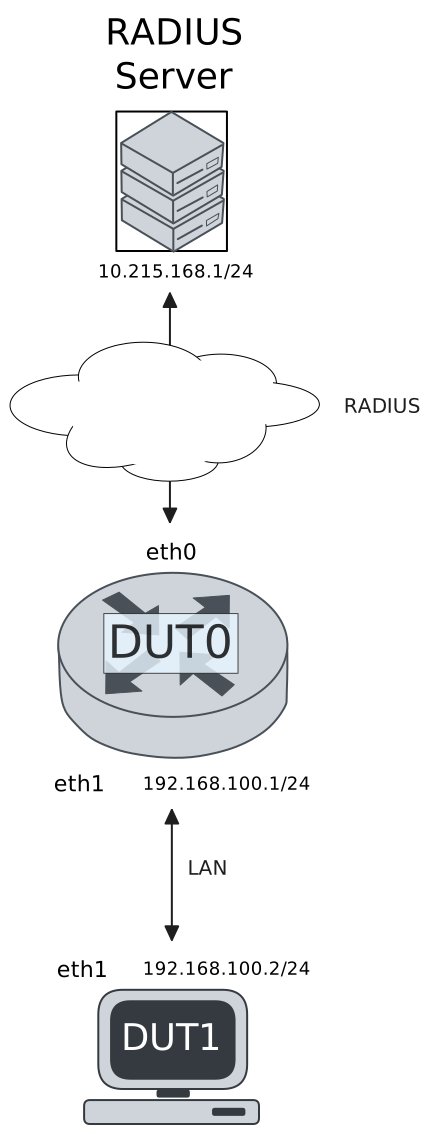
Test Successful MAB Authentication
Description
This scenario shows how to configure MAB-only authentication. DUT1 uses a correct MAC address.
Scenario
Step 1: Set the following configuration in DUT0 :
set interfaces ethernet eth0 address 10.215.168.64/24
set interfaces ethernet eth1 address 192.168.100.1/24
set interfaces ethernet eth1 authenticator aaa authentication list1
set interfaces ethernet eth1 authenticator log-level debug
set interfaces ethernet eth1 authenticator mode only-MAB
set interfaces ethernet eth1 authenticator quiet-period 60
set interfaces ethernet eth1 authenticator reauth-period 0
set system aaa group radius radgroup1 server serv1
set system aaa list list1 method 1 group radius radgroup1
set system aaa server radius serv1 address 10.215.168.1
set system aaa server radius serv1 encrypted-key U2FsdGVkX180wRSrsW3JOGeeSmYfyO7SNx7xOL/8b/8Ul/LPVvirtlLzF/kgKxLT+QrCeUWq6Es6o1Qmx+bM6A==
set system login user admin authentication encrypted-password '$6$GSjsCj8gHLv$/VcqU6FLi6CT2Oxn0MJQ2C2tqnRDrYKNF8HIYWJp68nvXvPdFccDsT04.WtigUONbKYrgKg8d6rEs8PjljMkH0'
Step 2: Ping the IP address 10.215.168.1 from DUT0:
admin@DUT0$ ping 10.215.168.1 count 1 size 56 timeout 1Show output
PING 10.215.168.1 (10.215.168.1) 56(84) bytes of data.
64 bytes from 10.215.168.1: icmp_seq=1 ttl=64 time=0.397 ms

--- 10.215.168.1 ping statistics ---
1 packets transmitted, 1 received, 0% packet loss, time 0ms
rtt min/avg/max/mdev = 0.397/0.397/0.397/0.000 ms
Step 3: Set the following configuration in DUT1 :
set interfaces ethernet eth1 address 192.168.100.2/24
set system login user admin authentication encrypted-password '$6$GSjsCj8gHLv$/VcqU6FLi6CT2Oxn0MJQ2C2tqnRDrYKNF8HIYWJp68nvXvPdFccDsT04.WtigUONbKYrgKg8d6rEs8PjljMkH0'
Step 4: Ping the IP address 192.168.100.1 from DUT1:
admin@DUT1$ ping 192.168.100.1 count 1 size 56 timeout 1Show output
PING 192.168.100.1 (192.168.100.1) 56(84) bytes of data.
64 bytes from 192.168.100.1: icmp_seq=1 ttl=64 time=0.728 ms

--- 192.168.100.1 ping statistics ---
1 packets transmitted, 1 received, 0% packet loss, time 0ms
rtt min/avg/max/mdev = 0.728/0.728/0.728/0.000 ms
Step 5: Run the command interfaces ethernet eth1 authenticator show stats on DUT0 and check whether the output matches the following regular expressions:
Authentication Successes\s+1
Authentication Mode\s+MAB
Show output
-------------------------------------------
Field                  Value
-------------------------------------------
Access Challenges                         0
Authentication Backend               RADIUS
Authentication Failures                   0
Authentication Mode                     MAB
Authentication Status      Authorized (MAB)
Authentication Successes                  1
EAPoL frames (Rx)                         0
EAPoL frames (Tx)                         0
Quiet Period                             60
Reauthenticate                        FALSE
Reauthenticate Period                     0
Session Time                              0
Session User MAC          de:ad:be:ef:6c:11
Session User Name                       N/A
Step 6: Ping the IP address 192.168.100.1 from DUT1:
admin@DUT1$ ping 192.168.100.1 count 1 size 56 timeout 1Show output
PING 192.168.100.1 (192.168.100.1) 56(84) bytes of data.
64 bytes from 192.168.100.1: icmp_seq=1 ttl=64 time=0.264 ms

--- 192.168.100.1 ping statistics ---
1 packets transmitted, 1 received, 0% packet loss, time 0ms
rtt min/avg/max/mdev = 0.264/0.264/0.264/0.000 ms
Step 7: Run the command system journal show | grep "osdx hostapd" on DUT0 and check whether the output contains the following tokens:
802.1X: MAB: station successfully authenticatedShow output
Jul 24 15:30:25.734808 osdx hostapd[1074016]: eth1: IEEE 802.11 Fetching hardware channel/rate support not supported.
Jul 24 15:30:25.735194 osdx hostapd[1074016]: connect[radius]: Network is unreachable
Jul 24 15:30:25.734825 osdx hostapd[1074016]: eth1: RADIUS Authentication server 10.215.168.1:1812
Jul 24 15:30:25.734869 osdx hostapd[1074016]: eth1: IEEE 802.1X Initializing IEEE 802.1X: mode=MAB-only, eap_server=0, eap_quiet_period=60, eap_max_retrans=5
Jul 24 15:30:25.734873 osdx hostapd[1074016]: eth1: IEEE 802.1X IEEE 802.1X: Enabling packet capture discovery mode
Jul 24 15:30:25.754324 osdx hostapd[1074016]: Discovery mode enabled on eth1
Jul 24 15:30:25.754417 osdx hostapd[1074016]: eth1: interface state UNINITIALIZED->ENABLED
Jul 24 15:30:25.754417 osdx hostapd[1074016]: eth1: AP-ENABLED
Jul 24 15:30:30.754587 osdx hostapd[1074017]: eth1: STA de:ad:be:ef:6c:11 DRIVER: Device discovered, triggering MAB authentication
Jul 24 15:30:30.754632 osdx hostapd[1074017]: eth1: STA de:ad:be:ef:6c:11 IEEE 802.1X: New STA de:ad:be:ef:6c:11 added
Jul 24 15:30:30.754642 osdx hostapd[1074017]: eth1: IEEE 802.1X IEEE 802.1X: Disabling packet capture discovery mode
Jul 24 15:30:30.770386 osdx hostapd[1074017]: eth1: STA de:ad:be:ef:6c:11 IEEE 802.1X: MAB-only mode: Starting MAB authentication
Jul 24 15:30:30.770421 osdx hostapd[1074017]: eth1: STA de:ad:be:ef:6c:11 IEEE 802.1X: MAB: Starting RADIUS query
Jul 24 15:30:30.770441 osdx hostapd[1074017]: eth1: STA de:ad:be:ef:6c:11 IEEE 802.1X: MAB: User-Name = de:ad:be:ef:6c:11
Jul 24 15:30:30.772807 osdx hostapd[1074017]: eth1: STA de:ad:be:ef:6c:11 IEEE 802.1X: MAB: User-Password = de:ad:be:ef:6c:11
Jul 24 15:30:30.772822 osdx hostapd[1074017]: eth1: RADIUS Authentication server 10.215.168.1:1812
Jul 24 15:30:30.772908 osdx hostapd[1074017]: eth1: RADIUS Sending RADIUS message to authentication server
Jul 24 15:30:30.772946 osdx hostapd[1074017]: eth1: RADIUS Next RADIUS client retransmit in 1 seconds
Jul 24 15:30:30.773263 osdx hostapd[1074017]: eth1: RADIUS Received 20 bytes from RADIUS server
Jul 24 15:30:30.773271 osdx hostapd[1074017]: eth1: RADIUS Received RADIUS message
Jul 24 15:30:30.773276 osdx hostapd[1074017]: eth1: STA de:ad:be:ef:6c:11 RADIUS: Received RADIUS packet matched with a pending request, round trip time 0.00 sec
Jul 24 15:30:30.773280 osdx hostapd[1074017]: eth1: STA de:ad:be:ef:6c:11 IEEE 802.1X: MAB: Processing RADIUS response
Jul 24 15:30:30.773296 osdx hostapd[1074017]: eth1: STA de:ad:be:ef:6c:11 IEEE 802.1X: MAB: Identity set to 'de:ad:be:ef:6c:11'
Jul 24 15:30:30.773310 osdx hostapd[1074017]: eth1: STA de:ad:be:ef:6c:11 IEEE 802.1X: MAB: station successfully authenticated
Jul 24 15:30:30.773314 osdx hostapd[1074017]: eth1: IEEE 802.1X IEEE 802.1X: Discovery already disabled
Jul 24 15:30:30.773324 osdx hostapd[1074017]: eth1: STA de:ad:be:ef:6c:11 IEEE 802.1X: authorizing port
Jul 24 15:30:30.773328 osdx hostapd[1074017]: eth1: STA de:ad:be:ef:6c:11 RADIUS: starting accounting session 4281C0CD6CB9E567
Test Unsuccessful MAB Authentication
Description
This scenario shows how to configure MAB-only authentication. DUT1 uses an incorrect MAC address.
Scenario
Step 1: Set the following configuration in DUT0 :
set interfaces ethernet eth0 address 10.215.168.64/24
set interfaces ethernet eth1 address 192.168.100.1/24
set interfaces ethernet eth1 authenticator aaa authentication list1
set interfaces ethernet eth1 authenticator log-level debug
set interfaces ethernet eth1 authenticator mode only-MAB
set interfaces ethernet eth1 authenticator quiet-period 60
set interfaces ethernet eth1 authenticator reauth-period 0
set system aaa group radius radgroup1 server serv1
set system aaa list list1 method 1 group radius radgroup1
set system aaa server radius serv1 address 10.215.168.1
set system aaa server radius serv1 encrypted-key U2FsdGVkX18fX4j5AckcFezKVjlfwCXin88rRTGzPEAwUFX9fUkmmOzCvTJZ+E2mzeOMw8XVdGzYR2IRS8+thw==
set system login user admin authentication encrypted-password '$6$GSjsCj8gHLv$/VcqU6FLi6CT2Oxn0MJQ2C2tqnRDrYKNF8HIYWJp68nvXvPdFccDsT04.WtigUONbKYrgKg8d6rEs8PjljMkH0'
Step 2: Ping the IP address 10.215.168.1 from DUT0:
admin@DUT0$ ping 10.215.168.1 count 1 size 56 timeout 1Show output
PING 10.215.168.1 (10.215.168.1) 56(84) bytes of data.
64 bytes from 10.215.168.1: icmp_seq=1 ttl=64 time=0.445 ms

--- 10.215.168.1 ping statistics ---
1 packets transmitted, 1 received, 0% packet loss, time 0ms
rtt min/avg/max/mdev = 0.445/0.445/0.445/0.000 ms
Step 3: Set the following configuration in DUT1 :
set interfaces ethernet eth1 address 192.168.100.2/24
set interfaces ethernet eth1 mac '00:11:22:33:44:55'
set system login user admin authentication encrypted-password '$6$GSjsCj8gHLv$/VcqU6FLi6CT2Oxn0MJQ2C2tqnRDrYKNF8HIYWJp68nvXvPdFccDsT04.WtigUONbKYrgKg8d6rEs8PjljMkH0'
Step 4: Run the command interfaces ethernet eth1 authenticator show stats on DUT0 and check whether the output matches the following regular expressions:
Authentication Failures\s+[1-9]\d?Show output
-------------------------------------------
Field                  Value
-------------------------------------------
Access Challenges                         0
Authentication Backend               RADIUS
Authentication Failures                   2
Authentication Mode                     N/A
Authentication Status          Unauthorized
Authentication Successes                  0
EAPoL frames (Rx)                         0
EAPoL frames (Tx)                         0
Quiet Period                             60
Reauthenticate                        FALSE
Reauthenticate Period                     0
Session Time                              0
Session User MAC          00:11:22:33:44:55
Session User Name                       N/A
Step 5: Expect a failure in the following command:
Ping the IP address 192.168.100.1 from DUT1:
admin@DUT1$ ping 192.168.100.1 count 1 size 56 timeout 1Show output
PING 192.168.100.1 (192.168.100.1) 56(84) bytes of data.

--- 192.168.100.1 ping statistics ---
1 packets transmitted, 0 received, 100% packet loss, time 0ms
Step 6: Run the command system journal show | grep "osdx hostapd" on DUT0 and check whether the output contains the following tokens:
802.1X: MAB: Authentication failedShow output
Jul 24 15:30:43.581874 osdx hostapd[1074599]: eth1: IEEE 802.11 Fetching hardware channel/rate support not supported.
Jul 24 15:30:43.581887 osdx hostapd[1074599]: eth1: RADIUS Authentication server 10.215.168.1:1812
Jul 24 15:30:43.582142 osdx hostapd[1074599]: connect[radius]: Network is unreachable
Jul 24 15:30:43.581924 osdx hostapd[1074599]: eth1: IEEE 802.1X Initializing IEEE 802.1X: mode=MAB-only, eap_server=0, eap_quiet_period=60, eap_max_retrans=5
Jul 24 15:30:43.581927 osdx hostapd[1074599]: eth1: IEEE 802.1X IEEE 802.1X: Enabling packet capture discovery mode
Jul 24 15:30:43.609696 osdx hostapd[1074599]: Discovery mode enabled on eth1
Jul 24 15:30:43.609755 osdx hostapd[1074599]: eth1: interface state UNINITIALIZED->ENABLED
Jul 24 15:30:43.609755 osdx hostapd[1074599]: eth1: AP-ENABLED
Jul 24 15:30:48.610034 osdx hostapd[1074600]: eth1: STA 00:11:22:33:44:55 DRIVER: Device discovered, triggering MAB authentication
Jul 24 15:30:48.610095 osdx hostapd[1074600]: eth1: STA 00:11:22:33:44:55 IEEE 802.1X: New STA 00:11:22:33:44:55 added
Jul 24 15:30:48.610106 osdx hostapd[1074600]: eth1: IEEE 802.1X IEEE 802.1X: Disabling packet capture discovery mode
Jul 24 15:30:48.621816 osdx hostapd[1074600]: eth1: STA 00:11:22:33:44:55 IEEE 802.1X: MAB-only mode: Starting MAB authentication
Jul 24 15:30:48.621866 osdx hostapd[1074600]: eth1: STA 00:11:22:33:44:55 IEEE 802.1X: MAB: Starting RADIUS query
Jul 24 15:30:48.621883 osdx hostapd[1074600]: eth1: STA 00:11:22:33:44:55 IEEE 802.1X: MAB: User-Name = 00:11:22:33:44:55
Jul 24 15:30:48.623765 osdx hostapd[1074600]: eth1: STA 00:11:22:33:44:55 IEEE 802.1X: MAB: User-Password = 00:11:22:33:44:55
Jul 24 15:30:48.623778 osdx hostapd[1074600]: eth1: RADIUS Authentication server 10.215.168.1:1812
Jul 24 15:30:48.623867 osdx hostapd[1074600]: eth1: RADIUS Sending RADIUS message to authentication server
Jul 24 15:30:48.623896 osdx hostapd[1074600]: eth1: RADIUS Next RADIUS client retransmit in 1 seconds
Jul 24 15:30:49.623994 osdx hostapd[1074600]: eth1: STA 00:11:22:33:44:55 RADIUS: Resending RADIUS message (id=128)
Jul 24 15:30:49.624034 osdx hostapd[1074600]: eth1: RADIUS Next RADIUS client retransmit in 2 seconds
Jul 24 15:30:49.624237 osdx hostapd[1074600]: eth1: RADIUS Received 20 bytes from RADIUS server
Jul 24 15:30:49.624240 osdx hostapd[1074600]: eth1: RADIUS Received RADIUS message
Jul 24 15:30:49.624245 osdx hostapd[1074600]: eth1: STA 00:11:22:33:44:55 RADIUS: Received RADIUS packet matched with a pending request, round trip time 0.00 sec
Jul 24 15:30:49.624249 osdx hostapd[1074600]: eth1: STA 00:11:22:33:44:55 IEEE 802.1X: MAB: Processing RADIUS response
Jul 24 15:30:49.624303 osdx hostapd[1074600]: eth1: IEEE 802.1X IEEE 802.1X: Discovery already disabled
Jul 24 15:30:49.624306 osdx hostapd[1074600]: eth1: IEEE 802.1X IEEE 802.1X: Discovery already disabled
Jul 24 15:30:49.624415 osdx hostapd[1074600]: eth1: STA 00:11:22:33:44:55 IEEE 802.1X: MAB: Authentication failed, entering held state (quiet period 60 sec)
Jul 24 15:30:49.624420 osdx hostapd[1074600]: eth1: STA 00:11:22:33:44:55 IEEE 802.1X: MAB: Retry timeout registered for 60 seconds
Jul 24 15:30:49.624430 osdx hostapd[1074600]: eth1: RADIUS Received 20 bytes from RADIUS server
Jul 24 15:30:49.624433 osdx hostapd[1074600]: eth1: RADIUS Received RADIUS message
Jul 24 15:30:49.624436 osdx hostapd[1074600]: eth1: RADIUS No matching RADIUS request found (type=0 id=128) - dropping packet