Vrf
This scenario demonstrates how to configure a VTI interface and bind it to a VRF.
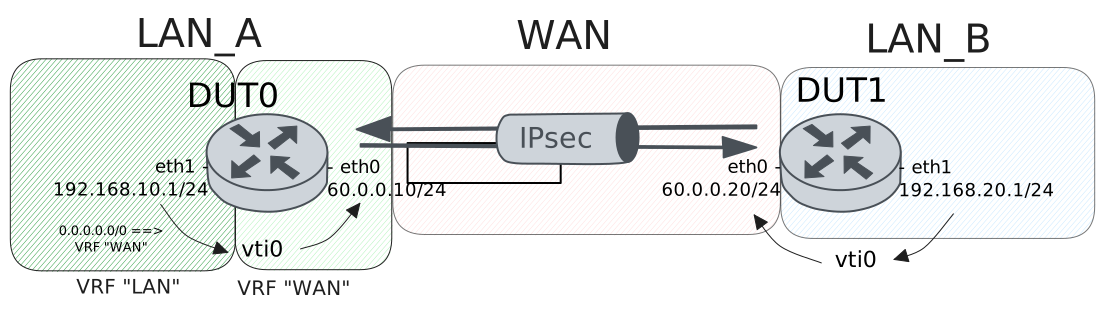
Test VTI With VRF Binding
Description
A tunnel is configured between DUT0
and DUT1. In DUT0, a vti is
configured and bound to a VRF.
Scenario
Step 1: Set the following configuration in DUT0 :
set interfaces ethernet eth0 address 60.0.0.10/24
set interfaces ethernet eth0 vrf WAN
set interfaces ethernet eth1 address 192.168.10.1/24
set interfaces ethernet eth1 vrf LAN
set interfaces vti vti0 ipsec PEER
set interfaces vti vti0 local-address 60.0.0.10
set interfaces vti vti0 vrf WAN
set protocols vrf LAN static route 0.0.0.0/0 interface vti0
set protocols vrf WAN static route 192.168.10.0/24 next-hop-vrf LAN
set system login user admin authentication encrypted-password '$6$GSjsCj8gHLv$/VcqU6FLi6CT2Oxn0MJQ2C2tqnRDrYKNF8HIYWJp68nvXvPdFccDsT04.WtigUONbKYrgKg8d6rEs8PjljMkH0'
set system vrf LAN
set system vrf WAN
set vpn ipsec auth-profile AUTH-SA global-secrets ike-psk test encrypted-secret U2FsdGVkX18ztvjDRIutuWl629xwGDwtNxfCpAjQpYg=
set vpn ipsec auth-profile AUTH-SA local auth ike-psk id test
set vpn ipsec auth-profile AUTH-SA remote auth ike-psk id %any
set vpn ipsec esp-group CHILD-SA proposal 1 encryption aes256gcm128
set vpn ipsec esp-group CHILD-SA proposal 1 pfs dh-group19
set vpn ipsec ike-group IKE-SA key-exchange ikev2
set vpn ipsec ike-group IKE-SA proposal 1 dh-group 19
set vpn ipsec ike-group IKE-SA proposal 1 encryption aes256gcm128
set vpn ipsec ike-group IKE-SA proposal 1 hash sha256
set vpn ipsec site-to-site peer PEER auth-profile AUTH-SA
set vpn ipsec site-to-site peer PEER connection-type on-demand
set vpn ipsec site-to-site peer PEER default-esp-group CHILD-SA
set vpn ipsec site-to-site peer PEER ike-group IKE-SA
set vpn ipsec site-to-site peer PEER local-address 60.0.0.10
set vpn ipsec site-to-site peer PEER vti local prefix 192.168.10.0/24
set vpn ipsec site-to-site peer PEER vti remote prefix 192.168.20.0/24
Step 2: Set the following configuration in DUT1 :
set interfaces ethernet eth0 address 60.0.0.20/24
set interfaces ethernet eth1 address 192.168.20.1/24
set interfaces vti vti0 ipsec PEER
set interfaces vti vti0 local-address 60.0.0.20
set protocols static route 0.0.0.0/0 interface vti0
set system login user admin authentication encrypted-password '$6$GSjsCj8gHLv$/VcqU6FLi6CT2Oxn0MJQ2C2tqnRDrYKNF8HIYWJp68nvXvPdFccDsT04.WtigUONbKYrgKg8d6rEs8PjljMkH0'
set vpn ipsec auth-profile AUTH-SA global-secrets ike-psk test encrypted-secret U2FsdGVkX1/Ue8SfXgk2pDDP7q/NWvcI4agTfHkaL1Y=
set vpn ipsec auth-profile AUTH-SA local auth ike-psk id test
set vpn ipsec auth-profile AUTH-SA remote auth ike-psk id %any
set vpn ipsec esp-group CHILD-SA proposal 1 encryption aes256gcm128
set vpn ipsec esp-group CHILD-SA proposal 1 pfs dh-group19
set vpn ipsec ike-group IKE-SA key-exchange ikev2
set vpn ipsec ike-group IKE-SA proposal 1 dh-group 19
set vpn ipsec ike-group IKE-SA proposal 1 encryption aes256gcm128
set vpn ipsec ike-group IKE-SA proposal 1 hash sha256
set vpn ipsec site-to-site peer PEER auth-profile AUTH-SA
set vpn ipsec site-to-site peer PEER connection-type initiate
set vpn ipsec site-to-site peer PEER default-esp-group CHILD-SA
set vpn ipsec site-to-site peer PEER ike-group IKE-SA
set vpn ipsec site-to-site peer PEER local-address 60.0.0.20
set vpn ipsec site-to-site peer PEER remote-address 60.0.0.10
set vpn ipsec site-to-site peer PEER vti local prefix 192.168.20.0/24
set vpn ipsec site-to-site peer PEER vti remote prefix 192.168.10.0/24
Step 3: Run the command vpn ipsec show sa on DUT0 and check whether the output contains the following tokens:
ESTABLISHEDShow output
vpn-peer-PEER: #1, ESTABLISHED, IKEv2, a24f1ee4009320e5_i 5d857fe151596d9a_r*
local  'test' @ 60.0.0.10[500]
remote 'test' @ 60.0.0.20[500]
AES_GCM_16-256/PRF_HMAC_SHA2_256/ECP_256
established 0s ago, rekeying in 18143s
peer-PEER-tunnel-VTI: #1, reqid 1, INSTALLED, TUNNEL, ESP:AES_GCM_16-256
installed 0s ago, rekeying in 3437s, expires in 3960s
in  cf95642c (0x90000000),      0 bytes,     0 packets
out c52fdb97 (0x90000000),      0 bytes,     0 packets
local  192.168.10.0/24
remote 192.168.20.0/24
Step 4: Ping the IP address 192.168.10.1 from DUT1:
admin@DUT1$ ping 192.168.10.1 local-address 192.168.20.1 count 1 size 56 timeout 1Show output
PING 192.168.10.1 (192.168.10.1) from 192.168.20.1 : 56(84) bytes of data.
64 bytes from 192.168.10.1: icmp_seq=1 ttl=64 time=0.837 ms

--- 192.168.10.1 ping statistics ---
1 packets transmitted, 1 received, 0% packet loss, time 0ms
rtt min/avg/max/mdev = 0.837/0.837/0.837/0.000 ms
Step 5: Run the command vpn ipsec show sa on DUT0 and check whether the output matches the following regular expressions:
,\s+[^0] packetsShow output
vpn-peer-PEER: #1, ESTABLISHED, IKEv2, a24f1ee4009320e5_i 5d857fe151596d9a_r*
local  'test' @ 60.0.0.10[500]
remote 'test' @ 60.0.0.20[500]
AES_GCM_16-256/PRF_HMAC_SHA2_256/ECP_256
established 1s ago, rekeying in 18142s
peer-PEER-tunnel-VTI: #1, reqid 1, INSTALLED, TUNNEL, ESP:AES_GCM_16-256
installed 1s ago, rekeying in 3436s, expires in 3959s
in  cf95642c (0x90000000),     84 bytes,     1 packets,     0s ago
out c52fdb97 (0x90000000),     84 bytes,     1 packets,     0s ago
local  192.168.10.0/24
remote 192.168.20.0/24