Bfd Ospf
Test to check BFD protocol in OSPF.
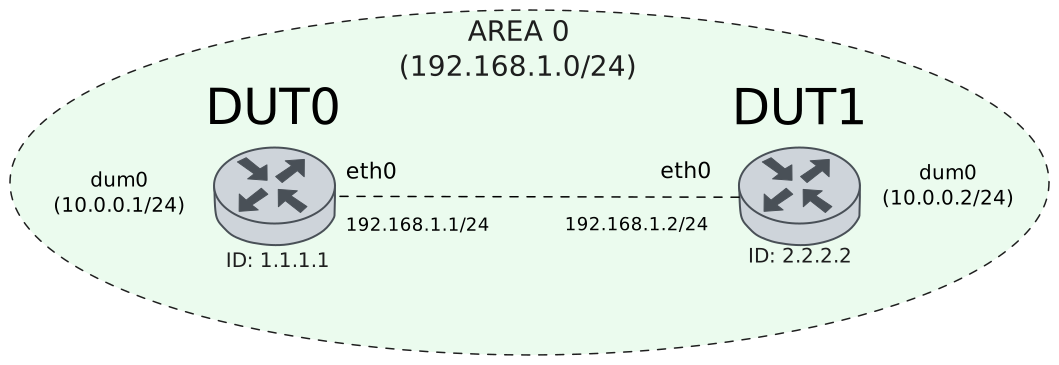
Test Connection
Description
Tests connection between two devices with BFD in OSPF by checking if they are each others peers and their status is up.
Scenario
Step 1: Set the following configuration in DUT0 :
set interfaces dummy dum0 address 10.0.0.1/24
set interfaces ethernet eth0 address 192.168.1.1/24
set interfaces ethernet eth0 ip ospf bfd
set interfaces ethernet eth0 ip ospf network point-to-point
set protocols ospf area 0 network 10.0.0.0/24
set protocols ospf area 0 network 192.168.1.0/24
set protocols ospf parameters router-id 1.1.1.1
set system login user admin authentication encrypted-password '$6$GSjsCj8gHLv$/VcqU6FLi6CT2Oxn0MJQ2C2tqnRDrYKNF8HIYWJp68nvXvPdFccDsT04.WtigUONbKYrgKg8d6rEs8PjljMkH0'
Step 2: Set the following configuration in DUT1 :
set interfaces dummy dum0 address 10.0.0.2/24
set interfaces ethernet eth0 address 192.168.1.2/24
set interfaces ethernet eth0 ip ospf bfd
set interfaces ethernet eth0 ip ospf network point-to-point
set protocols ospf area 0 network 10.0.0.0/24
set protocols ospf area 0 network 192.168.1.0/24
set protocols ospf parameters router-id 2.2.2.2
set system login user admin authentication encrypted-password '$6$GSjsCj8gHLv$/VcqU6FLi6CT2Oxn0MJQ2C2tqnRDrYKNF8HIYWJp68nvXvPdFccDsT04.WtigUONbKYrgKg8d6rEs8PjljMkH0'
Note
Check connectivity
Step 3: Ping the IP address 192.168.1.2 from DUT0:
admin@DUT0$ ping 192.168.1.2 count 1 size 56 timeout 1Show output
PING 192.168.1.2 (192.168.1.2) 56(84) bytes of data.
64 bytes from 192.168.1.2: icmp_seq=1 ttl=64 time=0.316 ms

--- 192.168.1.2 ping statistics ---
1 packets transmitted, 1 received, 0% packet loss, time 0ms
rtt min/avg/max/mdev = 0.316/0.316/0.316/0.000 ms
Step 4: Ping the IP address 192.168.1.1 from DUT1:
admin@DUT1$ ping 192.168.1.1 count 1 size 56 timeout 1Show output
PING 192.168.1.1 (192.168.1.1) 56(84) bytes of data.
64 bytes from 192.168.1.1: icmp_seq=1 ttl=64 time=0.559 ms

--- 192.168.1.1 ping statistics ---
1 packets transmitted, 1 received, 0% packet loss, time 0ms
rtt min/avg/max/mdev = 0.559/0.559/0.559/0.000 ms
Note
Check that they are each other’s neighbors
Step 5: Run the command protocols ospf show neighbor on DUT0 and check whether the output contains the following tokens:
2.2.2.2Show output
Neighbor ID     Pri State           Up Time         Dead Time Address         Interface                        RXmtL RqstL DBsmL
2.2.2.2           1 Init/-          0.543s            39.456s 192.168.1.2     eth0:192.168.1.1                     0     0     0
Step 6: Run the command protocols ospf show neighbor on DUT1 and check whether the output contains the following tokens:
1.1.1.1Show output
Neighbor ID     Pri State           Up Time         Dead Time Address         Interface                        RXmtL RqstL DBsmL
1.1.1.1           1 Full/-          0.850s            39.149s 192.168.1.1     eth0:192.168.1.2                     1     0     0
Note
Check that they are each other’s peers and that their status is up (the BFD session has been successfully established)
Step 7: Run the command protocols bfd show peers on DUT0 and check whether the output contains the following tokens:
192.168.1.2
Status: up
Show output
BFD Peers:
peer 192.168.1.2 local-address 192.168.1.1 vrf default interface eth0
ID: 2619136749
Remote ID: 2574594227
Active mode
Status: up
Uptime: 1 second(s)
Diagnostics: ok
Remote diagnostics: ok
Peer Type: dynamic
RTT min/avg/max: 0/0/0 usec
Local timers:
Detect-multiplier: 3
Receive interval: 300ms
Transmission interval: 300ms
Transmission interval (actual with jitter): 270ms
Detection timeout: 900ms
Echo receive interval: 50ms
Echo transmission interval: disabled
Remote timers:
Detect-multiplier: 3
Receive interval: 300ms
Transmission interval: 300ms
Echo receive interval: 50ms
Step 8: Run the command protocols bfd show peers on DUT1 and check whether the output contains the following tokens:
192.168.1.1
Status: up
Show output
BFD Peers:
peer 192.168.1.1 local-address 192.168.1.2 vrf default interface eth0
ID: 2574594227
Remote ID: 2619136749
Active mode
Status: up
Uptime: 2 second(s)
Diagnostics: ok
Remote diagnostics: ok
Peer Type: dynamic
RTT min/avg/max: 0/0/0 usec
Local timers:
Detect-multiplier: 3
Receive interval: 300ms
Transmission interval: 300ms
Transmission interval (actual with jitter): 297ms
Detection timeout: 900ms
Echo receive interval: 50ms
Echo transmission interval: disabled
Remote timers:
Detect-multiplier: 3
Receive interval: 300ms
Transmission interval: 300ms
Echo receive interval: 50ms
Test Profile
Description
Checks that all BFD profile configured parameters are shown.
Scenario
Step 1: Set the following configuration in DUT0 :
set interfaces dummy dum0 address 10.0.0.1/24
set interfaces ethernet eth0 address 192.168.1.1/24
set interfaces ethernet eth0 ip ospf bfd
set interfaces ethernet eth0 ip ospf network point-to-point
set protocols bfd profile PFL detect-multiplier 5
set protocols bfd profile PFL echo-interval 60
set protocols bfd profile PFL echo-mode
set protocols bfd profile PFL passive-mode
set protocols bfd profile PFL receive-interval 400
set protocols bfd profile PFL transmit-interval 400
set protocols ospf area 0 network 10.0.0.0/24
set protocols ospf area 0 network 192.168.1.0/24
set protocols ospf parameters router-id 1.1.1.1
set system login user admin authentication encrypted-password '$6$GSjsCj8gHLv$/VcqU6FLi6CT2Oxn0MJQ2C2tqnRDrYKNF8HIYWJp68nvXvPdFccDsT04.WtigUONbKYrgKg8d6rEs8PjljMkH0'
Step 2: Modify the following configuration lines in DUT0 :
set interfaces ethernet eth0 ip ospf bfd profile PFL
Step 3: Set the following configuration in DUT1 :
set interfaces dummy dum0 address 10.0.0.2/24
set interfaces ethernet eth0 address 192.168.1.2/24
set interfaces ethernet eth0 ip ospf bfd
set interfaces ethernet eth0 ip ospf network point-to-point
set protocols ospf area 0 network 10.0.0.0/24
set protocols ospf area 0 network 192.168.1.0/24
set protocols ospf parameters router-id 2.2.2.2
set system login user admin authentication encrypted-password '$6$GSjsCj8gHLv$/VcqU6FLi6CT2Oxn0MJQ2C2tqnRDrYKNF8HIYWJp68nvXvPdFccDsT04.WtigUONbKYrgKg8d6rEs8PjljMkH0'
Note
Check connectivity
Step 4: Ping the IP address 192.168.1.2 from DUT0:
admin@DUT0$ ping 192.168.1.2 count 1 size 56 timeout 1Show output
PING 192.168.1.2 (192.168.1.2) 56(84) bytes of data.
64 bytes from 192.168.1.2: icmp_seq=1 ttl=64 time=0.292 ms

--- 192.168.1.2 ping statistics ---
1 packets transmitted, 1 received, 0% packet loss, time 0ms
rtt min/avg/max/mdev = 0.292/0.292/0.292/0.000 ms
Step 5: Ping the IP address 192.168.1.1 from DUT1:
admin@DUT1$ ping 192.168.1.1 count 1 size 56 timeout 1Show output
PING 192.168.1.1 (192.168.1.1) 56(84) bytes of data.
64 bytes from 192.168.1.1: icmp_seq=1 ttl=64 time=0.556 ms

--- 192.168.1.1 ping statistics ---
1 packets transmitted, 1 received, 0% packet loss, time 0ms
rtt min/avg/max/mdev = 0.556/0.556/0.556/0.000 ms
Note
Check that they are each other’s neighbors
Step 6: Run the command protocols ospf show neighbor on DUT0 and check whether the output contains the following tokens:
192.168.1.2Show output
Neighbor ID     Pri State           Up Time         Dead Time Address         Interface                        RXmtL RqstL DBsmL
2.2.2.2           1 Init/-          0.549s            39.450s 192.168.1.2     eth0:192.168.1.1                     0     0     0
Step 7: Run the command protocols ospf show neighbor on DUT1 and check whether the output contains the following tokens:
192.168.1.1Show output
Neighbor ID     Pri State           Up Time         Dead Time Address         Interface                        RXmtL RqstL DBsmL
1.1.1.1           1 Full/-          1.655s            38.343s 192.168.1.1     eth0:192.168.1.2                     1     0     0
Note
Check that they are each other’s peers and that their status is up (the BFD session has been successfully established). Check that all configured profile parameters are shown in DUT0
Step 8: Run the command protocols bfd show peers on DUT0 and check whether the output contains the following tokens:
192.168.1.2
Status: up
Detect-multiplier: 5
Echo receive interval: 60ms
Echo transmission interval: 60ms
Passive mode
Receive interval: 400ms
Transmission interval: 400ms
Show output
BFD Peers:
peer 192.168.1.2 local-address 192.168.1.1 vrf default interface eth0
ID: 2175749082
Remote ID: 3554158619
Passive mode
Status: up
Uptime: 1 second(s)
Diagnostics: ok
Remote diagnostics: ok
Peer Type: dynamic
RTT min/avg/max: 249/1121/6430 usec
Profile: PFL
Local timers:
Detect-multiplier: 5
Receive interval: 400ms
Transmission interval: 400ms
Transmission interval (actual with jitter): 344ms
Detection timeout: 1200ms
Echo receive interval: 60ms
Echo transmission interval: 60ms
Echo transmission interval (actual with jitter): 59ms
Remote timers:
Detect-multiplier: 3
Receive interval: 300ms
Transmission interval: 300ms
Echo receive interval: 50ms
Step 9: Run the command protocols bfd show peers on DUT1 and check whether the output contains the following tokens:
192.168.1.1
Status: up
Show output
BFD Peers:
peer 192.168.1.1 local-address 192.168.1.2 vrf default interface eth0
ID: 3554158619
Remote ID: 2175749082
Active mode
Status: up
Uptime: 1 second(s)
Diagnostics: ok
Remote diagnostics: ok
Peer Type: dynamic
RTT min/avg/max: 0/0/0 usec
Local timers:
Detect-multiplier: 3
Receive interval: 300ms
Transmission interval: 300ms
Transmission interval (actual with jitter): 360ms
Detection timeout: 2000ms
Echo receive interval: 50ms
Echo transmission interval: disabled
Remote timers:
Detect-multiplier: 5
Receive interval: 400ms
Transmission interval: 400ms
Echo receive interval: 60ms