Relay
This scenario shows how to configure service dhcp-relay. The
relay agent must be used when the DHCP server and the DHCP
clients are not connected to the same layer 2 domain.
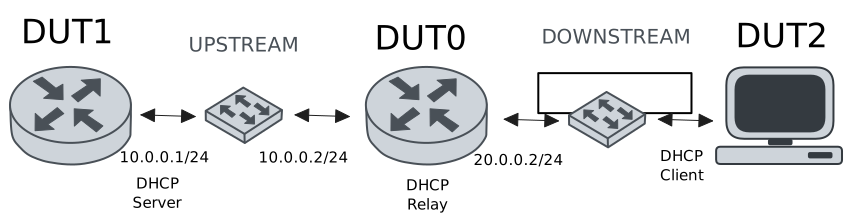
Test DHCP Relay
Description
This example demonstrates how to configure a DHCP relay instance in DUT0 to forward DHCP requests from DUT2 to DUT1.
Scenario
Step 1: Set the following configuration in DUT0 :
set interfaces ethernet eth0 address 10.0.0.2/24
set interfaces ethernet eth1 vif 200 address 20.0.0.2/24
set service dhcp-relay INS downstream-interface eth1.200
set service dhcp-relay INS server 10.0.0.1
set service dhcp-relay INS upstream-interface eth0
set system login user admin authentication encrypted-password '$6$GSjsCj8gHLv$/VcqU6FLi6CT2Oxn0MJQ2C2tqnRDrYKNF8HIYWJp68nvXvPdFccDsT04.WtigUONbKYrgKg8d6rEs8PjljMkH0'
Step 2: Set the following configuration in DUT1 :
set interfaces ethernet eth0 address 10.0.0.1/24
set protocols static route 0.0.0.0/0 next-hop 10.0.0.2
set service dhcp-server shared-network dummy subnet 10.0.0.1/32
set service dhcp-server shared-network remote subnet 20.0.0.0/24 start 20.0.0.50 stop 20.0.0.50
set system login user admin authentication encrypted-password '$6$GSjsCj8gHLv$/VcqU6FLi6CT2Oxn0MJQ2C2tqnRDrYKNF8HIYWJp68nvXvPdFccDsT04.WtigUONbKYrgKg8d6rEs8PjljMkH0'
Step 3: Set the following configuration in DUT2 :
set interfaces ethernet eth1 vif 200 address dhcp
set system login user admin authentication encrypted-password '$6$GSjsCj8gHLv$/VcqU6FLi6CT2Oxn0MJQ2C2tqnRDrYKNF8HIYWJp68nvXvPdFccDsT04.WtigUONbKYrgKg8d6rEs8PjljMkH0'
Step 4: Ping the IP address 10.0.0.1 from DUT0:
admin@DUT0$ ping 10.0.0.1 count 1 size 56 timeout 1Show output
PING 10.0.0.1 (10.0.0.1) 56(84) bytes of data.
64 bytes from 10.0.0.1: icmp_seq=1 ttl=64 time=0.290 ms

--- 10.0.0.1 ping statistics ---
1 packets transmitted, 1 received, 0% packet loss, time 0ms
rtt min/avg/max/mdev = 0.290/0.290/0.290/0.000 ms
Step 5: Run the command interfaces ethernet show on DUT2 and check whether the output contains the following tokens:
20.0.0.50Show output
---------------------------------------------------------------------
Name             IP Address           Admin  Oper  Vrf  Description
---------------------------------------------------------------------
eth0                                down   down
eth1  fe80::dcad:beff:feef:6c21/64  up     up
eth1.200  20.0.0.50/24                  up     up
fe80::dcad:beff:feef:6c21/64
eth2                                down   down
eth3                                down   down
Test DHCP Relay With Giaddr
Description
This example demonstrates how to set the gateway IP address (giaddr) in the IP address. This value must be set in an IP address that the DHCP server can reach.
Scenario
Step 1: Set the following configuration in DUT0 :
set interfaces ethernet eth0 address 10.0.0.2/24
set interfaces ethernet eth1 vif 200 address 20.0.0.2/24
set interfaces ethernet eth1 vif 200 address 20.0.0.3/24
set service dhcp-relay INS downstream-interface eth1.200
set service dhcp-relay INS server 10.0.0.1 giaddr 20.0.0.3
set service dhcp-relay INS upstream-interface eth0
set system login user admin authentication encrypted-password '$6$GSjsCj8gHLv$/VcqU6FLi6CT2Oxn0MJQ2C2tqnRDrYKNF8HIYWJp68nvXvPdFccDsT04.WtigUONbKYrgKg8d6rEs8PjljMkH0'
Step 2: Set the following configuration in DUT1 :
set interfaces ethernet eth0 address 10.0.0.1/24
set protocols static route 0.0.0.0/0 next-hop 10.0.0.2
set service dhcp-server shared-network dummy subnet 10.0.0.1/32
set service dhcp-server shared-network remote subnet 20.0.0.0/24 start 20.0.0.50 stop 20.0.0.50
set system login user admin authentication encrypted-password '$6$GSjsCj8gHLv$/VcqU6FLi6CT2Oxn0MJQ2C2tqnRDrYKNF8HIYWJp68nvXvPdFccDsT04.WtigUONbKYrgKg8d6rEs8PjljMkH0'
Step 3: Set the following configuration in DUT2 :
set interfaces ethernet eth1 vif 200 address dhcp
set system login user admin authentication encrypted-password '$6$GSjsCj8gHLv$/VcqU6FLi6CT2Oxn0MJQ2C2tqnRDrYKNF8HIYWJp68nvXvPdFccDsT04.WtigUONbKYrgKg8d6rEs8PjljMkH0'
Step 4: Ping the IP address 10.0.0.1 from DUT0:
admin@DUT0$ ping 10.0.0.1 count 1 size 56 timeout 1Show output
PING 10.0.0.1 (10.0.0.1) 56(84) bytes of data.
64 bytes from 10.0.0.1: icmp_seq=1 ttl=64 time=0.244 ms

--- 10.0.0.1 ping statistics ---
1 packets transmitted, 1 received, 0% packet loss, time 0ms
rtt min/avg/max/mdev = 0.244/0.244/0.244/0.000 ms
Step 5: Run the command interfaces ethernet show on DUT2 and check whether the output contains the following tokens:
20.0.0.50Show output
---------------------------------------------------------------------
Name             IP Address           Admin  Oper  Vrf  Description
---------------------------------------------------------------------
eth0                                down   down
eth1  fe80::dcad:beff:feef:6c21/64  up     up
eth1.200  20.0.0.50/24                  up     up
fe80::dcad:beff:feef:6c21/64
eth2                                down   down
eth3                                down   down
Step 6: Run the command system journal show | cat on DUT1 and check whether the output matches the following regular expressions:
DHCPACK on 20.0.0.50 to [^\)]+\) via 20.0.0.3Show output
Jul 24 11:42:14.289779 osdx systemd-journald[2060]: Runtime Journal (/run/log/journal/81882c36df9d4e5d8ea319c786369faf) is 928.0K, max 6.4M, 5.5M free.
Jul 24 11:42:14.290316 osdx systemd-journald[2060]: Received client request to rotate journal, rotating.
Jul 24 11:42:14.290365 osdx systemd-journald[2060]: Vacuuming done, freed 0B of archived journals from /run/log/journal/81882c36df9d4e5d8ea319c786369faf.
Jul 24 11:42:14.301171 osdx OSDxCLI[2419]: User 'admin' executed a new command: 'system journal clear'.
Jul 24 11:42:14.522153 osdx OSDxCLI[2419]: User 'admin' executed a new command: 'system coredump delete all'.
Jul 24 11:42:16.272290 osdx OSDxCLI[2419]: User 'admin' entered the configuration menu.
Jul 24 11:42:16.396617 osdx OSDxCLI[2419]: User 'admin' added a new cfg line: 'set interfaces eth0 address 10.0.0.1/24'.
Jul 24 11:42:16.462562 osdx OSDxCLI[2419]: User 'admin' added a new cfg line: 'set service dhcp-server shared-network dummy subnet 10.0.0.1/32'.
Jul 24 11:42:16.567113 osdx OSDxCLI[2419]: User 'admin' added a new cfg line: 'set service dhcp-server shared-network remote subnet 20.0.0.0/24 start 20.0.0.50 stop 20.0.0.50'.
Jul 24 11:42:16.638099 osdx OSDxCLI[2419]: User 'admin' added a new cfg line: 'set protocols static route 0.0.0.0/0 next-hop 10.0.0.2'.
Jul 24 11:42:16.768125 osdx OSDxCLI[2419]: User 'admin' added a new cfg line: 'show working'.
Jul 24 11:42:16.827276 osdx ubnt-cfgd[486813]: inactive
Jul 24 11:42:16.859043 osdx INFO[486826]: FRR daemons did not change
Jul 24 11:42:16.894096 osdx kernel: 8021q: adding VLAN 0 to HW filter on device eth0
Jul 24 11:42:16.946167 osdx WARNING[486899]: No supported link modes on interface eth0
Jul 24 11:42:16.947515 osdx modulelauncher[486899]: osdx.utils.xos cmd error: /sbin/ethtool -A eth0 autoneg on
Jul 24 11:42:16.947526 osdx modulelauncher[486899]: Command '/sbin/ethtool -A eth0 autoneg on' returned non-zero exit status 76.
Jul 24 11:42:16.948684 osdx modulelauncher[486899]: osdx.utils.xos cmd error: /sbin/ethtool -s eth0 autoneg on advertise Asym_Pause off Pause off --
Jul 24 11:42:16.948693 osdx modulelauncher[486899]: Command '/sbin/ethtool -s eth0 autoneg on advertise Asym_Pause off Pause off --' returned non-zero exit status 75.
Jul 24 11:42:17.082489 osdx systemd[1]: Started dhcpd@main.service - "DHCP Server Service instance main".
Jul 24 11:42:17.089784 osdx dhcpd[486946]: Wrote 0 static lease entries.
Jul 24 11:42:17.090005 osdx dhcpd[486946]: Wrote 0 leases to leases file.
Jul 24 11:42:17.134158 osdx dhcpd[486946]: Server starting service.
Jul 24 11:42:17.251520 osdx cfgd[1777]: [2419]Completed change to active configuration
Jul 24 11:42:17.252326 osdx OSDxCLI[2419]: User 'admin' committed the configuration.
Jul 24 11:42:17.277355 osdx OSDxCLI[2419]: User 'admin' left the configuration menu.
Jul 24 11:42:17.943068 osdx dhcpd[486946]: DHCPDISCOVER from de:ad:be:ef:6c:21 via 20.0.0.3
Jul 24 11:42:18.943789 osdx dhcpd[486946]: DHCPOFFER on 20.0.0.50 to de:ad:be:ef:6c:21 (osdx) via 20.0.0.3
Jul 24 11:42:18.944628 osdx dhcpd[486946]: DHCPREQUEST for 20.0.0.50 (10.0.0.1) from de:ad:be:ef:6c:21 (osdx) via 20.0.0.3
Jul 24 11:42:18.998057 osdx dhcpd[486946]: DHCPACK on 20.0.0.50 to de:ad:be:ef:6c:21 (osdx) via 20.0.0.3
Test DHCP Relay With GRE Tunnel
Description
This example demonstrates how to configure a DHCP relay that forwards DHCP requests to the DHCP server through a GRE tunnel (upstream).
Scenario
Step 1: Set the following configuration in DUT0 :
set interfaces ethernet eth0 address 10.0.0.2/24
set interfaces ethernet eth1 vif 200 address 20.0.0.2/24
set interfaces tunnel tun1 address 1.0.0.2/32
set interfaces tunnel tun1 encapsulation gre
set interfaces tunnel tun1 local-address 10.0.0.2
set interfaces tunnel tun1 local-interface eth0
set interfaces tunnel tun1 nhrp holdtime 5
set interfaces tunnel tun1 nhrp nhs 1.0.0.1 nbma 10.0.0.1
set service dhcp-relay INS downstream-interface eth1.200
set service dhcp-relay INS server 1.0.0.1
set service dhcp-relay INS upstream-interface eth0
set service dhcp-relay INS upstream-interface tun1
set system login user admin authentication encrypted-password '$6$GSjsCj8gHLv$/VcqU6FLi6CT2Oxn0MJQ2C2tqnRDrYKNF8HIYWJp68nvXvPdFccDsT04.WtigUONbKYrgKg8d6rEs8PjljMkH0'
Step 2: Set the following configuration in DUT1 :
set interfaces ethernet eth0 address 10.0.0.1/24
set interfaces tunnel tun1 address 1.0.0.1/32
set interfaces tunnel tun1 encapsulation gre
set interfaces tunnel tun1 local-address 10.0.0.1
set interfaces tunnel tun1 local-interface eth0
set interfaces tunnel tun1 nhrp
set protocols static route 0.0.0.0/0 next-hop 10.0.0.2
set protocols static route 20.0.0.0/24 next-hop 1.0.0.2
set service dhcp-server shared-network dummy subnet 1.0.0.1/32
set service dhcp-server shared-network remote subnet 20.0.0.0/24 start 20.0.0.50 stop 20.0.0.50
set system login user admin authentication encrypted-password '$6$GSjsCj8gHLv$/VcqU6FLi6CT2Oxn0MJQ2C2tqnRDrYKNF8HIYWJp68nvXvPdFccDsT04.WtigUONbKYrgKg8d6rEs8PjljMkH0'
Step 3: Set the following configuration in DUT2 :
set interfaces ethernet eth1 vif 200 address dhcp
set system login user admin authentication encrypted-password '$6$GSjsCj8gHLv$/VcqU6FLi6CT2Oxn0MJQ2C2tqnRDrYKNF8HIYWJp68nvXvPdFccDsT04.WtigUONbKYrgKg8d6rEs8PjljMkH0'
Step 4: Ping the IP address 10.0.0.1 from DUT0:
admin@DUT0$ ping 10.0.0.1 count 1 size 56 timeout 1Show output
PING 10.0.0.1 (10.0.0.1) 56(84) bytes of data.
64 bytes from 10.0.0.1: icmp_seq=1 ttl=64 time=0.313 ms

--- 10.0.0.1 ping statistics ---
1 packets transmitted, 1 received, 0% packet loss, time 0ms
rtt min/avg/max/mdev = 0.313/0.313/0.313/0.000 ms
Step 5: Ping the IP address 1.0.0.1 from DUT0:
admin@DUT0$ ping 1.0.0.1 count 1 size 56 timeout 1Show output
PING 1.0.0.1 (1.0.0.1) 56(84) bytes of data.
64 bytes from 1.0.0.1: icmp_seq=1 ttl=64 time=0.430 ms

--- 1.0.0.1 ping statistics ---
1 packets transmitted, 1 received, 0% packet loss, time 0ms
rtt min/avg/max/mdev = 0.430/0.430/0.430/0.000 ms
Step 6: Run the command interfaces ethernet show on DUT2 and check whether the output contains the following tokens:
20.0.0.50Show output
---------------------------------------------------------------------
Name             IP Address           Admin  Oper  Vrf  Description
---------------------------------------------------------------------
eth0                                down   down
eth1  fe80::dcad:beff:feef:6c21/64  up     up
eth1.200  20.0.0.50/24                  up     up
fe80::dcad:beff:feef:6c21/64
eth2                                down   down
eth3                                down   down
Test DHCP Relay With Multiple Instances
Description
This example demonstrates how to configure multiple DHCP relay instances.
Scenario
Step 1: Set the following configuration in DUT0 :
set interfaces ethernet eth0 address 10.0.0.2/24
set interfaces ethernet eth1 vif 200 address 20.0.0.2/24
set interfaces ethernet eth1 vif 300 address 30.0.0.2/24
set service dhcp-relay INS downstream-interface eth1.200
set service dhcp-relay INS server 10.0.0.1
set service dhcp-relay INS upstream-interface eth0
set service dhcp-relay INS2 downstream-interface eth1.300
set service dhcp-relay INS2 server 10.0.0.1
set service dhcp-relay INS2 upstream-interface eth0
set system login user admin authentication encrypted-password '$6$GSjsCj8gHLv$/VcqU6FLi6CT2Oxn0MJQ2C2tqnRDrYKNF8HIYWJp68nvXvPdFccDsT04.WtigUONbKYrgKg8d6rEs8PjljMkH0'
Step 2: Set the following configuration in DUT1 :
set interfaces ethernet eth0 address 10.0.0.1/24
set protocols static route 0.0.0.0/0 next-hop 10.0.0.2
set service dhcp-server shared-network dummy subnet 10.0.0.1/32
set service dhcp-server shared-network remote subnet 20.0.0.0/24 start 20.0.0.50 stop 20.0.0.50
set service dhcp-server shared-network remote2 subnet 30.0.0.0/24 start 30.0.0.50 stop 30.0.0.50
set system login user admin authentication encrypted-password '$6$GSjsCj8gHLv$/VcqU6FLi6CT2Oxn0MJQ2C2tqnRDrYKNF8HIYWJp68nvXvPdFccDsT04.WtigUONbKYrgKg8d6rEs8PjljMkH0'
Step 3: Set the following configuration in DUT2 :
set interfaces ethernet eth1 vif 200 address dhcp
set interfaces ethernet eth1 vif 300 address dhcp
set system login user admin authentication encrypted-password '$6$GSjsCj8gHLv$/VcqU6FLi6CT2Oxn0MJQ2C2tqnRDrYKNF8HIYWJp68nvXvPdFccDsT04.WtigUONbKYrgKg8d6rEs8PjljMkH0'
Step 4: Ping the IP address 10.0.0.1 from DUT0:
admin@DUT0$ ping 10.0.0.1 count 1 size 56 timeout 1Show output
PING 10.0.0.1 (10.0.0.1) 56(84) bytes of data.
64 bytes from 10.0.0.1: icmp_seq=1 ttl=64 time=0.390 ms

--- 10.0.0.1 ping statistics ---
1 packets transmitted, 1 received, 0% packet loss, time 0ms
rtt min/avg/max/mdev = 0.390/0.390/0.390/0.000 ms
Step 5: Run the command interfaces ethernet show on DUT2 and check whether the output contains the following tokens:
20.0.0.50Show output
---------------------------------------------------------------------
Name             IP Address           Admin  Oper  Vrf  Description
---------------------------------------------------------------------
eth0                                down   down
eth1  fe80::dcad:beff:feef:6c21/64  up     up
eth1.200  20.0.0.50/24                  up     up
fe80::dcad:beff:feef:6c21/64
eth1.300  30.0.0.50/24                  up     up
fe80::dcad:beff:feef:6c21/64
eth2                                down   down
eth3                                down   down
Step 6: Run the command interfaces ethernet show on DUT2 and check whether the output contains the following tokens:
30.0.0.50Show output
---------------------------------------------------------------------
Name             IP Address           Admin  Oper  Vrf  Description
---------------------------------------------------------------------
eth0                                down   down
eth1  fe80::dcad:beff:feef:6c21/64  up     up
eth1.200  20.0.0.50/24                  up     up
fe80::dcad:beff:feef:6c21/64
eth1.300  30.0.0.50/24                  up     up
fe80::dcad:beff:feef:6c21/64
eth2                                down   down
eth3                                down   down
Step 7: Run the command system journal show | cat on DUT1 and check whether the output matches the following regular expressions:
DHCPACK on 20.0.0.50 to [^\)]+\) via 20.0.0.2
DHCPACK on 30.0.0.50 to [^\)]+\) via 30.0.0.2
Show output
Jul 24 11:42:49.354491 osdx systemd-journald[2060]: Runtime Journal (/run/log/journal/81882c36df9d4e5d8ea319c786369faf) is 928.0K, max 6.4M, 5.5M free.
Jul 24 11:42:49.355047 osdx systemd-journald[2060]: Received client request to rotate journal, rotating.
Jul 24 11:42:49.355099 osdx systemd-journald[2060]: Vacuuming done, freed 0B of archived journals from /run/log/journal/81882c36df9d4e5d8ea319c786369faf.
Jul 24 11:42:49.365775 osdx OSDxCLI[2419]: User 'admin' executed a new command: 'system journal clear'.
Jul 24 11:42:49.625251 osdx OSDxCLI[2419]: User 'admin' executed a new command: 'system coredump delete all'.
Jul 24 11:42:51.487354 osdx OSDxCLI[2419]: User 'admin' entered the configuration menu.
Jul 24 11:42:51.575367 osdx OSDxCLI[2419]: User 'admin' added a new cfg line: 'set interfaces eth0 address 10.0.0.1/24'.
Jul 24 11:42:51.679236 osdx OSDxCLI[2419]: User 'admin' added a new cfg line: 'set service dhcp-server shared-network dummy subnet 10.0.0.1/32'.
Jul 24 11:42:51.820654 osdx OSDxCLI[2419]: User 'admin' added a new cfg line: 'set service dhcp-server shared-network remote subnet 20.0.0.0/24 start 20.0.0.50 stop 20.0.0.50'.
Jul 24 11:42:51.895185 osdx OSDxCLI[2419]: User 'admin' added a new cfg line: 'set protocols static route 0.0.0.0/0 next-hop 10.0.0.2'.
Jul 24 11:42:51.986598 osdx OSDxCLI[2419]: User 'admin' added a new cfg line: 'set service dhcp-server shared-network remote2 subnet 30.0.0.0/24 start 30.0.0.50 stop 30.0.0.50'.
Jul 24 11:42:52.051890 osdx OSDxCLI[2419]: User 'admin' added a new cfg line: 'show working'.
Jul 24 11:42:52.159585 osdx ubnt-cfgd[487950]: inactive
Jul 24 11:42:52.193610 osdx INFO[487965]: FRR daemons did not change
Jul 24 11:42:52.223038 osdx kernel: 8021q: adding VLAN 0 to HW filter on device eth0
Jul 24 11:42:52.272876 osdx WARNING[488038]: No supported link modes on interface eth0
Jul 24 11:42:52.274259 osdx modulelauncher[488038]: osdx.utils.xos cmd error: /sbin/ethtool -A eth0 autoneg on
Jul 24 11:42:52.274271 osdx modulelauncher[488038]: Command '/sbin/ethtool -A eth0 autoneg on' returned non-zero exit status 76.
Jul 24 11:42:52.275476 osdx modulelauncher[488038]: osdx.utils.xos cmd error: /sbin/ethtool -s eth0 autoneg on advertise Asym_Pause off Pause off --
Jul 24 11:42:52.275486 osdx modulelauncher[488038]: Command '/sbin/ethtool -s eth0 autoneg on advertise Asym_Pause off Pause off --' returned non-zero exit status 75.
Jul 24 11:42:52.411420 osdx systemd[1]: Started dhcpd@main.service - "DHCP Server Service instance main".
Jul 24 11:42:52.414514 osdx dhcpd[488085]: Wrote 0 static lease entries.
Jul 24 11:42:52.414519 osdx dhcpd[488085]: Wrote 0 leases to leases file.
Jul 24 11:42:52.503292 osdx dhcpd[488085]: Server starting service.
Jul 24 11:42:52.588399 osdx cfgd[1777]: [2419]Completed change to active configuration
Jul 24 11:42:52.589209 osdx OSDxCLI[2419]: User 'admin' committed the configuration.
Jul 24 11:42:52.616940 osdx OSDxCLI[2419]: User 'admin' left the configuration menu.
Jul 24 11:42:53.380022 osdx dhcpd[488085]: DHCPDISCOVER from de:ad:be:ef:6c:21 via 20.0.0.2
Jul 24 11:42:53.535824 osdx dhcpd[488085]: DHCPDISCOVER from de:ad:be:ef:6c:21 via 30.0.0.2
Jul 24 11:42:54.380614 osdx dhcpd[488085]: DHCPOFFER on 20.0.0.50 to de:ad:be:ef:6c:21 (osdx) via 20.0.0.2
Jul 24 11:42:54.381454 osdx dhcpd[488085]: DHCPREQUEST for 20.0.0.50 (10.0.0.1) from de:ad:be:ef:6c:21 (osdx) via 20.0.0.2
Jul 24 11:42:54.436419 osdx dhcpd[488085]: DHCPACK on 20.0.0.50 to de:ad:be:ef:6c:21 (osdx) via 20.0.0.2
Jul 24 11:42:54.535975 osdx dhcpd[488085]: DHCPOFFER on 30.0.0.50 to de:ad:be:ef:6c:21 (osdx) via 30.0.0.2
Jul 24 11:42:54.536595 osdx dhcpd[488085]: DHCPREQUEST for 30.0.0.50 (10.0.0.1) from de:ad:be:ef:6c:21 (osdx) via 30.0.0.2
Jul 24 11:42:54.573571 osdx dhcpd[488085]: DHCPACK on 30.0.0.50 to de:ad:be:ef:6c:21 (osdx) via 30.0.0.2