Check-Mac-Address
These scenarios show how the
check-mac-address feature works for the DHCP server
Test Check MAC Address
Description
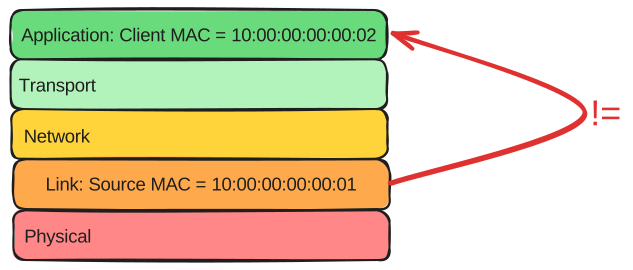
The check-mac-address option filters packets if there are differences between the MAC address found at the ethernet header and the MAC address found in the DHCP packet.
To check this option, you should send packets with these differences and enable this option to see if warnings appear in your logs.
Also, this test checks how the server behaves under normal conditions.
Scenario
Step 1: Set the following configuration in DUT0 :
set interfaces ethernet eth0 address 10.0.0.1/24
set service dhcp-server shared-network dhcp subnet 10.0.0.0/24 start 10.0.0.5 stop 10.0.0.5
set system login user admin authentication encrypted-password '$6$GSjsCj8gHLv$/VcqU6FLi6CT2Oxn0MJQ2C2tqnRDrYKNF8HIYWJp68nvXvPdFccDsT04.WtigUONbKYrgKg8d6rEs8PjljMkH0'
Step 2: Run the command system journal show | tail on DUT0 and check whether the output contains the following tokens:
DHCPDISCOVER from 10:00:00:00:00:02 via eth0Show output
Jul 24 11:04:46.356819 osdx dhcpd[650936]: Wrote 0 leases to leases file.
Jul 24 11:04:46.385628 osdx dhcpd[650936]: Server starting service.
Jul 24 11:04:46.539385 osdx cfgd[1923]: [606360]Completed change to active configuration
Jul 24 11:04:46.539979 osdx OSDxCLI[606360]: User 'admin' committed the configuration.
Jul 24 11:04:46.574389 osdx OSDxCLI[606360]: User 'admin' left the configuration menu.
Jul 24 11:04:46.756349 osdx OSDxCLI[606360]: User 'admin' executed a new command: 'system journal show | tail'.
Jul 24 11:04:47.288783 osdx dhcpd[650936]: DHCPDISCOVER from 10:00:00:00:00:02 via eth0
Jul 24 11:04:48.289288 osdx dhcpd[650936]: DHCPOFFER on 10.0.0.5 to 10:00:00:00:00:02 via eth0
Jul 24 11:04:48.344539 osdx dhcpd[650936]: DHCPDISCOVER from 10:00:00:00:00:02 via eth0
Jul 24 11:04:48.344568 osdx dhcpd[650936]: DHCPOFFER on 10.0.0.5 to 10:00:00:00:00:02 via eth0
Step 3: Modify the following configuration lines in DUT0 :
set service dhcp-server check-mac-address
Step 4: Run the command system journal clear on DUT0.
Step 5: Run the command system journal show | tail on DUT0 and check whether the output does not contain the following tokens:
DHCPDISCOVER from 10:00:00:00:00:02 via eth0Show output
Jul 24 11:04:49.547028 osdx systemd-journald[2180]: Runtime Journal (/run/log/journal/3a8dbab828fc40a183893e468c03e10b) is 1.8M, max 13.8M, 11.9M free.
Jul 24 11:04:49.549483 osdx systemd-journald[2180]: Received client request to rotate journal, rotating.
Jul 24 11:04:49.549543 osdx systemd-journald[2180]: Vacuuming done, freed 0B of archived journals from /run/log/journal/3a8dbab828fc40a183893e468c03e10b.
Jul 24 11:04:49.560117 osdx OSDxCLI[606360]: User 'admin' executed a new command: 'system journal clear'.
Step 6: Run the command system journal show | tail on DUT0 and check whether the output contains the following tokens:
MAC received in DHCP packet (10:00:00:00:00:02) is different than source MAC in ethernet header (10:00:00:00:00:01)Show output
Jul 24 11:04:49.547028 osdx systemd-journald[2180]: Runtime Journal (/run/log/journal/3a8dbab828fc40a183893e468c03e10b) is 1.8M, max 13.8M, 11.9M free.
Jul 24 11:04:49.549483 osdx systemd-journald[2180]: Received client request to rotate journal, rotating.
Jul 24 11:04:49.549543 osdx systemd-journald[2180]: Vacuuming done, freed 0B of archived journals from /run/log/journal/3a8dbab828fc40a183893e468c03e10b.
Jul 24 11:04:49.560117 osdx OSDxCLI[606360]: User 'admin' executed a new command: 'system journal clear'.
Jul 24 11:04:49.637621 osdx OSDxCLI[606360]: User 'admin' executed a new command: 'system journal show | tail'.
Jul 24 11:04:49.731332 osdx OSDxCLI[606360]: User 'admin' executed a new command: 'system journal show | tail'.
Jul 24 11:04:50.468390 osdx dhcpd[651011]: MAC received in DHCP packet (10:00:00:00:00:02) is different than source MAC in ethernet header (10:00:00:00:00:01)
Jul 24 11:04:51.520522 osdx dhcpd[651011]: MAC received in DHCP packet (10:00:00:00:00:02) is different than source MAC in ethernet header (10:00:00:00:00:01)
Step 7: Set the following configuration in DUT1 :
set interfaces ethernet eth0 mac '10:00:00:00:00:05'
set system login user admin authentication encrypted-password '$6$GSjsCj8gHLv$/VcqU6FLi6CT2Oxn0MJQ2C2tqnRDrYKNF8HIYWJp68nvXvPdFccDsT04.WtigUONbKYrgKg8d6rEs8PjljMkH0'
Step 8: Modify the following configuration lines in DUT1 :
set interfaces ethernet eth0 address dhcp
Step 9: Run the command interfaces ethernet eth0 show on DUT1 and check whether the output contains the following tokens:
10.0.0.5Show output
-----------------------------------------------------------------
Name           IP Address           Admin  Oper  Vrf  Description
-----------------------------------------------------------------
eth0  10.0.0.5/24                   up     up
fe80::dcad:beff:feef:6c10/64
Step 10: Run the command service dhcp-server show leases main | grep 10.0.0.5 on DUT0 and check whether the output contains the following tokens:
10:00:00:00:00:05Show output
10.0.0.5 10:00:00:00:00:05 2026/07/24 11:04:54 2026/07/24 23:04:54 2026/07/24 11:04:54
Test Check MAC Address VRF
Description
This scenario configures a DHCP server with VRF instead of regular interfaces and checks the check-mac-address option.
To check this option, you will need to send packets with differences in the Source MAC for the link layer and the client MAC from the application layer.
Scenario
Step 1: Set the following configuration in DUT0 :
set interfaces ethernet eth0 address 10.0.0.1/24
set interfaces ethernet eth0 vrf VRF0
set service dhcp-server shared-network dhcp local-vrf VRF0
set service dhcp-server shared-network dhcp subnet 10.0.0.0/24 start 10.0.0.5 stop 10.0.0.6
set system login user admin authentication encrypted-password '$6$GSjsCj8gHLv$/VcqU6FLi6CT2Oxn0MJQ2C2tqnRDrYKNF8HIYWJp68nvXvPdFccDsT04.WtigUONbKYrgKg8d6rEs8PjljMkH0'
set system vrf VRF0
Step 2: Run the command system journal show | tail on DUT0 and check whether the output contains the following tokens:
DHCPDISCOVER from 10:00:00:00:00:02 via eth0Show output
Jul 24 11:05:03.000010 osdx dhcpd[651432]: Wrote 0 leases to leases file.
Jul 24 11:05:03.053027 osdx dhcpd[651432]: Server starting service.
Jul 24 11:05:03.191323 osdx cfgd[1923]: [606360]Completed change to active configuration
Jul 24 11:05:03.191906 osdx OSDxCLI[606360]: User 'admin' committed the configuration.
Jul 24 11:05:03.207118 osdx OSDxCLI[606360]: User 'admin' left the configuration menu.
Jul 24 11:05:03.353917 osdx OSDxCLI[606360]: User 'admin' executed a new command: 'system journal show | tail'.
Jul 24 11:05:03.531582 osdx dhcpd[651432]: DHCPDISCOVER from 10:00:00:00:00:02 via eth0
Jul 24 11:05:04.531724 osdx dhcpd[651432]: DHCPOFFER on 10.0.0.5 to 10:00:00:00:00:02 via eth0
Jul 24 11:05:04.607567 osdx dhcpd[651432]: DHCPDISCOVER from 10:00:00:00:00:02 via eth0
Jul 24 11:05:04.607595 osdx dhcpd[651432]: DHCPOFFER on 10.0.0.5 to 10:00:00:00:00:02 via eth0
Step 3: Modify the following configuration lines in DUT0 :
set service dhcp-server check-mac-address
Step 4: Run the command system journal clear on DUT0.
Step 5: Run the command system journal show | tail on DUT0 and check whether the output does not contain the following tokens:
DHCPDISCOVER from 10:00:00:00:00:02 via eth0Show output
Jul 24 11:05:06.032273 osdx systemd-journald[2180]: Runtime Journal (/run/log/journal/3a8dbab828fc40a183893e468c03e10b) is 1.8M, max 13.8M, 11.9M free.
Jul 24 11:05:06.032851 osdx systemd-journald[2180]: Received client request to rotate journal, rotating.
Jul 24 11:05:06.032886 osdx systemd-journald[2180]: Vacuuming done, freed 0B of archived journals from /run/log/journal/3a8dbab828fc40a183893e468c03e10b.
Jul 24 11:05:06.042860 osdx OSDxCLI[606360]: User 'admin' executed a new command: 'system journal clear'.
Step 6: Run the command system journal show | tail on DUT0 and check whether the output contains the following tokens:
MAC received in DHCP packet (10:00:00:00:00:02) is different than source MAC in ethernet header (10:00:00:00:00:01)Show output
Jul 24 11:05:06.032273 osdx systemd-journald[2180]: Runtime Journal (/run/log/journal/3a8dbab828fc40a183893e468c03e10b) is 1.8M, max 13.8M, 11.9M free.
Jul 24 11:05:06.032851 osdx systemd-journald[2180]: Received client request to rotate journal, rotating.
Jul 24 11:05:06.032886 osdx systemd-journald[2180]: Vacuuming done, freed 0B of archived journals from /run/log/journal/3a8dbab828fc40a183893e468c03e10b.
Jul 24 11:05:06.042860 osdx OSDxCLI[606360]: User 'admin' executed a new command: 'system journal clear'.
Jul 24 11:05:06.108489 osdx OSDxCLI[606360]: User 'admin' executed a new command: 'system journal show | tail'.
Jul 24 11:05:06.216887 osdx OSDxCLI[606360]: User 'admin' executed a new command: 'system journal show | tail'.
Jul 24 11:05:06.723242 osdx dhcpd[651505]: MAC received in DHCP packet (10:00:00:00:00:02) is different than source MAC in ethernet header (10:00:00:00:00:01)
Jul 24 11:05:07.767201 osdx dhcpd[651505]: MAC received in DHCP packet (10:00:00:00:00:02) is different than source MAC in ethernet header (10:00:00:00:00:01)
Step 7: Set the following configuration in DUT1 :
set interfaces ethernet eth0 mac '10:00:00:00:00:05'
set system login user admin authentication encrypted-password '$6$GSjsCj8gHLv$/VcqU6FLi6CT2Oxn0MJQ2C2tqnRDrYKNF8HIYWJp68nvXvPdFccDsT04.WtigUONbKYrgKg8d6rEs8PjljMkH0'
Step 8: Modify the following configuration lines in DUT1 :
set interfaces ethernet eth0 address dhcp
Step 9: Run the command interfaces ethernet eth0 show on DUT1 and check whether the output contains the following tokens:
10.0.0.5Show output
-----------------------------------------------------------------
Name           IP Address           Admin  Oper  Vrf  Description
-----------------------------------------------------------------
eth0  10.0.0.5/24                   up     up
fe80::dcad:beff:feef:6c10/64
Step 10: Run the command service dhcp-server show leases VRF0 | grep 10.0.0.5 on DUT0 and check whether the output contains the following tokens:
10:00:00:00:00:05Show output
10.0.0.5 10:00:00:00:00:05 2026/07/24 11:05:10 2026/07/24 23:05:10 2026/07/24 11:05:10