Preclassification
The following scenario shows how to pre-classify packets using traffic policies. This reduces packet processing time and improves system performance.
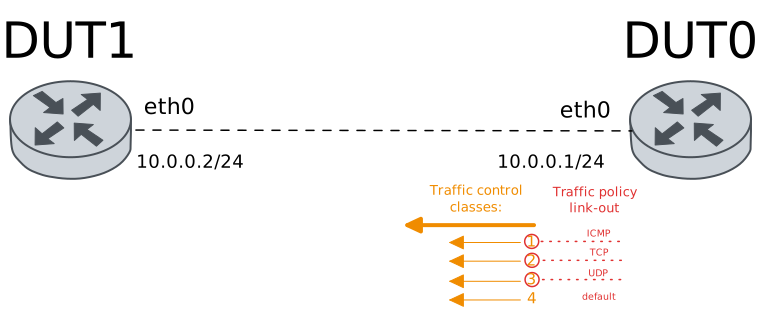
Test Pre-Classify Out
Description
A traffic policy is configured in DUT0 (interface
eth0). This policy enables
pre-classification in the OUT hook; i.e., only
IP packets are processed and classified.
Scenario
Step 1: Set the following configuration in DUT0 :
set interfaces ethernet eth0 address 10.0.0.1/24
set interfaces ethernet eth0 traffic control out HTB
set interfaces ethernet eth0 traffic policy out CLASSIFIER
set system login user admin authentication encrypted-password '$6$GSjsCj8gHLv$/VcqU6FLi6CT2Oxn0MJQ2C2tqnRDrYKNF8HIYWJp68nvXvPdFccDsT04.WtigUONbKYrgKg8d6rEs8PjljMkH0'
set traffic control HTB type htb bandwidth 10000
set traffic control HTB type htb class 1 bandwidth percentage 25
set traffic control HTB type htb class 2 bandwidth percentage 25
set traffic control HTB type htb class 3 bandwidth percentage 25
set traffic control HTB type htb class 4 bandwidth percentage 25
set traffic control HTB type htb default-class 4
set traffic policy CLASSIFIER rule 1 selector ICMP
set traffic policy CLASSIFIER rule 1 set class 1
set traffic policy CLASSIFIER rule 2 selector TCP
set traffic policy CLASSIFIER rule 2 set class 2
set traffic policy CLASSIFIER rule 3 selector UDP
set traffic policy CLASSIFIER rule 3 set class 3
set traffic selector ICMP rule 1 protocol icmp
set traffic selector TCP rule 1 protocol tcp
set traffic selector UDP rule 1 protocol udp
Step 2: Set the following configuration in DUT1 :
set interfaces ethernet eth0 address 10.0.0.2/24
set system login user admin authentication encrypted-password '$6$GSjsCj8gHLv$/VcqU6FLi6CT2Oxn0MJQ2C2tqnRDrYKNF8HIYWJp68nvXvPdFccDsT04.WtigUONbKYrgKg8d6rEs8PjljMkH0'
Step 3: Send an ARP ping from DUT0 to IP address 10.0.0.2:
admin@DUT0$ arping 10.0.0.2 interface eth0 timeout 5 count 1Show output
ARPING 10.0.0.2 from 10.0.0.1 eth0
Unicast reply from 10.0.0.2 [DE:AD:BE:EF:6C:10]  0.748ms
Sent 1 probes (1 broadcast(s))
Received 1 response(s)
Step 4: Ping the IP address 10.0.0.2 from DUT0:
admin@DUT0$ ping 10.0.0.2 count 5 size 56 timeout 1Show output
PING 10.0.0.2 (10.0.0.2) 56(84) bytes of data.
64 bytes from 10.0.0.2: icmp_seq=1 ttl=64 time=0.542 ms
64 bytes from 10.0.0.2: icmp_seq=2 ttl=64 time=0.314 ms
64 bytes from 10.0.0.2: icmp_seq=3 ttl=64 time=0.368 ms
64 bytes from 10.0.0.2: icmp_seq=4 ttl=64 time=0.299 ms
64 bytes from 10.0.0.2: icmp_seq=5 ttl=64 time=0.296 ms

--- 10.0.0.2 ping statistics ---
5 packets transmitted, 5 received, 0% packet loss, time 4095ms
rtt min/avg/max/mdev = 0.296/0.363/0.542/0.092 ms
Step 5: Initiate a bandwidth test from DUT0 to DUT1
admin@DUT1$ monitor test performance server port 5001
admin@DUT0$ monitor test performance client 10.0.0.2 duration 5 port 5001 parallel 1
Expect the following output on
DUT0:Connecting to host 10.0.0.2, port 5001 [ 5] local 10.0.0.1 port 35948 connected to 10.0.0.2 port 5001 [ ID] Interval Transfer Bitrate Retr Cwnd [ 5] 0.00-1.00 sec 324 MBytes 2.71 Gbits/sec 0 1.56 MBytes [ 5] 1.00-2.00 sec 274 MBytes 2.30 Gbits/sec 0 1.56 MBytes [ 5] 2.00-3.00 sec 259 MBytes 2.17 Gbits/sec 0 1.56 MBytes [ 5] 3.00-4.00 sec 210 MBytes 1.76 Gbits/sec 0 1.56 MBytes [ 5] 4.00-5.00 sec 231 MBytes 1.94 Gbits/sec 0 1.56 MBytes - - - - - - - - - - - - - - - - - - - - - - - - - [ ID] Interval Transfer Bitrate Retr [ 5] 0.00-5.00 sec 1.27 GBytes 2.18 Gbits/sec 0 sender [ 5] 0.00-5.00 sec 1.26 GBytes 2.17 Gbits/sec receiver iperf Done.
Step 6: Initiate a bandwidth test from DUT0 to DUT1
admin@DUT1$ monitor test performance server port 5001
admin@DUT0$ monitor test performance client 10.0.0.2 duration 5 udp port 5001 parallel 1
Expect the following output on
DUT0:Connecting to host 10.0.0.2, port 5001 [ 5] local 10.0.0.1 port 54129 connected to 10.0.0.2 port 5001 [ ID] Interval Transfer Bitrate Total Datagrams [ 5] 0.00-1.00 sec 129 KBytes 1.05 Mbits/sec 91 [ 5] 1.00-2.00 sec 127 KBytes 1.04 Mbits/sec 90 [ 5] 2.00-3.00 sec 129 KBytes 1.05 Mbits/sec 91 [ 5] 3.00-4.00 sec 127 KBytes 1.04 Mbits/sec 90 [ 5] 4.00-5.00 sec 129 KBytes 1.05 Mbits/sec 91 - - - - - - - - - - - - - - - - - - - - - - - - - [ ID] Interval Transfer Bitrate Jitter Lost/Total Datagrams [ 5] 0.00-5.00 sec 641 KBytes 1.05 Mbits/sec 0.000 ms 0/453 (0%) sender [ 5] 0.00-5.00 sec 641 KBytes 1.05 Mbits/sec 0.030 ms 0/453 (0%) receiver iperf Done.
Step 7: Run the command traffic control show on DUT0 and check whether the output matches the following regular expressions:
class 1\s+1:0\s+[1-9]\d*
class 2\s+1:0\s+[1-9]\d*
class 3\s+1:0\s+[1-9]\d*
class 4 \(default\)\s+1:0\s+[1-9]\d*
Show output
Traffic control for interface 'eth0' - 'egress' mode

------------------------------------------------------------------------------------
ID   traffic control        type         parent  bytes sent  pkts sent  pkts dropped
------------------------------------------------------------------------------------
1:0  HTB              htb                root    1421398850     938916             0
1:1  HTB              class 1            1:0            490          5             0
1:2  HTB              class 2            1:0     1420722284     938447             0
1:3  HTB              class 3            1:0         675016        454             0
1:4  HTB              class 4 (default)  1:0           1060         10             0
2:0  -                htb                1:1            490          5             0
3:0  -                htb                1:2     1420722284     938447             0
4:0  -                htb                1:3         675016        454             0
5:0  -                htb                1:4           1060         10             0
Note
Traffic selectors can also be used to filter packets based on pre-classification ID.
Step 8: Modify the following configuration lines in DUT0 :
set interfaces ethernet eth0 traffic policy link-out TP_ACCT
set traffic policy TP_ACCT rule 1 selector TS_ACCT
set traffic selector TS_ACCT rule 1 class 1
set traffic selector TS_ACCT rule 2 not class 2
Step 9: Send an ARP ping from DUT0 to IP address 10.0.0.2:
admin@DUT0$ arping 10.0.0.2 interface eth0 timeout 5 count 1Show output
ARPING 10.0.0.2 from 10.0.0.1 eth0
Unicast reply from 10.0.0.2 [DE:AD:BE:EF:6C:10]  0.881ms
Sent 1 probes (1 broadcast(s))
Received 1 response(s)
Step 10: Ping the IP address 10.0.0.2 from DUT0:
admin@DUT0$ ping 10.0.0.2 count 5 size 56 timeout 1Show output
PING 10.0.0.2 (10.0.0.2) 56(84) bytes of data.
64 bytes from 10.0.0.2: icmp_seq=1 ttl=64 time=0.482 ms
64 bytes from 10.0.0.2: icmp_seq=2 ttl=64 time=0.277 ms
64 bytes from 10.0.0.2: icmp_seq=3 ttl=64 time=0.309 ms
64 bytes from 10.0.0.2: icmp_seq=4 ttl=64 time=0.386 ms
64 bytes from 10.0.0.2: icmp_seq=5 ttl=64 time=0.291 ms

--- 10.0.0.2 ping statistics ---
5 packets transmitted, 5 received, 0% packet loss, time 4078ms
rtt min/avg/max/mdev = 0.277/0.349/0.482/0.076 ms
Step 11: Run the command traffic selector TS_ACCT show on DUT0 and check whether the output matches the following regular expressions:
1\s+[1-9]\d*
2\s+[1-9]\d*
Show output
Selector TS_ACCT (Policy TP_ACCT -- ifc eth0 -- hook link-out prio very-high -- rule 1)

-----------------------------------------------------
rule   pkts match  pkts eval  bytes match  bytes eval
-----------------------------------------------------
1               5          6          490         532
2               1          1           42          42
-----------------------------------------------------
Total           6          6          532         532
Test Pre-Classify Link-Out
Description
A traffic policy is configured in DUT0 (interface
eth0). This policy enables
pre-classification in the LINK-OUT hook; i.e., all
packets leaving this interface are processed.
Scenario
Step 1: Set the following configuration in DUT0 :
set interfaces ethernet eth0 address 10.0.0.1/24
set interfaces ethernet eth0 traffic control out HTB
set interfaces ethernet eth0 traffic policy link-out CLASSIFIER
set system login user admin authentication encrypted-password '$6$GSjsCj8gHLv$/VcqU6FLi6CT2Oxn0MJQ2C2tqnRDrYKNF8HIYWJp68nvXvPdFccDsT04.WtigUONbKYrgKg8d6rEs8PjljMkH0'
set traffic control HTB type htb bandwidth 10000
set traffic control HTB type htb class 1 bandwidth percentage 25
set traffic control HTB type htb class 2 bandwidth percentage 25
set traffic control HTB type htb class 3 bandwidth percentage 25
set traffic control HTB type htb class 4 bandwidth percentage 25
set traffic control HTB type htb default-class 4
set traffic policy CLASSIFIER rule 1 selector ICMP
set traffic policy CLASSIFIER rule 1 set class 1
set traffic policy CLASSIFIER rule 2 selector TCP
set traffic policy CLASSIFIER rule 2 set class 2
set traffic policy CLASSIFIER rule 3 selector UDP
set traffic policy CLASSIFIER rule 3 set class 3
set traffic selector ICMP rule 1 protocol icmp
set traffic selector TCP rule 1 protocol tcp
set traffic selector UDP rule 1 protocol udp
Step 2: Set the following configuration in DUT1 :
set interfaces ethernet eth0 address 10.0.0.2/24
set system login user admin authentication encrypted-password '$6$GSjsCj8gHLv$/VcqU6FLi6CT2Oxn0MJQ2C2tqnRDrYKNF8HIYWJp68nvXvPdFccDsT04.WtigUONbKYrgKg8d6rEs8PjljMkH0'
Step 3: Send an ARP ping from DUT0 to IP address 10.0.0.2:
admin@DUT0$ arping 10.0.0.2 interface eth0 timeout 5 count 1Show output
ARPING 10.0.0.2 from 10.0.0.1 eth0
Unicast reply from 10.0.0.2 [DE:AD:BE:EF:6C:10]  0.766ms
Sent 1 probes (1 broadcast(s))
Received 1 response(s)
Step 4: Ping the IP address 10.0.0.2 from DUT0:
admin@DUT0$ ping 10.0.0.2 count 5 size 56 timeout 1Show output
PING 10.0.0.2 (10.0.0.2) 56(84) bytes of data.
64 bytes from 10.0.0.2: icmp_seq=1 ttl=64 time=0.831 ms
64 bytes from 10.0.0.2: icmp_seq=2 ttl=64 time=0.279 ms
64 bytes from 10.0.0.2: icmp_seq=3 ttl=64 time=0.251 ms
64 bytes from 10.0.0.2: icmp_seq=4 ttl=64 time=0.287 ms
64 bytes from 10.0.0.2: icmp_seq=5 ttl=64 time=0.274 ms

--- 10.0.0.2 ping statistics ---
5 packets transmitted, 5 received, 0% packet loss, time 4098ms
rtt min/avg/max/mdev = 0.251/0.384/0.831/0.223 ms
Step 5: Initiate a bandwidth test from DUT0 to DUT1
admin@DUT1$ monitor test performance server port 5001
admin@DUT0$ monitor test performance client 10.0.0.2 duration 5 port 5001 parallel 1
Expect the following output on
DUT0:Connecting to host 10.0.0.2, port 5001 [ 5] local 10.0.0.1 port 50538 connected to 10.0.0.2 port 5001 [ ID] Interval Transfer Bitrate Retr Cwnd [ 5] 0.00-1.00 sec 322 MBytes 2.70 Gbits/sec 0 1.60 MBytes [ 5] 1.00-2.00 sec 230 MBytes 1.93 Gbits/sec 0 1.60 MBytes [ 5] 2.00-3.00 sec 230 MBytes 1.93 Gbits/sec 0 1.60 MBytes [ 5] 3.00-4.00 sec 256 MBytes 2.15 Gbits/sec 0 1.60 MBytes [ 5] 4.00-5.00 sec 309 MBytes 2.59 Gbits/sec 0 1.60 MBytes - - - - - - - - - - - - - - - - - - - - - - - - - [ ID] Interval Transfer Bitrate Retr [ 5] 0.00-5.00 sec 1.32 GBytes 2.26 Gbits/sec 0 sender [ 5] 0.00-5.00 sec 1.31 GBytes 2.25 Gbits/sec receiver iperf Done.
Step 6: Initiate a bandwidth test from DUT0 to DUT1
admin@DUT1$ monitor test performance server port 5001
admin@DUT0$ monitor test performance client 10.0.0.2 duration 5 udp port 5001 parallel 1
Expect the following output on
DUT0:Connecting to host 10.0.0.2, port 5001 [ 5] local 10.0.0.1 port 38944 connected to 10.0.0.2 port 5001 [ ID] Interval Transfer Bitrate Total Datagrams [ 5] 0.00-1.00 sec 129 KBytes 1.05 Mbits/sec 91 [ 5] 1.00-2.00 sec 127 KBytes 1.04 Mbits/sec 90 [ 5] 2.00-3.00 sec 129 KBytes 1.05 Mbits/sec 91 [ 5] 3.00-4.00 sec 127 KBytes 1.04 Mbits/sec 90 [ 5] 4.00-5.00 sec 129 KBytes 1.05 Mbits/sec 91 - - - - - - - - - - - - - - - - - - - - - - - - - [ ID] Interval Transfer Bitrate Jitter Lost/Total Datagrams [ 5] 0.00-5.00 sec 641 KBytes 1.05 Mbits/sec 0.000 ms 0/453 (0%) sender [ 5] 0.00-5.00 sec 641 KBytes 1.05 Mbits/sec 0.036 ms 0/453 (0%) receiver iperf Done.
Step 7: Run the command traffic control show on DUT0 and check whether the output matches the following regular expressions:
class 1\s+1:0\s+[1-9]\d*
class 2\s+1:0\s+[1-9]\d*
class 3\s+1:0\s+[1-9]\d*
class 4 \(default\)\s+1:0\s+[1-9]\d*
Show output
Traffic control for interface 'eth0' - 'egress' mode

------------------------------------------------------------------------------------
ID   traffic control        type         parent  bytes sent  pkts sent  pkts dropped
------------------------------------------------------------------------------------
1:0  HTB              htb                root    1474660183     974104             0
1:1  HTB              class 1            1:0            490          5             0
1:2  HTB              class 2            1:0     1473983703     973636             0
1:3  HTB              class 3            1:0         675016        454             0
1:4  HTB              class 4 (default)  1:0            974          9             0
2:0  -                htb                1:1            490          5             0
3:0  -                htb                1:2     1473983703     973636             0
4:0  -                htb                1:3         675016        454             0
5:0  -                htb                1:4            974          9             0