Selector
The following scenario shows how to configure different traffic selector rules. Selectors can be used to restrict the traffic affected by other features (like NAT, Netflow, traffic policies, etc).
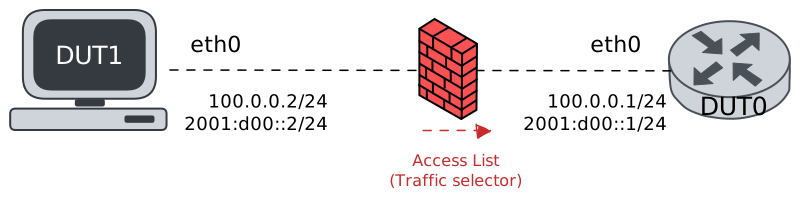
Test Traffic Selector Rules
Description
This scenario demonstrates how to use traffic selector rules that can be configured as filters to match the desired traffic.
Scenario
Example 1
Step 1: Set the following configuration in DUT0 :
set interfaces ethernet eth0 address 100.0.0.1/24
set interfaces ethernet eth0 address '2001:d00::1/24'
set interfaces ethernet eth0 traffic policy in ACCESS_LIST
set system login user admin authentication encrypted-password '$6$GSjsCj8gHLv$/VcqU6FLi6CT2Oxn0MJQ2C2tqnRDrYKNF8HIYWJp68nvXvPdFccDsT04.WtigUONbKYrgKg8d6rEs8PjljMkH0'
set traffic policy ACCESS_LIST rule 1 action accept
set traffic policy ACCESS_LIST rule 1 selector SELECTOR
set traffic policy ACCESS_LIST rule 2 action drop
set traffic selector SELECTOR rule 1
Step 2: Ping the IP address 100.0.0.1 from DUT1:
admin@DUT1$ ping 100.0.0.1 tos 32 ttl 32 count 1 size 56 timeout 1Show output
PING 100.0.0.1 (100.0.0.1) 56(84) bytes of data.
64 bytes from 100.0.0.1: icmp_seq=1 ttl=64 time=0.800 ms

--- 100.0.0.1 ping statistics ---
1 packets transmitted, 1 received, 0% packet loss, time 0ms
rtt min/avg/max/mdev = 0.800/0.800/0.800/0.000 ms
Step 3: Run the command traffic selector show on DUT0 and check whether the output matches the following regular expressions:
Total\s+(?!0)\d+\s+(?!0)\d+Show output
Selector SELECTOR (Policy ACCESS_LIST -- ifc eth0 -- hook in prio very-high -- rule 1)

-----------------------------------------------------
rule   pkts match  pkts eval  bytes match  bytes eval
-----------------------------------------------------
1               1          1           84          84
-----------------------------------------------------
Total           1          1           84          84
Example 2
Step 1: Set the following configuration in DUT0 :
set interfaces ethernet eth0 address 100.0.0.1/24
set interfaces ethernet eth0 address '2001:d00::1/24'
set interfaces ethernet eth0 traffic policy in ACCESS_LIST
set system login user admin authentication encrypted-password '$6$GSjsCj8gHLv$/VcqU6FLi6CT2Oxn0MJQ2C2tqnRDrYKNF8HIYWJp68nvXvPdFccDsT04.WtigUONbKYrgKg8d6rEs8PjljMkH0'
set traffic policy ACCESS_LIST rule 1 action accept
set traffic policy ACCESS_LIST rule 1 selector SELECTOR
set traffic policy ACCESS_LIST rule 2 action drop
set traffic selector SELECTOR rule 1 exclude
set traffic selector SELECTOR rule 1 not protocol icmp
set traffic selector SELECTOR rule 2 destination address 100.0.0.1
set traffic selector SELECTOR rule 3 source address 100.0.0.2
Step 2: Ping the IP address 100.0.0.1 from DUT1:
admin@DUT1$ ping 100.0.0.1 tos 32 ttl 32 count 1 size 56 timeout 1Show output
PING 100.0.0.1 (100.0.0.1) 56(84) bytes of data.
64 bytes from 100.0.0.1: icmp_seq=1 ttl=64 time=0.437 ms

--- 100.0.0.1 ping statistics ---
1 packets transmitted, 1 received, 0% packet loss, time 0ms
rtt min/avg/max/mdev = 0.437/0.437/0.437/0.000 ms
Step 3: Run the command traffic selector show on DUT0 and check whether the output matches the following regular expressions:
Total\s+(?!0)\d+\s+(?!0)\d+Show output
Selector SELECTOR (Policy ACCESS_LIST -- ifc eth0 -- hook in prio very-high -- rule 1)

---------------------------------------------------------
rule     pkts match  pkts eval  bytes match  bytes eval
---------------------------------------------------------
1 (excl.)           0          1            0          84
2                   1          1           84          84
3                   0          0            0           0
---------------------------------------------------------
Total               1          1           84          84
Example 3
Step 1: Set the following configuration in DUT0 :
set interfaces ethernet eth0 address 100.0.0.1/24
set interfaces ethernet eth0 address '2001:d00::1/24'
set interfaces ethernet eth0 traffic policy in ACCESS_LIST
set system login user admin authentication encrypted-password '$6$GSjsCj8gHLv$/VcqU6FLi6CT2Oxn0MJQ2C2tqnRDrYKNF8HIYWJp68nvXvPdFccDsT04.WtigUONbKYrgKg8d6rEs8PjljMkH0'
set traffic policy ACCESS_LIST rule 1 action accept
set traffic policy ACCESS_LIST rule 1 selector SELECTOR
set traffic policy ACCESS_LIST rule 2 action drop
set traffic selector SELECTOR rule 1 destination address 100.0.0.1
Step 2: Ping the IP address 100.0.0.1 from DUT1:
admin@DUT1$ ping 100.0.0.1 tos 32 ttl 32 count 1 size 56 timeout 1Show output
PING 100.0.0.1 (100.0.0.1) 56(84) bytes of data.
64 bytes from 100.0.0.1: icmp_seq=1 ttl=64 time=0.553 ms

--- 100.0.0.1 ping statistics ---
1 packets transmitted, 1 received, 0% packet loss, time 0ms
rtt min/avg/max/mdev = 0.553/0.553/0.553/0.000 ms
Step 3: Run the command traffic selector show on DUT0 and check whether the output matches the following regular expressions:
Total\s+(?!0)\d+\s+(?!0)\d+Show output
Selector SELECTOR (Policy ACCESS_LIST -- ifc eth0 -- hook in prio very-high -- rule 1)

-----------------------------------------------------
rule   pkts match  pkts eval  bytes match  bytes eval
-----------------------------------------------------
1               1          1           84          84
-----------------------------------------------------
Total           1          1           84          84
Example 4
Step 1: Set the following configuration in DUT0 :
set interfaces ethernet eth0 address 100.0.0.1/24
set interfaces ethernet eth0 address '2001:d00::1/24'
set interfaces ethernet eth0 traffic policy in ACCESS_LIST
set system login user admin authentication encrypted-password '$6$GSjsCj8gHLv$/VcqU6FLi6CT2Oxn0MJQ2C2tqnRDrYKNF8HIYWJp68nvXvPdFccDsT04.WtigUONbKYrgKg8d6rEs8PjljMkH0'
set traffic policy ACCESS_LIST rule 1 action accept
set traffic policy ACCESS_LIST rule 1 selector SELECTOR
set traffic policy ACCESS_LIST rule 2 action drop
set traffic selector SELECTOR rule 1 dscp 8
Step 2: Ping the IP address 100.0.0.1 from DUT1:
admin@DUT1$ ping 100.0.0.1 tos 32 ttl 32 count 1 size 56 timeout 1Show output
PING 100.0.0.1 (100.0.0.1) 56(84) bytes of data.
64 bytes from 100.0.0.1: icmp_seq=1 ttl=64 time=0.609 ms

--- 100.0.0.1 ping statistics ---
1 packets transmitted, 1 received, 0% packet loss, time 0ms
rtt min/avg/max/mdev = 0.609/0.609/0.609/0.000 ms
Step 3: Run the command traffic selector show on DUT0 and check whether the output matches the following regular expressions:
Total\s+(?!0)\d+\s+(?!0)\d+Show output
Selector SELECTOR (Policy ACCESS_LIST -- ifc eth0 -- hook in prio very-high -- rule 1)

-----------------------------------------------------
rule   pkts match  pkts eval  bytes match  bytes eval
-----------------------------------------------------
1               1          1           84          84
-----------------------------------------------------
Total           1          1           84          84
Example 5
Step 1: Set the following configuration in DUT0 :
set interfaces ethernet eth0 address 100.0.0.1/24
set interfaces ethernet eth0 address '2001:d00::1/24'
set interfaces ethernet eth0 traffic policy in ACCESS_LIST
set system login user admin authentication encrypted-password '$6$GSjsCj8gHLv$/VcqU6FLi6CT2Oxn0MJQ2C2tqnRDrYKNF8HIYWJp68nvXvPdFccDsT04.WtigUONbKYrgKg8d6rEs8PjljMkH0'
set traffic policy ACCESS_LIST rule 1 action accept
set traffic policy ACCESS_LIST rule 1 selector SELECTOR
set traffic policy ACCESS_LIST rule 2 action drop
set traffic selector SELECTOR rule 1 icmp-type echo-reply,echo-request
Step 2: Ping the IP address 100.0.0.1 from DUT1:
admin@DUT1$ ping 100.0.0.1 tos 32 ttl 32 count 1 size 56 timeout 1Show output
PING 100.0.0.1 (100.0.0.1) 56(84) bytes of data.
64 bytes from 100.0.0.1: icmp_seq=1 ttl=64 time=0.961 ms

--- 100.0.0.1 ping statistics ---
1 packets transmitted, 1 received, 0% packet loss, time 0ms
rtt min/avg/max/mdev = 0.961/0.961/0.961/0.000 ms
Step 3: Run the command traffic selector show on DUT0 and check whether the output matches the following regular expressions:
Total\s+(?!0)\d+\s+(?!0)\d+Show output
Selector SELECTOR (Policy ACCESS_LIST -- ifc eth0 -- hook in prio very-high -- rule 1)

-----------------------------------------------------
rule   pkts match  pkts eval  bytes match  bytes eval
-----------------------------------------------------
1               1          1           84          84
-----------------------------------------------------
Total           1          1           84          84
Example 6
Step 1: Set the following configuration in DUT0 :
set interfaces ethernet eth0 address 100.0.0.1/24
set interfaces ethernet eth0 address '2001:d00::1/24'
set interfaces ethernet eth0 traffic policy in ACCESS_LIST
set system login user admin authentication encrypted-password '$6$GSjsCj8gHLv$/VcqU6FLi6CT2Oxn0MJQ2C2tqnRDrYKNF8HIYWJp68nvXvPdFccDsT04.WtigUONbKYrgKg8d6rEs8PjljMkH0'
set traffic policy ACCESS_LIST rule 1 action accept
set traffic policy ACCESS_LIST rule 1 selector SELECTOR
set traffic policy ACCESS_LIST rule 2 action drop
set traffic selector SELECTOR rule 1 not ip-option lsrr
Step 2: Ping the IP address 100.0.0.1 from DUT1:
admin@DUT1$ ping 100.0.0.1 tos 32 ttl 32 count 1 size 56 timeout 1Show output
PING 100.0.0.1 (100.0.0.1) 56(84) bytes of data.
64 bytes from 100.0.0.1: icmp_seq=1 ttl=64 time=0.257 ms

--- 100.0.0.1 ping statistics ---
1 packets transmitted, 1 received, 0% packet loss, time 0ms
rtt min/avg/max/mdev = 0.257/0.257/0.257/0.000 ms
Step 3: Run the command traffic selector show on DUT0 and check whether the output matches the following regular expressions:
Total\s+(?!0)\d+\s+(?!0)\d+Show output
Selector SELECTOR (Policy ACCESS_LIST -- ifc eth0 -- hook in prio very-high -- rule 1)

-----------------------------------------------------
rule   pkts match  pkts eval  bytes match  bytes eval
-----------------------------------------------------
1               1          1           84          84
-----------------------------------------------------
Total           1          1           84          84
Example 7
Step 1: Set the following configuration in DUT0 :
set interfaces ethernet eth0 address 100.0.0.1/24
set interfaces ethernet eth0 address '2001:d00::1/24'
set interfaces ethernet eth0 traffic policy in ACCESS_LIST
set system login user admin authentication encrypted-password '$6$GSjsCj8gHLv$/VcqU6FLi6CT2Oxn0MJQ2C2tqnRDrYKNF8HIYWJp68nvXvPdFccDsT04.WtigUONbKYrgKg8d6rEs8PjljMkH0'
set traffic policy ACCESS_LIST rule 1 action accept
set traffic policy ACCESS_LIST rule 1 selector SELECTOR
set traffic policy ACCESS_LIST rule 2 action drop
set traffic selector SELECTOR rule 1 in-interface eth0
Step 2: Ping the IP address 100.0.0.1 from DUT1:
admin@DUT1$ ping 100.0.0.1 tos 32 ttl 32 count 1 size 56 timeout 1Show output
PING 100.0.0.1 (100.0.0.1) 56(84) bytes of data.
64 bytes from 100.0.0.1: icmp_seq=1 ttl=64 time=0.605 ms

--- 100.0.0.1 ping statistics ---
1 packets transmitted, 1 received, 0% packet loss, time 0ms
rtt min/avg/max/mdev = 0.605/0.605/0.605/0.000 ms
Step 3: Run the command traffic selector show on DUT0 and check whether the output matches the following regular expressions:
Total\s+(?!0)\d+\s+(?!0)\d+Show output
Selector SELECTOR (Policy ACCESS_LIST -- ifc eth0 -- hook in prio very-high -- rule 1)

-----------------------------------------------------
rule   pkts match  pkts eval  bytes match  bytes eval
-----------------------------------------------------
1               1          1           84          84
-----------------------------------------------------
Total           1          1           84          84
Example 8
Step 1: Set the following configuration in DUT0 :
set interfaces ethernet eth0 address 100.0.0.1/24
set interfaces ethernet eth0 address '2001:d00::1/24'
set interfaces ethernet eth0 traffic policy in ACCESS_LIST
set system login user admin authentication encrypted-password '$6$GSjsCj8gHLv$/VcqU6FLi6CT2Oxn0MJQ2C2tqnRDrYKNF8HIYWJp68nvXvPdFccDsT04.WtigUONbKYrgKg8d6rEs8PjljMkH0'
set traffic policy ACCESS_LIST rule 1 action accept
set traffic policy ACCESS_LIST rule 1 selector SELECTOR
set traffic policy ACCESS_LIST rule 2 action drop
set traffic selector SELECTOR rule 1 length min 32
Step 2: Ping the IP address 100.0.0.1 from DUT1:
admin@DUT1$ ping 100.0.0.1 tos 32 ttl 32 count 1 size 56 timeout 1Show output
PING 100.0.0.1 (100.0.0.1) 56(84) bytes of data.
64 bytes from 100.0.0.1: icmp_seq=1 ttl=64 time=0.528 ms

--- 100.0.0.1 ping statistics ---
1 packets transmitted, 1 received, 0% packet loss, time 0ms
rtt min/avg/max/mdev = 0.528/0.528/0.528/0.000 ms
Step 3: Run the command traffic selector show on DUT0 and check whether the output matches the following regular expressions:
Total\s+(?!0)\d+\s+(?!0)\d+Show output
Selector SELECTOR (Policy ACCESS_LIST -- ifc eth0 -- hook in prio very-high -- rule 1)

-----------------------------------------------------
rule   pkts match  pkts eval  bytes match  bytes eval
-----------------------------------------------------
1               1          1           84          84
-----------------------------------------------------
Total           1          1           84          84
Example 9
Step 1: Set the following configuration in DUT0 :
set interfaces ethernet eth0 address 100.0.0.1/24
set interfaces ethernet eth0 address '2001:d00::1/24'
set interfaces ethernet eth0 traffic policy in ACCESS_LIST
set system login user admin authentication encrypted-password '$6$GSjsCj8gHLv$/VcqU6FLi6CT2Oxn0MJQ2C2tqnRDrYKNF8HIYWJp68nvXvPdFccDsT04.WtigUONbKYrgKg8d6rEs8PjljMkH0'
set traffic policy ACCESS_LIST rule 1 action accept
set traffic policy ACCESS_LIST rule 1 selector SELECTOR
set traffic policy ACCESS_LIST rule 2 action drop
set traffic selector SELECTOR rule 1 not out-interface eth0
Step 2: Ping the IP address 100.0.0.1 from DUT1:
admin@DUT1$ ping 100.0.0.1 tos 32 ttl 32 count 1 size 56 timeout 1Show output
PING 100.0.0.1 (100.0.0.1) 56(84) bytes of data.
64 bytes from 100.0.0.1: icmp_seq=1 ttl=64 time=0.461 ms

--- 100.0.0.1 ping statistics ---
1 packets transmitted, 1 received, 0% packet loss, time 0ms
rtt min/avg/max/mdev = 0.461/0.461/0.461/0.000 ms
Step 3: Run the command traffic selector show on DUT0 and check whether the output matches the following regular expressions:
Total\s+(?!0)\d+\s+(?!0)\d+Show output
Selector SELECTOR (Policy ACCESS_LIST -- ifc eth0 -- hook in prio very-high -- rule 1)

-----------------------------------------------------
rule   pkts match  pkts eval  bytes match  bytes eval
-----------------------------------------------------
1               1          1           84          84
-----------------------------------------------------
Total           1          1           84          84
Example 10
Step 1: Set the following configuration in DUT0 :
set interfaces ethernet eth0 address 100.0.0.1/24
set interfaces ethernet eth0 address '2001:d00::1/24'
set interfaces ethernet eth0 traffic policy in ACCESS_LIST
set system login user admin authentication encrypted-password '$6$GSjsCj8gHLv$/VcqU6FLi6CT2Oxn0MJQ2C2tqnRDrYKNF8HIYWJp68nvXvPdFccDsT04.WtigUONbKYrgKg8d6rEs8PjljMkH0'
set traffic policy ACCESS_LIST rule 1 action accept
set traffic policy ACCESS_LIST rule 1 selector SELECTOR
set traffic policy ACCESS_LIST rule 2 action drop
set traffic selector SELECTOR rule 1 pkt-type unicast
Step 2: Ping the IP address 100.0.0.1 from DUT1:
admin@DUT1$ ping 100.0.0.1 tos 32 ttl 32 count 1 size 56 timeout 1Show output
PING 100.0.0.1 (100.0.0.1) 56(84) bytes of data.
64 bytes from 100.0.0.1: icmp_seq=1 ttl=64 time=0.556 ms

--- 100.0.0.1 ping statistics ---
1 packets transmitted, 1 received, 0% packet loss, time 0ms
rtt min/avg/max/mdev = 0.556/0.556/0.556/0.000 ms
Step 3: Run the command traffic selector show on DUT0 and check whether the output matches the following regular expressions:
Total\s+(?!0)\d+\s+(?!0)\d+Show output
Selector SELECTOR (Policy ACCESS_LIST -- ifc eth0 -- hook in prio very-high -- rule 1)

-----------------------------------------------------
rule   pkts match  pkts eval  bytes match  bytes eval
-----------------------------------------------------
1               1          1           84          84
-----------------------------------------------------
Total           1          1           84          84
Example 11
Step 1: Set the following configuration in DUT0 :
set interfaces ethernet eth0 address 100.0.0.1/24
set interfaces ethernet eth0 address '2001:d00::1/24'
set interfaces ethernet eth0 traffic policy in ACCESS_LIST
set system login user admin authentication encrypted-password '$6$GSjsCj8gHLv$/VcqU6FLi6CT2Oxn0MJQ2C2tqnRDrYKNF8HIYWJp68nvXvPdFccDsT04.WtigUONbKYrgKg8d6rEs8PjljMkH0'
set traffic policy ACCESS_LIST rule 1 action accept
set traffic policy ACCESS_LIST rule 1 selector SELECTOR
set traffic policy ACCESS_LIST rule 2 action drop
set traffic selector SELECTOR rule 1 protocol icmp
Step 2: Ping the IP address 100.0.0.1 from DUT1:
admin@DUT1$ ping 100.0.0.1 tos 32 ttl 32 count 1 size 56 timeout 1Show output
PING 100.0.0.1 (100.0.0.1) 56(84) bytes of data.
64 bytes from 100.0.0.1: icmp_seq=1 ttl=64 time=0.676 ms

--- 100.0.0.1 ping statistics ---
1 packets transmitted, 1 received, 0% packet loss, time 0ms
rtt min/avg/max/mdev = 0.676/0.676/0.676/0.000 ms
Step 3: Run the command traffic selector show on DUT0 and check whether the output matches the following regular expressions:
Total\s+(?!0)\d+\s+(?!0)\d+Show output
Selector SELECTOR (Policy ACCESS_LIST -- ifc eth0 -- hook in prio very-high -- rule 1)

-----------------------------------------------------
rule   pkts match  pkts eval  bytes match  bytes eval
-----------------------------------------------------
1               1          1           84          84
-----------------------------------------------------
Total           1          1           84          84
Example 12
Step 1: Set the following configuration in DUT0 :
set interfaces ethernet eth0 address 100.0.0.1/24
set interfaces ethernet eth0 address '2001:d00::1/24'
set interfaces ethernet eth0 traffic policy in ACCESS_LIST
set system login user admin authentication encrypted-password '$6$GSjsCj8gHLv$/VcqU6FLi6CT2Oxn0MJQ2C2tqnRDrYKNF8HIYWJp68nvXvPdFccDsT04.WtigUONbKYrgKg8d6rEs8PjljMkH0'
set traffic policy ACCESS_LIST rule 1 action accept
set traffic policy ACCESS_LIST rule 1 selector SELECTOR
set traffic policy ACCESS_LIST rule 2 action drop
set traffic selector SELECTOR rule 1 source address 100.0.0.2
Step 2: Ping the IP address 100.0.0.1 from DUT1:
admin@DUT1$ ping 100.0.0.1 tos 32 ttl 32 count 1 size 56 timeout 1Show output
PING 100.0.0.1 (100.0.0.1) 56(84) bytes of data.
64 bytes from 100.0.0.1: icmp_seq=1 ttl=64 time=0.467 ms

--- 100.0.0.1 ping statistics ---
1 packets transmitted, 1 received, 0% packet loss, time 0ms
rtt min/avg/max/mdev = 0.467/0.467/0.467/0.000 ms
Step 3: Run the command traffic selector show on DUT0 and check whether the output matches the following regular expressions:
Total\s+(?!0)\d+\s+(?!0)\d+Show output
Selector SELECTOR (Policy ACCESS_LIST -- ifc eth0 -- hook in prio very-high -- rule 1)

-----------------------------------------------------
rule   pkts match  pkts eval  bytes match  bytes eval
-----------------------------------------------------
1               1          1           84          84
-----------------------------------------------------
Total           1          1           84          84
Example 13
Step 1: Set the following configuration in DUT0 :
set interfaces ethernet eth0 address 100.0.0.1/24
set interfaces ethernet eth0 address '2001:d00::1/24'
set interfaces ethernet eth0 traffic policy in ACCESS_LIST
set system login user admin authentication encrypted-password '$6$GSjsCj8gHLv$/VcqU6FLi6CT2Oxn0MJQ2C2tqnRDrYKNF8HIYWJp68nvXvPdFccDsT04.WtigUONbKYrgKg8d6rEs8PjljMkH0'
set traffic policy ACCESS_LIST rule 1 action accept
set traffic policy ACCESS_LIST rule 1 selector SELECTOR
set traffic policy ACCESS_LIST rule 2 action drop
set traffic selector SELECTOR rule 1 state established,new
Step 2: Ping the IP address 100.0.0.1 from DUT1:
admin@DUT1$ ping 100.0.0.1 tos 32 ttl 32 count 1 size 56 timeout 1Show output
PING 100.0.0.1 (100.0.0.1) 56(84) bytes of data.
64 bytes from 100.0.0.1: icmp_seq=1 ttl=64 time=0.432 ms

--- 100.0.0.1 ping statistics ---
1 packets transmitted, 1 received, 0% packet loss, time 0ms
rtt min/avg/max/mdev = 0.432/0.432/0.432/0.000 ms
Step 3: Run the command traffic selector show on DUT0 and check whether the output matches the following regular expressions:
Total\s+(?!0)\d+\s+(?!0)\d+Show output
Selector SELECTOR (Policy ACCESS_LIST -- ifc eth0 -- hook in prio very-high -- rule 1)

-----------------------------------------------------
rule   pkts match  pkts eval  bytes match  bytes eval
-----------------------------------------------------
1               1          1           84          84
-----------------------------------------------------
Total           1          1           84          84
Example 14
Step 1: Set the following configuration in DUT0 :
set interfaces ethernet eth0 address 100.0.0.1/24
set interfaces ethernet eth0 address '2001:d00::1/24'
set interfaces ethernet eth0 traffic policy in ACCESS_LIST
set system login user admin authentication encrypted-password '$6$GSjsCj8gHLv$/VcqU6FLi6CT2Oxn0MJQ2C2tqnRDrYKNF8HIYWJp68nvXvPdFccDsT04.WtigUONbKYrgKg8d6rEs8PjljMkH0'
set traffic policy ACCESS_LIST rule 1 action accept
set traffic policy ACCESS_LIST rule 1 selector SELECTOR
set traffic policy ACCESS_LIST rule 2 action drop
set traffic selector SELECTOR rule 1 ttl equal 32
Step 2: Ping the IP address 100.0.0.1 from DUT1:
admin@DUT1$ ping 100.0.0.1 tos 32 ttl 32 count 1 size 56 timeout 1Show output
PING 100.0.0.1 (100.0.0.1) 56(84) bytes of data.
64 bytes from 100.0.0.1: icmp_seq=1 ttl=64 time=0.657 ms

--- 100.0.0.1 ping statistics ---
1 packets transmitted, 1 received, 0% packet loss, time 0ms
rtt min/avg/max/mdev = 0.657/0.657/0.657/0.000 ms
Step 3: Run the command traffic selector show on DUT0 and check whether the output matches the following regular expressions:
Total\s+(?!0)\d+\s+(?!0)\d+Show output
Selector SELECTOR (Policy ACCESS_LIST -- ifc eth0 -- hook in prio very-high -- rule 1)

-----------------------------------------------------
rule   pkts match  pkts eval  bytes match  bytes eval
-----------------------------------------------------
1               1          1           84          84
-----------------------------------------------------
Total           1          1           84          84
Example 15
Step 1: Set the following configuration in DUT0 :
set interfaces ethernet eth0 address 100.0.0.1/24
set interfaces ethernet eth0 address '2001:d00::1/24'
set interfaces ethernet eth0 traffic policy in ACCESS_LIST
set system login user admin authentication encrypted-password '$6$GSjsCj8gHLv$/VcqU6FLi6CT2Oxn0MJQ2C2tqnRDrYKNF8HIYWJp68nvXvPdFccDsT04.WtigUONbKYrgKg8d6rEs8PjljMkH0'
set traffic policy ACCESS_LIST rule 1 action accept
set traffic policy ACCESS_LIST rule 1 selector SELECTOR
set traffic policy ACCESS_LIST rule 2 action drop
set traffic selector SELECTOR rule 1 ttl greater-than 16
set traffic selector SELECTOR rule 1 ttl less-than 64
Step 2: Ping the IP address 100.0.0.1 from DUT1:
admin@DUT1$ ping 100.0.0.1 tos 32 ttl 32 count 1 size 56 timeout 1Show output
PING 100.0.0.1 (100.0.0.1) 56(84) bytes of data.
64 bytes from 100.0.0.1: icmp_seq=1 ttl=64 time=0.390 ms

--- 100.0.0.1 ping statistics ---
1 packets transmitted, 1 received, 0% packet loss, time 0ms
rtt min/avg/max/mdev = 0.390/0.390/0.390/0.000 ms
Step 3: Run the command traffic selector show on DUT0 and check whether the output matches the following regular expressions:
Total\s+(?!0)\d+\s+(?!0)\d+Show output
Selector SELECTOR (Policy ACCESS_LIST -- ifc eth0 -- hook in prio very-high -- rule 1)

-----------------------------------------------------
rule   pkts match  pkts eval  bytes match  bytes eval
-----------------------------------------------------
1               1          1           84          84
-----------------------------------------------------
Total           1          1           84          84
Example 16
Step 1: Set the following configuration in DUT0 :
set interfaces ethernet eth0 address 100.0.0.1/24
set interfaces ethernet eth0 address '2001:d00::1/24'
set interfaces ethernet eth0 traffic policy in ACCESS_LIST
set system login user admin authentication encrypted-password '$6$GSjsCj8gHLv$/VcqU6FLi6CT2Oxn0MJQ2C2tqnRDrYKNF8HIYWJp68nvXvPdFccDsT04.WtigUONbKYrgKg8d6rEs8PjljMkH0'
set traffic policy ACCESS_LIST rule 1 action accept
set traffic policy ACCESS_LIST rule 1 selector SELECTOR
set traffic policy ACCESS_LIST rule 2 action drop
set traffic selector SELECTOR rule 1 not destination mac-address '00:00:12:34:56:78'
Step 2: Ping the IP address 100.0.0.1 from DUT1:
admin@DUT1$ ping 100.0.0.1 tos 32 ttl 32 count 1 size 56 timeout 1Show output
PING 100.0.0.1 (100.0.0.1) 56(84) bytes of data.
64 bytes from 100.0.0.1: icmp_seq=1 ttl=64 time=0.437 ms

--- 100.0.0.1 ping statistics ---
1 packets transmitted, 1 received, 0% packet loss, time 0ms
rtt min/avg/max/mdev = 0.437/0.437/0.437/0.000 ms
Step 3: Run the command traffic selector show on DUT0 and check whether the output matches the following regular expressions:
Total\s+(?!0)\d+\s+(?!0)\d+Show output
Selector SELECTOR (Policy ACCESS_LIST -- ifc eth0 -- hook in prio very-high -- rule 1)

-----------------------------------------------------
rule   pkts match  pkts eval  bytes match  bytes eval
-----------------------------------------------------
1               1          1           84          84
-----------------------------------------------------
Total           1          1           84          84
Example 17
Step 1: Set the following configuration in DUT0 :
set interfaces ethernet eth0 address 100.0.0.1/24
set interfaces ethernet eth0 address '2001:d00::1/24'
set interfaces ethernet eth0 traffic policy in ACCESS_LIST
set system login user admin authentication encrypted-password '$6$GSjsCj8gHLv$/VcqU6FLi6CT2Oxn0MJQ2C2tqnRDrYKNF8HIYWJp68nvXvPdFccDsT04.WtigUONbKYrgKg8d6rEs8PjljMkH0'
set traffic policy ACCESS_LIST rule 1 action accept
set traffic policy ACCESS_LIST rule 1 selector SELECTOR
set traffic policy ACCESS_LIST rule 2 action drop
set traffic selector SELECTOR rule 1 source mac-address 'DE:AD:BE:EF:6C:00-DE:AD:BE:EF:6C:FF'
Step 2: Ping the IP address 100.0.0.1 from DUT1:
admin@DUT1$ ping 100.0.0.1 tos 32 ttl 32 count 1 size 56 timeout 1Show output
PING 100.0.0.1 (100.0.0.1) 56(84) bytes of data.
64 bytes from 100.0.0.1: icmp_seq=1 ttl=64 time=0.547 ms

--- 100.0.0.1 ping statistics ---
1 packets transmitted, 1 received, 0% packet loss, time 0ms
rtt min/avg/max/mdev = 0.547/0.547/0.547/0.000 ms
Step 3: Run the command traffic selector show on DUT0 and check whether the output matches the following regular expressions:
Total\s+(?!0)\d+\s+(?!0)\d+Show output
Selector SELECTOR (Policy ACCESS_LIST -- ifc eth0 -- hook in prio very-high -- rule 1)

-----------------------------------------------------
rule   pkts match  pkts eval  bytes match  bytes eval
-----------------------------------------------------
1               1          1           84          84
-----------------------------------------------------
Total           1          1           84          84
Example 18
Step 1: Set the following configuration in DUT0 :
set interfaces ethernet eth0 address 100.0.0.1/24
set interfaces ethernet eth0 address '2001:d00::1/24'
set interfaces ethernet eth0 traffic policy in ACCESS_LIST
set system login user admin authentication encrypted-password '$6$GSjsCj8gHLv$/VcqU6FLi6CT2Oxn0MJQ2C2tqnRDrYKNF8HIYWJp68nvXvPdFccDsT04.WtigUONbKYrgKg8d6rEs8PjljMkH0'
set traffic policy ACCESS_LIST rule 1 action accept
set traffic policy ACCESS_LIST rule 1 selector SELECTOR
set traffic policy ACCESS_LIST rule 2 action drop
set traffic selector SELECTOR rule 1 ether-type ip,ip6
Step 2: Ping the IP address 100.0.0.1 from DUT1:
admin@DUT1$ ping 100.0.0.1 tos 32 ttl 32 count 1 size 56 timeout 1Show output
PING 100.0.0.1 (100.0.0.1) 56(84) bytes of data.
64 bytes from 100.0.0.1: icmp_seq=1 ttl=64 time=1.32 ms

--- 100.0.0.1 ping statistics ---
1 packets transmitted, 1 received, 0% packet loss, time 0ms
rtt min/avg/max/mdev = 1.319/1.319/1.319/0.000 ms
Step 3: Run the command traffic selector show on DUT0 and check whether the output matches the following regular expressions:
Total\s+(?!0)\d+\s+(?!0)\d+Show output
Selector SELECTOR (Policy ACCESS_LIST -- ifc eth0 -- hook in prio very-high -- rule 1)

-----------------------------------------------------
rule   pkts match  pkts eval  bytes match  bytes eval
-----------------------------------------------------
1               1          1           84          84
-----------------------------------------------------
Total           1          1           84          84
Example 19
Step 1: Set the following configuration in DUT0 :
set interfaces ethernet eth0 address 100.0.0.1/24
set interfaces ethernet eth0 address '2001:d00::1/24'
set interfaces ethernet eth0 traffic policy in ACCESS_LIST
set system login user admin authentication encrypted-password '$6$GSjsCj8gHLv$/VcqU6FLi6CT2Oxn0MJQ2C2tqnRDrYKNF8HIYWJp68nvXvPdFccDsT04.WtigUONbKYrgKg8d6rEs8PjljMkH0'
set traffic policy ACCESS_LIST rule 1 action accept
set traffic policy ACCESS_LIST rule 1 selector SELECTOR
set traffic policy ACCESS_LIST rule 2 action drop
set traffic selector SELECTOR rule 1 header-length min 4
Step 2: Ping the IP address 100.0.0.1 from DUT1:
admin@DUT1$ ping 100.0.0.1 tos 32 ttl 32 count 1 size 56 timeout 1Show output
PING 100.0.0.1 (100.0.0.1) 56(84) bytes of data.
64 bytes from 100.0.0.1: icmp_seq=1 ttl=64 time=0.529 ms

--- 100.0.0.1 ping statistics ---
1 packets transmitted, 1 received, 0% packet loss, time 0ms
rtt min/avg/max/mdev = 0.529/0.529/0.529/0.000 ms
Step 3: Run the command traffic selector show on DUT0 and check whether the output matches the following regular expressions:
Total\s+(?!0)\d+\s+(?!0)\d+Show output
Selector SELECTOR (Policy ACCESS_LIST -- ifc eth0 -- hook in prio very-high -- rule 1)

-----------------------------------------------------
rule   pkts match  pkts eval  bytes match  bytes eval
-----------------------------------------------------
1               1          1           84          84
-----------------------------------------------------
Total           1          1           84          84
Example 20
Step 1: Set the following configuration in DUT0 :
set interfaces ethernet eth0 address 100.0.0.1/24
set interfaces ethernet eth0 address '2001:d00::1/24'
set interfaces ethernet eth0 traffic policy in ACCESS_LIST
set system login user admin authentication encrypted-password '$6$GSjsCj8gHLv$/VcqU6FLi6CT2Oxn0MJQ2C2tqnRDrYKNF8HIYWJp68nvXvPdFccDsT04.WtigUONbKYrgKg8d6rEs8PjljMkH0'
set traffic policy ACCESS_LIST rule 1 action accept
set traffic policy ACCESS_LIST rule 1 selector SELECTOR
set traffic policy ACCESS_LIST rule 2 action drop
set traffic selector SELECTOR rule 1 destination port 8080
set traffic selector SELECTOR rule 1 protocol tcp
Step 2: Initiate a tcp connection from DUT1 to DUT0 and exchange messages between both endpoints
admin@DUT0$ monitor test connection server 8080 tcp
admin@DUT1$ monitor test connection client 100.0.0.1 8080 tcp
Step 3: Run the command traffic selector show on DUT0 and check whether the output matches the following regular expressions:
Total\s+(?!0)\d+\s+(?!0)\d+Show output
Selector SELECTOR (Policy ACCESS_LIST -- ifc eth0 -- hook in prio very-high -- rule 1)

-----------------------------------------------------
rule   pkts match  pkts eval  bytes match  bytes eval
-----------------------------------------------------
1              12         12          732         732
-----------------------------------------------------
Total          12         12          732         732
Example 21
Step 1: Set the following configuration in DUT0 :
set interfaces ethernet eth0 address 100.0.0.1/24
set interfaces ethernet eth0 address '2001:d00::1/24'
set interfaces ethernet eth0 traffic policy in ACCESS_LIST
set system login user admin authentication encrypted-password '$6$GSjsCj8gHLv$/VcqU6FLi6CT2Oxn0MJQ2C2tqnRDrYKNF8HIYWJp68nvXvPdFccDsT04.WtigUONbKYrgKg8d6rEs8PjljMkH0'
set traffic policy ACCESS_LIST rule 1 action accept
set traffic policy ACCESS_LIST rule 1 selector SELECTOR
set traffic policy ACCESS_LIST rule 2 action drop
set traffic selector SELECTOR rule 1 not source port 8080
set traffic selector SELECTOR rule 1 protocol tcp
Step 2: Initiate a tcp connection from DUT1 to DUT0 and exchange messages between both endpoints
admin@DUT0$ monitor test connection server 8080 tcp
admin@DUT1$ monitor test connection client 100.0.0.1 8080 tcp
Step 3: Run the command traffic selector show on DUT0 and check whether the output matches the following regular expressions:
Total\s+(?!0)\d+\s+(?!0)\d+Show output
Selector SELECTOR (Policy ACCESS_LIST -- ifc eth0 -- hook in prio very-high -- rule 1)

-----------------------------------------------------
rule   pkts match  pkts eval  bytes match  bytes eval
-----------------------------------------------------
1              11         11          680         680
-----------------------------------------------------
Total          11         11          680         680
Example 22
Step 1: Set the following configuration in DUT0 :
set interfaces ethernet eth0 address 100.0.0.1/24
set interfaces ethernet eth0 address '2001:d00::1/24'
set interfaces ethernet eth0 traffic policy in ACCESS_LIST
set system login user admin authentication encrypted-password '$6$GSjsCj8gHLv$/VcqU6FLi6CT2Oxn0MJQ2C2tqnRDrYKNF8HIYWJp68nvXvPdFccDsT04.WtigUONbKYrgKg8d6rEs8PjljMkH0'
set traffic policy ACCESS_LIST rule 1 action accept
set traffic policy ACCESS_LIST rule 1 selector SELECTOR
set traffic policy ACCESS_LIST rule 2 action drop
set traffic selector SELECTOR rule 1 not tcp-flags rst
set traffic selector SELECTOR rule 1 protocol tcp
Step 2: Initiate a tcp connection from DUT1 to DUT0 and exchange messages between both endpoints
admin@DUT0$ monitor test connection server 8080 tcp
admin@DUT1$ monitor test connection client 100.0.0.1 8080 tcp
Step 3: Run the command traffic selector show on DUT0 and check whether the output matches the following regular expressions:
Total\s+(?!0)\d+\s+(?!0)\d+Show output
Selector SELECTOR (Policy ACCESS_LIST -- ifc eth0 -- hook in prio very-high -- rule 1)

-----------------------------------------------------
rule   pkts match  pkts eval  bytes match  bytes eval
-----------------------------------------------------
1              14         14          836         836
-----------------------------------------------------
Total          14         14          836         836
Example 23
Step 1: Set the following configuration in DUT0 :
set interfaces ethernet eth0 address 100.0.0.1/24
set interfaces ethernet eth0 address '2001:d00::1/24'
set interfaces ethernet eth0 traffic policy in ACCESS_LIST
set system login user admin authentication encrypted-password '$6$GSjsCj8gHLv$/VcqU6FLi6CT2Oxn0MJQ2C2tqnRDrYKNF8HIYWJp68nvXvPdFccDsT04.WtigUONbKYrgKg8d6rEs8PjljMkH0'
set traffic policy ACCESS_LIST rule 1 action accept
set traffic policy ACCESS_LIST rule 1 selector SELECTOR
set traffic policy ACCESS_LIST rule 2 action drop
set traffic selector SELECTOR rule 1 not tcp-option sack
set traffic selector SELECTOR rule 1 protocol tcp
set traffic selector SELECTOR rule 1 tcp-flags syn
set traffic selector SELECTOR rule 2 not tcp-flags syn
set traffic selector SELECTOR rule 2 protocol tcp
Step 2: Initiate a tcp connection from DUT1 to DUT0 and exchange messages between both endpoints
admin@DUT0$ monitor test connection server 8080 tcp
admin@DUT1$ monitor test connection client 100.0.0.1 8080 tcp
Step 3: Run the command traffic selector show on DUT0 and check whether the output matches the following regular expressions:
Total\s+(?!0)\d+\s+(?!0)\d+Show output
Selector SELECTOR (Policy ACCESS_LIST -- ifc eth0 -- hook in prio very-high -- rule 1)

-----------------------------------------------------
rule   pkts match  pkts eval  bytes match  bytes eval
-----------------------------------------------------
1               1         14           60         836
2              13         13          776         776
-----------------------------------------------------
Total          14         14          836         836
Example 24
Step 1: Set the following configuration in DUT0 :
set interfaces ethernet eth0 address 100.0.0.1/24
set interfaces ethernet eth0 address '2001:d00::1/24'
set interfaces ethernet eth0 traffic policy in ACCESS_LIST
set system login user admin authentication encrypted-password '$6$GSjsCj8gHLv$/VcqU6FLi6CT2Oxn0MJQ2C2tqnRDrYKNF8HIYWJp68nvXvPdFccDsT04.WtigUONbKYrgKg8d6rEs8PjljMkH0'
set traffic policy ACCESS_LIST rule 1 action accept
set traffic policy ACCESS_LIST rule 1 selector SELECTOR
set traffic policy ACCESS_LIST rule 2 action drop
set traffic selector SELECTOR rule 1 protocol tcp
set traffic selector SELECTOR rule 1 tcp-flags syn
set traffic selector SELECTOR rule 1 tcp-mss greater-than 1300
set traffic selector SELECTOR rule 2 not tcp-flags syn
set traffic selector SELECTOR rule 2 protocol tcp
Step 2: Initiate a tcp connection from DUT1 to DUT0 and exchange messages between both endpoints
admin@DUT0$ monitor test connection server 8080 tcp
admin@DUT1$ monitor test connection client 100.0.0.1 8080 tcp
Step 3: Run the command traffic selector show on DUT0 and check whether the output matches the following regular expressions:
Total\s+(?!0)\d+\s+(?!0)\d+Show output
Selector SELECTOR (Policy ACCESS_LIST -- ifc eth0 -- hook in prio very-high -- rule 1)

-----------------------------------------------------
rule   pkts match  pkts eval  bytes match  bytes eval
-----------------------------------------------------
1               1         13           60         784
2              12         12          724         724
-----------------------------------------------------
Total          13         13          784         784
Example 25
Step 1: Set the following configuration in DUT0 :
set interfaces ethernet eth0 address 100.0.0.1/24
set interfaces ethernet eth0 address '2001:d00::1/24'
set interfaces ethernet eth0 traffic policy in ACCESS_LIST
set system login user admin authentication encrypted-password '$6$GSjsCj8gHLv$/VcqU6FLi6CT2Oxn0MJQ2C2tqnRDrYKNF8HIYWJp68nvXvPdFccDsT04.WtigUONbKYrgKg8d6rEs8PjljMkH0'
set traffic policy ACCESS_LIST rule 1 action accept
set traffic policy ACCESS_LIST rule 1 selector SELECTOR
set traffic policy ACCESS_LIST rule 2 action drop
set traffic selector SELECTOR rule 1 protocol tcp
set traffic selector SELECTOR rule 1 tcp-flags syn
set traffic selector SELECTOR rule 1 tcp-window greater-than 5
set traffic selector SELECTOR rule 2 not tcp-flags syn
set traffic selector SELECTOR rule 2 protocol tcp
Step 2: Initiate a tcp connection from DUT1 to DUT0 and exchange messages between both endpoints
admin@DUT0$ monitor test connection server 8080 tcp
admin@DUT1$ monitor test connection client 100.0.0.1 8080 tcp
Step 3: Run the command traffic selector show on DUT0 and check whether the output matches the following regular expressions:
Total\s+(?!0)\d+\s+(?!0)\d+Show output
Selector SELECTOR (Policy ACCESS_LIST -- ifc eth0 -- hook in prio very-high -- rule 1)

-----------------------------------------------------
rule   pkts match  pkts eval  bytes match  bytes eval
-----------------------------------------------------
1               1         15           60         932
2              13         14          776         872
-----------------------------------------------------
Total          14         15          836         932
Example 26
Step 1: Set the following configuration in DUT0 :
set interfaces ethernet eth0 address 100.0.0.1/24
set interfaces ethernet eth0 address '2001:d00::1/24'
set interfaces ethernet eth0 traffic policy in ACCESS_LIST
set system login user admin authentication encrypted-password '$6$GSjsCj8gHLv$/VcqU6FLi6CT2Oxn0MJQ2C2tqnRDrYKNF8HIYWJp68nvXvPdFccDsT04.WtigUONbKYrgKg8d6rEs8PjljMkH0'
set traffic policy ACCESS_LIST rule 1 action accept
set traffic policy ACCESS_LIST rule 1 selector SELECTOR
set traffic policy ACCESS_LIST rule 2 action drop
set traffic selector SELECTOR rule 1 destination ipv6-address '2001:d00::/24'
set traffic selector SELECTOR rule 2 ipv6-icmp-type nd-neighbor-solicit
Step 2: Ping the IP address 2001:d00::1 from DUT1:
admin@DUT1$ ping 2001:d00::1 tos 32 ttl 32 count 1 size 56 timeout 1Show output
PING 2001:d00::1(2001:d00::1) 56 data bytes
64 bytes from 2001:d00::1: icmp_seq=1 ttl=64 time=0.396 ms

--- 2001:d00::1 ping statistics ---
1 packets transmitted, 1 received, 0% packet loss, time 0ms
rtt min/avg/max/mdev = 0.396/0.396/0.396/0.000 ms
Step 3: Run the command traffic selector show on DUT0 and check whether the output matches the following regular expressions:
Total\s+(?!0)\d+\s+(?!0)\d+Show output
Selector SELECTOR (Policy ACCESS_LIST -- ifc eth0 -- hook in prio very-high -- rule 1)

-----------------------------------------------------
rule   pkts match  pkts eval  bytes match  bytes eval
-----------------------------------------------------
1               1          1          104         104
2               0          0            0           0
-----------------------------------------------------
Total           1          1          104         104
Example 27
Step 1: Set the following configuration in DUT0 :
set interfaces ethernet eth0 address 100.0.0.1/24
set interfaces ethernet eth0 address '2001:d00::1/24'
set interfaces ethernet eth0 traffic policy in ACCESS_LIST
set system login user admin authentication encrypted-password '$6$GSjsCj8gHLv$/VcqU6FLi6CT2Oxn0MJQ2C2tqnRDrYKNF8HIYWJp68nvXvPdFccDsT04.WtigUONbKYrgKg8d6rEs8PjljMkH0'
set traffic policy ACCESS_LIST rule 1 action accept
set traffic policy ACCESS_LIST rule 1 selector SELECTOR
set traffic policy ACCESS_LIST rule 2 action drop
set traffic selector SELECTOR rule 1 hoplimit greater-than 16
set traffic selector SELECTOR rule 2 ipv6-icmp-type nd-neighbor-solicit
Step 2: Ping the IP address 2001:d00::1 from DUT1:
admin@DUT1$ ping 2001:d00::1 tos 32 ttl 32 count 1 size 56 timeout 1Show output
PING 2001:d00::1(2001:d00::1) 56 data bytes
64 bytes from 2001:d00::1: icmp_seq=1 ttl=64 time=0.533 ms

--- 2001:d00::1 ping statistics ---
1 packets transmitted, 1 received, 0% packet loss, time 0ms
rtt min/avg/max/mdev = 0.533/0.533/0.533/0.000 ms
Step 3: Run the command traffic selector show on DUT0 and check whether the output matches the following regular expressions:
Total\s+(?!0)\d+\s+(?!0)\d+Show output
Selector SELECTOR (Policy ACCESS_LIST -- ifc eth0 -- hook in prio very-high -- rule 1)

-----------------------------------------------------
rule   pkts match  pkts eval  bytes match  bytes eval
-----------------------------------------------------
1               1          1          104         104
2               0          0            0           0
-----------------------------------------------------
Total           1          1          104         104
Example 28
Step 1: Set the following configuration in DUT0 :
set interfaces ethernet eth0 address 100.0.0.1/24
set interfaces ethernet eth0 address '2001:d00::1/24'
set interfaces ethernet eth0 traffic policy in ACCESS_LIST
set system login user admin authentication encrypted-password '$6$GSjsCj8gHLv$/VcqU6FLi6CT2Oxn0MJQ2C2tqnRDrYKNF8HIYWJp68nvXvPdFccDsT04.WtigUONbKYrgKg8d6rEs8PjljMkH0'
set traffic policy ACCESS_LIST rule 1 action accept
set traffic policy ACCESS_LIST rule 1 selector SELECTOR
set traffic policy ACCESS_LIST rule 2 action drop
set traffic selector SELECTOR rule 1 hoplimit less-than 64
set traffic selector SELECTOR rule 2 ipv6-icmp-type nd-neighbor-solicit
Step 2: Ping the IP address 2001:d00::1 from DUT1:
admin@DUT1$ ping 2001:d00::1 tos 32 ttl 32 count 1 size 56 timeout 1Show output
PING 2001:d00::1(2001:d00::1) 56 data bytes
64 bytes from 2001:d00::1: icmp_seq=1 ttl=64 time=11.6 ms

--- 2001:d00::1 ping statistics ---
1 packets transmitted, 1 received, 0% packet loss, time 0ms
rtt min/avg/max/mdev = 11.638/11.638/11.638/0.000 ms
Step 3: Run the command traffic selector show on DUT0 and check whether the output matches the following regular expressions:
Total\s+(?!0)\d+\s+(?!0)\d+Show output
Selector SELECTOR (Policy ACCESS_LIST -- ifc eth0 -- hook in prio very-high -- rule 1)

-----------------------------------------------------
rule   pkts match  pkts eval  bytes match  bytes eval
-----------------------------------------------------
1               1          1          104         104
2               0          0            0           0
-----------------------------------------------------
Total           1          1          104         104
Example 29
Step 1: Set the following configuration in DUT0 :
set interfaces ethernet eth0 address 100.0.0.1/24
set interfaces ethernet eth0 address '2001:d00::1/24'
set interfaces ethernet eth0 traffic policy in ACCESS_LIST
set system login user admin authentication encrypted-password '$6$GSjsCj8gHLv$/VcqU6FLi6CT2Oxn0MJQ2C2tqnRDrYKNF8HIYWJp68nvXvPdFccDsT04.WtigUONbKYrgKg8d6rEs8PjljMkH0'
set traffic policy ACCESS_LIST rule 1 action accept
set traffic policy ACCESS_LIST rule 1 selector SELECTOR
set traffic policy ACCESS_LIST rule 2 action drop
set traffic selector SELECTOR rule 1 ipv6-dscp 8
set traffic selector SELECTOR rule 2 ipv6-icmp-type nd-neighbor-solicit
Step 2: Ping the IP address 2001:d00::1 from DUT1:
admin@DUT1$ ping 2001:d00::1 tos 32 ttl 32 count 1 size 56 timeout 1Show output
PING 2001:d00::1(2001:d00::1) 56 data bytes
64 bytes from 2001:d00::1: icmp_seq=1 ttl=64 time=0.537 ms

--- 2001:d00::1 ping statistics ---
1 packets transmitted, 1 received, 0% packet loss, time 0ms
rtt min/avg/max/mdev = 0.537/0.537/0.537/0.000 ms
Step 3: Run the command traffic selector show on DUT0 and check whether the output matches the following regular expressions:
Total\s+(?!0)\d+\s+(?!0)\d+Show output
Selector SELECTOR (Policy ACCESS_LIST -- ifc eth0 -- hook in prio very-high -- rule 1)

-----------------------------------------------------
rule   pkts match  pkts eval  bytes match  bytes eval
-----------------------------------------------------
1               1          1          104         104
2               0          0            0           0
-----------------------------------------------------
Total           1          1          104         104
Example 30
Step 1: Set the following configuration in DUT0 :
set interfaces ethernet eth0 address 100.0.0.1/24
set interfaces ethernet eth0 address '2001:d00::1/24'
set interfaces ethernet eth0 traffic policy in ACCESS_LIST
set system login user admin authentication encrypted-password '$6$GSjsCj8gHLv$/VcqU6FLi6CT2Oxn0MJQ2C2tqnRDrYKNF8HIYWJp68nvXvPdFccDsT04.WtigUONbKYrgKg8d6rEs8PjljMkH0'
set traffic policy ACCESS_LIST rule 1 action accept
set traffic policy ACCESS_LIST rule 1 selector SELECTOR
set traffic policy ACCESS_LIST rule 2 action drop
set traffic selector SELECTOR rule 1 ipv6-icmp-type echo-reply,echo-request
set traffic selector SELECTOR rule 2 ipv6-icmp-type nd-neighbor-solicit
Step 2: Ping the IP address 2001:d00::1 from DUT1:
admin@DUT1$ ping 2001:d00::1 tos 32 ttl 32 count 1 size 56 timeout 1Show output
PING 2001:d00::1(2001:d00::1) 56 data bytes
64 bytes from 2001:d00::1: icmp_seq=1 ttl=64 time=0.373 ms

--- 2001:d00::1 ping statistics ---
1 packets transmitted, 1 received, 0% packet loss, time 0ms
rtt min/avg/max/mdev = 0.373/0.373/0.373/0.000 ms
Step 3: Run the command traffic selector show on DUT0 and check whether the output matches the following regular expressions:
Total\s+(?!0)\d+\s+(?!0)\d+Show output
Selector SELECTOR (Policy ACCESS_LIST -- ifc eth0 -- hook in prio very-high -- rule 1)

-----------------------------------------------------
rule   pkts match  pkts eval  bytes match  bytes eval
-----------------------------------------------------
1               1          3          104         240
2               1          2           72         136
-----------------------------------------------------
Total           2          3          176         240
Example 31
Step 1: Set the following configuration in DUT0 :
set interfaces ethernet eth0 address 100.0.0.1/24
set interfaces ethernet eth0 address '2001:d00::1/24'
set interfaces ethernet eth0 traffic policy in ACCESS_LIST
set system login user admin authentication encrypted-password '$6$GSjsCj8gHLv$/VcqU6FLi6CT2Oxn0MJQ2C2tqnRDrYKNF8HIYWJp68nvXvPdFccDsT04.WtigUONbKYrgKg8d6rEs8PjljMkH0'
set traffic policy ACCESS_LIST rule 1 action accept
set traffic policy ACCESS_LIST rule 1 selector SELECTOR
set traffic policy ACCESS_LIST rule 2 action drop
set traffic selector SELECTOR rule 1 protocol ipv6-icmp
set traffic selector SELECTOR rule 2 ipv6-icmp-type nd-neighbor-solicit
Step 2: Ping the IP address 2001:d00::1 from DUT1:
admin@DUT1$ ping 2001:d00::1 tos 32 ttl 32 count 1 size 56 timeout 1Show output
PING 2001:d00::1(2001:d00::1) 56 data bytes
64 bytes from 2001:d00::1: icmp_seq=1 ttl=64 time=0.499 ms

--- 2001:d00::1 ping statistics ---
1 packets transmitted, 1 received, 0% packet loss, time 0ms
rtt min/avg/max/mdev = 0.499/0.499/0.499/0.000 ms
Step 3: Run the command traffic selector show on DUT0 and check whether the output matches the following regular expressions:
Total\s+(?!0)\d+\s+(?!0)\d+Show output
Selector SELECTOR (Policy ACCESS_LIST -- ifc eth0 -- hook in prio very-high -- rule 1)

-----------------------------------------------------
rule   pkts match  pkts eval  bytes match  bytes eval
-----------------------------------------------------
1               2          2          168         168
2               0          0            0           0
-----------------------------------------------------
Total           2          2          168         168
Example 32
Step 1: Set the following configuration in DUT0 :
set interfaces ethernet eth0 address 100.0.0.1/24
set interfaces ethernet eth0 address '2001:d00::1/24'
set interfaces ethernet eth0 traffic policy in ACCESS_LIST
set system login user admin authentication encrypted-password '$6$GSjsCj8gHLv$/VcqU6FLi6CT2Oxn0MJQ2C2tqnRDrYKNF8HIYWJp68nvXvPdFccDsT04.WtigUONbKYrgKg8d6rEs8PjljMkH0'
set traffic policy ACCESS_LIST rule 1 action accept
set traffic policy ACCESS_LIST rule 1 selector SELECTOR
set traffic policy ACCESS_LIST rule 2 action drop
set traffic selector SELECTOR rule 1 source ipv6-address '2001:d00::2'
set traffic selector SELECTOR rule 2 ipv6-icmp-type nd-neighbor-solicit
Step 2: Ping the IP address 2001:d00::1 from DUT1:
admin@DUT1$ ping 2001:d00::1 tos 32 ttl 32 count 1 size 56 timeout 1Show output
PING 2001:d00::1(2001:d00::1) 56 data bytes
64 bytes from 2001:d00::1: icmp_seq=1 ttl=64 time=0.473 ms

--- 2001:d00::1 ping statistics ---
1 packets transmitted, 1 received, 0% packet loss, time 0ms
rtt min/avg/max/mdev = 0.473/0.473/0.473/0.000 ms
Step 3: Run the command traffic selector show on DUT0 and check whether the output matches the following regular expressions:
Total\s+(?!0)\d+\s+(?!0)\d+Show output
Selector SELECTOR (Policy ACCESS_LIST -- ifc eth0 -- hook in prio very-high -- rule 1)

-----------------------------------------------------
rule   pkts match  pkts eval  bytes match  bytes eval
-----------------------------------------------------
1               1          1          104         104
2               0          0            0           0
-----------------------------------------------------
Total           1          1          104         104