Eap
This scenario shows how to configure and connect two subnets with each other through a VPN tunnel using different eap methods
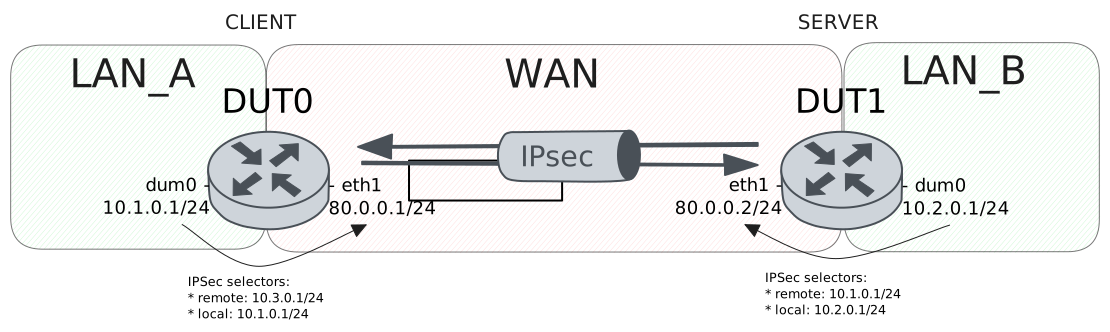
Test MD5 Method
Description
Simple VPN site-to-site configuration with md5 authentication for DUT1 (client) and pre shared secret for DUT0 (server)
Scenario
Step 1: Set the following configuration in DUT0 :
set interfaces dummy dum0 address 10.1.0.1/24
set interfaces ethernet eth1 address 80.0.0.1/24
set protocols static route 10.2.0.0/24 interface dum0
set protocols static route 10.3.0.0/24 interface dum0
set system login user admin authentication encrypted-password '$6$GSjsCj8gHLv$/VcqU6FLi6CT2Oxn0MJQ2C2tqnRDrYKNF8HIYWJp68nvXvPdFccDsT04.WtigUONbKYrgKg8d6rEs8PjljMkH0'
set vpn ipsec auth-profile AUTH-SA global-secrets eap dut0 encrypted-secret U2FsdGVkX194oJf6NCeIL4uEw7a/pDJXdRMuxkcrX+4=
set vpn ipsec auth-profile AUTH-SA global-secrets ike-psk test_psk encrypted-secret U2FsdGVkX1/T9Bs4+MztSjuzDm9+v0mafOrhw4fbUxw=
set vpn ipsec auth-profile AUTH-SA local auth ike-psk id test_psk
set vpn ipsec auth-profile AUTH-SA mirror-config false
set vpn ipsec auth-profile AUTH-SA remote auth eap dut0 type md5
set vpn ipsec esp-group CHILD-SA mode tunnel
set vpn ipsec esp-group CHILD-SA proposal 1 encryption aes256gcm128
set vpn ipsec esp-group CHILD-SA proposal 1 pfs dh-group19
set vpn ipsec ike-group IKE-SA key-exchange ikev2
set vpn ipsec ike-group IKE-SA proposal 1 dh-group 19
set vpn ipsec ike-group IKE-SA proposal 1 encryption aes256gcm128
set vpn ipsec ike-group IKE-SA proposal 1 hash sha256
set vpn ipsec logging log-types any log-level 1
set vpn ipsec site-to-site peer PEER auth-profile AUTH-SA
set vpn ipsec site-to-site peer PEER connection-type respond
set vpn ipsec site-to-site peer PEER default-esp-group CHILD-SA
set vpn ipsec site-to-site peer PEER ike-group IKE-SA
set vpn ipsec site-to-site peer PEER local-address 80.0.0.1
set vpn ipsec site-to-site peer PEER tunnel 1 local prefix 10.1.0.0/24
set vpn ipsec site-to-site peer PEER tunnel 1 local-interface dum0
Step 2: Set the following configuration in DUT1 :
set interfaces dummy dum0 address 10.2.0.1/24
set interfaces ethernet eth1 address 80.0.0.2/24
set protocols static route 10.1.0.0/24 interface dum0
set system login user admin authentication encrypted-password '$6$GSjsCj8gHLv$/VcqU6FLi6CT2Oxn0MJQ2C2tqnRDrYKNF8HIYWJp68nvXvPdFccDsT04.WtigUONbKYrgKg8d6rEs8PjljMkH0'
set vpn ipsec auth-profile AUTH-SA global-secrets eap dut0 encrypted-secret U2FsdGVkX19Zq1d1G5vdv/eOLwVbvrL+/B+teIfEKkE=
set vpn ipsec auth-profile AUTH-SA global-secrets ike-psk test_psk encrypted-secret U2FsdGVkX1+4JSx0Hxc7MNFLl7xYZOqTtAEDGHDh5iw=
set vpn ipsec auth-profile AUTH-SA local auth eap dut0 type md5
set vpn ipsec auth-profile AUTH-SA local id dut0
set vpn ipsec auth-profile AUTH-SA mirror-config false
set vpn ipsec auth-profile AUTH-SA remote auth ike-psk id %any
set vpn ipsec esp-group CHILD-SA mode tunnel
set vpn ipsec esp-group CHILD-SA proposal 1 encryption aes256gcm128
set vpn ipsec esp-group CHILD-SA proposal 1 pfs dh-group19
set vpn ipsec ike-group IKE-SA key-exchange ikev2
set vpn ipsec ike-group IKE-SA proposal 1 dh-group 19
set vpn ipsec ike-group IKE-SA proposal 1 encryption aes256gcm128
set vpn ipsec ike-group IKE-SA proposal 1 hash sha256
set vpn ipsec logging log-types any log-level 1
set vpn ipsec site-to-site peer PEER auth-profile AUTH-SA
set vpn ipsec site-to-site peer PEER connection-type initiate
set vpn ipsec site-to-site peer PEER default-esp-group CHILD-SA
set vpn ipsec site-to-site peer PEER ike-group IKE-SA
set vpn ipsec site-to-site peer PEER local-address 80.0.0.2
set vpn ipsec site-to-site peer PEER remote-address 80.0.0.1
set vpn ipsec site-to-site peer PEER tunnel 1 local prefix 10.2.0.0/24
set vpn ipsec site-to-site peer PEER tunnel 1 local-interface dum0
set vpn ipsec site-to-site peer PEER tunnel 1 remote prefix 10.1.0.0/24
Step 3: Ping the IP address 80.0.0.2 from DUT1:
admin@DUT1$ ping 80.0.0.2 count 1 size 56 timeout 1Show output
PING 80.0.0.2 (80.0.0.2) 56(84) bytes of data.
64 bytes from 80.0.0.2: icmp_seq=1 ttl=64 time=0.410 ms

--- 80.0.0.2 ping statistics ---
1 packets transmitted, 1 received, 0% packet loss, time 0ms
rtt min/avg/max/mdev = 0.410/0.410/0.410/0.000 ms
Step 4: Ping the IP address 80.0.0.1 from DUT0:
admin@DUT0$ ping 80.0.0.1 count 1 size 56 timeout 1Show output
PING 80.0.0.1 (80.0.0.1) 56(84) bytes of data.
64 bytes from 80.0.0.1: icmp_seq=1 ttl=64 time=0.031 ms

--- 80.0.0.1 ping statistics ---
1 packets transmitted, 1 received, 0% packet loss, time 0ms
rtt min/avg/max/mdev = 0.031/0.031/0.031/0.000 ms
Step 5: Run the command vpn ipsec show sa on DUT0 and check whether the output matches the following regular expressions:
peer-PEER-tunnel-\d+.+INSTALLEDShow output
vpn-peer-PEER: #1, ESTABLISHED, IKEv2, 45b66a377bcc3aa4_i 99f3738c18de2701_r*
local  'test_psk' @ 80.0.0.1[500]
remote 'dut0' @ 80.0.0.2[500]
AES_GCM_16-256/PRF_HMAC_SHA2_256/ECP_256
established 0s ago, rekeying in 22679s
peer-PEER-tunnel-1: #1, reqid 1, INSTALLED, TUNNEL, ESP:AES_GCM_16-256
installed 0s ago, rekeying in 3307s, expires in 3960s
in  c2304661,      0 bytes,     0 packets
out c48504fe,      0 bytes,     0 packets
local  10.1.0.0/24
remote 10.2.0.0/24
Step 6: Ping the IP address 10.2.0.1 from DUT0:
admin@DUT0$ ping 10.2.0.1 local-address 10.1.0.1 count 1 size 56 timeout 1Show output
PING 10.2.0.1 (10.2.0.1) from 10.1.0.1 : 56(84) bytes of data.
64 bytes from 10.2.0.1: icmp_seq=1 ttl=64 time=0.409 ms

--- 10.2.0.1 ping statistics ---
1 packets transmitted, 1 received, 0% packet loss, time 0ms
rtt min/avg/max/mdev = 0.409/0.409/0.409/0.000 ms
Step 7: Ping the IP address 10.1.0.1 from DUT1:
admin@DUT1$ ping 10.1.0.1 local-address 10.2.0.1 count 1 size 56 timeout 1Show output
PING 10.1.0.1 (10.1.0.1) from 10.2.0.1 : 56(84) bytes of data.
64 bytes from 10.1.0.1: icmp_seq=1 ttl=64 time=0.415 ms

--- 10.1.0.1 ping statistics ---
1 packets transmitted, 1 received, 0% packet loss, time 0ms
rtt min/avg/max/mdev = 0.415/0.415/0.415/0.000 ms
Step 8: Run the command vpn ipsec show sa on DUT0 and check whether the output matches the following regular expressions:
[1-9]\d? packetsShow output
vpn-peer-PEER: #1, ESTABLISHED, IKEv2, 45b66a377bcc3aa4_i 99f3738c18de2701_r*
local  'test_psk' @ 80.0.0.1[500]
remote 'dut0' @ 80.0.0.2[500]
AES_GCM_16-256/PRF_HMAC_SHA2_256/ECP_256
established 1s ago, rekeying in 22678s
peer-PEER-tunnel-1: #1, reqid 1, INSTALLED, TUNNEL, ESP:AES_GCM_16-256
installed 1s ago, rekeying in 3306s, expires in 3959s
in  c2304661,    168 bytes,     2 packets,     0s ago
out c48504fe,    168 bytes,     2 packets,     0s ago
local  10.1.0.0/24
remote 10.2.0.0/24
Test TLS Method
Description
Simple VPN site-to-site configuration with tls authentication in both sides
Scenario
Step 1: Set the following configuration in DUT0 :
set interfaces dummy dum0 address 10.1.0.1/24
set interfaces ethernet eth1 address 80.0.0.1/24
set protocols static route 10.2.0.0/24 interface dum0
set protocols static route 10.3.0.0/24 interface dum0
set system login user admin authentication encrypted-password '$6$GSjsCj8gHLv$/VcqU6FLi6CT2Oxn0MJQ2C2tqnRDrYKNF8HIYWJp68nvXvPdFccDsT04.WtigUONbKYrgKg8d6rEs8PjljMkH0'
set vpn ipsec auth-profile AUTH-SA local auth eap dut1 type tls
set vpn ipsec auth-profile AUTH-SA local cert-file 'running://server.crt'
set vpn ipsec auth-profile AUTH-SA local key file 'running://server.priv.pem'
set vpn ipsec auth-profile AUTH-SA mirror-config false
set vpn ipsec auth-profile AUTH-SA remote auth eap dut0 type tls
set vpn ipsec auth-profile AUTH-SA remote ca-cert-file 'running://ca.crt'
set vpn ipsec esp-group CHILD-SA mode tunnel
set vpn ipsec esp-group CHILD-SA proposal 1 encryption aes256gcm128
set vpn ipsec esp-group CHILD-SA proposal 1 pfs dh-group19
set vpn ipsec ike-group IKE-SA key-exchange ikev2
set vpn ipsec ike-group IKE-SA proposal 1 dh-group 19
set vpn ipsec ike-group IKE-SA proposal 1 encryption aes256gcm128
set vpn ipsec ike-group IKE-SA proposal 1 hash sha256
set vpn ipsec logging log-types any log-level 1
set vpn ipsec site-to-site peer PEER auth-profile AUTH-SA
set vpn ipsec site-to-site peer PEER connection-type respond
set vpn ipsec site-to-site peer PEER default-esp-group CHILD-SA
set vpn ipsec site-to-site peer PEER ike-group IKE-SA
set vpn ipsec site-to-site peer PEER local-address 80.0.0.1
set vpn ipsec site-to-site peer PEER tunnel 1 local prefix 10.1.0.0/24
set vpn ipsec site-to-site peer PEER tunnel 1 local-interface dum0
Step 2: Set the following configuration in DUT1 :
set interfaces dummy dum0 address 10.2.0.1/24
set interfaces ethernet eth1 address 80.0.0.2/24
set protocols static route 10.1.0.0/24 interface dum0
set system login user admin authentication encrypted-password '$6$GSjsCj8gHLv$/VcqU6FLi6CT2Oxn0MJQ2C2tqnRDrYKNF8HIYWJp68nvXvPdFccDsT04.WtigUONbKYrgKg8d6rEs8PjljMkH0'
set vpn ipsec auth-profile AUTH-SA local auth eap dut0 type tls
set vpn ipsec auth-profile AUTH-SA local cert-file 'running://client.crt'
set vpn ipsec auth-profile AUTH-SA local key file 'running://client.priv.pem'
set vpn ipsec auth-profile AUTH-SA mirror-config false
set vpn ipsec auth-profile AUTH-SA remote auth eap dut1 type tls
set vpn ipsec auth-profile AUTH-SA remote ca-cert-file 'running://ca.crt'
set vpn ipsec auth-profile AUTH-SA remote id CN=Server
set vpn ipsec esp-group CHILD-SA mode tunnel
set vpn ipsec esp-group CHILD-SA proposal 1 encryption aes256gcm128
set vpn ipsec esp-group CHILD-SA proposal 1 pfs dh-group19
set vpn ipsec ike-group IKE-SA key-exchange ikev2
set vpn ipsec ike-group IKE-SA proposal 1 dh-group 19
set vpn ipsec ike-group IKE-SA proposal 1 encryption aes256gcm128
set vpn ipsec ike-group IKE-SA proposal 1 hash sha256
set vpn ipsec logging log-types any log-level 1
set vpn ipsec site-to-site peer PEER auth-profile AUTH-SA
set vpn ipsec site-to-site peer PEER connection-type initiate
set vpn ipsec site-to-site peer PEER default-esp-group CHILD-SA
set vpn ipsec site-to-site peer PEER ike-group IKE-SA
set vpn ipsec site-to-site peer PEER local-address 80.0.0.2
set vpn ipsec site-to-site peer PEER remote-address 80.0.0.1
set vpn ipsec site-to-site peer PEER tunnel 1 local prefix 10.2.0.0/24
set vpn ipsec site-to-site peer PEER tunnel 1 local-interface dum0
set vpn ipsec site-to-site peer PEER tunnel 1 remote prefix 10.1.0.0/24
Step 3: Ping the IP address 80.0.0.2 from DUT1:
admin@DUT1$ ping 80.0.0.2 count 1 size 56 timeout 1Show output
PING 80.0.0.2 (80.0.0.2) 56(84) bytes of data.
64 bytes from 80.0.0.2: icmp_seq=1 ttl=64 time=0.037 ms

--- 80.0.0.2 ping statistics ---
1 packets transmitted, 1 received, 0% packet loss, time 0ms
rtt min/avg/max/mdev = 0.037/0.037/0.037/0.000 ms
Step 4: Ping the IP address 80.0.0.1 from DUT0:
admin@DUT0$ ping 80.0.0.1 count 1 size 56 timeout 1Show output
PING 80.0.0.1 (80.0.0.1) 56(84) bytes of data.
64 bytes from 80.0.0.1: icmp_seq=1 ttl=64 time=0.039 ms

--- 80.0.0.1 ping statistics ---
1 packets transmitted, 1 received, 0% packet loss, time 0ms
rtt min/avg/max/mdev = 0.039/0.039/0.039/0.000 ms
Step 5: Run the command vpn ipsec show sa on DUT0 and check whether the output matches the following regular expressions:
peer-PEER-tunnel-\d+.+INSTALLEDShow output
vpn-peer-PEER: #1, ESTABLISHED, IKEv2, 184a9296913a7937_i 5074c7f1526f3ca5_r*
local  'CN=Server' @ 80.0.0.1[500]
remote 'CN=Client' @ 80.0.0.2[500]
AES_GCM_16-256/PRF_HMAC_SHA2_256/ECP_256
established 1s ago, rekeying in 14423s
peer-PEER-tunnel-1: #1, reqid 1, INSTALLED, TUNNEL, ESP:AES_GCM_16-256
installed 1s ago, rekeying in 3255s, expires in 3959s
in  c1386d30,      0 bytes,     0 packets
out caba7021,      0 bytes,     0 packets
local  10.1.0.0/24
remote 10.2.0.0/24
Step 6: Ping the IP address 10.2.0.1 from DUT0:
admin@DUT0$ ping 10.2.0.1 local-address 10.1.0.1 count 1 size 56 timeout 1Show output
PING 10.2.0.1 (10.2.0.1) from 10.1.0.1 : 56(84) bytes of data.
64 bytes from 10.2.0.1: icmp_seq=1 ttl=64 time=0.581 ms

--- 10.2.0.1 ping statistics ---
1 packets transmitted, 1 received, 0% packet loss, time 0ms
rtt min/avg/max/mdev = 0.581/0.581/0.581/0.000 ms
Step 7: Ping the IP address 10.1.0.1 from DUT1:
admin@DUT1$ ping 10.1.0.1 local-address 10.2.0.1 count 1 size 56 timeout 1Show output
PING 10.1.0.1 (10.1.0.1) from 10.2.0.1 : 56(84) bytes of data.
64 bytes from 10.1.0.1: icmp_seq=1 ttl=64 time=0.633 ms

--- 10.1.0.1 ping statistics ---
1 packets transmitted, 1 received, 0% packet loss, time 0ms
rtt min/avg/max/mdev = 0.633/0.633/0.633/0.000 ms
Step 8: Run the command vpn ipsec show sa on DUT0 and check whether the output matches the following regular expressions:
[1-9]\d? packetsShow output
vpn-peer-PEER: #1, ESTABLISHED, IKEv2, 184a9296913a7937_i 5074c7f1526f3ca5_r*
local  'CN=Server' @ 80.0.0.1[500]
remote 'CN=Client' @ 80.0.0.2[500]
AES_GCM_16-256/PRF_HMAC_SHA2_256/ECP_256
established 1s ago, rekeying in 14423s
peer-PEER-tunnel-1: #1, reqid 1, INSTALLED, TUNNEL, ESP:AES_GCM_16-256
installed 1s ago, rekeying in 3255s, expires in 3959s
in  c1386d30,    168 bytes,     2 packets,     0s ago
out caba7021,    168 bytes,     2 packets,     0s ago
local  10.1.0.0/24
remote 10.2.0.0/24
Test MSCHAPV2 Method
Description
Simple VPN site-to-site configuration with mschapv2 authentication for DUT1 (client) and X.509 certificate for DUT0 (server)
Scenario
Step 1: Set the following configuration in DUT0 :
set interfaces dummy dum0 address 10.1.0.1/24
set interfaces ethernet eth1 address 80.0.0.1/24
set protocols static route 10.2.0.0/24 interface dum0
set protocols static route 10.3.0.0/24 interface dum0
set system login user admin authentication encrypted-password '$6$GSjsCj8gHLv$/VcqU6FLi6CT2Oxn0MJQ2C2tqnRDrYKNF8HIYWJp68nvXvPdFccDsT04.WtigUONbKYrgKg8d6rEs8PjljMkH0'
set vpn ipsec auth-profile AUTH-SA global-secrets eap dut0 encrypted-secret U2FsdGVkX183D8UoxIRhEp+xBhpDDKjuwILCysA5hNE=
set vpn ipsec auth-profile AUTH-SA local cert-file 'running://server.crt'
set vpn ipsec auth-profile AUTH-SA local key file 'running://server.priv.pem'
set vpn ipsec auth-profile AUTH-SA mirror-config false
set vpn ipsec auth-profile AUTH-SA remote auth eap %any type mschapv2
set vpn ipsec esp-group CHILD-SA mode tunnel
set vpn ipsec esp-group CHILD-SA proposal 1 encryption aes256gcm128
set vpn ipsec esp-group CHILD-SA proposal 1 pfs dh-group19
set vpn ipsec ike-group IKE-SA key-exchange ikev2
set vpn ipsec ike-group IKE-SA proposal 1 dh-group 19
set vpn ipsec ike-group IKE-SA proposal 1 encryption aes256gcm128
set vpn ipsec ike-group IKE-SA proposal 1 hash sha256
set vpn ipsec logging log-types any log-level 1
set vpn ipsec site-to-site peer PEER auth-profile AUTH-SA
set vpn ipsec site-to-site peer PEER connection-type respond
set vpn ipsec site-to-site peer PEER default-esp-group CHILD-SA
set vpn ipsec site-to-site peer PEER ike-group IKE-SA
set vpn ipsec site-to-site peer PEER local-address 80.0.0.1
set vpn ipsec site-to-site peer PEER tunnel 1 local prefix 10.1.0.0/24
set vpn ipsec site-to-site peer PEER tunnel 1 local-interface dum0
Step 2: Set the following configuration in DUT1 :
set interfaces dummy dum0 address 10.2.0.1/24
set interfaces ethernet eth1 address 80.0.0.2/24
set protocols static route 10.1.0.0/24 interface dum0
set system login user admin authentication encrypted-password '$6$GSjsCj8gHLv$/VcqU6FLi6CT2Oxn0MJQ2C2tqnRDrYKNF8HIYWJp68nvXvPdFccDsT04.WtigUONbKYrgKg8d6rEs8PjljMkH0'
set vpn ipsec auth-profile AUTH-SA global-secrets eap dut0 encrypted-secret U2FsdGVkX1+nqc5UxfFJm+0gd+cbvkMpqe2xW8ksY0M=
set vpn ipsec auth-profile AUTH-SA local auth eap dut0 type mschapv2
set vpn ipsec auth-profile AUTH-SA mirror-config false
set vpn ipsec auth-profile AUTH-SA remote ca-cert-file 'running://ca.crt'
set vpn ipsec auth-profile AUTH-SA remote id CN=Server
set vpn ipsec esp-group CHILD-SA mode tunnel
set vpn ipsec esp-group CHILD-SA proposal 1 encryption aes256gcm128
set vpn ipsec esp-group CHILD-SA proposal 1 pfs dh-group19
set vpn ipsec ike-group IKE-SA key-exchange ikev2
set vpn ipsec ike-group IKE-SA proposal 1 dh-group 19
set vpn ipsec ike-group IKE-SA proposal 1 encryption aes256gcm128
set vpn ipsec ike-group IKE-SA proposal 1 hash sha256
set vpn ipsec logging log-types any log-level 1
set vpn ipsec site-to-site peer PEER auth-profile AUTH-SA
set vpn ipsec site-to-site peer PEER connection-type initiate
set vpn ipsec site-to-site peer PEER default-esp-group CHILD-SA
set vpn ipsec site-to-site peer PEER ike-group IKE-SA
set vpn ipsec site-to-site peer PEER local-address 80.0.0.2
set vpn ipsec site-to-site peer PEER remote-address 80.0.0.1
set vpn ipsec site-to-site peer PEER tunnel 1 local prefix 10.2.0.0/24
set vpn ipsec site-to-site peer PEER tunnel 1 local-interface dum0
set vpn ipsec site-to-site peer PEER tunnel 1 remote prefix 10.1.0.0/24
Step 3: Ping the IP address 80.0.0.2 from DUT1:
admin@DUT1$ ping 80.0.0.2 count 1 size 56 timeout 1Show output
PING 80.0.0.2 (80.0.0.2) 56(84) bytes of data.
64 bytes from 80.0.0.2: icmp_seq=1 ttl=64 time=0.029 ms

--- 80.0.0.2 ping statistics ---
1 packets transmitted, 1 received, 0% packet loss, time 0ms
rtt min/avg/max/mdev = 0.029/0.029/0.029/0.000 ms
Step 4: Ping the IP address 80.0.0.1 from DUT0:
admin@DUT0$ ping 80.0.0.1 count 1 size 56 timeout 1Show output
PING 80.0.0.1 (80.0.0.1) 56(84) bytes of data.
64 bytes from 80.0.0.1: icmp_seq=1 ttl=64 time=0.031 ms

--- 80.0.0.1 ping statistics ---
1 packets transmitted, 1 received, 0% packet loss, time 0ms
rtt min/avg/max/mdev = 0.031/0.031/0.031/0.000 ms
Step 5: Run the command vpn ipsec show sa on DUT0 and check whether the output matches the following regular expressions:
peer-PEER-tunnel-\d+.+INSTALLEDShow output
vpn-peer-PEER: #1, ESTABLISHED, IKEv2, 04e34d359588469e_i 9e7835fe74eb3b3c_r*
local  'CN=Server' @ 80.0.0.1[500]
remote '80.0.0.2' @ 80.0.0.2[500] EAP: 'dut0'
AES_GCM_16-256/PRF_HMAC_SHA2_256/ECP_256
established 0s ago, rekeying in 24088s
peer-PEER-tunnel-1: #1, reqid 1, INSTALLED, TUNNEL, ESP:AES_GCM_16-256
installed 0s ago, rekeying in 3256s, expires in 3960s
in  c5f567ca,      0 bytes,     0 packets
out c9db3561,      0 bytes,     0 packets
local  10.1.0.0/24
remote 10.2.0.0/24
Step 6: Ping the IP address 10.2.0.1 from DUT0:
admin@DUT0$ ping 10.2.0.1 local-address 10.1.0.1 count 1 size 56 timeout 1Show output
PING 10.2.0.1 (10.2.0.1) from 10.1.0.1 : 56(84) bytes of data.
64 bytes from 10.2.0.1: icmp_seq=1 ttl=64 time=0.442 ms

--- 10.2.0.1 ping statistics ---
1 packets transmitted, 1 received, 0% packet loss, time 0ms
rtt min/avg/max/mdev = 0.442/0.442/0.442/0.000 ms
Step 7: Ping the IP address 10.1.0.1 from DUT1:
admin@DUT1$ ping 10.1.0.1 local-address 10.2.0.1 count 1 size 56 timeout 1Show output
PING 10.1.0.1 (10.1.0.1) from 10.2.0.1 : 56(84) bytes of data.
64 bytes from 10.1.0.1: icmp_seq=1 ttl=64 time=0.312 ms

--- 10.1.0.1 ping statistics ---
1 packets transmitted, 1 received, 0% packet loss, time 0ms
rtt min/avg/max/mdev = 0.312/0.312/0.312/0.000 ms
Step 8: Run the command vpn ipsec show sa on DUT0 and check whether the output matches the following regular expressions:
[1-9]\d? packetsShow output
vpn-peer-PEER: #1, ESTABLISHED, IKEv2, 04e34d359588469e_i 9e7835fe74eb3b3c_r*
local  'CN=Server' @ 80.0.0.1[500]
remote '80.0.0.2' @ 80.0.0.2[500] EAP: 'dut0'
AES_GCM_16-256/PRF_HMAC_SHA2_256/ECP_256
established 1s ago, rekeying in 24087s
peer-PEER-tunnel-1: #1, reqid 1, INSTALLED, TUNNEL, ESP:AES_GCM_16-256
installed 1s ago, rekeying in 3255s, expires in 3959s
in  c5f567ca,    168 bytes,     2 packets,     0s ago
out c9db3561,    168 bytes,     2 packets,     0s ago
local  10.1.0.0/24
remote 10.2.0.0/24
Test TTLS Method
Description
Simple VPN site-to-site configuration with ttls authentication in both sides, but DUT1 (client) using a secret password and DUT0 (server) a X.509 certificate
Scenario
Step 1: Set the following configuration in DUT0 :
set interfaces dummy dum0 address 10.1.0.1/24
set interfaces ethernet eth1 address 80.0.0.1/24
set protocols static route 10.2.0.0/24 interface dum0
set protocols static route 10.3.0.0/24 interface dum0
set system login user admin authentication encrypted-password '$6$GSjsCj8gHLv$/VcqU6FLi6CT2Oxn0MJQ2C2tqnRDrYKNF8HIYWJp68nvXvPdFccDsT04.WtigUONbKYrgKg8d6rEs8PjljMkH0'
set vpn ipsec auth-profile AUTH-SA global-secrets eap dut0 encrypted-secret U2FsdGVkX1/os4kT11ijOsJIaPR62F8HVTypcflxF6w=
set vpn ipsec auth-profile AUTH-SA local auth eap dut1 type ttls
set vpn ipsec auth-profile AUTH-SA local cert-file 'running://server.crt'
set vpn ipsec auth-profile AUTH-SA local key file 'running://server.priv.pem'
set vpn ipsec auth-profile AUTH-SA mirror-config false
set vpn ipsec auth-profile AUTH-SA remote auth eap dut0 type ttls
set vpn ipsec esp-group CHILD-SA mode tunnel
set vpn ipsec esp-group CHILD-SA proposal 1 encryption aes256gcm128
set vpn ipsec esp-group CHILD-SA proposal 1 pfs dh-group19
set vpn ipsec ike-group IKE-SA key-exchange ikev2
set vpn ipsec ike-group IKE-SA proposal 1 dh-group 19
set vpn ipsec ike-group IKE-SA proposal 1 encryption aes256gcm128
set vpn ipsec ike-group IKE-SA proposal 1 hash sha256
set vpn ipsec logging log-types any log-level 1
set vpn ipsec site-to-site peer PEER auth-profile AUTH-SA
set vpn ipsec site-to-site peer PEER connection-type respond
set vpn ipsec site-to-site peer PEER default-esp-group CHILD-SA
set vpn ipsec site-to-site peer PEER ike-group IKE-SA
set vpn ipsec site-to-site peer PEER local-address 80.0.0.1
set vpn ipsec site-to-site peer PEER tunnel 1 local prefix 10.1.0.0/24
set vpn ipsec site-to-site peer PEER tunnel 1 local-interface dum0
Step 2: Set the following configuration in DUT1 :
set interfaces dummy dum0 address 10.2.0.1/24
set interfaces ethernet eth1 address 80.0.0.2/24
set protocols static route 10.1.0.0/24 interface dum0
set system login user admin authentication encrypted-password '$6$GSjsCj8gHLv$/VcqU6FLi6CT2Oxn0MJQ2C2tqnRDrYKNF8HIYWJp68nvXvPdFccDsT04.WtigUONbKYrgKg8d6rEs8PjljMkH0'
set vpn ipsec auth-profile AUTH-SA global-secrets eap dut0 encrypted-secret U2FsdGVkX18dpyzwzzx9Nleq4ix2gNc0nbUJQ95WzlA=
set vpn ipsec auth-profile AUTH-SA local auth eap dut0 type ttls
set vpn ipsec auth-profile AUTH-SA local id dut0
set vpn ipsec auth-profile AUTH-SA mirror-config false
set vpn ipsec auth-profile AUTH-SA remote auth eap dut1 type ttls
set vpn ipsec auth-profile AUTH-SA remote ca-cert-file 'running://ca.crt'
set vpn ipsec auth-profile AUTH-SA remote id CN=Server
set vpn ipsec esp-group CHILD-SA mode tunnel
set vpn ipsec esp-group CHILD-SA proposal 1 encryption aes256gcm128
set vpn ipsec esp-group CHILD-SA proposal 1 pfs dh-group19
set vpn ipsec ike-group IKE-SA key-exchange ikev2
set vpn ipsec ike-group IKE-SA proposal 1 dh-group 19
set vpn ipsec ike-group IKE-SA proposal 1 encryption aes256gcm128
set vpn ipsec ike-group IKE-SA proposal 1 hash sha256
set vpn ipsec logging log-types any log-level 1
set vpn ipsec site-to-site peer PEER auth-profile AUTH-SA
set vpn ipsec site-to-site peer PEER connection-type initiate
set vpn ipsec site-to-site peer PEER default-esp-group CHILD-SA
set vpn ipsec site-to-site peer PEER ike-group IKE-SA
set vpn ipsec site-to-site peer PEER local-address 80.0.0.2
set vpn ipsec site-to-site peer PEER remote-address 80.0.0.1
set vpn ipsec site-to-site peer PEER tunnel 1 local prefix 10.2.0.0/24
set vpn ipsec site-to-site peer PEER tunnel 1 local-interface dum0
set vpn ipsec site-to-site peer PEER tunnel 1 remote prefix 10.1.0.0/24
Step 3: Ping the IP address 80.0.0.2 from DUT1:
admin@DUT1$ ping 80.0.0.2 count 1 size 56 timeout 1Show output
PING 80.0.0.2 (80.0.0.2) 56(84) bytes of data.
64 bytes from 80.0.0.2: icmp_seq=1 ttl=64 time=0.032 ms

--- 80.0.0.2 ping statistics ---
1 packets transmitted, 1 received, 0% packet loss, time 0ms
rtt min/avg/max/mdev = 0.032/0.032/0.032/0.000 ms
Step 4: Ping the IP address 80.0.0.1 from DUT0:
admin@DUT0$ ping 80.0.0.1 count 1 size 56 timeout 1Show output
PING 80.0.0.1 (80.0.0.1) 56(84) bytes of data.
64 bytes from 80.0.0.1: icmp_seq=1 ttl=64 time=0.436 ms

--- 80.0.0.1 ping statistics ---
1 packets transmitted, 1 received, 0% packet loss, time 0ms
rtt min/avg/max/mdev = 0.436/0.436/0.436/0.000 ms
Step 5: Run the command vpn ipsec show sa on DUT0 and check whether the output matches the following regular expressions:
peer-PEER-tunnel-\d+.+INSTALLEDShow output
vpn-peer-PEER: #1, ESTABLISHED, IKEv2, dbbbf9ffca305de9_i b5d2657788fd8242_r*
local  'CN=Server' @ 80.0.0.1[500]
remote 'dut0' @ 80.0.0.2[500]
AES_GCM_16-256/PRF_HMAC_SHA2_256/ECP_256
established 0s ago, rekeying in 22203s
peer-PEER-tunnel-1: #1, reqid 1, INSTALLED, TUNNEL, ESP:AES_GCM_16-256
installed 0s ago, rekeying in 3355s, expires in 3960s
in  ca337586,      0 bytes,     0 packets
out c9925a72,      0 bytes,     0 packets
local  10.1.0.0/24
remote 10.2.0.0/24
Step 6: Ping the IP address 10.2.0.1 from DUT0:
admin@DUT0$ ping 10.2.0.1 local-address 10.1.0.1 count 1 size 56 timeout 1Show output
PING 10.2.0.1 (10.2.0.1) from 10.1.0.1 : 56(84) bytes of data.
64 bytes from 10.2.0.1: icmp_seq=1 ttl=64 time=0.547 ms

--- 10.2.0.1 ping statistics ---
1 packets transmitted, 1 received, 0% packet loss, time 0ms
rtt min/avg/max/mdev = 0.547/0.547/0.547/0.000 ms
Step 7: Ping the IP address 10.1.0.1 from DUT1:
admin@DUT1$ ping 10.1.0.1 local-address 10.2.0.1 count 1 size 56 timeout 1Show output
PING 10.1.0.1 (10.1.0.1) from 10.2.0.1 : 56(84) bytes of data.
64 bytes from 10.1.0.1: icmp_seq=1 ttl=64 time=0.620 ms

--- 10.1.0.1 ping statistics ---
1 packets transmitted, 1 received, 0% packet loss, time 0ms
rtt min/avg/max/mdev = 0.620/0.620/0.620/0.000 ms
Step 8: Run the command vpn ipsec show sa on DUT0 and check whether the output matches the following regular expressions:
[1-9]\d? packetsShow output
vpn-peer-PEER: #1, ESTABLISHED, IKEv2, dbbbf9ffca305de9_i b5d2657788fd8242_r*
local  'CN=Server' @ 80.0.0.1[500]
remote 'dut0' @ 80.0.0.2[500]
AES_GCM_16-256/PRF_HMAC_SHA2_256/ECP_256
established 1s ago, rekeying in 22202s
peer-PEER-tunnel-1: #1, reqid 1, INSTALLED, TUNNEL, ESP:AES_GCM_16-256
installed 1s ago, rekeying in 3354s, expires in 3959s
in  ca337586,    168 bytes,     2 packets,     0s ago
out c9925a72,    168 bytes,     2 packets,     0s ago
local  10.1.0.0/24
remote 10.2.0.0/24
Test EAP With Multiple Remotes
Description
Test with multiple remotes using the same EAP method and different secrets.
Scenario
Step 1: Set the following configuration in DUT0 :
set interfaces dummy dum0 address 10.1.0.1/24
set interfaces ethernet eth1 address 80.0.0.1/24
set protocols static route 10.2.0.0/24 interface dum0
set protocols static route 10.3.0.0/24 interface dum0
set system login user admin authentication encrypted-password '$6$GSjsCj8gHLv$/VcqU6FLi6CT2Oxn0MJQ2C2tqnRDrYKNF8HIYWJp68nvXvPdFccDsT04.WtigUONbKYrgKg8d6rEs8PjljMkH0'
set vpn ipsec auth-profile AUTH-SA global-secrets eap dut0 encrypted-secret U2FsdGVkX1/zfV3O7bzIYKWiWRiFK1Syx+eouLOCG6k=
set vpn ipsec auth-profile AUTH-SA global-secrets eap dut1 encrypted-secret U2FsdGVkX1+w+s/Dx5UvuGbOi3deKmN88qpfsaUK32Y=
set vpn ipsec auth-profile AUTH-SA global-secrets ike-psk test_psk encrypted-secret U2FsdGVkX18W5E6ZHbivrE/9emJOvaEpSycissnWdgY=
set vpn ipsec auth-profile AUTH-SA local auth ike-psk id test_psk
set vpn ipsec auth-profile AUTH-SA mirror-config false
set vpn ipsec auth-profile AUTH-SA remote auth eap %any type md5
set vpn ipsec esp-group CHILD-SA mode tunnel
set vpn ipsec esp-group CHILD-SA proposal 1 encryption aes256gcm128
set vpn ipsec esp-group CHILD-SA proposal 1 pfs dh-group19
set vpn ipsec ike-group IKE-SA key-exchange ikev2
set vpn ipsec ike-group IKE-SA proposal 1 dh-group 19
set vpn ipsec ike-group IKE-SA proposal 1 encryption aes256gcm128
set vpn ipsec ike-group IKE-SA proposal 1 hash sha256
set vpn ipsec logging log-types any log-level 1
set vpn ipsec site-to-site peer PEER auth-profile AUTH-SA
set vpn ipsec site-to-site peer PEER connection-type respond
set vpn ipsec site-to-site peer PEER default-esp-group CHILD-SA
set vpn ipsec site-to-site peer PEER ike-group IKE-SA
set vpn ipsec site-to-site peer PEER local-address 80.0.0.1
set vpn ipsec site-to-site peer PEER tunnel 1 local prefix 10.1.0.0/24
set vpn ipsec site-to-site peer PEER tunnel 1 local-interface dum0
Step 2: Set the following configuration in DUT1 :
set interfaces dummy dum0 address 10.2.0.1/24
set interfaces ethernet eth1 address 80.0.0.2/24
set protocols static route 10.1.0.0/24 interface dum0
set system login user admin authentication encrypted-password '$6$GSjsCj8gHLv$/VcqU6FLi6CT2Oxn0MJQ2C2tqnRDrYKNF8HIYWJp68nvXvPdFccDsT04.WtigUONbKYrgKg8d6rEs8PjljMkH0'
set vpn ipsec auth-profile AUTH-SA global-secrets eap dut0 encrypted-secret U2FsdGVkX18yTUAS/0kw9IiYRI3TsOoU9l7Yq/fPSUg=
set vpn ipsec auth-profile AUTH-SA global-secrets ike-psk test_psk encrypted-secret U2FsdGVkX19oMYoQYP858TS92pUG5qk89+r4nvi4gn8=
set vpn ipsec auth-profile AUTH-SA local auth eap dut0 type md5
set vpn ipsec auth-profile AUTH-SA local id dut0
set vpn ipsec auth-profile AUTH-SA mirror-config false
set vpn ipsec auth-profile AUTH-SA remote auth ike-psk id %any
set vpn ipsec esp-group CHILD-SA mode tunnel
set vpn ipsec esp-group CHILD-SA proposal 1 encryption aes256gcm128
set vpn ipsec esp-group CHILD-SA proposal 1 pfs dh-group19
set vpn ipsec ike-group IKE-SA key-exchange ikev2
set vpn ipsec ike-group IKE-SA proposal 1 dh-group 19
set vpn ipsec ike-group IKE-SA proposal 1 encryption aes256gcm128
set vpn ipsec ike-group IKE-SA proposal 1 hash sha256
set vpn ipsec logging log-types any log-level 1
set vpn ipsec site-to-site peer PEER auth-profile AUTH-SA
set vpn ipsec site-to-site peer PEER connection-type initiate
set vpn ipsec site-to-site peer PEER default-esp-group CHILD-SA
set vpn ipsec site-to-site peer PEER ike-group IKE-SA
set vpn ipsec site-to-site peer PEER local-address 80.0.0.2
set vpn ipsec site-to-site peer PEER remote-address 80.0.0.1
set vpn ipsec site-to-site peer PEER tunnel 1 local prefix 10.2.0.0/24
set vpn ipsec site-to-site peer PEER tunnel 1 local-interface dum0
set vpn ipsec site-to-site peer PEER tunnel 1 remote prefix 10.1.0.0/24
Step 3: Ping the IP address 80.0.0.2 from DUT1:
admin@DUT1$ ping 80.0.0.2 count 1 size 56 timeout 1Show output
PING 80.0.0.2 (80.0.0.2) 56(84) bytes of data.
64 bytes from 80.0.0.2: icmp_seq=1 ttl=64 time=0.283 ms

--- 80.0.0.2 ping statistics ---
1 packets transmitted, 1 received, 0% packet loss, time 0ms
rtt min/avg/max/mdev = 0.283/0.283/0.283/0.000 ms
Step 4: Ping the IP address 80.0.0.1 from DUT0:
admin@DUT0$ ping 80.0.0.1 count 1 size 56 timeout 1Show output
PING 80.0.0.1 (80.0.0.1) 56(84) bytes of data.
64 bytes from 80.0.0.1: icmp_seq=1 ttl=64 time=0.474 ms

--- 80.0.0.1 ping statistics ---
1 packets transmitted, 1 received, 0% packet loss, time 0ms
rtt min/avg/max/mdev = 0.474/0.474/0.474/0.000 ms
Step 5: Run the command vpn ipsec show sa on DUT0 and check whether the output matches the following regular expressions:
peer-PEER-tunnel-\d+.+INSTALLEDShow output
vpn-peer-PEER: #1, ESTABLISHED, IKEv2, 4c249e8d5d620b6e_i da58d1095fdba950_r*
local  'test_psk' @ 80.0.0.1[500]
remote 'dut0' @ 80.0.0.2[500]
AES_GCM_16-256/PRF_HMAC_SHA2_256/ECP_256
established 1s ago, rekeying in 21427s
peer-PEER-tunnel-1: #1, reqid 1, INSTALLED, TUNNEL, ESP:AES_GCM_16-256
installed 1s ago, rekeying in 3463s, expires in 3959s
in  c653b270,      0 bytes,     0 packets
out ccaf2e96,      0 bytes,     0 packets
local  10.1.0.0/24
remote 10.2.0.0/24
Step 6: Ping the IP address 10.2.0.1 from DUT0:
admin@DUT0$ ping 10.2.0.1 local-address 10.1.0.1 count 1 size 56 timeout 1Show output
PING 10.2.0.1 (10.2.0.1) from 10.1.0.1 : 56(84) bytes of data.
64 bytes from 10.2.0.1: icmp_seq=1 ttl=64 time=0.311 ms

--- 10.2.0.1 ping statistics ---
1 packets transmitted, 1 received, 0% packet loss, time 0ms
rtt min/avg/max/mdev = 0.311/0.311/0.311/0.000 ms
Step 7: Ping the IP address 10.1.0.1 from DUT1:
admin@DUT1$ ping 10.1.0.1 local-address 10.2.0.1 count 1 size 56 timeout 1Show output
PING 10.1.0.1 (10.1.0.1) from 10.2.0.1 : 56(84) bytes of data.
64 bytes from 10.1.0.1: icmp_seq=1 ttl=64 time=0.807 ms

--- 10.1.0.1 ping statistics ---
1 packets transmitted, 1 received, 0% packet loss, time 0ms
rtt min/avg/max/mdev = 0.807/0.807/0.807/0.000 ms
Step 8: Run the command vpn ipsec show sa on DUT0 and check whether the output matches the following regular expressions:
[1-9]\d? packetsShow output
vpn-peer-PEER: #1, ESTABLISHED, IKEv2, 4c249e8d5d620b6e_i da58d1095fdba950_r*
local  'test_psk' @ 80.0.0.1[500]
remote 'dut0' @ 80.0.0.2[500]
AES_GCM_16-256/PRF_HMAC_SHA2_256/ECP_256
established 1s ago, rekeying in 21427s
peer-PEER-tunnel-1: #1, reqid 1, INSTALLED, TUNNEL, ESP:AES_GCM_16-256
installed 1s ago, rekeying in 3463s, expires in 3959s
in  c653b270,    168 bytes,     2 packets,     0s ago
out ccaf2e96,    168 bytes,     2 packets,     0s ago
local  10.1.0.0/24
remote 10.2.0.0/24
Step 9: Modify the following configuration lines in DUT1 :
delete vpn ipsec auth-profile AUTH-SA global-secrets eap dut0
delete vpn ipsec auth-profile AUTH-SA local auth eap dut0
set vpn ipsec auth-profile AUTH-SA global-secrets eap dut1 encrypted-secret U2FsdGVkX19lC3IyYnwvS45Or91QkRekLF6k1NBZaPY=
set vpn ipsec auth-profile AUTH-SA local auth eap dut1 type md5
set vpn ipsec auth-profile AUTH-SA local id dut1
Step 10: Run the command vpn ipsec clear sa on DUT1 and expect the following output:
Show output
Deleting IPSec SAs... 100.00%
Closed tunnels: 1
Step 11: Run the command vpn ipsec initiate peer PEER on DUT1 and expect the following output:
Show output
Initiating IPSec SAs... 100.00%
Initiated tunnels: 1
Step 12: Run the command vpn ipsec show sa on DUT0 and check whether the output matches the following regular expressions:
peer-PEER-tunnel-\d+.+INSTALLEDShow output
vpn-peer-PEER: #3, ESTABLISHED, IKEv2, 73eb21feea1ab73f_i 673c56c82861f6c5_r*
local  'test_psk' @ 80.0.0.1[500]
remote 'dut1' @ 80.0.0.2[500]
AES_GCM_16-256/PRF_HMAC_SHA2_256/ECP_256
established 1s ago, rekeying in 24830s
peer-PEER-tunnel-1: #3, reqid 1, INSTALLED, TUNNEL, ESP:AES_GCM_16-256
installed 1s ago, rekeying in 3371s, expires in 3959s
in  c58d0199,      0 bytes,     0 packets
out c55f7b04,      0 bytes,     0 packets
local  10.1.0.0/24
remote 10.2.0.0/24
Step 13: Ping the IP address 10.2.0.1 from DUT0:
admin@DUT0$ ping 10.2.0.1 local-address 10.1.0.1 count 1 size 56 timeout 1Show output
PING 10.2.0.1 (10.2.0.1) from 10.1.0.1 : 56(84) bytes of data.
64 bytes from 10.2.0.1: icmp_seq=1 ttl=64 time=0.533 ms

--- 10.2.0.1 ping statistics ---
1 packets transmitted, 1 received, 0% packet loss, time 0ms
rtt min/avg/max/mdev = 0.533/0.533/0.533/0.000 ms
Step 14: Ping the IP address 10.1.0.1 from DUT1:
admin@DUT1$ ping 10.1.0.1 local-address 10.2.0.1 count 1 size 56 timeout 1Show output
PING 10.1.0.1 (10.1.0.1) from 10.2.0.1 : 56(84) bytes of data.
64 bytes from 10.1.0.1: icmp_seq=1 ttl=64 time=0.332 ms

--- 10.1.0.1 ping statistics ---
1 packets transmitted, 1 received, 0% packet loss, time 0ms
rtt min/avg/max/mdev = 0.332/0.332/0.332/0.000 ms
Step 15: Run the command vpn ipsec show sa on DUT0 and check whether the output matches the following regular expressions:
[1-9]\d? packetsShow output
vpn-peer-PEER: #3, ESTABLISHED, IKEv2, 73eb21feea1ab73f_i 673c56c82861f6c5_r*
local  'test_psk' @ 80.0.0.1[500]
remote 'dut1' @ 80.0.0.2[500]
AES_GCM_16-256/PRF_HMAC_SHA2_256/ECP_256
established 1s ago, rekeying in 24830s
peer-PEER-tunnel-1: #3, reqid 1, INSTALLED, TUNNEL, ESP:AES_GCM_16-256
installed 1s ago, rekeying in 3371s, expires in 3959s
in  c58d0199,    168 bytes,     2 packets,     0s ago
out c55f7b04,    168 bytes,     2 packets,     0s ago
local  10.1.0.0/24
remote 10.2.0.0/24