Host-To-Host
This scenario shows how to configure IPSec between two single hosts which do not have a subnet behind them. Since there’s only host-to-host communication, both transport and tunnel mode can be used.
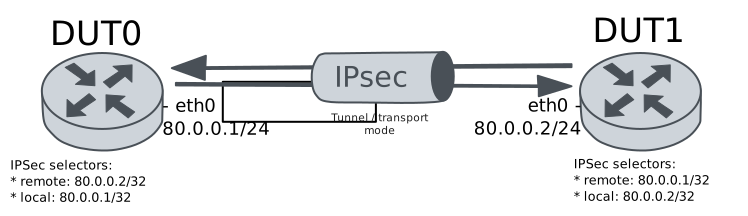
Test Host-To-Host Transport Mode
Description
Simple VPN configuration to connect two hosts using transport mode.
Scenario
Step 1: Set the following configuration in DUT0 :
set interfaces ethernet eth0 address 80.0.0.1/24
set system login user admin authentication encrypted-password '$6$GSjsCj8gHLv$/VcqU6FLi6CT2Oxn0MJQ2C2tqnRDrYKNF8HIYWJp68nvXvPdFccDsT04.WtigUONbKYrgKg8d6rEs8PjljMkH0'
set vpn ipsec auth-profile AUTH-SA global-secrets ike-psk %any encrypted-secret U2FsdGVkX1/YL/V/lwX2csmHXbn6sxR8lQsUurRzt1Y=
set vpn ipsec auth-profile AUTH-SA local auth ike-psk id %any
set vpn ipsec auth-profile AUTH-SA remote auth ike-psk id %any
set vpn ipsec esp-group CHILD-SA mode transport
set vpn ipsec esp-group CHILD-SA proposal 1 encryption aes256gcm128
set vpn ipsec esp-group CHILD-SA proposal 1 pfs dh-group19
set vpn ipsec ike-group IKE-SA key-exchange ikev2
set vpn ipsec ike-group IKE-SA proposal 1 dh-group 19
set vpn ipsec ike-group IKE-SA proposal 1 encryption aes256gcm128
set vpn ipsec ike-group IKE-SA proposal 1 hash sha256
set vpn ipsec site-to-site peer PEER auth-profile AUTH-SA
set vpn ipsec site-to-site peer PEER connection-type respond
set vpn ipsec site-to-site peer PEER default-esp-group CHILD-SA
set vpn ipsec site-to-site peer PEER ike-group IKE-SA
set vpn ipsec site-to-site peer PEER local-address 80.0.0.1
set vpn ipsec site-to-site peer PEER remote-address 80.0.0.2
set vpn ipsec site-to-site peer PEER tunnel 1 local prefix 80.0.0.1/32
set vpn ipsec site-to-site peer PEER tunnel 1 remote prefix 80.0.0.2/32
Step 2: Set the following configuration in DUT1 :
set interfaces ethernet eth0 address 80.0.0.2/24
set system login user admin authentication encrypted-password '$6$GSjsCj8gHLv$/VcqU6FLi6CT2Oxn0MJQ2C2tqnRDrYKNF8HIYWJp68nvXvPdFccDsT04.WtigUONbKYrgKg8d6rEs8PjljMkH0'
set vpn ipsec auth-profile AUTH-SA global-secrets ike-psk %any encrypted-secret U2FsdGVkX1+GV72gf1ldtKjOsu8i1KL1etsrryVi1tQ=
set vpn ipsec auth-profile AUTH-SA local auth ike-psk id %any
set vpn ipsec auth-profile AUTH-SA remote auth ike-psk id %any
set vpn ipsec esp-group CHILD-SA mode transport
set vpn ipsec esp-group CHILD-SA proposal 1 encryption aes256gcm128
set vpn ipsec esp-group CHILD-SA proposal 1 pfs dh-group19
set vpn ipsec ike-group IKE-SA key-exchange ikev2
set vpn ipsec ike-group IKE-SA proposal 1 dh-group 19
set vpn ipsec ike-group IKE-SA proposal 1 encryption aes256gcm128
set vpn ipsec ike-group IKE-SA proposal 1 hash sha256
set vpn ipsec site-to-site peer PEER auth-profile AUTH-SA
set vpn ipsec site-to-site peer PEER connection-type initiate
set vpn ipsec site-to-site peer PEER default-esp-group CHILD-SA
set vpn ipsec site-to-site peer PEER ike-group IKE-SA
set vpn ipsec site-to-site peer PEER local-address 80.0.0.2
set vpn ipsec site-to-site peer PEER remote-address 80.0.0.1
set vpn ipsec site-to-site peer PEER tunnel 1 local prefix 80.0.0.2/32
set vpn ipsec site-to-site peer PEER tunnel 1 remote prefix 80.0.0.1/32
Step 3: Ping the IP address 80.0.0.1 from DUT1:
admin@DUT1$ ping 80.0.0.1 count 1 size 56 timeout 1Show output
PING 80.0.0.1 (80.0.0.1) 56(84) bytes of data.
64 bytes from 80.0.0.1: icmp_seq=1 ttl=64 time=0.447 ms

--- 80.0.0.1 ping statistics ---
1 packets transmitted, 1 received, 0% packet loss, time 0ms
rtt min/avg/max/mdev = 0.447/0.447/0.447/0.000 ms
Step 4: Ping the IP address 80.0.0.2 from DUT0:
admin@DUT0$ ping 80.0.0.2 count 1 size 56 timeout 1Show output
PING 80.0.0.2 (80.0.0.2) 56(84) bytes of data.
64 bytes from 80.0.0.2: icmp_seq=1 ttl=64 time=0.541 ms

--- 80.0.0.2 ping statistics ---
1 packets transmitted, 1 received, 0% packet loss, time 0ms
rtt min/avg/max/mdev = 0.541/0.541/0.541/0.000 ms
Step 5: Run the command vpn ipsec show sa on DUT0 and check whether the output matches the following regular expressions:
peer-PEER-tunnel-\d+.+INSTALLEDShow output
vpn-peer-PEER: #1, ESTABLISHED, IKEv2, f6bcfe9453824d12_i 22015f6146a41014_r*
local  '80.0.0.1' @ 80.0.0.1[500]
remote '80.0.0.2' @ 80.0.0.2[500]
AES_GCM_16-256/PRF_HMAC_SHA2_256/ECP_256
established 1s ago, rekeying in 15711s
peer-PEER-tunnel-1: #1, reqid 1, INSTALLED, TRANSPORT, ESP:AES_GCM_16-256
installed 1s ago, rekeying in 3520s, expires in 3959s
in  c20531dc,    128 bytes,     2 packets,     0s ago
out c448e8f4,    128 bytes,     2 packets,     0s ago
local  80.0.0.1/32
remote 80.0.0.2/32
Step 6: Ping the IP address 80.0.0.1 from DUT1:
admin@DUT1$ ping 80.0.0.1 count 1 size 56 timeout 1Show output
PING 80.0.0.1 (80.0.0.1) 56(84) bytes of data.
64 bytes from 80.0.0.1: icmp_seq=1 ttl=64 time=0.689 ms

--- 80.0.0.1 ping statistics ---
1 packets transmitted, 1 received, 0% packet loss, time 0ms
rtt min/avg/max/mdev = 0.689/0.689/0.689/0.000 ms
Step 7: Ping the IP address 80.0.0.2 from DUT0:
admin@DUT0$ ping 80.0.0.2 count 1 size 56 timeout 1Show output
PING 80.0.0.2 (80.0.0.2) 56(84) bytes of data.
64 bytes from 80.0.0.2: icmp_seq=1 ttl=64 time=0.523 ms

--- 80.0.0.2 ping statistics ---
1 packets transmitted, 1 received, 0% packet loss, time 0ms
rtt min/avg/max/mdev = 0.523/0.523/0.523/0.000 ms
Step 8: Run the command vpn ipsec show sa on DUT0 and check whether the output matches the following regular expressions:
[1-9]\d? packetsShow output
vpn-peer-PEER: #1, ESTABLISHED, IKEv2, f6bcfe9453824d12_i 22015f6146a41014_r*
local  '80.0.0.1' @ 80.0.0.1[500]
remote '80.0.0.2' @ 80.0.0.2[500]
AES_GCM_16-256/PRF_HMAC_SHA2_256/ECP_256
established 1s ago, rekeying in 15711s
peer-PEER-tunnel-1: #1, reqid 1, INSTALLED, TRANSPORT, ESP:AES_GCM_16-256
installed 1s ago, rekeying in 3520s, expires in 3959s
in  c20531dc,    256 bytes,     4 packets,     0s ago
out c448e8f4,    256 bytes,     4 packets,     0s ago
local  80.0.0.1/32
remote 80.0.0.2/32
Test Host-To-Host Tunnel Mode
Description
Simple VPN configuration to connect two hosts using tunnel mode.
Scenario
Step 1: Set the following configuration in DUT0 :
set interfaces ethernet eth0 address 80.0.0.1/24
set system login user admin authentication encrypted-password '$6$GSjsCj8gHLv$/VcqU6FLi6CT2Oxn0MJQ2C2tqnRDrYKNF8HIYWJp68nvXvPdFccDsT04.WtigUONbKYrgKg8d6rEs8PjljMkH0'
set vpn ipsec auth-profile AUTH-SA global-secrets ike-psk %any encrypted-secret U2FsdGVkX1+4SJWXjU/F50MSVg9ENZlMd9QkrVf95I8=
set vpn ipsec auth-profile AUTH-SA local auth ike-psk id %any
set vpn ipsec auth-profile AUTH-SA remote auth ike-psk id %any
set vpn ipsec esp-group CHILD-SA mode tunnel
set vpn ipsec esp-group CHILD-SA proposal 1 encryption aes256gcm128
set vpn ipsec esp-group CHILD-SA proposal 1 pfs dh-group19
set vpn ipsec ike-group IKE-SA key-exchange ikev2
set vpn ipsec ike-group IKE-SA proposal 1 dh-group 19
set vpn ipsec ike-group IKE-SA proposal 1 encryption aes256gcm128
set vpn ipsec ike-group IKE-SA proposal 1 hash sha256
set vpn ipsec site-to-site peer PEER auth-profile AUTH-SA
set vpn ipsec site-to-site peer PEER connection-type respond
set vpn ipsec site-to-site peer PEER default-esp-group CHILD-SA
set vpn ipsec site-to-site peer PEER ike-group IKE-SA
set vpn ipsec site-to-site peer PEER local-address 80.0.0.1
set vpn ipsec site-to-site peer PEER remote-address 80.0.0.2
set vpn ipsec site-to-site peer PEER tunnel 1 local prefix 80.0.0.1/32
set vpn ipsec site-to-site peer PEER tunnel 1 remote prefix 80.0.0.2/32
Step 2: Set the following configuration in DUT1 :
set interfaces ethernet eth0 address 80.0.0.2/24
set system login user admin authentication encrypted-password '$6$GSjsCj8gHLv$/VcqU6FLi6CT2Oxn0MJQ2C2tqnRDrYKNF8HIYWJp68nvXvPdFccDsT04.WtigUONbKYrgKg8d6rEs8PjljMkH0'
set vpn ipsec auth-profile AUTH-SA global-secrets ike-psk %any encrypted-secret U2FsdGVkX18+vXKg507LvRGO2/GdgProuGhK3RNJ83M=
set vpn ipsec auth-profile AUTH-SA local auth ike-psk id %any
set vpn ipsec auth-profile AUTH-SA remote auth ike-psk id %any
set vpn ipsec esp-group CHILD-SA mode tunnel
set vpn ipsec esp-group CHILD-SA proposal 1 encryption aes256gcm128
set vpn ipsec esp-group CHILD-SA proposal 1 pfs dh-group19
set vpn ipsec ike-group IKE-SA key-exchange ikev2
set vpn ipsec ike-group IKE-SA proposal 1 dh-group 19
set vpn ipsec ike-group IKE-SA proposal 1 encryption aes256gcm128
set vpn ipsec ike-group IKE-SA proposal 1 hash sha256
set vpn ipsec site-to-site peer PEER auth-profile AUTH-SA
set vpn ipsec site-to-site peer PEER connection-type initiate
set vpn ipsec site-to-site peer PEER default-esp-group CHILD-SA
set vpn ipsec site-to-site peer PEER ike-group IKE-SA
set vpn ipsec site-to-site peer PEER local-address 80.0.0.2
set vpn ipsec site-to-site peer PEER remote-address 80.0.0.1
set vpn ipsec site-to-site peer PEER tunnel 1 local prefix 80.0.0.2/32
set vpn ipsec site-to-site peer PEER tunnel 1 remote prefix 80.0.0.1/32
Step 3: Ping the IP address 80.0.0.1 from DUT1:
admin@DUT1$ ping 80.0.0.1 count 1 size 56 timeout 1Show output
PING 80.0.0.1 (80.0.0.1) 56(84) bytes of data.
64 bytes from 80.0.0.1: icmp_seq=1 ttl=64 time=0.394 ms

--- 80.0.0.1 ping statistics ---
1 packets transmitted, 1 received, 0% packet loss, time 0ms
rtt min/avg/max/mdev = 0.394/0.394/0.394/0.000 ms
Step 4: Ping the IP address 80.0.0.2 from DUT0:
admin@DUT0$ ping 80.0.0.2 count 1 size 56 timeout 1Show output
PING 80.0.0.2 (80.0.0.2) 56(84) bytes of data.
64 bytes from 80.0.0.2: icmp_seq=1 ttl=64 time=0.478 ms

--- 80.0.0.2 ping statistics ---
1 packets transmitted, 1 received, 0% packet loss, time 0ms
rtt min/avg/max/mdev = 0.478/0.478/0.478/0.000 ms
Step 5: Run the command vpn ipsec show sa on DUT0 and check whether the output matches the following regular expressions:
peer-PEER-tunnel-\d+.+INSTALLEDShow output
vpn-peer-PEER: #1, ESTABLISHED, IKEv2, 2ad927ab8a6565e7_i 3e64597060965aed_r*
local  '80.0.0.1' @ 80.0.0.1[500]
remote '80.0.0.2' @ 80.0.0.2[500]
AES_GCM_16-256/PRF_HMAC_SHA2_256/ECP_256
established 1s ago, rekeying in 13398s
peer-PEER-tunnel-1: #1, reqid 1, INSTALLED, TUNNEL, ESP:AES_GCM_16-256
installed 1s ago, rekeying in 3573s, expires in 3959s
in  cff76af8,    168 bytes,     2 packets,     0s ago
out c3fe3bda,    168 bytes,     2 packets,     0s ago
local  80.0.0.1/32
remote 80.0.0.2/32
Step 6: Ping the IP address 80.0.0.1 from DUT1:
admin@DUT1$ ping 80.0.0.1 count 1 size 56 timeout 1Show output
PING 80.0.0.1 (80.0.0.1) 56(84) bytes of data.
64 bytes from 80.0.0.1: icmp_seq=1 ttl=64 time=0.710 ms

--- 80.0.0.1 ping statistics ---
1 packets transmitted, 1 received, 0% packet loss, time 0ms
rtt min/avg/max/mdev = 0.710/0.710/0.710/0.000 ms
Step 7: Ping the IP address 80.0.0.2 from DUT0:
admin@DUT0$ ping 80.0.0.2 count 1 size 56 timeout 1Show output
PING 80.0.0.2 (80.0.0.2) 56(84) bytes of data.
64 bytes from 80.0.0.2: icmp_seq=1 ttl=64 time=0.397 ms

--- 80.0.0.2 ping statistics ---
1 packets transmitted, 1 received, 0% packet loss, time 0ms
rtt min/avg/max/mdev = 0.397/0.397/0.397/0.000 ms
Step 8: Run the command vpn ipsec show sa on DUT0 and check whether the output matches the following regular expressions:
[1-9]\d? packetsShow output
vpn-peer-PEER: #1, ESTABLISHED, IKEv2, 2ad927ab8a6565e7_i 3e64597060965aed_r*
local  '80.0.0.1' @ 80.0.0.1[500]
remote '80.0.0.2' @ 80.0.0.2[500]
AES_GCM_16-256/PRF_HMAC_SHA2_256/ECP_256
established 1s ago, rekeying in 13398s
peer-PEER-tunnel-1: #1, reqid 1, INSTALLED, TUNNEL, ESP:AES_GCM_16-256
installed 1s ago, rekeying in 3573s, expires in 3959s
in  cff76af8,    336 bytes,     4 packets,     0s ago
out c3fe3bda,    336 bytes,     4 packets,     0s ago
local  80.0.0.1/32
remote 80.0.0.2/32