Site-To-Site
This scenario shows how to configure and connect two subnets with each other through a VPN tunnel. The initiator requests an additional IP address from the responder to use as the inner IPsec tunnel address.
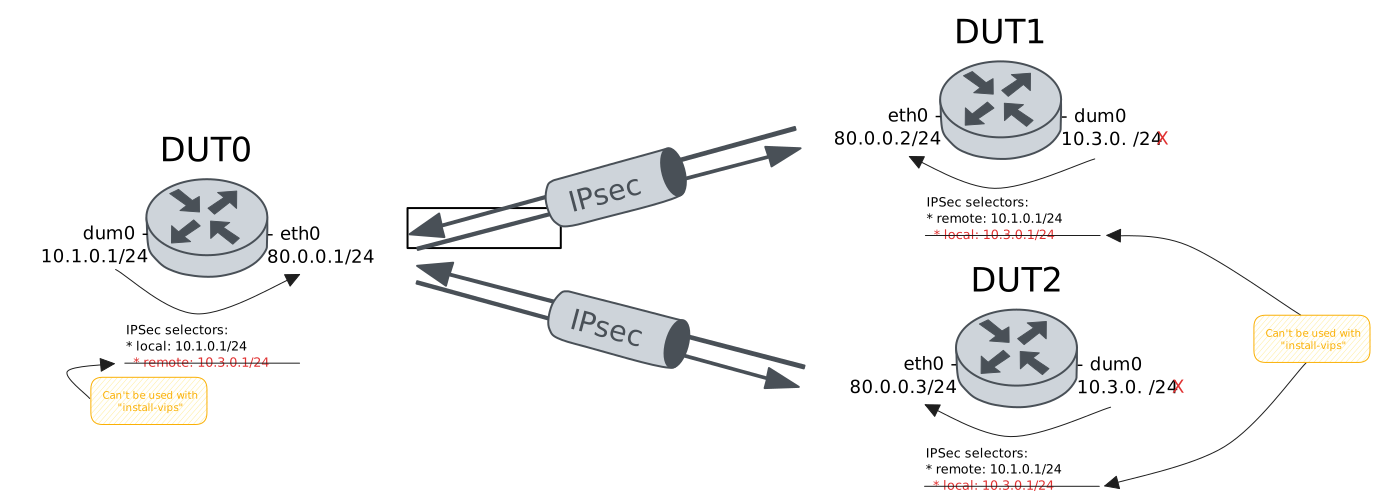
Test Site-To-Site VIP Pool And A Single Client
Description
In this scenario, DUT1 acts as initiator
and requests a VIP from the DUT0 pool.
Scenario
Step 1: Set the following configuration in DUT0 :
set interfaces dummy dum0 address 10.1.0.1/24
set interfaces ethernet eth0 address 80.0.0.1/24
set protocols static route 10.3.0.0/24 interface eth0
set system login user admin authentication encrypted-password '$6$GSjsCj8gHLv$/VcqU6FLi6CT2Oxn0MJQ2C2tqnRDrYKNF8HIYWJp68nvXvPdFccDsT04.WtigUONbKYrgKg8d6rEs8PjljMkH0'
set vpn ipsec auth-profile AUTH-SA global-secrets ike-psk %any encrypted-secret U2FsdGVkX18n8fotucgsTi+aug0WVKq/iaUGCT2ZIwI=
set vpn ipsec auth-profile AUTH-SA local auth ike-psk id %any
set vpn ipsec auth-profile AUTH-SA remote auth ike-psk id %any
set vpn ipsec esp-group CHILD-SA mode tunnel
set vpn ipsec esp-group CHILD-SA proposal 1 encryption aes256gcm128
set vpn ipsec esp-group CHILD-SA proposal 1 pfs dh-group19
set vpn ipsec ike-group IKE-SA key-exchange ikev2
set vpn ipsec ike-group IKE-SA proposal 1 dh-group 19
set vpn ipsec ike-group IKE-SA proposal 1 encryption aes256gcm128
set vpn ipsec ike-group IKE-SA proposal 1 hash sha256
set vpn ipsec pool POOL prefix 10.3.0.0/24
set vpn ipsec site-to-site peer PEER auth-profile AUTH-SA
set vpn ipsec site-to-site peer PEER connection-type respond
set vpn ipsec site-to-site peer PEER default-esp-group CHILD-SA
set vpn ipsec site-to-site peer PEER ike-group IKE-SA
set vpn ipsec site-to-site peer PEER pool POOL
set vpn ipsec site-to-site peer PEER tunnel 1 local prefix 10.1.0.0/24
Step 2: Set the following configuration in DUT1 :
set interfaces dummy dum0
set interfaces ethernet eth0 address 80.0.0.2/24
set protocols static route 10.1.0.0/24 interface eth0
set system login user admin authentication encrypted-password '$6$GSjsCj8gHLv$/VcqU6FLi6CT2Oxn0MJQ2C2tqnRDrYKNF8HIYWJp68nvXvPdFccDsT04.WtigUONbKYrgKg8d6rEs8PjljMkH0'
set vpn ipsec auth-profile AUTH-SA global-secrets ike-psk %any encrypted-secret U2FsdGVkX190Cdr6IHEcvtkdjvvNTWzGvbLdB3StCaM=
set vpn ipsec auth-profile AUTH-SA local auth ike-psk id %any
set vpn ipsec auth-profile AUTH-SA remote auth ike-psk id %any
set vpn ipsec esp-group CHILD-SA mode tunnel
set vpn ipsec esp-group CHILD-SA proposal 1 encryption aes256gcm128
set vpn ipsec esp-group CHILD-SA proposal 1 pfs dh-group19
set vpn ipsec ike-group IKE-SA key-exchange ikev2
set vpn ipsec ike-group IKE-SA proposal 1 dh-group 19
set vpn ipsec ike-group IKE-SA proposal 1 encryption aes256gcm128
set vpn ipsec ike-group IKE-SA proposal 1 hash sha256
set vpn ipsec site-to-site peer PEER auth-profile AUTH-SA
set vpn ipsec site-to-site peer PEER connection-type initiate
set vpn ipsec site-to-site peer PEER default-esp-group CHILD-SA
set vpn ipsec site-to-site peer PEER ike-group IKE-SA
set vpn ipsec site-to-site peer PEER install-vips interface dum0
set vpn ipsec site-to-site peer PEER remote-address 80.0.0.1
set vpn ipsec site-to-site peer PEER tunnel 1 remote prefix 10.1.0.0/24
Step 3: Ping the IP address 80.0.0.1 from DUT1:
admin@DUT1$ ping 80.0.0.1 count 1 size 56 timeout 1Show output
PING 80.0.0.1 (80.0.0.1) 56(84) bytes of data.
64 bytes from 80.0.0.1: icmp_seq=1 ttl=64 time=0.512 ms

--- 80.0.0.1 ping statistics ---
1 packets transmitted, 1 received, 0% packet loss, time 0ms
rtt min/avg/max/mdev = 0.512/0.512/0.512/0.000 ms
Step 4: Ping the IP address 80.0.0.2 from DUT0:
admin@DUT0$ ping 80.0.0.2 count 1 size 56 timeout 1Show output
PING 80.0.0.2 (80.0.0.2) 56(84) bytes of data.
64 bytes from 80.0.0.2: icmp_seq=1 ttl=64 time=0.393 ms

--- 80.0.0.2 ping statistics ---
1 packets transmitted, 1 received, 0% packet loss, time 0ms
rtt min/avg/max/mdev = 0.393/0.393/0.393/0.000 ms
Step 5: Run the command interfaces dummy dum0 show on DUT1 and expect the following output:
Show output
----------------------------------------------------------------
Name          IP Address           Admin  Oper  Vrf  Description
----------------------------------------------------------------
dum0  10.3.0.1/32                  up     up
      fe80::58f5:dff:fe6e:278d/64
Step 6: Run the command vpn ipsec show sa on DUT1 and check whether the output matches the following regular expressions:
peer-PEER-tunnel-\d+.+INSTALLEDShow output
vpn-peer-PEER: #1, ESTABLISHED, IKEv2, 73238be1b4e92eaa_i* c0bdf5bdbd2ebe46_r
local  '80.0.0.2' @ 80.0.0.2[4500] [10.3.0.1]
remote '80.0.0.1' @ 80.0.0.1[4500]
AES_GCM_16-256/PRF_HMAC_SHA2_256/ECP_256
established 1s ago, rekeying in 18817s
peer-PEER-tunnel-1: #1, reqid 1, INSTALLED, TUNNEL-in-UDP, ESP:AES_GCM_16-256
installed 1s ago, rekeying in 3324s, expires in 3959s
in  cd271432,      0 bytes,     0 packets
out c1a566a6,      0 bytes,     0 packets
local  10.3.0.1/32
remote 10.1.0.0/24
Step 7: Ping the IP address 10.1.0.1 from DUT1:
admin@DUT1$ ping 10.1.0.1 local-address 10.3.0.1 count 1 size 56 timeout 1Show output
PING 10.1.0.1 (10.1.0.1) from 10.3.0.1 : 56(84) bytes of data.
64 bytes from 10.1.0.1: icmp_seq=1 ttl=64 time=1.10 ms

--- 10.1.0.1 ping statistics ---
1 packets transmitted, 1 received, 0% packet loss, time 0ms
rtt min/avg/max/mdev = 1.099/1.099/1.099/0.000 ms
Step 8: Initiate a tcp connection from DUT1 to DUT0 and exchange messages between both endpoints
admin@DUT0$ monitor test connection server 8080 tcp
admin@DUT1$ monitor test connection client 10.1.0.1 8080 tcp local-address 10.3.0.1
Step 9: Run the command vpn ipsec show sa on DUT1 and check whether the output matches the following regular expressions:
[1-9]\d? packetsShow output
vpn-peer-PEER: #1, ESTABLISHED, IKEv2, 73238be1b4e92eaa_i* c0bdf5bdbd2ebe46_r
local  '80.0.0.2' @ 80.0.0.2[4500] [10.3.0.1]
remote '80.0.0.1' @ 80.0.0.1[4500]
AES_GCM_16-256/PRF_HMAC_SHA2_256/ECP_256
established 4s ago, rekeying in 18814s
peer-PEER-tunnel-1: #1, reqid 1, INSTALLED, TUNNEL-in-UDP, ESP:AES_GCM_16-256
installed 4s ago, rekeying in 3321s, expires in 3956s
in  cd271432,    764 bytes,    12 packets,     0s ago
out c1a566a6,    764 bytes,    12 packets,     0s ago
local  10.3.0.1/32
remote 10.1.0.0/24
Step 10: Run the command vpn ipsec show pool summary on DUT0 and check whether the output matches the following regular expressions:
1\s+0\s+\d+Show output
--------------------------------------
pool  base IP   online  offline  total
--------------------------------------
POOL  10.3.0.0       1        0    254
Test Site-To-Site VIP Pool And A Single Client Using On-Demand Connection-Type
Description
In this scenario, DUT1 requests a VIP from
the DUT0 pool. Both devices use
on-demand as a connection-type.
Scenario
Step 1: Set the following configuration in DUT0 :
set interfaces dummy dum0 address 10.1.0.1/24
set interfaces ethernet eth0 address 80.0.0.1/24
set protocols static route 10.3.0.0/24 interface eth0
set system login user admin authentication encrypted-password '$6$GSjsCj8gHLv$/VcqU6FLi6CT2Oxn0MJQ2C2tqnRDrYKNF8HIYWJp68nvXvPdFccDsT04.WtigUONbKYrgKg8d6rEs8PjljMkH0'
set vpn ipsec auth-profile AUTH-SA global-secrets ike-psk %any encrypted-secret U2FsdGVkX19Nzwbf2vCCD7IvcEWIjgrZoz1VS2rxZrs=
set vpn ipsec auth-profile AUTH-SA local auth ike-psk id %any
set vpn ipsec auth-profile AUTH-SA remote auth ike-psk id %any
set vpn ipsec esp-group CHILD-SA mode tunnel
set vpn ipsec esp-group CHILD-SA proposal 1 encryption aes256gcm128
set vpn ipsec esp-group CHILD-SA proposal 1 pfs dh-group19
set vpn ipsec ike-group IKE-SA key-exchange ikev2
set vpn ipsec ike-group IKE-SA proposal 1 dh-group 19
set vpn ipsec ike-group IKE-SA proposal 1 encryption aes256gcm128
set vpn ipsec ike-group IKE-SA proposal 1 hash sha256
set vpn ipsec pool POOL prefix 10.3.0.0/24
set vpn ipsec site-to-site peer PEER auth-profile AUTH-SA
set vpn ipsec site-to-site peer PEER connection-type on-demand
set vpn ipsec site-to-site peer PEER default-esp-group CHILD-SA
set vpn ipsec site-to-site peer PEER ike-group IKE-SA
set vpn ipsec site-to-site peer PEER pool POOL
set vpn ipsec site-to-site peer PEER tunnel 1 local prefix 10.1.0.0/24
Step 2: Set the following configuration in DUT1 :
set interfaces dummy dum0
set interfaces ethernet eth0 address 80.0.0.2/24
set protocols static route 10.1.0.0/24 interface eth0
set system login user admin authentication encrypted-password '$6$GSjsCj8gHLv$/VcqU6FLi6CT2Oxn0MJQ2C2tqnRDrYKNF8HIYWJp68nvXvPdFccDsT04.WtigUONbKYrgKg8d6rEs8PjljMkH0'
set vpn ipsec auth-profile AUTH-SA global-secrets ike-psk %any encrypted-secret U2FsdGVkX1/DaGVpH7nuGGaSO3KMXsCZqxLt2oi3fqI=
set vpn ipsec auth-profile AUTH-SA local auth ike-psk id %any
set vpn ipsec auth-profile AUTH-SA remote auth ike-psk id %any
set vpn ipsec esp-group CHILD-SA mode tunnel
set vpn ipsec esp-group CHILD-SA proposal 1 encryption aes256gcm128
set vpn ipsec esp-group CHILD-SA proposal 1 pfs dh-group19
set vpn ipsec ike-group IKE-SA key-exchange ikev2
set vpn ipsec ike-group IKE-SA proposal 1 dh-group 19
set vpn ipsec ike-group IKE-SA proposal 1 encryption aes256gcm128
set vpn ipsec ike-group IKE-SA proposal 1 hash sha256
set vpn ipsec site-to-site peer PEER auth-profile AUTH-SA
set vpn ipsec site-to-site peer PEER connection-type on-demand
set vpn ipsec site-to-site peer PEER default-esp-group CHILD-SA
set vpn ipsec site-to-site peer PEER ike-group IKE-SA
set vpn ipsec site-to-site peer PEER install-vips interface dum0
set vpn ipsec site-to-site peer PEER remote-address 80.0.0.1
set vpn ipsec site-to-site peer PEER tunnel 1 remote prefix 10.1.0.0/24
Step 3: Ping the IP address 80.0.0.1 from DUT1:
admin@DUT1$ ping 80.0.0.1 count 1 size 56 timeout 1Show output
PING 80.0.0.1 (80.0.0.1) 56(84) bytes of data.
64 bytes from 80.0.0.1: icmp_seq=1 ttl=64 time=0.429 ms

--- 80.0.0.1 ping statistics ---
1 packets transmitted, 1 received, 0% packet loss, time 0ms
rtt min/avg/max/mdev = 0.429/0.429/0.429/0.000 ms
Step 4: Ping the IP address 80.0.0.2 from DUT0:
admin@DUT0$ ping 80.0.0.2 count 1 size 56 timeout 1Show output
PING 80.0.0.2 (80.0.0.2) 56(84) bytes of data.
64 bytes from 80.0.0.2: icmp_seq=1 ttl=64 time=0.312 ms

--- 80.0.0.2 ping statistics ---
1 packets transmitted, 1 received, 0% packet loss, time 0ms
rtt min/avg/max/mdev = 0.312/0.312/0.312/0.000 ms
Step 5: Expect a failure in the following command:
Ping the IP address 10.1.0.1 from DUT1:
admin@DUT1$ ping 10.1.0.1 count 5 size 56 timeout 1Show output
PING 10.1.0.1 (10.1.0.1) 56(84) bytes of data.

--- 10.1.0.1 ping statistics ---
5 packets transmitted, 0 received, 100% packet loss, time 4084ms
Step 6: Run the command interfaces dummy dum0 show on DUT1 and expect the following output:
Show output
---------------------------------------------------------------
Name          IP Address          Admin  Oper  Vrf  Description
---------------------------------------------------------------
dum0  10.3.0.1/32                 up     up
      fe80::d7:e2ff:fe3a:6961/64
Step 7: Run the command vpn ipsec show sa on DUT1 and check whether the output matches the following regular expressions:
peer-PEER-tunnel-\d+.+INSTALLEDShow output
vpn-peer-PEER: #1, ESTABLISHED, IKEv2, 6f8ee02c7d13f917_i* fa56af6cb5114d25_r
local  '80.0.0.2' @ 80.0.0.2[4500] [10.3.0.1]
remote '80.0.0.1' @ 80.0.0.1[4500]
AES_GCM_16-256/PRF_HMAC_SHA2_256/ECP_256
established 5s ago, rekeying in 17828s
peer-PEER-tunnel-1: #2, reqid 1, INSTALLED, TUNNEL-in-UDP, ESP:AES_GCM_16-256
installed 5s ago, rekeying in 3280s, expires in 3955s
in  c5e7a405,      0 bytes,     0 packets
out c646c624,    336 bytes,     4 packets,     1s ago
local  10.3.0.1/32
remote 10.1.0.0/24
Step 8: Ping the IP address 10.1.0.1 from DUT1:
admin@DUT1$ ping 10.1.0.1 local-address 10.3.0.1 count 1 size 56 timeout 1Show output
PING 10.1.0.1 (10.1.0.1) from 10.3.0.1 : 56(84) bytes of data.
64 bytes from 10.1.0.1: icmp_seq=1 ttl=64 time=0.472 ms

--- 10.1.0.1 ping statistics ---
1 packets transmitted, 1 received, 0% packet loss, time 0ms
rtt min/avg/max/mdev = 0.472/0.472/0.472/0.000 ms
Step 9: Initiate a tcp connection from DUT1 to DUT0 and exchange messages between both endpoints
admin@DUT0$ monitor test connection server 8080 tcp
admin@DUT1$ monitor test connection client 10.1.0.1 8080 tcp local-address 10.3.0.1
Step 10: Run the command vpn ipsec show sa on DUT1 and check whether the output matches the following regular expressions:
[1-9]\d? packetsShow output
vpn-peer-PEER: #1, ESTABLISHED, IKEv2, 6f8ee02c7d13f917_i* fa56af6cb5114d25_r
local  '80.0.0.2' @ 80.0.0.2[4500] [10.3.0.1]
remote '80.0.0.1' @ 80.0.0.1[4500]
AES_GCM_16-256/PRF_HMAC_SHA2_256/ECP_256
established 8s ago, rekeying in 17825s
peer-PEER-tunnel-1: #2, reqid 1, INSTALLED, TUNNEL-in-UDP, ESP:AES_GCM_16-256
installed 8s ago, rekeying in 3277s, expires in 3952s
in  c5e7a405,    660 bytes,    10 packets,     0s ago
out c646c624,   1152 bytes,    17 packets,     0s ago
local  10.3.0.1/32
remote 10.1.0.0/24
Step 11: Run the command vpn ipsec show pool summary on DUT0 and check whether the output matches the following regular expressions:
1\s+0\s+\d+Show output
--------------------------------------
pool  base IP   online  offline  total
--------------------------------------
POOL  10.3.0.0       1        0    254
Test Site-To-Site VIP Pool And Multiple Clients
Description
In this scenario, DUT0 install routes
in a separate VRF called LAN.
Scenario
Step 1: Set the following configuration in DUT0 :
set interfaces dummy dum0 address 10.1.0.1/24
set interfaces ethernet eth0 address 80.0.0.1/24
set protocols static route 10.3.0.0/24 interface eth0
set system login user admin authentication encrypted-password '$6$GSjsCj8gHLv$/VcqU6FLi6CT2Oxn0MJQ2C2tqnRDrYKNF8HIYWJp68nvXvPdFccDsT04.WtigUONbKYrgKg8d6rEs8PjljMkH0'
set vpn ipsec auth-profile AUTH-SA global-secrets ike-psk %any encrypted-secret U2FsdGVkX1/zJz4kXpigMVSm9MDwx2malcgsZGTH9SI=
set vpn ipsec auth-profile AUTH-SA local auth ike-psk id %any
set vpn ipsec auth-profile AUTH-SA remote auth ike-psk id %any
set vpn ipsec esp-group CHILD-SA mode tunnel
set vpn ipsec esp-group CHILD-SA proposal 1 encryption aes256gcm128
set vpn ipsec esp-group CHILD-SA proposal 1 pfs dh-group19
set vpn ipsec ike-group IKE-SA key-exchange ikev2
set vpn ipsec ike-group IKE-SA proposal 1 dh-group 19
set vpn ipsec ike-group IKE-SA proposal 1 encryption aes256gcm128
set vpn ipsec ike-group IKE-SA proposal 1 hash sha256
set vpn ipsec pool POOL prefix 10.3.0.0/24
set vpn ipsec site-to-site peer PEER auth-profile AUTH-SA
set vpn ipsec site-to-site peer PEER connection-type respond
set vpn ipsec site-to-site peer PEER default-esp-group CHILD-SA
set vpn ipsec site-to-site peer PEER ike-group IKE-SA
set vpn ipsec site-to-site peer PEER pool POOL
set vpn ipsec site-to-site peer PEER tunnel 1 local prefix 10.1.0.0/24
Step 2: Set the following configuration in DUT1 :
set interfaces dummy dum0
set interfaces ethernet eth0 address 80.0.0.2/24
set protocols static route 10.1.0.0/24 interface eth0
set system login user admin authentication encrypted-password '$6$GSjsCj8gHLv$/VcqU6FLi6CT2Oxn0MJQ2C2tqnRDrYKNF8HIYWJp68nvXvPdFccDsT04.WtigUONbKYrgKg8d6rEs8PjljMkH0'
set vpn ipsec auth-profile AUTH-SA global-secrets ike-psk %any encrypted-secret U2FsdGVkX1/GQ/oXLs2bEOW7prPq2ERxqU76PBF8fdk=
set vpn ipsec auth-profile AUTH-SA local auth ike-psk id %any
set vpn ipsec auth-profile AUTH-SA remote auth ike-psk id %any
set vpn ipsec esp-group CHILD-SA mode tunnel
set vpn ipsec esp-group CHILD-SA proposal 1 encryption aes256gcm128
set vpn ipsec esp-group CHILD-SA proposal 1 pfs dh-group19
set vpn ipsec ike-group IKE-SA key-exchange ikev2
set vpn ipsec ike-group IKE-SA proposal 1 dh-group 19
set vpn ipsec ike-group IKE-SA proposal 1 encryption aes256gcm128
set vpn ipsec ike-group IKE-SA proposal 1 hash sha256
set vpn ipsec site-to-site peer PEER auth-profile AUTH-SA
set vpn ipsec site-to-site peer PEER connection-type initiate
set vpn ipsec site-to-site peer PEER default-esp-group CHILD-SA
set vpn ipsec site-to-site peer PEER ike-group IKE-SA
set vpn ipsec site-to-site peer PEER install-vips interface dum0
set vpn ipsec site-to-site peer PEER remote-address 80.0.0.1
set vpn ipsec site-to-site peer PEER tunnel 1 remote prefix 10.1.0.0/24
Step 3: Ping the IP address 80.0.0.1 from DUT1:
admin@DUT1$ ping 80.0.0.1 count 1 size 56 timeout 1Show output
PING 80.0.0.1 (80.0.0.1) 56(84) bytes of data.
64 bytes from 80.0.0.1: icmp_seq=1 ttl=64 time=0.482 ms

--- 80.0.0.1 ping statistics ---
1 packets transmitted, 1 received, 0% packet loss, time 0ms
rtt min/avg/max/mdev = 0.482/0.482/0.482/0.000 ms
Step 4: Ping the IP address 80.0.0.2 from DUT0:
admin@DUT0$ ping 80.0.0.2 count 1 size 56 timeout 1Show output
PING 80.0.0.2 (80.0.0.2) 56(84) bytes of data.
64 bytes from 80.0.0.2: icmp_seq=1 ttl=64 time=0.273 ms

--- 80.0.0.2 ping statistics ---
1 packets transmitted, 1 received, 0% packet loss, time 0ms
rtt min/avg/max/mdev = 0.273/0.273/0.273/0.000 ms
Step 5: Set the following configuration in DUT2 :
set interfaces dummy dum0
set interfaces ethernet eth0 address 80.0.0.3/24
set protocols static route 10.1.0.0/24 interface eth0
set system login user admin authentication encrypted-password '$6$GSjsCj8gHLv$/VcqU6FLi6CT2Oxn0MJQ2C2tqnRDrYKNF8HIYWJp68nvXvPdFccDsT04.WtigUONbKYrgKg8d6rEs8PjljMkH0'
set vpn ipsec auth-profile AUTH-SA global-secrets ike-psk %any encrypted-secret U2FsdGVkX1+TDUfRAejOXhD6IQQ6ehL9BjxzNrFHwNI=
set vpn ipsec auth-profile AUTH-SA local auth ike-psk id %any
set vpn ipsec auth-profile AUTH-SA remote auth ike-psk id %any
set vpn ipsec esp-group CHILD-SA proposal 1 encryption aes256gcm128
set vpn ipsec esp-group CHILD-SA proposal 1 pfs dh-group19
set vpn ipsec ike-group IKE-SA key-exchange ikev2
set vpn ipsec ike-group IKE-SA proposal 1 dh-group 19
set vpn ipsec ike-group IKE-SA proposal 1 encryption aes256gcm128
set vpn ipsec ike-group IKE-SA proposal 1 hash sha256
set vpn ipsec site-to-site peer PEER auth-profile AUTH-SA
set vpn ipsec site-to-site peer PEER default-esp-group CHILD-SA
set vpn ipsec site-to-site peer PEER ike-group IKE-SA
set vpn ipsec site-to-site peer PEER install-vips interface dum0
set vpn ipsec site-to-site peer PEER remote-address 80.0.0.1
set vpn ipsec site-to-site peer PEER tunnel 1 remote prefix 10.1.0.0/24
Step 6: Run the command interfaces dummy dum0 show on DUT1 and expect the following output:
Show output
-----------------------------------------------------------------
Name           IP Address           Admin  Oper  Vrf  Description
-----------------------------------------------------------------
dum0  10.3.0.1/32                   up     up
      fe80::5c15:62ff:fed2:5f4b/64
Step 7: Run the command vpn ipsec show sa on DUT1 and check whether the output matches the following regular expressions:
peer-PEER-tunnel-\d+.+INSTALLEDShow output
vpn-peer-PEER: #1, ESTABLISHED, IKEv2, 4dfee7ec6b1b6e7b_i* 7d5e8521e4c9445e_r
local  '80.0.0.2' @ 80.0.0.2[4500] [10.3.0.1]
remote '80.0.0.1' @ 80.0.0.1[4500]
AES_GCM_16-256/PRF_HMAC_SHA2_256/ECP_256
established 5s ago, rekeying in 25720s
peer-PEER-tunnel-1: #1, reqid 1, INSTALLED, TUNNEL-in-UDP, ESP:AES_GCM_16-256
installed 5s ago, rekeying in 3309s, expires in 3955s
in  c1db487f,      0 bytes,     0 packets
out caeee143,      0 bytes,     0 packets
local  10.3.0.1/32
remote 10.1.0.0/24
Step 8: Ping the IP address 10.1.0.1 from DUT1:
admin@DUT1$ ping 10.1.0.1 local-address 10.3.0.1 count 1 size 56 timeout 1Show output
PING 10.1.0.1 (10.1.0.1) from 10.3.0.1 : 56(84) bytes of data.
64 bytes from 10.1.0.1: icmp_seq=1 ttl=64 time=1.02 ms

--- 10.1.0.1 ping statistics ---
1 packets transmitted, 1 received, 0% packet loss, time 0ms
rtt min/avg/max/mdev = 1.019/1.019/1.019/0.000 ms
Step 9: Initiate a tcp connection from DUT1 to DUT0 and exchange messages between both endpoints
admin@DUT0$ monitor test connection server 8080 tcp
admin@DUT1$ monitor test connection client 10.1.0.1 8080 tcp local-address 10.3.0.1
Step 10: Run the command vpn ipsec show sa on DUT1 and check whether the output matches the following regular expressions:
[1-9]\d? packetsShow output
vpn-peer-PEER: #1, ESTABLISHED, IKEv2, 4dfee7ec6b1b6e7b_i* 7d5e8521e4c9445e_r
local  '80.0.0.2' @ 80.0.0.2[4500] [10.3.0.1]
remote '80.0.0.1' @ 80.0.0.1[4500]
AES_GCM_16-256/PRF_HMAC_SHA2_256/ECP_256
established 8s ago, rekeying in 25717s
peer-PEER-tunnel-1: #1, reqid 1, INSTALLED, TUNNEL-in-UDP, ESP:AES_GCM_16-256
installed 8s ago, rekeying in 3306s, expires in 3952s
in  c1db487f,    868 bytes,    14 packets,     1s ago
out caeee143,    868 bytes,    14 packets,     1s ago
local  10.3.0.1/32
remote 10.1.0.0/24
Step 11: Run the command interfaces dummy dum0 show on DUT2 and expect the following output:
Show output
-----------------------------------------------------------------
Name           IP Address           Admin  Oper  Vrf  Description
-----------------------------------------------------------------
dum0  10.3.0.2/32                   up     up
      fe80::948b:e9ff:fec5:c54d/64
Step 12: Run the command vpn ipsec show sa on DUT2 and check whether the output matches the following regular expressions:
peer-PEER-tunnel-\d+.+INSTALLEDShow output
vpn-peer-PEER: #1, ESTABLISHED, IKEv2, 5dcc4da12462be18_i* e7aa74c499d82228_r
local  '80.0.0.3' @ 80.0.0.3[4500] [10.3.0.2]
remote '80.0.0.1' @ 80.0.0.1[4500]
AES_GCM_16-256/PRF_HMAC_SHA2_256/ECP_256
established 4s ago, rekeying in 15260s
peer-PEER-tunnel-1: #1, reqid 1, INSTALLED, TUNNEL-in-UDP, ESP:AES_GCM_16-256
installed 4s ago, rekeying in 3255s, expires in 3956s
in  cb6b2ded,      0 bytes,     0 packets
out c8027e0d,      0 bytes,     0 packets
local  10.3.0.2/32
remote 10.1.0.0/24
Step 13: Ping the IP address 10.1.0.1 from DUT2:
admin@DUT2$ ping 10.1.0.1 local-address 10.3.0.2 count 1 size 56 timeout 1Show output
PING 10.1.0.1 (10.1.0.1) from 10.3.0.2 : 56(84) bytes of data.
64 bytes from 10.1.0.1: icmp_seq=1 ttl=64 time=0.834 ms

--- 10.1.0.1 ping statistics ---
1 packets transmitted, 1 received, 0% packet loss, time 0ms
rtt min/avg/max/mdev = 0.834/0.834/0.834/0.000 ms
Step 14: Initiate a tcp connection from DUT2 to DUT0 and exchange messages between both endpoints
admin@DUT0$ monitor test connection server 8080 tcp
admin@DUT2$ monitor test connection client 10.1.0.1 8080 tcp local-address 10.3.0.2
Step 15: Run the command vpn ipsec show sa on DUT2 and check whether the output matches the following regular expressions:
[1-9]\d? packetsShow output
vpn-peer-PEER: #1, ESTABLISHED, IKEv2, 5dcc4da12462be18_i* e7aa74c499d82228_r
local  '80.0.0.3' @ 80.0.0.3[4500] [10.3.0.2]
remote '80.0.0.1' @ 80.0.0.1[4500]
AES_GCM_16-256/PRF_HMAC_SHA2_256/ECP_256
established 7s ago, rekeying in 15257s
peer-PEER-tunnel-1: #1, reqid 1, INSTALLED, TUNNEL-in-UDP, ESP:AES_GCM_16-256
installed 7s ago, rekeying in 3252s, expires in 3953s
in  cb6b2ded,    660 bytes,    10 packets,     0s ago
out c8027e0d,    764 bytes,    12 packets,     0s ago
local  10.3.0.2/32
remote 10.1.0.0/24
Step 16: Run the command vpn ipsec show pool summary on DUT0 and check whether the output matches the following regular expressions:
2\s+0\s+\d+Show output
--------------------------------------
pool  base IP   online  offline  total
--------------------------------------
POOL  10.3.0.0       2        0    254