Round-Robin
These scenarios cover some aspects related to link-aggregation (combining multiple network connections simultaneously to increase throughput, provide redundancy, or both). In OSDx, this can be achieved through bonding interfaces.
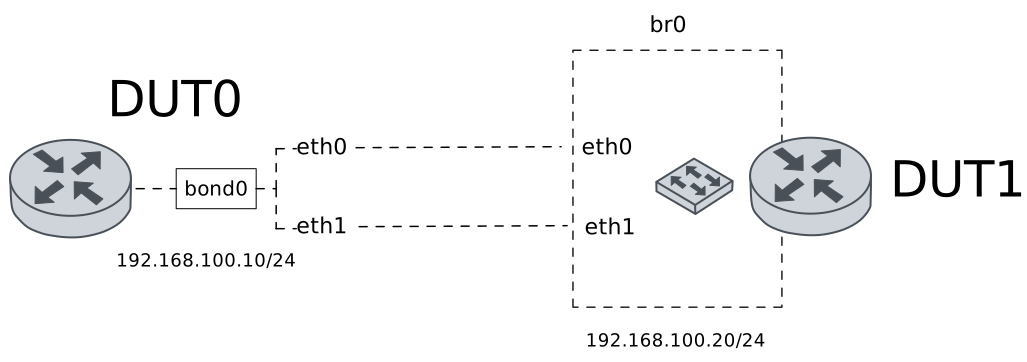
Test Round-Robin
Description
A bonding interface is configured in DUT0 using the round-robin mode. This mode can be used to achieve load-balancing.
Scenario
Example 1
Step 1: Set the following configuration in DUT0 :
set interfaces bonding bond0 address 192.168.100.10/24
set interfaces bonding bond0 miimon 100
set interfaces bonding bond0 mode round-robin
set interfaces ethernet eth0p0 bond-group bond0
set interfaces ethernet eth1 bond-group bond0
set system login user admin authentication encrypted-password '$6$GSjsCj8gHLv$/VcqU6FLi6CT2Oxn0MJQ2C2tqnRDrYKNF8HIYWJp68nvXvPdFccDsT04.WtigUONbKYrgKg8d6rEs8PjljMkH0'
Step 2: Set the following configuration in DUT1 :
set interfaces bridge br0 address 192.168.100.20/24
set interfaces bridge br0 stp version rstp
set interfaces ethernet eth0 bridge-group bridge br0
set interfaces ethernet eth1 bridge-group bridge br0
set system login user admin authentication encrypted-password '$6$GSjsCj8gHLv$/VcqU6FLi6CT2Oxn0MJQ2C2tqnRDrYKNF8HIYWJp68nvXvPdFccDsT04.WtigUONbKYrgKg8d6rEs8PjljMkH0'
Step 3: Run the command interfaces bonding show on DUT0 and check whether the output matches the following regular expressions:
bond0\s+192.168.100\.10\/24\s+up\s+upShow output
---------------------------------------------------------------
Name          IP Address          Admin  Oper  Vrf  Description
---------------------------------------------------------------
bond0  192.168.100.10/24          up     up
fe80::2a0:26ff:fe18:c9/64
Step 4: Run the command interfaces bonding bond0 show ports on DUT0 and check whether the output contains the following tokens:
Bonding Mode: load balancing (round-robin)Show output
Ethernet Channel Bonding Driver: v6.12.49

Bonding Mode: load balancing (round-robin)
MII Status: up
MII Polling Interval (ms): 100
Up Delay (ms): 0
Down Delay (ms): 0
Peer Notification Delay (ms): 0

Slave Interface: eth0p0
MII Status: up
Speed: 1000 Mbps
Duplex: full
Link Failure Count: 0
Permanent HW addr: 00:a0:26:18:00:c9
Slave queue ID: 0

Slave Interface: eth1
MII Status: down
Speed: Unknown
Duplex: Unknown
Link Failure Count: 0
Permanent HW addr: 00:a0:26:18:00:ca
Slave queue ID: 0
Step 5: Ping the IP address 192.168.100.20 from DUT0:
admin@DUT0$ ping 192.168.100.20 count 1 size 56 timeout 1Show output
PING 192.168.100.20 (192.168.100.20) 56(84) bytes of data.
64 bytes from 192.168.100.20: icmp_seq=1 ttl=64 time=367 ms

--- 192.168.100.20 ping statistics ---
1 packets transmitted, 1 received, 0% packet loss, time 0ms
rtt min/avg/max/mdev = 367.125/367.125/367.125/0.000 ms
Step 6: Run the command interfaces ethernet clear on DUT0.
Step 7: Initiate a bandwidth test from DUT0 to DUT1
admin@DUT1$ monitor test performance server port 5001
admin@DUT0$ monitor test performance client 192.168.100.20 duration 5 port 5001 parallel 10
Expect the following output on
DUT0:Connecting to host 192.168.100.20, port 5001 [ 5] local 192.168.100.10 port 46894 connected to 192.168.100.20 port 5001 [ 7] local 192.168.100.10 port 46910 connected to 192.168.100.20 port 5001 [ 9] local 192.168.100.10 port 46920 connected to 192.168.100.20 port 5001 [ 11] local 192.168.100.10 port 46928 connected to 192.168.100.20 port 5001 [ 13] local 192.168.100.10 port 46938 connected to 192.168.100.20 port 5001 [ 15] local 192.168.100.10 port 46954 connected to 192.168.100.20 port 5001 [ 17] local 192.168.100.10 port 46966 connected to 192.168.100.20 port 5001 [ 19] local 192.168.100.10 port 46982 connected to 192.168.100.20 port 5001 [ 21] local 192.168.100.10 port 46988 connected to 192.168.100.20 port 5001 [ 23] local 192.168.100.10 port 46998 connected to 192.168.100.20 port 5001 [ ID] Interval Transfer Bitrate Retr Cwnd [ 5] 0.00-1.00 sec 12.0 MBytes 100 Mbits/sec 13 67.9 KBytes [ 7] 0.00-1.00 sec 9.37 MBytes 78.6 Mbits/sec 22 41.0 KBytes [ 9] 0.00-1.00 sec 13.5 MBytes 113 Mbits/sec 25 56.6 KBytes [ 11] 0.00-1.00 sec 11.0 MBytes 92.7 Mbits/sec 22 50.9 KBytes [ 13] 0.00-1.00 sec 11.5 MBytes 96.6 Mbits/sec 17 59.4 KBytes [ 15] 0.00-1.00 sec 10.1 MBytes 85.1 Mbits/sec 17 65.0 KBytes [ 17] 0.00-1.00 sec 9.52 MBytes 79.9 Mbits/sec 20 55.1 KBytes [ 19] 0.00-1.00 sec 11.6 MBytes 97.3 Mbits/sec 19 41.0 KBytes [ 21] 0.00-1.00 sec 13.4 MBytes 112 Mbits/sec 17 72.1 KBytes [ 23] 0.00-1.00 sec 14.0 MBytes 118 Mbits/sec 17 60.8 KBytes [SUM] 0.00-1.00 sec 116 MBytes 974 Mbits/sec 189 - - - - - - - - - - - - - - - - - - - - - - - - - [ 5] 1.00-2.00 sec 12.2 MBytes 102 Mbits/sec 31 55.1 KBytes [ 7] 1.00-2.00 sec 9.32 MBytes 78.2 Mbits/sec 43 56.6 KBytes [ 9] 1.00-2.00 sec 9.26 MBytes 77.7 Mbits/sec 48 59.4 KBytes [ 11] 1.00-2.00 sec 11.1 MBytes 93.3 Mbits/sec 40 73.5 KBytes [ 13] 1.00-2.00 sec 10.6 MBytes 89.1 Mbits/sec 45 59.4 KBytes [ 15] 1.00-2.00 sec 13.7 MBytes 115 Mbits/sec 29 94.7 KBytes [ 17] 1.00-2.00 sec 11.8 MBytes 99.0 Mbits/sec 31 76.4 KBytes [ 19] 1.00-2.00 sec 10.2 MBytes 85.5 Mbits/sec 24 62.2 KBytes [ 21] 1.00-2.00 sec 13.5 MBytes 113 Mbits/sec 38 77.8 KBytes [ 23] 1.00-2.00 sec 10.4 MBytes 87.1 Mbits/sec 36 66.5 KBytes [SUM] 1.00-2.00 sec 112 MBytes 940 Mbits/sec 365 - - - - - - - - - - - - - - - - - - - - - - - - - [ 5] 2.00-3.00 sec 10.5 MBytes 88.1 Mbits/sec 32 84.8 KBytes [ 7] 2.00-3.00 sec 9.57 MBytes 80.3 Mbits/sec 35 62.2 KBytes [ 9] 2.00-3.00 sec 10.0 MBytes 83.9 Mbits/sec 35 72.1 KBytes [ 11] 2.00-3.00 sec 13.2 MBytes 111 Mbits/sec 30 55.1 KBytes [ 13] 2.00-3.00 sec 11.4 MBytes 95.9 Mbits/sec 23 80.6 KBytes [ 15] 2.00-3.00 sec 10.0 MBytes 83.9 Mbits/sec 35 49.5 KBytes [ 17] 2.00-3.00 sec 11.5 MBytes 96.4 Mbits/sec 30 62.2 KBytes [ 19] 2.00-3.00 sec 12.2 MBytes 103 Mbits/sec 38 76.4 KBytes [ 21] 2.00-3.00 sec 12.2 MBytes 103 Mbits/sec 26 87.7 KBytes [ 23] 2.00-3.00 sec 11.3 MBytes 94.9 Mbits/sec 17 82.0 KBytes [SUM] 2.00-3.00 sec 112 MBytes 939 Mbits/sec 301 - - - - - - - - - - - - - - - - - - - - - - - - - [ 5] 3.00-4.00 sec 10.3 MBytes 86.0 Mbits/sec 50 59.4 KBytes [ 7] 3.00-4.00 sec 10.6 MBytes 88.6 Mbits/sec 53 56.6 KBytes [ 9] 3.00-4.00 sec 11.7 MBytes 98.0 Mbits/sec 39 82.0 KBytes [ 11] 3.00-4.00 sec 12.6 MBytes 105 Mbits/sec 4 90.5 KBytes [ 13] 3.00-4.00 sec 11.0 MBytes 92.3 Mbits/sec 52 53.7 KBytes [ 15] 3.00-4.00 sec 10.8 MBytes 90.2 Mbits/sec 38 63.6 KBytes [ 17] 3.00-4.00 sec 10.9 MBytes 91.2 Mbits/sec 35 97.6 KBytes [ 19] 3.00-4.00 sec 12.1 MBytes 102 Mbits/sec 50 83.4 KBytes [ 21] 3.00-4.00 sec 10.6 MBytes 88.6 Mbits/sec 53 28.3 KBytes [ 23] 3.00-4.00 sec 11.7 MBytes 98.5 Mbits/sec 56 66.5 KBytes [SUM] 3.00-4.00 sec 112 MBytes 940 Mbits/sec 430 - - - - - - - - - - - - - - - - - - - - - - - - - [ 5] 4.00-5.00 sec 11.5 MBytes 96.4 Mbits/sec 19 63.6 KBytes [ 7] 4.00-5.00 sec 11.4 MBytes 95.4 Mbits/sec 42 90.5 KBytes [ 9] 4.00-5.00 sec 10.0 MBytes 83.9 Mbits/sec 20 87.7 KBytes [ 11] 4.00-5.00 sec 12.1 MBytes 102 Mbits/sec 56 38.2 KBytes [ 13] 4.00-5.00 sec 10.4 MBytes 87.6 Mbits/sec 27 63.6 KBytes [ 15] 4.00-5.00 sec 10.8 MBytes 90.2 Mbits/sec 26 90.5 KBytes [ 17] 4.00-5.00 sec 12.5 MBytes 105 Mbits/sec 39 90.5 KBytes [ 19] 4.00-5.00 sec 12.8 MBytes 107 Mbits/sec 56 45.2 KBytes [ 21] 4.00-5.00 sec 11.1 MBytes 92.8 Mbits/sec 20 58.0 KBytes [ 23] 4.00-5.00 sec 9.01 MBytes 75.6 Mbits/sec 58 49.5 KBytes [SUM] 4.00-5.00 sec 112 MBytes 936 Mbits/sec 363 - - - - - - - - - - - - - - - - - - - - - - - - - [ ID] Interval Transfer Bitrate Retr [ 5] 0.00-5.00 sec 56.4 MBytes 94.6 Mbits/sec 145 sender [ 5] 0.00-5.01 sec 55.9 MBytes 93.6 Mbits/sec receiver [ 7] 0.00-5.00 sec 50.2 MBytes 84.2 Mbits/sec 195 sender [ 7] 0.00-5.01 sec 49.9 MBytes 83.6 Mbits/sec receiver [ 9] 0.00-5.00 sec 54.5 MBytes 91.4 Mbits/sec 167 sender [ 9] 0.00-5.01 sec 54.1 MBytes 90.7 Mbits/sec receiver [ 11] 0.00-5.00 sec 60.0 MBytes 101 Mbits/sec 152 sender [ 11] 0.00-5.01 sec 59.5 MBytes 99.7 Mbits/sec receiver [ 13] 0.00-5.00 sec 55.0 MBytes 92.3 Mbits/sec 164 sender [ 13] 0.00-5.01 sec 54.5 MBytes 91.3 Mbits/sec receiver [ 15] 0.00-5.00 sec 55.3 MBytes 92.8 Mbits/sec 145 sender [ 15] 0.00-5.01 sec 54.7 MBytes 91.6 Mbits/sec receiver [ 17] 0.00-5.00 sec 56.2 MBytes 94.3 Mbits/sec 155 sender [ 17] 0.00-5.01 sec 55.8 MBytes 93.5 Mbits/sec receiver [ 19] 0.00-5.00 sec 59.0 MBytes 98.9 Mbits/sec 187 sender [ 19] 0.00-5.01 sec 58.4 MBytes 97.8 Mbits/sec receiver [ 21] 0.00-5.00 sec 60.8 MBytes 102 Mbits/sec 154 sender [ 21] 0.00-5.01 sec 60.2 MBytes 101 Mbits/sec receiver [ 23] 0.00-5.00 sec 56.5 MBytes 94.7 Mbits/sec 184 sender [ 23] 0.00-5.01 sec 56.0 MBytes 93.9 Mbits/sec receiver [SUM] 0.00-5.00 sec 564 MBytes 946 Mbits/sec 1648 sender [SUM] 0.00-5.01 sec 559 MBytes 937 Mbits/sec receiver iperf Done.
Step 8: Run the command interfaces ethernet show counters on DUT0 and check whether the output matches the following regular expressions:
eth1 \s+up\s+\d+\s+\d+\s+0\s+\d{2,}
eth0p0 \s+up\s+\d+\s+\d+\s+0\s+\d{2,}
Show output
-------------------------------------------------------------------------------
Name   Oper  Rx Packets  Rx Bytes  Rx Errors  Tx Packets  Tx Bytes   Tx Errors
-------------------------------------------------------------------------------
eth0p0  up         87680   6038311          0      202811  307010586          0
eth0p1  down           0         0          0           0          0          0
eth0p2  down           0         0          0           0          0          0
eth0p3  down           0         0          0           0          0          0
eth0p4  down           0         0          0           0          0          0
eth0p5  down           0         0          0           0          0          0
eth0p6  down           0         0          0           0          0          0
eth0p7  down           0         0          0           0          0          0
eth1  up         77909   5379853          0      204296  309256401          0
eth2  down           0         0          0           0          0          0
Example 2
Step 1: Set the following configuration in DUT0 :
set interfaces bonding bond0 address 192.168.100.10/24
set interfaces bonding bond0 miimon 100
set interfaces bonding bond0 mode round-robin
set interfaces ethernet eth0p0 bond-group bond0
set interfaces ethernet eth0p4 bond-group bond0
set system login user admin authentication encrypted-password '$6$GSjsCj8gHLv$/VcqU6FLi6CT2Oxn0MJQ2C2tqnRDrYKNF8HIYWJp68nvXvPdFccDsT04.WtigUONbKYrgKg8d6rEs8PjljMkH0'
Step 2: Set the following configuration in DUT1 :
set interfaces bridge br0 address 192.168.100.20/24
set interfaces bridge br0 stp version rstp
set interfaces ethernet eth1 bridge-group bridge br0
set interfaces ethernet eth2 bridge-group bridge br0
set system login user admin authentication encrypted-password '$6$GSjsCj8gHLv$/VcqU6FLi6CT2Oxn0MJQ2C2tqnRDrYKNF8HIYWJp68nvXvPdFccDsT04.WtigUONbKYrgKg8d6rEs8PjljMkH0'
Step 3: Run the command interfaces bonding show on DUT0 and check whether the output matches the following regular expressions:
bond0\s+192.168.100\.10\/24\s+up\s+upShow output
---------------------------------------------------------------
Name          IP Address          Admin  Oper  Vrf  Description
---------------------------------------------------------------
bond0  192.168.100.10/24          up     up
fe80::2a0:26ff:fe18:c9/64
Step 4: Run the command interfaces bonding bond0 show ports on DUT0 and check whether the output contains the following tokens:
Bonding Mode: load balancing (round-robin)Show output
Ethernet Channel Bonding Driver: v6.12.49

Bonding Mode: load balancing (round-robin)
MII Status: up
MII Polling Interval (ms): 100
Up Delay (ms): 0
Down Delay (ms): 0
Peer Notification Delay (ms): 0

Slave Interface: eth0p0
MII Status: up
Speed: 1000 Mbps
Duplex: full
Link Failure Count: 0
Permanent HW addr: 00:a0:26:18:00:c9
Slave queue ID: 0

Slave Interface: eth0p4
MII Status: up
Speed: 1000 Mbps
Duplex: full
Link Failure Count: 0
Permanent HW addr: 02:a0:26:18:00:cc
Slave queue ID: 0
Step 5: Ping the IP address 192.168.100.20 from DUT0:
admin@DUT0$ ping 192.168.100.20 count 1 size 56 timeout 1Show output
PING 192.168.100.20 (192.168.100.20) 56(84) bytes of data.
64 bytes from 192.168.100.20: icmp_seq=1 ttl=64 time=375 ms

--- 192.168.100.20 ping statistics ---
1 packets transmitted, 1 received, 0% packet loss, time 0ms
rtt min/avg/max/mdev = 375.393/375.393/375.393/0.000 ms
Step 6: Run the command interfaces ethernet clear on DUT0.
Step 7: Initiate a bandwidth test from DUT0 to DUT1
admin@DUT1$ monitor test performance server port 5001
admin@DUT0$ monitor test performance client 192.168.100.20 duration 5 port 5001 parallel 10
Expect the following output on
DUT0:Connecting to host 192.168.100.20, port 5001 [ 5] local 192.168.100.10 port 37326 connected to 192.168.100.20 port 5001 [ 7] local 192.168.100.10 port 37332 connected to 192.168.100.20 port 5001 [ 9] local 192.168.100.10 port 37342 connected to 192.168.100.20 port 5001 [ 11] local 192.168.100.10 port 37348 connected to 192.168.100.20 port 5001 [ 13] local 192.168.100.10 port 37356 connected to 192.168.100.20 port 5001 [ 15] local 192.168.100.10 port 37358 connected to 192.168.100.20 port 5001 [ 17] local 192.168.100.10 port 37366 connected to 192.168.100.20 port 5001 [ 19] local 192.168.100.10 port 37370 connected to 192.168.100.20 port 5001 [ 21] local 192.168.100.10 port 37386 connected to 192.168.100.20 port 5001 [ 23] local 192.168.100.10 port 37398 connected to 192.168.100.20 port 5001 [ ID] Interval Transfer Bitrate Retr Cwnd [ 5] 0.00-1.00 sec 12.5 MBytes 105 Mbits/sec 97 73.5 KBytes [ 7] 0.00-1.00 sec 11.0 MBytes 92.1 Mbits/sec 30 89.1 KBytes [ 9] 0.00-1.00 sec 11.2 MBytes 93.6 Mbits/sec 32 41.0 KBytes [ 11] 0.00-1.00 sec 9.81 MBytes 82.3 Mbits/sec 29 58.0 KBytes [ 13] 0.00-1.00 sec 9.80 MBytes 82.2 Mbits/sec 25 56.6 KBytes [ 15] 0.00-1.00 sec 13.6 MBytes 114 Mbits/sec 25 86.3 KBytes [ 17] 0.00-1.00 sec 11.2 MBytes 93.7 Mbits/sec 15 59.4 KBytes [ 19] 0.00-1.00 sec 13.2 MBytes 110 Mbits/sec 18 74.9 KBytes [ 21] 0.00-1.00 sec 10.5 MBytes 88.4 Mbits/sec 26 49.5 KBytes [ 23] 0.00-1.00 sec 12.8 MBytes 108 Mbits/sec 36 76.4 KBytes [SUM] 0.00-1.00 sec 116 MBytes 969 Mbits/sec 333 - - - - - - - - - - - - - - - - - - - - - - - - - [ 5] 1.00-2.00 sec 12.6 MBytes 105 Mbits/sec 70 83.4 KBytes [ 7] 1.00-2.00 sec 12.1 MBytes 102 Mbits/sec 45 83.4 KBytes [ 9] 1.00-2.00 sec 11.7 MBytes 98.0 Mbits/sec 24 70.7 KBytes [ 11] 1.00-2.00 sec 11.7 MBytes 98.5 Mbits/sec 44 53.7 KBytes [ 13] 1.00-2.00 sec 10.4 MBytes 87.6 Mbits/sec 45 58.0 KBytes [ 15] 1.00-2.00 sec 11.2 MBytes 94.3 Mbits/sec 43 63.6 KBytes [ 17] 1.00-2.00 sec 9.26 MBytes 77.7 Mbits/sec 65 32.5 KBytes [ 19] 1.00-2.00 sec 13.7 MBytes 115 Mbits/sec 41 93.3 KBytes [ 21] 1.00-2.00 sec 9.51 MBytes 79.8 Mbits/sec 29 66.5 KBytes [ 23] 1.00-2.00 sec 8.43 MBytes 70.7 Mbits/sec 35 86.3 KBytes [SUM] 1.00-2.00 sec 111 MBytes 928 Mbits/sec 441 - - - - - - - - - - - - - - - - - - - - - - - - - [ 5] 2.00-3.00 sec 13.0 MBytes 109 Mbits/sec 12 32.5 KBytes [ 7] 2.00-3.00 sec 11.6 MBytes 97.5 Mbits/sec 12 60.8 KBytes [ 9] 2.00-3.00 sec 11.2 MBytes 93.8 Mbits/sec 19 39.6 KBytes [ 11] 2.00-3.00 sec 10.6 MBytes 88.6 Mbits/sec 13 89.1 KBytes [ 13] 2.00-3.00 sec 10.7 MBytes 89.7 Mbits/sec 15 43.8 KBytes [ 15] 2.00-3.00 sec 9.51 MBytes 79.8 Mbits/sec 28 53.7 KBytes [ 17] 2.00-3.00 sec 11.1 MBytes 92.8 Mbits/sec 16 69.3 KBytes [ 19] 2.00-3.00 sec 11.2 MBytes 94.4 Mbits/sec 27 49.5 KBytes [ 21] 2.00-3.00 sec 10.6 MBytes 88.6 Mbits/sec 8 62.2 KBytes [ 23] 2.00-3.00 sec 13.2 MBytes 111 Mbits/sec 16 72.1 KBytes [SUM] 2.00-3.00 sec 113 MBytes 945 Mbits/sec 166 - - - - - - - - - - - - - - - - - - - - - - - - - [ 5] 3.00-4.00 sec 10.7 MBytes 89.7 Mbits/sec 16 50.9 KBytes [ 7] 3.00-4.00 sec 12.1 MBytes 102 Mbits/sec 11 65.0 KBytes [ 9] 3.00-4.00 sec 11.2 MBytes 94.4 Mbits/sec 12 39.6 KBytes [ 11] 3.00-4.00 sec 10.3 MBytes 86.0 Mbits/sec 23 49.5 KBytes [ 13] 3.00-4.00 sec 12.1 MBytes 102 Mbits/sec 14 70.7 KBytes [ 15] 3.00-4.00 sec 11.2 MBytes 93.8 Mbits/sec 21 55.1 KBytes [ 17] 3.00-4.00 sec 13.2 MBytes 111 Mbits/sec 18 66.5 KBytes [ 19] 3.00-4.00 sec 9.01 MBytes 75.6 Mbits/sec 21 58.0 KBytes [ 21] 3.00-4.00 sec 11.4 MBytes 95.4 Mbits/sec 9 74.9 KBytes [ 23] 3.00-4.00 sec 10.7 MBytes 89.7 Mbits/sec 13 65.0 KBytes [SUM] 3.00-4.00 sec 112 MBytes 939 Mbits/sec 158 - - - - - - - - - - - - - - - - - - - - - - - - - [ 5] 4.00-5.00 sec 13.0 MBytes 109 Mbits/sec 18 60.8 KBytes [ 7] 4.00-5.00 sec 12.3 MBytes 103 Mbits/sec 32 76.4 KBytes [ 9] 4.00-5.00 sec 9.69 MBytes 81.3 Mbits/sec 17 33.9 KBytes [ 11] 4.00-5.00 sec 10.2 MBytes 85.5 Mbits/sec 28 63.6 KBytes [ 13] 4.00-5.00 sec 11.2 MBytes 93.8 Mbits/sec 34 53.7 KBytes [ 15] 4.00-5.00 sec 12.2 MBytes 102 Mbits/sec 17 65.0 KBytes [ 17] 4.00-5.00 sec 11.1 MBytes 92.8 Mbits/sec 32 66.5 KBytes [ 19] 4.00-5.00 sec 9.76 MBytes 81.8 Mbits/sec 26 60.8 KBytes [ 21] 4.00-5.00 sec 11.6 MBytes 97.5 Mbits/sec 30 65.0 KBytes [ 23] 4.00-5.00 sec 10.7 MBytes 89.7 Mbits/sec 21 84.8 KBytes [SUM] 4.00-5.00 sec 112 MBytes 937 Mbits/sec 255 - - - - - - - - - - - - - - - - - - - - - - - - - [ ID] Interval Transfer Bitrate Retr [ 5] 0.00-5.00 sec 61.7 MBytes 104 Mbits/sec 213 sender [ 5] 0.00-5.01 sec 61.2 MBytes 103 Mbits/sec receiver [ 7] 0.00-5.00 sec 59.1 MBytes 99.2 Mbits/sec 130 sender [ 7] 0.00-5.01 sec 58.8 MBytes 98.5 Mbits/sec receiver [ 9] 0.00-5.00 sec 55.0 MBytes 92.2 Mbits/sec 104 sender [ 9] 0.00-5.01 sec 54.4 MBytes 91.2 Mbits/sec receiver [ 11] 0.00-5.00 sec 52.6 MBytes 88.2 Mbits/sec 137 sender [ 11] 0.00-5.01 sec 52.3 MBytes 87.6 Mbits/sec receiver [ 13] 0.00-5.00 sec 54.2 MBytes 91.0 Mbits/sec 133 sender [ 13] 0.00-5.01 sec 53.7 MBytes 90.0 Mbits/sec receiver [ 15] 0.00-5.00 sec 57.7 MBytes 96.8 Mbits/sec 134 sender [ 15] 0.00-5.01 sec 57.1 MBytes 95.8 Mbits/sec receiver [ 17] 0.00-5.00 sec 55.8 MBytes 93.6 Mbits/sec 146 sender [ 17] 0.00-5.01 sec 55.2 MBytes 92.6 Mbits/sec receiver [ 19] 0.00-5.00 sec 56.8 MBytes 95.4 Mbits/sec 133 sender [ 19] 0.00-5.01 sec 56.4 MBytes 94.6 Mbits/sec receiver [ 21] 0.00-5.00 sec 53.6 MBytes 89.9 Mbits/sec 102 sender [ 21] 0.00-5.01 sec 53.2 MBytes 89.2 Mbits/sec receiver [ 23] 0.00-5.00 sec 55.9 MBytes 93.8 Mbits/sec 121 sender [ 23] 0.00-5.01 sec 55.6 MBytes 93.1 Mbits/sec receiver [SUM] 0.00-5.00 sec 562 MBytes 944 Mbits/sec 1353 sender [SUM] 0.00-5.01 sec 558 MBytes 935 Mbits/sec receiver iperf Done.
Step 8: Run the command interfaces ethernet show counters on DUT0 and check whether the output matches the following regular expressions:
eth0p0 \s+up\s+\d+\s+\d+\s+0\s+\d{2,}
eth0p4 \s+up\s+\d+\s+\d+\s+0\s+\d{2,}
Show output
-------------------------------------------------------------------------------
Name   Oper  Rx Packets  Rx Bytes  Rx Errors  Tx Packets  Tx Bytes   Tx Errors
-------------------------------------------------------------------------------
eth0p0  up         82556   5634599          0      203326  307790729          0
eth0p1  down           0         0          0           0          0          0
eth0p2  down           0         0          0           0          0          0
eth0p3  down           0         0          0           0          0          0
eth0p4  up         92993   6341625          0      202619  306727742          0
eth0p5  down           0         0          0           0          0          0
eth0p6  down           0         0          0           0          0          0
eth0p7  down           0         0          0           0          0          0
eth1  down           0         0          0           0          0          0
eth2  down           0         0          0           0          0          0