Check Connection
This scenario shows how to create a bridge interface and enable offloading to perform the forward processing in the hardware switch.
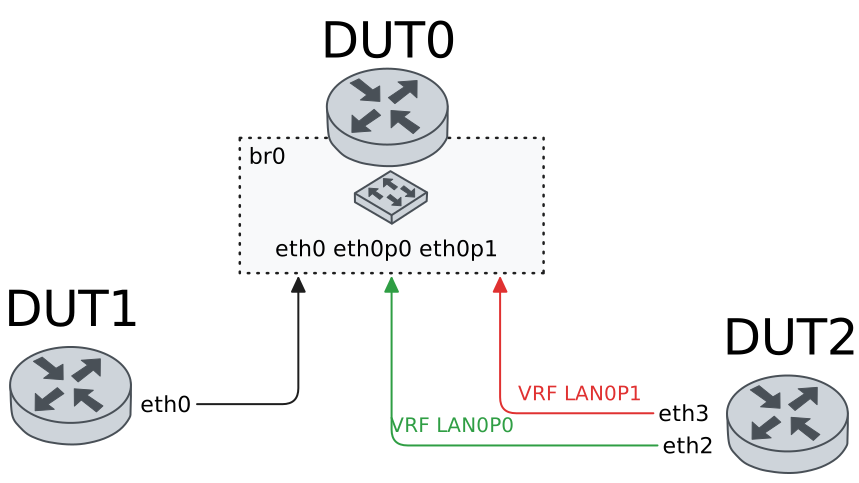
Test Hardware Bridge With Default VLAN
Description
In these scenarios, no VLAN are configured.
Scenario
Example 1
Step 1: Set the following configuration in DUT0 :
set interfaces bridge br0
set interfaces ethernet eth0p0 bridge-group bridge br0
set interfaces ethernet eth0p4 bridge-group bridge br0
set interfaces ethernet eth1 bridge-group bridge br0
set system login user admin authentication encrypted-password '$6$GSjsCj8gHLv$/VcqU6FLi6CT2Oxn0MJQ2C2tqnRDrYKNF8HIYWJp68nvXvPdFccDsT04.WtigUONbKYrgKg8d6rEs8PjljMkH0'
Step 2: Set the following configuration in DUT1 :
set interfaces ethernet eth0 address 192.168.1.2/24
set system login user admin authentication encrypted-password '$6$GSjsCj8gHLv$/VcqU6FLi6CT2Oxn0MJQ2C2tqnRDrYKNF8HIYWJp68nvXvPdFccDsT04.WtigUONbKYrgKg8d6rEs8PjljMkH0'
Step 3: Set the following configuration in DUT2 :
set interfaces ethernet eth1 address 192.168.1.3/24
set interfaces ethernet eth1 vrf LAN_PORT0
set interfaces ethernet eth2 address 192.168.1.4/24
set interfaces ethernet eth2 vrf LAN_PORT1
set system login user admin authentication encrypted-password '$6$GSjsCj8gHLv$/VcqU6FLi6CT2Oxn0MJQ2C2tqnRDrYKNF8HIYWJp68nvXvPdFccDsT04.WtigUONbKYrgKg8d6rEs8PjljMkH0'
set system vrf LAN_PORT0
set system vrf LAN_PORT1
Step 4: Ping the IP address 192.168.1.4 from DUT2:
admin@DUT2$ ping 192.168.1.4 vrf LAN_PORT0 count 1 size 56 timeout 1Show output
ping: Warning: source address might be selected on device other than: LAN_PORT0
PING 192.168.1.4 (192.168.1.4) from 192.168.1.3 LAN_PORT0: 56(84) bytes of data.
64 bytes from 192.168.1.4: icmp_seq=1 ttl=64 time=0.752 ms

--- 192.168.1.4 ping statistics ---
1 packets transmitted, 1 received, 0% packet loss, time 0ms
rtt min/avg/max/mdev = 0.752/0.752/0.752/0.000 ms
Step 5: Ping the IP address 192.168.1.3 from DUT1:
admin@DUT1$ ping 192.168.1.3 count 1 size 56 timeout 1Show output
PING 192.168.1.3 (192.168.1.3) 56(84) bytes of data.
64 bytes from 192.168.1.3: icmp_seq=1 ttl=64 time=0.782 ms

--- 192.168.1.3 ping statistics ---
1 packets transmitted, 1 received, 0% packet loss, time 0ms
rtt min/avg/max/mdev = 0.782/0.782/0.782/0.000 ms
Step 6: Ping the IP address 192.168.1.4 from DUT1:
admin@DUT1$ ping 192.168.1.4 count 1 size 56 timeout 1Show output
PING 192.168.1.4 (192.168.1.4) 56(84) bytes of data.
64 bytes from 192.168.1.4: icmp_seq=1 ttl=64 time=1.11 ms

--- 192.168.1.4 ping statistics ---
1 packets transmitted, 1 received, 0% packet loss, time 0ms
rtt min/avg/max/mdev = 1.108/1.108/1.108/0.000 ms
Example 2
Step 1: Set the following configuration in DUT0 :
set interfaces bridge br0 hardware-offload eth0
set interfaces ethernet eth0p0 bridge-group bridge br0
set interfaces ethernet eth0p4 bridge-group bridge br0
set interfaces ethernet eth1 bridge-group bridge br0
set system login user admin authentication encrypted-password '$6$GSjsCj8gHLv$/VcqU6FLi6CT2Oxn0MJQ2C2tqnRDrYKNF8HIYWJp68nvXvPdFccDsT04.WtigUONbKYrgKg8d6rEs8PjljMkH0'
Step 2: Set the following configuration in DUT1 :
set interfaces ethernet eth0 address 192.168.1.2/24
set system login user admin authentication encrypted-password '$6$GSjsCj8gHLv$/VcqU6FLi6CT2Oxn0MJQ2C2tqnRDrYKNF8HIYWJp68nvXvPdFccDsT04.WtigUONbKYrgKg8d6rEs8PjljMkH0'
Step 3: Set the following configuration in DUT2 :
set interfaces ethernet eth1 address 192.168.1.3/24
set interfaces ethernet eth1 vrf LAN_PORT0
set interfaces ethernet eth2 address 192.168.1.4/24
set interfaces ethernet eth2 vrf LAN_PORT1
set system login user admin authentication encrypted-password '$6$GSjsCj8gHLv$/VcqU6FLi6CT2Oxn0MJQ2C2tqnRDrYKNF8HIYWJp68nvXvPdFccDsT04.WtigUONbKYrgKg8d6rEs8PjljMkH0'
set system vrf LAN_PORT0
set system vrf LAN_PORT1
Step 4: Ping the IP address 192.168.1.4 from DUT2:
admin@DUT2$ ping 192.168.1.4 vrf LAN_PORT0 count 1 size 56 timeout 1Show output
ping: Warning: source address might be selected on device other than: LAN_PORT0
PING 192.168.1.4 (192.168.1.4) from 192.168.1.3 LAN_PORT0: 56(84) bytes of data.
64 bytes from 192.168.1.4: icmp_seq=1 ttl=64 time=0.491 ms

--- 192.168.1.4 ping statistics ---
1 packets transmitted, 1 received, 0% packet loss, time 1ms
rtt min/avg/max/mdev = 0.491/0.491/0.491/0.000 ms
Step 5: Ping the IP address 192.168.1.3 from DUT1:
admin@DUT1$ ping 192.168.1.3 count 1 size 56 timeout 1Show output
PING 192.168.1.3 (192.168.1.3) 56(84) bytes of data.
64 bytes from 192.168.1.3: icmp_seq=1 ttl=64 time=0.538 ms

--- 192.168.1.3 ping statistics ---
1 packets transmitted, 1 received, 0% packet loss, time 0ms
rtt min/avg/max/mdev = 0.538/0.538/0.538/0.000 ms
Step 6: Ping the IP address 192.168.1.4 from DUT1:
admin@DUT1$ ping 192.168.1.4 count 1 size 56 timeout 1Show output
PING 192.168.1.4 (192.168.1.4) 56(84) bytes of data.
64 bytes from 192.168.1.4: icmp_seq=1 ttl=64 time=1.16 ms

--- 192.168.1.4 ping statistics ---
1 packets transmitted, 1 received, 0% packet loss, time 0ms
rtt min/avg/max/mdev = 1.157/1.157/1.157/0.000 ms
Example 3
Step 1: Set the following configuration in DUT0 :
set interfaces bridge br0 address 192.168.1.1/24
set interfaces ethernet eth0p0 bridge-group bridge br0
set interfaces ethernet eth0p4 bridge-group bridge br0
set interfaces ethernet eth1 bridge-group bridge br0
set system login user admin authentication encrypted-password '$6$GSjsCj8gHLv$/VcqU6FLi6CT2Oxn0MJQ2C2tqnRDrYKNF8HIYWJp68nvXvPdFccDsT04.WtigUONbKYrgKg8d6rEs8PjljMkH0'
Step 2: Set the following configuration in DUT1 :
set interfaces ethernet eth0 address 192.168.1.2/24
set system login user admin authentication encrypted-password '$6$GSjsCj8gHLv$/VcqU6FLi6CT2Oxn0MJQ2C2tqnRDrYKNF8HIYWJp68nvXvPdFccDsT04.WtigUONbKYrgKg8d6rEs8PjljMkH0'
Step 3: Set the following configuration in DUT2 :
set interfaces ethernet eth1 address 192.168.1.3/24
set interfaces ethernet eth1 vrf LAN_PORT0
set interfaces ethernet eth2 address 192.168.1.4/24
set interfaces ethernet eth2 vrf LAN_PORT1
set system login user admin authentication encrypted-password '$6$GSjsCj8gHLv$/VcqU6FLi6CT2Oxn0MJQ2C2tqnRDrYKNF8HIYWJp68nvXvPdFccDsT04.WtigUONbKYrgKg8d6rEs8PjljMkH0'
set system vrf LAN_PORT0
set system vrf LAN_PORT1
Step 4: Ping the IP address 192.168.1.4 from DUT2:
admin@DUT2$ ping 192.168.1.4 vrf LAN_PORT0 count 1 size 56 timeout 1Show output
ping: Warning: source address might be selected on device other than: LAN_PORT0
PING 192.168.1.4 (192.168.1.4) from 192.168.1.3 LAN_PORT0: 56(84) bytes of data.
64 bytes from 192.168.1.4: icmp_seq=1 ttl=64 time=0.875 ms

--- 192.168.1.4 ping statistics ---
1 packets transmitted, 1 received, 0% packet loss, time 0ms
rtt min/avg/max/mdev = 0.875/0.875/0.875/0.000 ms
Step 5: Ping the IP address 192.168.1.3 from DUT1:
admin@DUT1$ ping 192.168.1.3 count 1 size 56 timeout 1Show output
PING 192.168.1.3 (192.168.1.3) 56(84) bytes of data.
64 bytes from 192.168.1.3: icmp_seq=1 ttl=64 time=0.790 ms

--- 192.168.1.3 ping statistics ---
1 packets transmitted, 1 received, 0% packet loss, time 0ms
rtt min/avg/max/mdev = 0.790/0.790/0.790/0.000 ms
Step 6: Ping the IP address 192.168.1.4 from DUT1:
admin@DUT1$ ping 192.168.1.4 count 1 size 56 timeout 1Show output
PING 192.168.1.4 (192.168.1.4) 56(84) bytes of data.
64 bytes from 192.168.1.4: icmp_seq=1 ttl=64 time=0.842 ms

--- 192.168.1.4 ping statistics ---
1 packets transmitted, 1 received, 0% packet loss, time 0ms
rtt min/avg/max/mdev = 0.842/0.842/0.842/0.000 ms
Step 7: Ping the IP address 192.168.1.1 from DUT2:
admin@DUT2$ ping 192.168.1.1 vrf LAN_PORT0 count 1 size 56 timeout 1Show output
ping: Warning: source address might be selected on device other than: LAN_PORT0
PING 192.168.1.1 (192.168.1.1) from 192.168.1.3 LAN_PORT0: 56(84) bytes of data.
64 bytes from 192.168.1.1: icmp_seq=1 ttl=64 time=0.564 ms

--- 192.168.1.1 ping statistics ---
1 packets transmitted, 1 received, 0% packet loss, time 0ms
rtt min/avg/max/mdev = 0.564/0.564/0.564/0.000 ms
Step 8: Ping the IP address 192.168.1.1 from DUT2:
admin@DUT2$ ping 192.168.1.1 vrf LAN_PORT1 count 1 size 56 timeout 1Show output
ping: Warning: source address might be selected on device other than: LAN_PORT1
PING 192.168.1.1 (192.168.1.1) from 192.168.1.4 LAN_PORT1: 56(84) bytes of data.
64 bytes from 192.168.1.1: icmp_seq=1 ttl=64 time=0.505 ms

--- 192.168.1.1 ping statistics ---
1 packets transmitted, 1 received, 0% packet loss, time 0ms
rtt min/avg/max/mdev = 0.505/0.505/0.505/0.000 ms
Step 9: Ping the IP address 192.168.1.1 from DUT1:
admin@DUT1$ ping 192.168.1.1 count 1 size 56 timeout 1Show output
PING 192.168.1.1 (192.168.1.1) 56(84) bytes of data.
64 bytes from 192.168.1.1: icmp_seq=1 ttl=64 time=0.765 ms

--- 192.168.1.1 ping statistics ---
1 packets transmitted, 1 received, 0% packet loss, time 0ms
rtt min/avg/max/mdev = 0.765/0.765/0.765/0.000 ms
Example 4
Step 1: Set the following configuration in DUT0 :
set interfaces bridge br0 address 192.168.1.1/24
set interfaces bridge br0 hardware-offload eth0
set interfaces ethernet eth0p0 bridge-group bridge br0
set interfaces ethernet eth0p4 bridge-group bridge br0
set interfaces ethernet eth1 bridge-group bridge br0
set system login user admin authentication encrypted-password '$6$GSjsCj8gHLv$/VcqU6FLi6CT2Oxn0MJQ2C2tqnRDrYKNF8HIYWJp68nvXvPdFccDsT04.WtigUONbKYrgKg8d6rEs8PjljMkH0'
Step 2: Set the following configuration in DUT1 :
set interfaces ethernet eth0 address 192.168.1.2/24
set system login user admin authentication encrypted-password '$6$GSjsCj8gHLv$/VcqU6FLi6CT2Oxn0MJQ2C2tqnRDrYKNF8HIYWJp68nvXvPdFccDsT04.WtigUONbKYrgKg8d6rEs8PjljMkH0'
Step 3: Set the following configuration in DUT2 :
set interfaces ethernet eth1 address 192.168.1.3/24
set interfaces ethernet eth1 vrf LAN_PORT0
set interfaces ethernet eth2 address 192.168.1.4/24
set interfaces ethernet eth2 vrf LAN_PORT1
set system login user admin authentication encrypted-password '$6$GSjsCj8gHLv$/VcqU6FLi6CT2Oxn0MJQ2C2tqnRDrYKNF8HIYWJp68nvXvPdFccDsT04.WtigUONbKYrgKg8d6rEs8PjljMkH0'
set system vrf LAN_PORT0
set system vrf LAN_PORT1
Step 4: Ping the IP address 192.168.1.4 from DUT2:
admin@DUT2$ ping 192.168.1.4 vrf LAN_PORT0 count 1 size 56 timeout 1Show output
ping: Warning: source address might be selected on device other than: LAN_PORT0
PING 192.168.1.4 (192.168.1.4) from 192.168.1.3 LAN_PORT0: 56(84) bytes of data.
64 bytes from 192.168.1.4: icmp_seq=1 ttl=64 time=0.448 ms

--- 192.168.1.4 ping statistics ---
1 packets transmitted, 1 received, 0% packet loss, time 0ms
rtt min/avg/max/mdev = 0.448/0.448/0.448/0.000 ms
Step 5: Ping the IP address 192.168.1.3 from DUT1:
admin@DUT1$ ping 192.168.1.3 count 1 size 56 timeout 1Show output
PING 192.168.1.3 (192.168.1.3) 56(84) bytes of data.
64 bytes from 192.168.1.3: icmp_seq=1 ttl=64 time=0.826 ms

--- 192.168.1.3 ping statistics ---
1 packets transmitted, 1 received, 0% packet loss, time 0ms
rtt min/avg/max/mdev = 0.826/0.826/0.826/0.000 ms
Step 6: Ping the IP address 192.168.1.4 from DUT1:
admin@DUT1$ ping 192.168.1.4 count 1 size 56 timeout 1Show output
PING 192.168.1.4 (192.168.1.4) 56(84) bytes of data.
64 bytes from 192.168.1.4: icmp_seq=1 ttl=64 time=1.16 ms

--- 192.168.1.4 ping statistics ---
1 packets transmitted, 1 received, 0% packet loss, time 0ms
rtt min/avg/max/mdev = 1.157/1.157/1.157/0.000 ms
Step 7: Ping the IP address 192.168.1.1 from DUT2:
admin@DUT2$ ping 192.168.1.1 vrf LAN_PORT0 count 1 size 56 timeout 1Show output
ping: Warning: source address might be selected on device other than: LAN_PORT0
PING 192.168.1.1 (192.168.1.1) from 192.168.1.3 LAN_PORT0: 56(84) bytes of data.
64 bytes from 192.168.1.1: icmp_seq=1 ttl=64 time=1.33 ms

--- 192.168.1.1 ping statistics ---
1 packets transmitted, 1 received, 0% packet loss, time 0ms
rtt min/avg/max/mdev = 1.329/1.329/1.329/0.000 ms
Step 8: Ping the IP address 192.168.1.1 from DUT2:
admin@DUT2$ ping 192.168.1.1 vrf LAN_PORT1 count 1 size 56 timeout 1Show output
ping: Warning: source address might be selected on device other than: LAN_PORT1
PING 192.168.1.1 (192.168.1.1) from 192.168.1.4 LAN_PORT1: 56(84) bytes of data.
64 bytes from 192.168.1.1: icmp_seq=1 ttl=64 time=0.539 ms

--- 192.168.1.1 ping statistics ---
1 packets transmitted, 1 received, 0% packet loss, time 0ms
rtt min/avg/max/mdev = 0.539/0.539/0.539/0.000 ms
Step 9: Ping the IP address 192.168.1.1 from DUT1:
admin@DUT1$ ping 192.168.1.1 count 1 size 56 timeout 1Show output
PING 192.168.1.1 (192.168.1.1) 56(84) bytes of data.
64 bytes from 192.168.1.1: icmp_seq=1 ttl=64 time=0.579 ms

--- 192.168.1.1 ping statistics ---
1 packets transmitted, 1 received, 0% packet loss, time 0ms
rtt min/avg/max/mdev = 0.579/0.579/0.579/0.000 ms
Test Hardware Bridge VLAN Aware
Description
In these scenarios, both DUT1 and DUT2 send tagged traffic (a VLAN-aware bridge is needed).
Scenario
Example 1
Step 1: Set the following configuration in DUT0 :
set interfaces bridge br0
set interfaces ethernet eth0p0 bridge-group bridge br0
set interfaces ethernet eth0p0 bridge-group vlan 100
set interfaces ethernet eth0p4 bridge-group bridge br0
set interfaces ethernet eth0p4 bridge-group vlan 100
set interfaces ethernet eth1 bridge-group bridge br0
set interfaces ethernet eth1 bridge-group vlan 100
set system login user admin authentication encrypted-password '$6$GSjsCj8gHLv$/VcqU6FLi6CT2Oxn0MJQ2C2tqnRDrYKNF8HIYWJp68nvXvPdFccDsT04.WtigUONbKYrgKg8d6rEs8PjljMkH0'
Step 2: Set the following configuration in DUT1 :
set interfaces ethernet eth0 vif 100 address 192.168.1.2/24
set system login user admin authentication encrypted-password '$6$GSjsCj8gHLv$/VcqU6FLi6CT2Oxn0MJQ2C2tqnRDrYKNF8HIYWJp68nvXvPdFccDsT04.WtigUONbKYrgKg8d6rEs8PjljMkH0'
Step 3: Set the following configuration in DUT2 :
set interfaces ethernet eth1 vif 100 address 192.168.1.3/24
set interfaces ethernet eth1 vif 100 vrf LAN_PORT0
set interfaces ethernet eth2 vif 100 address 192.168.1.4/24
set interfaces ethernet eth2 vif 100 vrf LAN_PORT1
set system login user admin authentication encrypted-password '$6$GSjsCj8gHLv$/VcqU6FLi6CT2Oxn0MJQ2C2tqnRDrYKNF8HIYWJp68nvXvPdFccDsT04.WtigUONbKYrgKg8d6rEs8PjljMkH0'
set system vrf LAN_PORT0
set system vrf LAN_PORT1
Step 4: Ping the IP address 192.168.1.4 from DUT2:
admin@DUT2$ ping 192.168.1.4 vrf LAN_PORT0 count 1 size 56 timeout 1Show output
ping: Warning: source address might be selected on device other than: LAN_PORT0
PING 192.168.1.4 (192.168.1.4) from 192.168.1.3 LAN_PORT0: 56(84) bytes of data.
64 bytes from 192.168.1.4: icmp_seq=1 ttl=64 time=0.988 ms

--- 192.168.1.4 ping statistics ---
1 packets transmitted, 1 received, 0% packet loss, time 0ms
rtt min/avg/max/mdev = 0.988/0.988/0.988/0.000 ms
Step 5: Ping the IP address 192.168.1.3 from DUT1:
admin@DUT1$ ping 192.168.1.3 count 1 size 56 timeout 1Show output
PING 192.168.1.3 (192.168.1.3) 56(84) bytes of data.
64 bytes from 192.168.1.3: icmp_seq=1 ttl=64 time=0.494 ms

--- 192.168.1.3 ping statistics ---
1 packets transmitted, 1 received, 0% packet loss, time 0ms
rtt min/avg/max/mdev = 0.494/0.494/0.494/0.000 ms
Step 6: Ping the IP address 192.168.1.4 from DUT1:
admin@DUT1$ ping 192.168.1.4 count 1 size 56 timeout 1Show output
PING 192.168.1.4 (192.168.1.4) 56(84) bytes of data.
64 bytes from 192.168.1.4: icmp_seq=1 ttl=64 time=1.24 ms

--- 192.168.1.4 ping statistics ---
1 packets transmitted, 1 received, 0% packet loss, time 0ms
rtt min/avg/max/mdev = 1.244/1.244/1.244/0.000 ms
Example 2
Step 1: Set the following configuration in DUT0 :
set interfaces bridge br0 hardware-offload eth0
set interfaces ethernet eth0p0 bridge-group bridge br0
set interfaces ethernet eth0p0 bridge-group vlan 100
set interfaces ethernet eth0p4 bridge-group bridge br0
set interfaces ethernet eth0p4 bridge-group vlan 100
set interfaces ethernet eth1 bridge-group bridge br0
set interfaces ethernet eth1 bridge-group vlan 100
set system login user admin authentication encrypted-password '$6$GSjsCj8gHLv$/VcqU6FLi6CT2Oxn0MJQ2C2tqnRDrYKNF8HIYWJp68nvXvPdFccDsT04.WtigUONbKYrgKg8d6rEs8PjljMkH0'
Step 2: Set the following configuration in DUT1 :
set interfaces ethernet eth0 vif 100 address 192.168.1.2/24
set system login user admin authentication encrypted-password '$6$GSjsCj8gHLv$/VcqU6FLi6CT2Oxn0MJQ2C2tqnRDrYKNF8HIYWJp68nvXvPdFccDsT04.WtigUONbKYrgKg8d6rEs8PjljMkH0'
Step 3: Set the following configuration in DUT2 :
set interfaces ethernet eth1 vif 100 address 192.168.1.3/24
set interfaces ethernet eth1 vif 100 vrf LAN_PORT0
set interfaces ethernet eth2 vif 100 address 192.168.1.4/24
set interfaces ethernet eth2 vif 100 vrf LAN_PORT1
set system login user admin authentication encrypted-password '$6$GSjsCj8gHLv$/VcqU6FLi6CT2Oxn0MJQ2C2tqnRDrYKNF8HIYWJp68nvXvPdFccDsT04.WtigUONbKYrgKg8d6rEs8PjljMkH0'
set system vrf LAN_PORT0
set system vrf LAN_PORT1
Step 4: Ping the IP address 192.168.1.4 from DUT2:
admin@DUT2$ ping 192.168.1.4 vrf LAN_PORT0 count 1 size 56 timeout 1Show output
ping: Warning: source address might be selected on device other than: LAN_PORT0
PING 192.168.1.4 (192.168.1.4) from 192.168.1.3 LAN_PORT0: 56(84) bytes of data.
64 bytes from 192.168.1.4: icmp_seq=1 ttl=64 time=1.56 ms

--- 192.168.1.4 ping statistics ---
1 packets transmitted, 1 received, 0% packet loss, time 0ms
rtt min/avg/max/mdev = 1.561/1.561/1.561/0.000 ms
Step 5: Ping the IP address 192.168.1.3 from DUT1:
admin@DUT1$ ping 192.168.1.3 count 1 size 56 timeout 1Show output
PING 192.168.1.3 (192.168.1.3) 56(84) bytes of data.
64 bytes from 192.168.1.3: icmp_seq=1 ttl=64 time=0.485 ms

--- 192.168.1.3 ping statistics ---
1 packets transmitted, 1 received, 0% packet loss, time 0ms
rtt min/avg/max/mdev = 0.485/0.485/0.485/0.000 ms
Step 6: Ping the IP address 192.168.1.4 from DUT1:
admin@DUT1$ ping 192.168.1.4 count 1 size 56 timeout 1Show output
PING 192.168.1.4 (192.168.1.4) 56(84) bytes of data.
64 bytes from 192.168.1.4: icmp_seq=1 ttl=64 time=1.06 ms

--- 192.168.1.4 ping statistics ---
1 packets transmitted, 1 received, 0% packet loss, time 0ms
rtt min/avg/max/mdev = 1.059/1.059/1.059/0.000 ms
Example 3
Step 1: Set the following configuration in DUT0 :
set interfaces bridge br0 vif 100 address 192.168.1.1/24
set interfaces bridge br0 vlan 100
set interfaces ethernet eth0p0 bridge-group bridge br0
set interfaces ethernet eth0p0 bridge-group vlan 100
set interfaces ethernet eth0p4 bridge-group bridge br0
set interfaces ethernet eth0p4 bridge-group vlan 100
set interfaces ethernet eth1 bridge-group bridge br0
set interfaces ethernet eth1 bridge-group vlan 100
set system login user admin authentication encrypted-password '$6$GSjsCj8gHLv$/VcqU6FLi6CT2Oxn0MJQ2C2tqnRDrYKNF8HIYWJp68nvXvPdFccDsT04.WtigUONbKYrgKg8d6rEs8PjljMkH0'
Step 2: Set the following configuration in DUT1 :
set interfaces ethernet eth0 vif 100 address 192.168.1.2/24
set system login user admin authentication encrypted-password '$6$GSjsCj8gHLv$/VcqU6FLi6CT2Oxn0MJQ2C2tqnRDrYKNF8HIYWJp68nvXvPdFccDsT04.WtigUONbKYrgKg8d6rEs8PjljMkH0'
Step 3: Set the following configuration in DUT2 :
set interfaces ethernet eth1 vif 100 address 192.168.1.3/24
set interfaces ethernet eth1 vif 100 vrf LAN_PORT0
set interfaces ethernet eth2 vif 100 address 192.168.1.4/24
set interfaces ethernet eth2 vif 100 vrf LAN_PORT1
set system login user admin authentication encrypted-password '$6$GSjsCj8gHLv$/VcqU6FLi6CT2Oxn0MJQ2C2tqnRDrYKNF8HIYWJp68nvXvPdFccDsT04.WtigUONbKYrgKg8d6rEs8PjljMkH0'
set system vrf LAN_PORT0
set system vrf LAN_PORT1
Step 4: Ping the IP address 192.168.1.4 from DUT2:
admin@DUT2$ ping 192.168.1.4 vrf LAN_PORT0 count 1 size 56 timeout 1Show output
ping: Warning: source address might be selected on device other than: LAN_PORT0
PING 192.168.1.4 (192.168.1.4) from 192.168.1.3 LAN_PORT0: 56(84) bytes of data.
64 bytes from 192.168.1.4: icmp_seq=1 ttl=64 time=0.829 ms

--- 192.168.1.4 ping statistics ---
1 packets transmitted, 1 received, 0% packet loss, time 0ms
rtt min/avg/max/mdev = 0.829/0.829/0.829/0.000 ms
Step 5: Ping the IP address 192.168.1.3 from DUT1:
admin@DUT1$ ping 192.168.1.3 count 1 size 56 timeout 1Show output
PING 192.168.1.3 (192.168.1.3) 56(84) bytes of data.
64 bytes from 192.168.1.3: icmp_seq=1 ttl=64 time=0.434 ms

--- 192.168.1.3 ping statistics ---
1 packets transmitted, 1 received, 0% packet loss, time 0ms
rtt min/avg/max/mdev = 0.434/0.434/0.434/0.000 ms
Step 6: Ping the IP address 192.168.1.4 from DUT1:
admin@DUT1$ ping 192.168.1.4 count 1 size 56 timeout 1Show output
PING 192.168.1.4 (192.168.1.4) 56(84) bytes of data.
64 bytes from 192.168.1.4: icmp_seq=1 ttl=64 time=1.11 ms

--- 192.168.1.4 ping statistics ---
1 packets transmitted, 1 received, 0% packet loss, time 0ms
rtt min/avg/max/mdev = 1.112/1.112/1.112/0.000 ms
Step 7: Ping the IP address 192.168.1.1 from DUT2:
admin@DUT2$ ping 192.168.1.1 vrf LAN_PORT0 count 1 size 56 timeout 1Show output
ping: Warning: source address might be selected on device other than: LAN_PORT0
PING 192.168.1.1 (192.168.1.1) from 192.168.1.3 LAN_PORT0: 56(84) bytes of data.
64 bytes from 192.168.1.1: icmp_seq=1 ttl=64 time=1.30 ms

--- 192.168.1.1 ping statistics ---
1 packets transmitted, 1 received, 0% packet loss, time 0ms
rtt min/avg/max/mdev = 1.304/1.304/1.304/0.000 ms
Step 8: Ping the IP address 192.168.1.1 from DUT2:
admin@DUT2$ ping 192.168.1.1 vrf LAN_PORT1 count 1 size 56 timeout 1Show output
ping: Warning: source address might be selected on device other than: LAN_PORT1
PING 192.168.1.1 (192.168.1.1) from 192.168.1.4 LAN_PORT1: 56(84) bytes of data.
64 bytes from 192.168.1.1: icmp_seq=1 ttl=64 time=0.501 ms

--- 192.168.1.1 ping statistics ---
1 packets transmitted, 1 received, 0% packet loss, time 0ms
rtt min/avg/max/mdev = 0.501/0.501/0.501/0.000 ms
Step 9: Ping the IP address 192.168.1.1 from DUT1:
admin@DUT1$ ping 192.168.1.1 count 1 size 56 timeout 1Show output
PING 192.168.1.1 (192.168.1.1) 56(84) bytes of data.
64 bytes from 192.168.1.1: icmp_seq=1 ttl=64 time=0.626 ms

--- 192.168.1.1 ping statistics ---
1 packets transmitted, 1 received, 0% packet loss, time 0ms
rtt min/avg/max/mdev = 0.626/0.626/0.626/0.000 ms
Example 4
Step 1: Set the following configuration in DUT0 :
set interfaces bridge br0 hardware-offload eth0
set interfaces bridge br0 vif 100 address 192.168.1.1/24
set interfaces bridge br0 vlan 100
set interfaces ethernet eth0p0 bridge-group bridge br0
set interfaces ethernet eth0p0 bridge-group vlan 100
set interfaces ethernet eth0p4 bridge-group bridge br0
set interfaces ethernet eth0p4 bridge-group vlan 100
set interfaces ethernet eth1 bridge-group bridge br0
set interfaces ethernet eth1 bridge-group vlan 100
set system login user admin authentication encrypted-password '$6$GSjsCj8gHLv$/VcqU6FLi6CT2Oxn0MJQ2C2tqnRDrYKNF8HIYWJp68nvXvPdFccDsT04.WtigUONbKYrgKg8d6rEs8PjljMkH0'
Step 2: Set the following configuration in DUT1 :
set interfaces ethernet eth0 vif 100 address 192.168.1.2/24
set system login user admin authentication encrypted-password '$6$GSjsCj8gHLv$/VcqU6FLi6CT2Oxn0MJQ2C2tqnRDrYKNF8HIYWJp68nvXvPdFccDsT04.WtigUONbKYrgKg8d6rEs8PjljMkH0'
Step 3: Set the following configuration in DUT2 :
set interfaces ethernet eth1 vif 100 address 192.168.1.3/24
set interfaces ethernet eth1 vif 100 vrf LAN_PORT0
set interfaces ethernet eth2 vif 100 address 192.168.1.4/24
set interfaces ethernet eth2 vif 100 vrf LAN_PORT1
set system login user admin authentication encrypted-password '$6$GSjsCj8gHLv$/VcqU6FLi6CT2Oxn0MJQ2C2tqnRDrYKNF8HIYWJp68nvXvPdFccDsT04.WtigUONbKYrgKg8d6rEs8PjljMkH0'
set system vrf LAN_PORT0
set system vrf LAN_PORT1
Step 4: Ping the IP address 192.168.1.4 from DUT2:
admin@DUT2$ ping 192.168.1.4 vrf LAN_PORT0 count 1 size 56 timeout 1Show output
ping: Warning: source address might be selected on device other than: LAN_PORT0
PING 192.168.1.4 (192.168.1.4) from 192.168.1.3 LAN_PORT0: 56(84) bytes of data.
64 bytes from 192.168.1.4: icmp_seq=1 ttl=64 time=0.512 ms

--- 192.168.1.4 ping statistics ---
1 packets transmitted, 1 received, 0% packet loss, time 0ms
rtt min/avg/max/mdev = 0.512/0.512/0.512/0.000 ms
Step 5: Ping the IP address 192.168.1.3 from DUT1:
admin@DUT1$ ping 192.168.1.3 count 1 size 56 timeout 1Show output
PING 192.168.1.3 (192.168.1.3) 56(84) bytes of data.
64 bytes from 192.168.1.3: icmp_seq=1 ttl=64 time=0.520 ms

--- 192.168.1.3 ping statistics ---
1 packets transmitted, 1 received, 0% packet loss, time 0ms
rtt min/avg/max/mdev = 0.520/0.520/0.520/0.000 ms
Step 6: Ping the IP address 192.168.1.4 from DUT1:
admin@DUT1$ ping 192.168.1.4 count 1 size 56 timeout 1Show output
PING 192.168.1.4 (192.168.1.4) 56(84) bytes of data.
64 bytes from 192.168.1.4: icmp_seq=1 ttl=64 time=1.05 ms

--- 192.168.1.4 ping statistics ---
1 packets transmitted, 1 received, 0% packet loss, time 0ms
rtt min/avg/max/mdev = 1.047/1.047/1.047/0.000 ms
Step 7: Ping the IP address 192.168.1.1 from DUT2:
admin@DUT2$ ping 192.168.1.1 vrf LAN_PORT0 count 1 size 56 timeout 1Show output
ping: Warning: source address might be selected on device other than: LAN_PORT0
PING 192.168.1.1 (192.168.1.1) from 192.168.1.3 LAN_PORT0: 56(84) bytes of data.
64 bytes from 192.168.1.1: icmp_seq=1 ttl=64 time=0.696 ms

--- 192.168.1.1 ping statistics ---
1 packets transmitted, 1 received, 0% packet loss, time 0ms
rtt min/avg/max/mdev = 0.696/0.696/0.696/0.000 ms
Step 8: Ping the IP address 192.168.1.1 from DUT2:
admin@DUT2$ ping 192.168.1.1 vrf LAN_PORT1 count 1 size 56 timeout 1Show output
ping: Warning: source address might be selected on device other than: LAN_PORT1
PING 192.168.1.1 (192.168.1.1) from 192.168.1.4 LAN_PORT1: 56(84) bytes of data.
64 bytes from 192.168.1.1: icmp_seq=1 ttl=64 time=0.460 ms

--- 192.168.1.1 ping statistics ---
1 packets transmitted, 1 received, 0% packet loss, time 0ms
rtt min/avg/max/mdev = 0.460/0.460/0.460/0.000 ms
Step 9: Ping the IP address 192.168.1.1 from DUT1:
admin@DUT1$ ping 192.168.1.1 count 1 size 56 timeout 1Show output
PING 192.168.1.1 (192.168.1.1) 56(84) bytes of data.
64 bytes from 192.168.1.1: icmp_seq=1 ttl=64 time=0.885 ms

--- 192.168.1.1 ping statistics ---
1 packets transmitted, 1 received, 0% packet loss, time 0ms
rtt min/avg/max/mdev = 0.885/0.885/0.885/0.000 ms
Test Hardware Bridge With PVID And Untagged
Description
In these scenarios, DUT2 sends tagged traffic, but DUT1 does not use VLANs.
Scenario
Example 1
Step 1: Set the following configuration in DUT0 :
set interfaces bridge br0
set interfaces ethernet eth0p0 bridge-group bridge br0
set interfaces ethernet eth0p0 bridge-group vlan 100
set interfaces ethernet eth0p4 bridge-group bridge br0
set interfaces ethernet eth0p4 bridge-group vlan 100
set interfaces ethernet eth1 bridge-group bridge br0
set interfaces ethernet eth1 bridge-group vlan 100 pvid
set interfaces ethernet eth1 bridge-group vlan 100 untagged
set system login user admin authentication encrypted-password '$6$GSjsCj8gHLv$/VcqU6FLi6CT2Oxn0MJQ2C2tqnRDrYKNF8HIYWJp68nvXvPdFccDsT04.WtigUONbKYrgKg8d6rEs8PjljMkH0'
Step 2: Set the following configuration in DUT1 :
set interfaces ethernet eth0 address 192.168.1.2/24
set system login user admin authentication encrypted-password '$6$GSjsCj8gHLv$/VcqU6FLi6CT2Oxn0MJQ2C2tqnRDrYKNF8HIYWJp68nvXvPdFccDsT04.WtigUONbKYrgKg8d6rEs8PjljMkH0'
Step 3: Set the following configuration in DUT2 :
set interfaces ethernet eth1 vif 100 address 192.168.1.3/24
set interfaces ethernet eth1 vif 100 vrf LAN_PORT0
set interfaces ethernet eth2 vif 100 address 192.168.1.4/24
set interfaces ethernet eth2 vif 100 vrf LAN_PORT1
set system login user admin authentication encrypted-password '$6$GSjsCj8gHLv$/VcqU6FLi6CT2Oxn0MJQ2C2tqnRDrYKNF8HIYWJp68nvXvPdFccDsT04.WtigUONbKYrgKg8d6rEs8PjljMkH0'
set system vrf LAN_PORT0
set system vrf LAN_PORT1
Step 4: Ping the IP address 192.168.1.4 from DUT2:
admin@DUT2$ ping 192.168.1.4 vrf LAN_PORT0 count 1 size 56 timeout 1Show output
ping: Warning: source address might be selected on device other than: LAN_PORT0
PING 192.168.1.4 (192.168.1.4) from 192.168.1.3 LAN_PORT0: 56(84) bytes of data.
64 bytes from 192.168.1.4: icmp_seq=1 ttl=64 time=0.791 ms

--- 192.168.1.4 ping statistics ---
1 packets transmitted, 1 received, 0% packet loss, time 0ms
rtt min/avg/max/mdev = 0.791/0.791/0.791/0.000 ms
Step 5: Ping the IP address 192.168.1.3 from DUT1:
admin@DUT1$ ping 192.168.1.3 count 1 size 56 timeout 1Show output
PING 192.168.1.3 (192.168.1.3) 56(84) bytes of data.
64 bytes from 192.168.1.3: icmp_seq=1 ttl=64 time=0.585 ms

--- 192.168.1.3 ping statistics ---
1 packets transmitted, 1 received, 0% packet loss, time 0ms
rtt min/avg/max/mdev = 0.585/0.585/0.585/0.000 ms
Step 6: Ping the IP address 192.168.1.4 from DUT1:
admin@DUT1$ ping 192.168.1.4 count 1 size 56 timeout 1Show output
PING 192.168.1.4 (192.168.1.4) 56(84) bytes of data.
64 bytes from 192.168.1.4: icmp_seq=1 ttl=64 time=1.14 ms

--- 192.168.1.4 ping statistics ---
1 packets transmitted, 1 received, 0% packet loss, time 0ms
rtt min/avg/max/mdev = 1.137/1.137/1.137/0.000 ms
Example 2
Step 1: Set the following configuration in DUT0 :
set interfaces bridge br0 hardware-offload eth0
set interfaces ethernet eth0p0 bridge-group bridge br0
set interfaces ethernet eth0p0 bridge-group vlan 100
set interfaces ethernet eth0p4 bridge-group bridge br0
set interfaces ethernet eth0p4 bridge-group vlan 100
set interfaces ethernet eth1 bridge-group bridge br0
set interfaces ethernet eth1 bridge-group vlan 100 pvid
set interfaces ethernet eth1 bridge-group vlan 100 untagged
set system login user admin authentication encrypted-password '$6$GSjsCj8gHLv$/VcqU6FLi6CT2Oxn0MJQ2C2tqnRDrYKNF8HIYWJp68nvXvPdFccDsT04.WtigUONbKYrgKg8d6rEs8PjljMkH0'
Step 2: Set the following configuration in DUT1 :
set interfaces ethernet eth0 address 192.168.1.2/24
set system login user admin authentication encrypted-password '$6$GSjsCj8gHLv$/VcqU6FLi6CT2Oxn0MJQ2C2tqnRDrYKNF8HIYWJp68nvXvPdFccDsT04.WtigUONbKYrgKg8d6rEs8PjljMkH0'
Step 3: Set the following configuration in DUT2 :
set interfaces ethernet eth1 vif 100 address 192.168.1.3/24
set interfaces ethernet eth1 vif 100 vrf LAN_PORT0
set interfaces ethernet eth2 vif 100 address 192.168.1.4/24
set interfaces ethernet eth2 vif 100 vrf LAN_PORT1
set system login user admin authentication encrypted-password '$6$GSjsCj8gHLv$/VcqU6FLi6CT2Oxn0MJQ2C2tqnRDrYKNF8HIYWJp68nvXvPdFccDsT04.WtigUONbKYrgKg8d6rEs8PjljMkH0'
set system vrf LAN_PORT0
set system vrf LAN_PORT1
Step 4: Ping the IP address 192.168.1.4 from DUT2:
admin@DUT2$ ping 192.168.1.4 vrf LAN_PORT0 count 1 size 56 timeout 1Show output
ping: Warning: source address might be selected on device other than: LAN_PORT0
PING 192.168.1.4 (192.168.1.4) from 192.168.1.3 LAN_PORT0: 56(84) bytes of data.
64 bytes from 192.168.1.4: icmp_seq=1 ttl=64 time=1.33 ms

--- 192.168.1.4 ping statistics ---
1 packets transmitted, 1 received, 0% packet loss, time 0ms
rtt min/avg/max/mdev = 1.333/1.333/1.333/0.000 ms
Step 5: Ping the IP address 192.168.1.3 from DUT1:
admin@DUT1$ ping 192.168.1.3 count 1 size 56 timeout 1Show output
PING 192.168.1.3 (192.168.1.3) 56(84) bytes of data.
64 bytes from 192.168.1.3: icmp_seq=1 ttl=64 time=0.623 ms

--- 192.168.1.3 ping statistics ---
1 packets transmitted, 1 received, 0% packet loss, time 0ms
rtt min/avg/max/mdev = 0.623/0.623/0.623/0.000 ms
Step 6: Ping the IP address 192.168.1.4 from DUT1:
admin@DUT1$ ping 192.168.1.4 count 1 size 56 timeout 1Show output
PING 192.168.1.4 (192.168.1.4) 56(84) bytes of data.
64 bytes from 192.168.1.4: icmp_seq=1 ttl=64 time=1.25 ms

--- 192.168.1.4 ping statistics ---
1 packets transmitted, 1 received, 0% packet loss, time 0ms
rtt min/avg/max/mdev = 1.252/1.252/1.252/0.000 ms
Example 3
Step 1: Set the following configuration in DUT0 :
set interfaces bridge br0 vif 100 address 192.168.1.1/24
set interfaces bridge br0 vlan 100
set interfaces ethernet eth0p0 bridge-group bridge br0
set interfaces ethernet eth0p0 bridge-group vlan 100
set interfaces ethernet eth0p4 bridge-group bridge br0
set interfaces ethernet eth0p4 bridge-group vlan 100
set interfaces ethernet eth1 bridge-group bridge br0
set interfaces ethernet eth1 bridge-group vlan 100 pvid
set interfaces ethernet eth1 bridge-group vlan 100 untagged
set system login user admin authentication encrypted-password '$6$GSjsCj8gHLv$/VcqU6FLi6CT2Oxn0MJQ2C2tqnRDrYKNF8HIYWJp68nvXvPdFccDsT04.WtigUONbKYrgKg8d6rEs8PjljMkH0'
Step 2: Set the following configuration in DUT1 :
set interfaces ethernet eth0 address 192.168.1.2/24
set system login user admin authentication encrypted-password '$6$GSjsCj8gHLv$/VcqU6FLi6CT2Oxn0MJQ2C2tqnRDrYKNF8HIYWJp68nvXvPdFccDsT04.WtigUONbKYrgKg8d6rEs8PjljMkH0'
Step 3: Set the following configuration in DUT2 :
set interfaces ethernet eth1 vif 100 address 192.168.1.3/24
set interfaces ethernet eth1 vif 100 vrf LAN_PORT0
set interfaces ethernet eth2 vif 100 address 192.168.1.4/24
set interfaces ethernet eth2 vif 100 vrf LAN_PORT1
set system login user admin authentication encrypted-password '$6$GSjsCj8gHLv$/VcqU6FLi6CT2Oxn0MJQ2C2tqnRDrYKNF8HIYWJp68nvXvPdFccDsT04.WtigUONbKYrgKg8d6rEs8PjljMkH0'
set system vrf LAN_PORT0
set system vrf LAN_PORT1
Step 4: Ping the IP address 192.168.1.4 from DUT2:
admin@DUT2$ ping 192.168.1.4 vrf LAN_PORT0 count 1 size 56 timeout 1Show output
ping: Warning: source address might be selected on device other than: LAN_PORT0
PING 192.168.1.4 (192.168.1.4) from 192.168.1.3 LAN_PORT0: 56(84) bytes of data.
64 bytes from 192.168.1.4: icmp_seq=1 ttl=64 time=1.53 ms

--- 192.168.1.4 ping statistics ---
1 packets transmitted, 1 received, 0% packet loss, time 0ms
rtt min/avg/max/mdev = 1.532/1.532/1.532/0.000 ms
Step 5: Ping the IP address 192.168.1.3 from DUT1:
admin@DUT1$ ping 192.168.1.3 count 1 size 56 timeout 1Show output
PING 192.168.1.3 (192.168.1.3) 56(84) bytes of data.
64 bytes from 192.168.1.3: icmp_seq=1 ttl=64 time=0.575 ms

--- 192.168.1.3 ping statistics ---
1 packets transmitted, 1 received, 0% packet loss, time 0ms
rtt min/avg/max/mdev = 0.575/0.575/0.575/0.000 ms
Step 6: Ping the IP address 192.168.1.4 from DUT1:
admin@DUT1$ ping 192.168.1.4 count 1 size 56 timeout 1Show output
PING 192.168.1.4 (192.168.1.4) 56(84) bytes of data.
64 bytes from 192.168.1.4: icmp_seq=1 ttl=64 time=0.854 ms

--- 192.168.1.4 ping statistics ---
1 packets transmitted, 1 received, 0% packet loss, time 0ms
rtt min/avg/max/mdev = 0.854/0.854/0.854/0.000 ms
Step 7: Ping the IP address 192.168.1.1 from DUT2:
admin@DUT2$ ping 192.168.1.1 vrf LAN_PORT0 count 1 size 56 timeout 1Show output
ping: Warning: source address might be selected on device other than: LAN_PORT0
PING 192.168.1.1 (192.168.1.1) from 192.168.1.3 LAN_PORT0: 56(84) bytes of data.
64 bytes from 192.168.1.1: icmp_seq=1 ttl=64 time=1.62 ms

--- 192.168.1.1 ping statistics ---
1 packets transmitted, 1 received, 0% packet loss, time 0ms
rtt min/avg/max/mdev = 1.616/1.616/1.616/0.000 ms
Step 8: Ping the IP address 192.168.1.1 from DUT2:
admin@DUT2$ ping 192.168.1.1 vrf LAN_PORT1 count 1 size 56 timeout 1Show output
ping: Warning: source address might be selected on device other than: LAN_PORT1
PING 192.168.1.1 (192.168.1.1) from 192.168.1.4 LAN_PORT1: 56(84) bytes of data.
64 bytes from 192.168.1.1: icmp_seq=1 ttl=64 time=0.481 ms

--- 192.168.1.1 ping statistics ---
1 packets transmitted, 1 received, 0% packet loss, time 0ms
rtt min/avg/max/mdev = 0.481/0.481/0.481/0.000 ms
Step 9: Ping the IP address 192.168.1.1 from DUT1:
admin@DUT1$ ping 192.168.1.1 count 1 size 56 timeout 1Show output
PING 192.168.1.1 (192.168.1.1) 56(84) bytes of data.
64 bytes from 192.168.1.1: icmp_seq=1 ttl=64 time=0.778 ms

--- 192.168.1.1 ping statistics ---
1 packets transmitted, 1 received, 0% packet loss, time 0ms
rtt min/avg/max/mdev = 0.778/0.778/0.778/0.000 ms
Example 4
Step 1: Set the following configuration in DUT0 :
set interfaces bridge br0 hardware-offload eth0
set interfaces bridge br0 vif 100 address 192.168.1.1/24
set interfaces bridge br0 vlan 100
set interfaces ethernet eth0p0 bridge-group bridge br0
set interfaces ethernet eth0p0 bridge-group vlan 100
set interfaces ethernet eth0p4 bridge-group bridge br0
set interfaces ethernet eth0p4 bridge-group vlan 100
set interfaces ethernet eth1 bridge-group bridge br0
set interfaces ethernet eth1 bridge-group vlan 100 pvid
set interfaces ethernet eth1 bridge-group vlan 100 untagged
set system login user admin authentication encrypted-password '$6$GSjsCj8gHLv$/VcqU6FLi6CT2Oxn0MJQ2C2tqnRDrYKNF8HIYWJp68nvXvPdFccDsT04.WtigUONbKYrgKg8d6rEs8PjljMkH0'
Step 2: Set the following configuration in DUT1 :
set interfaces ethernet eth0 address 192.168.1.2/24
set system login user admin authentication encrypted-password '$6$GSjsCj8gHLv$/VcqU6FLi6CT2Oxn0MJQ2C2tqnRDrYKNF8HIYWJp68nvXvPdFccDsT04.WtigUONbKYrgKg8d6rEs8PjljMkH0'
Step 3: Set the following configuration in DUT2 :
set interfaces ethernet eth1 vif 100 address 192.168.1.3/24
set interfaces ethernet eth1 vif 100 vrf LAN_PORT0
set interfaces ethernet eth2 vif 100 address 192.168.1.4/24
set interfaces ethernet eth2 vif 100 vrf LAN_PORT1
set system login user admin authentication encrypted-password '$6$GSjsCj8gHLv$/VcqU6FLi6CT2Oxn0MJQ2C2tqnRDrYKNF8HIYWJp68nvXvPdFccDsT04.WtigUONbKYrgKg8d6rEs8PjljMkH0'
set system vrf LAN_PORT0
set system vrf LAN_PORT1
Step 4: Ping the IP address 192.168.1.4 from DUT2:
admin@DUT2$ ping 192.168.1.4 vrf LAN_PORT0 count 1 size 56 timeout 1Show output
ping: Warning: source address might be selected on device other than: LAN_PORT0
PING 192.168.1.4 (192.168.1.4) from 192.168.1.3 LAN_PORT0: 56(84) bytes of data.
64 bytes from 192.168.1.4: icmp_seq=1 ttl=64 time=0.622 ms

--- 192.168.1.4 ping statistics ---
1 packets transmitted, 1 received, 0% packet loss, time 0ms
rtt min/avg/max/mdev = 0.622/0.622/0.622/0.000 ms
Step 5: Ping the IP address 192.168.1.3 from DUT1:
admin@DUT1$ ping 192.168.1.3 count 1 size 56 timeout 1Show output
PING 192.168.1.3 (192.168.1.3) 56(84) bytes of data.
64 bytes from 192.168.1.3: icmp_seq=1 ttl=64 time=0.504 ms

--- 192.168.1.3 ping statistics ---
1 packets transmitted, 1 received, 0% packet loss, time 0ms
rtt min/avg/max/mdev = 0.504/0.504/0.504/0.000 ms
Step 6: Ping the IP address 192.168.1.4 from DUT1:
admin@DUT1$ ping 192.168.1.4 count 1 size 56 timeout 1Show output
PING 192.168.1.4 (192.168.1.4) 56(84) bytes of data.
64 bytes from 192.168.1.4: icmp_seq=1 ttl=64 time=1.12 ms

--- 192.168.1.4 ping statistics ---
1 packets transmitted, 1 received, 0% packet loss, time 0ms
rtt min/avg/max/mdev = 1.118/1.118/1.118/0.000 ms
Step 7: Ping the IP address 192.168.1.1 from DUT2:
admin@DUT2$ ping 192.168.1.1 vrf LAN_PORT0 count 1 size 56 timeout 1Show output
ping: Warning: source address might be selected on device other than: LAN_PORT0
PING 192.168.1.1 (192.168.1.1) from 192.168.1.3 LAN_PORT0: 56(84) bytes of data.
64 bytes from 192.168.1.1: icmp_seq=1 ttl=64 time=1.27 ms

--- 192.168.1.1 ping statistics ---
1 packets transmitted, 1 received, 0% packet loss, time 0ms
rtt min/avg/max/mdev = 1.265/1.265/1.265/0.000 ms
Step 8: Ping the IP address 192.168.1.1 from DUT2:
admin@DUT2$ ping 192.168.1.1 vrf LAN_PORT1 count 1 size 56 timeout 1Show output
ping: Warning: source address might be selected on device other than: LAN_PORT1
PING 192.168.1.1 (192.168.1.1) from 192.168.1.4 LAN_PORT1: 56(84) bytes of data.
64 bytes from 192.168.1.1: icmp_seq=1 ttl=64 time=1.15 ms

--- 192.168.1.1 ping statistics ---
1 packets transmitted, 1 received, 0% packet loss, time 0ms
rtt min/avg/max/mdev = 1.145/1.145/1.145/0.000 ms
Step 9: Ping the IP address 192.168.1.1 from DUT1:
admin@DUT1$ ping 192.168.1.1 count 1 size 56 timeout 1Show output
PING 192.168.1.1 (192.168.1.1) 56(84) bytes of data.
64 bytes from 192.168.1.1: icmp_seq=1 ttl=64 time=0.738 ms

--- 192.168.1.1 ping statistics ---
1 packets transmitted, 1 received, 0% packet loss, time 0ms
rtt min/avg/max/mdev = 0.738/0.738/0.738/0.000 ms