Storm Control
This scenario shows how to configure a bridge interface and enable offloading to perform storm-control in the hardware switch.
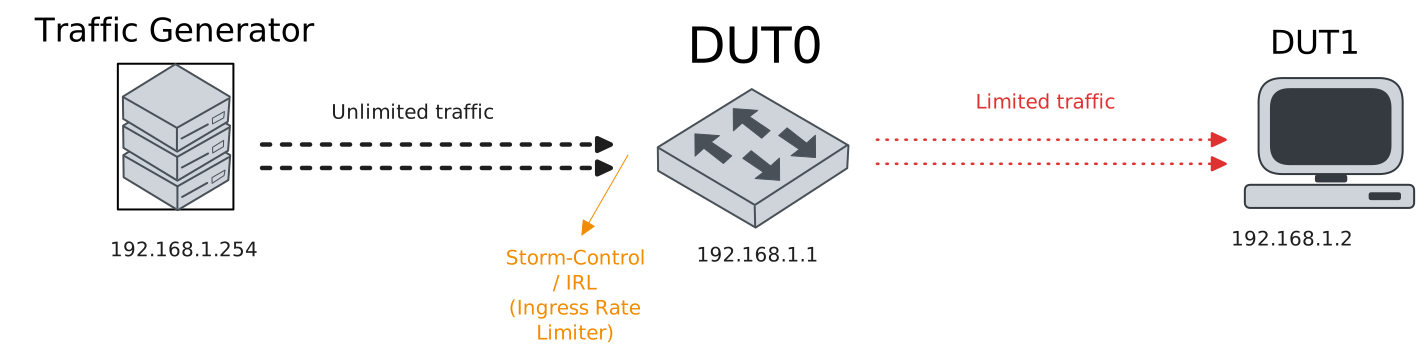
Test Storm-Control
Description
In these scenarios, the storm-control feature is configured to rate-limit different kinds of traffic generated below and above the limit rate.
Scenario
Example 1
Step 1: Set the following configuration in DUT1 :
set interfaces ethernet eth2 address 192.168.1.2/24
set interfaces ethernet eth2 traffic policy link-in LOGGER
set system login user admin authentication encrypted-password '$6$GSjsCj8gHLv$/VcqU6FLi6CT2Oxn0MJQ2C2tqnRDrYKNF8HIYWJp68nvXvPdFccDsT04.WtigUONbKYrgKg8d6rEs8PjljMkH0'
set traffic policy LOGGER rule 1 selector ACL
set traffic selector ACL rule 1 destination address 192.168.1.255
Step 2: Set the following configuration in DUT0 :
set interfaces bridge br0 address 192.168.1.1/24
set interfaces bridge br0 hardware-offload eth0
set interfaces ethernet eth0p0 bridge-group bridge br0
set interfaces ethernet eth0p0 bridge-group storm-control 1 burst 100ms
set interfaces ethernet eth0p0 bridge-group storm-control 1 protocol broadcast
set interfaces ethernet eth0p0 bridge-group storm-control 1 rate 1
set interfaces ethernet eth0p4 bridge-group bridge br0
set system login user admin authentication encrypted-password '$6$GSjsCj8gHLv$/VcqU6FLi6CT2Oxn0MJQ2C2tqnRDrYKNF8HIYWJp68nvXvPdFccDsT04.WtigUONbKYrgKg8d6rEs8PjljMkH0'
Step 3: Ping the IP address 192.168.1.1 from DUT1:
admin@DUT1$ ping 192.168.1.1 count 1 size 56 timeout 1Show output
PING 192.168.1.1 (192.168.1.1) 56(84) bytes of data.
64 bytes from 192.168.1.1: icmp_seq=1 ttl=64 time=0.526 ms

--- 192.168.1.1 ping statistics ---
1 packets transmitted, 1 received, 0% packet loss, time 0ms
rtt min/avg/max/mdev = 0.526/0.526/0.526/0.000 ms
Note
Generate 40 Mbps of broadcast traffic against a 1 Mbps rate-limit and measure how much is actually received at the destination.
Step 4: Run the command traffic selector show on DUT1 and expect the following output:
Show output
Selector ACL (Policy LOGGER -- ifc eth2 -- hook link-in prio very-high -- rule 1)

-----------------------------------------------------
rule   pkts match  pkts eval  bytes match  bytes eval
-----------------------------------------------------
1              74         77        74444       74658
-----------------------------------------------------
Total          74         77        74444       74658
Example 2
Step 1: Set the following configuration in DUT1 :
set interfaces ethernet eth2 address 192.168.1.2/24
set interfaces ethernet eth2 traffic policy link-in LOGGER
set system login user admin authentication encrypted-password '$6$GSjsCj8gHLv$/VcqU6FLi6CT2Oxn0MJQ2C2tqnRDrYKNF8HIYWJp68nvXvPdFccDsT04.WtigUONbKYrgKg8d6rEs8PjljMkH0'
set traffic policy LOGGER rule 1 selector ACL
set traffic selector ACL rule 1 destination address 192.168.1.255
Step 2: Set the following configuration in DUT0 :
set interfaces bridge br0 address 192.168.1.1/24
set interfaces bridge br0 hardware-offload eth0
set interfaces ethernet eth0p0 bridge-group bridge br0
set interfaces ethernet eth0p0 bridge-group storm-control 1 burst 100ms
set interfaces ethernet eth0p0 bridge-group storm-control 1 protocol broadcast
set interfaces ethernet eth0p0 bridge-group storm-control 1 rate 5
set interfaces ethernet eth0p4 bridge-group bridge br0
set system login user admin authentication encrypted-password '$6$GSjsCj8gHLv$/VcqU6FLi6CT2Oxn0MJQ2C2tqnRDrYKNF8HIYWJp68nvXvPdFccDsT04.WtigUONbKYrgKg8d6rEs8PjljMkH0'
Step 3: Ping the IP address 192.168.1.1 from DUT1:
admin@DUT1$ ping 192.168.1.1 count 1 size 56 timeout 1Show output
PING 192.168.1.1 (192.168.1.1) 56(84) bytes of data.
64 bytes from 192.168.1.1: icmp_seq=1 ttl=64 time=0.365 ms

--- 192.168.1.1 ping statistics ---
1 packets transmitted, 1 received, 0% packet loss, time 0ms
rtt min/avg/max/mdev = 0.365/0.365/0.365/0.000 ms
Note
Generate 40 Mbps of broadcast traffic against a 5 Mbps rate-limit and measure how much is actually received at the destination.
Step 4: Run the command traffic selector show on DUT1 and expect the following output:
Show output
Selector ACL (Policy LOGGER -- ifc eth2 -- hook link-in prio very-high -- rule 1)

-----------------------------------------------------
rule   pkts match  pkts eval  bytes match  bytes eval
-----------------------------------------------------
1             373        376       375238      375452
-----------------------------------------------------
Total         373        376       375238      375452
Example 3
Step 1: Set the following configuration in DUT1 :
set interfaces ethernet eth2 address 192.168.1.2/24
set interfaces ethernet eth2 traffic policy link-in LOGGER
set system login user admin authentication encrypted-password '$6$GSjsCj8gHLv$/VcqU6FLi6CT2Oxn0MJQ2C2tqnRDrYKNF8HIYWJp68nvXvPdFccDsT04.WtigUONbKYrgKg8d6rEs8PjljMkH0'
set traffic policy LOGGER rule 1 selector ACL
set traffic selector ACL rule 1 destination address 192.168.1.255
Step 2: Set the following configuration in DUT0 :
set interfaces bridge br0 address 192.168.1.1/24
set interfaces bridge br0 hardware-offload eth0
set interfaces ethernet eth0p0 bridge-group bridge br0
set interfaces ethernet eth0p0 bridge-group storm-control 1 burst 100ms
set interfaces ethernet eth0p0 bridge-group storm-control 1 protocol broadcast
set interfaces ethernet eth0p0 bridge-group storm-control 1 rate 20
set interfaces ethernet eth0p4 bridge-group bridge br0
set system login user admin authentication encrypted-password '$6$GSjsCj8gHLv$/VcqU6FLi6CT2Oxn0MJQ2C2tqnRDrYKNF8HIYWJp68nvXvPdFccDsT04.WtigUONbKYrgKg8d6rEs8PjljMkH0'
Step 3: Ping the IP address 192.168.1.1 from DUT1:
admin@DUT1$ ping 192.168.1.1 count 1 size 56 timeout 1Show output
PING 192.168.1.1 (192.168.1.1) 56(84) bytes of data.
64 bytes from 192.168.1.1: icmp_seq=1 ttl=64 time=0.589 ms

--- 192.168.1.1 ping statistics ---
1 packets transmitted, 1 received, 0% packet loss, time 0ms
rtt min/avg/max/mdev = 0.589/0.589/0.589/0.000 ms
Note
Generate 40 Mbps of broadcast traffic against a 20 Mbps rate-limit and measure how much is actually received at the destination.
Step 4: Run the command traffic selector show on DUT1 and expect the following output:
Show output
Selector ACL (Policy LOGGER -- ifc eth2 -- hook link-in prio very-high -- rule 1)

-----------------------------------------------------
rule   pkts match  pkts eval  bytes match  bytes eval
-----------------------------------------------------
1            1490       1493      1498940     1499154
-----------------------------------------------------
Total        1490       1493      1498940     1499154
Example 4
Step 1: Set the following configuration in DUT1 :
set interfaces ethernet eth2 address 192.168.1.2/24
set interfaces ethernet eth2 traffic policy link-in LOGGER
set system login user admin authentication encrypted-password '$6$GSjsCj8gHLv$/VcqU6FLi6CT2Oxn0MJQ2C2tqnRDrYKNF8HIYWJp68nvXvPdFccDsT04.WtigUONbKYrgKg8d6rEs8PjljMkH0'
set traffic policy LOGGER rule 1 selector ACL
set traffic selector ACL rule 1 protocol tcp
Step 2: Set the following configuration in DUT0 :
set interfaces bridge br0 address 192.168.1.1/24
set interfaces bridge br0 hardware-offload eth0
set interfaces ethernet eth0p0 bridge-group bridge br0
set interfaces ethernet eth0p0 bridge-group storm-control 1 burst 100ms
set interfaces ethernet eth0p0 bridge-group storm-control 1 protocol tcp_data
set interfaces ethernet eth0p0 bridge-group storm-control 1 rate 1
set interfaces ethernet eth0p4 bridge-group bridge br0
set system login user admin authentication encrypted-password '$6$GSjsCj8gHLv$/VcqU6FLi6CT2Oxn0MJQ2C2tqnRDrYKNF8HIYWJp68nvXvPdFccDsT04.WtigUONbKYrgKg8d6rEs8PjljMkH0'
Step 3: Ping the IP address 192.168.1.1 from DUT1:
admin@DUT1$ ping 192.168.1.1 count 1 size 56 timeout 1Show output
PING 192.168.1.1 (192.168.1.1) 56(84) bytes of data.
64 bytes from 192.168.1.1: icmp_seq=1 ttl=64 time=0.318 ms

--- 192.168.1.1 ping statistics ---
1 packets transmitted, 1 received, 0% packet loss, time 0ms
rtt min/avg/max/mdev = 0.318/0.318/0.318/0.000 ms
Note
Generate 40 Mbps of TCP traffic against a 1 Mbps rate-limit and measure how much is actually received at the destination.
Step 4: Run the command traffic selector show on DUT1 and expect the following output:
Show output
Selector ACL (Policy LOGGER -- ifc eth2 -- hook link-in prio very-high -- rule 1)

-----------------------------------------------------
rule   pkts match  pkts eval  bytes match  bytes eval
-----------------------------------------------------
1              74         77        75332       75546
-----------------------------------------------------
Total          74         77        75332       75546
Example 5
Step 1: Set the following configuration in DUT1 :
set interfaces ethernet eth2 address 192.168.1.2/24
set interfaces ethernet eth2 traffic policy link-in LOGGER
set system login user admin authentication encrypted-password '$6$GSjsCj8gHLv$/VcqU6FLi6CT2Oxn0MJQ2C2tqnRDrYKNF8HIYWJp68nvXvPdFccDsT04.WtigUONbKYrgKg8d6rEs8PjljMkH0'
set traffic policy LOGGER rule 1 selector ACL
set traffic selector ACL rule 1 protocol tcp
Step 2: Set the following configuration in DUT0 :
set interfaces bridge br0 address 192.168.1.1/24
set interfaces bridge br0 hardware-offload eth0
set interfaces ethernet eth0p0 bridge-group bridge br0
set interfaces ethernet eth0p0 bridge-group storm-control 1 burst 100ms
set interfaces ethernet eth0p0 bridge-group storm-control 1 protocol tcp_data
set interfaces ethernet eth0p0 bridge-group storm-control 1 rate 5
set interfaces ethernet eth0p4 bridge-group bridge br0
set system login user admin authentication encrypted-password '$6$GSjsCj8gHLv$/VcqU6FLi6CT2Oxn0MJQ2C2tqnRDrYKNF8HIYWJp68nvXvPdFccDsT04.WtigUONbKYrgKg8d6rEs8PjljMkH0'
Step 3: Ping the IP address 192.168.1.1 from DUT1:
admin@DUT1$ ping 192.168.1.1 count 1 size 56 timeout 1Show output
PING 192.168.1.1 (192.168.1.1) 56(84) bytes of data.
64 bytes from 192.168.1.1: icmp_seq=1 ttl=64 time=0.353 ms

--- 192.168.1.1 ping statistics ---
1 packets transmitted, 1 received, 0% packet loss, time 0ms
rtt min/avg/max/mdev = 0.353/0.353/0.353/0.000 ms
Note
Generate 40 Mbps of TCP traffic against a 5 Mbps rate-limit and measure how much is actually received at the destination.
Step 4: Run the command traffic selector show on DUT1 and expect the following output:
Show output
Selector ACL (Policy LOGGER -- ifc eth2 -- hook link-in prio very-high -- rule 1)

-----------------------------------------------------
rule   pkts match  pkts eval  bytes match  bytes eval
-----------------------------------------------------
1             370        373       376660      376874
-----------------------------------------------------
Total         370        373       376660      376874
Example 6
Step 1: Set the following configuration in DUT1 :
set interfaces ethernet eth2 address 192.168.1.2/24
set interfaces ethernet eth2 traffic policy link-in LOGGER
set system login user admin authentication encrypted-password '$6$GSjsCj8gHLv$/VcqU6FLi6CT2Oxn0MJQ2C2tqnRDrYKNF8HIYWJp68nvXvPdFccDsT04.WtigUONbKYrgKg8d6rEs8PjljMkH0'
set traffic policy LOGGER rule 1 selector ACL
set traffic selector ACL rule 1 protocol tcp
Step 2: Set the following configuration in DUT0 :
set interfaces bridge br0 address 192.168.1.1/24
set interfaces bridge br0 hardware-offload eth0
set interfaces ethernet eth0p0 bridge-group bridge br0
set interfaces ethernet eth0p0 bridge-group storm-control 1 burst 100ms
set interfaces ethernet eth0p0 bridge-group storm-control 1 protocol tcp_data
set interfaces ethernet eth0p0 bridge-group storm-control 1 rate 20
set interfaces ethernet eth0p4 bridge-group bridge br0
set system login user admin authentication encrypted-password '$6$GSjsCj8gHLv$/VcqU6FLi6CT2Oxn0MJQ2C2tqnRDrYKNF8HIYWJp68nvXvPdFccDsT04.WtigUONbKYrgKg8d6rEs8PjljMkH0'
Step 3: Ping the IP address 192.168.1.1 from DUT1:
admin@DUT1$ ping 192.168.1.1 count 1 size 56 timeout 1Show output
PING 192.168.1.1 (192.168.1.1) 56(84) bytes of data.
64 bytes from 192.168.1.1: icmp_seq=1 ttl=64 time=0.484 ms

--- 192.168.1.1 ping statistics ---
1 packets transmitted, 1 received, 0% packet loss, time 0ms
rtt min/avg/max/mdev = 0.484/0.484/0.484/0.000 ms
Note
Generate 40 Mbps of TCP traffic against a 20 Mbps rate-limit and measure how much is actually received at the destination.
Step 4: Run the command traffic selector show on DUT1 and expect the following output:
Show output
Selector ACL (Policy LOGGER -- ifc eth2 -- hook link-in prio very-high -- rule 1)

-----------------------------------------------------
rule   pkts match  pkts eval  bytes match  bytes eval
-----------------------------------------------------
1            1485       1488      1511730     1511944
-----------------------------------------------------
Total        1485       1488      1511730     1511944
Example 7
Step 1: Set the following configuration in DUT1 :
set interfaces ethernet eth2 address 192.168.1.2/24
set interfaces ethernet eth2 traffic policy link-in LOGGER
set system login user admin authentication encrypted-password '$6$GSjsCj8gHLv$/VcqU6FLi6CT2Oxn0MJQ2C2tqnRDrYKNF8HIYWJp68nvXvPdFccDsT04.WtigUONbKYrgKg8d6rEs8PjljMkH0'
set traffic policy LOGGER rule 1 selector ACL
set traffic selector ACL rule 1 protocol udp
Step 2: Set the following configuration in DUT0 :
set interfaces bridge br0 address 192.168.1.1/24
set interfaces bridge br0 hardware-offload eth0
set interfaces ethernet eth0p0 bridge-group bridge br0
set interfaces ethernet eth0p0 bridge-group storm-control 1 burst 100ms
set interfaces ethernet eth0p0 bridge-group storm-control 1 protocol udp
set interfaces ethernet eth0p0 bridge-group storm-control 1 rate 1
set interfaces ethernet eth0p4 bridge-group bridge br0
set system login user admin authentication encrypted-password '$6$GSjsCj8gHLv$/VcqU6FLi6CT2Oxn0MJQ2C2tqnRDrYKNF8HIYWJp68nvXvPdFccDsT04.WtigUONbKYrgKg8d6rEs8PjljMkH0'
Step 3: Ping the IP address 192.168.1.1 from DUT1:
admin@DUT1$ ping 192.168.1.1 count 1 size 56 timeout 1Show output
PING 192.168.1.1 (192.168.1.1) 56(84) bytes of data.
64 bytes from 192.168.1.1: icmp_seq=1 ttl=64 time=0.348 ms

--- 192.168.1.1 ping statistics ---
1 packets transmitted, 1 received, 0% packet loss, time 0ms
rtt min/avg/max/mdev = 0.348/0.348/0.348/0.000 ms
Note
Generate 40 Mbps of UDP traffic against a 1 Mbps rate-limit and measure how much is actually received at the destination.
Step 4: Run the command traffic selector show on DUT1 and expect the following output:
Show output
Selector ACL (Policy LOGGER -- ifc eth2 -- hook link-in prio very-high -- rule 1)

-----------------------------------------------------
rule   pkts match  pkts eval  bytes match  bytes eval
-----------------------------------------------------
1              74         77        74444       74658
-----------------------------------------------------
Total          74         77        74444       74658
Example 8
Step 1: Set the following configuration in DUT1 :
set interfaces ethernet eth2 address 192.168.1.2/24
set interfaces ethernet eth2 traffic policy link-in LOGGER
set system login user admin authentication encrypted-password '$6$GSjsCj8gHLv$/VcqU6FLi6CT2Oxn0MJQ2C2tqnRDrYKNF8HIYWJp68nvXvPdFccDsT04.WtigUONbKYrgKg8d6rEs8PjljMkH0'
set traffic policy LOGGER rule 1 selector ACL
set traffic selector ACL rule 1 protocol udp
Step 2: Set the following configuration in DUT0 :
set interfaces bridge br0 address 192.168.1.1/24
set interfaces bridge br0 hardware-offload eth0
set interfaces ethernet eth0p0 bridge-group bridge br0
set interfaces ethernet eth0p0 bridge-group storm-control 1 burst 100ms
set interfaces ethernet eth0p0 bridge-group storm-control 1 protocol udp
set interfaces ethernet eth0p0 bridge-group storm-control 1 rate 5
set interfaces ethernet eth0p4 bridge-group bridge br0
set system login user admin authentication encrypted-password '$6$GSjsCj8gHLv$/VcqU6FLi6CT2Oxn0MJQ2C2tqnRDrYKNF8HIYWJp68nvXvPdFccDsT04.WtigUONbKYrgKg8d6rEs8PjljMkH0'
Step 3: Ping the IP address 192.168.1.1 from DUT1:
admin@DUT1$ ping 192.168.1.1 count 1 size 56 timeout 1Show output
PING 192.168.1.1 (192.168.1.1) 56(84) bytes of data.
64 bytes from 192.168.1.1: icmp_seq=1 ttl=64 time=448 ms

--- 192.168.1.1 ping statistics ---
1 packets transmitted, 1 received, 0% packet loss, time 0ms
rtt min/avg/max/mdev = 447.532/447.532/447.532/0.000 ms
Note
Generate 40 Mbps of UDP traffic against a 5 Mbps rate-limit and measure how much is actually received at the destination.
Step 4: Run the command traffic selector show on DUT1 and expect the following output:
Show output
Selector ACL (Policy LOGGER -- ifc eth2 -- hook link-in prio very-high -- rule 1)

-----------------------------------------------------
rule   pkts match  pkts eval  bytes match  bytes eval
-----------------------------------------------------
1             371        374       373226      373440
-----------------------------------------------------
Total         371        374       373226      373440
Example 9
Step 1: Set the following configuration in DUT1 :
set interfaces ethernet eth2 address 192.168.1.2/24
set interfaces ethernet eth2 traffic policy link-in LOGGER
set system login user admin authentication encrypted-password '$6$GSjsCj8gHLv$/VcqU6FLi6CT2Oxn0MJQ2C2tqnRDrYKNF8HIYWJp68nvXvPdFccDsT04.WtigUONbKYrgKg8d6rEs8PjljMkH0'
set traffic policy LOGGER rule 1 selector ACL
set traffic selector ACL rule 1 protocol udp
Step 2: Set the following configuration in DUT0 :
set interfaces bridge br0 address 192.168.1.1/24
set interfaces bridge br0 hardware-offload eth0
set interfaces ethernet eth0p0 bridge-group bridge br0
set interfaces ethernet eth0p0 bridge-group storm-control 1 burst 100ms
set interfaces ethernet eth0p0 bridge-group storm-control 1 protocol udp
set interfaces ethernet eth0p0 bridge-group storm-control 1 rate 20
set interfaces ethernet eth0p4 bridge-group bridge br0
set system login user admin authentication encrypted-password '$6$GSjsCj8gHLv$/VcqU6FLi6CT2Oxn0MJQ2C2tqnRDrYKNF8HIYWJp68nvXvPdFccDsT04.WtigUONbKYrgKg8d6rEs8PjljMkH0'
Step 3: Ping the IP address 192.168.1.1 from DUT1:
admin@DUT1$ ping 192.168.1.1 count 1 size 56 timeout 1Show output
PING 192.168.1.1 (192.168.1.1) 56(84) bytes of data.
64 bytes from 192.168.1.1: icmp_seq=1 ttl=64 time=0.586 ms

--- 192.168.1.1 ping statistics ---
1 packets transmitted, 1 received, 0% packet loss, time 0ms
rtt min/avg/max/mdev = 0.586/0.586/0.586/0.000 ms
Note
Generate 40 Mbps of UDP traffic against a 20 Mbps rate-limit and measure how much is actually received at the destination.
Step 4: Run the command traffic selector show on DUT1 and expect the following output:
Show output
Selector ACL (Policy LOGGER -- ifc eth2 -- hook link-in prio very-high -- rule 1)

-----------------------------------------------------
rule   pkts match  pkts eval  bytes match  bytes eval
-----------------------------------------------------
1            1488       1491      1496928     1497142
-----------------------------------------------------
Total        1488       1491      1496928     1497142
Example 10
Step 1: Set the following configuration in DUT1 :
set interfaces ethernet eth2 address 192.168.1.2/24
set interfaces ethernet eth2 traffic policy link-in LOGGER
set system login user admin authentication encrypted-password '$6$GSjsCj8gHLv$/VcqU6FLi6CT2Oxn0MJQ2C2tqnRDrYKNF8HIYWJp68nvXvPdFccDsT04.WtigUONbKYrgKg8d6rEs8PjljMkH0'
set traffic policy LOGGER rule 1 selector ACL
set traffic selector ACL rule 1 protocol icmp
Step 2: Set the following configuration in DUT0 :
set interfaces bridge br0 address 192.168.1.1/24
set interfaces bridge br0 hardware-offload eth0
set interfaces ethernet eth0p0 bridge-group bridge br0
set interfaces ethernet eth0p0 bridge-group storm-control 1 burst 100ms
set interfaces ethernet eth0p0 bridge-group storm-control 1 protocol other
set interfaces ethernet eth0p0 bridge-group storm-control 1 rate 1
set interfaces ethernet eth0p4 bridge-group bridge br0
set system login user admin authentication encrypted-password '$6$GSjsCj8gHLv$/VcqU6FLi6CT2Oxn0MJQ2C2tqnRDrYKNF8HIYWJp68nvXvPdFccDsT04.WtigUONbKYrgKg8d6rEs8PjljMkH0'
Step 3: Ping the IP address 192.168.1.1 from DUT1:
admin@DUT1$ ping 192.168.1.1 count 1 size 56 timeout 1Show output
PING 192.168.1.1 (192.168.1.1) 56(84) bytes of data.
64 bytes from 192.168.1.1: icmp_seq=1 ttl=64 time=0.748 ms

--- 192.168.1.1 ping statistics ---
1 packets transmitted, 1 received, 0% packet loss, time 0ms
rtt min/avg/max/mdev = 0.748/0.748/0.748/0.000 ms
Note
Generate 40 Mbps of ICMP traffic against a 1 Mbps rate-limit and measure how much is actually received at the destination.
Step 4: Run the command traffic selector show on DUT1 and expect the following output:
Show output
Selector ACL (Policy LOGGER -- ifc eth2 -- hook link-in prio very-high -- rule 1)

-----------------------------------------------------
rule   pkts match  pkts eval  bytes match  bytes eval
-----------------------------------------------------
1              76         77        74612       74658
-----------------------------------------------------
Total          76         77        74612       74658
Example 11
Step 1: Set the following configuration in DUT1 :
set interfaces ethernet eth2 address 192.168.1.2/24
set interfaces ethernet eth2 traffic policy link-in LOGGER
set system login user admin authentication encrypted-password '$6$GSjsCj8gHLv$/VcqU6FLi6CT2Oxn0MJQ2C2tqnRDrYKNF8HIYWJp68nvXvPdFccDsT04.WtigUONbKYrgKg8d6rEs8PjljMkH0'
set traffic policy LOGGER rule 1 selector ACL
set traffic selector ACL rule 1 protocol icmp
Step 2: Set the following configuration in DUT0 :
set interfaces bridge br0 address 192.168.1.1/24
set interfaces bridge br0 hardware-offload eth0
set interfaces ethernet eth0p0 bridge-group bridge br0
set interfaces ethernet eth0p0 bridge-group storm-control 1 burst 100ms
set interfaces ethernet eth0p0 bridge-group storm-control 1 protocol other
set interfaces ethernet eth0p0 bridge-group storm-control 1 rate 5
set interfaces ethernet eth0p4 bridge-group bridge br0
set system login user admin authentication encrypted-password '$6$GSjsCj8gHLv$/VcqU6FLi6CT2Oxn0MJQ2C2tqnRDrYKNF8HIYWJp68nvXvPdFccDsT04.WtigUONbKYrgKg8d6rEs8PjljMkH0'
Step 3: Ping the IP address 192.168.1.1 from DUT1:
admin@DUT1$ ping 192.168.1.1 count 1 size 56 timeout 1Show output
PING 192.168.1.1 (192.168.1.1) 56(84) bytes of data.
64 bytes from 192.168.1.1: icmp_seq=1 ttl=64 time=0.589 ms

--- 192.168.1.1 ping statistics ---
1 packets transmitted, 1 received, 0% packet loss, time 0ms
rtt min/avg/max/mdev = 0.589/0.589/0.589/0.000 ms
Note
Generate 40 Mbps of ICMP traffic against a 5 Mbps rate-limit and measure how much is actually received at the destination.
Step 4: Run the command traffic selector show on DUT1 and expect the following output:
Show output
Selector ACL (Policy LOGGER -- ifc eth2 -- hook link-in prio very-high -- rule 1)

-----------------------------------------------------
rule   pkts match  pkts eval  bytes match  bytes eval
-----------------------------------------------------
1             373        374       373394      373440
-----------------------------------------------------
Total         373        374       373394      373440
Example 12
Step 1: Set the following configuration in DUT1 :
set interfaces ethernet eth2 address 192.168.1.2/24
set interfaces ethernet eth2 traffic policy link-in LOGGER
set system login user admin authentication encrypted-password '$6$GSjsCj8gHLv$/VcqU6FLi6CT2Oxn0MJQ2C2tqnRDrYKNF8HIYWJp68nvXvPdFccDsT04.WtigUONbKYrgKg8d6rEs8PjljMkH0'
set traffic policy LOGGER rule 1 selector ACL
set traffic selector ACL rule 1 protocol icmp
Step 2: Set the following configuration in DUT0 :
set interfaces bridge br0 address 192.168.1.1/24
set interfaces bridge br0 hardware-offload eth0
set interfaces ethernet eth0p0 bridge-group bridge br0
set interfaces ethernet eth0p0 bridge-group storm-control 1 burst 100ms
set interfaces ethernet eth0p0 bridge-group storm-control 1 protocol other
set interfaces ethernet eth0p0 bridge-group storm-control 1 rate 20
set interfaces ethernet eth0p4 bridge-group bridge br0
set system login user admin authentication encrypted-password '$6$GSjsCj8gHLv$/VcqU6FLi6CT2Oxn0MJQ2C2tqnRDrYKNF8HIYWJp68nvXvPdFccDsT04.WtigUONbKYrgKg8d6rEs8PjljMkH0'
Step 3: Ping the IP address 192.168.1.1 from DUT1:
admin@DUT1$ ping 192.168.1.1 count 1 size 56 timeout 1Show output
PING 192.168.1.1 (192.168.1.1) 56(84) bytes of data.
64 bytes from 192.168.1.1: icmp_seq=1 ttl=64 time=0.290 ms

--- 192.168.1.1 ping statistics ---
1 packets transmitted, 1 received, 0% packet loss, time 0ms
rtt min/avg/max/mdev = 0.290/0.290/0.290/0.000 ms
Note
Generate 40 Mbps of ICMP traffic against a 20 Mbps rate-limit and measure how much is actually received at the destination.
Step 4: Run the command traffic selector show on DUT1 and expect the following output:
Show output
Selector ACL (Policy LOGGER -- ifc eth2 -- hook link-in prio very-high -- rule 1)

-----------------------------------------------------
rule   pkts match  pkts eval  bytes match  bytes eval
-----------------------------------------------------
1            1490       1491      1497096     1497142
-----------------------------------------------------
Total        1490       1491      1497096     1497142
Example 13
Step 1: Set the following configuration in DUT1 :
set interfaces ethernet eth2 address 192.168.1.2/24
set interfaces ethernet eth2 traffic policy link-in LOGGER
set system login user admin authentication encrypted-password '$6$GSjsCj8gHLv$/VcqU6FLi6CT2Oxn0MJQ2C2tqnRDrYKNF8HIYWJp68nvXvPdFccDsT04.WtigUONbKYrgKg8d6rEs8PjljMkH0'
set traffic policy LOGGER rule 1 selector ACL
set traffic selector ACL rule 1 protocol udp
set traffic selector ACL rule 2 protocol icmp
Step 2: Set the following configuration in DUT0 :
set interfaces bridge br0 address 192.168.1.1/24
set interfaces bridge br0 hardware-offload eth0
set interfaces ethernet eth0p0 bridge-group bridge br0
set interfaces ethernet eth0p0 bridge-group storm-control 1 burst 100ms
set interfaces ethernet eth0p0 bridge-group storm-control 1 protocol udp
set interfaces ethernet eth0p0 bridge-group storm-control 1 rate 1
set interfaces ethernet eth0p0 bridge-group storm-control 2 burst 100ms
set interfaces ethernet eth0p0 bridge-group storm-control 2 protocol other
set interfaces ethernet eth0p0 bridge-group storm-control 2 rate 1
set interfaces ethernet eth0p4 bridge-group bridge br0
set system login user admin authentication encrypted-password '$6$GSjsCj8gHLv$/VcqU6FLi6CT2Oxn0MJQ2C2tqnRDrYKNF8HIYWJp68nvXvPdFccDsT04.WtigUONbKYrgKg8d6rEs8PjljMkH0'
Step 3: Ping the IP address 192.168.1.1 from DUT1:
admin@DUT1$ ping 192.168.1.1 count 1 size 56 timeout 1Show output
PING 192.168.1.1 (192.168.1.1) 56(84) bytes of data.
64 bytes from 192.168.1.1: icmp_seq=1 ttl=64 time=457 ms

--- 192.168.1.1 ping statistics ---
1 packets transmitted, 1 received, 0% packet loss, time 0ms
rtt min/avg/max/mdev = 456.615/456.615/456.615/0.000 ms
Note
Generate 40 Mbps of UDP or ICMP traffic against a 1 Mbps rate-limit and measure how much is actually received at the destination.
Step 4: Run the command traffic selector show on DUT1 and expect the following output:
Show output
Selector ACL (Policy LOGGER -- ifc eth2 -- hook link-in prio very-high -- rule 1)

-----------------------------------------------------
rule   pkts match  pkts eval  bytes match  bytes eval
-----------------------------------------------------
1              74         77        74444       74658
2               2          3          168         214
-----------------------------------------------------
Total          76         77        74612       74658
Example 14
Step 1: Set the following configuration in DUT1 :
set interfaces ethernet eth2 address 192.168.1.2/24
set interfaces ethernet eth2 traffic policy link-in LOGGER
set system login user admin authentication encrypted-password '$6$GSjsCj8gHLv$/VcqU6FLi6CT2Oxn0MJQ2C2tqnRDrYKNF8HIYWJp68nvXvPdFccDsT04.WtigUONbKYrgKg8d6rEs8PjljMkH0'
set traffic policy LOGGER rule 1 selector ACL
set traffic selector ACL rule 1 protocol udp
set traffic selector ACL rule 2 protocol icmp
Step 2: Set the following configuration in DUT0 :
set interfaces bridge br0 address 192.168.1.1/24
set interfaces bridge br0 hardware-offload eth0
set interfaces ethernet eth0p0 bridge-group bridge br0
set interfaces ethernet eth0p0 bridge-group storm-control 1 burst 100ms
set interfaces ethernet eth0p0 bridge-group storm-control 1 protocol udp
set interfaces ethernet eth0p0 bridge-group storm-control 1 rate 5
set interfaces ethernet eth0p0 bridge-group storm-control 2 burst 100ms
set interfaces ethernet eth0p0 bridge-group storm-control 2 protocol other
set interfaces ethernet eth0p0 bridge-group storm-control 2 rate 5
set interfaces ethernet eth0p4 bridge-group bridge br0
set system login user admin authentication encrypted-password '$6$GSjsCj8gHLv$/VcqU6FLi6CT2Oxn0MJQ2C2tqnRDrYKNF8HIYWJp68nvXvPdFccDsT04.WtigUONbKYrgKg8d6rEs8PjljMkH0'
Step 3: Ping the IP address 192.168.1.1 from DUT1:
admin@DUT1$ ping 192.168.1.1 count 1 size 56 timeout 1Show output
PING 192.168.1.1 (192.168.1.1) 56(84) bytes of data.
64 bytes from 192.168.1.1: icmp_seq=1 ttl=64 time=0.707 ms

--- 192.168.1.1 ping statistics ---
1 packets transmitted, 1 received, 0% packet loss, time 0ms
rtt min/avg/max/mdev = 0.707/0.707/0.707/0.000 ms
Note
Generate 40 Mbps of UDP or ICMP traffic against a 5 Mbps rate-limit and measure how much is actually received at the destination.
Step 4: Run the command traffic selector show on DUT1 and expect the following output:
Show output
Selector ACL (Policy LOGGER -- ifc eth2 -- hook link-in prio very-high -- rule 1)

-----------------------------------------------------
rule   pkts match  pkts eval  bytes match  bytes eval
-----------------------------------------------------
1             371        374       373226      373440
2               2          3          168         214
-----------------------------------------------------
Total         373        374       373394      373440
Example 15
Step 1: Set the following configuration in DUT1 :
set interfaces ethernet eth2 address 192.168.1.2/24
set interfaces ethernet eth2 traffic policy link-in LOGGER
set system login user admin authentication encrypted-password '$6$GSjsCj8gHLv$/VcqU6FLi6CT2Oxn0MJQ2C2tqnRDrYKNF8HIYWJp68nvXvPdFccDsT04.WtigUONbKYrgKg8d6rEs8PjljMkH0'
set traffic policy LOGGER rule 1 selector ACL
set traffic selector ACL rule 1 protocol udp
set traffic selector ACL rule 2 protocol icmp
Step 2: Set the following configuration in DUT0 :
set interfaces bridge br0 address 192.168.1.1/24
set interfaces bridge br0 hardware-offload eth0
set interfaces ethernet eth0p0 bridge-group bridge br0
set interfaces ethernet eth0p0 bridge-group storm-control 1 burst 100ms
set interfaces ethernet eth0p0 bridge-group storm-control 1 protocol udp
set interfaces ethernet eth0p0 bridge-group storm-control 1 rate 20
set interfaces ethernet eth0p0 bridge-group storm-control 2 burst 100ms
set interfaces ethernet eth0p0 bridge-group storm-control 2 protocol other
set interfaces ethernet eth0p0 bridge-group storm-control 2 rate 20
set interfaces ethernet eth0p4 bridge-group bridge br0
set system login user admin authentication encrypted-password '$6$GSjsCj8gHLv$/VcqU6FLi6CT2Oxn0MJQ2C2tqnRDrYKNF8HIYWJp68nvXvPdFccDsT04.WtigUONbKYrgKg8d6rEs8PjljMkH0'
Step 3: Ping the IP address 192.168.1.1 from DUT1:
admin@DUT1$ ping 192.168.1.1 count 1 size 56 timeout 1Show output
PING 192.168.1.1 (192.168.1.1) 56(84) bytes of data.
64 bytes from 192.168.1.1: icmp_seq=1 ttl=64 time=0.307 ms

--- 192.168.1.1 ping statistics ---
1 packets transmitted, 1 received, 0% packet loss, time 0ms
rtt min/avg/max/mdev = 0.307/0.307/0.307/0.000 ms
Note
Generate 40 Mbps of UDP or ICMP traffic against a 20 Mbps rate-limit and measure how much is actually received at the destination.
Step 4: Run the command traffic selector show on DUT1 and expect the following output:
Show output
Selector ACL (Policy LOGGER -- ifc eth2 -- hook link-in prio very-high -- rule 1)

-----------------------------------------------------
rule   pkts match  pkts eval  bytes match  bytes eval
-----------------------------------------------------
1            1488       1491      1496928     1497142
2               2          3          168         214
-----------------------------------------------------
Total        1490       1491      1497096     1497142