Radius Capture
This scenario shows how to capture and filter RADIUS accounting messages after successful authentication.
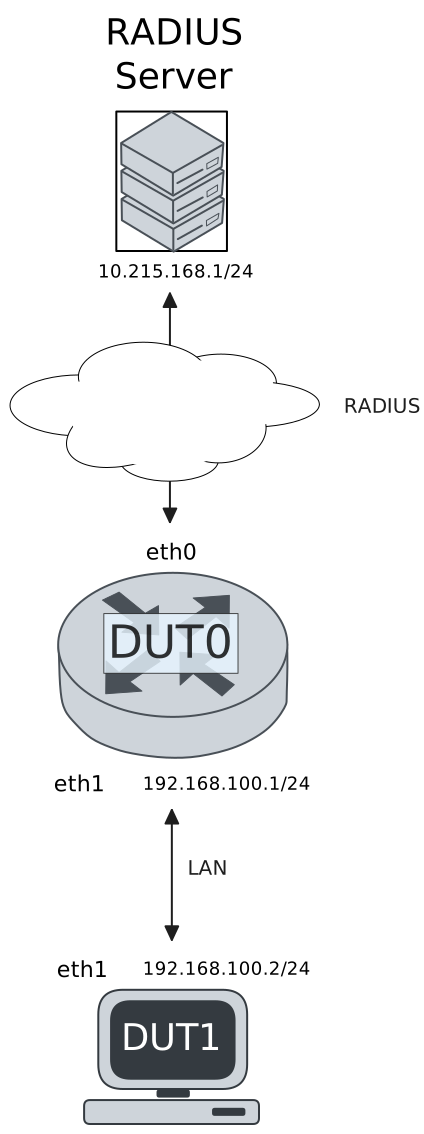
Test RADIUS Accounting With 802.1x Authentication
Description
DUT0 is configured with an 802.1x-authenticated interface and DUT1 acts as an 802.1x supplicant. RADIUS accounting messages are captured in DUT0.
Scenario
Step 1: Set the following configuration in DUT0 :
set interfaces ethernet eth0 address 10.215.168.64/24
set interfaces ethernet eth1 address 192.168.100.1/24
set interfaces ethernet eth1 authenticator 802.1x max-retransmissions 2
set interfaces ethernet eth1 authenticator aaa accounting list1
set interfaces ethernet eth1 authenticator aaa authentication list1
set interfaces ethernet eth1 authenticator log-level debug
set interfaces ethernet eth1 authenticator mode only-802.1x
set interfaces ethernet eth1 authenticator quiet-period 60
set interfaces ethernet eth1 authenticator reauth-period 0
set system aaa group radius radgroup1 server serv1
set system aaa list list1 method 1 group radius radgroup1
set system aaa server radius serv1 address 10.215.168.1
set system aaa server radius serv1 encrypted-key U2FsdGVkX1+G4ypik/CWAywOoKOPxaISUQQKZ+bDU/fH4sYAZlcbsuZMH1xHrGhDmifFv3WMczAKLmzrQaph6w==
set system login user admin authentication encrypted-password '$6$GSjsCj8gHLv$/VcqU6FLi6CT2Oxn0MJQ2C2tqnRDrYKNF8HIYWJp68nvXvPdFccDsT04.WtigUONbKYrgKg8d6rEs8PjljMkH0'
Step 2: Ping the IP address 10.215.168.1 from DUT0:
admin@DUT0$ ping 10.215.168.1 count 1 size 56 timeout 1Show output
PING 10.215.168.1 (10.215.168.1) 56(84) bytes of data.
64 bytes from 10.215.168.1: icmp_seq=1 ttl=64 time=0.449 ms

--- 10.215.168.1 ping statistics ---
1 packets transmitted, 1 received, 0% packet loss, time 0ms
rtt min/avg/max/mdev = 0.449/0.449/0.449/0.000 ms
Note
Start packet capture in DUT0 to filter RADIUS messages
Step 3: Set the following configuration in DUT1 :
set interfaces ethernet eth1 address 192.168.100.2/24
set interfaces ethernet eth1 supplicant encrypted-password U2FsdGVkX1/pbivic+cK1HDaL1KM0eRM0JiufNVGwf0=
set interfaces ethernet eth1 supplicant username testing
set system login user admin authentication encrypted-password '$6$GSjsCj8gHLv$/VcqU6FLi6CT2Oxn0MJQ2C2tqnRDrYKNF8HIYWJp68nvXvPdFccDsT04.WtigUONbKYrgKg8d6rEs8PjljMkH0'
Step 4: Run the command interfaces ethernet eth1 supplicant show status on DUT1 and check whether the output contains the following tokens:
AuthorizedShow output
---------------------------------------------------
Field                      Value
---------------------------------------------------
EAP State                                   SUCCESS
EAP TLS Cipher          ECDHE-RSA-AES256-GCM-SHA384
EAP TLS Version                             TLSv1.2
PAE State                             AUTHENTICATED
Supplicant Port Status                   Authorized
WPA State                                 COMPLETED
Step 5: Ping the IP address 192.168.100.1 from DUT1:
admin@DUT1$ ping 192.168.100.1 count 1 size 56 timeout 1Show output
PING 192.168.100.1 (192.168.100.1) 56(84) bytes of data.
64 bytes from 192.168.100.1: icmp_seq=1 ttl=64 time=0.755 ms

--- 192.168.100.1 ping statistics ---
1 packets transmitted, 1 received, 0% packet loss, time 0ms
rtt min/avg/max/mdev = 0.755/0.755/0.755/0.000 ms
Note
Stop packet capture in DUT0 and expect
the following RADIUS messages:
Show output
tcpdump: listening on eth0, link-type EN10MB (Ethernet), snapshot length 262144 bytes
14:46:30.465050 de:ad:be:ef:6c:00 > fe:85:ac:81:55:1e, ethertype IPv4 (0x0800), length 183: (tos 0x0, ttl 64, id 62712, offset 0, flags [none], proto UDP (17), length 169)
    10.215.168.64.51554 > 10.215.168.1.1813: [bad udp cksum 0x6696 -> 0x0ade!] RADIUS, length: 141
        Accounting-Request (4), id: 0x0b, Authenticator: 38770968740f2820ae921321cb13cfaa
          Acct-Status-Type Attribute (40), length: 6, Value: Start
            0x0000:  0000 0001
          Acct-Authentic Attribute (45), length: 6, Value: RADIUS
            0x0000:  0000 0001
          User-Name Attribute (1), length: 9, Value: testing
            0x0000:  7465 7374 696e 67
          Called-Station-Id Attribute (30), length: 20, Value: DE-AD-BE-EF-6C-01:
            0x0000:  4445 2d41 442d 4245 2d45 462d 3643 2d30
            0x0010:  313a
          Service-Type Attribute (6), length: 6, Value: Framed
            0x0000:  0000 0002
          Calling-Station-Id Attribute (31), length: 19, Value: DE-AD-BE-EF-6C-11
            0x0000:  4445 2d41 442d 4245 2d45 462d 3643 2d31
            0x0010:  31
          Acct-Session-Id Attribute (44), length: 18, Value: F0C804E376697ECA
            0x0000:  4630 4338 3034 4533 3736 3639 3745 4341
          NAS-Port-Type Attribute (61), length: 6, Value: Ethernet
            0x0000:  0000 000f
          Connect-Info Attribute (77), length: 13, Value: Unsupported
            0x0000:  556e 7375 7070 6f72 7465 64
          NAS-Port-Id Attribute (87), length: 6, Value: eth1
            0x0000:  6574 6831
          Event-Timestamp Attribute (55), length: 6, Value: Wed Sep 16 14:46:30 2026
            0x0000:  6aaa abc6
          Acct-Delay-Time Attribute (41), length: 6, Value: 00 secs
            0x0000:  0000 0000
1 packet captured
2 packets received by filter
0 packets dropped by kernel
admin@osdx$
Step 6: Run the command interfaces ethernet eth1 authenticator show stats on DUT0 and check whether the output matches the following regular expressions:
Authentication Mode\s+802.1X
Session User MAC\s+de:ad:be:ef:6c:11
Session User Name\s+testing
Show output
---------------------------------------------
Field                   Value
---------------------------------------------
Access Challenges                           9
Authentication Backend                 RADIUS
Authentication Failures                     0
Authentication Mode                    802.1X
Authentication Status     Authorized (802.1X)
Authentication Successes                    1
EAPoL frames (Rx)                          11
EAPoL frames (Tx)                          11
Quiet Period                               60
Reauthenticate                          FALSE
Reauthenticate Period                       0
Session Time                                0
Session User MAC            de:ad:be:ef:6c:11
Session User Name                     testing
Test RADIUS Accounting With MAB Authentication
Description
DUT0 is configured with a MAB-authenticated interface. RADIUS accounting messages are captured in DUT0.
Scenario
Step 1: Set the following configuration in DUT0 :
set interfaces ethernet eth0 address 10.215.168.64/24
set interfaces ethernet eth1 address 192.168.100.1/24
set interfaces ethernet eth1 authenticator aaa accounting list1
set interfaces ethernet eth1 authenticator aaa authentication list1
set interfaces ethernet eth1 authenticator log-level debug
set interfaces ethernet eth1 authenticator mode only-MAB
set interfaces ethernet eth1 authenticator quiet-period 60
set interfaces ethernet eth1 authenticator reauth-period 0
set system aaa group radius radgroup1 server serv1
set system aaa list list1 method 1 group radius radgroup1
set system aaa server radius serv1 address 10.215.168.1
set system aaa server radius serv1 encrypted-key U2FsdGVkX1/8A5XmqBDmn1iTseiwKOCdIMYEsvMMESgkyme7HYASiPnZbaM6TCgdNR81msDzk34jZdY8yyzF8A==
set system login user admin authentication encrypted-password '$6$GSjsCj8gHLv$/VcqU6FLi6CT2Oxn0MJQ2C2tqnRDrYKNF8HIYWJp68nvXvPdFccDsT04.WtigUONbKYrgKg8d6rEs8PjljMkH0'
Step 2: Ping the IP address 10.215.168.1 from DUT0:
admin@DUT0$ ping 10.215.168.1 count 1 size 56 timeout 1Show output
PING 10.215.168.1 (10.215.168.1) 56(84) bytes of data.
64 bytes from 10.215.168.1: icmp_seq=1 ttl=64 time=0.511 ms

--- 10.215.168.1 ping statistics ---
1 packets transmitted, 1 received, 0% packet loss, time 0ms
rtt min/avg/max/mdev = 0.511/0.511/0.511/0.000 ms
Note
Start packet capture in DUT0 to filter RADIUS messages
Step 3: Set the following configuration in DUT1 :
set interfaces ethernet eth1 address 192.168.100.2/24
set system login user admin authentication encrypted-password '$6$GSjsCj8gHLv$/VcqU6FLi6CT2Oxn0MJQ2C2tqnRDrYKNF8HIYWJp68nvXvPdFccDsT04.WtigUONbKYrgKg8d6rEs8PjljMkH0'
Step 4: Ping the IP address 192.168.100.1 from DUT1:
admin@DUT1$ ping 192.168.100.1 count 1 size 56 timeout 1Show output
PING 192.168.100.1 (192.168.100.1) 56(84) bytes of data.
64 bytes from 192.168.100.1: icmp_seq=1 ttl=64 time=0.669 ms

--- 192.168.100.1 ping statistics ---
1 packets transmitted, 1 received, 0% packet loss, time 0ms
rtt min/avg/max/mdev = 0.669/0.669/0.669/0.000 ms
Note
Stop packet capture in DUT0 and expect
the following RADIUS messages:
Show output
tcpdump: listening on eth0, link-type EN10MB (Ethernet), snapshot length 262144 bytes
14:46:44.342911 de:ad:be:ef:6c:00 > fe:85:ac:81:55:1e, ethertype IPv4 (0x0800), length 193: (tos 0x0, ttl 64, id 23214, offset 0, flags [none], proto UDP (17), length 179)
    10.215.168.64.34238 > 10.215.168.1.1813: [bad udp cksum 0x66a0 -> 0x1ab6!] RADIUS, length: 151
        Accounting-Request (4), id: 0x01, Authenticator: 5fcf284ac2cd12a308bc16284d32ab34
          Acct-Status-Type Attribute (40), length: 6, Value: Start
            0x0000:  0000 0001
          Acct-Authentic Attribute (45), length: 6, Value: Local
            0x0000:  0000 0002
          User-Name Attribute (1), length: 19, Value: de:ad:be:ef:6c:11
            0x0000:  6465 3a61 643a 6265 3a65 663a 3663 3a31
            0x0010:  31
          Called-Station-Id Attribute (30), length: 20, Value: DE-AD-BE-EF-6C-01:
            0x0000:  4445 2d41 442d 4245 2d45 462d 3643 2d30
            0x0010:  313a
          Service-Type Attribute (6), length: 6, Value: Framed
            0x0000:  0000 0002
          Calling-Station-Id Attribute (31), length: 19, Value: DE-AD-BE-EF-6C-11
            0x0000:  4445 2d41 442d 4245 2d45 462d 3643 2d31
            0x0010:  31
          Acct-Session-Id Attribute (44), length: 18, Value: 3EFAC65361A34DE4
            0x0000:  3345 4641 4336 3533 3631 4133 3444 4534
          NAS-Port-Type Attribute (61), length: 6, Value: Ethernet
            0x0000:  0000 000f
          Connect-Info Attribute (77), length: 13, Value: Unsupported
            0x0000:  556e 7375 7070 6f72 7465 64
          NAS-Port-Id Attribute (87), length: 6, Value: eth1
            0x0000:  6574 6831
          Event-Timestamp Attribute (55), length: 6, Value: Wed Sep 16 14:46:44 2026
            0x0000:  6aaa abd4
          Acct-Delay-Time Attribute (41), length: 6, Value: 00 secs
            0x0000:  0000 0000
1 packet captured
2 packets received by filter
0 packets dropped by kernel
admin@osdx$
Step 5: Run the command interfaces ethernet eth1 authenticator show stats on DUT0 and check whether the output matches the following regular expressions:
Authentication Mode\s+MAB
Session User MAC\s+de:ad:be:ef:6c:11
Session User Name\s+N/A
Show output
-------------------------------------------
Field                  Value
-------------------------------------------
Access Challenges                         0
Authentication Backend               RADIUS
Authentication Failures                   0
Authentication Mode                     MAB
Authentication Status      Authorized (MAB)
Authentication Successes                  1
EAPoL frames (Rx)                         0
EAPoL frames (Tx)                         0
Quiet Period                             60
Reauthenticate                        FALSE
Reauthenticate Period                     0
Session Time                              1
Session User MAC          de:ad:be:ef:6c:11
Session User Name                       N/A