Acl Id
This scenario shows how to install traffic policies from received RADIUS messages (using the “Filter-Id” attribute and according to RFC2865).
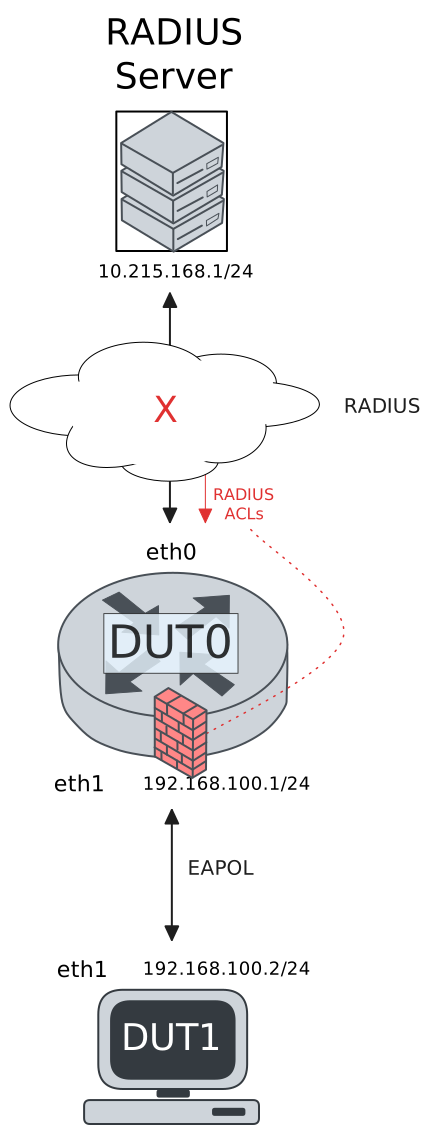
Test 802.1x Filter-ID ACL
Description
DUT0 is configured with an 802.1x-authenticated interface and DUT1 is configured as a supplicant. A traffic policy is automatically configured in DUT0 after the supplicant is authenticated.
Scenario
Step 1: Set the following configuration in DUT0 :
set interfaces ethernet eth0 address 10.215.168.64/24
set interfaces ethernet eth1 address 192.168.100.1/24
set interfaces ethernet eth1 authenticator 802.1x max-retransmissions 2
set interfaces ethernet eth1 authenticator aaa authentication list1
set interfaces ethernet eth1 authenticator aaa authorization acl-alias RADIUS_ACL direction both
set interfaces ethernet eth1 authenticator aaa authorization acl-alias RADIUS_ACL priority very-high
set interfaces ethernet eth1 authenticator aaa authorization acl-alias RADIUS_ACL traffic-policy POL1
set interfaces ethernet eth1 authenticator log-level debug
set interfaces ethernet eth1 authenticator mode only-802.1x
set interfaces ethernet eth1 authenticator quiet-period 60
set interfaces ethernet eth1 authenticator reauth-period 0
set service ssh
set system aaa group radius radgroup1 server serv1
set system aaa list list1 method 1 group radius radgroup1
set system aaa server radius serv1 address 10.215.168.1
set system aaa server radius serv1 encrypted-key U2FsdGVkX19oSGravvU79QcxYYnxyuGYdfjG2C9EbfOg4mMXXwdaCx3XUkoNFC98/qrDWwyutijkpYYUF/chfA==
set system login user admin authentication encrypted-password '$6$GSjsCj8gHLv$/VcqU6FLi6CT2Oxn0MJQ2C2tqnRDrYKNF8HIYWJp68nvXvPdFccDsT04.WtigUONbKYrgKg8d6rEs8PjljMkH0'
set traffic policy POL1 rule 1 selector SEL_ICMP
set traffic policy POL1 rule 2 selector SEL_SSH
set traffic policy POL1 rule 3 action drop
set traffic selector SEL_ICMP rule 1 protocol icmp
set traffic selector SEL_SSH rule 1 destination port 22
set traffic selector SEL_SSH rule 1 protocol tcp
set traffic selector SEL_SSH rule 2 protocol tcp
set traffic selector SEL_SSH rule 2 source port 22
Step 2: Ping the IP address 10.215.168.1 from DUT0:
admin@DUT0$ ping 10.215.168.1 count 1 size 56 timeout 1Show output
PING 10.215.168.1 (10.215.168.1) 56(84) bytes of data.
64 bytes from 10.215.168.1: icmp_seq=1 ttl=64 time=0.684 ms

--- 10.215.168.1 ping statistics ---
1 packets transmitted, 1 received, 0% packet loss, time 0ms
rtt min/avg/max/mdev = 0.684/0.684/0.684/0.000 ms
Step 3: Set the following configuration in DUT1 :
set interfaces ethernet eth1 address 192.168.100.2/24
set interfaces ethernet eth1 supplicant encrypted-password U2FsdGVkX1+HT2s2jS3p5Zq6ppXQIOH3C02N6i++Mr8=
set interfaces ethernet eth1 supplicant username user_acl_id
set system login user admin authentication encrypted-password '$6$GSjsCj8gHLv$/VcqU6FLi6CT2Oxn0MJQ2C2tqnRDrYKNF8HIYWJp68nvXvPdFccDsT04.WtigUONbKYrgKg8d6rEs8PjljMkH0'
Step 4: Run the command interfaces ethernet eth1 supplicant show status on DUT1 and check whether the output contains the following tokens:
AuthorizedShow output
---------------------------------------------------
Field                      Value
---------------------------------------------------
EAP State                                   SUCCESS
EAP TLS Cipher          ECDHE-RSA-AES256-GCM-SHA384
EAP TLS Version                             TLSv1.2
PAE State                             AUTHENTICATED
Supplicant Port Status                   Authorized
WPA State                                 COMPLETED
Step 5: Run the command interfaces ethernet eth1 supplicant show stats on DUT1 and check whether the output matches the following regular expressions:
Port Status\s+AuthorizedShow output
-------------------------------
Field           Value
-------------------------------
EAPoL Frames (Rx)            11
EAPoL Frames (Tx)            11
Invalid Frames (Rx)           0
Logoff Frames (Tx)            0
Port Status          Authorized
Req Frames (Rx)               9
Req ID Frames (Rx)            1
Resp Frames (Tx)             10
Start Frames (Tx)             1
Step 6: Run the command interfaces ethernet eth1 authenticator show stats on DUT0 and check whether the output matches the following regular expressions:
Authentication Successes\s+1
Authentication Mode\s+802\.1X
Show output
---------------------------------------------
Field                   Value
---------------------------------------------
Access Challenges                           9
Authentication Backend                 RADIUS
Authentication Failures                     0
Authentication Mode                    802.1X
Authentication Status     Authorized (802.1X)
Authentication Successes                    1
EAPoL frames (Rx)                          11
EAPoL frames (Tx)                          11
Quiet Period                               60
Reauthenticate                          FALSE
Reauthenticate Period                       0
Session Time                                0
Session User MAC            de:ad:be:ef:6c:11
Session User Name                 user_acl_id
Step 7: Ping the IP address 192.168.100.1 from DUT1:
admin@DUT1$ ping 192.168.100.1 count 1 size 56 timeout 1Show output
PING 192.168.100.1 (192.168.100.1) 56(84) bytes of data.
64 bytes from 192.168.100.1: icmp_seq=1 ttl=64 time=0.836 ms

--- 192.168.100.1 ping statistics ---
1 packets transmitted, 1 received, 0% packet loss, time 0ms
rtt min/avg/max/mdev = 0.836/0.836/0.836/0.000 ms
Step 8: Run the command interfaces ethernet eth1 authenticator show acl rules on DUT0 and expect the following output:
Show output
Received ACL type: Filter-ID.
ACL with alias 'RADIUS_ACL' is not installed.
Step 9: Ping the IP address 192.168.100.1 from DUT1:
admin@DUT1$ ping 192.168.100.1 count 1 size 56 timeout 1Show output
PING 192.168.100.1 (192.168.100.1) 56(84) bytes of data.
64 bytes from 192.168.100.1: icmp_seq=1 ttl=64 time=0.578 ms

--- 192.168.100.1 ping statistics ---
1 packets transmitted, 1 received, 0% packet loss, time 0ms
rtt min/avg/max/mdev = 0.578/0.578/0.578/0.000 ms
Step 10: Initiate an SSH connection from DUT1 to IP address 192.168.100.1 using user admin:
admin@DUT1$ ssh admin@192.168.100.1 option StrictHostKeyChecking=no option UserKnownHostsFile=/dev/nullShow output
Warning: Permanently added '192.168.100.1' (ECDSA) to the list of known hosts.
admin@192.168.100.1's password:
Welcome to Teldat OSDx v4.2.10.4

This system includes free software.
Contact Teldat for licenses information and source code.

Last login: Wed Sep 16 14:37:39 2026 from 192.168.100.2
admin@osdx$
Step 11: Expect a failure in the following command:
Initiate a udp connection from DUT0 to DUT1 and exchange messages between both endpoints
admin@DUT1$ monitor test connection server 4321 udp
admin@DUT0$ monitor test connection client 192.168.100.2 4321 udp
Step 12: Run the command interfaces ethernet eth1 authenticator show acl stats on DUT0 and expect the following output:
Show output
Policy POL1 -- ifc eth1 -- hook in prio very-high

---------------------------------------------------------------
rule   selector  pkts match  pkts eval  bytes match  bytes eval
---------------------------------------------------------------
1      SEL_ICMP           2         29          168        5381
2      SEL_SSH           27         27         5213        5213
3      -                  0          0            0           0
---------------------------------------------------------------
Total                    29         29         5381        5381

Policy POL1 -- ifc eth1 -- hook out prio very-high

---------------------------------------------------------------
rule   selector  pkts match  pkts eval  bytes match  bytes eval
---------------------------------------------------------------
1      SEL_ICMP           2         24          168        5217
2      SEL_SSH           20         22         4865        5049
3      -                  2          2          184         184
---------------------------------------------------------------
Total                    24         24         5217        5217
Test 802.1x Filter-ID ACL And CoA
Description
In this scenario, DUT1 is successfully authenticated and a traffic policy is configured from a “Filter-ID” attribute. A CoA message is then received from the authentication server that changes the configured traffic policy to drop non-ICMP traffic.
Scenario
Step 1: Set the following configuration in DUT0 :
set interfaces ethernet eth0 address 10.215.168.64/24
set interfaces ethernet eth1 address 192.168.100.1/24
set interfaces ethernet eth1 authenticator 802.1x max-retransmissions 2
set interfaces ethernet eth1 authenticator aaa authentication list1
set interfaces ethernet eth1 authenticator aaa authorization acl-alias RADIUS_ACL direction both
set interfaces ethernet eth1 authenticator aaa authorization acl-alias RADIUS_ACL priority very-high
set interfaces ethernet eth1 authenticator aaa authorization acl-alias RADIUS_ACL traffic-policy POL1
set interfaces ethernet eth1 authenticator aaa authorization acl-alias RADIUS_ACL_COA direction in
set interfaces ethernet eth1 authenticator aaa authorization acl-alias RADIUS_ACL_COA traffic-policy POL2
set interfaces ethernet eth1 authenticator coa client 10.215.168.1
set interfaces ethernet eth1 authenticator coa encrypted-secret U2FsdGVkX1/XzX/OkYN61+11MmvkRXCfOV9yz/TZFKc=
set interfaces ethernet eth1 authenticator log-level debug
set interfaces ethernet eth1 authenticator mode only-802.1x
set interfaces ethernet eth1 authenticator quiet-period 60
set interfaces ethernet eth1 authenticator reauth-period 0
set service ssh
set system aaa group radius radgroup1 server serv1
set system aaa list list1 method 1 group radius radgroup1
set system aaa server radius serv1 address 10.215.168.1
set system aaa server radius serv1 encrypted-key U2FsdGVkX19VzdSvyc6cR+9AaLLrFIC51157r6ra08JbdX5GHLRNkNfTCgLZFErzhyJetM7p5oWnJPhVIOxhsw==
set system login user admin authentication encrypted-password '$6$GSjsCj8gHLv$/VcqU6FLi6CT2Oxn0MJQ2C2tqnRDrYKNF8HIYWJp68nvXvPdFccDsT04.WtigUONbKYrgKg8d6rEs8PjljMkH0'
set traffic policy POL1 rule 1 selector SEL_ICMP
set traffic policy POL1 rule 2 selector SEL_SSH
set traffic policy POL1 rule 3 action drop
set traffic policy POL2 rule 1 selector SEL_ICMP
set traffic policy POL2 rule 2 action drop
set traffic selector SEL_ICMP rule 1 protocol icmp
set traffic selector SEL_SSH rule 1 destination port 22
set traffic selector SEL_SSH rule 1 protocol tcp
set traffic selector SEL_SSH rule 2 protocol tcp
set traffic selector SEL_SSH rule 2 source port 22
Step 2: Ping the IP address 10.215.168.1 from DUT0:
admin@DUT0$ ping 10.215.168.1 count 1 size 56 timeout 1Show output
PING 10.215.168.1 (10.215.168.1) 56(84) bytes of data.
64 bytes from 10.215.168.1: icmp_seq=1 ttl=64 time=0.352 ms

--- 10.215.168.1 ping statistics ---
1 packets transmitted, 1 received, 0% packet loss, time 0ms
rtt min/avg/max/mdev = 0.352/0.352/0.352/0.000 ms
Step 3: Set the following configuration in DUT1 :
set interfaces ethernet eth1 address 192.168.100.2/24
set interfaces ethernet eth1 supplicant encrypted-password U2FsdGVkX1/ftUCm0kz4b2JrcLN/pSwjj53ZtLaX77Q=
set interfaces ethernet eth1 supplicant username user_acl_id
set system login user admin authentication encrypted-password '$6$GSjsCj8gHLv$/VcqU6FLi6CT2Oxn0MJQ2C2tqnRDrYKNF8HIYWJp68nvXvPdFccDsT04.WtigUONbKYrgKg8d6rEs8PjljMkH0'
Step 4: Run the command interfaces ethernet eth1 supplicant show status on DUT1 and check whether the output contains the following tokens:
AuthorizedShow output
---------------------------------------------------
Field                      Value
---------------------------------------------------
EAP State                                   SUCCESS
EAP TLS Cipher          ECDHE-RSA-AES256-GCM-SHA384
EAP TLS Version                             TLSv1.2
PAE State                             AUTHENTICATED
Supplicant Port Status                   Authorized
WPA State                                 COMPLETED
Step 5: Run the command interfaces ethernet eth1 supplicant show stats on DUT1 and check whether the output matches the following regular expressions:
Port Status\s+AuthorizedShow output
-------------------------------
Field           Value
-------------------------------
EAPoL Frames (Rx)            11
EAPoL Frames (Tx)            11
Invalid Frames (Rx)           0
Logoff Frames (Tx)            0
Port Status          Authorized
Req Frames (Rx)               9
Req ID Frames (Rx)            1
Resp Frames (Tx)             10
Start Frames (Tx)             1
Step 6: Run the command interfaces ethernet eth1 authenticator show stats on DUT0 and check whether the output matches the following regular expressions:
Authentication Successes\s+1
Authentication Mode\s+802\.1X
Show output
---------------------------------------------
Field                   Value
---------------------------------------------
Access Challenges                           9
Authentication Backend                 RADIUS
Authentication Failures                     0
Authentication Mode                    802.1X
Authentication Status     Authorized (802.1X)
Authentication Successes                    1
EAPoL frames (Rx)                          11
EAPoL frames (Tx)                          11
Quiet Period                               60
Reauthenticate                          FALSE
Reauthenticate Period                       0
Session Time                                0
Session User MAC            de:ad:be:ef:6c:11
Session User Name                 user_acl_id
Step 7: Ping the IP address 192.168.100.1 from DUT1:
admin@DUT1$ ping 192.168.100.1 count 1 size 56 timeout 1Show output
PING 192.168.100.1 (192.168.100.1) 56(84) bytes of data.
64 bytes from 192.168.100.1: icmp_seq=1 ttl=64 time=0.416 ms

--- 192.168.100.1 ping statistics ---
1 packets transmitted, 1 received, 0% packet loss, time 0ms
rtt min/avg/max/mdev = 0.416/0.416/0.416/0.000 ms
Note
Send a CoA/Disconnect request from the RADIUS server
On Linux, the FreeRADIUS package includes the
radtest utility, which can be used to send these messages:
Show output
$ cat /osdx-tests/utils/dot1x/acl_id.req
User-Name = "user_acl_id"
Filter-ID = "RADIUS_ACL_COA"
$ radclient -s -t 1 -r 1 10.215.168.64:3799 coa coa_secret -f /osdx-tests/utils/dot1x/acl_id.req
Sent CoA-Request Id 66 from 0.0.0.0:41744 to 10.215.168.64:3799 length 49
Received CoA-ACK Id 66 from 10.215.168.64:3799 to 10.215.168.1:41744 length 44
Packet summary:
      Accepted      : 1
      Rejected      : 0
      Lost          : 0
      Passed filter : 1
      Failed filter : 0
Step 8: Run the command interfaces ethernet eth1 authenticator show acl rules on DUT0 and expect the following output:
Show output
Received ACL type: Filter-ID.
ACL with alias 'RADIUS_ACL_COA' is not installed.
Step 9: Ping the IP address 192.168.100.1 from DUT1:
admin@DUT1$ ping 192.168.100.1 count 1 size 56 timeout 1Show output
PING 192.168.100.1 (192.168.100.1) 56(84) bytes of data.
64 bytes from 192.168.100.1: icmp_seq=1 ttl=64 time=0.596 ms

--- 192.168.100.1 ping statistics ---
1 packets transmitted, 1 received, 0% packet loss, time 0ms
rtt min/avg/max/mdev = 0.596/0.596/0.596/0.000 ms
Step 10: Initiate an SSH connection from DUT1 to IP address 192.168.100.1 using user admin which is expected to fail:
admin@DUT1$ ssh admin@192.168.100.1 option StrictHostKeyChecking=no option UserKnownHostsFile=/dev/null
Step 11: Run the command interfaces ethernet eth1 authenticator show acl stats on DUT0 and expect the following output:
Show output
Policy POL2 -- ifc eth1 -- hook in prio very-high

---------------------------------------------------------------
rule   selector  pkts match  pkts eval  bytes match  bytes eval
---------------------------------------------------------------
1      SEL_ICMP           1         10           84         624
2      -                  9          9          540         540
---------------------------------------------------------------
Total                    10         10          624         624
Test MAB Filter-ID ACL
Description
DUT0 is configured with a MAB-authenticated interface. A traffic policy is automatically configured in DUT0 after the supplicant is authenticated via MAC address.
Scenario
Step 1: Set the following configuration in DUT0 :
set interfaces ethernet eth0 address 10.215.168.64/24
set interfaces ethernet eth1 address 192.168.100.1/24
set interfaces ethernet eth1 authenticator aaa authentication list1
set interfaces ethernet eth1 authenticator aaa authorization acl-alias RADIUS_ACL direction both
set interfaces ethernet eth1 authenticator aaa authorization acl-alias RADIUS_ACL priority very-high
set interfaces ethernet eth1 authenticator aaa authorization acl-alias RADIUS_ACL traffic-policy POL1
set interfaces ethernet eth1 authenticator log-level debug
set interfaces ethernet eth1 authenticator mode only-MAB
set interfaces ethernet eth1 authenticator quiet-period 60
set interfaces ethernet eth1 authenticator reauth-period 0
set service ssh
set system aaa group radius radgroup1 server serv1
set system aaa list list1 method 1 group radius radgroup1
set system aaa server radius serv1 address 10.215.168.1
set system aaa server radius serv1 encrypted-key U2FsdGVkX18kXV5RrE/h2qnHSK+rgL77e8/+/5ZNsX18faQh/sXdrspQf4u16EGt2sXRTp4VyMptyoymhfDqIg==
set system login user admin authentication encrypted-password '$6$GSjsCj8gHLv$/VcqU6FLi6CT2Oxn0MJQ2C2tqnRDrYKNF8HIYWJp68nvXvPdFccDsT04.WtigUONbKYrgKg8d6rEs8PjljMkH0'
set traffic policy POL1 rule 1 selector SEL_ICMP
set traffic policy POL1 rule 2 selector SEL_SSH
set traffic policy POL1 rule 3 action drop
set traffic selector SEL_ICMP rule 1 protocol icmp
set traffic selector SEL_SSH rule 1 destination port 22
set traffic selector SEL_SSH rule 1 protocol tcp
set traffic selector SEL_SSH rule 2 protocol tcp
set traffic selector SEL_SSH rule 2 source port 22
Step 2: Ping the IP address 10.215.168.1 from DUT0:
admin@DUT0$ ping 10.215.168.1 count 1 size 56 timeout 1Show output
PING 10.215.168.1 (10.215.168.1) 56(84) bytes of data.
64 bytes from 10.215.168.1: icmp_seq=1 ttl=64 time=0.209 ms

--- 10.215.168.1 ping statistics ---
1 packets transmitted, 1 received, 0% packet loss, time 0ms
rtt min/avg/max/mdev = 0.209/0.209/0.209/0.000 ms
Step 3: Set the following configuration in DUT1 :
set interfaces ethernet eth1 address 192.168.100.2/24
set interfaces ethernet eth1 mac 'de:ad:be:ef:6c:1e'
set system login user admin authentication encrypted-password '$6$GSjsCj8gHLv$/VcqU6FLi6CT2Oxn0MJQ2C2tqnRDrYKNF8HIYWJp68nvXvPdFccDsT04.WtigUONbKYrgKg8d6rEs8PjljMkH0'
Step 4: Ping the IP address 192.168.100.1 from DUT1:
admin@DUT1$ ping 192.168.100.1 count 1 size 56 timeout 1Show output
PING 192.168.100.1 (192.168.100.1) 56(84) bytes of data.
64 bytes from 192.168.100.1: icmp_seq=1 ttl=64 time=0.519 ms

--- 192.168.100.1 ping statistics ---
1 packets transmitted, 1 received, 0% packet loss, time 0ms
rtt min/avg/max/mdev = 0.519/0.519/0.519/0.000 ms
Step 5: Run the command interfaces ethernet eth1 authenticator show stats on DUT0 and check whether the output matches the following regular expressions:
Authentication Successes\s+1
Authentication Mode\s+MAB
Show output
-------------------------------------------
Field                  Value
-------------------------------------------
Access Challenges                         0
Authentication Backend               RADIUS
Authentication Failures                   0
Authentication Mode                     MAB
Authentication Status      Authorized (MAB)
Authentication Successes                  1
EAPoL frames (Rx)                         0
EAPoL frames (Tx)                         0
Quiet Period                             60
Reauthenticate                        FALSE
Reauthenticate Period                     0
Session Time                              0
Session User MAC          de:ad:be:ef:6c:1e
Session User Name                       N/A
Step 6: Ping the IP address 192.168.100.1 from DUT1:
admin@DUT1$ ping 192.168.100.1 count 1 size 56 timeout 1Show output
PING 192.168.100.1 (192.168.100.1) 56(84) bytes of data.
64 bytes from 192.168.100.1: icmp_seq=1 ttl=64 time=0.539 ms

--- 192.168.100.1 ping statistics ---
1 packets transmitted, 1 received, 0% packet loss, time 0ms
rtt min/avg/max/mdev = 0.539/0.539/0.539/0.000 ms
Step 7: Run the command interfaces ethernet eth1 authenticator show acl rules on DUT0 and expect the following output:
Show output
Received ACL type: Filter-ID.
ACL with alias 'RADIUS_ACL' is not installed.
Step 8: Ping the IP address 192.168.100.1 from DUT1:
admin@DUT1$ ping 192.168.100.1 count 1 size 56 timeout 1Show output
PING 192.168.100.1 (192.168.100.1) 56(84) bytes of data.
64 bytes from 192.168.100.1: icmp_seq=1 ttl=64 time=0.294 ms

--- 192.168.100.1 ping statistics ---
1 packets transmitted, 1 received, 0% packet loss, time 0ms
rtt min/avg/max/mdev = 0.294/0.294/0.294/0.000 ms
Step 9: Initiate an SSH connection from DUT1 to IP address 192.168.100.1 using user admin:
admin@DUT1$ ssh admin@192.168.100.1 option StrictHostKeyChecking=no option UserKnownHostsFile=/dev/nullShow output
Warning: Permanently added '192.168.100.1' (ECDSA) to the list of known hosts.
admin@192.168.100.1's password:
Welcome to Teldat OSDx v4.2.10.4

This system includes free software.
Contact Teldat for licenses information and source code.

Last login: Wed Sep 16 14:39:50 2026 from 192.168.100.2
admin@osdx$
Step 10: Expect a failure in the following command:
Initiate a udp connection from DUT0 to DUT1 and exchange messages between both endpoints
admin@DUT1$ monitor test connection server 4321 udp
admin@DUT0$ monitor test connection client 192.168.100.2 4321 udp
Step 11: Run the command interfaces ethernet eth1 authenticator show acl stats on DUT0 and expect the following output:
Show output
Policy POL1 -- ifc eth1 -- hook in prio very-high

---------------------------------------------------------------
rule   selector  pkts match  pkts eval  bytes match  bytes eval
---------------------------------------------------------------
1      SEL_ICMP           3         28          252        5361
2      SEL_SSH           25         25         5109        5109
3      -                  0          0            0           0
---------------------------------------------------------------
Total                    28         28         5361        5361

Policy POL1 -- ifc eth1 -- hook out prio very-high

---------------------------------------------------------------
rule   selector  pkts match  pkts eval  bytes match  bytes eval
---------------------------------------------------------------
1      SEL_ICMP           3         25          252        5265
2      SEL_SSH           20         22         4829        5013
3      -                  2          2          184         184
---------------------------------------------------------------
Total                    25         25         5265        5265
Test MAB Filter-ID ACL And CoA
Description
In this scenario, DUT1 is successfully authenticated via MAC address and a traffic policy is configured from a “Filter-ID” attribute. A CoA message is then received from the authentication server that changes the configured traffic policy to drop non-ICMP traffic.
Scenario
Step 1: Set the following configuration in DUT0 :
set interfaces ethernet eth0 address 10.215.168.64/24
set interfaces ethernet eth1 address 192.168.100.1/24
set interfaces ethernet eth1 authenticator aaa authentication list1
set interfaces ethernet eth1 authenticator aaa authorization acl-alias RADIUS_ACL direction both
set interfaces ethernet eth1 authenticator aaa authorization acl-alias RADIUS_ACL priority very-high
set interfaces ethernet eth1 authenticator aaa authorization acl-alias RADIUS_ACL traffic-policy POL1
set interfaces ethernet eth1 authenticator aaa authorization acl-alias RADIUS_ACL_COA direction in
set interfaces ethernet eth1 authenticator aaa authorization acl-alias RADIUS_ACL_COA traffic-policy POL2
set interfaces ethernet eth1 authenticator coa client 10.215.168.1
set interfaces ethernet eth1 authenticator coa encrypted-secret U2FsdGVkX18j5fgXNMmtG9KFknd/9LbnAYUknDdmdWw=
set interfaces ethernet eth1 authenticator log-level debug
set interfaces ethernet eth1 authenticator mode only-MAB
set interfaces ethernet eth1 authenticator quiet-period 60
set interfaces ethernet eth1 authenticator reauth-period 0
set service ssh
set system aaa group radius radgroup1 server serv1
set system aaa list list1 method 1 group radius radgroup1
set system aaa server radius serv1 address 10.215.168.1
set system aaa server radius serv1 encrypted-key U2FsdGVkX1/5ycFB2cAuYesjZTuqgJux5RKhgvemQfN98LADbsxVrTUSkm4jcdSL6P3STrW6hY1slP0+Ix+bKA==
set system login user admin authentication encrypted-password '$6$GSjsCj8gHLv$/VcqU6FLi6CT2Oxn0MJQ2C2tqnRDrYKNF8HIYWJp68nvXvPdFccDsT04.WtigUONbKYrgKg8d6rEs8PjljMkH0'
set traffic policy POL1 rule 1 selector SEL_ICMP
set traffic policy POL1 rule 2 selector SEL_SSH
set traffic policy POL1 rule 3 action drop
set traffic policy POL2 rule 1 selector SEL_ICMP
set traffic policy POL2 rule 2 action drop
set traffic selector SEL_ICMP rule 1 protocol icmp
set traffic selector SEL_SSH rule 1 destination port 22
set traffic selector SEL_SSH rule 1 protocol tcp
set traffic selector SEL_SSH rule 2 protocol tcp
set traffic selector SEL_SSH rule 2 source port 22
Step 2: Ping the IP address 10.215.168.1 from DUT0:
admin@DUT0$ ping 10.215.168.1 count 1 size 56 timeout 1Show output
PING 10.215.168.1 (10.215.168.1) 56(84) bytes of data.
64 bytes from 10.215.168.1: icmp_seq=1 ttl=64 time=0.272 ms

--- 10.215.168.1 ping statistics ---
1 packets transmitted, 1 received, 0% packet loss, time 0ms
rtt min/avg/max/mdev = 0.272/0.272/0.272/0.000 ms
Step 3: Set the following configuration in DUT1 :
set interfaces ethernet eth1 address 192.168.100.2/24
set interfaces ethernet eth1 mac 'de:ad:be:ef:6c:1e'
set system login user admin authentication encrypted-password '$6$GSjsCj8gHLv$/VcqU6FLi6CT2Oxn0MJQ2C2tqnRDrYKNF8HIYWJp68nvXvPdFccDsT04.WtigUONbKYrgKg8d6rEs8PjljMkH0'
Step 4: Ping the IP address 192.168.100.1 from DUT1:
admin@DUT1$ ping 192.168.100.1 count 1 size 56 timeout 1Show output
PING 192.168.100.1 (192.168.100.1) 56(84) bytes of data.
64 bytes from 192.168.100.1: icmp_seq=1 ttl=64 time=0.560 ms

--- 192.168.100.1 ping statistics ---
1 packets transmitted, 1 received, 0% packet loss, time 0ms
rtt min/avg/max/mdev = 0.560/0.560/0.560/0.000 ms
Step 5: Run the command interfaces ethernet eth1 authenticator show stats on DUT0 and check whether the output matches the following regular expressions:
Authentication Successes\s+1
Authentication Mode\s+MAB
Show output
-------------------------------------------
Field                  Value
-------------------------------------------
Access Challenges                         0
Authentication Backend               RADIUS
Authentication Failures                   0
Authentication Mode                     MAB
Authentication Status      Authorized (MAB)
Authentication Successes                  1
EAPoL frames (Rx)                         0
EAPoL frames (Tx)                         0
Quiet Period                             60
Reauthenticate                        FALSE
Reauthenticate Period                     0
Session Time                              0
Session User MAC          de:ad:be:ef:6c:1e
Session User Name                       N/A
Step 6: Ping the IP address 192.168.100.1 from DUT1:
admin@DUT1$ ping 192.168.100.1 count 1 size 56 timeout 1Show output
PING 192.168.100.1 (192.168.100.1) 56(84) bytes of data.
64 bytes from 192.168.100.1: icmp_seq=1 ttl=64 time=0.293 ms

--- 192.168.100.1 ping statistics ---
1 packets transmitted, 1 received, 0% packet loss, time 0ms
rtt min/avg/max/mdev = 0.293/0.293/0.293/0.000 ms
Note
Send a CoA/Disconnect request from the RADIUS server
On Linux, the FreeRADIUS package includes the
radtest utility, which can be used to send these messages:
Show output
$ cat /osdx-tests/utils/dot1x/mab_acl_id.req
User-Name = "de:ad:be:ef:6c:1e"
Filter-ID = "RADIUS_ACL_COA"
$ radclient -s -t 1 -r 1 10.215.168.64:3799 coa coa_secret -f /osdx-tests/utils/dot1x/mab_acl_id.req
Sent CoA-Request Id 190 from 0.0.0.0:57239 to 10.215.168.64:3799 length 55
Received CoA-ACK Id 190 from 10.215.168.64:3799 to 10.215.168.1:57239 length 44
Packet summary:
      Accepted      : 1
      Rejected      : 0
      Lost          : 0
      Passed filter : 1
      Failed filter : 0
Step 7: Run the command interfaces ethernet eth1 authenticator show acl rules on DUT0 and expect the following output:
Show output
Received ACL type: Filter-ID.
ACL with alias 'RADIUS_ACL_COA' is not installed.
Step 8: Ping the IP address 192.168.100.1 from DUT1:
admin@DUT1$ ping 192.168.100.1 count 1 size 56 timeout 1Show output
PING 192.168.100.1 (192.168.100.1) 56(84) bytes of data.
64 bytes from 192.168.100.1: icmp_seq=1 ttl=64 time=0.276 ms

--- 192.168.100.1 ping statistics ---
1 packets transmitted, 1 received, 0% packet loss, time 0ms
rtt min/avg/max/mdev = 0.276/0.276/0.276/0.000 ms
Step 9: Initiate an SSH connection from DUT1 to IP address 192.168.100.1 using user admin which is expected to fail:
admin@DUT1$ ssh admin@192.168.100.1 option StrictHostKeyChecking=no option UserKnownHostsFile=/dev/null
Step 10: Run the command interfaces ethernet eth1 authenticator show acl stats on DUT0 and expect the following output:
Show output
Policy POL2 -- ifc eth1 -- hook in prio very-high

---------------------------------------------------------------
rule   selector  pkts match  pkts eval  bytes match  bytes eval
---------------------------------------------------------------
1      SEL_ICMP           1         10           84         624
2      -                  9          9          540         540
---------------------------------------------------------------
Total                    10         10          624         624