Network Access Server
This scenario shows different Network Access Server (NAS) configurations: server failover and VRF-aware communication.
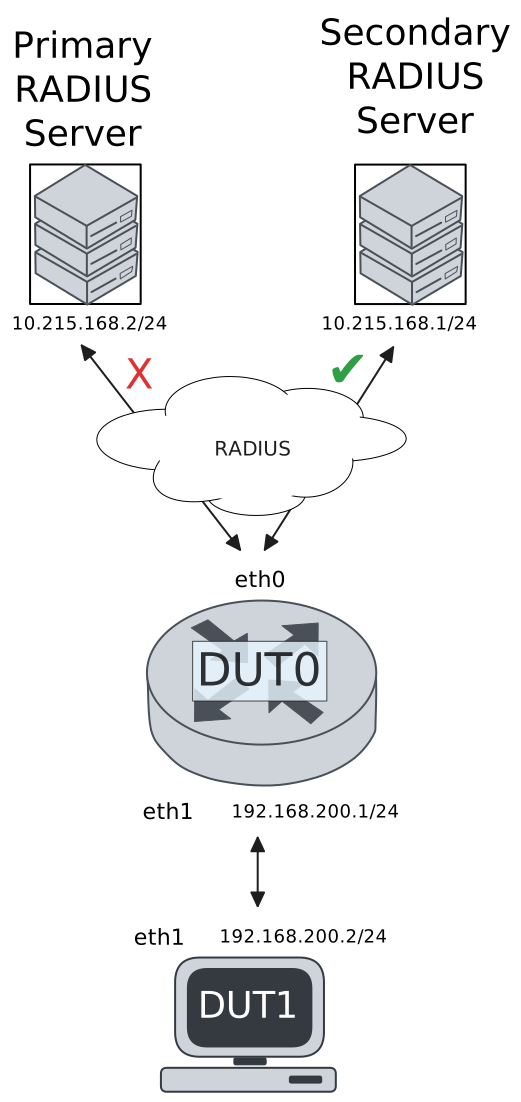
Test 802.1X Authentication Against NAS Through a VRF-Aware Interface
Description
This scenario shows how to configure 802.1X authentication. It focuses on Authenticator/NAS communication, when performed via an VRF-aware Ethernet interface.
Scenario
Step 1: Set the following configuration in DUT0 :
set interfaces ethernet eth0 address 10.215.168.64/24
set interfaces ethernet eth0 vrf WAN
set interfaces ethernet eth1 address 192.168.100.1/24
set interfaces ethernet eth1 authenticator 802.1x max-retransmissions 2
set interfaces ethernet eth1 authenticator aaa authentication list1
set interfaces ethernet eth1 authenticator log-level debug
set interfaces ethernet eth1 authenticator mode only-802.1x
set interfaces ethernet eth1 authenticator quiet-period 60
set interfaces ethernet eth1 authenticator reauth-period 0
set system aaa group radius radgroup1 local-vrf WAN
set system aaa group radius radgroup1 server serv1
set system aaa list list1 method 1 group radius radgroup1
set system aaa server radius serv1 address 10.215.168.1
set system aaa server radius serv1 encrypted-key U2FsdGVkX18INFi0ZNel2v2K/BGJxX8fIDH4YgAy8FGa7PN5EHTH6GyiZ1+OzlD04HkTJ8OYtClTYwfg9PsDmw==
set system login user admin authentication encrypted-password '$6$GSjsCj8gHLv$/VcqU6FLi6CT2Oxn0MJQ2C2tqnRDrYKNF8HIYWJp68nvXvPdFccDsT04.WtigUONbKYrgKg8d6rEs8PjljMkH0'
set system vrf WAN
Step 2: Ping the IP address 10.215.168.1 from DUT0:
admin@DUT0$ ping 10.215.168.1 vrf WAN count 1 size 56 timeout 1Show output
ping: Warning: source address might be selected on device other than: WAN
PING 10.215.168.1 (10.215.168.1) from 10.215.168.64 WAN: 56(84) bytes of data.
64 bytes from 10.215.168.1: icmp_seq=1 ttl=64 time=1.01 ms

--- 10.215.168.1 ping statistics ---
1 packets transmitted, 1 received, 0% packet loss, time 0ms
rtt min/avg/max/mdev = 1.011/1.011/1.011/0.000 ms
Step 3: Set the following configuration in DUT1 :
set interfaces ethernet eth1 address 192.168.100.2/24
set interfaces ethernet eth1 supplicant encrypted-password U2FsdGVkX1/2clH8WLtEC2u3rclKRVPWwLw8nxGelOM=
set interfaces ethernet eth1 supplicant username testing
set system login user admin authentication encrypted-password '$6$GSjsCj8gHLv$/VcqU6FLi6CT2Oxn0MJQ2C2tqnRDrYKNF8HIYWJp68nvXvPdFccDsT04.WtigUONbKYrgKg8d6rEs8PjljMkH0'
Step 4: Run the command interfaces ethernet eth1 supplicant show status on DUT1 and check whether the output contains the following tokens:
AuthorizedShow output
---------------------------------------------------
Field                      Value
---------------------------------------------------
EAP State                                   SUCCESS
EAP TLS Cipher          ECDHE-RSA-AES256-GCM-SHA384
EAP TLS Version                             TLSv1.2
PAE State                             AUTHENTICATED
Supplicant Port Status                   Authorized
WPA State                                 COMPLETED
Step 5: Run the command interfaces ethernet eth1 supplicant show stats on DUT1 and check whether the output matches the following regular expressions:
Port Status\s+AuthorizedShow output
-------------------------------
Field           Value
-------------------------------
EAPoL Frames (Rx)            11
EAPoL Frames (Tx)            11
Invalid Frames (Rx)           0
Logoff Frames (Tx)            0
Port Status          Authorized
Req Frames (Rx)               9
Req ID Frames (Rx)            1
Resp Frames (Tx)             10
Start Frames (Tx)             1
Step 6: Run the command interfaces ethernet eth1 authenticator show stats on DUT0 and check whether the output matches the following regular expressions:
Authentication Successes\s+1
Authentication Mode\s+802\.1X
Show output
---------------------------------------------
Field                   Value
---------------------------------------------
Access Challenges                           9
Authentication Backend                 RADIUS
Authentication Failures                     0
Authentication Mode                    802.1X
Authentication Status     Authorized (802.1X)
Authentication Successes                    1
EAPoL frames (Rx)                          11
EAPoL frames (Tx)                          11
Quiet Period                               60
Reauthenticate                          FALSE
Reauthenticate Period                       0
Session Time                                0
Session User MAC            de:ad:be:ef:6c:11
Session User Name                     testing
Step 7: Ping the IP address 192.168.100.1 from DUT1:
admin@DUT1$ ping 192.168.100.1 count 1 size 56 timeout 1Show output
PING 192.168.100.1 (192.168.100.1) 56(84) bytes of data.
64 bytes from 192.168.100.1: icmp_seq=1 ttl=64 time=0.565 ms

--- 192.168.100.1 ping statistics ---
1 packets transmitted, 1 received, 0% packet loss, time 0ms
rtt min/avg/max/mdev = 0.565/0.565/0.565/0.000 ms
Test MAB Authentication Against NAS Through a VRF-Aware Interface
Description
This scenario shows how to configure MAB authentication. It focuses on Authenticator/NAS communication, when performed via an VRF-aware Ethernet interface.
Scenario
Step 1: Set the following configuration in DUT0 :
set interfaces ethernet eth0 address 10.215.168.64/24
set interfaces ethernet eth0 vrf WAN
set interfaces ethernet eth1 address 192.168.100.1/24
set interfaces ethernet eth1 authenticator aaa authentication list1
set interfaces ethernet eth1 authenticator log-level debug
set interfaces ethernet eth1 authenticator mode only-MAB
set interfaces ethernet eth1 authenticator quiet-period 60
set interfaces ethernet eth1 authenticator reauth-period 0
set system aaa group radius radgroup1 local-vrf WAN
set system aaa group radius radgroup1 server serv1
set system aaa list list1 method 1 group radius radgroup1
set system aaa server radius serv1 address 10.215.168.1
set system aaa server radius serv1 encrypted-key U2FsdGVkX1+vpgCqgEOqJCVo1z71bUGVPx7+miLym4piT8RmMZhVfzKSLeCmMl9mXNChDpndjJ2tEk8ExJgzxg==
set system login user admin authentication encrypted-password '$6$GSjsCj8gHLv$/VcqU6FLi6CT2Oxn0MJQ2C2tqnRDrYKNF8HIYWJp68nvXvPdFccDsT04.WtigUONbKYrgKg8d6rEs8PjljMkH0'
set system vrf WAN
Step 2: Ping the IP address 10.215.168.1 from DUT0:
admin@DUT0$ ping 10.215.168.1 vrf WAN count 1 size 56 timeout 1Show output
ping: Warning: source address might be selected on device other than: WAN
PING 10.215.168.1 (10.215.168.1) from 10.215.168.64 WAN: 56(84) bytes of data.
64 bytes from 10.215.168.1: icmp_seq=1 ttl=64 time=0.494 ms

--- 10.215.168.1 ping statistics ---
1 packets transmitted, 1 received, 0% packet loss, time 0ms
rtt min/avg/max/mdev = 0.494/0.494/0.494/0.000 ms
Step 3: Set the following configuration in DUT1 :
set interfaces ethernet eth1 address 192.168.100.2/24
set system login user admin authentication encrypted-password '$6$GSjsCj8gHLv$/VcqU6FLi6CT2Oxn0MJQ2C2tqnRDrYKNF8HIYWJp68nvXvPdFccDsT04.WtigUONbKYrgKg8d6rEs8PjljMkH0'
Step 4: Ping the IP address 192.168.100.1 from DUT1:
admin@DUT1$ ping 192.168.100.1 count 1 size 56 timeout 1Show output
PING 192.168.100.1 (192.168.100.1) 56(84) bytes of data.
64 bytes from 192.168.100.1: icmp_seq=1 ttl=64 time=0.685 ms

--- 192.168.100.1 ping statistics ---
1 packets transmitted, 1 received, 0% packet loss, time 0ms
rtt min/avg/max/mdev = 0.685/0.685/0.685/0.000 ms
Step 5: Run the command interfaces ethernet eth1 authenticator show stats on DUT0 and check whether the output matches the following regular expressions:
Authentication Successes\s+1
Authentication Mode\s+MAB
Show output
-------------------------------------------
Field                  Value
-------------------------------------------
Access Challenges                         0
Authentication Backend               RADIUS
Authentication Failures                   0
Authentication Mode                     MAB
Authentication Status      Authorized (MAB)
Authentication Successes                  1
EAPoL frames (Rx)                         0
EAPoL frames (Tx)                         0
Quiet Period                             60
Reauthenticate                        FALSE
Reauthenticate Period                     0
Session Time                              0
Session User MAC          de:ad:be:ef:6c:11
Session User Name                       N/A
Step 6: Ping the IP address 192.168.100.1 from DUT1:
admin@DUT1$ ping 192.168.100.1 count 1 size 56 timeout 1Show output
PING 192.168.100.1 (192.168.100.1) 56(84) bytes of data.
64 bytes from 192.168.100.1: icmp_seq=1 ttl=64 time=0.474 ms

--- 192.168.100.1 ping statistics ---
1 packets transmitted, 1 received, 0% packet loss, time 0ms
rtt min/avg/max/mdev = 0.474/0.474/0.474/0.000 ms
Test 802.1X Authentication With Server Failover
Description
This scenario shows how to configure 802.1X authentication. The primary Nework Access Server is not reachable, so the secondary one is used instead.
Scenario
Step 1: Set the following configuration in DUT0 :
set interfaces ethernet eth0 address 10.215.168.64/24
set interfaces ethernet eth0 vrf WAN
set interfaces ethernet eth1 address 192.168.100.1/24
set interfaces ethernet eth1 authenticator 802.1x max-retransmissions 2
set interfaces ethernet eth1 authenticator aaa authentication list1
set interfaces ethernet eth1 authenticator log-level debug
set interfaces ethernet eth1 authenticator mode only-802.1x
set interfaces ethernet eth1 authenticator quiet-period 60
set interfaces ethernet eth1 authenticator reauth-period 0
set system aaa group radius radgroup0 local-vrf WAN
set system aaa group radius radgroup0 server MAIN
set system aaa group radius radgroup1 local-vrf WAN
set system aaa group radius radgroup1 server serv1
set system aaa list list1 method 0 group radius radgroup0
set system aaa list list1 method 1 group radius radgroup1
set system aaa server radius MAIN address 10.215.168.2
set system aaa server radius MAIN encrypted-key U2FsdGVkX1/cocFGWmbd0GSnuHXGlVcPqlJ7guJp6aKsX68t0si4Jeq76NxD85EpbROFTZ9FWUFVG3b+V+yuYg==
set system aaa server radius serv1 address 10.215.168.1
set system aaa server radius serv1 encrypted-key U2FsdGVkX1+U/22nj4aOurxRDItWij2YEGcip7TYrqT8V49AePmSHuYroIWq8IYpAj7yrlGVfehwVSr2FGTQ4A==
set system login user admin authentication encrypted-password '$6$GSjsCj8gHLv$/VcqU6FLi6CT2Oxn0MJQ2C2tqnRDrYKNF8HIYWJp68nvXvPdFccDsT04.WtigUONbKYrgKg8d6rEs8PjljMkH0'
set system vrf WAN
Step 2: Ping the IP address 10.215.168.1 from DUT0:
admin@DUT0$ ping 10.215.168.1 vrf WAN count 1 size 56 timeout 1Show output
ping: Warning: source address might be selected on device other than: WAN
PING 10.215.168.1 (10.215.168.1) from 10.215.168.64 WAN: 56(84) bytes of data.
64 bytes from 10.215.168.1: icmp_seq=1 ttl=64 time=0.307 ms

--- 10.215.168.1 ping statistics ---
1 packets transmitted, 1 received, 0% packet loss, time 0ms
rtt min/avg/max/mdev = 0.307/0.307/0.307/0.000 ms
Step 3: Set the following configuration in DUT1 :
set interfaces ethernet eth1 address 192.168.100.2/24
set interfaces ethernet eth1 supplicant encrypted-password U2FsdGVkX1/rEYnm4k6+nGZog0FyV/j6qH3GlGW6TQQ=
set interfaces ethernet eth1 supplicant username testing
set system login user admin authentication encrypted-password '$6$GSjsCj8gHLv$/VcqU6FLi6CT2Oxn0MJQ2C2tqnRDrYKNF8HIYWJp68nvXvPdFccDsT04.WtigUONbKYrgKg8d6rEs8PjljMkH0'
Step 4: Run the command interfaces ethernet eth1 supplicant show status on DUT1 and check whether the output contains the following tokens:
AuthorizedShow output
---------------------------------------------------
Field                      Value
---------------------------------------------------
EAP State                                   SUCCESS
EAP TLS Cipher          ECDHE-RSA-AES256-GCM-SHA384
EAP TLS Version                             TLSv1.2
PAE State                             AUTHENTICATED
Supplicant Port Status                   Authorized
WPA State                                 COMPLETED
Step 5: Run the command interfaces ethernet eth1 supplicant show stats on DUT1 and check whether the output matches the following regular expressions:
Port Status\s+AuthorizedShow output
-------------------------------
Field           Value
-------------------------------
EAPoL Frames (Rx)            11
EAPoL Frames (Tx)            11
Invalid Frames (Rx)           0
Logoff Frames (Tx)            0
Port Status          Authorized
Req Frames (Rx)               9
Req ID Frames (Rx)            1
Resp Frames (Tx)             10
Start Frames (Tx)             1
Step 6: Run the command interfaces ethernet eth1 authenticator show stats on DUT0 and check whether the output matches the following regular expressions:
Authentication Successes\s+1
Authentication Mode\s+802\.1X
Show output
---------------------------------------------
Field                   Value
---------------------------------------------
Access Challenges                           9
Authentication Backend                 RADIUS
Authentication Failures                     0
Authentication Mode                    802.1X
Authentication Status     Authorized (802.1X)
Authentication Successes                    1
EAPoL frames (Rx)                          11
EAPoL frames (Tx)                          11
Quiet Period                               60
Reauthenticate                          FALSE
Reauthenticate Period                       0
Session Time                                0
Session User MAC            de:ad:be:ef:6c:11
Session User Name                     testing
Step 7: Ping the IP address 192.168.100.1 from DUT1:
admin@DUT1$ ping 192.168.100.1 count 1 size 56 timeout 1Show output
PING 192.168.100.1 (192.168.100.1) 56(84) bytes of data.
64 bytes from 192.168.100.1: icmp_seq=1 ttl=64 time=0.642 ms

--- 192.168.100.1 ping statistics ---
1 packets transmitted, 1 received, 0% packet loss, time 0ms
rtt min/avg/max/mdev = 0.642/0.642/0.642/0.000 ms
Step 8: Run the command system journal show | grep "osdx hostapd" on DUT0 and check whether the output contains the following tokens:
No response from Authentication server 10.215.168.2Show output
Sep 16 14:26:10.694688 osdx hostapd[76593]: eth1: IEEE 802.11 Fetching hardware channel/rate support not supported.
Sep 16 14:26:10.694709 osdx hostapd[76593]: eth1: RADIUS Authentication server 10.215.168.2:1812
Sep 16 14:26:10.695057 osdx hostapd[76593]: connect[radius]: No route to host
Sep 16 14:26:10.694751 osdx hostapd[76593]: eth1: IEEE 802.1X Initializing IEEE 802.1X: mode=802.1X, eap_server=0, eap_quiet_period=60, eap_max_retrans=2
Sep 16 14:26:10.694755 osdx hostapd[76593]: eth1: IEEE 802.1X IEEE 802.1X: Enabling packet capture discovery mode
Sep 16 14:26:10.710881 osdx hostapd[76593]: Discovery mode enabled on eth1
Sep 16 14:26:10.710881 osdx hostapd[76593]: eth1: interface state UNINITIALIZED->ENABLED
Sep 16 14:26:10.710881 osdx hostapd[76593]: eth1: AP-ENABLED
Sep 16 14:26:14.324729 osdx hostapd[76594]: eth1: STA de:ad:be:ef:6c:11 IEEE 802.1X: New STA de:ad:be:ef:6c:11 added
Sep 16 14:26:14.324746 osdx hostapd[76594]: eth1: IEEE 802.1X IEEE 802.1X: Disabling packet capture discovery mode
Sep 16 14:26:14.338474 osdx hostapd[76594]: eth1: STA de:ad:be:ef:6c:11 IEEE 802.1X: start authentication
Sep 16 14:26:14.338511 osdx hostapd[76594]: eth1: STA 01:80:c2:00:00:03 IEEE 802.1X: disabling transmission of periodic EAP-Request frames
Sep 16 14:26:14.338531 osdx hostapd[76594]: eth1: STA de:ad:be:ef:6c:11 IEEE 802.1X: received EAPOL-Start from STA
Sep 16 14:26:14.338546 osdx hostapd[76594]: eth1: STA de:ad:be:ef:6c:11 IEEE 802.1X: unauthorizing port
Sep 16 14:26:14.338555 osdx hostapd[76594]: eth1: STA 01:80:c2:00:00:03 IEEE 802.1X: Trying RADIUS authentication
Sep 16 14:26:14.338571 osdx hostapd[76594]: IEEE 802.1X: OSDX-EAP: getDecision: no identity known yet -> CONTINUE
Sep 16 14:26:14.338582 osdx hostapd[76594]: eth1: STA de:ad:be:ef:6c:11 IEEE 802.1X: Sending EAP Packet (identifier 131)
Sep 16 14:26:14.338974 osdx hostapd[76594]: eth1: STA de:ad:be:ef:6c:11 IEEE 802.1X: received EAP packet (code=2 id=131 len=12) from STA: EAP Response-Identity (1)
Sep 16 14:26:14.338987 osdx hostapd[76594]: IEEE 802.1X: OSDX-EAP: getDecision: -> PASSTHROUGH
Sep 16 14:26:14.338992 osdx hostapd[76594]: eth1: STA de:ad:be:ef:6c:11 IEEE 802.1X: STA identity 'testing'
Sep 16 14:26:14.339021 osdx hostapd[76594]: eth1: RADIUS Authentication server 10.215.168.2:1812
Sep 16 14:26:14.341478 osdx hostapd[76594]: eth1: RADIUS Sending RADIUS message to authentication server
Sep 16 14:26:14.341519 osdx hostapd[76594]: eth1: RADIUS Next RADIUS client retransmit in 1 seconds
Sep 16 14:26:15.341598 osdx hostapd[76594]: eth1: STA de:ad:be:ef:6c:11 RADIUS: Resending RADIUS message (id=0)
Sep 16 14:26:15.341622 osdx hostapd[76594]: eth1: RADIUS Next RADIUS client retransmit in 2 seconds
Sep 16 14:26:17.341729 osdx hostapd[76594]: eth1: STA de:ad:be:ef:6c:11 RADIUS: Resending RADIUS message (id=0)
Sep 16 14:26:17.341756 osdx hostapd[76594]: eth1: RADIUS Next RADIUS client retransmit in 4 seconds
Sep 16 14:26:21.342521 osdx hostapd[76594]: eth1: RADIUS No response from Authentication server 10.215.168.2:1812 - failover (1º round)
Sep 16 14:26:21.342539 osdx hostapd[76594]: eth1: RADIUS Authentication server 10.215.168.1:1812
Sep 16 14:26:21.342597 osdx hostapd[76594]: eth1: STA de:ad:be:ef:6c:11 RADIUS: Resending RADIUS message (id=0)
Sep 16 14:26:21.342635 osdx hostapd[76594]: eth1: RADIUS Next RADIUS client retransmit in 2 seconds
Sep 16 14:26:21.342929 osdx hostapd[76594]: eth1: RADIUS Received 80 bytes from RADIUS server
Sep 16 14:26:21.342936 osdx hostapd[76594]: eth1: RADIUS Received RADIUS message
Sep 16 14:26:21.342940 osdx hostapd[76594]: eth1: STA de:ad:be:ef:6c:11 RADIUS: Received RADIUS packet matched with a pending request, round trip time 0.00 sec
Sep 16 14:26:21.343005 osdx hostapd[76594]: eth1: STA de:ad:be:ef:6c:11 IEEE 802.1X: decapsulated EAP packet (code=1 id=132 len=22) from RADIUS server: EAP-Request-MD5 (4)
Sep 16 14:26:21.343016 osdx hostapd[76594]: eth1: STA de:ad:be:ef:6c:11 IEEE 802.1X: Sending EAP Packet (identifier 132)
Sep 16 14:26:21.343409 osdx hostapd[76594]: eth1: STA de:ad:be:ef:6c:11 IEEE 802.1X: received EAP packet (code=2 id=132 len=6) from STA: EAP Response-unknown (3)
Sep 16 14:26:21.343481 osdx hostapd[76594]: eth1: RADIUS Sending RADIUS message to authentication server
Sep 16 14:26:21.343500 osdx hostapd[76594]: eth1: RADIUS Next RADIUS client retransmit in 1 seconds
Sep 16 14:26:21.343769 osdx hostapd[76594]: eth1: RADIUS Received 64 bytes from RADIUS server
Sep 16 14:26:21.343776 osdx hostapd[76594]: eth1: RADIUS Received RADIUS message
Sep 16 14:26:21.343779 osdx hostapd[76594]: eth1: STA de:ad:be:ef:6c:11 RADIUS: Received RADIUS packet matched with a pending request, round trip time 0.00 sec
Sep 16 14:26:21.343811 osdx hostapd[76594]: eth1: STA de:ad:be:ef:6c:11 IEEE 802.1X: decapsulated EAP packet (code=1 id=133 len=6) from RADIUS server: EAP-Request-PEAP (25)
Sep 16 14:26:21.343818 osdx hostapd[76594]: eth1: STA de:ad:be:ef:6c:11 IEEE 802.1X: Sending EAP Packet (identifier 133)
Sep 16 14:26:21.344313 osdx hostapd[76594]: eth1: STA de:ad:be:ef:6c:11 IEEE 802.1X: received EAP packet (code=2 id=133 len=194) from STA: EAP Response-PEAP (25)
Sep 16 14:26:21.344370 osdx hostapd[76594]: eth1: RADIUS Sending RADIUS message to authentication server
Sep 16 14:26:21.344387 osdx hostapd[76594]: eth1: RADIUS Next RADIUS client retransmit in 1 seconds
Sep 16 14:26:21.345367 osdx hostapd[76594]: eth1: RADIUS Received 1068 bytes from RADIUS server
Sep 16 14:26:21.345376 osdx hostapd[76594]: eth1: RADIUS Received RADIUS message
Sep 16 14:26:21.345385 osdx hostapd[76594]: eth1: STA de:ad:be:ef:6c:11 RADIUS: Received RADIUS packet matched with a pending request, round trip time 0.00 sec
Sep 16 14:26:21.345419 osdx hostapd[76594]: eth1: STA de:ad:be:ef:6c:11 IEEE 802.1X: decapsulated EAP packet (code=1 id=134 len=1004) from RADIUS server: EAP-Request-PEAP (25)
Sep 16 14:26:21.345434 osdx hostapd[76594]: eth1: STA de:ad:be:ef:6c:11 IEEE 802.1X: Sending EAP Packet (identifier 134)
Sep 16 14:26:21.345689 osdx hostapd[76594]: eth1: STA de:ad:be:ef:6c:11 IEEE 802.1X: received EAP packet (code=2 id=134 len=6) from STA: EAP Response-PEAP (25)
Sep 16 14:26:21.345757 osdx hostapd[76594]: eth1: RADIUS Sending RADIUS message to authentication server
Sep 16 14:26:21.345774 osdx hostapd[76594]: eth1: RADIUS Next RADIUS client retransmit in 1 seconds
Sep 16 14:26:21.345989 osdx hostapd[76594]: eth1: RADIUS Received 229 bytes from RADIUS server
Sep 16 14:26:21.345995 osdx hostapd[76594]: eth1: RADIUS Received RADIUS message
Sep 16 14:26:21.345998 osdx hostapd[76594]: eth1: STA de:ad:be:ef:6c:11 RADIUS: Received RADIUS packet matched with a pending request, round trip time 0.00 sec
Sep 16 14:26:21.346020 osdx hostapd[76594]: eth1: STA de:ad:be:ef:6c:11 IEEE 802.1X: decapsulated EAP packet (code=1 id=135 len=171) from RADIUS server: EAP-Request-PEAP (25)
Sep 16 14:26:21.346026 osdx hostapd[76594]: eth1: STA de:ad:be:ef:6c:11 IEEE 802.1X: Sending EAP Packet (identifier 135)
Sep 16 14:26:21.347938 osdx hostapd[76594]: eth1: STA de:ad:be:ef:6c:11 IEEE 802.1X: received EAP packet (code=2 id=135 len=103) from STA: EAP Response-PEAP (25)
Sep 16 14:26:21.347997 osdx hostapd[76594]: eth1: RADIUS Sending RADIUS message to authentication server
Sep 16 14:26:21.348013 osdx hostapd[76594]: eth1: RADIUS Next RADIUS client retransmit in 1 seconds
Sep 16 14:26:21.348310 osdx hostapd[76594]: eth1: RADIUS Received 115 bytes from RADIUS server
Sep 16 14:26:21.348319 osdx hostapd[76594]: eth1: RADIUS Received RADIUS message
Sep 16 14:26:21.348323 osdx hostapd[76594]: eth1: STA de:ad:be:ef:6c:11 RADIUS: Received RADIUS packet matched with a pending request, round trip time 0.00 sec
Sep 16 14:26:21.348350 osdx hostapd[76594]: eth1: STA de:ad:be:ef:6c:11 IEEE 802.1X: decapsulated EAP packet (code=1 id=136 len=57) from RADIUS server: EAP-Request-PEAP (25)
Sep 16 14:26:21.348360 osdx hostapd[76594]: eth1: STA de:ad:be:ef:6c:11 IEEE 802.1X: Sending EAP Packet (identifier 136)
Sep 16 14:26:21.348670 osdx hostapd[76594]: eth1: STA de:ad:be:ef:6c:11 IEEE 802.1X: received EAP packet (code=2 id=136 len=6) from STA: EAP Response-PEAP (25)
Sep 16 14:26:21.348735 osdx hostapd[76594]: eth1: RADIUS Sending RADIUS message to authentication server
Sep 16 14:26:21.348750 osdx hostapd[76594]: eth1: RADIUS Next RADIUS client retransmit in 1 seconds
Sep 16 14:26:21.348898 osdx hostapd[76594]: eth1: RADIUS Received 98 bytes from RADIUS server
Sep 16 14:26:21.348904 osdx hostapd[76594]: eth1: RADIUS Received RADIUS message
Sep 16 14:26:21.348908 osdx hostapd[76594]: eth1: STA de:ad:be:ef:6c:11 RADIUS: Received RADIUS packet matched with a pending request, round trip time 0.00 sec
Sep 16 14:26:21.348926 osdx hostapd[76594]: eth1: STA de:ad:be:ef:6c:11 IEEE 802.1X: decapsulated EAP packet (code=1 id=137 len=40) from RADIUS server: EAP-Request-PEAP (25)
Sep 16 14:26:21.348933 osdx hostapd[76594]: eth1: STA de:ad:be:ef:6c:11 IEEE 802.1X: Sending EAP Packet (identifier 137)
Sep 16 14:26:21.349171 osdx hostapd[76594]: eth1: STA de:ad:be:ef:6c:11 IEEE 802.1X: received EAP packet (code=2 id=137 len=43) from STA: EAP Response-PEAP (25)
Sep 16 14:26:21.349215 osdx hostapd[76594]: eth1: RADIUS Sending RADIUS message to authentication server
Sep 16 14:26:21.349254 osdx hostapd[76594]: eth1: RADIUS Next RADIUS client retransmit in 1 seconds
Sep 16 14:26:21.349399 osdx hostapd[76594]: eth1: RADIUS Received 131 bytes from RADIUS server
Sep 16 14:26:21.349405 osdx hostapd[76594]: eth1: RADIUS Received RADIUS message
Sep 16 14:26:21.349408 osdx hostapd[76594]: eth1: STA de:ad:be:ef:6c:11 RADIUS: Received RADIUS packet matched with a pending request, round trip time 0.00 sec
Sep 16 14:26:21.349427 osdx hostapd[76594]: eth1: STA de:ad:be:ef:6c:11 IEEE 802.1X: decapsulated EAP packet (code=1 id=138 len=73) from RADIUS server: EAP-Request-PEAP (25)
Sep 16 14:26:21.349433 osdx hostapd[76594]: eth1: STA de:ad:be:ef:6c:11 IEEE 802.1X: Sending EAP Packet (identifier 138)
Sep 16 14:26:21.349852 osdx hostapd[76594]: eth1: STA de:ad:be:ef:6c:11 IEEE 802.1X: received EAP packet (code=2 id=138 len=97) from STA: EAP Response-PEAP (25)
Sep 16 14:26:21.349909 osdx hostapd[76594]: eth1: RADIUS Sending RADIUS message to authentication server
Sep 16 14:26:21.349986 osdx hostapd[76594]: eth1: RADIUS Next RADIUS client retransmit in 1 seconds
Sep 16 14:26:21.350163 osdx hostapd[76594]: eth1: RADIUS Received 140 bytes from RADIUS server
Sep 16 14:26:21.350171 osdx hostapd[76594]: eth1: RADIUS Received RADIUS message
Sep 16 14:26:21.350175 osdx hostapd[76594]: eth1: STA de:ad:be:ef:6c:11 RADIUS: Received RADIUS packet matched with a pending request, round trip time 0.00 sec
Sep 16 14:26:21.350195 osdx hostapd[76594]: eth1: STA de:ad:be:ef:6c:11 IEEE 802.1X: decapsulated EAP packet (code=1 id=139 len=82) from RADIUS server: EAP-Request-PEAP (25)
Sep 16 14:26:21.350203 osdx hostapd[76594]: eth1: STA de:ad:be:ef:6c:11 IEEE 802.1X: Sending EAP Packet (identifier 139)
Sep 16 14:26:21.350588 osdx hostapd[76594]: eth1: STA de:ad:be:ef:6c:11 IEEE 802.1X: received EAP packet (code=2 id=139 len=37) from STA: EAP Response-PEAP (25)
Sep 16 14:26:21.350653 osdx hostapd[76594]: eth1: RADIUS Sending RADIUS message to authentication server
Sep 16 14:26:21.350711 osdx hostapd[76594]: eth1: RADIUS Next RADIUS client retransmit in 1 seconds
Sep 16 14:26:21.350914 osdx hostapd[76594]: eth1: RADIUS Received 104 bytes from RADIUS server
Sep 16 14:26:21.350922 osdx hostapd[76594]: eth1: RADIUS Received RADIUS message
Sep 16 14:26:21.350927 osdx hostapd[76594]: eth1: STA de:ad:be:ef:6c:11 RADIUS: Received RADIUS packet matched with a pending request, round trip time 0.00 sec
Sep 16 14:26:21.350958 osdx hostapd[76594]: eth1: STA de:ad:be:ef:6c:11 IEEE 802.1X: decapsulated EAP packet (code=1 id=140 len=46) from RADIUS server: EAP-Request-PEAP (25)
Sep 16 14:26:21.350970 osdx hostapd[76594]: eth1: STA de:ad:be:ef:6c:11 IEEE 802.1X: Sending EAP Packet (identifier 140)
Sep 16 14:26:21.351251 osdx hostapd[76594]: eth1: STA de:ad:be:ef:6c:11 IEEE 802.1X: received EAP packet (code=2 id=140 len=46) from STA: EAP Response-PEAP (25)
Sep 16 14:26:21.351309 osdx hostapd[76594]: eth1: RADIUS Sending RADIUS message to authentication server
Sep 16 14:26:21.351362 osdx hostapd[76594]: eth1: RADIUS Next RADIUS client retransmit in 1 seconds
Sep 16 14:26:21.351572 osdx hostapd[76594]: eth1: RADIUS Received 175 bytes from RADIUS server
Sep 16 14:26:21.351583 osdx hostapd[76594]: eth1: RADIUS Received RADIUS message
Sep 16 14:26:21.351587 osdx hostapd[76594]: eth1: STA de:ad:be:ef:6c:11 RADIUS: Received RADIUS packet matched with a pending request, round trip time 0.00 sec
Sep 16 14:26:21.351618 osdx hostapd[76594]: eth1: STA de:ad:be:ef:6c:11 IEEE 802.1X: old identity 'testing' updated with User-Name from Access-Accept 'testing'
Sep 16 14:26:21.351622 osdx hostapd[76594]: eth1: STA de:ad:be:ef:6c:11 IEEE 802.1X: decapsulated EAP packet (code=3 id=140 len=4) from RADIUS server: EAP Success
Sep 16 14:26:21.351643 osdx hostapd[76594]: eth1: STA de:ad:be:ef:6c:11 IEEE 802.1X: Sending EAP Packet (identifier 140)
Sep 16 14:26:21.351661 osdx hostapd[76594]: eth1: STA de:ad:be:ef:6c:11 IEEE 802.1X: authorizing port
Sep 16 14:26:21.351664 osdx hostapd[76594]: eth1: STA de:ad:be:ef:6c:11 RADIUS: starting accounting session AAC5209320B1092A
Sep 16 14:26:21.351668 osdx hostapd[76594]: eth1: STA de:ad:be:ef:6c:11 IEEE 802.1X: authenticated - EAP type: 25 (PEAP)
Test MAB Authentication With Server Failover
Description
This scenario shows how to configure MAB authentication. The primary Nework Access Server is not reachable, so the secondary one is used instead.
Scenario
Step 1: Set the following configuration in DUT0 :
set interfaces ethernet eth0 address 10.215.168.64/24
set interfaces ethernet eth0 vrf WAN
set interfaces ethernet eth1 address 192.168.100.1/24
set interfaces ethernet eth1 authenticator aaa authentication list1
set interfaces ethernet eth1 authenticator log-level debug
set interfaces ethernet eth1 authenticator mode only-MAB
set interfaces ethernet eth1 authenticator quiet-period 60
set interfaces ethernet eth1 authenticator reauth-period 0
set system aaa group radius radgroup0 local-vrf WAN
set system aaa group radius radgroup0 server MAIN
set system aaa group radius radgroup1 local-vrf WAN
set system aaa group radius radgroup1 server serv1
set system aaa list list1 method 0 group radius radgroup0
set system aaa list list1 method 1 group radius radgroup1
set system aaa server radius MAIN address 10.215.168.2
set system aaa server radius MAIN encrypted-key U2FsdGVkX1+2bXZ2tXOjm+8lbFx86EPEdlqSBHB06glXZ+HUtV7QPcJ6ix+n1EezbPsOC4Q19tBQQCPTTaKOcQ==
set system aaa server radius serv1 address 10.215.168.1
set system aaa server radius serv1 encrypted-key U2FsdGVkX18SReOcgcZrVb77A0KYXqFM8qdqzERlBTX3lyn6yiUtfF+LogU1VMp93a1mouMltMLdwU9PbTVfYw==
set system login user admin authentication encrypted-password '$6$GSjsCj8gHLv$/VcqU6FLi6CT2Oxn0MJQ2C2tqnRDrYKNF8HIYWJp68nvXvPdFccDsT04.WtigUONbKYrgKg8d6rEs8PjljMkH0'
set system vrf WAN
Step 2: Ping the IP address 10.215.168.1 from DUT0:
admin@DUT0$ ping 10.215.168.1 vrf WAN count 1 size 56 timeout 1Show output
ping: Warning: source address might be selected on device other than: WAN
PING 10.215.168.1 (10.215.168.1) from 10.215.168.64 WAN: 56(84) bytes of data.
64 bytes from 10.215.168.1: icmp_seq=1 ttl=64 time=0.294 ms

--- 10.215.168.1 ping statistics ---
1 packets transmitted, 1 received, 0% packet loss, time 0ms
rtt min/avg/max/mdev = 0.294/0.294/0.294/0.000 ms
Step 3: Set the following configuration in DUT1 :
set interfaces ethernet eth1 address 192.168.100.2/24
set system login user admin authentication encrypted-password '$6$GSjsCj8gHLv$/VcqU6FLi6CT2Oxn0MJQ2C2tqnRDrYKNF8HIYWJp68nvXvPdFccDsT04.WtigUONbKYrgKg8d6rEs8PjljMkH0'
Step 4: Ping the IP address 192.168.100.1 from DUT1:
admin@DUT1$ ping 192.168.100.1 count 1 size 56 timeout 1Show output
PING 192.168.100.1 (192.168.100.1) 56(84) bytes of data.
64 bytes from 192.168.100.1: icmp_seq=1 ttl=64 time=0.788 ms

--- 192.168.100.1 ping statistics ---
1 packets transmitted, 1 received, 0% packet loss, time 0ms
rtt min/avg/max/mdev = 0.788/0.788/0.788/0.000 ms
Step 5: Run the command interfaces ethernet eth1 authenticator show stats on DUT0 and check whether the output matches the following regular expressions:
Authentication Successes\s+1
Authentication Mode\s+MAB
Show output
-------------------------------------------
Field                  Value
-------------------------------------------
Access Challenges                         0
Authentication Backend               RADIUS
Authentication Failures                   0
Authentication Mode                     MAB
Authentication Status      Authorized (MAB)
Authentication Successes                  1
EAPoL frames (Rx)                         0
EAPoL frames (Tx)                         0
Quiet Period                             60
Reauthenticate                        FALSE
Reauthenticate Period                     0
Session Time                              0
Session User MAC          de:ad:be:ef:6c:11
Session User Name                       N/A
Step 6: Ping the IP address 192.168.100.1 from DUT1:
admin@DUT1$ ping 192.168.100.1 count 1 size 56 timeout 1Show output
PING 192.168.100.1 (192.168.100.1) 56(84) bytes of data.
64 bytes from 192.168.100.1: icmp_seq=1 ttl=64 time=0.461 ms

--- 192.168.100.1 ping statistics ---
1 packets transmitted, 1 received, 0% packet loss, time 0ms
rtt min/avg/max/mdev = 0.461/0.461/0.461/0.000 ms
Step 7: Run the command system journal show | grep "osdx hostapd" on DUT0 and check whether the output contains the following tokens:
No response from Authentication server 10.215.168.2Show output
Sep 16 14:26:35.147501 osdx hostapd[77300]: eth1: IEEE 802.11 Fetching hardware channel/rate support not supported.
Sep 16 14:26:35.147517 osdx hostapd[77300]: eth1: RADIUS Authentication server 10.215.168.2:1812
Sep 16 14:26:35.147839 osdx hostapd[77300]: connect[radius]: No route to host
Sep 16 14:26:35.147568 osdx hostapd[77300]: eth1: IEEE 802.1X Initializing IEEE 802.1X: mode=MAB-only, eap_server=0, eap_quiet_period=60, eap_max_retrans=5
Sep 16 14:26:35.147571 osdx hostapd[77300]: eth1: IEEE 802.1X IEEE 802.1X: Enabling packet capture discovery mode
Sep 16 14:26:35.159334 osdx hostapd[77300]: Discovery mode enabled on eth1
Sep 16 14:26:35.159446 osdx hostapd[77300]: eth1: interface state UNINITIALIZED->ENABLED
Sep 16 14:26:35.159446 osdx hostapd[77300]: eth1: AP-ENABLED
Sep 16 14:26:40.159422 osdx hostapd[77301]: eth1: STA de:ad:be:ef:6c:11 DRIVER: Device discovered, triggering MAB authentication
Sep 16 14:26:40.159467 osdx hostapd[77301]: eth1: STA de:ad:be:ef:6c:11 IEEE 802.1X: New STA de:ad:be:ef:6c:11 added
Sep 16 14:26:40.159477 osdx hostapd[77301]: eth1: IEEE 802.1X IEEE 802.1X: Disabling packet capture discovery mode
Sep 16 14:26:40.187293 osdx hostapd[77301]: eth1: STA de:ad:be:ef:6c:11 IEEE 802.1X: MAB-only mode: Starting MAB authentication
Sep 16 14:26:40.187326 osdx hostapd[77301]: eth1: STA de:ad:be:ef:6c:11 IEEE 802.1X: MAB: Starting RADIUS query
Sep 16 14:26:40.187347 osdx hostapd[77301]: eth1: STA de:ad:be:ef:6c:11 IEEE 802.1X: MAB: User-Name = de:ad:be:ef:6c:11
Sep 16 14:26:40.189045 osdx hostapd[77301]: eth1: STA de:ad:be:ef:6c:11 IEEE 802.1X: MAB: User-Password = de:ad:be:ef:6c:11
Sep 16 14:26:40.189060 osdx hostapd[77301]: eth1: RADIUS Authentication server 10.215.168.2:1812
Sep 16 14:26:40.189135 osdx hostapd[77301]: eth1: RADIUS Sending RADIUS message to authentication server
Sep 16 14:26:40.189170 osdx hostapd[77301]: eth1: RADIUS Next RADIUS client retransmit in 1 seconds
Sep 16 14:26:41.189264 osdx hostapd[77301]: eth1: STA de:ad:be:ef:6c:11 RADIUS: Resending RADIUS message (id=128)
Sep 16 14:26:41.189295 osdx hostapd[77301]: eth1: RADIUS Next RADIUS client retransmit in 2 seconds
Sep 16 14:26:43.189607 osdx hostapd[77301]: eth1: STA de:ad:be:ef:6c:11 RADIUS: Resending RADIUS message (id=128)
Sep 16 14:26:43.189641 osdx hostapd[77301]: eth1: RADIUS Next RADIUS client retransmit in 4 seconds
Sep 16 14:26:47.190598 osdx hostapd[77301]: eth1: RADIUS No response from Authentication server 10.215.168.2:1812 - failover (1º round)
Sep 16 14:26:47.190617 osdx hostapd[77301]: eth1: RADIUS Authentication server 10.215.168.1:1812
Sep 16 14:26:47.190674 osdx hostapd[77301]: eth1: STA de:ad:be:ef:6c:11 RADIUS: Resending RADIUS message (id=128)
Sep 16 14:26:47.190710 osdx hostapd[77301]: eth1: RADIUS Next RADIUS client retransmit in 2 seconds
Sep 16 14:26:47.190988 osdx hostapd[77301]: eth1: RADIUS Received 20 bytes from RADIUS server
Sep 16 14:26:47.190996 osdx hostapd[77301]: eth1: RADIUS Received RADIUS message
Sep 16 14:26:47.191001 osdx hostapd[77301]: eth1: STA de:ad:be:ef:6c:11 RADIUS: Received RADIUS packet matched with a pending request, round trip time 0.00 sec
Sep 16 14:26:47.191007 osdx hostapd[77301]: eth1: STA de:ad:be:ef:6c:11 IEEE 802.1X: MAB: Processing RADIUS response
Sep 16 14:26:47.191043 osdx hostapd[77301]: eth1: STA de:ad:be:ef:6c:11 IEEE 802.1X: MAB: Identity set to 'de:ad:be:ef:6c:11'
Sep 16 14:26:47.191064 osdx hostapd[77301]: eth1: STA de:ad:be:ef:6c:11 IEEE 802.1X: MAB: station successfully authenticated
Sep 16 14:26:47.191067 osdx hostapd[77301]: eth1: IEEE 802.1X IEEE 802.1X: Discovery already disabled
Sep 16 14:26:47.191078 osdx hostapd[77301]: eth1: STA de:ad:be:ef:6c:11 IEEE 802.1X: authorizing port
Sep 16 14:26:47.191082 osdx hostapd[77301]: eth1: STA de:ad:be:ef:6c:11 RADIUS: starting accounting session 6A292DB91A19C7A1