Bfd Ospfv3 Three Devs
Test to check BFD protocol in OSPFv3 with three devices.
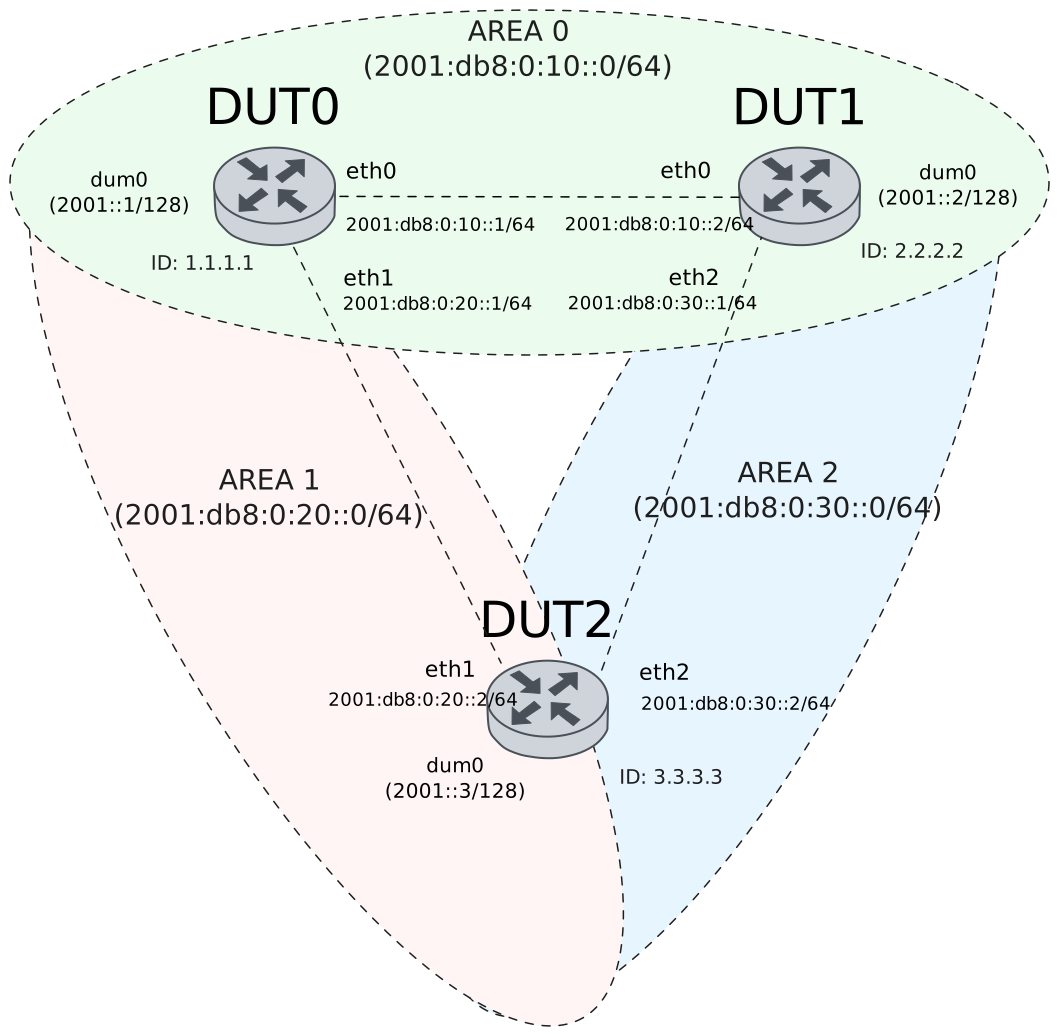
Test Connection With Three Devices
Description
Tests connection between three devices with BFD in OSPFv3 by checking if they are each others peers and their status is up.
Scenario
Step 1: Set the following configuration in DUT0 :
set interfaces dummy dum0 address '2001::1/128'
set interfaces dummy dum0 ipv6 ospfv3 area 0.0.0.0
set interfaces ethernet eth0 address '2001:db8:0:10::1/64'
set interfaces ethernet eth0 ipv6 ospfv3 area 0.0.0.0
set interfaces ethernet eth0 ipv6 ospfv3 bfd
set interfaces ethernet eth0 ipv6 ospfv3 network point-to-point
set interfaces ethernet eth1 address '2001:db8:0:20::1/64'
set interfaces ethernet eth1 ipv6 ospfv3 area 0.0.0.1
set interfaces ethernet eth1 ipv6 ospfv3 bfd
set interfaces ethernet eth1 ipv6 ospfv3 network point-to-point
set protocols ospfv3 area 0.0.0.0 range '2001:db8:0:10::/64'
set protocols ospfv3 area 0.0.0.1 range '2001:db8:0:20::/64'
set protocols ospfv3 parameters router-id 1.1.1.1
set system login user admin authentication encrypted-password '$6$GSjsCj8gHLv$/VcqU6FLi6CT2Oxn0MJQ2C2tqnRDrYKNF8HIYWJp68nvXvPdFccDsT04.WtigUONbKYrgKg8d6rEs8PjljMkH0'
Step 2: Set the following configuration in DUT1 :
set interfaces dummy dum0 address '2001::2/128'
set interfaces dummy dum0 ipv6 ospfv3 area 0.0.0.0
set interfaces ethernet eth0 address '2001:db8:0:10::2/64'
set interfaces ethernet eth0 ipv6 ospfv3 area 0.0.0.0
set interfaces ethernet eth0 ipv6 ospfv3 bfd
set interfaces ethernet eth0 ipv6 ospfv3 network point-to-point
set interfaces ethernet eth2 address '2001:db8:0:30::2/64'
set interfaces ethernet eth2 ipv6 ospfv3 area 0.0.0.2
set interfaces ethernet eth2 ipv6 ospfv3 bfd
set interfaces ethernet eth2 ipv6 ospfv3 network point-to-point
set protocols ospfv3 area 0.0.0.0 range '2001:db8:0:10::/64'
set protocols ospfv3 area 0.0.0.2 range '2001:db8:0:30::/64'
set protocols ospfv3 parameters router-id 2.2.2.2
set system login user admin authentication encrypted-password '$6$GSjsCj8gHLv$/VcqU6FLi6CT2Oxn0MJQ2C2tqnRDrYKNF8HIYWJp68nvXvPdFccDsT04.WtigUONbKYrgKg8d6rEs8PjljMkH0'
Step 3: Set the following configuration in DUT2 :
set interfaces dummy dum0 address '2001::3/128'
set interfaces dummy dum0 ipv6 ospfv3 area 0.0.0.0
set interfaces ethernet eth1 address '2001:db8:0:20::3/64'
set interfaces ethernet eth1 ipv6 ospfv3 area 0.0.0.1
set interfaces ethernet eth1 ipv6 ospfv3 bfd
set interfaces ethernet eth1 ipv6 ospfv3 network point-to-point
set interfaces ethernet eth2 address '2001:db8:0:30::3/64'
set interfaces ethernet eth2 ipv6 ospfv3 area 0.0.0.2
set interfaces ethernet eth2 ipv6 ospfv3 bfd
set interfaces ethernet eth2 ipv6 ospfv3 network point-to-point
set protocols ospfv3 area 0.0.0.1 range '2001:db8:0:20::/64'
set protocols ospfv3 area 0.0.0.2 range '2001:db8:0:30::/64'
set protocols ospfv3 parameters router-id 3.3.3.3
set system login user admin authentication encrypted-password '$6$GSjsCj8gHLv$/VcqU6FLi6CT2Oxn0MJQ2C2tqnRDrYKNF8HIYWJp68nvXvPdFccDsT04.WtigUONbKYrgKg8d6rEs8PjljMkH0'
Note
Check connectivity
Step 4: Ping the IP address 2001:db8:0:10::2 from DUT0:
admin@DUT0$ ping 2001:db8:0:10::2 count 1 size 56 timeout 1Show output
PING 2001:db8:0:10::2(2001:db8:0:10::2) 56 data bytes
64 bytes from 2001:db8:0:10::2: icmp_seq=1 ttl=64 time=0.341 ms

--- 2001:db8:0:10::2 ping statistics ---
1 packets transmitted, 1 received, 0% packet loss, time 0ms
rtt min/avg/max/mdev = 0.341/0.341/0.341/0.000 ms
Step 5: Ping the IP address 2001:db8:0:20::3 from DUT0:
admin@DUT0$ ping 2001:db8:0:20::3 count 1 size 56 timeout 1Show output
PING 2001:db8:0:20::3(2001:db8:0:20::3) 56 data bytes
64 bytes from 2001:db8:0:20::3: icmp_seq=1 ttl=64 time=0.256 ms

--- 2001:db8:0:20::3 ping statistics ---
1 packets transmitted, 1 received, 0% packet loss, time 0ms
rtt min/avg/max/mdev = 0.256/0.256/0.256/0.000 ms
Step 6: Ping the IP address 2001:db8:0:10::1 from DUT1:
admin@DUT1$ ping 2001:db8:0:10::1 count 1 size 56 timeout 1Show output
PING 2001:db8:0:10::1(2001:db8:0:10::1) 56 data bytes
64 bytes from 2001:db8:0:10::1: icmp_seq=1 ttl=64 time=0.677 ms

--- 2001:db8:0:10::1 ping statistics ---
1 packets transmitted, 1 received, 0% packet loss, time 0ms
rtt min/avg/max/mdev = 0.677/0.677/0.677/0.000 ms
Step 7: Ping the IP address 2001:db8:0:30::3 from DUT1:
admin@DUT1$ ping 2001:db8:0:30::3 count 1 size 56 timeout 1Show output
PING 2001:db8:0:30::3(2001:db8:0:30::3) 56 data bytes
64 bytes from 2001:db8:0:30::3: icmp_seq=1 ttl=64 time=0.467 ms

--- 2001:db8:0:30::3 ping statistics ---
1 packets transmitted, 1 received, 0% packet loss, time 0ms
rtt min/avg/max/mdev = 0.467/0.467/0.467/0.000 ms
Step 8: Ping the IP address 2001:db8:0:20::1 from DUT2:
admin@DUT2$ ping 2001:db8:0:20::1 count 1 size 56 timeout 1Show output
PING 2001:db8:0:20::1(2001:db8:0:20::1) 56 data bytes
64 bytes from 2001:db8:0:20::1: icmp_seq=1 ttl=64 time=0.268 ms

--- 2001:db8:0:20::1 ping statistics ---
1 packets transmitted, 1 received, 0% packet loss, time 0ms
rtt min/avg/max/mdev = 0.268/0.268/0.268/0.000 ms
Step 9: Ping the IP address 2001:db8:0:30::2 from DUT2:
admin@DUT2$ ping 2001:db8:0:30::2 count 1 size 56 timeout 1Show output
PING 2001:db8:0:30::2(2001:db8:0:30::2) 56 data bytes
64 bytes from 2001:db8:0:30::2: icmp_seq=1 ttl=64 time=0.237 ms

--- 2001:db8:0:30::2 ping statistics ---
1 packets transmitted, 1 received, 0% packet loss, time 0ms
rtt min/avg/max/mdev = 0.237/0.237/0.237/0.000 ms
Note
Check that they are each other’s neighbors
Step 10: Run the command protocols ospfv3 show neighbor on DUT0 and check whether the output contains the following tokens:
2.2.2.2
3.3.3.3
Show output
Neighbor ID     Pri    DeadTime    State/IfState         Duration I/F[State]
2.2.2.2           1    00:00:35     Init/PointToPoint    00:00:04 eth0[PointToPoint]
3.3.3.3           1    00:00:38     Init/PointToPoint    00:00:01 eth1[PointToPoint]
Step 11: Run the command protocols ospfv3 show neighbor on DUT1 and check whether the output contains the following tokens:
1.1.1.1
3.3.3.3
Show output
Neighbor ID     Pri    DeadTime    State/IfState         Duration I/F[State]
1.1.1.1           1    00:00:39     Full/PointToPoint    00:00:00 eth0[PointToPoint]
3.3.3.3           1    00:00:34     Init/PointToPoint    00:00:05 eth2[PointToPoint]
Step 12: Run the command protocols ospfv3 show neighbor on DUT2 and check whether the output contains the following tokens:
1.1.1.1
2.2.2.2
Show output
Neighbor ID     Pri    DeadTime    State/IfState         Duration I/F[State]
1.1.1.1           1    00:00:36     Full/PointToPoint    00:00:03 eth1[PointToPoint]
2.2.2.2           1    00:00:39     Full/PointToPoint    00:00:00 eth2[PointToPoint]
Note
Check that they are each other’s peers and that their status is up (the BFD session has been successfully established)
Step 13: Run the command protocols bfd show peers on DUT0 and check whether the output contains the following tokens:
interface eth0
interface eth1
Status: up
Show output
BFD Peers:
peer fe80::dcad:beff:feef:6c21 local-address fe80::dcad:beff:feef:6c01 vrf default interface eth1
ID: 4194438373
Remote ID: 1580113610
Active mode
Status: up
Uptime: 1 second(s)
Diagnostics: ok
Remote diagnostics: ok
Peer Type: dynamic
RTT min/avg/max: 0/0/0 usec
Local timers:
Detect-multiplier: 3
Receive interval: 300ms
Transmission interval: 300ms
Transmission interval (actual with jitter): 255ms
Detection timeout: 900ms
Echo receive interval: 50ms
Echo transmission interval: disabled
Remote timers:
Detect-multiplier: 3
Receive interval: 300ms
Transmission interval: 300ms
Echo receive interval: 50ms

peer fe80::dcad:beff:feef:6c10 local-address fe80::dcad:beff:feef:6c00 vrf default interface eth0
ID: 1237983845
Remote ID: 1040804888
Active mode
Status: up
Uptime: 1 second(s)
Diagnostics: ok
Remote diagnostics: ok
Peer Type: dynamic
RTT min/avg/max: 0/0/0 usec
Local timers:
Detect-multiplier: 3
Receive interval: 300ms
Transmission interval: 300ms
Transmission interval (actual with jitter): 246ms
Detection timeout: 900ms
Echo receive interval: 50ms
Echo transmission interval: disabled
Remote timers:
Detect-multiplier: 3
Receive interval: 300ms
Transmission interval: 300ms
Echo receive interval: 50ms
Step 14: Run the command protocols bfd show peers on DUT1 and check whether the output contains the following tokens:
interface eth0
interface eth2
Status: up
Show output
BFD Peers:
peer fe80::dcad:beff:feef:6c00 local-address fe80::dcad:beff:feef:6c10 vrf default interface eth0
ID: 1040804888
Remote ID: 1237983845
Active mode
Status: up
Uptime: 2 second(s)
Diagnostics: ok
Remote diagnostics: ok
Peer Type: dynamic
RTT min/avg/max: 0/0/0 usec
Local timers:
Detect-multiplier: 3
Receive interval: 300ms
Transmission interval: 300ms
Transmission interval (actual with jitter): 288ms
Detection timeout: 900ms
Echo receive interval: 50ms
Echo transmission interval: disabled
Remote timers:
Detect-multiplier: 3
Receive interval: 300ms
Transmission interval: 300ms
Echo receive interval: 50ms

peer fe80::dcad:beff:feef:6c22 local-address fe80::dcad:beff:feef:6c12 vrf default interface eth2
ID: 476511785
Remote ID: 0
Active mode
Status: down
Downtime: 1 second(s)
Diagnostics: ok
Remote diagnostics: ok
Peer Type: dynamic
RTT min/avg/max: 0/0/0 usec
Local timers:
Detect-multiplier: 3
Receive interval: 300ms
Transmission interval: 300ms
Transmission interval (actual with jitter): 1000ms
Detection timeout: 3000ms
Echo receive interval: 50ms
Echo transmission interval: disabled
Remote timers:
Detect-multiplier: 3
Receive interval: 1000ms
Transmission interval: 1000ms
Echo receive interval: disabled
Step 15: Run the command protocols bfd show peers on DUT2 and check whether the output contains the following tokens:
interface eth1
interface eth2
Status: up
Show output
BFD Peers:
peer fe80::dcad:beff:feef:6c01 local-address fe80::dcad:beff:feef:6c21 vrf default interface eth1
ID: 1580113610
Remote ID: 4194438373
Active mode
Status: up
Uptime: 2 second(s)
Diagnostics: ok
Remote diagnostics: ok
Peer Type: dynamic
RTT min/avg/max: 0/0/0 usec
Local timers:
Detect-multiplier: 3
Receive interval: 300ms
Transmission interval: 300ms
Transmission interval (actual with jitter): 288ms
Detection timeout: 900ms
Echo receive interval: 50ms
Echo transmission interval: disabled
Remote timers:
Detect-multiplier: 3
Receive interval: 300ms
Transmission interval: 300ms
Echo receive interval: 50ms

peer fe80::dcad:beff:feef:6c12 local-address fe80::dcad:beff:feef:6c22 vrf default interface eth2
ID: 4115974929
Remote ID: 0
Active mode
Status: down
Downtime: 1 second(s)
Diagnostics: ok
Remote diagnostics: ok
Peer Type: dynamic
RTT min/avg/max: 0/0/0 usec
Local timers:
Detect-multiplier: 3
Receive interval: 300ms
Transmission interval: 300ms
Transmission interval (actual with jitter): 1000ms
Detection timeout: 3000ms
Echo receive interval: 50ms
Echo transmission interval: disabled
Remote timers:
Detect-multiplier: 3
Receive interval: 1000ms
Transmission interval: 1000ms
Echo receive interval: disabled