Bfd Static Route
Tests to check BFD protocol in static routes.
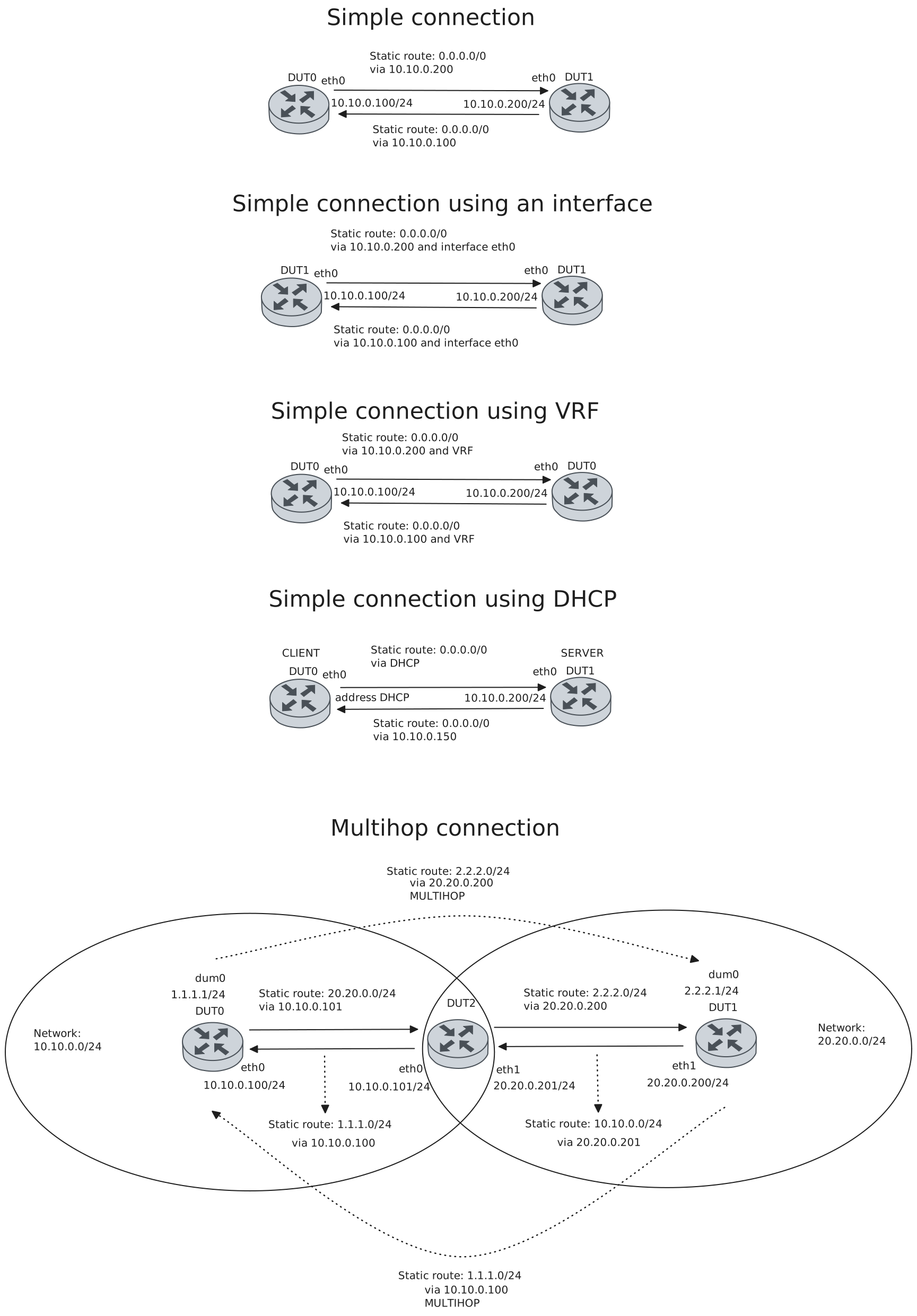
Test Connection With Next Hop IPv4
Description
Tests connection between two devices with BFD in static routes using the gateway as the BFD peer, checking if they are each others peers and their status is up and installed.
Scenario
Step 1: Set the following configuration in DUT0 :
set interfaces ethernet eth0 address 10.10.0.100/24
set protocols static route 0.0.0.0/0 next-hop 10.10.0.200 bfd
set system login user admin authentication encrypted-password '$6$GSjsCj8gHLv$/VcqU6FLi6CT2Oxn0MJQ2C2tqnRDrYKNF8HIYWJp68nvXvPdFccDsT04.WtigUONbKYrgKg8d6rEs8PjljMkH0'
Step 2: Set the following configuration in DUT1 :
set interfaces ethernet eth0 address 10.10.0.200/24
set protocols static route 0.0.0.0/0 next-hop 10.10.0.100 bfd
set system login user admin authentication encrypted-password '$6$GSjsCj8gHLv$/VcqU6FLi6CT2Oxn0MJQ2C2tqnRDrYKNF8HIYWJp68nvXvPdFccDsT04.WtigUONbKYrgKg8d6rEs8PjljMkH0'
Note
Check connectivity
Step 3: Ping the IP address 10.10.0.200 from DUT0:
admin@DUT0$ ping 10.10.0.200 count 1 size 56 timeout 1Show output
PING 10.10.0.200 (10.10.0.200) 56(84) bytes of data.
64 bytes from 10.10.0.200: icmp_seq=1 ttl=64 time=360 ms

--- 10.10.0.200 ping statistics ---
1 packets transmitted, 1 received, 0% packet loss, time 0ms
rtt min/avg/max/mdev = 360.418/360.418/360.418/0.000 ms
Step 4: Ping the IP address 10.10.0.100 from DUT1:
admin@DUT1$ ping 10.10.0.100 count 1 size 56 timeout 1Show output
PING 10.10.0.100 (10.10.0.100) 56(84) bytes of data.
64 bytes from 10.10.0.100: icmp_seq=1 ttl=64 time=0.683 ms

--- 10.10.0.100 ping statistics ---
1 packets transmitted, 1 received, 0% packet loss, time 0ms
rtt min/avg/max/mdev = 0.683/0.683/0.683/0.000 ms
Note
Check that the operational command ‘protocols bfd show static route’ works, and shows that they are each other’s peers and that their status is installed, indicating that the next-hop router is reachable
Step 5: Run the command protocols bfd show static route on DUT0 and check whether the output matches the following regular expressions:
10.10.0.200
status: installed
Show output
Showing BFD monitored static routes:

Next hops:
VRF LAN IPv4 Unicast:

VRF LAN IPv4 Multicast:

VRF LAN IPv6 Unicast:
VRF RED IPv4 Unicast:

VRF RED IPv4 Multicast:

VRF RED IPv6 Unicast:
VRF SRV1 IPv4 Unicast:

VRF SRV1 IPv4 Multicast:

VRF SRV1 IPv6 Unicast:
VRF VRF IPv4 Unicast:

VRF VRF IPv4 Multicast:

VRF VRF IPv6 Unicast:
VRF WAN IPv4 Unicast:

VRF WAN IPv4 Multicast:

VRF WAN IPv6 Unicast:
VRF default IPv4 Unicast:
0.0.0.0/0 peer 10.10.0.200 (status: installed)

VRF default IPv4 Multicast:

VRF default IPv6 Unicast:
Step 6: Run the command protocols bfd show static route on DUT1 and check whether the output matches the following regular expressions:
10.10.0.100
status: installed
Show output
Showing BFD monitored static routes:

Next hops:
VRF default IPv4 Unicast:
0.0.0.0/0 peer 10.10.0.100 (status: installed)

VRF default IPv4 Multicast:

VRF default IPv6 Unicast:
Note
Check that they are each other’s peers and that their status is up (the BFD session has beedn successfully established)
Step 7: Run the command protocols bfd show peers on DUT0 and check whether the output matches the following regular expressions:
10.10.0.200
Status: up
Show output
BFD Peers:
peer 10.10.0.200 vrf default
ID: 4294822076
Remote ID: 3743267533
Active mode
Status: up
Uptime: 2 second(s)
Diagnostics: ok
Remote diagnostics: ok
Peer Type: dynamic
RTT min/avg/max: 0/0/0 usec
Local timers:
Detect-multiplier: 3
Receive interval: 300ms
Transmission interval: 300ms
Transmission interval (actual with jitter): 282ms
Detection timeout: 900ms
Echo receive interval: 50ms
Echo transmission interval: disabled
Remote timers:
Detect-multiplier: 3
Receive interval: 300ms
Transmission interval: 300ms
Echo receive interval: 50ms
Step 8: Run the command protocols bfd show peers on DUT1 and check whether the output matches the following regular expressions:
10.10.0.100
Status: up
Show output
BFD Peers:
peer 10.10.0.100 vrf default
ID: 3743267533
Remote ID: 4294822076
Active mode
Status: up
Uptime: 3 second(s)
Diagnostics: ok
Remote diagnostics: ok
Peer Type: dynamic
RTT min/avg/max: 0/0/0 usec
Local timers:
Detect-multiplier: 3
Receive interval: 300ms
Transmission interval: 300ms
Transmission interval (actual with jitter): 249ms
Detection timeout: 900ms
Echo receive interval: 50ms
Echo transmission interval: disabled
Remote timers:
Detect-multiplier: 3
Receive interval: 300ms
Transmission interval: 300ms
Echo receive interval: 50ms
Test Connection With Next Hop And Interface IPv4
Description
Tests connection between two devices with BFD in static routes using the gateway as the BFD peer and an interface, checking if they are each others peers and their status is up and installed.
Scenario
Step 1: Set the following configuration in DUT0 :
set interfaces ethernet eth0 address 10.10.0.100/24
set protocols static route 0.0.0.0/0 next-hop 10.10.0.200 interface eth0 bfd
set system login user admin authentication encrypted-password '$6$GSjsCj8gHLv$/VcqU6FLi6CT2Oxn0MJQ2C2tqnRDrYKNF8HIYWJp68nvXvPdFccDsT04.WtigUONbKYrgKg8d6rEs8PjljMkH0'
Step 2: Set the following configuration in DUT1 :
set interfaces ethernet eth0 address 10.10.0.200/24
set protocols static route 0.0.0.0/0 next-hop 10.10.0.100 interface eth0 bfd
set system login user admin authentication encrypted-password '$6$GSjsCj8gHLv$/VcqU6FLi6CT2Oxn0MJQ2C2tqnRDrYKNF8HIYWJp68nvXvPdFccDsT04.WtigUONbKYrgKg8d6rEs8PjljMkH0'
Note
Check connectivity
Step 3: Ping the IP address 10.10.0.200 from DUT0:
admin@DUT0$ ping 10.10.0.200 count 1 size 56 timeout 1Show output
PING 10.10.0.200 (10.10.0.200) 56(84) bytes of data.
64 bytes from 10.10.0.200: icmp_seq=1 ttl=64 time=384 ms

--- 10.10.0.200 ping statistics ---
1 packets transmitted, 1 received, 0% packet loss, time 0ms
rtt min/avg/max/mdev = 383.871/383.871/383.871/0.000 ms
Step 4: Ping the IP address 10.10.0.100 from DUT1:
admin@DUT1$ ping 10.10.0.100 count 1 size 56 timeout 1Show output
PING 10.10.0.100 (10.10.0.100) 56(84) bytes of data.
64 bytes from 10.10.0.100: icmp_seq=1 ttl=64 time=0.451 ms

--- 10.10.0.100 ping statistics ---
1 packets transmitted, 1 received, 0% packet loss, time 0ms
rtt min/avg/max/mdev = 0.451/0.451/0.451/0.000 ms
Note
Check that the operational command ‘protocols bfd show static route’ works, and shows that they are each other’s peers and that their status is installed, indicating that the next-hop router is reachable
Step 5: Run the command protocols bfd show static route on DUT0 and check whether the output matches the following regular expressions:
10.10.0.200
status: installed
Show output
Showing BFD monitored static routes:

Next hops:
VRF LAN IPv4 Unicast:

VRF LAN IPv4 Multicast:

VRF LAN IPv6 Unicast:
VRF RED IPv4 Unicast:

VRF RED IPv4 Multicast:

VRF RED IPv6 Unicast:
VRF SRV1 IPv4 Unicast:

VRF SRV1 IPv4 Multicast:

VRF SRV1 IPv6 Unicast:
VRF VRF IPv4 Unicast:

VRF VRF IPv4 Multicast:

VRF VRF IPv6 Unicast:
VRF WAN IPv4 Unicast:

VRF WAN IPv4 Multicast:

VRF WAN IPv6 Unicast:
VRF default IPv4 Unicast:
0.0.0.0/0 peer 10.10.0.200 (status: installed)

VRF default IPv4 Multicast:

VRF default IPv6 Unicast:
Step 6: Run the command protocols bfd show static route on DUT1 and check whether the output matches the following regular expressions:
10.10.0.100
status: installed
Show output
Showing BFD monitored static routes:

Next hops:
VRF default IPv4 Unicast:
0.0.0.0/0 peer 10.10.0.100 (status: installed)

VRF default IPv4 Multicast:

VRF default IPv6 Unicast:
Note
Check that they are each other’s peers and that their status is up (the BFD session has beedn successfully established)
Step 7: Run the command protocols bfd show peers on DUT0 and check whether the output matches the following regular expressions:
10.10.0.200
Status: up
Show output
BFD Peers:
peer 10.10.0.200 vrf default interface eth0
ID: 3090948580
Remote ID: 4176429613
Active mode
Status: up
Uptime: 2 second(s)
Diagnostics: ok
Remote diagnostics: ok
Peer Type: dynamic
RTT min/avg/max: 0/0/0 usec
Local timers:
Detect-multiplier: 3
Receive interval: 300ms
Transmission interval: 300ms
Transmission interval (actual with jitter): 291ms
Detection timeout: 900ms
Echo receive interval: 50ms
Echo transmission interval: disabled
Remote timers:
Detect-multiplier: 3
Receive interval: 300ms
Transmission interval: 300ms
Echo receive interval: 50ms
Step 8: Run the command protocols bfd show peers on DUT1 and check whether the output matches the following regular expressions:
10.10.0.100
Status: up
Show output
BFD Peers:
peer 10.10.0.100 vrf default interface eth0
ID: 4176429613
Remote ID: 3090948580
Active mode
Status: up
Uptime: 2 second(s)
Diagnostics: ok
Remote diagnostics: ok
Peer Type: dynamic
RTT min/avg/max: 0/0/0 usec
Local timers:
Detect-multiplier: 3
Receive interval: 300ms
Transmission interval: 300ms
Transmission interval (actual with jitter): 246ms
Detection timeout: 900ms
Echo receive interval: 50ms
Echo transmission interval: disabled
Remote timers:
Detect-multiplier: 3
Receive interval: 300ms
Transmission interval: 300ms
Echo receive interval: 50ms
Test Connection With Next Hop And Next Hop VRF IPv4
Description
Tests connection between two devices with BFD in static routes using the gateway as the BFD peer and a leaked route with a nexthop in the specified VRF ID, checking if they are each others peers and their status is up and installed.
Scenario
Step 1: Set the following configuration in DUT0 :
set interfaces ethernet eth0 address 10.10.0.100/24
set interfaces ethernet eth0 vrf VRF
set protocols static route 0.0.0.0/0 next-hop 10.10.0.200 next-hop-vrf VRF bfd
set system login user admin authentication encrypted-password '$6$GSjsCj8gHLv$/VcqU6FLi6CT2Oxn0MJQ2C2tqnRDrYKNF8HIYWJp68nvXvPdFccDsT04.WtigUONbKYrgKg8d6rEs8PjljMkH0'
set system vrf VRF
Step 2: Set the following configuration in DUT1 :
set interfaces ethernet eth0 address 10.10.0.200/24
set interfaces ethernet eth0 vrf VRF
set protocols static route 0.0.0.0/0 next-hop 10.10.0.100 next-hop-vrf VRF bfd
set system login user admin authentication encrypted-password '$6$GSjsCj8gHLv$/VcqU6FLi6CT2Oxn0MJQ2C2tqnRDrYKNF8HIYWJp68nvXvPdFccDsT04.WtigUONbKYrgKg8d6rEs8PjljMkH0'
set system vrf VRF
Note
Check connectivity
Step 3: Ping the IP address 10.10.0.200 from DUT0:
admin@DUT0$ ping 10.10.0.200 count 1 size 56 timeout 1Show output
PING 10.10.0.200 (10.10.0.200) 56(84) bytes of data.
64 bytes from 10.10.0.200: icmp_seq=1 ttl=64 time=0.670 ms

--- 10.10.0.200 ping statistics ---
1 packets transmitted, 1 received, 0% packet loss, time 0ms
rtt min/avg/max/mdev = 0.670/0.670/0.670/0.000 ms
Step 4: Ping the IP address 10.10.0.100 from DUT1:
admin@DUT1$ ping 10.10.0.100 count 1 size 56 timeout 1Show output
PING 10.10.0.100 (10.10.0.100) 56(84) bytes of data.
64 bytes from 10.10.0.100: icmp_seq=1 ttl=64 time=0.287 ms

--- 10.10.0.100 ping statistics ---
1 packets transmitted, 1 received, 0% packet loss, time 0ms
rtt min/avg/max/mdev = 0.287/0.287/0.287/0.000 ms
Note
Check that the operational command ‘protocols bfd show static route’ works, and shows that they are each other’s peers and that their status is installed, indicating that the next-hop router is reachable
Step 5: Run the command protocols bfd show static route on DUT0 and check whether the output matches the following regular expressions:
10.10.0.200
status: installed
Show output
Showing BFD monitored static routes:

Next hops:
VRF LAN IPv4 Unicast:

VRF LAN IPv4 Multicast:

VRF LAN IPv6 Unicast:
VRF RED IPv4 Unicast:

VRF RED IPv4 Multicast:

VRF RED IPv6 Unicast:
VRF SRV1 IPv4 Unicast:

VRF SRV1 IPv4 Multicast:

VRF SRV1 IPv6 Unicast:
VRF VRF IPv4 Unicast:

VRF VRF IPv4 Multicast:

VRF VRF IPv6 Unicast:
VRF WAN IPv4 Unicast:

VRF WAN IPv4 Multicast:

VRF WAN IPv6 Unicast:
VRF default IPv4 Unicast:
0.0.0.0/0 peer 10.10.0.200 (status: installed)

VRF default IPv4 Multicast:

VRF default IPv6 Unicast:
Step 6: Run the command protocols bfd show static route on DUT1 and check whether the output matches the following regular expressions:
10.10.0.100
status: installed
Show output
Showing BFD monitored static routes:

Next hops:
VRF default IPv4 Unicast:
0.0.0.0/0 peer 10.10.0.100 (status: installed)

VRF default IPv4 Multicast:

VRF default IPv6 Unicast:
Note
Check that they are each other’s peers and that their status is up (the BFD session has beedn successfully established)
Step 7: Run the command protocols bfd show peers on DUT0 and check whether the output matches the following regular expressions:
10.10.0.200
Status: up
Show output
BFD Peers:
peer 10.10.0.200 vrf VRF
ID: 64907374
Remote ID: 3165283260
Active mode
Status: up
Uptime: 1 second(s)
Diagnostics: ok
Remote diagnostics: ok
Peer Type: dynamic
RTT min/avg/max: 0/0/0 usec
Local timers:
Detect-multiplier: 3
Receive interval: 300ms
Transmission interval: 300ms
Transmission interval (actual with jitter): 255ms
Detection timeout: 900ms
Echo receive interval: 50ms
Echo transmission interval: disabled
Remote timers:
Detect-multiplier: 3
Receive interval: 300ms
Transmission interval: 300ms
Echo receive interval: 50ms
Step 8: Run the command protocols bfd show peers on DUT1 and check whether the output matches the following regular expressions:
10.10.0.100
Status: up
Show output
BFD Peers:
peer 10.10.0.100 vrf VRF
ID: 3165283260
Remote ID: 64907374
Active mode
Status: up
Uptime: 1 second(s)
Diagnostics: ok
Remote diagnostics: ok
Peer Type: dynamic
RTT min/avg/max: 0/0/0 usec
Local timers:
Detect-multiplier: 3
Receive interval: 300ms
Transmission interval: 300ms
Transmission interval (actual with jitter): 255ms
Detection timeout: 900ms
Echo receive interval: 50ms
Echo transmission interval: disabled
Remote timers:
Detect-multiplier: 3
Receive interval: 300ms
Transmission interval: 300ms
Echo receive interval: 50ms
Test Connection With DHCP Interface IPv4
Description
Tests connection between two devices with BFD in static routes using a DHCP interface that supplies the next-hop IP address, checking if they are each others peers and their status is up and installed.
Scenario
Step 1: Set the following configuration in DUT0 :
set interfaces ethernet eth0 address dhcp
set protocols static route 0.0.0.0/0 dhcp-interface eth0 bfd
set system login user admin authentication encrypted-password '$6$GSjsCj8gHLv$/VcqU6FLi6CT2Oxn0MJQ2C2tqnRDrYKNF8HIYWJp68nvXvPdFccDsT04.WtigUONbKYrgKg8d6rEs8PjljMkH0'
Step 2: Set the following configuration in DUT1 :
set interfaces ethernet eth0 address 10.10.0.200/24
set protocols static route 0.0.0.0/0 next-hop 10.10.0.150 bfd
set service dhcp-server shared-network dhcpserver subnet 10.10.0.0/24 options default-router 10.10.0.200
set service dhcp-server shared-network dhcpserver subnet 10.10.0.0/24 start 10.10.0.150 stop 10.10.0.150
set system login user admin authentication encrypted-password '$6$GSjsCj8gHLv$/VcqU6FLi6CT2Oxn0MJQ2C2tqnRDrYKNF8HIYWJp68nvXvPdFccDsT04.WtigUONbKYrgKg8d6rEs8PjljMkH0'
Note
Check connectivity
Step 3: Ping the IP address 10.10.0.200 from DUT0:
admin@DUT0$ ping 10.10.0.200 count 1 size 56 timeout 1Show output
PING 10.10.0.200 (10.10.0.200) 56(84) bytes of data.
64 bytes from 10.10.0.200: icmp_seq=1 ttl=64 time=0.341 ms

--- 10.10.0.200 ping statistics ---
1 packets transmitted, 1 received, 0% packet loss, time 0ms
rtt min/avg/max/mdev = 0.341/0.341/0.341/0.000 ms
Step 4: Ping the IP address 10.10.0.150 from DUT1:
admin@DUT1$ ping 10.10.0.150 count 1 size 56 timeout 1Show output
PING 10.10.0.150 (10.10.0.150) 56(84) bytes of data.
64 bytes from 10.10.0.150: icmp_seq=1 ttl=64 time=0.541 ms

--- 10.10.0.150 ping statistics ---
1 packets transmitted, 1 received, 0% packet loss, time 0ms
rtt min/avg/max/mdev = 0.541/0.541/0.541/0.000 ms
Note
Check that the operational command ‘protocols bfd show static route’ works, and shows that they are each other’s peers and that their status is installed, indicating that the next-hop router is reachable
Step 5: Run the command protocols bfd show static route on DUT0 and check whether the output matches the following regular expressions:
10.10.0.200
status: installed
Show output
Showing BFD monitored static routes:

Next hops:
VRF LAN IPv4 Unicast:

VRF LAN IPv4 Multicast:

VRF LAN IPv6 Unicast:
VRF RED IPv4 Unicast:

VRF RED IPv4 Multicast:

VRF RED IPv6 Unicast:
VRF SRV1 IPv4 Unicast:

VRF SRV1 IPv4 Multicast:

VRF SRV1 IPv6 Unicast:
VRF VRF IPv4 Unicast:

VRF VRF IPv4 Multicast:

VRF VRF IPv6 Unicast:
VRF WAN IPv4 Unicast:

VRF WAN IPv4 Multicast:

VRF WAN IPv6 Unicast:
VRF default IPv4 Unicast:
0.0.0.0/0 peer 10.10.0.200 (status: installed)

VRF default IPv4 Multicast:

VRF default IPv6 Unicast:
Step 6: Run the command protocols bfd show static route on DUT1 and check whether the output matches the following regular expressions:
10.10.0.150
status: installed
Show output
Showing BFD monitored static routes:

Next hops:
VRF default IPv4 Unicast:
0.0.0.0/0 peer 10.10.0.150 (status: installed)

VRF default IPv4 Multicast:

VRF default IPv6 Unicast:
Note
Check that they are each other’s peers and that their status is up (the BFD session has beedn successfully established)
Step 7: Run the command protocols bfd show peers on DUT0 and check whether the output matches the following regular expressions:
10.10.0.200
Status: up
Show output
BFD Peers:
peer 10.10.0.200 vrf default interface eth0
ID: 3531002851
Remote ID: 56355437
Active mode
Status: up
Uptime: 2 second(s)
Diagnostics: ok
Remote diagnostics: ok
Peer Type: dynamic
RTT min/avg/max: 0/0/0 usec
Local timers:
Detect-multiplier: 3
Receive interval: 300ms
Transmission interval: 300ms
Transmission interval (actual with jitter): 294ms
Detection timeout: 900ms
Echo receive interval: 50ms
Echo transmission interval: disabled
Remote timers:
Detect-multiplier: 3
Receive interval: 300ms
Transmission interval: 300ms
Echo receive interval: 50ms
Step 8: Run the command protocols bfd show peers on DUT1 and check whether the output matches the following regular expressions:
10.10.0.150
Status: up
Show output
BFD Peers:
peer 10.10.0.150 vrf default
ID: 56355437
Remote ID: 3531002851
Active mode
Status: up
Uptime: 1 second(s)
Diagnostics: ok
Remote diagnostics: ok
Peer Type: dynamic
RTT min/avg/max: 0/0/0 usec
Local timers:
Detect-multiplier: 3
Receive interval: 300ms
Transmission interval: 300ms
Transmission interval (actual with jitter): 300ms
Detection timeout: 900ms
Echo receive interval: 50ms
Echo transmission interval: disabled
Remote timers:
Detect-multiplier: 3
Receive interval: 300ms
Transmission interval: 300ms
Echo receive interval: 50ms
Test Multihop Connection IPv4
Description
Tests multihop connection between two devices in different networks using a third device connected to both networks, checking if they are each others peers and their status is up and installed.
Scenario
Step 1: Set the following configuration in DUT0 :
set interfaces dummy dum0 address 1.1.1.1/24
set interfaces ethernet eth0 address 10.10.0.100/24
set protocols static route 2.2.2.0/24 next-hop 20.20.0.200 bfd multihop
set protocols static route 20.20.0.0/24 next-hop 10.10.0.101
set system login user admin authentication encrypted-password '$6$GSjsCj8gHLv$/VcqU6FLi6CT2Oxn0MJQ2C2tqnRDrYKNF8HIYWJp68nvXvPdFccDsT04.WtigUONbKYrgKg8d6rEs8PjljMkH0'
Step 2: Set the following configuration in DUT1 :
set interfaces dummy dum0 address 2.2.2.1/24
set interfaces ethernet eth1 address 20.20.0.200/24
set protocols static route 1.1.1.0/24 next-hop 10.10.0.100 bfd multihop
set protocols static route 10.10.0.0/24 next-hop 20.20.0.201
set system login user admin authentication encrypted-password '$6$GSjsCj8gHLv$/VcqU6FLi6CT2Oxn0MJQ2C2tqnRDrYKNF8HIYWJp68nvXvPdFccDsT04.WtigUONbKYrgKg8d6rEs8PjljMkH0'
Step 3: Set the following configuration in DUT2 :
set interfaces ethernet eth0 address 10.10.0.101/24
set interfaces ethernet eth1 address 20.20.0.201/24
set protocols static route 1.1.1.0/24 next-hop 10.10.0.100
set protocols static route 2.2.2.0/24 next-hop 20.20.0.200
set system login user admin authentication encrypted-password '$6$GSjsCj8gHLv$/VcqU6FLi6CT2Oxn0MJQ2C2tqnRDrYKNF8HIYWJp68nvXvPdFccDsT04.WtigUONbKYrgKg8d6rEs8PjljMkH0'
Note
Check connectivity
Step 4: Ping the IP address 20.20.0.200 from DUT0:
admin@DUT0$ ping 20.20.0.200 count 1 size 56 timeout 1Show output
PING 20.20.0.200 (20.20.0.200) 56(84) bytes of data.
64 bytes from 20.20.0.200: icmp_seq=1 ttl=63 time=0.664 ms

--- 20.20.0.200 ping statistics ---
1 packets transmitted, 1 received, 0% packet loss, time 0ms
rtt min/avg/max/mdev = 0.664/0.664/0.664/0.000 ms
Step 5: Ping the IP address 10.10.0.100 from DUT1:
admin@DUT1$ ping 10.10.0.100 count 1 size 56 timeout 1Show output
PING 10.10.0.100 (10.10.0.100) 56(84) bytes of data.
64 bytes from 10.10.0.100: icmp_seq=1 ttl=63 time=0.903 ms

--- 10.10.0.100 ping statistics ---
1 packets transmitted, 1 received, 0% packet loss, time 0ms
rtt min/avg/max/mdev = 0.903/0.903/0.903/0.000 ms
Note
Check that the operational command ‘protocols bfd show static route’ works, and shows that they are each other’s peers and that their status is installed, indicating that the next-hop router is reachable
Step 6: Run the command protocols bfd show static route on DUT0 and check whether the output matches the following regular expressions:
20.20.0.200
status: installed
Show output
Showing BFD monitored static routes:

Next hops:
VRF LAN IPv4 Unicast:

VRF LAN IPv4 Multicast:

VRF LAN IPv6 Unicast:
VRF RED IPv4 Unicast:

VRF RED IPv4 Multicast:

VRF RED IPv6 Unicast:
VRF SRV1 IPv4 Unicast:

VRF SRV1 IPv4 Multicast:

VRF SRV1 IPv6 Unicast:
VRF VRF IPv4 Unicast:

VRF VRF IPv4 Multicast:

VRF VRF IPv6 Unicast:
VRF WAN IPv4 Unicast:

VRF WAN IPv4 Multicast:

VRF WAN IPv6 Unicast:
VRF default IPv4 Unicast:
2.2.2.0/24 peer 20.20.0.200 (status: installed)

VRF default IPv4 Multicast:

VRF default IPv6 Unicast:
Step 7: Run the command protocols bfd show static route on DUT1 and check whether the output matches the following regular expressions:
10.10.0.100
status: installed
Show output
Showing BFD monitored static routes:

Next hops:
VRF default IPv4 Unicast:
1.1.1.0/24 peer 10.10.0.100 (status: installed)

VRF default IPv4 Multicast:

VRF default IPv6 Unicast:
Note
Check that they are each other’s peers and that their status is up (the BFD session has beedn successfully established)
Step 8: Run the command protocols bfd show peers on DUT0 and check whether the output matches the following regular expressions:
20.20.0.200
Status: up
Show output
BFD Peers:
peer 20.20.0.200 multihop local-address 10.10.0.100 vrf default
ID: 3319256368
Remote ID: 2355530982
Active mode
Minimum TTL: 2
Status: up
Uptime: 2 second(s)
Diagnostics: ok
Remote diagnostics: ok
Peer Type: dynamic
RTT min/avg/max: 0/0/0 usec
Local timers:
Detect-multiplier: 3
Receive interval: 300ms
Transmission interval: 300ms
Transmission interval (actual with jitter): 273ms
Detection timeout: 900ms
Echo receive interval: 50ms
Echo transmission interval: disabled
Remote timers:
Detect-multiplier: 3
Receive interval: 300ms
Transmission interval: 300ms
Echo receive interval: 50ms
Step 9: Run the command protocols bfd show peers on DUT1 and check whether the output matches the following regular expressions:
10.10.0.100
Status: up
Show output
BFD Peers:
peer 10.10.0.100 multihop local-address 20.20.0.200 vrf default
ID: 2355530982
Remote ID: 3319256368
Active mode
Minimum TTL: 2
Status: up
Uptime: 3 second(s)
Diagnostics: ok
Remote diagnostics: ok
Peer Type: dynamic
RTT min/avg/max: 0/0/0 usec
Local timers:
Detect-multiplier: 3
Receive interval: 300ms
Transmission interval: 300ms
Transmission interval (actual with jitter): 234ms
Detection timeout: 900ms
Echo receive interval: 50ms
Echo transmission interval: disabled
Remote timers:
Detect-multiplier: 3
Receive interval: 300ms
Transmission interval: 300ms
Echo receive interval: 50ms
Test DUT0 Source IP IPv4
Description
Captures BFD packets and verifies the source address is correct when packets are sent from DUT0.
Scenario
Step 1: Set the following configuration in DUT0 :
set interfaces ethernet eth0 address 10.10.0.100/24
set protocols static route 0.0.0.0/0 next-hop 10.10.0.200 bfd
set system login user admin authentication encrypted-password '$6$GSjsCj8gHLv$/VcqU6FLi6CT2Oxn0MJQ2C2tqnRDrYKNF8HIYWJp68nvXvPdFccDsT04.WtigUONbKYrgKg8d6rEs8PjljMkH0'
Step 2: Set the following configuration in DUT1 :
set interfaces ethernet eth0 address 10.10.0.200/24
set protocols static route 0.0.0.0/0 next-hop 10.10.0.100 bfd source-ip 10.10.0.100
set system login user admin authentication encrypted-password '$6$GSjsCj8gHLv$/VcqU6FLi6CT2Oxn0MJQ2C2tqnRDrYKNF8HIYWJp68nvXvPdFccDsT04.WtigUONbKYrgKg8d6rEs8PjljMkH0'
Note
Capture packets and show one to verify that the source address is 10.10.0.100:
Note
Source line:
Show output
17 2026-09-16 15:15:55.630111867 10.10.0.100 → 10.10.0.200 BFD Control 66 Diag: No Diagnostic, State: Down, Flags: 0x00
Test DUT1 Source IP IPv4
Description
Captures BFD packets and verifies the source address is correct when packets are sent from DUT1.
Scenario
Step 1: Set the following configuration in DUT0 :
set interfaces ethernet eth0 address 10.10.0.100/24
set protocols static route 0.0.0.0/0 next-hop 10.10.0.200 bfd source-ip 10.10.0.200
set system login user admin authentication encrypted-password '$6$GSjsCj8gHLv$/VcqU6FLi6CT2Oxn0MJQ2C2tqnRDrYKNF8HIYWJp68nvXvPdFccDsT04.WtigUONbKYrgKg8d6rEs8PjljMkH0'
Step 2: Set the following configuration in DUT1 :
set interfaces ethernet eth0 address 10.10.0.200/24
set protocols static route 0.0.0.0/0 next-hop 10.10.0.100 bfd
set system login user admin authentication encrypted-password '$6$GSjsCj8gHLv$/VcqU6FLi6CT2Oxn0MJQ2C2tqnRDrYKNF8HIYWJp68nvXvPdFccDsT04.WtigUONbKYrgKg8d6rEs8PjljMkH0'
Note
Capture packets and show one to verify that the source address is 10.10.0.200:
Note
Source line:
Show output
15 2026-09-16 15:16:07.743800459 10.10.0.200 → 10.10.0.100 BFD Control 66 Diag: No Diagnostic, State: Down, Flags: 0x00
Test Profile IPv4
Description
Checks that all BFD profile configured parameters are shown.
Scenario
Step 1: Set the following configuration in DUT0 :
set interfaces ethernet eth0 address 10.10.0.100/24
set protocols bfd profile PFL detect-multiplier 5
set protocols bfd profile PFL echo-interval 60
set protocols bfd profile PFL echo-mode
set protocols bfd profile PFL passive-mode
set protocols bfd profile PFL receive-interval 400
set protocols bfd profile PFL transmit-interval 400
set protocols static route 0.0.0.0/0 next-hop 10.10.0.200 bfd profile PFL
set system login user admin authentication encrypted-password '$6$GSjsCj8gHLv$/VcqU6FLi6CT2Oxn0MJQ2C2tqnRDrYKNF8HIYWJp68nvXvPdFccDsT04.WtigUONbKYrgKg8d6rEs8PjljMkH0'
Step 2: Set the following configuration in DUT1 :
set interfaces ethernet eth0 address 10.10.0.200/24
set protocols static route 0.0.0.0/0 next-hop 10.10.0.100 bfd
set system login user admin authentication encrypted-password '$6$GSjsCj8gHLv$/VcqU6FLi6CT2Oxn0MJQ2C2tqnRDrYKNF8HIYWJp68nvXvPdFccDsT04.WtigUONbKYrgKg8d6rEs8PjljMkH0'
Note
Check connectivity
Step 3: Ping the IP address 10.10.0.200 from DUT0:
admin@DUT0$ ping 10.10.0.200 count 1 size 56 timeout 1Show output
PING 10.10.0.200 (10.10.0.200) 56(84) bytes of data.
64 bytes from 10.10.0.200: icmp_seq=1 ttl=64 time=0.430 ms

--- 10.10.0.200 ping statistics ---
1 packets transmitted, 1 received, 0% packet loss, time 0ms
rtt min/avg/max/mdev = 0.430/0.430/0.430/0.000 ms
Step 4: Ping the IP address 10.10.0.100 from DUT1:
admin@DUT1$ ping 10.10.0.100 count 1 size 56 timeout 1Show output
PING 10.10.0.100 (10.10.0.100) 56(84) bytes of data.
64 bytes from 10.10.0.100: icmp_seq=1 ttl=64 time=0.334 ms

--- 10.10.0.100 ping statistics ---
1 packets transmitted, 1 received, 0% packet loss, time 0ms
rtt min/avg/max/mdev = 0.334/0.334/0.334/0.000 ms
Note
Check that they are each other’s peers and that their status is up (the BFD session has beedn successfully established). Check that all configured profile parameters are shown in DUT0
Step 5: Run the command protocols bfd show peers on DUT0 and check whether the output matches the following regular expressions:
10.10.0.200
Status: up
Detect-multiplier: 5
Echo receive interval: 60ms
Echo transmission interval: 60ms
Passive mode
Receive interval: 400ms
Transmission interval: 400ms
Show output
BFD Peers:
peer 10.10.0.200 vrf default
ID: 594473076
Remote ID: 3485268306
Passive mode
Status: up
Uptime: 1 second(s)
Diagnostics: ok
Remote diagnostics: ok
Peer Type: dynamic
RTT min/avg/max: 257/334/629 usec
Profile: PFL
Local timers:
Detect-multiplier: 5
Receive interval: 400ms
Transmission interval: 400ms
Transmission interval (actual with jitter): 308ms
Detection timeout: 1200ms
Echo receive interval: 60ms
Echo transmission interval: 60ms
Echo transmission interval (actual with jitter): 54ms
Remote timers:
Detect-multiplier: 3
Receive interval: 300ms
Transmission interval: 300ms
Echo receive interval: 50ms
Step 6: Run the command protocols bfd show peers on DUT1 and check whether the output matches the following regular expressions:
10.10.0.100
Status: up
Show output
BFD Peers:
peer 10.10.0.100 vrf default
ID: 3485268306
Remote ID: 594473076
Active mode
Status: up
Uptime: 2 second(s)
Diagnostics: ok
Remote diagnostics: ok
Peer Type: dynamic
RTT min/avg/max: 0/0/0 usec
Local timers:
Detect-multiplier: 3
Receive interval: 300ms
Transmission interval: 300ms
Transmission interval (actual with jitter): 364ms
Detection timeout: 2000ms
Echo receive interval: 50ms
Echo transmission interval: disabled
Remote timers:
Detect-multiplier: 5
Receive interval: 400ms
Transmission interval: 400ms
Echo receive interval: 60ms