Relay
This scenario shows how to configure service dhcp-relay. The
relay agent must be used when the DHCP server and the DHCP
clients are not connected to the same layer 2 domain.
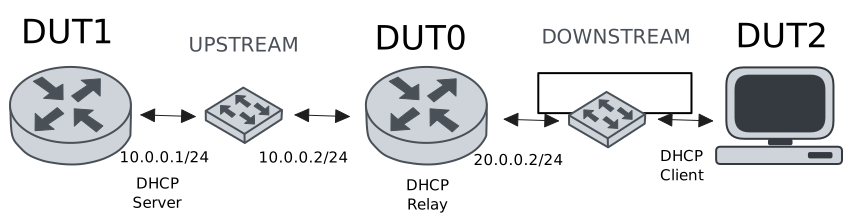
Test DHCP Relay
Description
This example demonstrates how to configure a DHCP relay instance in DUT0 to forward DHCP requests from DUT2 to DUT1.
Scenario
Step 1: Set the following configuration in DUT0 :
set interfaces ethernet eth0 address 10.0.0.2/24
set interfaces ethernet eth1 vif 200 address 20.0.0.2/24
set service dhcp-relay INS downstream-interface eth1.200
set service dhcp-relay INS server 10.0.0.1
set service dhcp-relay INS upstream-interface eth0
set system login user admin authentication encrypted-password '$6$GSjsCj8gHLv$/VcqU6FLi6CT2Oxn0MJQ2C2tqnRDrYKNF8HIYWJp68nvXvPdFccDsT04.WtigUONbKYrgKg8d6rEs8PjljMkH0'
Step 2: Set the following configuration in DUT1 :
set interfaces ethernet eth0 address 10.0.0.1/24
set protocols static route 0.0.0.0/0 next-hop 10.0.0.2
set service dhcp-server shared-network dummy subnet 10.0.0.1/32
set service dhcp-server shared-network remote subnet 20.0.0.0/24 start 20.0.0.50 stop 20.0.0.50
set system login user admin authentication encrypted-password '$6$GSjsCj8gHLv$/VcqU6FLi6CT2Oxn0MJQ2C2tqnRDrYKNF8HIYWJp68nvXvPdFccDsT04.WtigUONbKYrgKg8d6rEs8PjljMkH0'
Step 3: Set the following configuration in DUT2 :
set interfaces ethernet eth1 vif 200 address dhcp
set system login user admin authentication encrypted-password '$6$GSjsCj8gHLv$/VcqU6FLi6CT2Oxn0MJQ2C2tqnRDrYKNF8HIYWJp68nvXvPdFccDsT04.WtigUONbKYrgKg8d6rEs8PjljMkH0'
Step 4: Ping the IP address 10.0.0.1 from DUT0:
admin@DUT0$ ping 10.0.0.1 count 1 size 56 timeout 1Show output
PING 10.0.0.1 (10.0.0.1) 56(84) bytes of data.
64 bytes from 10.0.0.1: icmp_seq=1 ttl=64 time=0.458 ms

--- 10.0.0.1 ping statistics ---
1 packets transmitted, 1 received, 0% packet loss, time 0ms
rtt min/avg/max/mdev = 0.458/0.458/0.458/0.000 ms
Step 5: Run the command interfaces ethernet show on DUT2 and check whether the output contains the following tokens:
20.0.0.50Show output
---------------------------------------------------------------------
Name             IP Address           Admin  Oper  Vrf  Description
---------------------------------------------------------------------
eth0                                down   down
eth1  fe80::dcad:beff:feef:6c21/64  up     up
eth1.200  20.0.0.50/24                  up     up
fe80::dcad:beff:feef:6c21/64
eth2                                down   down
eth3                                down   down
Test DHCP Relay With Giaddr
Description
This example demonstrates how to set the gateway IP address (giaddr) in the IP address. This value must be set in an IP address that the DHCP server can reach.
Scenario
Step 1: Set the following configuration in DUT0 :
set interfaces ethernet eth0 address 10.0.0.2/24
set interfaces ethernet eth1 vif 200 address 20.0.0.2/24
set interfaces ethernet eth1 vif 200 address 20.0.0.3/24
set service dhcp-relay INS downstream-interface eth1.200
set service dhcp-relay INS server 10.0.0.1 giaddr 20.0.0.3
set service dhcp-relay INS upstream-interface eth0
set system login user admin authentication encrypted-password '$6$GSjsCj8gHLv$/VcqU6FLi6CT2Oxn0MJQ2C2tqnRDrYKNF8HIYWJp68nvXvPdFccDsT04.WtigUONbKYrgKg8d6rEs8PjljMkH0'
Step 2: Set the following configuration in DUT1 :
set interfaces ethernet eth0 address 10.0.0.1/24
set protocols static route 0.0.0.0/0 next-hop 10.0.0.2
set service dhcp-server shared-network dummy subnet 10.0.0.1/32
set service dhcp-server shared-network remote subnet 20.0.0.0/24 start 20.0.0.50 stop 20.0.0.50
set system login user admin authentication encrypted-password '$6$GSjsCj8gHLv$/VcqU6FLi6CT2Oxn0MJQ2C2tqnRDrYKNF8HIYWJp68nvXvPdFccDsT04.WtigUONbKYrgKg8d6rEs8PjljMkH0'
Step 3: Set the following configuration in DUT2 :
set interfaces ethernet eth1 vif 200 address dhcp
set system login user admin authentication encrypted-password '$6$GSjsCj8gHLv$/VcqU6FLi6CT2Oxn0MJQ2C2tqnRDrYKNF8HIYWJp68nvXvPdFccDsT04.WtigUONbKYrgKg8d6rEs8PjljMkH0'
Step 4: Ping the IP address 10.0.0.1 from DUT0:
admin@DUT0$ ping 10.0.0.1 count 1 size 56 timeout 1Show output
PING 10.0.0.1 (10.0.0.1) 56(84) bytes of data.
64 bytes from 10.0.0.1: icmp_seq=1 ttl=64 time=0.313 ms

--- 10.0.0.1 ping statistics ---
1 packets transmitted, 1 received, 0% packet loss, time 0ms
rtt min/avg/max/mdev = 0.313/0.313/0.313/0.000 ms
Step 5: Run the command interfaces ethernet show on DUT2 and check whether the output contains the following tokens:
20.0.0.50Show output
---------------------------------------------------------------------
Name             IP Address           Admin  Oper  Vrf  Description
---------------------------------------------------------------------
eth0                                down   down
eth1  fe80::dcad:beff:feef:6c21/64  up     up
eth1.200  20.0.0.50/24                  up     up
fe80::dcad:beff:feef:6c21/64
eth2                                down   down
eth3                                down   down
Step 6: Run the command system journal show | cat on DUT1 and check whether the output matches the following regular expressions:
DHCPACK on 20.0.0.50 to [^\)]+\) via 20.0.0.3Show output
Sep 16 23:59:11.312131 osdx systemd-journald[2055]: Runtime Journal (/run/log/journal/db82908865474f16bd4eb2f983136eff) is 928.0K, max 6.4M, 5.5M free.
Sep 16 23:59:11.315939 osdx systemd-journald[2055]: Received client request to rotate journal, rotating.
Sep 16 23:59:11.316021 osdx systemd-journald[2055]: Vacuuming done, freed 0B of archived journals from /run/log/journal/db82908865474f16bd4eb2f983136eff.
Sep 16 23:59:11.322355 osdx OSDxCLI[663347]: User 'admin' executed a new command: 'system journal clear'.
Sep 16 23:59:11.558412 osdx OSDxCLI[663347]: User 'admin' executed a new command: 'system coredump delete all'.
Sep 16 23:59:13.512083 osdx OSDxCLI[663347]: User 'admin' entered the configuration menu.
Sep 16 23:59:13.609623 osdx OSDxCLI[663347]: User 'admin' added a new cfg line: 'set interfaces eth0 address 10.0.0.1/24'.
Sep 16 23:59:13.682949 osdx OSDxCLI[663347]: User 'admin' added a new cfg line: 'set service dhcp-server shared-network dummy subnet 10.0.0.1/32'.
Sep 16 23:59:13.784570 osdx OSDxCLI[663347]: User 'admin' added a new cfg line: 'set service dhcp-server shared-network remote subnet 20.0.0.0/24 start 20.0.0.50 stop 20.0.0.50'.
Sep 16 23:59:13.876330 osdx OSDxCLI[663347]: User 'admin' added a new cfg line: 'set protocols static route 0.0.0.0/0 next-hop 10.0.0.2'.
Sep 16 23:59:13.962413 osdx OSDxCLI[663347]: User 'admin' added a new cfg line: 'show working'.
Sep 16 23:59:14.051286 osdx ubnt-cfgd[831814]: inactive
Sep 16 23:59:14.091142 osdx INFO[831829]: FRR daemons did not change
Sep 16 23:59:14.127894 osdx kernel: 8021q: adding VLAN 0 to HW filter on device eth0
Sep 16 23:59:14.188304 osdx WARNING[831902]: No supported link modes on interface eth0
Sep 16 23:59:14.190748 osdx modulelauncher[831902]: osdx.utils.xos cmd error: /sbin/ethtool -A eth0 autoneg on
Sep 16 23:59:14.190762 osdx modulelauncher[831902]: Command '/sbin/ethtool -A eth0 autoneg on' returned non-zero exit status 76.
Sep 16 23:59:14.192222 osdx modulelauncher[831902]: osdx.utils.xos cmd error: /sbin/ethtool -s eth0 autoneg on advertise Asym_Pause off Pause off --
Sep 16 23:59:14.192277 osdx modulelauncher[831902]: Command '/sbin/ethtool -s eth0 autoneg on advertise Asym_Pause off Pause off --' returned non-zero exit status 75.
Sep 16 23:59:14.316272 osdx systemd[1]: Started dhcpd@main.service - "DHCP Server Service instance main".
Sep 16 23:59:14.318553 osdx dhcpd[831949]: Wrote 0 leases to leases file.
Sep 16 23:59:14.348137 osdx dhcpd[831949]: Server starting service.
Sep 16 23:59:14.493140 osdx cfgd[1770]: [663347]Completed change to active configuration
Sep 16 23:59:14.493825 osdx OSDxCLI[663347]: User 'admin' committed the configuration.
Sep 16 23:59:14.544201 osdx OSDxCLI[663347]: User 'admin' left the configuration menu.
Sep 16 23:59:15.307688 osdx dhcpd[831949]: DHCPDISCOVER from de:ad:be:ef:6c:21 via 20.0.0.3
Sep 16 23:59:16.308407 osdx dhcpd[831949]: DHCPOFFER on 20.0.0.50 to de:ad:be:ef:6c:21 (osdx) via 20.0.0.3
Sep 16 23:59:16.309206 osdx dhcpd[831949]: DHCPREQUEST for 20.0.0.50 (10.0.0.1) from de:ad:be:ef:6c:21 (osdx) via 20.0.0.3
Sep 16 23:59:16.339275 osdx dhcpd[831949]: DHCPACK on 20.0.0.50 to de:ad:be:ef:6c:21 (osdx) via 20.0.0.3
Test DHCP Relay With GRE Tunnel
Description
This example demonstrates how to configure a DHCP relay that forwards DHCP requests to the DHCP server through a GRE tunnel (upstream).
Scenario
Step 1: Set the following configuration in DUT0 :
set interfaces ethernet eth0 address 10.0.0.2/24
set interfaces ethernet eth1 vif 200 address 20.0.0.2/24
set interfaces tunnel tun1 address 1.0.0.2/32
set interfaces tunnel tun1 encapsulation gre
set interfaces tunnel tun1 local-address 10.0.0.2
set interfaces tunnel tun1 local-interface eth0
set interfaces tunnel tun1 nhrp holdtime 5
set interfaces tunnel tun1 nhrp nhs 1.0.0.1 nbma 10.0.0.1
set service dhcp-relay INS downstream-interface eth1.200
set service dhcp-relay INS server 1.0.0.1
set service dhcp-relay INS upstream-interface eth0
set service dhcp-relay INS upstream-interface tun1
set system login user admin authentication encrypted-password '$6$GSjsCj8gHLv$/VcqU6FLi6CT2Oxn0MJQ2C2tqnRDrYKNF8HIYWJp68nvXvPdFccDsT04.WtigUONbKYrgKg8d6rEs8PjljMkH0'
Step 2: Set the following configuration in DUT1 :
set interfaces ethernet eth0 address 10.0.0.1/24
set interfaces tunnel tun1 address 1.0.0.1/32
set interfaces tunnel tun1 encapsulation gre
set interfaces tunnel tun1 local-address 10.0.0.1
set interfaces tunnel tun1 local-interface eth0
set interfaces tunnel tun1 nhrp
set protocols static route 0.0.0.0/0 next-hop 10.0.0.2
set protocols static route 20.0.0.0/24 next-hop 1.0.0.2
set service dhcp-server shared-network dummy subnet 1.0.0.1/32
set service dhcp-server shared-network remote subnet 20.0.0.0/24 start 20.0.0.50 stop 20.0.0.50
set system login user admin authentication encrypted-password '$6$GSjsCj8gHLv$/VcqU6FLi6CT2Oxn0MJQ2C2tqnRDrYKNF8HIYWJp68nvXvPdFccDsT04.WtigUONbKYrgKg8d6rEs8PjljMkH0'
Step 3: Set the following configuration in DUT2 :
set interfaces ethernet eth1 vif 200 address dhcp
set system login user admin authentication encrypted-password '$6$GSjsCj8gHLv$/VcqU6FLi6CT2Oxn0MJQ2C2tqnRDrYKNF8HIYWJp68nvXvPdFccDsT04.WtigUONbKYrgKg8d6rEs8PjljMkH0'
Step 4: Ping the IP address 10.0.0.1 from DUT0:
admin@DUT0$ ping 10.0.0.1 count 1 size 56 timeout 1Show output
PING 10.0.0.1 (10.0.0.1) 56(84) bytes of data.
64 bytes from 10.0.0.1: icmp_seq=1 ttl=64 time=0.366 ms

--- 10.0.0.1 ping statistics ---
1 packets transmitted, 1 received, 0% packet loss, time 0ms
rtt min/avg/max/mdev = 0.366/0.366/0.366/0.000 ms
Step 5: Ping the IP address 1.0.0.1 from DUT0:
admin@DUT0$ ping 1.0.0.1 count 1 size 56 timeout 1Show output
PING 1.0.0.1 (1.0.0.1) 56(84) bytes of data.
64 bytes from 1.0.0.1: icmp_seq=1 ttl=64 time=0.408 ms

--- 1.0.0.1 ping statistics ---
1 packets transmitted, 1 received, 0% packet loss, time 0ms
rtt min/avg/max/mdev = 0.408/0.408/0.408/0.000 ms
Step 6: Run the command interfaces ethernet show on DUT2 and check whether the output contains the following tokens:
20.0.0.50Show output
---------------------------------------------------------------------
Name             IP Address           Admin  Oper  Vrf  Description
---------------------------------------------------------------------
eth0                                down   down
eth1  fe80::dcad:beff:feef:6c21/64  up     up
eth1.200  20.0.0.50/24                  up     up
fe80::dcad:beff:feef:6c21/64
eth2                                down   down
eth3                                down   down
Test DHCP Relay With Multiple Instances
Description
This example demonstrates how to configure multiple DHCP relay instances.
Scenario
Step 1: Set the following configuration in DUT0 :
set interfaces ethernet eth0 address 10.0.0.2/24
set interfaces ethernet eth1 vif 200 address 20.0.0.2/24
set interfaces ethernet eth1 vif 300 address 30.0.0.2/24
set service dhcp-relay INS downstream-interface eth1.200
set service dhcp-relay INS server 10.0.0.1
set service dhcp-relay INS upstream-interface eth0
set service dhcp-relay INS2 downstream-interface eth1.300
set service dhcp-relay INS2 server 10.0.0.1
set service dhcp-relay INS2 upstream-interface eth0
set system login user admin authentication encrypted-password '$6$GSjsCj8gHLv$/VcqU6FLi6CT2Oxn0MJQ2C2tqnRDrYKNF8HIYWJp68nvXvPdFccDsT04.WtigUONbKYrgKg8d6rEs8PjljMkH0'
Step 2: Set the following configuration in DUT1 :
set interfaces ethernet eth0 address 10.0.0.1/24
set protocols static route 0.0.0.0/0 next-hop 10.0.0.2
set service dhcp-server shared-network dummy subnet 10.0.0.1/32
set service dhcp-server shared-network remote subnet 20.0.0.0/24 start 20.0.0.50 stop 20.0.0.50
set service dhcp-server shared-network remote2 subnet 30.0.0.0/24 start 30.0.0.50 stop 30.0.0.50
set system login user admin authentication encrypted-password '$6$GSjsCj8gHLv$/VcqU6FLi6CT2Oxn0MJQ2C2tqnRDrYKNF8HIYWJp68nvXvPdFccDsT04.WtigUONbKYrgKg8d6rEs8PjljMkH0'
Step 3: Set the following configuration in DUT2 :
set interfaces ethernet eth1 vif 200 address dhcp
set interfaces ethernet eth1 vif 300 address dhcp
set system login user admin authentication encrypted-password '$6$GSjsCj8gHLv$/VcqU6FLi6CT2Oxn0MJQ2C2tqnRDrYKNF8HIYWJp68nvXvPdFccDsT04.WtigUONbKYrgKg8d6rEs8PjljMkH0'
Step 4: Ping the IP address 10.0.0.1 from DUT0:
admin@DUT0$ ping 10.0.0.1 count 1 size 56 timeout 1Show output
PING 10.0.0.1 (10.0.0.1) 56(84) bytes of data.
64 bytes from 10.0.0.1: icmp_seq=1 ttl=64 time=0.562 ms

--- 10.0.0.1 ping statistics ---
1 packets transmitted, 1 received, 0% packet loss, time 0ms
rtt min/avg/max/mdev = 0.562/0.562/0.562/0.000 ms
Step 5: Run the command interfaces ethernet show on DUT2 and check whether the output contains the following tokens:
20.0.0.50Show output
---------------------------------------------------------------------
Name             IP Address           Admin  Oper  Vrf  Description
---------------------------------------------------------------------
eth0                                down   down
eth1  fe80::dcad:beff:feef:6c21/64  up     up
eth1.200  20.0.0.50/24                  up     up
fe80::dcad:beff:feef:6c21/64
eth1.300  30.0.0.50/24                  up     up
fe80::dcad:beff:feef:6c21/64
eth2                                down   down
eth3                                down   down
Step 6: Run the command interfaces ethernet show on DUT2 and check whether the output contains the following tokens:
30.0.0.50Show output
---------------------------------------------------------------------
Name             IP Address           Admin  Oper  Vrf  Description
---------------------------------------------------------------------
eth0                                down   down
eth1  fe80::dcad:beff:feef:6c21/64  up     up
eth1.200  20.0.0.50/24                  up     up
fe80::dcad:beff:feef:6c21/64
eth1.300  30.0.0.50/24                  up     up
fe80::dcad:beff:feef:6c21/64
eth2                                down   down
eth3                                down   down
Step 7: Run the command system journal show | cat on DUT1 and check whether the output matches the following regular expressions:
DHCPACK on 20.0.0.50 to [^\)]+\) via 20.0.0.2
DHCPACK on 30.0.0.50 to [^\)]+\) via 30.0.0.2
Show output
Sep 16 23:59:41.297239 osdx systemd-journald[2055]: Runtime Journal (/run/log/journal/db82908865474f16bd4eb2f983136eff) is 928.0K, max 6.4M, 5.5M free.
Sep 16 23:59:41.298678 osdx systemd-journald[2055]: Received client request to rotate journal, rotating.
Sep 16 23:59:41.298738 osdx systemd-journald[2055]: Vacuuming done, freed 0B of archived journals from /run/log/journal/db82908865474f16bd4eb2f983136eff.
Sep 16 23:59:41.307549 osdx OSDxCLI[663347]: User 'admin' executed a new command: 'system journal clear'.
Sep 16 23:59:41.523041 osdx OSDxCLI[663347]: User 'admin' executed a new command: 'system coredump delete all'.
Sep 16 23:59:43.673271 osdx OSDxCLI[663347]: User 'admin' entered the configuration menu.
Sep 16 23:59:43.766626 osdx OSDxCLI[663347]: User 'admin' added a new cfg line: 'set interfaces eth0 address 10.0.0.1/24'.
Sep 16 23:59:43.847270 osdx OSDxCLI[663347]: User 'admin' added a new cfg line: 'set service dhcp-server shared-network dummy subnet 10.0.0.1/32'.
Sep 16 23:59:43.943730 osdx OSDxCLI[663347]: User 'admin' added a new cfg line: 'set service dhcp-server shared-network remote subnet 20.0.0.0/24 start 20.0.0.50 stop 20.0.0.50'.
Sep 16 23:59:44.011202 osdx OSDxCLI[663347]: User 'admin' added a new cfg line: 'set protocols static route 0.0.0.0/0 next-hop 10.0.0.2'.
Sep 16 23:59:44.098628 osdx OSDxCLI[663347]: User 'admin' added a new cfg line: 'set service dhcp-server shared-network remote2 subnet 30.0.0.0/24 start 30.0.0.50 stop 30.0.0.50'.
Sep 16 23:59:44.173504 osdx OSDxCLI[663347]: User 'admin' added a new cfg line: 'show working'.
Sep 16 23:59:44.298733 osdx ubnt-cfgd[832963]: inactive
Sep 16 23:59:44.335695 osdx INFO[832980]: FRR daemons did not change
Sep 16 23:59:44.366709 osdx kernel: 8021q: adding VLAN 0 to HW filter on device eth0
Sep 16 23:59:44.421320 osdx WARNING[833053]: No supported link modes on interface eth0
Sep 16 23:59:44.423309 osdx modulelauncher[833053]: osdx.utils.xos cmd error: /sbin/ethtool -A eth0 autoneg on
Sep 16 23:59:44.423421 osdx modulelauncher[833053]: Command '/sbin/ethtool -A eth0 autoneg on' returned non-zero exit status 76.
Sep 16 23:59:44.424919 osdx modulelauncher[833053]: osdx.utils.xos cmd error: /sbin/ethtool -s eth0 autoneg on advertise Asym_Pause off Pause off --
Sep 16 23:59:44.424926 osdx modulelauncher[833053]: Command '/sbin/ethtool -s eth0 autoneg on advertise Asym_Pause off Pause off --' returned non-zero exit status 75.
Sep 16 23:59:44.541358 osdx dhcpd[833100]: Wrote 0 leases to leases file.
Sep 16 23:59:44.539011 osdx systemd[1]: Started dhcpd@main.service - "DHCP Server Service instance main".
Sep 16 23:59:44.634792 osdx dhcpd[833100]: Server starting service.
Sep 16 23:59:44.691763 osdx cfgd[1770]: [663347]Completed change to active configuration
Sep 16 23:59:44.692324 osdx OSDxCLI[663347]: User 'admin' committed the configuration.
Sep 16 23:59:44.708209 osdx OSDxCLI[663347]: User 'admin' left the configuration menu.
Sep 16 23:59:45.415579 osdx dhcpd[833100]: DHCPDISCOVER from de:ad:be:ef:6c:21 via 20.0.0.2
Sep 16 23:59:45.582355 osdx dhcpd[833100]: DHCPDISCOVER from de:ad:be:ef:6c:21 via 30.0.0.2
Sep 16 23:59:46.416197 osdx dhcpd[833100]: DHCPOFFER on 20.0.0.50 to de:ad:be:ef:6c:21 (osdx) via 20.0.0.2
Sep 16 23:59:46.416997 osdx dhcpd[833100]: DHCPREQUEST for 20.0.0.50 (10.0.0.1) from de:ad:be:ef:6c:21 (osdx) via 20.0.0.2
Sep 16 23:59:46.444583 osdx dhcpd[833100]: DHCPACK on 20.0.0.50 to de:ad:be:ef:6c:21 (osdx) via 20.0.0.2
Sep 16 23:59:46.582624 osdx dhcpd[833100]: DHCPOFFER on 30.0.0.50 to de:ad:be:ef:6c:21 (osdx) via 30.0.0.2
Sep 16 23:59:46.583468 osdx dhcpd[833100]: DHCPREQUEST for 30.0.0.50 (10.0.0.1) from de:ad:be:ef:6c:21 (osdx) via 30.0.0.2
Sep 16 23:59:46.598245 osdx dhcpd[833100]: DHCPACK on 30.0.0.50 to de:ad:be:ef:6c:21 (osdx) via 30.0.0.2