Check Reachable Check
This scenario shows how to configure a reachability checking before sending any trap.
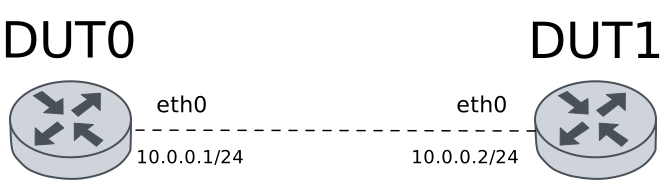
Test SNMPv1 Send Traps
Description
This scenario tests reachability checking for traps in SNMPv1. Initially, the DUT0 is not reachable from DUT1, so no traps are received. After the DUT0 is reachable from DUT1, the traps are received.
Scenario
Step 1: Set the following configuration in DUT0 :
set interfaces dummy dum0 address 20.0.0.1/24
set interfaces dummy dum0 alarm down ALARM2TEST
set interfaces ethernet eth0 address 10.0.0.1/24
set service nsm operation CHECK_REACHABILITY alarm ALARM_REACHABILITY activate loss 1
set service nsm operation CHECK_REACHABILITY alarm ALARM_REACHABILITY deactivate loss 0
set service nsm operation CHECK_REACHABILITY destination-address 10.0.0.2
set service nsm operation CHECK_REACHABILITY type icmp
set service nsm operation CHECK_REACHABILITY window 2
set service snmp community 'COMMUNITY2TEST!' notify-traps advisor ADVISOR2TEST
set service snmp community 'COMMUNITY2TEST!' notify-traps alarm ALARM2TEST
set service snmp trap-target 10.0.0.2 reachability-checking ADVISOR_REACHABLE
set service snmp trap-target 10.0.0.2 version v1 community 'COMMUNITY2TEST!'
set service snmp trap-target 10.0.0.2 version v1 source 10.0.0.1
set system advisor ADVISOR2TEST test ALARM2TEST
set system advisor ADVISOR_REACHABLE test 'not ALARM_REACHABILITY'
set system alarm ALARM2TEST
set system alarm ALARM_REACHABILITY initial-state true
set system login user admin authentication encrypted-password '$6$GSjsCj8gHLv$/VcqU6FLi6CT2Oxn0MJQ2C2tqnRDrYKNF8HIYWJp68nvXvPdFccDsT04.WtigUONbKYrgKg8d6rEs8PjljMkH0'
Step 2: Set the following configuration in DUT1 :
set interfaces ethernet eth0 address 10.0.0.2/24
set system login user admin authentication encrypted-password '$6$GSjsCj8gHLv$/VcqU6FLi6CT2Oxn0MJQ2C2tqnRDrYKNF8HIYWJp68nvXvPdFccDsT04.WtigUONbKYrgKg8d6rEs8PjljMkH0'
No traps would be received if DUT1 is not reachable from DUT0, and this traps are saved for later when DUT1 is reachable again.
Step 3: Modify the following configuration lines in DUT0 :
set interfaces ethernet eth0 disable
Step 4: Run the command system alarm show on DUT0 and check whether the output matches the following regular expressions:
ALARM_REACHABILITY\s+trueShow output
-------------------------------------------------------------------------------------------------------------------------
Alarm         Status              Toggled                         Prev-toggled            Toggle-count  Time up (%)
-------------------------------------------------------------------------------------------------------------------------
ALARM2TEST          false   2026-09-16 21:44:57.068260+00:00  2026-09-16 21:44:56.566117+00:00             2        20.37
ALARM_REACHABILITY  true                                                                                   0       100.00
Step 5: Run the command system advisor show on DUT0 and check whether the output matches the following regular expressions:
ADVISOR_REACHABLE\s+falseShow output
---------------------------------------------------------------------------
Advisor       Status  Toggled  Prev-toggled  Toggle-count  Time up (%)
---------------------------------------------------------------------------
ADVISOR2TEST       false                                     0         0.00
ADVISOR_REACHABLE  false                                     0         0.00
Step 6: Run the command service snmp monitor traps community COMMUNITY2TEST! on DUT1.
Step 7: Modify the following configuration lines in DUT0 :
set interfaces dummy dum0 disable
Step 8: Run the command system alarm show on DUT0 and check whether the output matches the following regular expressions:
ALARM2TEST\s+trueShow output
-------------------------------------------------------------------------------------------------------------------------
Alarm         Status              Toggled                         Prev-toggled            Toggle-count  Time up (%)
-------------------------------------------------------------------------------------------------------------------------
ALARM2TEST          true    2026-09-16 21:44:59.589993+00:00  2026-09-16 21:44:57.068260+00:00             3        20.40
ALARM_REACHABILITY  true                                                                                   0       100.00
Step 9: Run the command system advisor show on DUT0 and check whether the output matches the following regular expressions:
ADVISOR2TEST\s+trueShow output
----------------------------------------------------------------------------------------------------
Advisor       Status              Toggled               Prev-toggled  Toggle-count  Time up (%)
----------------------------------------------------------------------------------------------------
ADVISOR2TEST       true    2026-09-16 21:44:59.597804+00:00                           1         7.15
ADVISOR_REACHABLE  false                                                              0         0.00
Note
Stop traps capture in DUT0 and expect
the following monitoring messages:
Show output
^C
  CLI Error: Command error
admin@osdx$
Now DUT1 is reachable from DUT0, so traps should be received, including the ones
that were saved before.
Step 10: Run the command service snmp monitor traps community COMMUNITY2TEST! on DUT1.
Step 11: Modify the following configuration lines in DUT0 :
delete interfaces ethernet eth0 disable
Step 12: Run the command system alarm show on DUT0 and check whether the output matches the following regular expressions:
ALARM_REACHABILITY\s+falseShow output
-------------------------------------------------------------------------------------------------------------------------
Alarm         Status              Toggled                         Prev-toggled            Toggle-count  Time up (%)
-------------------------------------------------------------------------------------------------------------------------
ALARM2TEST          true    2026-09-16 21:44:59.589993+00:00  2026-09-16 21:44:57.068260+00:00             3        76.46
ALARM_REACHABILITY  false   2026-09-16 21:45:06.918442+00:00                                               1        94.41
Step 13: Run the command system advisor show on DUT0 and check whether the output matches the following regular expressions:
ADVISOR_REACHABLE\s+trueShow output
----------------------------------------------------------------------------------------------------
Advisor       Status              Toggled               Prev-toggled  Toggle-count  Time up (%)
----------------------------------------------------------------------------------------------------
ADVISOR2TEST       true    2026-09-16 21:44:59.597804+00:00                           1        72.07
ADVISOR_REACHABLE  true    2026-09-16 21:45:06.924201+00:00                           1         6.07
Step 14: Modify the following configuration lines in DUT0 :
delete interfaces dummy dum0 disable
Step 15: Run the command system alarm show on DUT0 and check whether the output matches the following regular expressions:
ALARM2TEST\s+falseShow output
-------------------------------------------------------------------------------------------------------------------------
Alarm         Status              Toggled                         Prev-toggled            Toggle-count  Time up (%)
-------------------------------------------------------------------------------------------------------------------------
ALARM2TEST          false   2026-09-16 21:45:08.094476+00:00  2026-09-16 21:44:59.589993+00:00             4        76.24
ALARM_REACHABILITY  false   2026-09-16 21:45:06.918442+00:00                                               1        88.29
Step 16: Run the command system advisor show on DUT0 and check whether the output matches the following regular expressions:
ADVISOR2TEST\s+falseShow output
------------------------------------------------------------------------------------------------------------------------
Advisor       Status              Toggled                         Prev-toggled            Toggle-count  Time up (%)
------------------------------------------------------------------------------------------------------------------------
ADVISOR2TEST       false   2026-09-16 21:45:08.103173+00:00  2026-09-16 21:44:59.597804+00:00             2        71.61
ADVISOR_REACHABLE  true    2026-09-16 21:45:06.924201+00:00                                               1        12.21
Note
Stop traps capture in DUT0 and expect
the following monitoring messages:
Show output
2026-09-16 21:45:06 10.0.0.1 [10.0.0.1] (via UDP: [10.0.0.1]:41205->[10.0.0.2]:162) TRAP, SNMP v1, community COMMUNITY2TEST!
        TELDAT-OSDX-TRAPS-ADVISOR-MIB::advisorNotification1 Enterprise Specific Trap (0) Uptime: 0:00:02.71
        TELDAT-OSDX-TRAPS-ADVISOR-MIB::advisor1Name = STRING: ADVISOR2TEST      TELDAT-OSDX-TRAPS-ADVISOR-MIB::advisor1Status = INTEGER: true(1)
2026-09-16 21:45:06 10.0.0.1 [10.0.0.1] (via UDP: [10.0.0.1]:37011->[10.0.0.2]:162) TRAP, SNMP v1, community COMMUNITY2TEST!
        TELDAT-OSDX-TRAPS-ALARM-MIB::alarmNotification1 Enterprise Specific Trap (0) Uptime: 0:00:00.17
        TELDAT-OSDX-TRAPS-ALARM-MIB::alarm1Name = STRING: ALARM2TEST    TELDAT-OSDX-TRAPS-ALARM-MIB::alarm1Status = INTEGER: false(2)
2026-09-16 21:45:06 10.0.0.1 [10.0.0.1] (via UDP: [10.0.0.1]:33670->[10.0.0.2]:162) TRAP, SNMP v1, community COMMUNITY2TEST!
        TELDAT-OSDX-TRAPS-ALARM-MIB::alarmNotification1 Enterprise Specific Trap (0) Uptime: 0:00:02.70
        TELDAT-OSDX-TRAPS-ALARM-MIB::alarm1Name = STRING: ALARM2TEST    TELDAT-OSDX-TRAPS-ALARM-MIB::alarm1Status = INTEGER: true(1)
2026-09-16 21:45:06 10.0.0.1 [10.0.0.1] (via UDP: [10.0.0.1]:56749->[10.0.0.2]:162) TRAP, SNMP v1, community COMMUNITY2TEST!
        NET-SNMP-TC::linux Cold Start Trap (0) Uptime: 0:00:00.09

2026-09-16 21:45:07 10.0.0.1 [10.0.0.1] (via UDP: [10.0.0.1]:44697->[10.0.0.2]:162) TRAP, SNMP v1, community COMMUNITY2TEST!
        TELDAT-OSDX-TRAPS-ALARM-MIB::alarmNotification1 Enterprise Specific Trap (0) Uptime: 0:00:11.20
        TELDAT-OSDX-TRAPS-ALARM-MIB::alarm1Name = STRING: ALARM2TEST    TELDAT-OSDX-TRAPS-ALARM-MIB::alarm1Status = INTEGER: false(2)
2026-09-16 21:45:08 10.0.0.1 [10.0.0.1] (via UDP: [10.0.0.1]:49726->[10.0.0.2]:162) TRAP, SNMP v1, community COMMUNITY2TEST!
        TELDAT-OSDX-TRAPS-ADVISOR-MIB::advisorNotification1 Enterprise Specific Trap (0) Uptime: 0:00:11.24
        TELDAT-OSDX-TRAPS-ADVISOR-MIB::advisor1Name = STRING: ADVISOR2TEST      TELDAT-OSDX-TRAPS-ADVISOR-MIB::advisor1Status = INTEGER: false(2)
^C
  CLI Error: Command error
admin@osdx$
Test SNMPv2c Send Traps
Description
Same as the previous test, but for SNMPv2c.
Scenario
Step 1: Set the following configuration in DUT0 :
set interfaces dummy dum0 address 20.0.0.1/24
set interfaces dummy dum0 alarm down ALARM2TEST
set interfaces ethernet eth0 address 10.0.0.1/24
set service nsm operation CHECK_REACHABILITY alarm ALARM_REACHABILITY activate loss 1
set service nsm operation CHECK_REACHABILITY alarm ALARM_REACHABILITY deactivate loss 0
set service nsm operation CHECK_REACHABILITY destination-address 10.0.0.2
set service nsm operation CHECK_REACHABILITY type icmp
set service nsm operation CHECK_REACHABILITY window 2
set service snmp community 'COMMUNITY2TEST!' notify-traps advisor ADVISOR2TEST
set service snmp community 'COMMUNITY2TEST!' notify-traps alarm ALARM2TEST
set service snmp trap-target 10.0.0.2 reachability-checking ADVISOR_REACHABLE
set service snmp trap-target 10.0.0.2 version v2c community 'COMMUNITY2TEST!'
set system advisor ADVISOR2TEST test ALARM2TEST
set system advisor ADVISOR_REACHABLE test 'not ALARM_REACHABILITY'
set system alarm ALARM2TEST
set system alarm ALARM_REACHABILITY initial-state true
set system login user admin authentication encrypted-password '$6$GSjsCj8gHLv$/VcqU6FLi6CT2Oxn0MJQ2C2tqnRDrYKNF8HIYWJp68nvXvPdFccDsT04.WtigUONbKYrgKg8d6rEs8PjljMkH0'
Step 2: Set the following configuration in DUT1 :
set interfaces ethernet eth0 address 10.0.0.2/24
set system login user admin authentication encrypted-password '$6$GSjsCj8gHLv$/VcqU6FLi6CT2Oxn0MJQ2C2tqnRDrYKNF8HIYWJp68nvXvPdFccDsT04.WtigUONbKYrgKg8d6rEs8PjljMkH0'
No traps would be received if DUT1 is not reachable from DUT0, and this traps are saved for later when DUT1 is reachable again.
Step 3: Modify the following configuration lines in DUT0 :
set interfaces ethernet eth0 disable
Step 4: Run the command system alarm show on DUT0 and check whether the output matches the following regular expressions:
ALARM_REACHABILITY\s+trueShow output
-------------------------------------------------------------------------------------------------------------------------
Alarm         Status              Toggled                         Prev-toggled            Toggle-count  Time up (%)
-------------------------------------------------------------------------------------------------------------------------
ALARM2TEST          false   2026-09-16 21:45:23.711413+00:00  2026-09-16 21:45:23.172710+00:00             2        24.00
ALARM_REACHABILITY  true                                                                                   0       100.00
Step 5: Run the command system advisor show on DUT0 and check whether the output matches the following regular expressions:
ADVISOR_REACHABLE\s+falseShow output
---------------------------------------------------------------------------
Advisor       Status  Toggled  Prev-toggled  Toggle-count  Time up (%)
---------------------------------------------------------------------------
ADVISOR2TEST       false                                     0         0.00
ADVISOR_REACHABLE  false                                     0         0.00
Step 6: Run the command service snmp monitor traps community COMMUNITY2TEST! on DUT1.
Step 7: Modify the following configuration lines in DUT0 :
set interfaces dummy dum0 disable
Step 8: Run the command system alarm show on DUT0 and check whether the output matches the following regular expressions:
ALARM2TEST\s+trueShow output
-------------------------------------------------------------------------------------------------------------------------
Alarm         Status              Toggled                         Prev-toggled            Toggle-count  Time up (%)
-------------------------------------------------------------------------------------------------------------------------
ALARM2TEST          true    2026-09-16 21:45:25.865228+00:00  2026-09-16 21:45:23.711413+00:00             3        24.12
ALARM_REACHABILITY  true                                                                                   0       100.00
Step 9: Run the command system advisor show on DUT0 and check whether the output matches the following regular expressions:
ADVISOR2TEST\s+trueShow output
----------------------------------------------------------------------------------------------------
Advisor       Status              Toggled               Prev-toggled  Toggle-count  Time up (%)
----------------------------------------------------------------------------------------------------
ADVISOR2TEST       true    2026-09-16 21:45:25.871338+00:00                           1         8.40
ADVISOR_REACHABLE  false                                                              0         0.00
Note
Stop traps capture in DUT0 and expect
the following monitoring messages:
Show output
^C
  CLI Error: Command error
admin@osdx$
Now DUT1 is reachable from DUT0, so traps should be received, including the ones
that were saved before.
Step 10: Run the command service snmp monitor traps community COMMUNITY2TEST! on DUT1.
Step 11: Modify the following configuration lines in DUT0 :
delete interfaces ethernet eth0 disable
Step 12: Run the command system alarm show on DUT0 and check whether the output matches the following regular expressions:
ALARM_REACHABILITY\s+falseShow output
-------------------------------------------------------------------------------------------------------------------------
Alarm         Status              Toggled                         Prev-toggled            Toggle-count  Time up (%)
-------------------------------------------------------------------------------------------------------------------------
ALARM2TEST          true    2026-09-16 21:45:25.865228+00:00  2026-09-16 21:45:23.711413+00:00             3        79.44
ALARM_REACHABILITY  false   2026-09-16 21:45:33.550682+00:00                                               1        95.33
Step 13: Run the command system advisor show on DUT0 and check whether the output matches the following regular expressions:
ADVISOR_REACHABLE\s+trueShow output
----------------------------------------------------------------------------------------------------
Advisor       Status              Toggled               Prev-toggled  Toggle-count  Time up (%)
----------------------------------------------------------------------------------------------------
ADVISOR2TEST       true    2026-09-16 21:45:25.871338+00:00                           1        74.74
ADVISOR_REACHABLE  true    2026-09-16 21:45:33.556241+00:00                           1         5.30
Step 14: Modify the following configuration lines in DUT0 :
delete interfaces dummy dum0 disable
Step 15: Run the command system alarm show on DUT0 and check whether the output matches the following regular expressions:
ALARM2TEST\s+falseShow output
-------------------------------------------------------------------------------------------------------------------------
Alarm         Status              Toggled                         Prev-toggled            Toggle-count  Time up (%)
-------------------------------------------------------------------------------------------------------------------------
ALARM2TEST          false   2026-09-16 21:45:34.692976+00:00  2026-09-16 21:45:25.865228+00:00             4        79.38
ALARM_REACHABILITY  false   2026-09-16 21:45:33.550682+00:00                                               1        88.86
Step 16: Run the command system advisor show on DUT0 and check whether the output matches the following regular expressions:
ADVISOR2TEST\s+falseShow output
------------------------------------------------------------------------------------------------------------------------
Advisor       Status              Toggled                         Prev-toggled            Toggle-count  Time up (%)
------------------------------------------------------------------------------------------------------------------------
ADVISOR2TEST       false   2026-09-16 21:45:34.699200+00:00  2026-09-16 21:45:25.871338+00:00             2        74.35
ADVISOR_REACHABLE  true    2026-09-16 21:45:33.556241+00:00                                               1        11.73
Note
Stop traps capture in DUT0 and expect
the following monitoring messages:
Show output
2026-09-16 21:45:33 <UNKNOWN> [UDP: [10.0.0.1]:49489->[10.0.0.2]:162]:
SNMPv2-MIB::sysUpTime.0 = Timeticks: (235) 0:00:02.35   SNMPv2-MIB::snmpTrapOID.0 = OID: TELDAT-OSDX-TRAPS-ADVISOR-MIB::advisorNotification1    TELDAT-OSDX-TRAPS-ADVISOR-MIB::advisor1Name = STRING: ADVISOR2TEST      TELDAT-OSDX-TRAPS-ADVISOR-MIB::advisor1Status = INTEGER: true(1)
2026-09-16 21:45:33 <UNKNOWN> [UDP: [10.0.0.1]:44286->[10.0.0.2]:162]:
SNMPv2-MIB::sysUpTime.0 = Timeticks: (19) 0:00:00.19    SNMPv2-MIB::snmpTrapOID.0 = OID: TELDAT-OSDX-TRAPS-ALARM-MIB::alarmNotification1        TELDAT-OSDX-TRAPS-ALARM-MIB::alarm1Name = STRING: ALARM2TEST    TELDAT-OSDX-TRAPS-ALARM-MIB::alarm1Status = INTEGER: false(2)
2026-09-16 21:45:33 <UNKNOWN> [UDP: [10.0.0.1]:58778->[10.0.0.2]:162]:
SNMPv2-MIB::sysUpTime.0 = Timeticks: (235) 0:00:02.35   SNMPv2-MIB::snmpTrapOID.0 = OID: TELDAT-OSDX-TRAPS-ALARM-MIB::alarmNotification1        TELDAT-OSDX-TRAPS-ALARM-MIB::alarm1Name = STRING: ALARM2TEST    TELDAT-OSDX-TRAPS-ALARM-MIB::alarm1Status = INTEGER: true(1)
2026-09-16 21:45:33 <UNKNOWN> [UDP: [10.0.0.1]:50791->[10.0.0.2]:162]:
SNMPv2-MIB::sysUpTime.0 = Timeticks: (10) 0:00:00.10    SNMPv2-MIB::snmpTrapOID.0 = OID: SNMPv2-MIB::coldStart  SNMPv2-MIB::snmpTrapEnterprise.0 = OID: NET-SNMP-TC::linux
2026-09-16 21:45:34 <UNKNOWN> [UDP: [10.0.0.1]:47033->[10.0.0.2]:162]:
SNMPv2-MIB::sysUpTime.0 = Timeticks: (1117) 0:00:11.17  SNMPv2-MIB::snmpTrapOID.0 = OID: TELDAT-OSDX-TRAPS-ALARM-MIB::alarmNotification1        TELDAT-OSDX-TRAPS-ALARM-MIB::alarm1Name = STRING: ALARM2TEST    TELDAT-OSDX-TRAPS-ALARM-MIB::alarm1Status = INTEGER: false(2)
2026-09-16 21:45:34 <UNKNOWN> [UDP: [10.0.0.1]:42103->[10.0.0.2]:162]:
SNMPv2-MIB::sysUpTime.0 = Timeticks: (1121) 0:00:11.21  SNMPv2-MIB::snmpTrapOID.0 = OID: TELDAT-OSDX-TRAPS-ADVISOR-MIB::advisorNotification1    TELDAT-OSDX-TRAPS-ADVISOR-MIB::advisor1Name = STRING: ADVISOR2TEST      TELDAT-OSDX-TRAPS-ADVISOR-MIB::advisor1Status = INTEGER: false(2)
^C
  CLI Error: Command error
admin@osdx$
Test SNMPv2 Send Informs
Description
Same as the previous test, but for SNMPv2c informs.
Scenario
Step 1: Set the following configuration in DUT0 :
set interfaces dummy dum0 address 20.0.0.1/24
set interfaces dummy dum0 alarm down ALARM2TEST
set interfaces ethernet eth0 address 10.0.0.1/24
set service nsm operation CHECK_REACHABILITY alarm ALARM_REACHABILITY activate loss 1
set service nsm operation CHECK_REACHABILITY alarm ALARM_REACHABILITY deactivate loss 0
set service nsm operation CHECK_REACHABILITY destination-address 10.0.0.2
set service nsm operation CHECK_REACHABILITY type icmp
set service nsm operation CHECK_REACHABILITY window 2
set service snmp community 'COMMUNITY2TEST!' notify-traps advisor ADVISOR2TEST
set service snmp community 'COMMUNITY2TEST!' notify-traps alarm ALARM2TEST
set service snmp trap-target 10.0.0.2 reachability-checking ADVISOR_REACHABLE
set service snmp trap-target 10.0.0.2 version v2c community 'COMMUNITY2TEST!'
set service snmp trap-target 10.0.0.2 version v2c type inform
set system advisor ADVISOR2TEST test ALARM2TEST
set system advisor ADVISOR_REACHABLE test 'not ALARM_REACHABILITY'
set system alarm ALARM2TEST
set system alarm ALARM_REACHABILITY initial-state true
set system login user admin authentication encrypted-password '$6$GSjsCj8gHLv$/VcqU6FLi6CT2Oxn0MJQ2C2tqnRDrYKNF8HIYWJp68nvXvPdFccDsT04.WtigUONbKYrgKg8d6rEs8PjljMkH0'
Step 2: Set the following configuration in DUT1 :
set interfaces ethernet eth0 address 10.0.0.2/24
set system login user admin authentication encrypted-password '$6$GSjsCj8gHLv$/VcqU6FLi6CT2Oxn0MJQ2C2tqnRDrYKNF8HIYWJp68nvXvPdFccDsT04.WtigUONbKYrgKg8d6rEs8PjljMkH0'
No traps would be received if DUT1 is not reachable from DUT0, and this traps are saved for later when DUT1 is reachable again.
Step 3: Modify the following configuration lines in DUT0 :
set interfaces ethernet eth0 disable
Step 4: Run the command system alarm show on DUT0 and check whether the output matches the following regular expressions:
ALARM_REACHABILITY\s+trueShow output
-------------------------------------------------------------------------------------------------------------------------
Alarm         Status              Toggled                         Prev-toggled            Toggle-count  Time up (%)
-------------------------------------------------------------------------------------------------------------------------
ALARM2TEST          false   2026-09-16 21:45:50.095466+00:00  2026-09-16 21:45:49.551144+00:00             2        20.71
ALARM_REACHABILITY  true                                                                                   0       100.00
Step 5: Run the command system advisor show on DUT0 and check whether the output matches the following regular expressions:
ADVISOR_REACHABLE\s+falseShow output
---------------------------------------------------------------------------
Advisor       Status  Toggled  Prev-toggled  Toggle-count  Time up (%)
---------------------------------------------------------------------------
ADVISOR2TEST       false                                     0         0.00
ADVISOR_REACHABLE  false                                     0         0.00
Step 6: Run the command service snmp monitor traps community COMMUNITY2TEST! on DUT1.
Step 7: Modify the following configuration lines in DUT0 :
set interfaces dummy dum0 disable
Step 8: Run the command system alarm show on DUT0 and check whether the output matches the following regular expressions:
ALARM2TEST\s+trueShow output
-------------------------------------------------------------------------------------------------------------------------
Alarm         Status              Toggled                         Prev-toggled            Toggle-count  Time up (%)
-------------------------------------------------------------------------------------------------------------------------
ALARM2TEST          true    2026-09-16 21:45:52.732113+00:00  2026-09-16 21:45:50.095466+00:00             3        21.43
ALARM_REACHABILITY  true                                                                                   0       100.00
Step 9: Run the command system advisor show on DUT0 and check whether the output matches the following regular expressions:
ADVISOR2TEST\s+trueShow output
----------------------------------------------------------------------------------------------------
Advisor       Status              Toggled               Prev-toggled  Toggle-count  Time up (%)
----------------------------------------------------------------------------------------------------
ADVISOR2TEST       true    2026-09-16 21:45:52.740943+00:00                           1         8.66
ADVISOR_REACHABLE  false                                                              0         0.00
Note
Stop traps capture in DUT0 and expect
the following monitoring messages:
Show output
^C
  CLI Error: Command error
admin@osdx$
Now DUT1 is reachable from DUT0, so traps should be received, including the ones
that were saved before.
Step 10: Run the command service snmp monitor traps community COMMUNITY2TEST! on DUT1.
Step 11: Modify the following configuration lines in DUT0 :
delete interfaces ethernet eth0 disable
Step 12: Run the command system alarm show on DUT0 and check whether the output matches the following regular expressions:
ALARM_REACHABILITY\s+falseShow output
-------------------------------------------------------------------------------------------------------------------------
Alarm         Status              Toggled                         Prev-toggled            Toggle-count  Time up (%)
-------------------------------------------------------------------------------------------------------------------------
ALARM2TEST          true    2026-09-16 21:45:52.732113+00:00  2026-09-16 21:45:50.095466+00:00             3        75.98
ALARM_REACHABILITY  false   2026-09-16 21:45:59.942655+00:00                                               1        92.08
Step 13: Run the command system advisor show on DUT0 and check whether the output matches the following regular expressions:
ADVISOR_REACHABLE\s+trueShow output
----------------------------------------------------------------------------------------------------
Advisor       Status              Toggled               Prev-toggled  Toggle-count  Time up (%)
----------------------------------------------------------------------------------------------------
ADVISOR2TEST       true    2026-09-16 21:45:52.740943+00:00                           1        71.42
ADVISOR_REACHABLE  true    2026-09-16 21:45:59.948815+00:00                           1         8.63
Step 14: Modify the following configuration lines in DUT0 :
delete interfaces dummy dum0 disable
Step 15: Run the command system alarm show on DUT0 and check whether the output matches the following regular expressions:
ALARM2TEST\s+falseShow output
-------------------------------------------------------------------------------------------------------------------------
Alarm         Status              Toggled                         Prev-toggled            Toggle-count  Time up (%)
-------------------------------------------------------------------------------------------------------------------------
ALARM2TEST          false   2026-09-16 21:46:01.362463+00:00  2026-09-16 21:45:52.732113+00:00             4        75.80
ALARM_REACHABILITY  false   2026-09-16 21:45:59.942655+00:00                                               1        86.67
Step 16: Run the command system advisor show on DUT0 and check whether the output matches the following regular expressions:
ADVISOR2TEST\s+falseShow output
------------------------------------------------------------------------------------------------------------------------
Advisor       Status              Toggled                         Prev-toggled            Toggle-count  Time up (%)
------------------------------------------------------------------------------------------------------------------------
ADVISOR2TEST       false   2026-09-16 21:46:01.369537+00:00  2026-09-16 21:45:52.740943+00:00             2        70.91
ADVISOR_REACHABLE  true    2026-09-16 21:45:59.948815+00:00                                               1        13.81
Note
Stop traps capture in DUT0 and expect
the following monitoring messages:
Show output
2026-09-16 21:45:59 <UNKNOWN> [UDP: [10.0.0.1]:57785->[10.0.0.2]:162]:
SNMPv2-MIB::sysUpTime.0 = Timeticks: (283) 0:00:02.83   SNMPv2-MIB::snmpTrapOID.0 = OID: TELDAT-OSDX-TRAPS-ADVISOR-MIB::advisorNotification1    TELDAT-OSDX-TRAPS-ADVISOR-MIB::advisor1Name = STRING: ADVISOR2TEST      TELDAT-OSDX-TRAPS-ADVISOR-MIB::advisor1Status = INTEGER: true(1)
2026-09-16 21:45:59 <UNKNOWN> [UDP: [10.0.0.1]:55403->[10.0.0.2]:162]:
SNMPv2-MIB::sysUpTime.0 = Timeticks: (18) 0:00:00.18    SNMPv2-MIB::snmpTrapOID.0 = OID: TELDAT-OSDX-TRAPS-ALARM-MIB::alarmNotification1        TELDAT-OSDX-TRAPS-ALARM-MIB::alarm1Name = STRING: ALARM2TEST    TELDAT-OSDX-TRAPS-ALARM-MIB::alarm1Status = INTEGER: false(2)
2026-09-16 21:45:59 <UNKNOWN> [UDP: [10.0.0.1]:56261->[10.0.0.2]:162]:
SNMPv2-MIB::sysUpTime.0 = Timeticks: (283) 0:00:02.83   SNMPv2-MIB::snmpTrapOID.0 = OID: TELDAT-OSDX-TRAPS-ALARM-MIB::alarmNotification1        TELDAT-OSDX-TRAPS-ALARM-MIB::alarm1Name = STRING: ALARM2TEST    TELDAT-OSDX-TRAPS-ALARM-MIB::alarm1Status = INTEGER: true(1)
2026-09-16 21:45:59 <UNKNOWN> [UDP: [10.0.0.1]:54989->[10.0.0.2]:162]:
SNMPv2-MIB::sysUpTime.0 = Timeticks: (9) 0:00:00.09     SNMPv2-MIB::snmpTrapOID.0 = OID: SNMPv2-MIB::coldStart  SNMPv2-MIB::snmpTrapEnterprise.0 = OID: NET-SNMP-TC::linux
2026-09-16 21:46:01 <UNKNOWN> [UDP: [10.0.0.1]:35828->[10.0.0.2]:162]:
SNMPv2-MIB::sysUpTime.0 = Timeticks: (1145) 0:00:11.45  SNMPv2-MIB::snmpTrapOID.0 = OID: TELDAT-OSDX-TRAPS-ALARM-MIB::alarmNotification1        TELDAT-OSDX-TRAPS-ALARM-MIB::alarm1Name = STRING: ALARM2TEST    TELDAT-OSDX-TRAPS-ALARM-MIB::alarm1Status = INTEGER: false(2)
2026-09-16 21:46:01 <UNKNOWN> [UDP: [10.0.0.1]:41864->[10.0.0.2]:162]:
SNMPv2-MIB::sysUpTime.0 = Timeticks: (1150) 0:00:11.50  SNMPv2-MIB::snmpTrapOID.0 = OID: TELDAT-OSDX-TRAPS-ADVISOR-MIB::advisorNotification1    TELDAT-OSDX-TRAPS-ADVISOR-MIB::advisor1Name = STRING: ADVISOR2TEST      TELDAT-OSDX-TRAPS-ADVISOR-MIB::advisor1Status = INTEGER: false(2)
^C
  CLI Error: Command error
admin@osdx$
Test SNMPv3 Send Traps
Description
Same as the previous test, but for SNMPv3.
Scenario
Step 1: Set the following configuration in DUT0 :
set interfaces dummy dum0 address 20.0.0.1/24
set interfaces dummy dum0 alarm down ALARM2TEST
set interfaces ethernet eth0 address 10.0.0.1/24
set service nsm operation CHECK_REACHABILITY alarm ALARM_REACHABILITY activate loss 1
set service nsm operation CHECK_REACHABILITY alarm ALARM_REACHABILITY deactivate loss 0
set service nsm operation CHECK_REACHABILITY destination-address 10.0.0.2
set service nsm operation CHECK_REACHABILITY type icmp
set service nsm operation CHECK_REACHABILITY window 2
set service snmp engine-id 0x80000009010a0101c1
set service snmp trap-target 10.0.0.2 reachability-checking ADVISOR_REACHABLE
set service snmp trap-target 10.0.0.2 version v3 user USER2TEST
set service snmp user USER2TEST notify-traps advisor ADVISOR2TEST
set service snmp user USER2TEST notify-traps alarm ALARM2TEST
set system advisor ADVISOR2TEST test ALARM2TEST
set system advisor ADVISOR_REACHABLE test 'not ALARM_REACHABILITY'
set system alarm ALARM2TEST
set system alarm ALARM_REACHABILITY initial-state true
set system login user admin authentication encrypted-password '$6$GSjsCj8gHLv$/VcqU6FLi6CT2Oxn0MJQ2C2tqnRDrYKNF8HIYWJp68nvXvPdFccDsT04.WtigUONbKYrgKg8d6rEs8PjljMkH0'
Step 2: Set the following configuration in DUT1 :
set interfaces ethernet eth0 address 10.0.0.2/24
set system login user admin authentication encrypted-password '$6$GSjsCj8gHLv$/VcqU6FLi6CT2Oxn0MJQ2C2tqnRDrYKNF8HIYWJp68nvXvPdFccDsT04.WtigUONbKYrgKg8d6rEs8PjljMkH0'
No traps would be received if DUT1 is not reachable from DUT0, and this traps are saved for later when DUT1 is reachable again.
Step 3: Modify the following configuration lines in DUT0 :
set interfaces ethernet eth0 disable
Step 4: Run the command system alarm show on DUT0 and check whether the output matches the following regular expressions:
ALARM_REACHABILITY\s+trueShow output
-------------------------------------------------------------------------------------------------------------------------
Alarm         Status              Toggled                         Prev-toggled            Toggle-count  Time up (%)
-------------------------------------------------------------------------------------------------------------------------
ALARM2TEST          false   2026-09-16 21:46:23.206747+00:00  2026-09-16 21:46:22.689309+00:00             2        10.71
ALARM_REACHABILITY  true    2026-09-16 21:46:27.016650+00:00  2026-09-16 21:46:25.017178+00:00             2        58.59
Step 5: Run the command system advisor show on DUT0 and check whether the output matches the following regular expressions:
ADVISOR_REACHABLE\s+falseShow output
------------------------------------------------------------------------------------------------------------------------
Advisor       Status              Toggled                         Prev-toggled            Toggle-count  Time up (%)
------------------------------------------------------------------------------------------------------------------------
ADVISOR2TEST       false                                                                                  0         0.00
ADVISOR_REACHABLE  false   2026-09-16 21:46:27.021792+00:00  2026-09-16 21:46:25.023212+00:00             2        40.86
Step 6: Run the command service snmp monitor traps user USER2TEST engine-id 0x80000009010a0101c1 on DUT1.
Step 7: Modify the following configuration lines in DUT0 :
set interfaces dummy dum0 disable
Step 8: Run the command system alarm show on DUT0 and check whether the output matches the following regular expressions:
ALARM2TEST\s+trueShow output
-------------------------------------------------------------------------------------------------------------------------
Alarm         Status              Toggled                         Prev-toggled            Toggle-count  Time up (%)
-------------------------------------------------------------------------------------------------------------------------
ALARM2TEST          true    2026-09-16 21:46:27.991392+00:00  2026-09-16 21:46:23.206747+00:00             3        12.17
ALARM_REACHABILITY  true    2026-09-16 21:46:27.016650+00:00  2026-09-16 21:46:25.017178+00:00             2        64.10
Step 9: Run the command system advisor show on DUT0 and check whether the output matches the following regular expressions:
ADVISOR2TEST\s+trueShow output
------------------------------------------------------------------------------------------------------------------------
Advisor       Status              Toggled                         Prev-toggled            Toggle-count  Time up (%)
------------------------------------------------------------------------------------------------------------------------
ADVISOR2TEST       true    2026-09-16 21:46:27.998583+00:00                                               1         3.91
ADVISOR_REACHABLE  false   2026-09-16 21:46:27.021792+00:00  2026-09-16 21:46:25.023212+00:00             2        35.50
Note
Stop traps capture in DUT0 and expect
the following monitoring messages:
Show output
^C
  CLI Error: Command error
admin@osdx$
Now DUT1 is reachable from DUT0, so traps should be received, including the ones
that were saved before.
Step 10: Run the command service snmp monitor traps user USER2TEST engine-id 0x80000009010a0101c1 on DUT1.
Step 11: Modify the following configuration lines in DUT0 :
delete interfaces ethernet eth0 disable
Step 12: Run the command system alarm show on DUT0 and check whether the output matches the following regular expressions:
ALARM_REACHABILITY\s+falseShow output
-------------------------------------------------------------------------------------------------------------------------
Alarm         Status              Toggled                         Prev-toggled            Toggle-count  Time up (%)
-------------------------------------------------------------------------------------------------------------------------
ALARM2TEST          true    2026-09-16 21:46:27.991392+00:00  2026-09-16 21:46:23.206747+00:00             3        63.70
ALARM_REACHABILITY  false   2026-09-16 21:46:35.017562+00:00  2026-09-16 21:46:27.016650+00:00             3        77.39
Step 13: Run the command system advisor show on DUT0 and check whether the output matches the following regular expressions:
ADVISOR_REACHABLE\s+trueShow output
------------------------------------------------------------------------------------------------------------------------
Advisor       Status              Toggled                         Prev-toggled            Toggle-count  Time up (%)
------------------------------------------------------------------------------------------------------------------------
ADVISOR2TEST       true    2026-09-16 21:46:27.998583+00:00                                               1        60.13
ADVISOR_REACHABLE  true    2026-09-16 21:46:35.022885+00:00  2026-09-16 21:46:27.021792+00:00             3        23.10
Step 14: Modify the following configuration lines in DUT0 :
delete interfaces dummy dum0 disable
Step 15: Run the command system alarm show on DUT0 and check whether the output matches the following regular expressions:
ALARM2TEST\s+falseShow output
-------------------------------------------------------------------------------------------------------------------------
Alarm         Status              Toggled                         Prev-toggled            Toggle-count  Time up (%)
-------------------------------------------------------------------------------------------------------------------------
ALARM2TEST          false   2026-09-16 21:46:36.632712+00:00  2026-09-16 21:46:27.991392+00:00             4        64.38
ALARM_REACHABILITY  false   2026-09-16 21:46:35.017562+00:00  2026-09-16 21:46:27.016650+00:00             3        73.38
Step 16: Run the command system advisor show on DUT0 and check whether the output matches the following regular expressions:
ADVISOR2TEST\s+falseShow output
------------------------------------------------------------------------------------------------------------------------
Advisor       Status              Toggled                         Prev-toggled            Toggle-count  Time up (%)
------------------------------------------------------------------------------------------------------------------------
ADVISOR2TEST       false   2026-09-16 21:46:36.638248+00:00  2026-09-16 21:46:27.998583+00:00             2        60.46
ADVISOR_REACHABLE  true    2026-09-16 21:46:35.022885+00:00  2026-09-16 21:46:27.021792+00:00             3        26.97
Note
Stop traps capture in DUT0 and expect
the following monitoring messages:
Show output
2026-09-16 21:46:34 <UNKNOWN> [UDP: [10.0.0.1]:42787->[10.0.0.2]:162]:
SNMPv2-MIB::sysUpTime.0 = Timeticks: (502) 0:00:05.02   SNMPv2-MIB::snmpTrapOID.0 = OID: TELDAT-OSDX-TRAPS-ADVISOR-MIB::advisorNotification1    TELDAT-OSDX-TRAPS-ADVISOR-MIB::advisor1Name = STRING: ADVISOR2TEST      TELDAT-OSDX-TRAPS-ADVISOR-MIB::advisor1Status = INTEGER: true(1)
2026-09-16 21:46:34 <UNKNOWN> [UDP: [10.0.0.1]:50600->[10.0.0.2]:162]:
SNMPv2-MIB::sysUpTime.0 = Timeticks: (501) 0:00:05.01   SNMPv2-MIB::snmpTrapOID.0 = OID: TELDAT-OSDX-TRAPS-ALARM-MIB::alarmNotification1        TELDAT-OSDX-TRAPS-ALARM-MIB::alarm1Name = STRING: ALARM2TEST    TELDAT-OSDX-TRAPS-ALARM-MIB::alarm1Status = INTEGER: true(1)
2026-09-16 21:46:36 <UNKNOWN> [UDP: [10.0.0.1]:55154->[10.0.0.2]:162]:
SNMPv2-MIB::sysUpTime.0 = Timeticks: (1365) 0:00:13.65  SNMPv2-MIB::snmpTrapOID.0 = OID: TELDAT-OSDX-TRAPS-ALARM-MIB::alarmNotification1        TELDAT-OSDX-TRAPS-ALARM-MIB::alarm1Name = STRING: ALARM2TEST    TELDAT-OSDX-TRAPS-ALARM-MIB::alarm1Status = INTEGER: false(2)
2026-09-16 21:46:36 <UNKNOWN> [UDP: [10.0.0.1]:46888->[10.0.0.2]:162]:
SNMPv2-MIB::sysUpTime.0 = Timeticks: (1369) 0:00:13.69  SNMPv2-MIB::snmpTrapOID.0 = OID: TELDAT-OSDX-TRAPS-ADVISOR-MIB::advisorNotification1    TELDAT-OSDX-TRAPS-ADVISOR-MIB::advisor1Name = STRING: ADVISOR2TEST      TELDAT-OSDX-TRAPS-ADVISOR-MIB::advisor1Status = INTEGER: false(2)
^C
  CLI Error: Command error
admin@osdx$
Test SNMPv3 Send Informs
Description
Same as the previous test, but for SNMPv3 informs.
Scenario
Step 1: Set the following configuration in DUT0 :
set interfaces dummy dum0 address 20.0.0.1/24
set interfaces dummy dum0 alarm down ALARM2TEST
set interfaces ethernet eth0 address 10.0.0.1/24
set service nsm operation CHECK_REACHABILITY alarm ALARM_REACHABILITY activate loss 1
set service nsm operation CHECK_REACHABILITY alarm ALARM_REACHABILITY deactivate loss 0
set service nsm operation CHECK_REACHABILITY destination-address 10.0.0.2
set service nsm operation CHECK_REACHABILITY type icmp
set service nsm operation CHECK_REACHABILITY window 2
set service snmp trap-target 10.0.0.2 reachability-checking ADVISOR_REACHABLE
set service snmp trap-target 10.0.0.2 version v3 type inform
set service snmp trap-target 10.0.0.2 version v3 user USER2TEST
set service snmp user USER2TEST notify-traps advisor ADVISOR2TEST
set service snmp user USER2TEST notify-traps alarm ALARM2TEST
set system advisor ADVISOR2TEST test ALARM2TEST
set system advisor ADVISOR_REACHABLE test 'not ALARM_REACHABILITY'
set system alarm ALARM2TEST
set system alarm ALARM_REACHABILITY initial-state true
set system login user admin authentication encrypted-password '$6$GSjsCj8gHLv$/VcqU6FLi6CT2Oxn0MJQ2C2tqnRDrYKNF8HIYWJp68nvXvPdFccDsT04.WtigUONbKYrgKg8d6rEs8PjljMkH0'
Step 2: Set the following configuration in DUT1 :
set interfaces ethernet eth0 address 10.0.0.2/24
set system login user admin authentication encrypted-password '$6$GSjsCj8gHLv$/VcqU6FLi6CT2Oxn0MJQ2C2tqnRDrYKNF8HIYWJp68nvXvPdFccDsT04.WtigUONbKYrgKg8d6rEs8PjljMkH0'
No traps would be received if DUT1 is not reachable from DUT0, and this traps are saved for later when DUT1 is reachable again.
Step 3: Modify the following configuration lines in DUT0 :
set interfaces ethernet eth0 disable
Step 4: Run the command system alarm show on DUT0 and check whether the output matches the following regular expressions:
ALARM_REACHABILITY\s+trueShow output
-------------------------------------------------------------------------------------------------------------------------
Alarm         Status              Toggled                         Prev-toggled            Toggle-count  Time up (%)
-------------------------------------------------------------------------------------------------------------------------
ALARM2TEST          false   2026-09-16 21:46:50.888011+00:00  2026-09-16 21:46:50.320512+00:00             2        11.71
ALARM_REACHABILITY  true    2026-09-16 21:46:54.666844+00:00  2026-09-16 21:46:52.667074+00:00             2        58.67
Step 5: Run the command system advisor show on DUT0 and check whether the output matches the following regular expressions:
ADVISOR_REACHABLE\s+falseShow output
------------------------------------------------------------------------------------------------------------------------
Advisor       Status              Toggled                         Prev-toggled            Toggle-count  Time up (%)
------------------------------------------------------------------------------------------------------------------------
ADVISOR2TEST       false                                                                                  0         0.00
ADVISOR_REACHABLE  false   2026-09-16 21:46:54.673056+00:00  2026-09-16 21:46:52.672614+00:00             2        40.68
Step 6: Run the command service snmp monitor traps user USER2TEST on DUT1.
Step 7: Modify the following configuration lines in DUT0 :
set interfaces dummy dum0 disable
Step 8: Run the command system alarm show on DUT0 and check whether the output matches the following regular expressions:
ALARM2TEST\s+trueShow output
-------------------------------------------------------------------------------------------------------------------------
Alarm         Status              Toggled                         Prev-toggled            Toggle-count  Time up (%)
-------------------------------------------------------------------------------------------------------------------------
ALARM2TEST          true    2026-09-16 21:46:55.614881+00:00  2026-09-16 21:46:50.888011+00:00             3        13.25
ALARM_REACHABILITY  true    2026-09-16 21:46:54.666844+00:00  2026-09-16 21:46:52.667074+00:00             2        64.15
Step 9: Run the command system advisor show on DUT0 and check whether the output matches the following regular expressions:
ADVISOR2TEST\s+trueShow output
------------------------------------------------------------------------------------------------------------------------
Advisor       Status              Toggled                         Prev-toggled            Toggle-count  Time up (%)
------------------------------------------------------------------------------------------------------------------------
ADVISOR2TEST       true    2026-09-16 21:46:55.621737+00:00                                               1         4.77
ADVISOR_REACHABLE  false   2026-09-16 21:46:54.673056+00:00  2026-09-16 21:46:52.672614+00:00             2        35.25
Note
Stop traps capture in DUT0 and expect
the following monitoring messages:
Show output
^C
  CLI Error: Command error
admin@osdx$
Now DUT1 is reachable from DUT0, so traps should be received, including the ones
that were saved before.
Step 10: Run the command service snmp monitor traps user USER2TEST on DUT1.
Step 11: Modify the following configuration lines in DUT0 :
delete interfaces ethernet eth0 disable
Step 12: Run the command system alarm show on DUT0 and check whether the output matches the following regular expressions:
ALARM_REACHABILITY\s+falseShow output
-------------------------------------------------------------------------------------------------------------------------
Alarm         Status              Toggled                         Prev-toggled            Toggle-count  Time up (%)
-------------------------------------------------------------------------------------------------------------------------
ALARM2TEST          true    2026-09-16 21:46:55.614881+00:00  2026-09-16 21:46:50.888011+00:00             3        63.95
ALARM_REACHABILITY  false   2026-09-16 21:47:02.667818+00:00  2026-09-16 21:46:54.666844+00:00             3        77.85
Step 13: Run the command system advisor show on DUT0 and check whether the output matches the following regular expressions:
ADVISOR_REACHABLE\s+trueShow output
------------------------------------------------------------------------------------------------------------------------
Advisor       Status              Toggled                         Prev-toggled            Toggle-count  Time up (%)
------------------------------------------------------------------------------------------------------------------------
ADVISOR2TEST       true    2026-09-16 21:46:55.621737+00:00                                               1        60.01
ADVISOR_REACHABLE  true    2026-09-16 21:47:02.672731+00:00  2026-09-16 21:46:54.673056+00:00             3        22.65
Step 14: Modify the following configuration lines in DUT0 :
delete interfaces dummy dum0 disable
Step 15: Run the command system alarm show on DUT0 and check whether the output matches the following regular expressions:
ALARM2TEST\s+falseShow output
-------------------------------------------------------------------------------------------------------------------------
Alarm         Status              Toggled                         Prev-toggled            Toggle-count  Time up (%)
-------------------------------------------------------------------------------------------------------------------------
ALARM2TEST          false   2026-09-16 21:47:04.309119+00:00  2026-09-16 21:46:55.614881+00:00             4        64.84
ALARM_REACHABILITY  false   2026-09-16 21:47:02.667818+00:00  2026-09-16 21:46:54.666844+00:00             3        73.26
Step 16: Run the command system advisor show on DUT0 and check whether the output matches the following regular expressions:
ADVISOR2TEST\s+falseShow output
------------------------------------------------------------------------------------------------------------------------
Advisor       Status              Toggled                         Prev-toggled            Toggle-count  Time up (%)
------------------------------------------------------------------------------------------------------------------------
ADVISOR2TEST       false   2026-09-16 21:47:04.316943+00:00  2026-09-16 21:46:55.621737+00:00             2        60.59
ADVISOR_REACHABLE  true    2026-09-16 21:47:02.672731+00:00  2026-09-16 21:46:54.673056+00:00             3        27.15
Note
Stop traps capture in DUT0 and expect
the following monitoring messages:
Show output
2026-09-16 21:47:03 <UNKNOWN> [UDP: [10.0.0.1]:37180->[10.0.0.2]:162]:
SNMPv2-MIB::sysUpTime.0 = Timeticks: (499) 0:00:04.99   SNMPv2-MIB::snmpTrapOID.0 = OID: TELDAT-OSDX-TRAPS-ADVISOR-MIB::advisorNotification1    TELDAT-OSDX-TRAPS-ADVISOR-MIB::advisor1Name = STRING: ADVISOR2TEST      TELDAT-OSDX-TRAPS-ADVISOR-MIB::advisor1Status = INTEGER: true(1)
2026-09-16 21:47:03 <UNKNOWN> [UDP: [10.0.0.1]:50503->[10.0.0.2]:162]:
SNMPv2-MIB::sysUpTime.0 = Timeticks: (498) 0:00:04.98   SNMPv2-MIB::snmpTrapOID.0 = OID: TELDAT-OSDX-TRAPS-ALARM-MIB::alarmNotification1        TELDAT-OSDX-TRAPS-ALARM-MIB::alarm1Name = STRING: ALARM2TEST    TELDAT-OSDX-TRAPS-ALARM-MIB::alarm1Status = INTEGER: true(1)
2026-09-16 21:47:05 <UNKNOWN> [UDP: [10.0.0.1]:54748->[10.0.0.2]:162]:
SNMPv2-MIB::sysUpTime.0 = Timeticks: (1368) 0:00:13.68  SNMPv2-MIB::snmpTrapOID.0 = OID: TELDAT-OSDX-TRAPS-ALARM-MIB::alarmNotification1        TELDAT-OSDX-TRAPS-ALARM-MIB::alarm1Name = STRING: ALARM2TEST    TELDAT-OSDX-TRAPS-ALARM-MIB::alarm1Status = INTEGER: false(2)
2026-09-16 21:47:05 <UNKNOWN> [UDP: [10.0.0.1]:38209->[10.0.0.2]:162]:
SNMPv2-MIB::sysUpTime.0 = Timeticks: (1372) 0:00:13.72  SNMPv2-MIB::snmpTrapOID.0 = OID: TELDAT-OSDX-TRAPS-ADVISOR-MIB::advisorNotification1    TELDAT-OSDX-TRAPS-ADVISOR-MIB::advisor1Name = STRING: ADVISOR2TEST      TELDAT-OSDX-TRAPS-ADVISOR-MIB::advisor1Status = INTEGER: false(2)
^C
  CLI Error: Command error
admin@osdx$
Test Notifications Reachability Check
Description
This scenario tests the reachability checking for notifications traps. The DUT0 is configured to send traps to DUT1, and the reachability checking is enabled. Initialilly, the DUT0 is not reachable from DUT1, so no traps are received. After the DUT0 is reachable from DUT1, the traps are received, including the ones that were saved before.
Scenario
Step 1: Set the following configuration in DUT0 :
set interfaces dummy dum0 address 20.0.0.1/24
set interfaces dummy dum0 alarm down ALARM2TEST
set interfaces ethernet eth0 address 10.0.0.1/24
set service nsm operation CHECK_REACHABILITY alarm ALARM_REACHABILITY activate loss 1
set service nsm operation CHECK_REACHABILITY alarm ALARM_REACHABILITY deactivate loss 0
set service nsm operation CHECK_REACHABILITY destination-address 10.0.0.2
set service nsm operation CHECK_REACHABILITY type icmp
set service nsm operation CHECK_REACHABILITY window 2
set service snmp engine-id 0x80000009010a0101c1
set service snmp trap-target 10.0.0.2 reachability-checking ADVISOR_REACHABLE
set service snmp trap-target 10.0.0.2 version v3 user USER2TEST
set service snmp user USER2TEST notify-traps advisor ADVISOR2TEST
set service snmp user USER2TEST notify-traps alarm ALARM2TEST
set system advisor ADVISOR2TEST test ALARM2TEST
set system advisor ADVISOR_REACHABLE test 'not ALARM_REACHABILITY'
set system alarm ALARM2TEST
set system alarm ALARM_REACHABILITY initial-state true
set system login user admin authentication encrypted-password '$6$GSjsCj8gHLv$/VcqU6FLi6CT2Oxn0MJQ2C2tqnRDrYKNF8HIYWJp68nvXvPdFccDsT04.WtigUONbKYrgKg8d6rEs8PjljMkH0'
Step 2: Set the following configuration in DUT1 :
set interfaces ethernet eth0 address 10.0.0.2/24
set system login user admin authentication encrypted-password '$6$GSjsCj8gHLv$/VcqU6FLi6CT2Oxn0MJQ2C2tqnRDrYKNF8HIYWJp68nvXvPdFccDsT04.WtigUONbKYrgKg8d6rEs8PjljMkH0'
No traps would be received if DUT1 is not reachable from DUT0, and this traps are saved for later when DUT1 is reachable again.
Step 3: Modify the following configuration lines in DUT0 :
set interfaces ethernet eth0 disable
Step 4: Run the command system alarm show on DUT0 and check whether the output matches the following regular expressions:
ALARM_REACHABILITY\s+trueShow output
-------------------------------------------------------------------------------------------------------------------------
Alarm         Status              Toggled                         Prev-toggled            Toggle-count  Time up (%)
-------------------------------------------------------------------------------------------------------------------------
ALARM2TEST          false   2026-09-16 21:47:26.297013+00:00  2026-09-16 21:47:25.636286+00:00             2        24.81
ALARM_REACHABILITY  true                                                                                   0       100.00
Step 5: Run the command system advisor show on DUT0 and check whether the output matches the following regular expressions:
ADVISOR_REACHABLE\s+falseShow output
---------------------------------------------------------------------------
Advisor       Status  Toggled  Prev-toggled  Toggle-count  Time up (%)
---------------------------------------------------------------------------
ADVISOR2TEST       false                                     0         0.00
ADVISOR_REACHABLE  false                                     0         0.00
Step 6: Run the command service snmp monitor traps user USER2TEST engine-id 0x80000009010a0101c1 on DUT1.
Step 7: Modify the following configuration lines in DUT0 :
set service snmp log-level debug
Step 8: Modify the following configuration lines in DUT0 :
set interfaces dummy dum0 disable
Step 9: Run the command system alarm show on DUT0 and check whether the output matches the following regular expressions:
ALARM2TEST\s+trueShow output
-------------------------------------------------------------------------------------------------------------------------
Alarm         Status              Toggled                         Prev-toggled            Toggle-count  Time up (%)
-------------------------------------------------------------------------------------------------------------------------
ALARM2TEST          true    2026-09-16 21:47:29.846535+00:00  2026-09-16 21:47:29.278021+00:00             3        19.22
ALARM_REACHABILITY  true                                                                                   0       100.00
Step 10: Run the command system advisor show on DUT0 and check whether the output matches the following regular expressions:
ADVISOR2TEST\s+trueShow output
----------------------------------------------------------------------------------------------------
Advisor       Status              Toggled               Prev-toggled  Toggle-count  Time up (%)
----------------------------------------------------------------------------------------------------
ADVISOR2TEST       true    2026-09-16 21:47:29.857562+00:00                           1         6.61
ADVISOR_REACHABLE  false                                                              0         0.00
Note
Stop traps capture in DUT0 and expect
the following monitoring messages:
Show output
^C
  CLI Error: Command error
admin@osdx$
Now DUT1 is reachable from DUT0, so traps should be received, including the ones
that were saved before.
Step 11: Run the command service snmp monitor traps user USER2TEST engine-id 0x80000009010a0101c1 on DUT1.
Step 12: Modify the following configuration lines in DUT0 :
delete interfaces ethernet eth0 disable
Step 13: Run the command system alarm show on DUT0 and check whether the output matches the following regular expressions:
ALARM_REACHABILITY\s+falseShow output
-------------------------------------------------------------------------------------------------------------------------
Alarm         Status              Toggled                         Prev-toggled            Toggle-count  Time up (%)
-------------------------------------------------------------------------------------------------------------------------
ALARM2TEST          true    2026-09-16 21:47:29.846535+00:00  2026-09-16 21:47:29.278021+00:00             3        70.91
ALARM_REACHABILITY  false   2026-09-16 21:47:37.138784+00:00                                               1        92.24
Step 14: Run the command system advisor show on DUT0 and check whether the output matches the following regular expressions:
ADVISOR_REACHABLE\s+trueShow output
----------------------------------------------------------------------------------------------------
Advisor       Status              Toggled               Prev-toggled  Toggle-count  Time up (%)
----------------------------------------------------------------------------------------------------
ADVISOR2TEST       true    2026-09-16 21:47:29.857562+00:00                           1        65.84
ADVISOR_REACHABLE  true    2026-09-16 21:47:37.143186+00:00                           1         8.26
Step 15: Modify the following configuration lines in DUT0 :
delete interfaces dummy dum0 disable
Step 16: Run the command system alarm show on DUT0 and check whether the output matches the following regular expressions:
ALARM2TEST\s+falseShow output
-------------------------------------------------------------------------------------------------------------------------
Alarm         Status              Toggled                         Prev-toggled            Toggle-count  Time up (%)
-------------------------------------------------------------------------------------------------------------------------
ALARM2TEST          false   2026-09-16 21:47:38.636863+00:00  2026-09-16 21:47:29.846535+00:00             4        71.02
ALARM_REACHABILITY  false   2026-09-16 21:47:37.138784+00:00                                               1        87.29
Step 17: Run the command system advisor show on DUT0 and check whether the output matches the following regular expressions:
ADVISOR2TEST\s+falseShow output
------------------------------------------------------------------------------------------------------------------------
Advisor       Status              Toggled                         Prev-toggled            Toggle-count  Time up (%)
------------------------------------------------------------------------------------------------------------------------
ADVISOR2TEST       false   2026-09-16 21:47:38.643464+00:00  2026-09-16 21:47:29.857562+00:00             2        65.55
ADVISOR_REACHABLE  true    2026-09-16 21:47:37.143186+00:00                                               1        13.39
Note
Stop traps capture in DUT0 and expect
the following monitoring messages:
Show output
2026-09-16 21:47:37 <UNKNOWN> [UDP: [10.0.0.1]:49039->[10.0.0.2]:162]:
SNMPv2-MIB::sysUpTime.0 = Timeticks: (64) 0:00:00.64    SNMPv2-MIB::snmpTrapOID.0 = OID: TELDAT-OSDX-TRAPS-ADVISOR-MIB::advisorNotification1    TELDAT-OSDX-TRAPS-ADVISOR-MIB::advisor1Name = STRING: ADVISOR2TEST      TELDAT-OSDX-TRAPS-ADVISOR-MIB::advisor1Status = INTEGER: true(1)
2026-09-16 21:47:37 <UNKNOWN> [UDP: [10.0.0.1]:46329->[10.0.0.2]:162]:
SNMPv2-MIB::sysUpTime.0 = Timeticks: (20) 0:00:00.20    SNMPv2-MIB::snmpTrapOID.0 = OID: TELDAT-OSDX-TRAPS-ALARM-MIB::alarmNotification1        TELDAT-OSDX-TRAPS-ALARM-MIB::alarm1Name = STRING: ALARM2TEST    TELDAT-OSDX-TRAPS-ALARM-MIB::alarm1Status = INTEGER: false(2)
2026-09-16 21:47:37 <UNKNOWN> [UDP: [10.0.0.1]:34792->[10.0.0.2]:162]:
SNMPv2-MIB::sysUpTime.0 = Timeticks: (62) 0:00:00.62    SNMPv2-MIB::snmpTrapOID.0 = OID: TELDAT-OSDX-TRAPS-ALARM-MIB::alarmNotification1        TELDAT-OSDX-TRAPS-ALARM-MIB::alarm1Name = STRING: ALARM2TEST    TELDAT-OSDX-TRAPS-ALARM-MIB::alarm1Status = INTEGER: true(1)
2026-09-16 21:47:37 <UNKNOWN> [UDP: [10.0.0.1]:44908->[10.0.0.2]:162]:
SNMPv2-MIB::sysUpTime.0 = Timeticks: (10) 0:00:00.10    SNMPv2-MIB::snmpTrapOID.0 = OID: SNMPv2-MIB::coldStart  SNMPv2-MIB::snmpTrapEnterprise.0 = OID: NET-SNMP-TC::linux
2026-09-16 21:47:37 <UNKNOWN> [UDP: [10.0.0.1]:44844->[10.0.0.2]:162]:
SNMPv2-MIB::sysUpTime.0 = Timeticks: (290) 0:00:02.90   SNMPv2-MIB::snmpTrapOID.0 = OID: NET-SNMP-AGENT-MIB::nsNotifyShutdown   SNMPv2-MIB::snmpTrapEnterprise.0 = OID: NET-SNMP-MIB::netSnmpNotificationPrefix
2026-09-16 21:47:37 <UNKNOWN> [UDP: [10.0.0.1]:46666->[10.0.0.2]:162]:
SNMPv2-MIB::sysUpTime.0 = Timeticks: (10) 0:00:00.10    SNMPv2-MIB::snmpTrapOID.0 = OID: SNMPv2-MIB::coldStart  SNMPv2-MIB::snmpTrapEnterprise.0 = OID: NET-SNMP-TC::linux
2026-09-16 21:47:38 <UNKNOWN> [UDP: [10.0.0.1]:33726->[10.0.0.2]:162]:
SNMPv2-MIB::sysUpTime.0 = Timeticks: (940) 0:00:09.40   SNMPv2-MIB::snmpTrapOID.0 = OID: TELDAT-OSDX-TRAPS-ALARM-MIB::alarmNotification1        TELDAT-OSDX-TRAPS-ALARM-MIB::alarm1Name = STRING: ALARM2TEST    TELDAT-OSDX-TRAPS-ALARM-MIB::alarm1Status = INTEGER: false(2)
2026-09-16 21:47:38 <UNKNOWN> [UDP: [10.0.0.1]:47170->[10.0.0.2]:162]:
SNMPv2-MIB::sysUpTime.0 = Timeticks: (944) 0:00:09.44   SNMPv2-MIB::snmpTrapOID.0 = OID: TELDAT-OSDX-TRAPS-ADVISOR-MIB::advisorNotification1    TELDAT-OSDX-TRAPS-ADVISOR-MIB::advisor1Name = STRING: ADVISOR2TEST      TELDAT-OSDX-TRAPS-ADVISOR-MIB::advisor1Status = INTEGER: false(2)
^C
  CLI Error: Command error
admin@osdx$